No-Code Enterprise Software Expert Professional Website Template
Catalog is a no-code product information management (PIM) landing page template built for ecommerce teams managing large SKU catalogs. It uses a split-screen layout, a Problem-to-Solution Arc structure, and an Electric Indigo Tech Glass visual identity to move visitors from recognizing their data chaos toward requesting a demo or submitting a lead form.
by Rocket studio
Quick summary
Catalog is a single-page PIM landing page template designed for no-code enterprise software teams. It presents a clear Problem-to-Solution Arc, guiding ecommerce operations managers and brand managers from feeling the pain of messy product data to trusting a clean, structured solution. The layout is split-screen, and every section builds toward a lead capture form.
Who this template is for
This template is built for teams who manage large volumes of product data across multiple sales channels. It speaks directly to the people who feel the daily cost of disorganized catalog management.
- Ecommerce operations managers overwhelmed by spreadsheet-based product data workflows
- Brand managers who need consistent product information across multiple retail and wholesale channels simultaneously
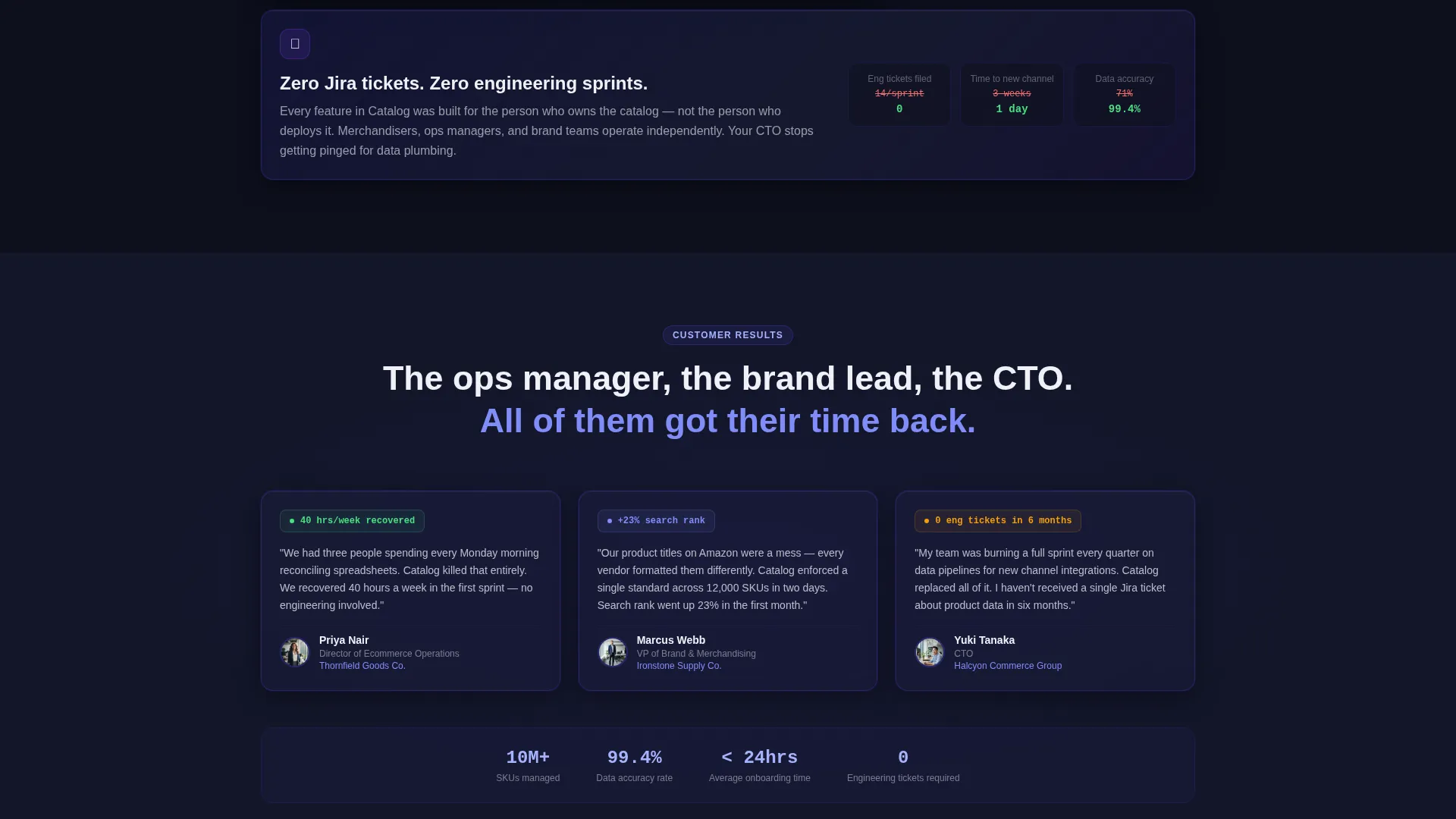
- Chief Technology Officers (CTOs) at mid-market retailers who want to stop spending engineering time on data plumbing
What problem this template solves
Product catalog management is painful at scale. Teams spend dozens of hours each week on manual data entry, version conflicts, and syndication errors that quietly drain ad budgets and hurt search performance. This template is designed to make that pain visible and then show the relief of a better system.
- Inconsistent product titles and missing attributes that reduce search visibility across channels
- Manual product enrichment processes that consume roughly forty hours per week
- Syndication errors that result in wasted advertising spend and mismatched product listings
What you get with this template
You get a fully structured, single-page lead generation layout that walks visitors through the cost of catalog chaos and the value of a no-code PIM solution. Every section is purposeful and conversion-oriented.
- A split-screen (50/50) layout with a header Logo Bar, a Problem-to-Solution Arc scroll structure, and two strategically placed primary call-to-action (call to action) sections
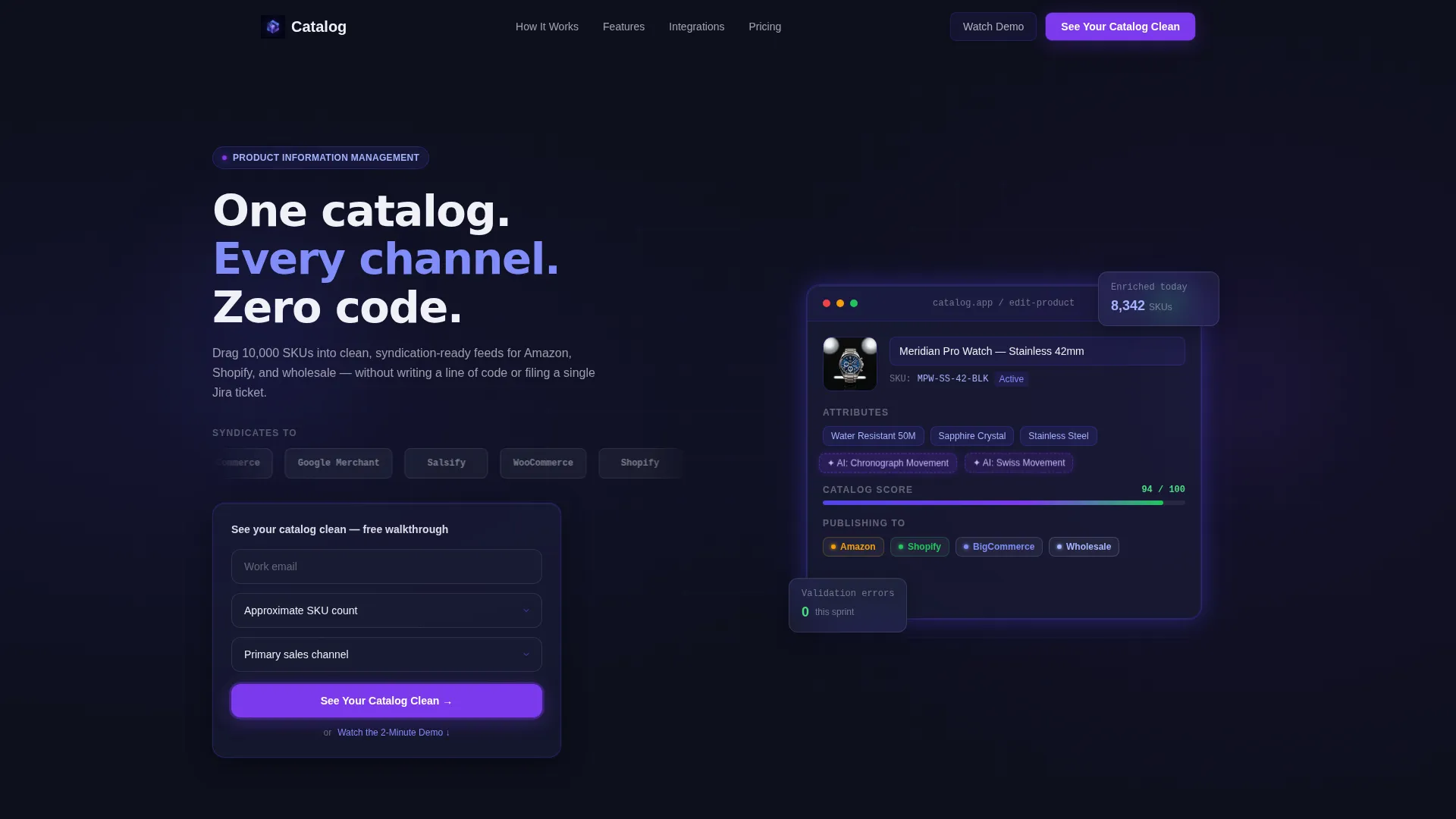
- A three-field lead capture glass card form collecting work email, approximate SKU count, and primary sales channel
- A secondary conversion path for visitors who prefer to watch a two-minute demo before committing to a conversation
Feature list
This template delivers a set of purposefully designed components that support the full visitor journey from awareness to lead capture.
Split-Screen Problem-to-Solution Layout
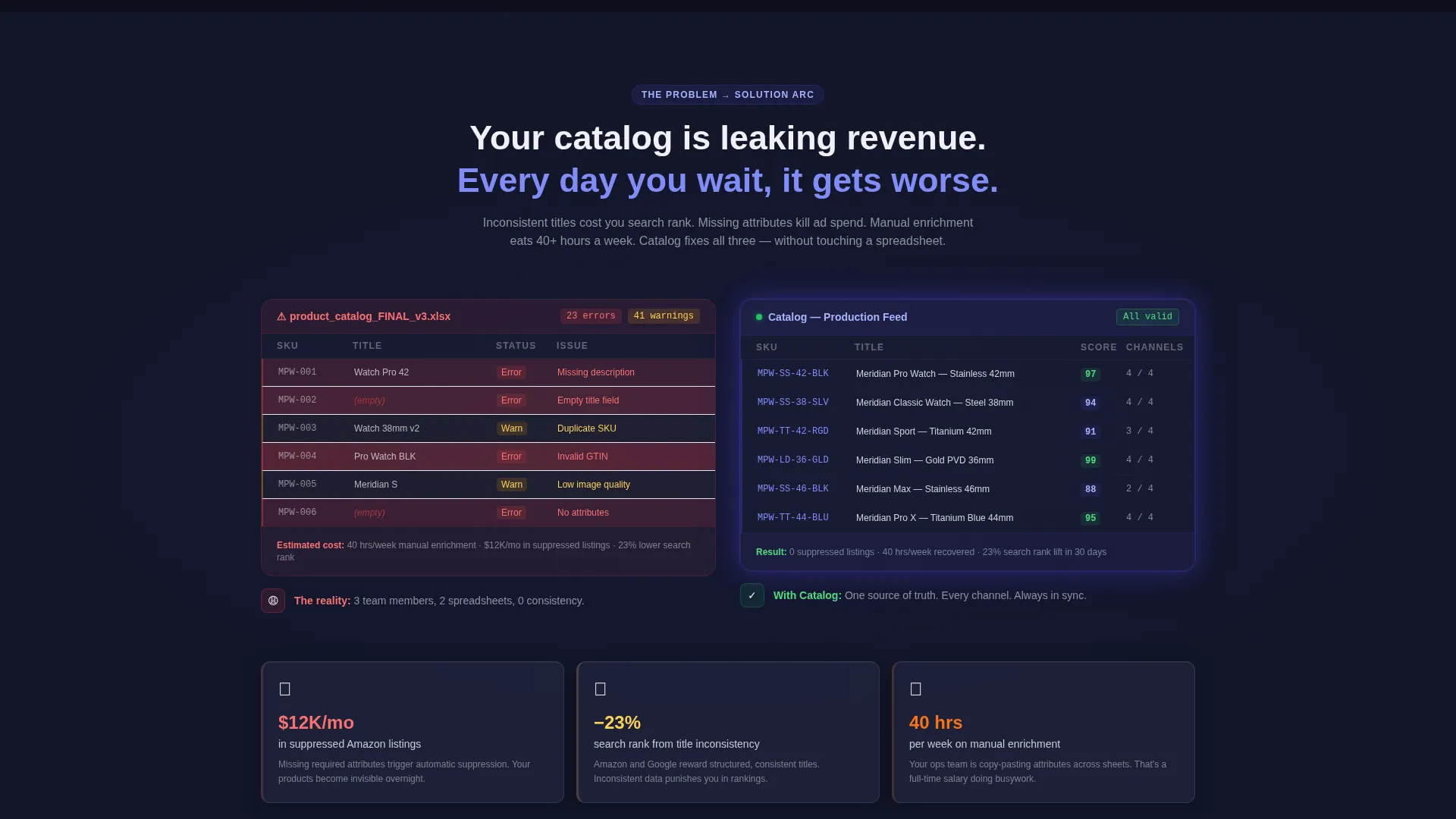
The page uses a 50/50 split screen structure throughout. The left side of the hero shows a chaotic spreadsheet with error highlights and version warnings. The right side presents a clean, structured product information management grid. Each subsequent section escalates the problem and then pivots to the corresponding solution.
Logo Bar Header with Channel Branding
The header opens with a horizontal ribbon of recognizable retail and marketplace logo chips rendered in monochrome on frosted-glass panels. The bar uses a slow horizontal drift animation to reinforce multi-channel reach without cluttering the page.
Glassmorphic Product Card Demo
The right half of the hero section shows a stylized product card mid-edit. A thumbnail, a title field, and an attribute tag being dragged into place are all displayed behind a glassmorphic panel with a subtle indigo edge glow. This visual immediately communicates the drag-and-drop experience.
Three-Field Lead Capture Form
The primary call to action form is a glass card with three inputs: work email, approximate SKU count via dropdown (under 1K, 1K to 10K, 10K to 100K, 100K or more), and primary sales channel. It appears at the top of the page and repeats after the arc's pivot point to catch visitors at two moments of intent.
Two-Minute Demo Secondary Path
Below the primary form, a secondary conversion option invites visitors to watch a two-minute demo. This path captures email on play, giving hesitant visitors a lower-commitment entry point while still generating a lead.
Escalating Arc Section Blocks
Each scroll section follows the Problem-to-Solution Arc pattern. Problems are shown with visual cues like red highlights and missing fields, while solution panels use brightening glass aesthetics and deepening indigo tones. The arc is designed so visitors feel the cost of inaction before they see the call to action.
Page sections overview
| Section | Purpose |
|---|---|
| Logo Bar Header | Establish multi-channel credibility and introduce the headline |
| Hero Split Screen | Show product card demo and primary call to action form side by side |
| Chaos versus. Order | Contrast tangled spreadsheet data against a clean PIM grid |
| Syndication Problem Block | Show how feed errors cost ad spend and hurt product visibility |
| Manual Enrichment Block | Quantify the time cost of manual product data work |
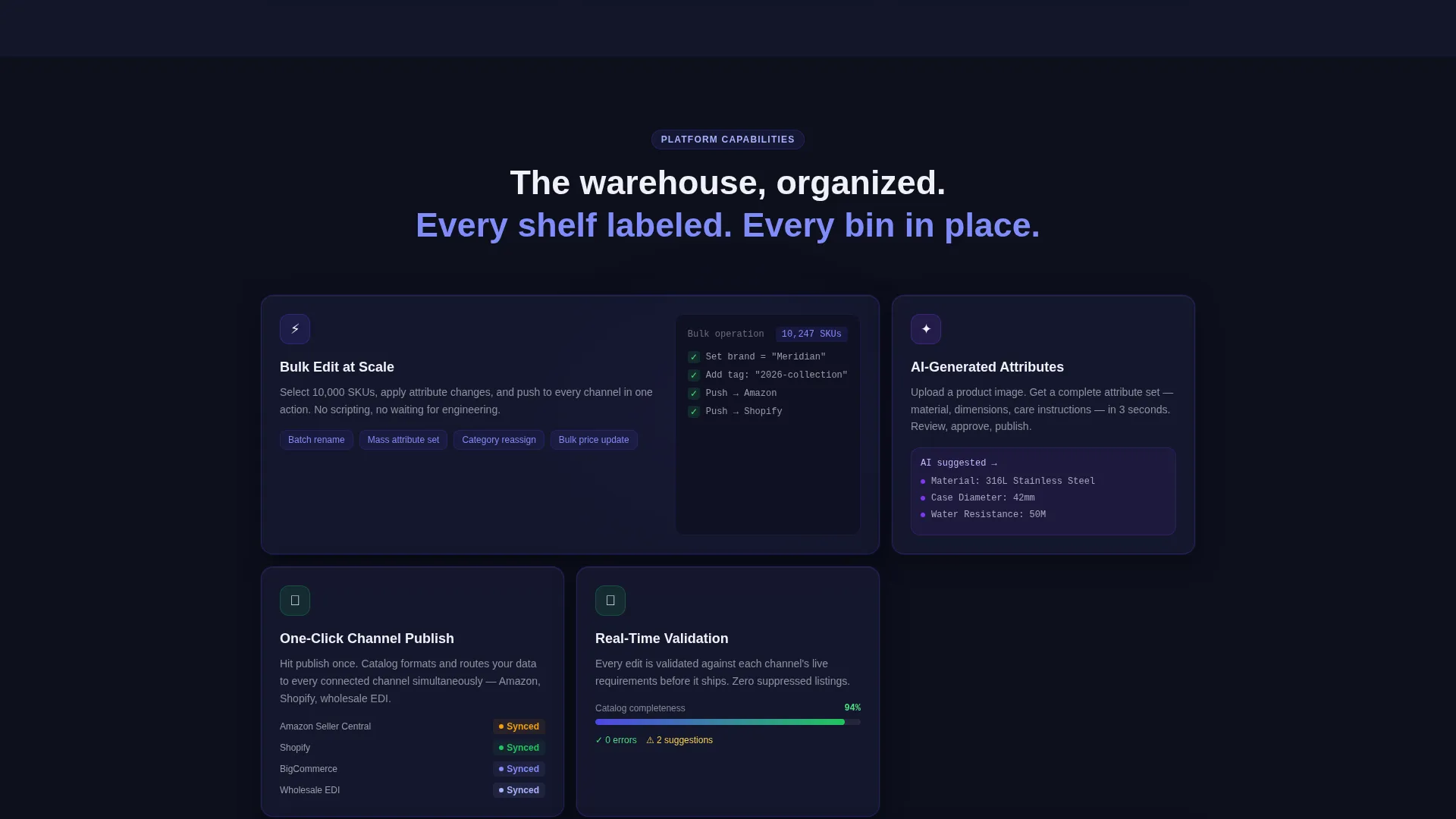
| Solution Pivot: Bulk Editing | Introduce bulk editing as the answer to the enrichment problem |
| Solution Pivot: AI Attributes | Present AI-generated attribute filling as a time-saving feature |
| One-Click Publishing Block | Show channel publishing and real-time validation score features |
| Mid-Page call to action Repeat | Re-present the lead capture form after the solution arc |
| Secondary Demo Path | Offer the two-minute demo as a lower-commitment conversion |
Design & branding system
The visual identity follows a Tech Glass theme built around an Electric Indigo color system. The palette is precise and luminous, designed to feel like a focused interface in a dark environment.
- Core colors: deep interface black (#0D0F1C) as the base, translucent indigo (#4F46E5) glowing behind frosted-glass panels, and cool mist gray (#E0E2EB) for surface cards
- Accent usage: hot electric violet (#7C3AED) is reserved exclusively for interactive states and call to action pulses to guide the eye without overwhelming the design
- Typography: medium-weight sans-serif headlines with clean, readable body copy that keeps the interface feel consistent throughout
Mobile & speed optimization
The template is structured for clean rendering at any screen size. The split-screen layout adapts naturally to narrower viewports without losing the visual contrast between problem and solution panels.
- The glassmorphic panels and frosted-glass card components are designed to remain legible and visually distinct on smaller screens
- The three-field form collapses cleanly into a single-column layout on mobile, keeping the lead capture path accessible and uncluttered
How this template helps you convert
This template earns the click before it asks for it. The sequence is deliberate: show the mess, raise the stakes, then offer the relief. By the time a visitor reaches the form, they have already felt the cost of inaction.
- The Problem-to-Solution Arc builds emotional momentum through the scroll, so visitors arrive at the call to action already convinced they need a better system.
- Two separate call to action placements, one at the top and one after the solution pivot, give the form maximum exposure without feeling repetitive.
Other information about this template
This template is a strong fit for teams evaluating no-code product information management platforms. It is built to demonstrate PIM value quickly, without requiring engineering involvement to publish or update.
- The template is designed for lead generation campaigns targeting mid-market ecommerce operations teams
- It supports the positioning of a no-code PIM as an alternative to spreadsheet-based product data management and engineering-heavy data pipelines
- The SKU count dropdown in the lead form helps qualify incoming leads by catalog size before any sales conversation begins
- The template is built with the Tech Glass theme and Electric Indigo color system, making it visually distinct from typical SaaS landing page templates
Theme
Tech Glass
Creative direction
Problem→Solution Arc
Color system
Electric Indigo
Style
Split Screen (50/50)
Direction
Lead Generation
Page Sections
Split-screen Problem-to-solution Layout
Logo Bar with Animated Channel Chips
Glassmorphic Product Card Demo Visual
Three-field Qualified Lead Capture Form
Secondary Demo Conversion Path
Escalating Arc Section Blocks
Related questions
Who is this landing page template designed for?
What is the primary conversion goal of this template?
Does this template include actual PIM product functionality?
Can I customize the form fields and dropdown values?
What makes this template different from a generic software landing page?



