Advanced Tech & AI Platforms Pricing Website Template
Catalyst is a hub-and-spoke landing page template built for AI agent builder platforms. It pairs a Feature Tab Switcher header with an anchor-nav Industry Report scroll, covering architecture, benchmarks, security, integrations, and pricing. The Data Command visual identity keeps everything dark, precise, and alive with teal and cyan highlights that feel like mission control at full capacity.
by Rocket studio
Quick summary
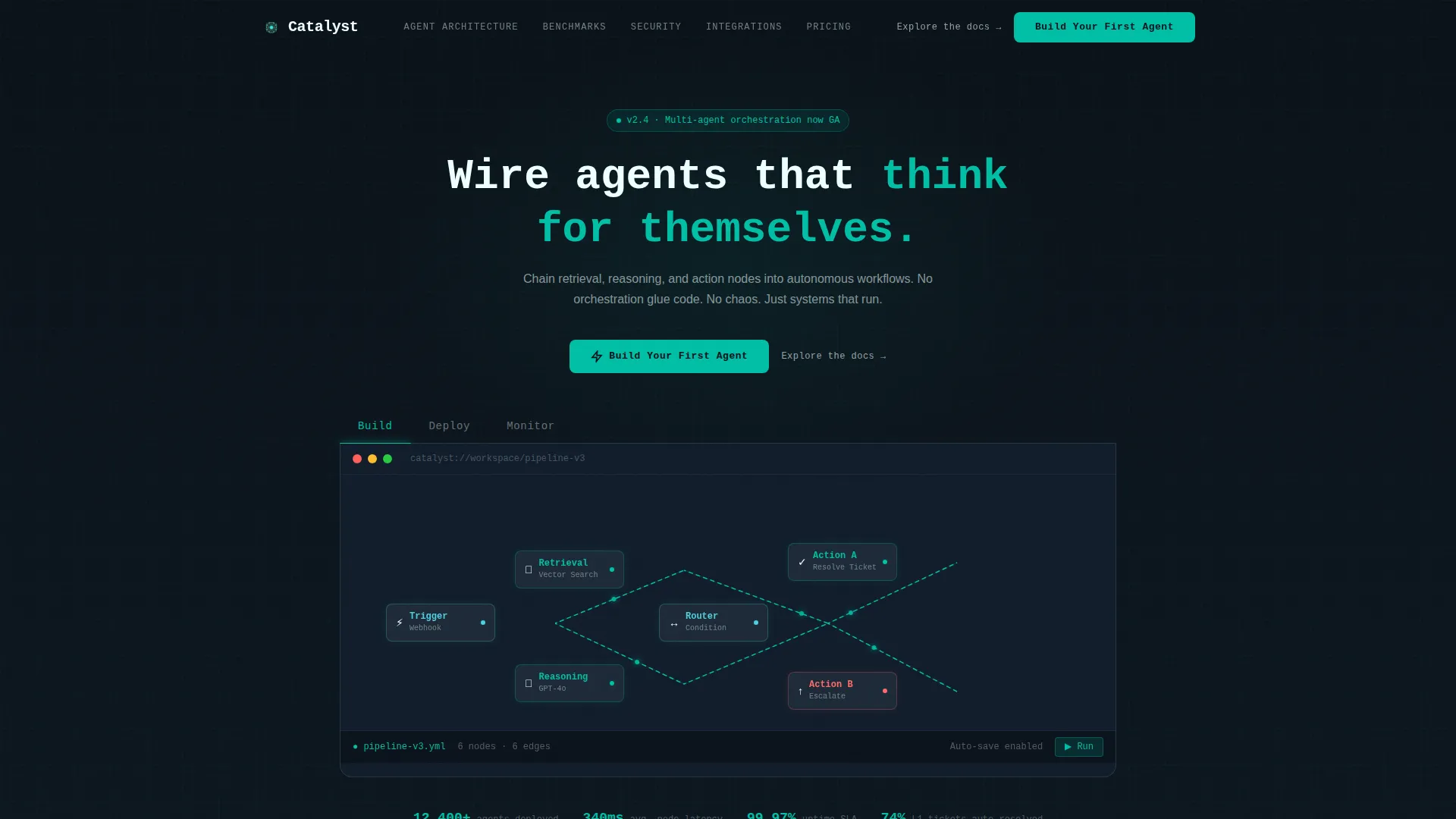
Catalyst is a single-page landing page template designed for autonomous AI agent platforms. It opens with a three-tab product frame showing Build, Deploy, and Monitor states. From there, a pinned anchor nav guides visitors through five deep-dive sections. The result is a page that proves capability before it ever asks for a click.
Who this template is for
This template is built for technical teams and founders who need to turn a complex AI platform into something a visitor can understand in under two minutes. It works best when your product has real depth to show off.
- ML engineers at Series B startups prototyping multi-agent pipelines who need to demo technical depth quickly
- Operations leads at mid-market software-as-a-service companies automating tier-one support workflows
- Solo founders running lean back-office automation stacks who want a credible, conversion-ready presence
What problem this template solves
Most AI platform pages either oversimplify or overwhelm. A visitor with a technical background leaves when the page feels like marketing. A non-technical buyer leaves when the page reads like a whitepaper. Catalyst sits precisely between those two failure modes.
- Generic hero sections that describe AI without showing it, causing qualified visitors to bounce before reading
- Long prose-heavy pages with no visual proof, making it hard to trust that the product actually works
- Weak conversion paths that bury the call to action after paragraphs of unverified claims
What you get with this template
You get a fully structured landing page built around the hub-and-spoke anchor navigation pattern. Every section arrives pre-wired with its layout role, content rhythm, and conversion logic already decided.
- A Feature Tab Switcher header with three interactive product frames covering Build, Deploy, and Monitor states
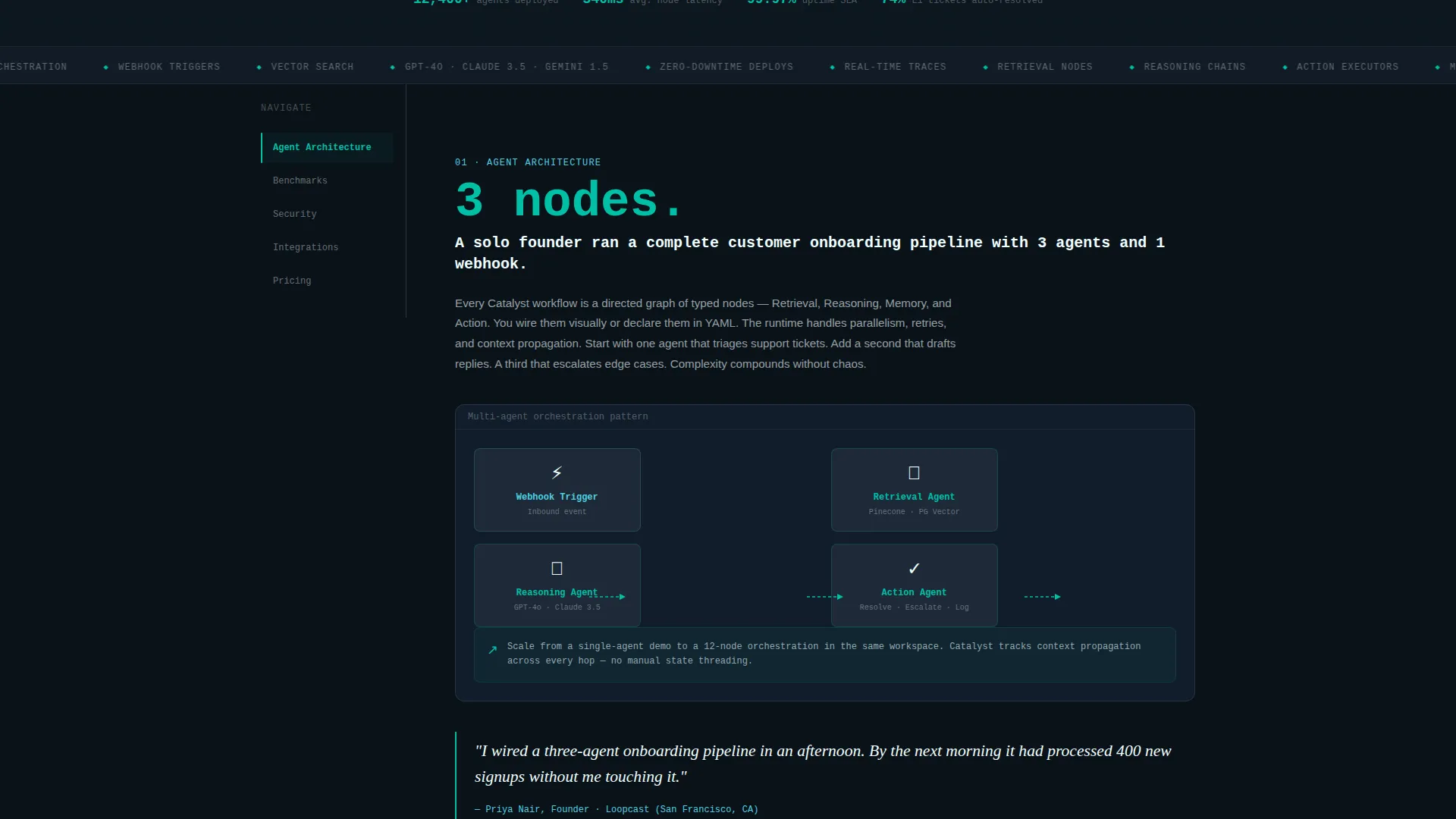
- Five anchor-nav spoke sections flowing through Agent Architecture, Benchmarks, Security, Integrations, and Pricing
- A click-through conversion path with a primary call to action, a sticky mobile bottom bar, and a secondary documentation link beneath every button
Feature list
This template ships with a tightly defined set of components. Each one serves a specific role in moving a visitor from curious to convinced.
Feature Tab Switcher Header
Three clickable tabs labeled Build, Deploy, and Monitor sit above a live product frame. Each tab snaps to a distinct screen: a node-graph canvas with pulsing teal connectors, a deployment selector with latency badges, and a real-time execution dashboard with token usage sparklines. The active tab underline glows reactor teal.
Pinned Anchor Navigation
A five-spoke anchor nav pins to the left rail as visitors scroll. The spokes link to Agent Architecture, Benchmarks, Security, Integrations, and Pricing. This keeps orientation clear across a long, data-dense scroll without requiring the visitor to scroll back to the top.
Industry Report Content Rhythm
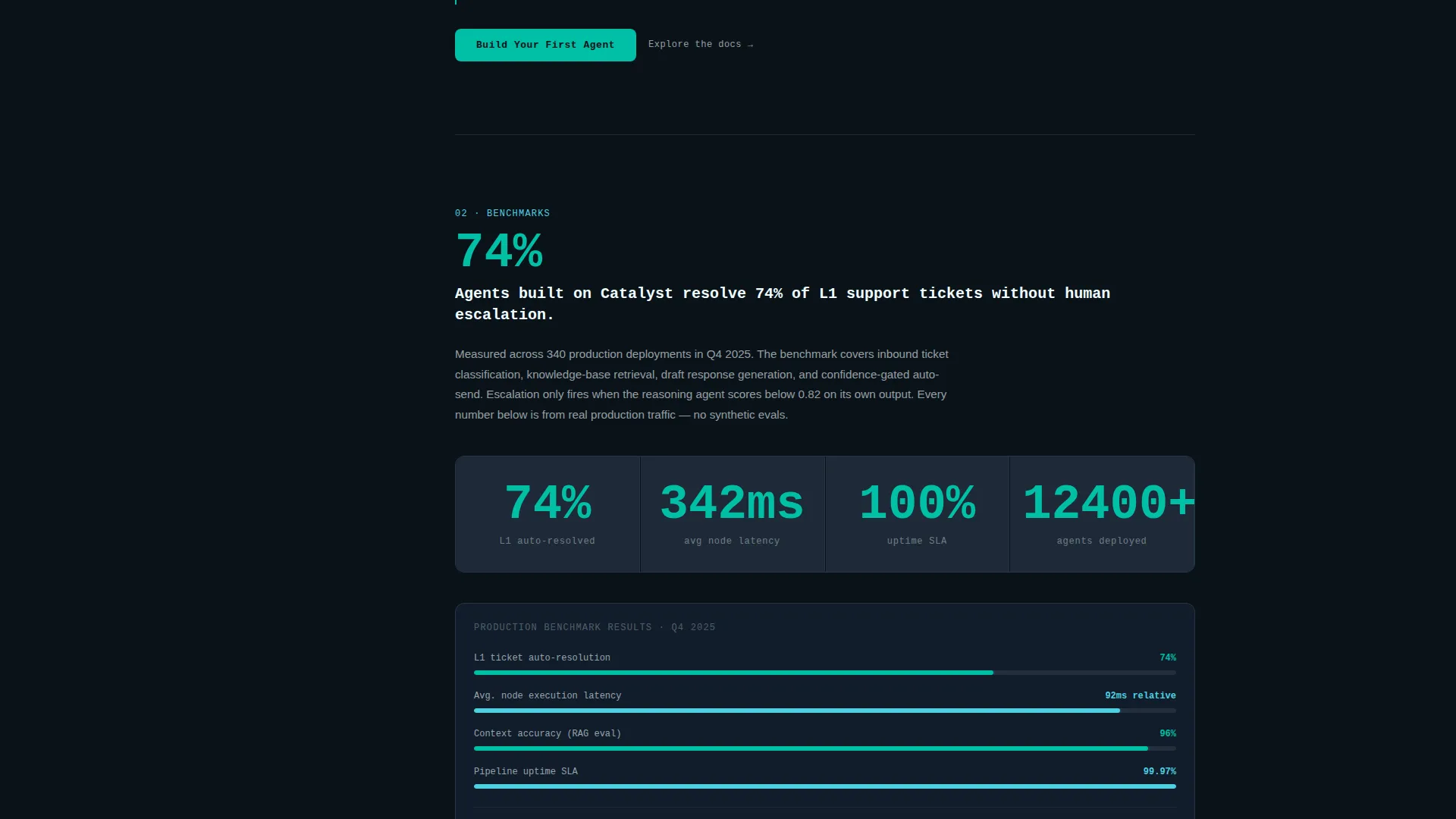
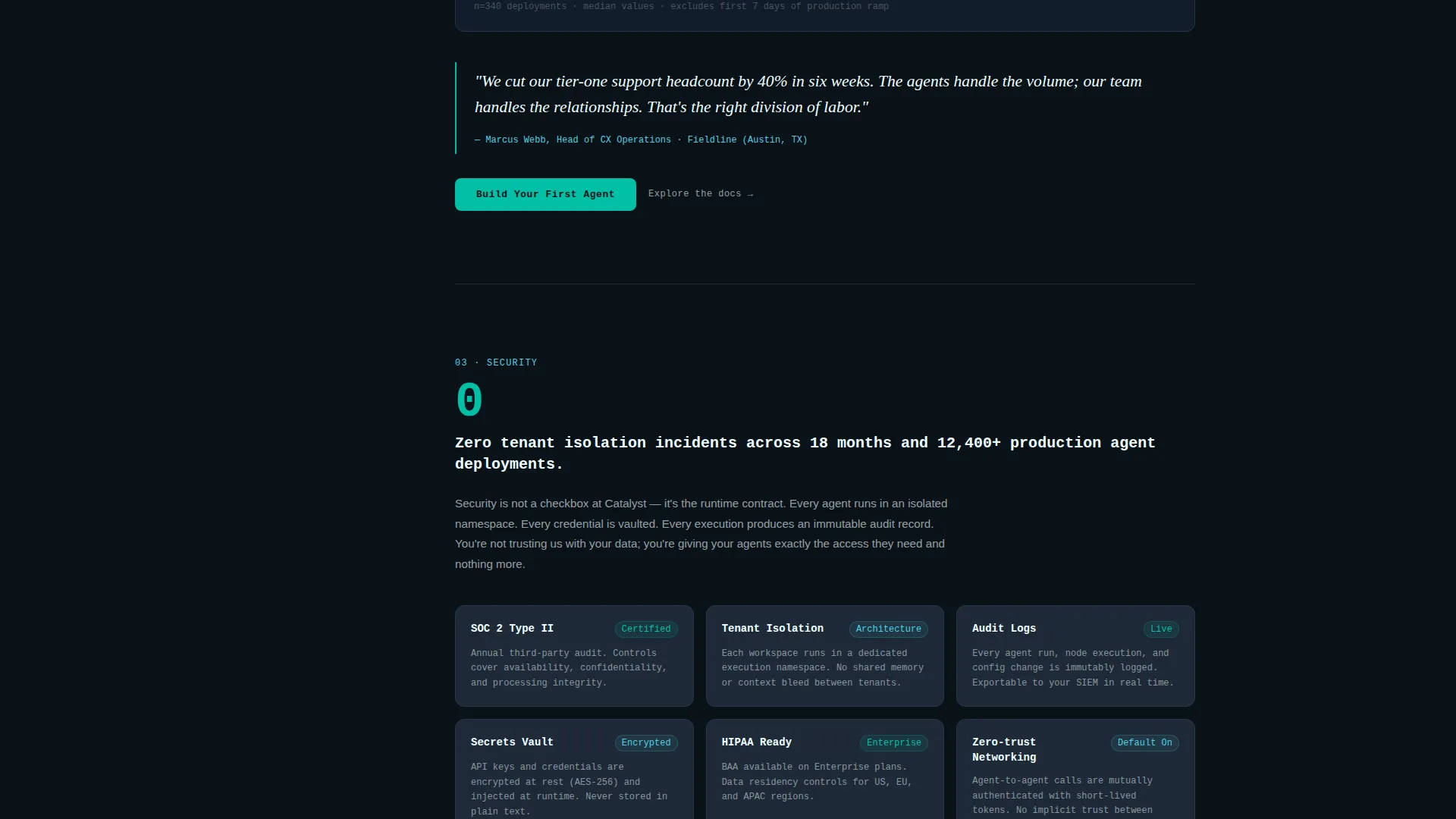
Each spoke section opens with a bold proprietary stat, followed by an explanatory paragraph, a supporting diagram or product screenshot, and a named customer pull-quote. The scroll builds complexity progressively, moving from single-agent demos toward full multi-agent orchestration patterns.
Click-Through Conversion Path
The primary call to action, "Build Your First Agent," appears in the header, repeats as a sticky bottom bar on mobile, and anchors the final spoke section as a full-width teal button. No form appears on this page. The click routes directly to a signup flow with GitHub or Google single sign-on support.
Data Command Visual System
The template uses deep terminal black for the base, reactor teal for interactive states and active indicators, signal cyan for data annotations and secondary labels, and muted graphite for floating card surfaces. Every color has a precise role, so the hierarchy reads instantly without explanation.
Secondary Documentation Link
A text link reading "Explore the docs" sits beneath every call-to-action button. This gives technical visitors a low-commitment next step when they want to read before signing up, keeping them on the conversion path without pressure.
Page sections overview
| Section | Purpose |
|---|---|
| Feature Tab Switcher | Shows Build, Deploy, Monitor product states interactively |
| Agent Architecture Spoke | Explains modular logic block structure and agent chaining |
| Benchmarks Spoke | Presents proprietary performance stats with supporting charts |
| Security Spoke | Covers trust signals relevant to enterprise and ops buyers |
| Integrations Spoke | Demonstrates platform connectivity and workflow compatibility |
| Pricing Spoke | Anchors the conversion with plan context and the primary call to action |
Design & branding system
The Teal Catalyst color system is built to feel like a submarine control room lit by sonar. Nothing glows unless it earns it. The result is a page where every active state, hover trail, and data label carries visual weight.
- Core palette: deep terminal black (#0B1219) as the base, reactor teal (#00BFA6) for interactive states, signal cyan (#4DD0E1) for secondary annotations, muted graphite (#1E2A38) for card surfaces, and hot white (#EEFFFF) for primary text
- Graphite panels float above the black background like docked modules, giving the layout a layered, dimensional feel without decoration
- Cyan appears sparingly on data labels and secondary interface elements, keeping visual hierarchy surgical and intentional
Mobile & speed optimization
The template is designed so the conversion path stays intact across screen sizes. The sticky bottom bar on mobile ensures the primary call to action is always reachable, even deep in a long scroll.
- Sticky mobile bottom bar keeps "Build Your First Agent" visible throughout the entire page scroll on small screens
- The anchor nav adapts so spoke navigation remains accessible without cluttering the mobile viewport
- No stock imagery is used anywhere in the template, keeping every visual tied to functional product representation
How this template helps you convert
Catalyst is structured around earning the click before asking for it. Every layout decision supports a single outcome: a visitor who understands the product well enough to sign up without needing a demo call.
- The Feature Tab Switcher front-loads real product screens in the header, so visitors see proof of capability within the first scroll position before any claims are made in prose.
- The Industry Report rhythm builds trust progressively, pairing every bold stat with a supporting visual and a named customer quote, so credibility compounds as the visitor moves down the page.
- The no-form click-through path removes friction entirely, routing the primary call to action directly into a GitHub or Google single sign-on signup flow.
Other information about this template
Catalyst is categorized under Technology, specifically within the Advanced Tech and AI Platforms subcategory, targeting the AI agent builder platform niche. It is built as a hub-and-spoke template with anchor navigation, following the Industry Report creative direction and the Data Command visual theme.
- The template style is Hub and Spoke with anchor navigation, meaning the left-rail nav persists as visitors scroll through each spoke section
- The landing page direction is Click-Through, optimized for routing visitors into a frictionless signup flow rather than capturing leads via a form
- The header concept is a Feature Tab Switcher, a component type particularly well-suited to platforms with distinct workflow phases like build, deploy, and monitor
Theme
Data Command
Creative direction
Industry Report
Color system
Teal Catalyst
Style
Hub & Spoke (Anchor Nav)
Direction
Click-Through
Page Sections
Feature Tab Switcher Header
Pinned Anchor Navigation Rail
Industry Report Content Rhythm
Frictionless Click-through Call to Action Path
Data Command Visual System
Related questions
Who is this landing page template designed for?
Does this template include a contact form or lead capture?
Can I customize the spoke sections with my own platform content?
What makes the anchor navigation useful for a long-scroll page?
Is the Teal Catalyst color system customizable?



