Fitness & Gym Software Privacy Policy Website Template
The Catalyst landing page template is built for gym operators who need one clean command center for every incident report, waiver, and certification. A dark mission-control aesthetic, scroll-triggered reveal animations, and a qualifying lead form work together to show visitors the cost of operational chaos before moving them toward a demo request or compliance checklist download.
by Rocket studio
Quick summary
Catalyst is a scroll reveal landing page template designed for fitness and gym case management platforms. It opens with a 3D product screenshot, walks visitors through a Problem to Solution arc, and closes with a two-path lead form. Every section is coded to progressive reveal logic, so each scroll collapses one layer of operational chaos into a clean product screen.
Who this template is for
This template is built for B2B software companies selling gym operations or compliance management tools. It speaks directly to operators who manage real risk at real scale and need a page that earns trust before asking for contact details.
- Gym owners managing two or more locations who face compliance audits and worker's compensation tracking
- Operations directors at franchise fitness chains handling incident paperwork across multiple states
- Boutique studio managers whose liability waivers, trainer certifications, and incident logs live in scattered binders or personal email accounts
What problem this template solves
Gym operators drown in disconnected paperwork. A slip-and-fall report lives in one folder. A trainer certification renewal sits in someone's inbox. An audit demand arrives, and the team spends the next 23 hours hunting files across three binders and a shared drive. This page template is designed to display that pain vividly, then resolve it section by section.
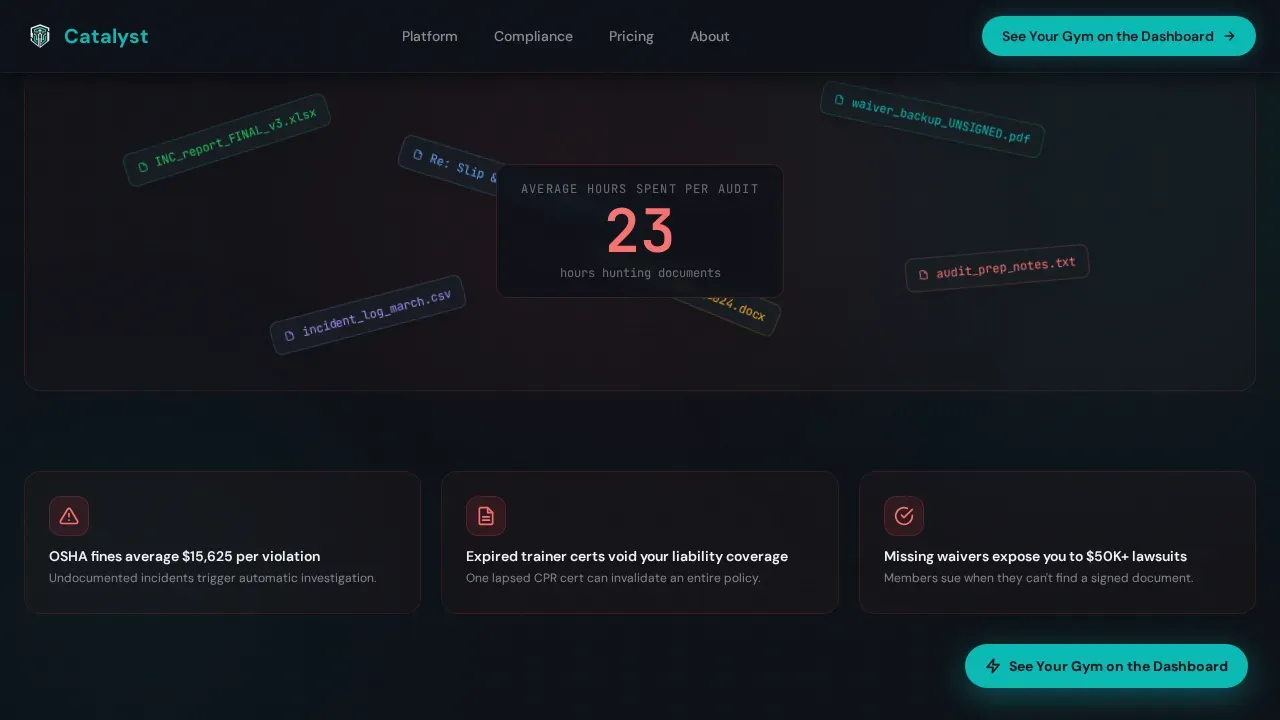
- Visitors arrive frustrated with audit chaos. The animated document mess in the pain section reflects that frustration back at them immediately.
- No clear proof of value means visitors bounce before seeing the solution. The before-and-after dissolve sections create proof at every scroll step.
- Generic call-to-action forms capture low-quality leads. The qualifying chip menu filters by location count and pain point, generating higher-value demo requests.
What you get with this template
You get a complete, single-page landing layout built for lead generation. Every visual element, section sequence, and interactive component is defined and ready to edit. The page is structured so that visitors feel the operational problem before they ever see a form.
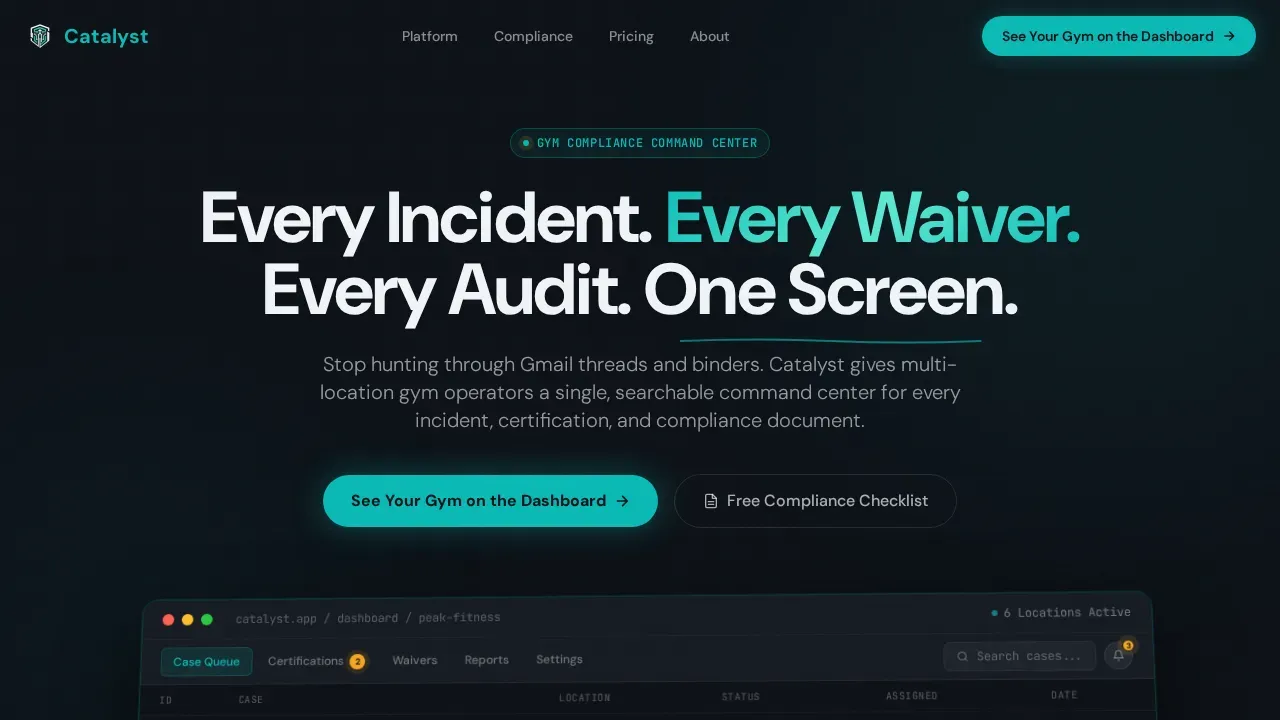
- A hero section with a 3D-angled product screenshot, amber-pulsing case queue badges, and a headline that fades in on load
- A full Problem to Solution arc with animated document chaos, a live audit-hour counter, before-and-after product screen dissolves, and stacked social proof cards
- A dual-path conversion section with a qualifying lead form featuring gym name input, location count selector, and pain-point chip menu, plus a secondary gated checklist download
Feature list
This template is built around a specific set of page components and interaction patterns. Each one is defined in the source brief and contributes to the lead generation goal.
3D Hero Product Screenshot
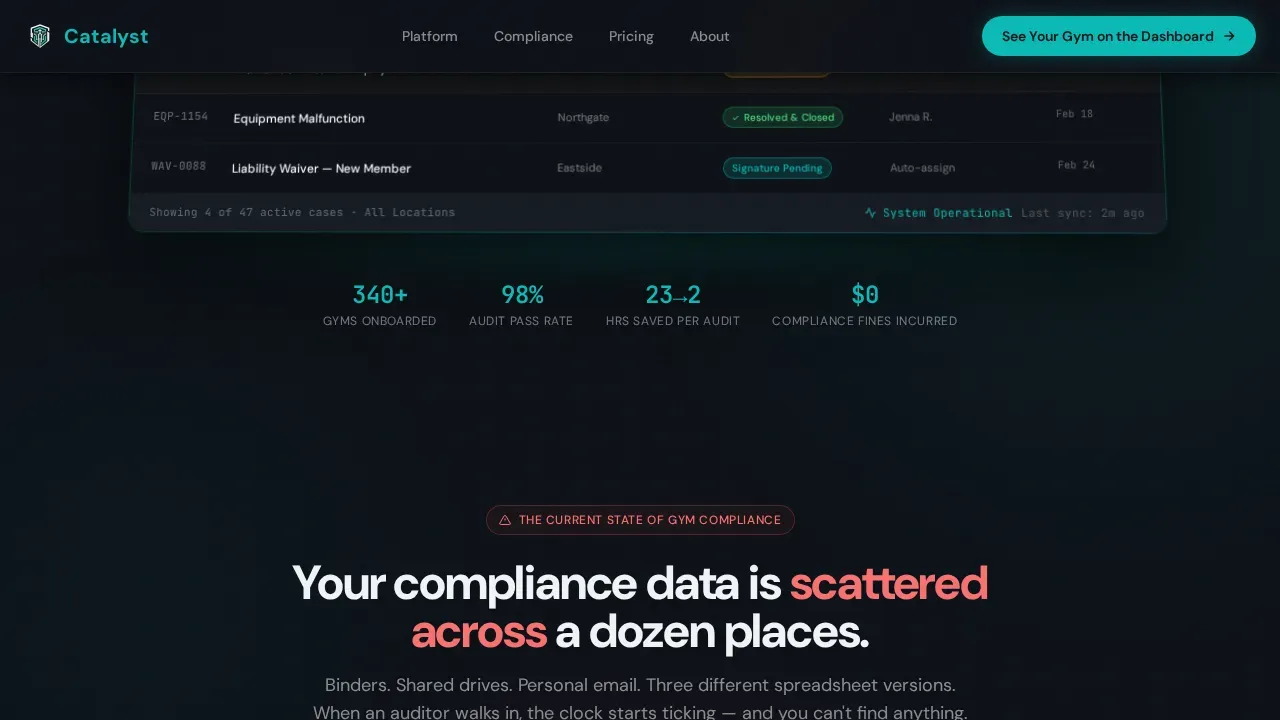
The hero opens with a full-width platform dashboard image displayed on a subtle 3D plane, floating above the deep operations black background. A soft teal glow bleeds beneath it like light from a live monitor. Amber-pulsing badge indicators call out an open slip-and-fall case, an expiring trainer certification, and a resolved equipment malfunction with a green closed badge. This is the "hero shot" that lets visitors visualize the command center interface and its real-time gym metrics before reading a single word of body copy.
Animated Pain Section with Counter
The second reveal animates scattered PDFs, email threads, and spreadsheet fragments onto the screen like documents dumped on a desk. A counter ticks upward to display the average audit preparation time: 23 hours. Real consequences follow, including fines, lawsuits, and lapsed insurance language, creating the tension that makes the solution feel necessary. This section is powered by scroll-triggered Intersection Observer logic and CSS transforms only.
Before-and-After Solution Arc
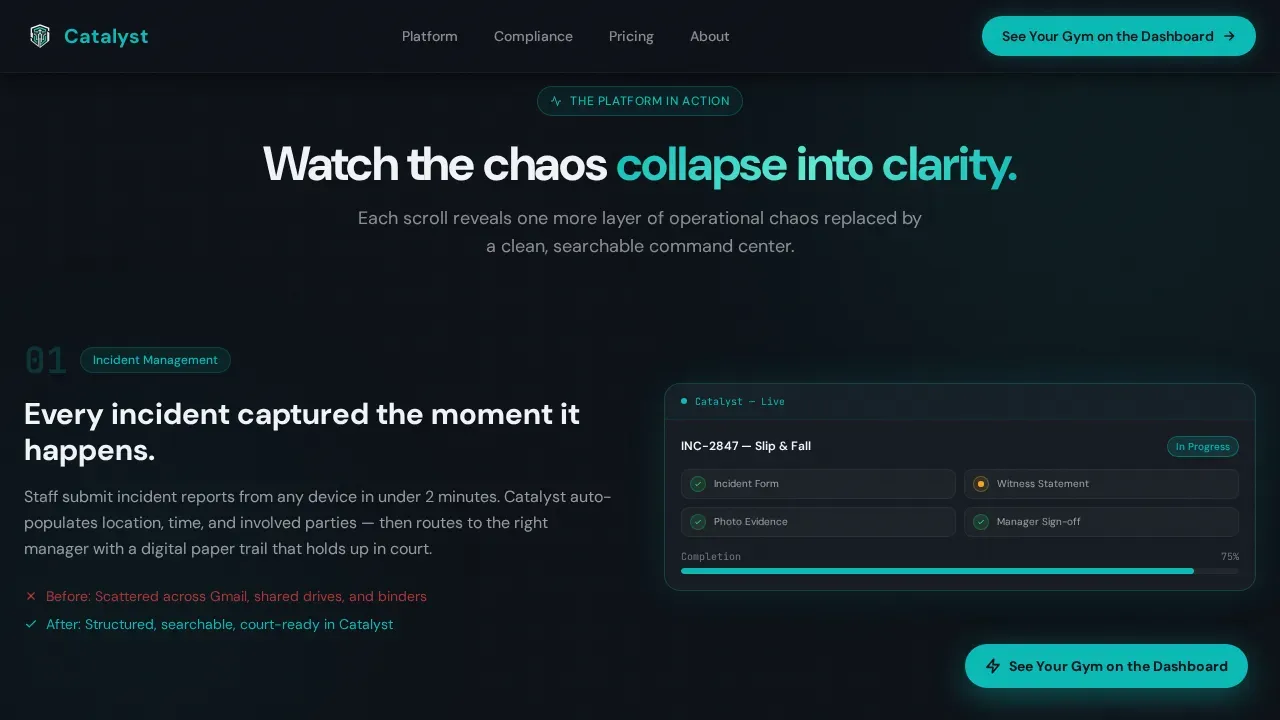
Three scroll reveals dissolve chaos into clean product screens. The first shows an incident intake form that auto-populates fields. The second shows a certification tracking panel that sends renewal alerts before expiration. The third shows a compliance dashboard that generates audit-ready reports in a single click. Each reveal is a defined transition: before-state dissolving into after-state, not just a static image swap.
Qualifying Lead Form with Chip Selector
The primary conversion section includes a short qualifying form designed for higher-value lead capture. Fields collect gym name and number of locations using a selector set to single, two to five, six plus, or franchise options. A chip menu lets visitors self-identify their biggest operational headache from four defined options: incident tracking, compliance audits, trainer certifications, and member waivers. The form is placed below the social proof cards and anchors the bottom of the page.
Floating and Anchored Call-to-Action
The primary call-to-action, labeled "See Your Gym on the Dashboard," appears first as a floating button after the third scroll reveal. It then reappears anchored inside the lead form section at the bottom of the page. This dual placement ensures the call-to-action remains accessible at multiple scroll depths without interrupting the narrative arc of the page.
Gated Compliance Checklist Download
A secondary conversion path offers a gated PDF download labeled "Download the Compliance Checklist." It captures email and gym size only, creating a lower-commitment entry point for visitors not ready to book a demo. This option is positioned alongside the main form so both paths are visible without competing visually.
Page sections overview
| Section | Purpose |
|---|---|
| Hero Dashboard Shot | Display platform screenshot with amber-pulsing case queue and headline fade-in |
| Animated Pain Reveal | Show document chaos and ticking audit-hour counter to surface visitor frustration |
| Solution Arc Dissolves | Walk through three before-and-after product screen transitions covering core features |
| Social Proof Cards | Present gym operator testimonials and compliance outcome metrics in stacked card format |
| Dual-Path Lead Form | Qualify demo leads via chip form and capture checklist email addresses simultaneously |
| Linear Single-Row Footer | Close the page with a compact single-row footer layout |
Design & branding system
The visual identity follows a Data Command theme. The palette is defined to feel like a mission-control dashboard at 2 AM: dark, focused, and alive with information that pulses where the eye needs to land. Bold typography and ample whitespace guide visual hierarchy across every section.
- Color set: deep operations black (#0D1117) as background, command-center teal (#0ABAB5) for interactive elements and data displays, signal white (#F0F4F8) for body text and card surfaces, and alert amber (#F5A623) reserved exclusively for notification badges and urgency indicators
- Typography: DM Sans for all user interface copy and headings; JetBrains Mono for data and code display elements such as case identifiers, counter values, and status tags
- Interaction layer: scroll-triggered reveal animations, amber pulse badge animations, a floating call-to-action button, counter animation on the audit-hour figure, parallax depth on the hero screenshot, and a chip selector with active state styles
Mobile & speed optimization
The template is desktop-first by design. Gym owners and operations directors most often review audit materials and compliance details at a desk, so the layout prioritizes the large-screen command center aesthetic. The page also includes defined mobile handling so the experience stays functional and readable on smaller devices.
- All scroll-triggered animations are built using Intersection Observer, which defers reveal logic until each element enters the viewport
- All visual transitions rely on CSS transforms only, keeping the animation layer lightweight across device types
- A mobile-first command template approach is applied to the qualifying form and navigation, so gym staff accessing the page via phone can still reach the call-to-action without layout breakage
How this template helps you convert
The page is structured around earning the click before asking for it. Visitors experience the problem, see evidence of the solution, and reach the form only after the narrative has done the work.
- The pain section surfaces the real cost of inaction first. The 23-hour audit counter and consequence language create urgency before any product feature is mentioned, setting up the solution arc as relief rather than a sales pitch.
- The before-and-after dissolve sections build product credibility at each scroll step. Visitors see real-looking platform screens rather than abstract feature lists, making the value specific and visual before the call-to-action appears.
- The dual-path lead form lowers the barrier for visitors at different stages. The chip menu qualifies serious demo prospects while the checklist download captures email addresses from visitors still evaluating, giving the company two lead types from one page.
Other information about this template
This template belongs to the Scroll Reveal (Progressive) template style category. It is a single landing page, not a multi-page website. The source brief defines a very specific interaction budget and visual system that gives the Catalyst center page its operational identity.
- The template is fully customizable. You can edit content, change images, apply your own brand colors, and input your own fonts to fit specific branding needs. It is available at a standard display size of 1366x768 pixels and can be downloaded in high-resolution formats including JPEG, PNG, PDF, or HTML5.
- The template can be embedded into blog posts or webpages, or shared via a direct link for online use. Multiple templates from the same library can be adapted for different campaign needs or location-specific landing pages.
- The Catalyst command center gym case management landing page template references a Data Command visual system defined by the Teal Catalyst color set. Brand terms associated with network management platforms such as Catalyst Center, Cisco DNA Center, and Cisco appear in this section for platform context only. Catalyst Center is an intelligent automation and assurance platform for network management that enables simplified Day-0 through Day-N management of switching, routing, and wireless infrastructure. Cisco DNA Center unifies configuration, monitoring, and network security across distributed networks.
- Day-N templates in Catalyst Center are used for configuration management and consistency across multiple network devices. Configuration templates allow an administrator to define a set of command-line interface (CLI) commands that can be used to consistently configure network devices, reducing deployment time. These configuration templates can be built using parameterized elements or template variables to customize settings for specific devices.
- Onboarding templates in Catalyst Center automate the initial provisioning and onboarding process on network devices. Onboarding templates differ from Day-N templates in that day-zero templates are not allowed to bind to source or system variables. Day-N templates are associated with network profiles and are applied to devices during device provisioning. Templates can be provisioned to a device by attaching them to network profiles, ensuring correct configurations are applied during deployment.
- CLI templates support version control for tracking changes and detecting errors. Catalyst Center also supports the use of interactive commands and template simulation for testing configurations before deployment. Catalyst Center includes features for detecting potential design conflicts and run-time conflicts in CLI templates. The platform also provides a dhcp server configuration method and supports json format input for composite template definitions.
- A composite template in Catalyst Center is a combination of multiple templates grouped together and applied as a single unit. This approach is useful when generating consistent configuration across a large network, such as when onboarding a new device or pushing Day-N policy changes to switches across multiple sites. Template variables within a composite template can be defined at the network profile level so that each device receives the correct configured values without manual input per device.
- From a fitness center business planning perspective, this landing page template supports the marketing strategy component of a broader business plan. It is important to identify your target audience based on local market analysis and demographics. The page template is tailored to a specific location type and buyer profile: multi-site gym operators in the United States. A business plan for a fitness center should include a detailed financial projection, a two-year revenue forecast, and a defined profit margin target. Operational strategies should address how to attract and retain customers while outlining the company's unique selling proposition and staffing details.
- Member management in gym software includes tracking progress and communication history. Staff coordination helps manage trainer schedules and facility access. Actionable insights in gym management systems suggest specific actions based on user behavior. Automated billing refers to managing recurring payments and financial reporting. These operational aspects are all relevant context for a gym case management platform and can be explained to prospects through the content sections of this template.
- Visual hierarchy in design involves using bold typography and ample whitespace to guide attention. Navigation in this layout focuses on a single path toward the primary conversion goal. Sticky call-to-action buttons remain visible at multiple scroll depths. The framework centralizes complex data, including member health tracking, billing, and scheduling, into a command interface that this template is designed to display and sell.
- Additional information on setup: the template is plug-and-play from a layout perspective. The code is organized to support straightforward editing without requiring a server-side build process. Each file in the template package is clearly labeled, so developers and non-technical users can locate and modify the correct sections. Instructions are included to explain how to set default values, configure the chip selector range, and link the form to an external service endpoint.
Theme
Data Command
Creative direction
Problem→Solution Arc
Color system
Teal Catalyst
Style
Scroll Reveal (Progressive)
Direction
Lead Generation
Page Sections
3D Hero Dashboard with Amber Pulse Badges
Animated Document Chaos and Audit Counter
Before-and-after Solution Arc Dissolves
Qualifying Chip Selector Lead Form
Gated Compliance Checklist Download
Stacked Social Proof Cards
Related questions
Can I edit the colors and fonts to match my brand?
Is this a single landing page or a full website?
How does the qualifying lead form work?
Can visitors engage without booking a demo?
Can this template be shared or embedded online?



