Catalyst - Powerful Analytics Landing Page Template
Catalyst is a hub and spoke anchor navigation landing page template built for education analytics platforms. It guides visitors through a Problem to Solution arc, opening with the data chaos educators recognize and steadily revealing a clean, actionable dashboard. With a Teal Catalyst color system, animated header widgets, a progressive sign-up form, and a secondary interactive demo path, Catalyst is built to convert district leaders and school administrators into trial users.
by Rocket studio
Quick summary
Catalyst is a single-page, anchor-navigated landing page template designed for education analytics dashboard products. It walks visitors from the problem of disconnected data to a fully realized dashboard solution across five spoke sections. The design uses deep academic teal, midnight chalkboard, and spark yellow to communicate institutional trust and modern clarity.
Who this template is for
This template is built for SaaS teams and product marketers launching or promoting an education analytics dashboard. It speaks directly to the buyers those products need to reach.
- District superintendents and school principals who need fast, board-ready visibility into student performance data
- Instructional coaches and curriculum leads tracking whether past interventions produced measurable results
- EdTech founders and product teams who need a credible, conversion-ready landing page for a freemium or free-trial offer
What problem this template solves
Education analytics tools often struggle to communicate their value quickly. Decision-makers arrive skeptical, overwhelmed, and short on time. A generic landing page loses them before they see the product.
- Raw student data lives in disconnected spreadsheets, CSV exports, and email chains that no single person can synthesize
- School leaders lack a conversion path that matches their level of urgency and their specific role
- Most software landing pages show the product too early, before the visitor feels understood
What you get with this template
Catalyst delivers a structured, section-led landing page that earns visitor trust before asking for a sign-up. Every design and layout decision comes from the source brief.
- A full hub and spoke anchor navigation system with five labeled spokes: Data Chaos, The Dashboard, Early Alerts, Reporting, and Results
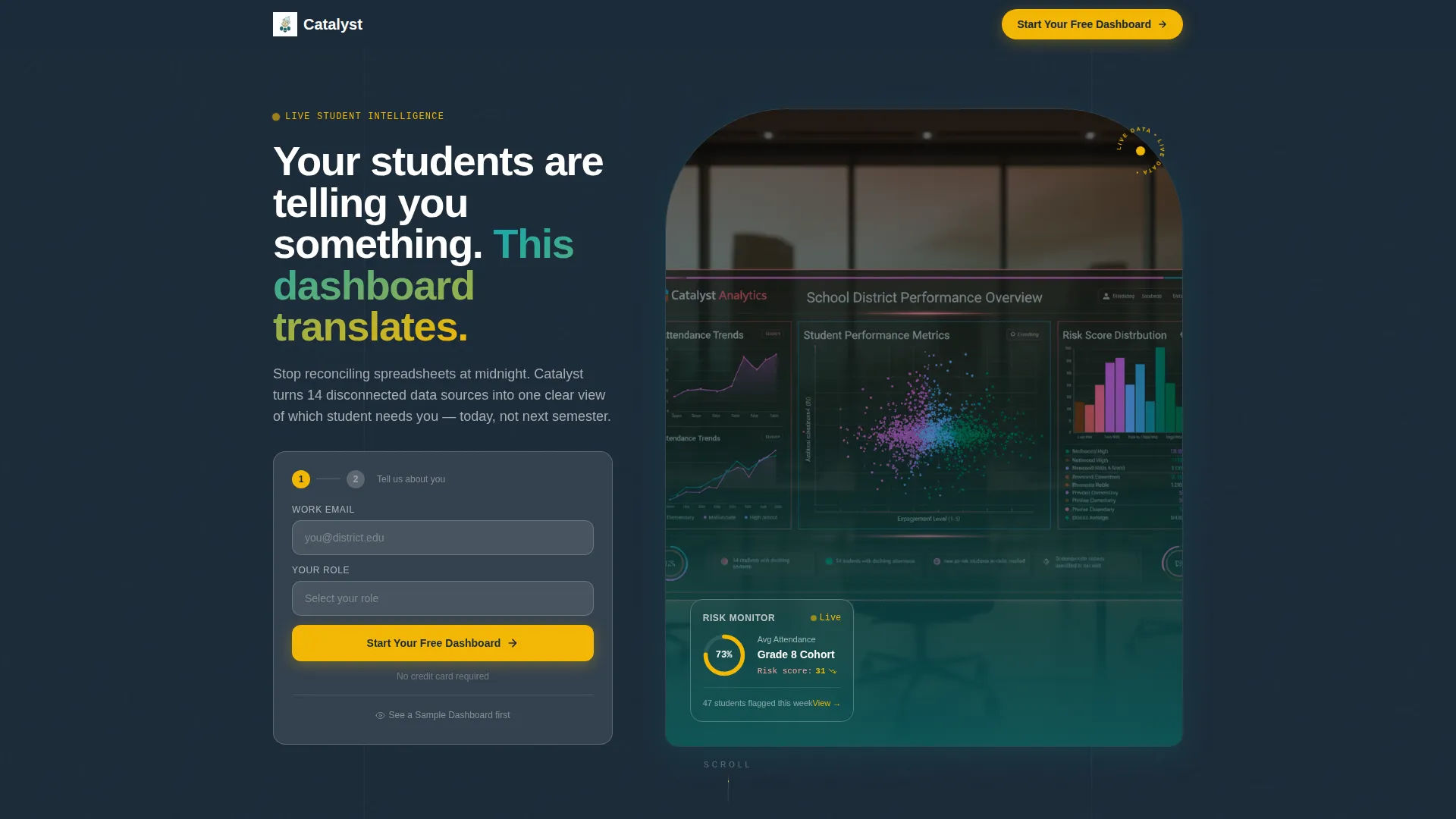
- A header Logo Bar with a scrolling ribbon of institution logos, a bold headline, and an animated mini dashboard widget
- A two-screen progressive sign-up form and a secondary "See a Sample Dashboard" conversion path using fictional student data
Feature list
This template ships with six purposeful components, each mapped directly to what education software buyers need to see and feel before they commit.
Hub and Spoke Anchor Navigation
A sticky anchor nav pins five spoke labels to the top of the page. Visitors can jump to any section or scroll through in sequence. The nav makes the page feel organized and intentional from the first scroll.
Problem to Solution Arc Layout
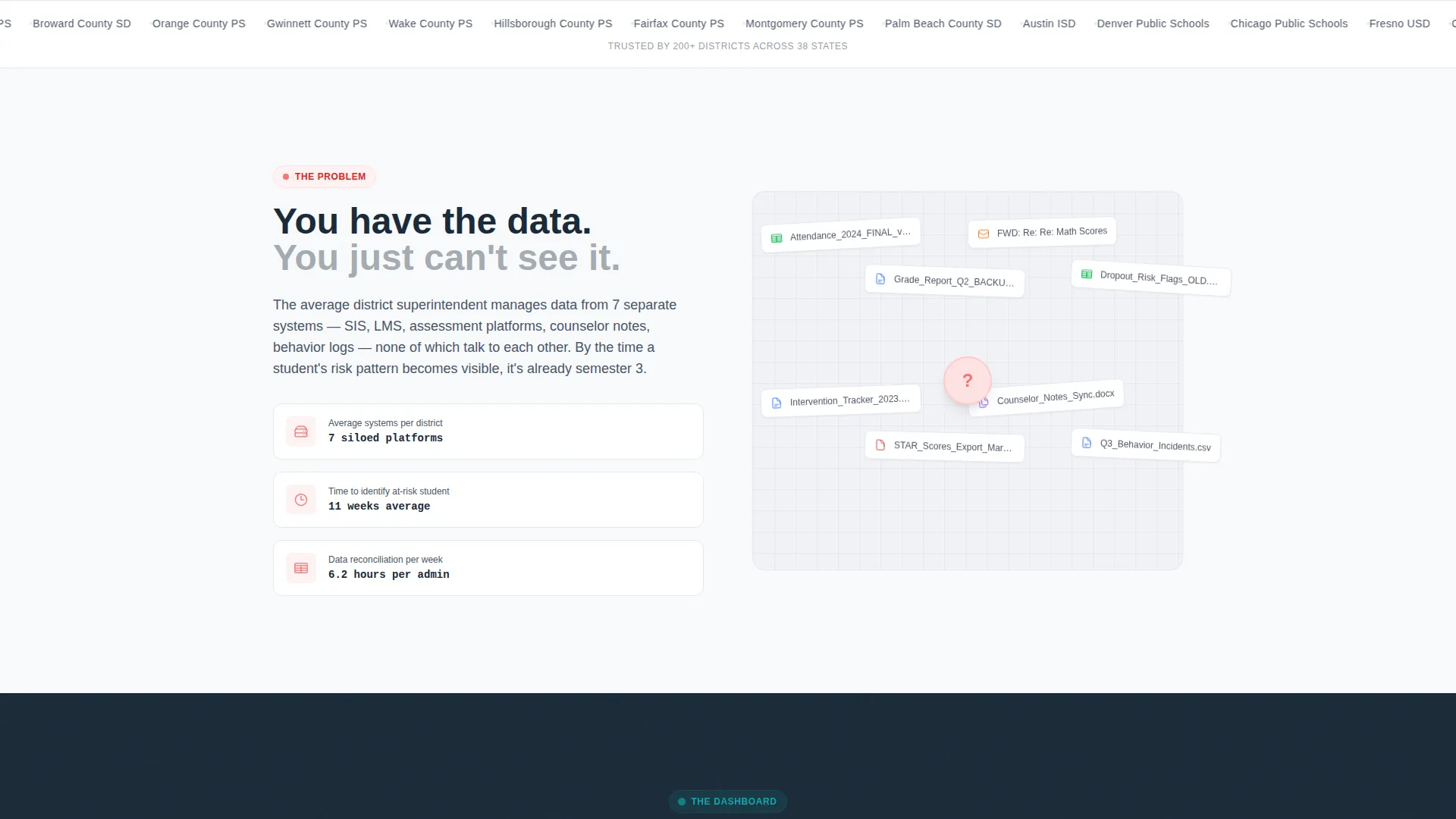
The page opens on the problem before revealing the product. A visual wall of disconnected spreadsheets and CSV files gives way to a growing dashboard interface across spokes two through four. By the time visitors reach the final spoke, they have already watched the solution take shape.
Animated Header with Logo Bar
The header opens with a slow-scrolling horizontal ribbon of school district and university logos. Above it sits a bold sans-serif headline against a chalkboard background. Below the logo bar, a miniature dashboard widget animates with a filling donut chart and a ticking risk score.
Contextual Dashboard Screenshots
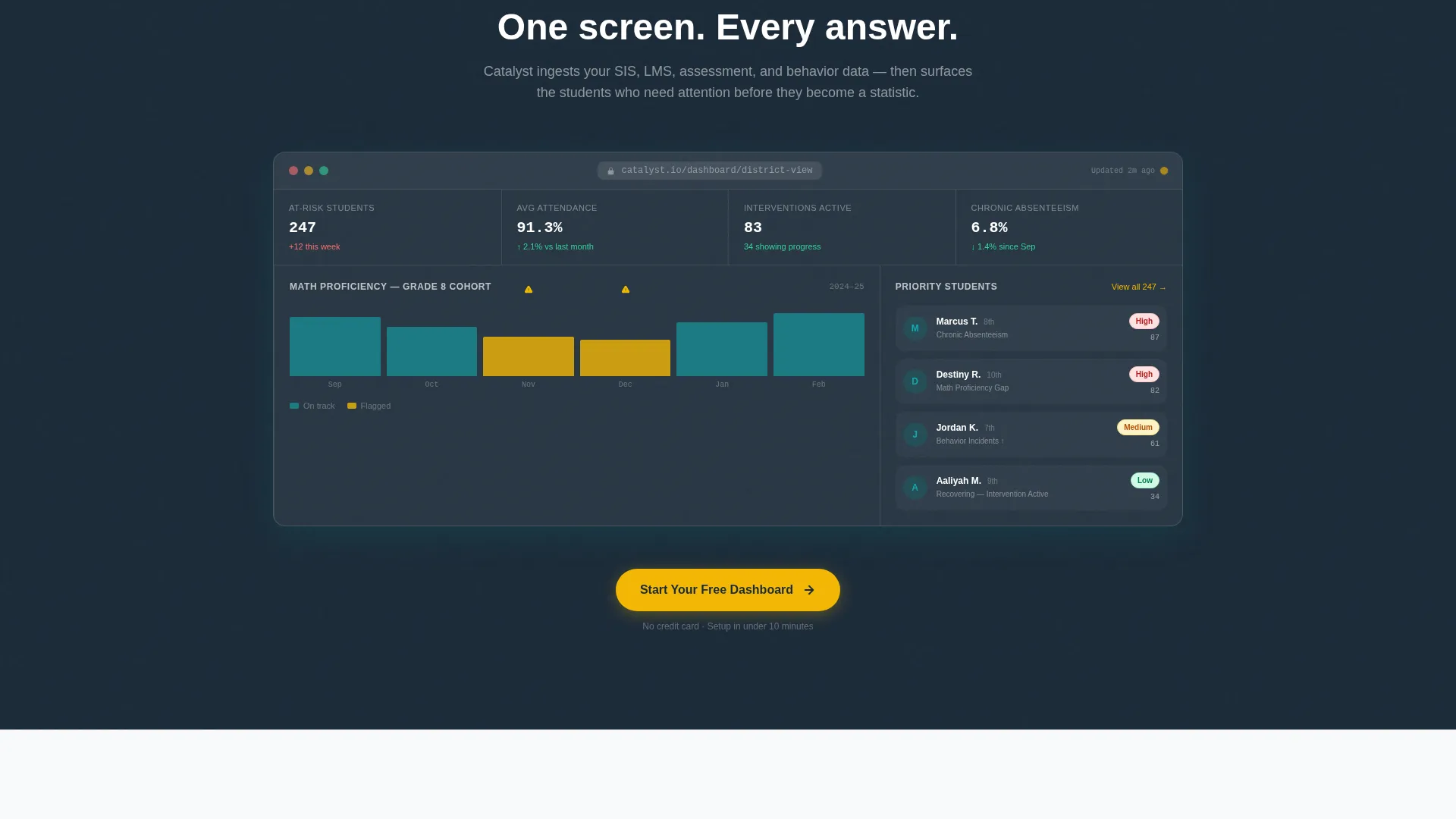
Screenshots throughout the page show specific, recognizable scenarios: a student cohort flagged for chronic absenteeism, an equity gap in math proficiency. These are never generic placeholder charts. The specificity builds confidence that the product handles real problems.
Two-Screen Progressive Sign-Up Form
The primary conversion path uses a two-step form. The first screen asks only for work email and role. The second screen asks for district size and primary pain point via a short dropdown. No credit card is required at any step.
Interactive Demo Conversion Path
A secondary call to action offers visitors a gated interactive demo using fictional student data. Visitors can click, filter, and explore before committing. This path captures buyers who are not yet ready to create an account.
Page sections overview
| Section | Purpose |
|---|---|
| Header Logo Bar | Establish credibility with scrolling institution logos and animated dashboard widget |
| Data Chaos Spoke | Show the familiar problem of fragmented spreadsheets and disconnected data |
| The Dashboard Spoke | Reveal the core product interface as the solution begins to take shape |
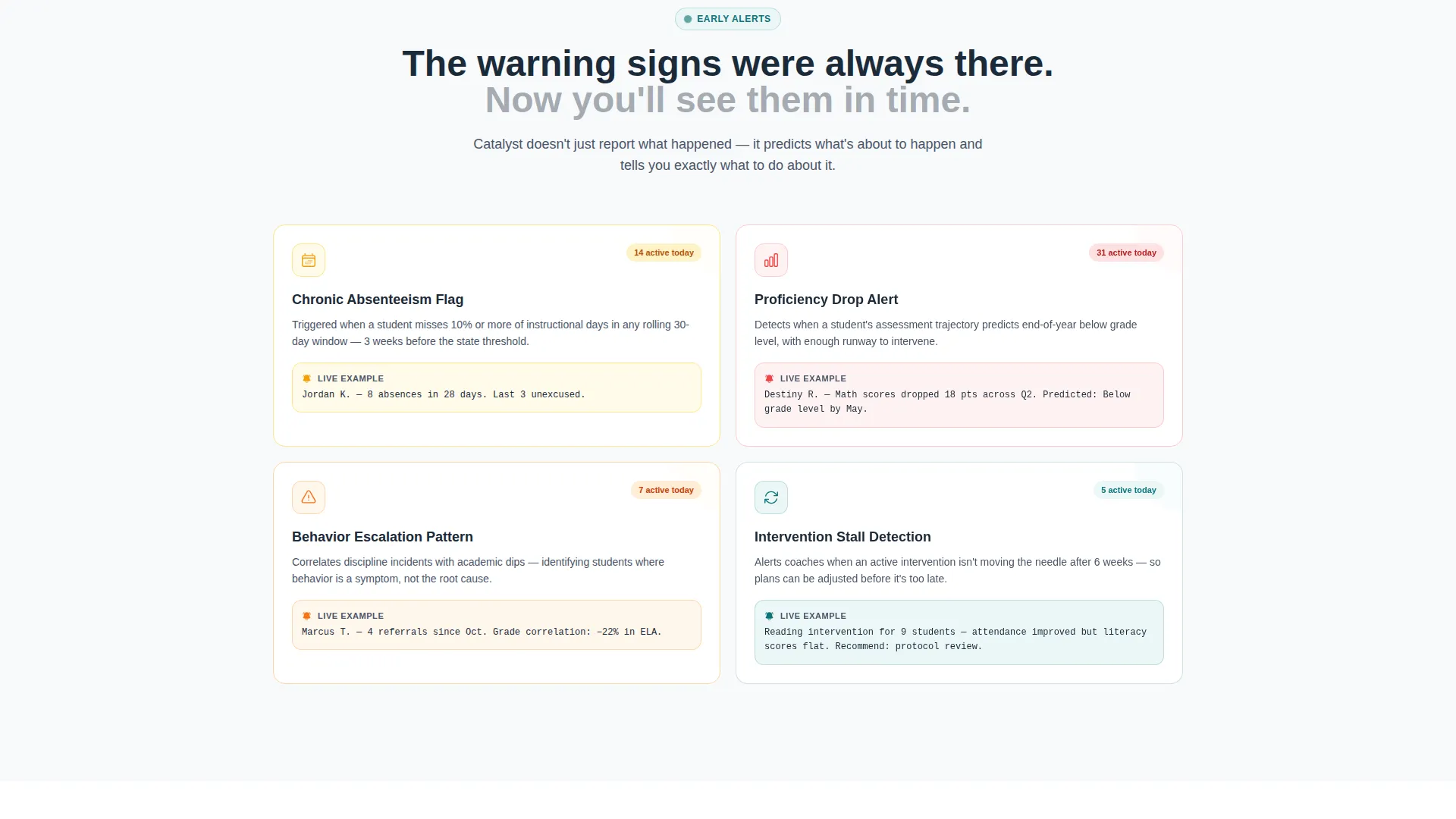
| Early Alerts Spoke | Highlight dropout risk flags and chronic absenteeism detection features |
| Reporting Spoke | Demonstrate board-ready reporting capabilities for principals and district leaders |
| Results Spoke | Present real deployment outcome metrics including reduced dropout rates |
| Mid-Page call to action | Surface the primary sign-up form after the third spoke for warm visitors |
| Floating Mobile call to action | Keep "Start Your Free Dashboard" accessible as a persistent button on mobile |
| Interactive Demo Gate | Let hesitant visitors explore a fictional student dataset before signing up |
Design & branding system
The Teal Catalyst color system is built to feel institutional and modern at the same time. It draws on the visual language of renovated school libraries: structured enough to trust, clean enough to signal change.
- Deep academic teal (#0D7377) anchors the primary identity; midnight chalkboard (#1B2A38) covers text and navigation rails; clean whiteboard (#F7F9FB) fills content panels
- Spark yellow (#F2B705) is reserved exclusively for calls to action, active navigation states, and data highlights that need to stand out immediately
- Bold sans-serif typography reinforces authority in headlines, while the overall layout prioritizes whitespace and scannable sections over dense text blocks
Mobile & speed optimization
The template is designed so that mobile visitors lose none of the conversion infrastructure available on desktop. The layout adapts the hub and spoke experience for smaller screens.
- The primary call-to-action appears as a persistent floating button on mobile, keeping "Start Your Free Dashboard" within reach at all times
- The anchor navigation and spoke sections reflow cleanly for portrait-oriented screens used by educators on phones and tablets
- Animated elements in the header are designed to feel live without overwhelming mobile rendering or distracting from the primary message
How this template helps you convert
Catalyst is structured around the buying behavior of education decision-makers. Every conversion element is placed where trust is highest, not just where it is convenient.
- The Logo Bar and animated widget establish credibility in the first three seconds, before any product claim is made, which reduces early bounce from skeptical visitors.
- The Problem to Solution arc earns trust by showing the visitor's own problem before presenting the product, making the sign-up feel like a logical next step rather than a sales push.
- The dual conversion paths, a progressive sign-up form and an interactive demo, capture both ready-to-commit visitors and those who need one more look before deciding.
Other information about this template
Catalyst is categorized under Technology, specifically within the Education Software and SaaS subcategory, targeting the education analytics dashboard niche. It is built as a hub and spoke landing page following a Directory and Discovery theme. The template uses the Teal Catalyst color system as defined in its matched intersection context. It is designed for freemium and free-trial conversion models where reducing sign-up friction is the primary goal.
- The template style is Hub and Spoke with Anchor Navigation, making it suitable for products with multiple distinct value propositions that benefit from organized, labeled sections
- The creative direction follows a Problem to Solution Arc, a structure that resonates with buyers who are already aware they have a problem but have not yet committed to a solution
- The header concept is the Logo Bar, a credibility-first opening that is well suited to education SaaS products targeting district-level and institutional buyers
Theme
Directory & Discovery
Creative direction
Problem→Solution Arc
Color system
Teal Catalyst
Style
Hub & Spoke (Anchor Nav)
Direction
Freemium/Trial
Page Sections
Hub and Spoke Anchor Navigation
Problem to Solution Arc Layout
Animated Header with Logo Bar
Contextual Dashboard Screenshots
Two-screen Progressive Sign-up Form
Interactive Demo Conversion Path
Related questions
Who is this landing page template designed for?
Does the template include the interactive demo functionality?
Can I adjust the five spoke sections to match my product?
Is a credit card required for the sign-up form?
What makes this template different from a generic SaaS landing page?



