Catalyst - Powerful Dealerbooking Landing Page Template
Catalyst is a split-screen landing page template built for auto dealer booking systems. It combines a live micro-dashboard header, scroll-triggered performance stats, and a three-field free trial sign-up flow into one high-converting page. Designed for dealership groups of all sizes, it turns appointment data into a compelling, always-on sales tool.
by Rocket studio
Quick summary
Catalyst is a single-page, split-screen landing page template purpose-built for auto dealer booking platforms. It opens with a functioning micro-dashboard, walks visitors through real performance benchmarks, and closes with a frictionless 14-day free trial sign-up. The design speaks directly to dealership operators who need to see the product working before they commit.
Who this template is for
This template is built for dealership operators and vertical SaaS teams who need a landing page that earns trust fast. The page speaks the language of the showroom floor, the service lane, and the business development center (BDC).
- Multi-rooftop dealer groups managing 200 or more appointments per week
- Single-point used-car lots where the owner runs the BDC personally
- Fixed-operations directors who track service bay utilization by the hour
What problem this template solves
Dealership software is a hard sell. Buyers are skeptical, busy, and wary of another tool that promises results but hides the product behind a demo request wall. This template removes that friction by putting the product on screen before anyone reads a headline.
- No-show rates, empty bays, and wasted BDC hours go unaddressed when the pitch feels abstract
- Generic SaaS landing pages fail to speak to dealership-specific pain points like lift utilization and F&I scheduling
- A long sign-up form or credit card requirement kills conversions before the value lands
What you get with this template
You get a fully structured split-screen landing page that pairs proof with product at every scroll depth. Every section is designed to move a skeptical dealership operator from curiosity to a 14-day free trial without friction.
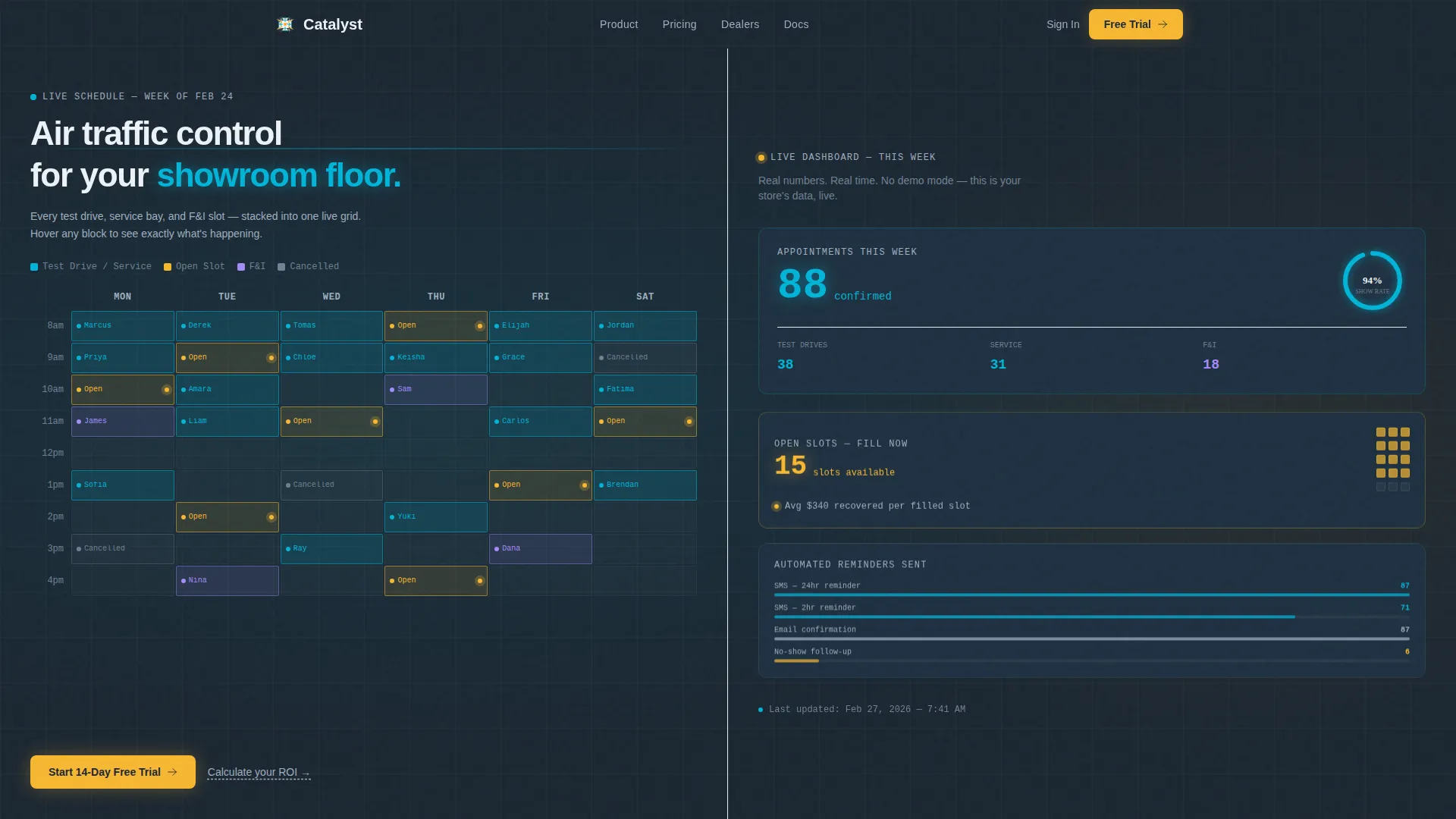
- An interactive header micro-dashboard with a live appointment grid and three animated stat cards
- A scroll-driven stats panel that pairs dealer performance benchmarks with matching product screenshots
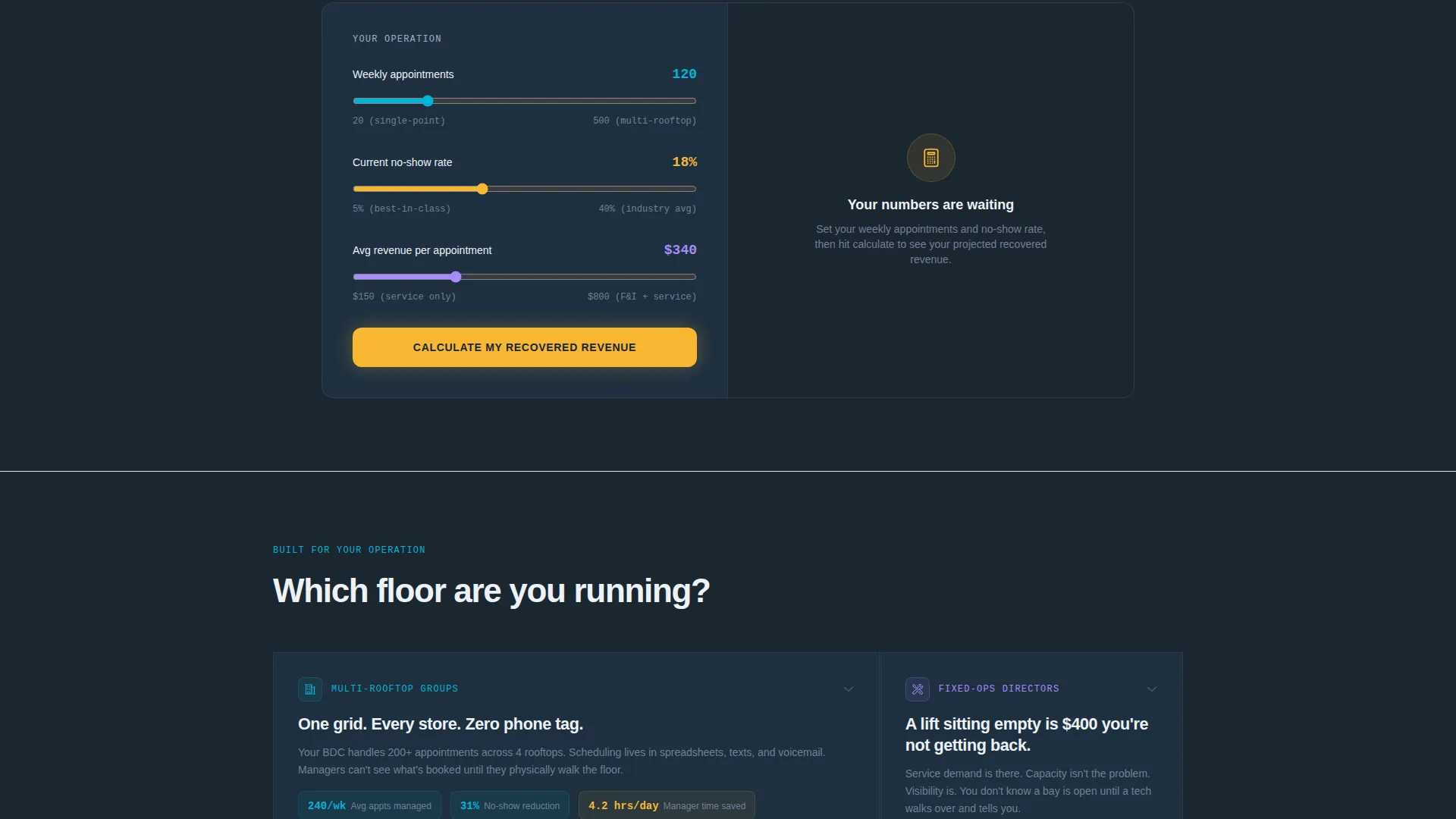
- A pinned bottom bar with the primary call to action and a mid-page revenue recovery calculator
Feature list
This template is built around a clear set of visual and interactive components drawn from the source brief. Each one serves a specific conversion purpose.
Interactive Micro-Dashboard Header
The header splits the viewport 50/50. The left side shows a weekly calendar grid with color-coded appointment blocks: teal for confirmed test drives, amber for unassigned service slots, and ghost-white outlines for cancellations. Visitors can hover each block to reveal customer names, vehicle interests, and appointment sources.
Live-Updating Stat Cards
The right side of the header displays three stat cards that tick upward on a two-second loop. Cards show total appointments this week, open slots pulsing in amber, and show rate in clean white. The numbers update continuously, making the product feel operational the moment the page loads.
Scroll-Triggered Performance Benchmarks
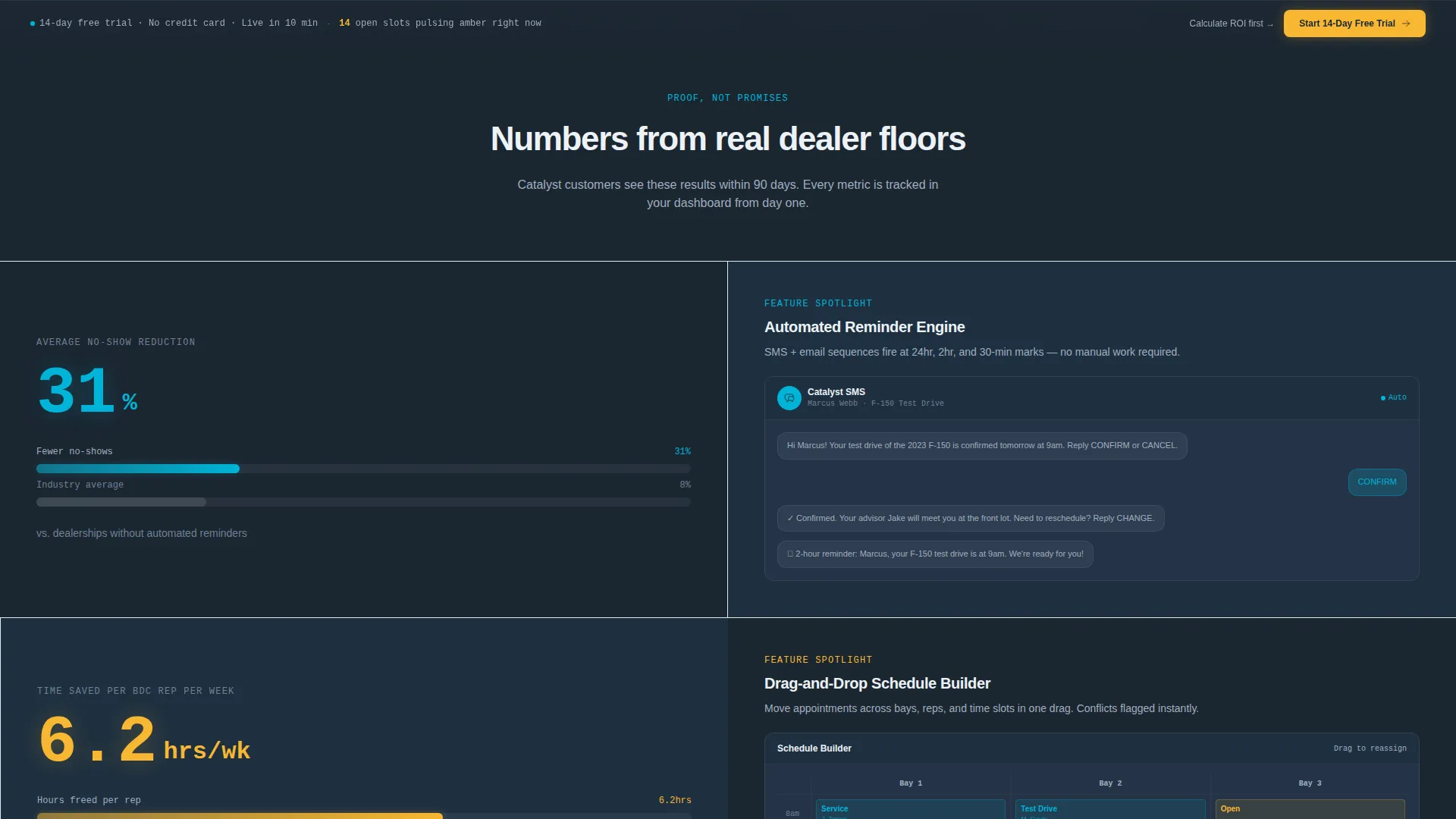
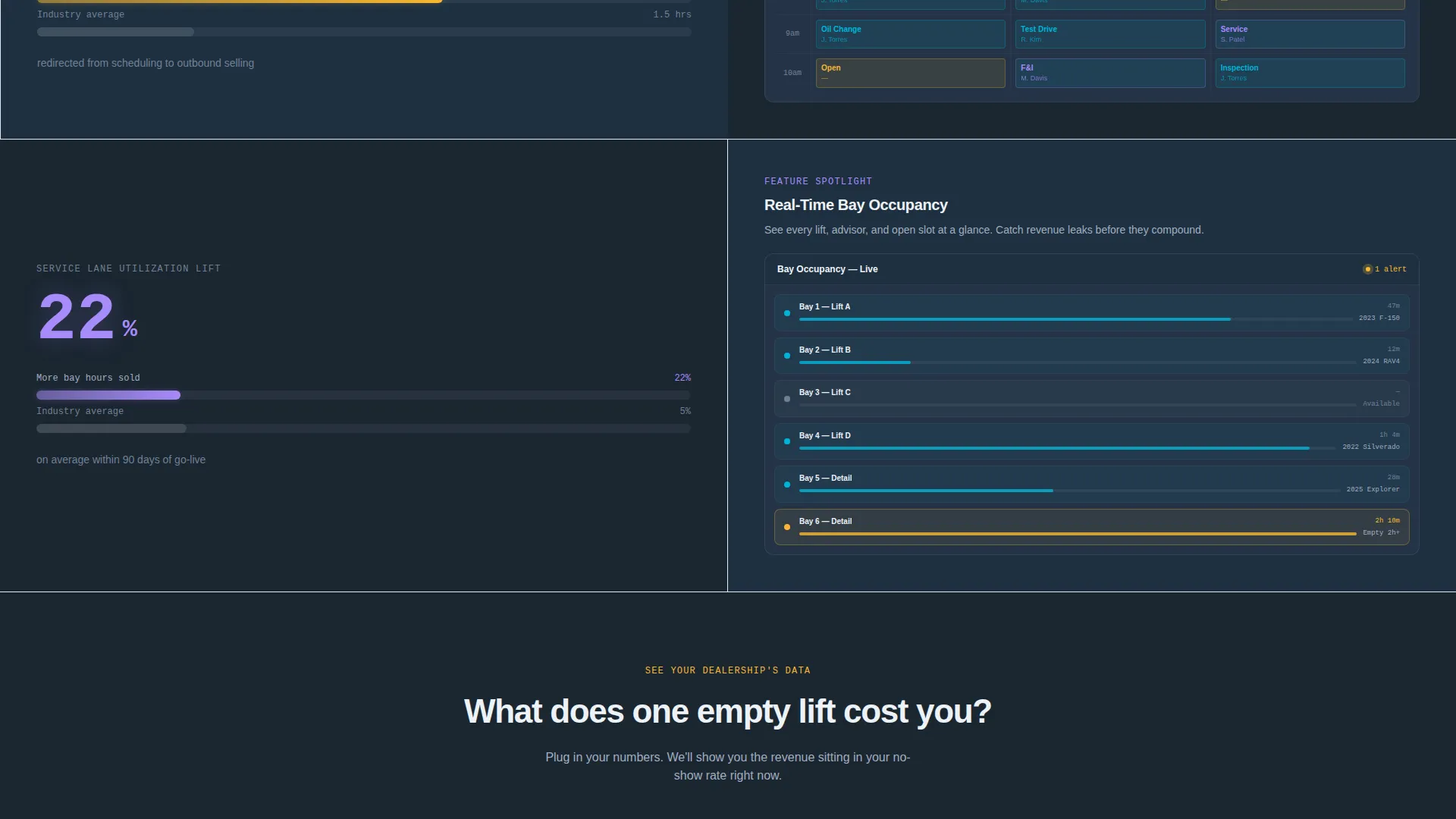
Below the header, the left panel cycles through real dealer performance figures. Each stat, such as a 31% average no-show reduction, 6.2 hours saved per BDC rep weekly, and a 22% service lane utilization lift, animates into view with a horizontal bar chart that fills as the visitor scrolls.
Paired Product Screenshot Panel
For every benchmark on the left, the right panel surfaces the matching product screen. Visitors see the automated reminder SMS thread, the drag-and-drop schedule builder, and the real-time bay occupancy view in direct sequence. The pairing builds an evidence wall that makes the trial feel logical rather than risky.
Revenue Recovery Calculator
A mid-page secondary conversion path lets managers input their weekly appointment volume and current no-show percentage. The page returns a projected recovered revenue figure, making the cost of inaction tangible before the primary call to action appears again.
Three-Field Free Trial Form
The sign-up form asks for dealership name, number of rooftops via a dropdown (1, 2 to 5, or 6 and above), and a work email address. No credit card is required. The form sits behind the primary call to action pinned to a slim bottom bar that appears after the first scroll.
Page sections overview
| Section | Purpose |
|---|---|
| Split-Screen Header | Display live micro-dashboard and animated stat cards |
| Benchmark Stats Panel | Show scroll-triggered performance data with bar charts |
| Product Screenshot Panel | Pair each benchmark with a matching feature screen |
| Revenue Recovery Calculator | Let managers calculate projected recovered revenue |
| Free Trial Sign-Up | Capture dealership name, rooftop count, and work email |
| Pinned Bottom Bar | Keep the primary call to action visible after first scroll |
Design & branding system
The visual identity follows a Dashboard Pro theme using the Teal Catalyst color system. The palette is built to feel like a dealership after hours: monitors glowing, amber security lights reflecting off windshields, overhead fluorescents off.
- Deep charcoal (#1B2631) anchors all backgrounds; showroom teal (#00B4D8) lights up live data and active states
- Headlight white (#EDF2F7) handles all typography and card surfaces throughout the page
- Signal amber (#F7B731) is reserved exclusively for alerts, open slots, and calls to action that demand immediate attention
Mobile & speed optimization
The template is designed as a lean, single-page layout with no stock photography or hero illustrations. The product itself serves as the visual, which keeps asset weight low and rendering fast on any device.
- The split-screen layout adapts to stack vertically on smaller screens without losing the micro-dashboard impact
- Stat cards and bar chart animations are built to run smoothly without requiring heavy third-party dependencies
How this template helps you convert
Every design decision in Catalyst is built around reducing skepticism and removing friction before asking for a commitment.
- The interactive header puts the product to work before anyone reads a word, building immediate credibility with a live-looking dashboard that mirrors what operators use daily.
- The scroll-driven evidence wall trades a real number for a real feature at every scroll depth, so by the time visitors reach the sign-up form, the value case has already been made.
- The no-credit-card, three-field form and the revenue recovery calculator both reduce the perceived commitment, making the 14-day free trial feel like an obvious next step rather than a risk.
Other information about this template
Catalyst is structured as a Freemium/Trial landing page with a Stats-First Impact creative direction. It is built on the Dashboard Pro theme and uses the Teal Catalyst color system throughout.
- The template style is Split Screen (50/50), with each panel designed to complement and mirror the other at every section
- The header concept is classified as an Interactive Preview, meaning the product functionality is visible and partially operable before the visitor takes any action
- The landing page direction targets a freemium entry point, removing financial barriers to the first conversion event
- This template fits the Auto Dealer Vertical SaaS subcategory and is purpose-built for the auto dealer booking system niche within the broader technology category
Theme
Dashboard Pro
Creative direction
Stats-First Impact
Color system
Teal Catalyst
Style
Split Screen (50/50)
Direction
Freemium/Trial
Page Sections
Interactive Micro-dashboard Header
Scroll-triggered Benchmark Stats
Paired Product Screenshot Panel
Revenue Recovery Calculator
Three-field Free Trial Form
Pinned Bottom Bar Call to Action
Related questions
Who is this landing page template designed for?
Does the sign-up form require a credit card?
What makes the header different from a standard hero section?
Can this template work for a single dealership location?
What visual style does this template use?



