Catalyst - High-Impact Energy Management Landing Page Template
Catalyst is a hub-and-spoke landing page template built for green energy management software. It combines a brutalist visual identity with an interactive explorer layout, guiding sustainability directors, operations managers, and municipal energy coordinators through a fixed anchor nav that lets prospects manipulate live-styled dashboard widgets before they ever contact sales.
by Rocket studio
Quick summary
Catalyst is a single-page, anchor-nav landing page template designed for green energy management software. It uses a Bold Brutalist visual identity and an Interactive Explorer layout to let prospects experience the platform before committing. Five industrial nav tabs lead visitors through monitor, analyze, report, optimize, and comply workflows, all driving toward a two-step lead generation form.
Who this template is for
This template is built for software teams selling complex energy management tools to data-heavy enterprise buyers. It works best when the product needs to earn trust through demonstration rather than description.
- Sustainability directors managing multi-building university campuses across dozens of separate utility meters
- Operations managers at manufacturing plants working toward energy certification deadlines
- Municipal energy coordinators reporting net-zero progress to city councils and oversight bodies
What problem this template solves
Facilities teams and sustainability professionals deal with fragmented utility data across dozens of buildings, meters, and reporting frameworks. A generic software landing page cannot communicate that complexity or earn the trust of a technical buyer. Catalyst solves that gap by letting visitors interact with the product concept before they speak to sales.
- Buyers cannot picture how a platform handles sixty buildings until they see a toggling campus map widget
- Generic templates lack the industrial credibility that energy and compliance buyers expect
- Lead capture forms placed too early lose technical prospects who need to see value first
What you get with this template
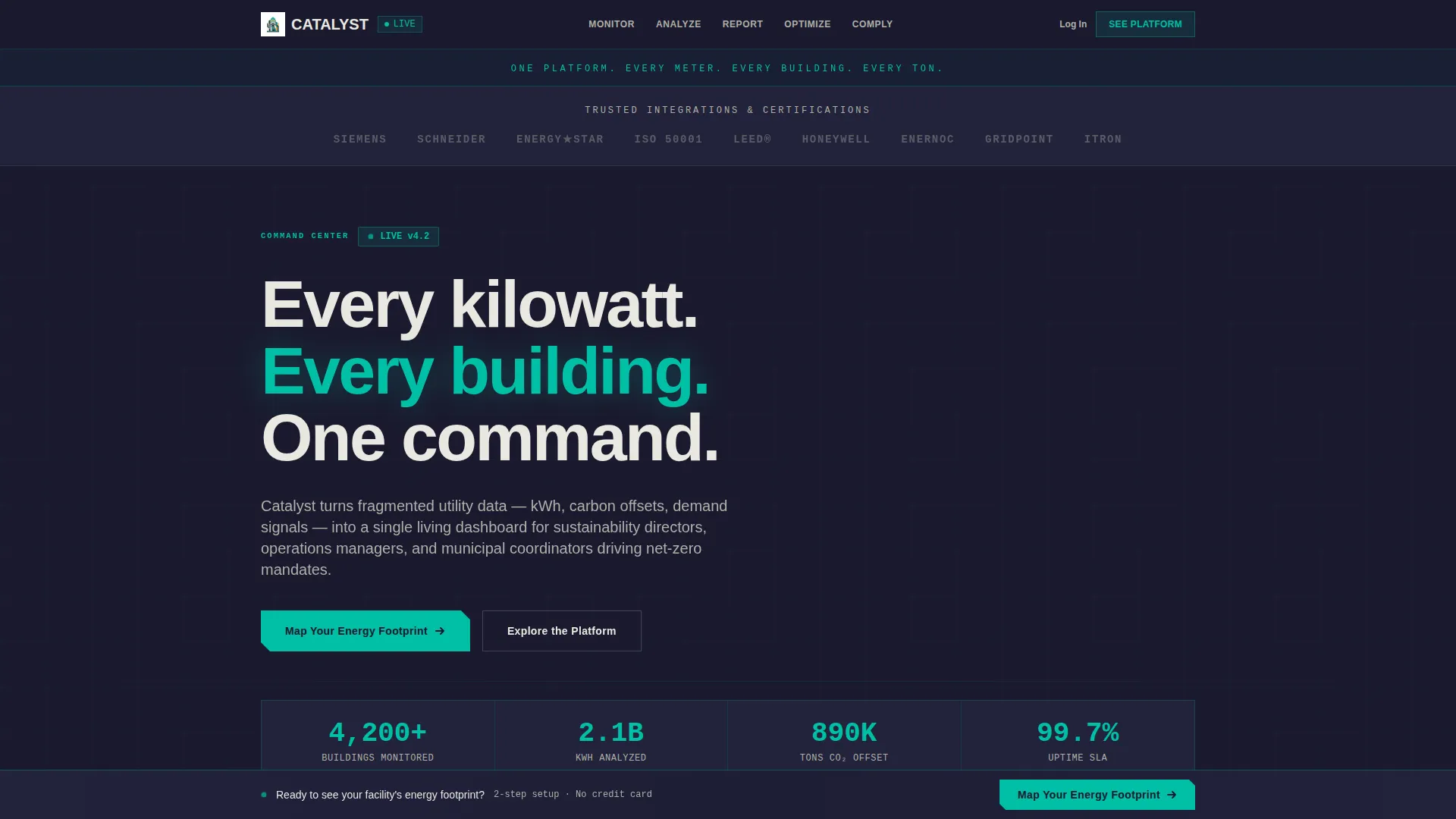
You get a fully structured, single-page layout with a fixed left-rail anchor navigation and five interactive spoke sections. Every component is designed around the energy management use case, from the credential-stamped logo bar header to the persistent bottom-bar call-to-action form.
- A Bold Brutalist design system using the Teal Catalyst color palette, built for industrial credibility
- Five interactive spoke sections where visitors manipulate live-styled widgets tied to real energy scenarios
- A two-step lead generation form that qualifies prospects by building count, energy spend, and primary goal
Feature list
This template packs its value into purposeful, interactive components that mirror how energy management software actually works. Each feature below is grounded directly in the template structure described in the brief.
Fixed Anchor Navigation Rail
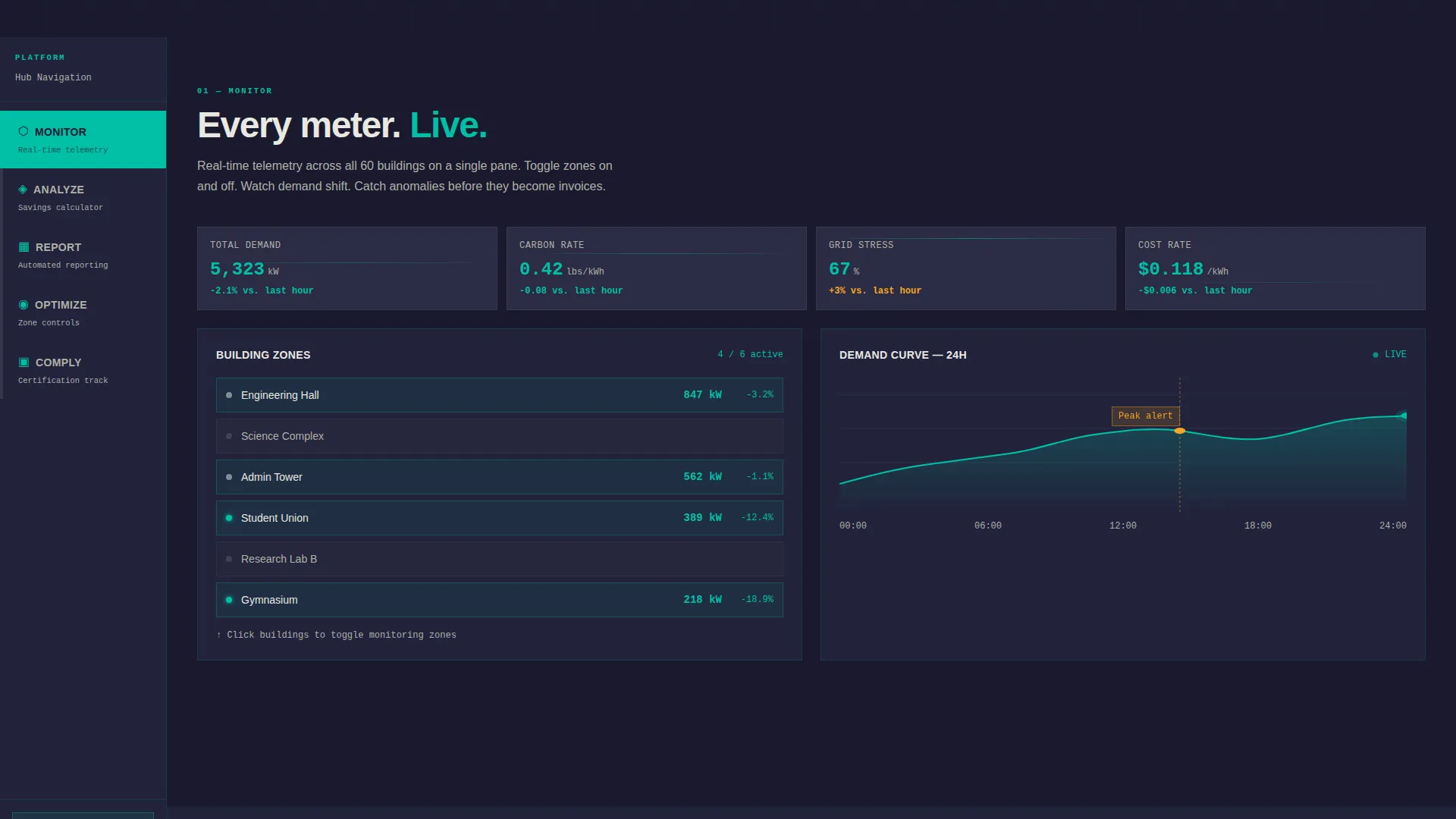
A heavy, left-rail tab system carries five industrial labels: Monitor, Analyze, Report, Optimize, and Comply. Each tab click or scroll snap loads a dedicated spoke section, keeping visitors oriented without breaking page flow.
Interactive Dashboard Widgets
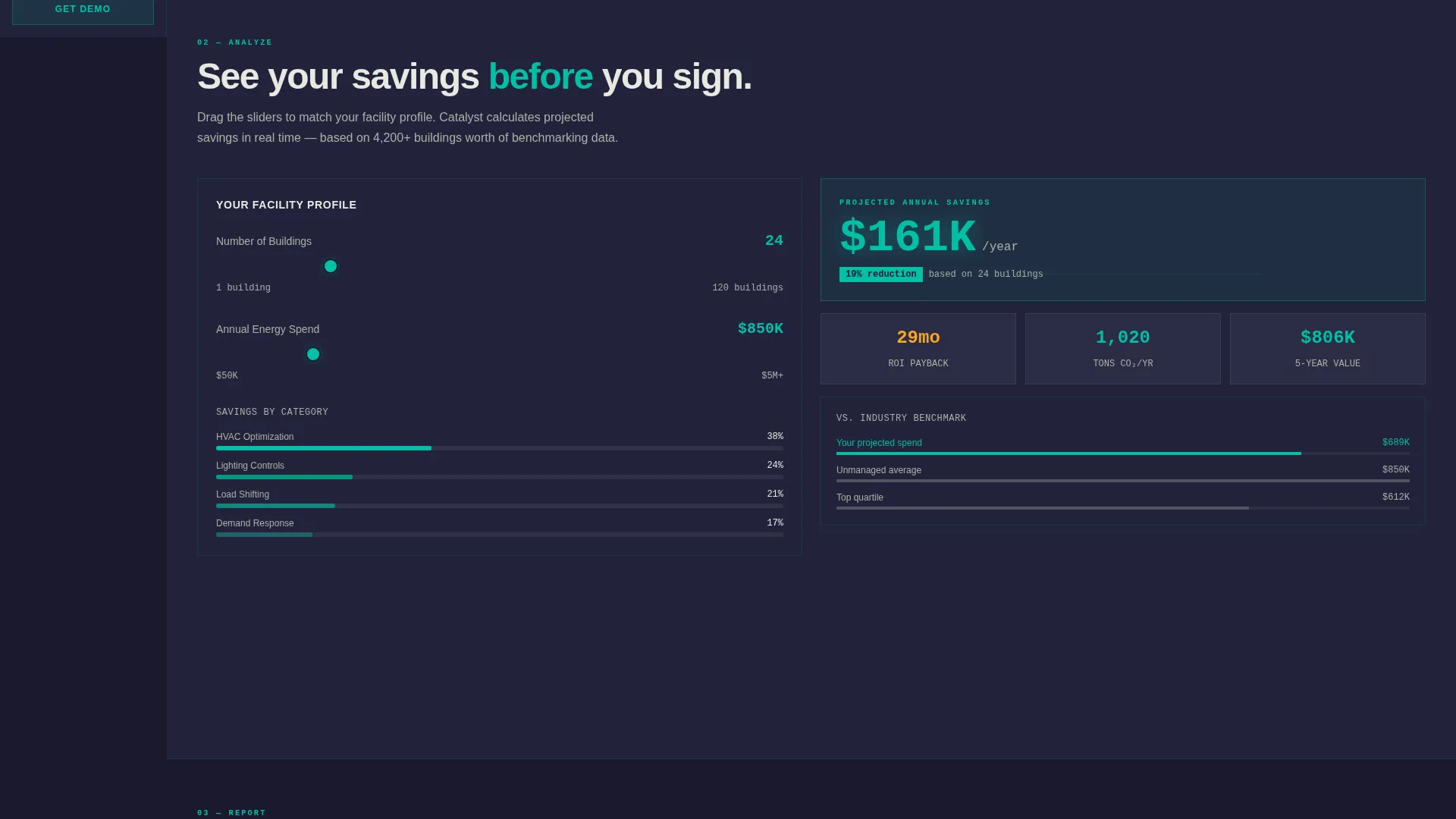
Each spoke section includes a live-styled widget tied to a real energy scenario. Visitors drag a slider to watch savings compound, toggle building zones on a campus map, or expand a compliance checklist that auto-checks as features appear.
Monolithic Logo Bar Header
A full-width, slab charcoal strip displays client and integration logos in grayscale, each stamped like cast-iron plates on a wall. A single line of knockout white type runs above the logos to anchor the brand statement immediately.
Two-Step Lead Capture Form
The persistent bottom bar opens a sequenced form. Step one collects building count, annual energy spend range, and primary goal. Step two captures name, work email, and a preferred demo date, qualifying the lead before any sales conversation begins.
Escalating Spoke Complexity
Each successive spoke section increases the sophistication of what the platform handles. This progressive disclosure keeps visitors engaged and mirrors the actual depth of an energy management platform without overwhelming them upfront.
Persistent Bottom Bar call to action
A fixed bottom bar labeled "Map Your Energy Footprint" stays visible throughout the entire page scroll. It invites action at any point in the visitor journey without interrupting the interactive exploration flow.
Page sections overview
| Section | Purpose |
|---|---|
| Logo Bar Header | Establishes credibility through client and integration logo stamps |
| Monitor Spoke | Shows real-time energy data across building zones |
| Analyze Spoke | Lets visitors explore consumption breakdowns and demand signals |
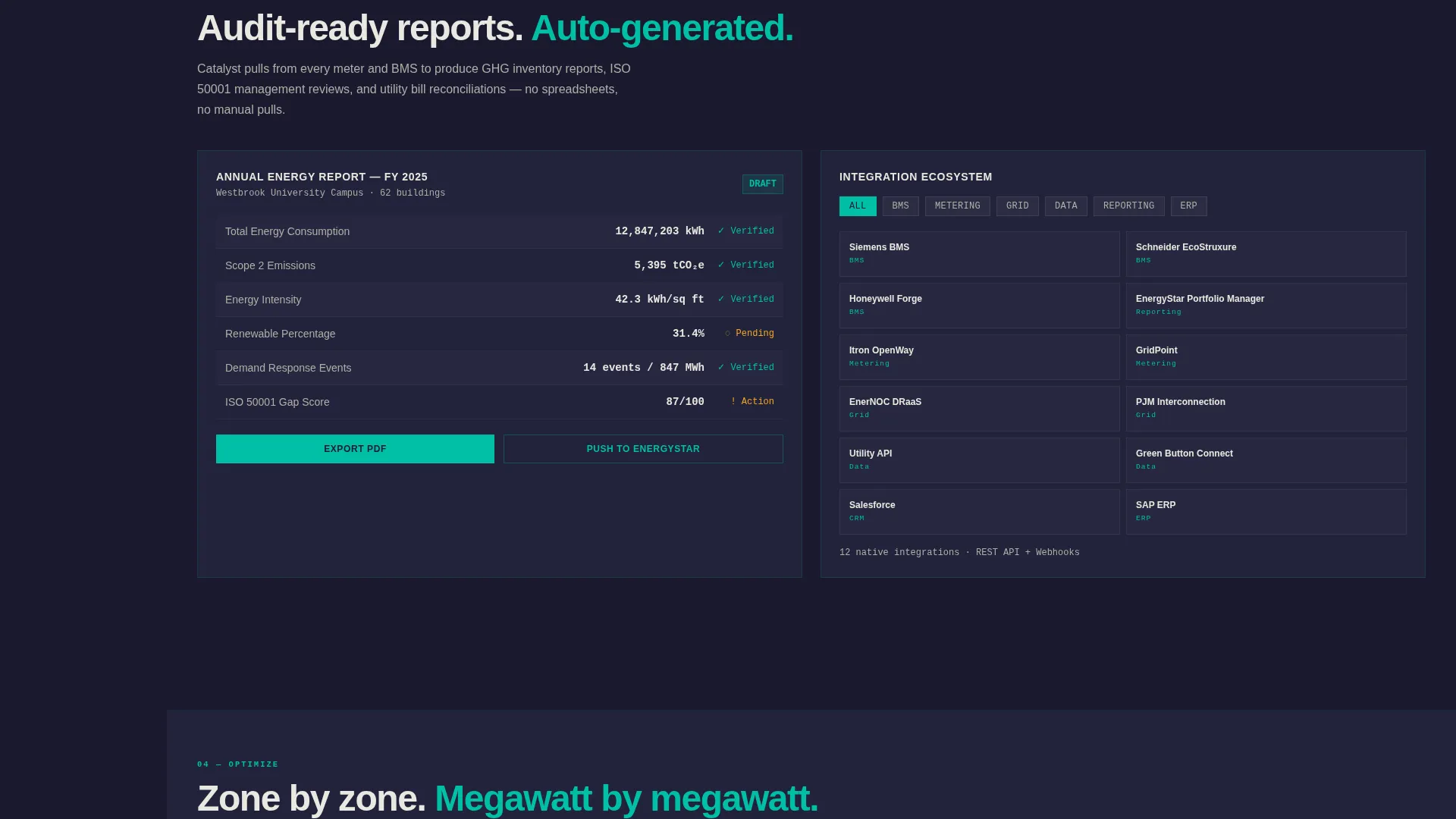
| Report Spoke | Demonstrates carbon offset and utility reporting outputs |
| Optimize Spoke | Illustrates savings compounding through a draggable slider widget |
| Comply Spoke | Expands a certification checklist tied to visible platform features |
| Bottom Bar call to action | Captures qualified leads through a persistent two-step form |
Design & branding system
The visual identity is Bold Brutalist, built to feel like a power station retrofitted with clean-tech instrumentation. Every color and layout choice reinforces industrial authority while the teal telemetry accents signal precision and forward momentum.
- Deep slab charcoal (#1A1A2E) fills massive background blocks; reactor teal (#00BFA6) highlights data and primary actions; raw concrete off-white (#E8E8E0) handles readable text surfaces
- Caution amber (#F5A623) is reserved strictly for alerts, badges, and hover states, never used as a general accent
- No imagery, no gradients; the weight of cast-iron logo stamps and slab type carries all visual authority
Mobile & speed optimization
The template is structured to translate its industrial desktop layout to smaller screens without losing the interactive explorer concept. The fixed left-rail navigation adapts to preserve usability across devices.
- The anchor navigation and spoke sections are built for responsive reflow so the hub-and-spoke structure works on tablet and mobile viewports
- Interactive widgets are designed to remain functional and legible at reduced screen widths
- The persistent bottom bar call to action stays accessible at the base of the screen on all device sizes
How this template helps you convert
Catalyst earns the lead before asking for it. The interactive explorer model means visitors are already using the product concept by the time the bottom bar call to action appears, which removes the friction that kills conversion on feature-heavy B2B software pages.
- Each spoke section deepens prospect investment by showing them their own scenario in a live-styled widget, making the ask feel natural rather than premature.
- The two-step form structure qualifies intent before capturing contact details, so the leads that reach your sales team already understand their own energy situation.
Other information about this template
This template sits at the intersection of Green Energy Vertical SaaS and the broader energy management software category. It is built for teams selling to buyers who bring technical vocabulary and compliance pressure to every evaluation.
- The template style is Hub and Spoke with Anchor Navigation, making it well-suited for platforms with multiple distinct capability areas
- The Interactive Explorer creative direction was chosen to reflect how energy management tools are actually evaluated by facilities teams
- The Lead Generation landing page direction prioritizes qualified prospect capture over broad awareness
- The Teal Catalyst color system and Bold Brutalist theme are designed to appeal to industrial and institutional buyers who associate clean minimalism with credibility
Theme
Bold Brutalist
Creative direction
Interactive Explorer
Color system
Teal Catalyst
Style
Hub & Spoke (Anchor Nav)
Direction
Lead Generation
Page Sections
Fixed Anchor Navigation Rail
Interactive Dashboard Widgets
Monolithic Logo Bar Header
Two-step Lead Capture Form
Escalating Spoke Complexity
Persistent Bottom Bar Call to Action
Related questions
Who is this template designed for?
Can I adapt the interactive widgets to reflect my own product data?
How does the two-step form qualify leads?
Is the anchor navigation fixed throughout the page scroll?



