Real Estate Course Landing Page Template
Catalyst is a split-screen real estate course landing page built around a Calculator-First experience. Visitors interact with live deal analysis tools before they read a single line of sales copy. The Teal Catalyst color system and Data Command theme give the page the focused, number-driven feel of a professional trading terminal rebuilt for rental property investors.
by Rocket studio
Quick summary
Catalyst is a single-page template designed for real estate training platforms. It leads with interactive deal analysis tools, earns visitor trust through live calculations, and converts through a no-credit-card freemium signup. The design uses a deep charcoal and electric teal palette that makes every number pop, keeping aspiring investors engaged from scroll to signup.
Who this template is for
This template is built for educators and course creators in the real estate investing space. It works best when the offer centers on teaching financial analysis rather than listing properties.
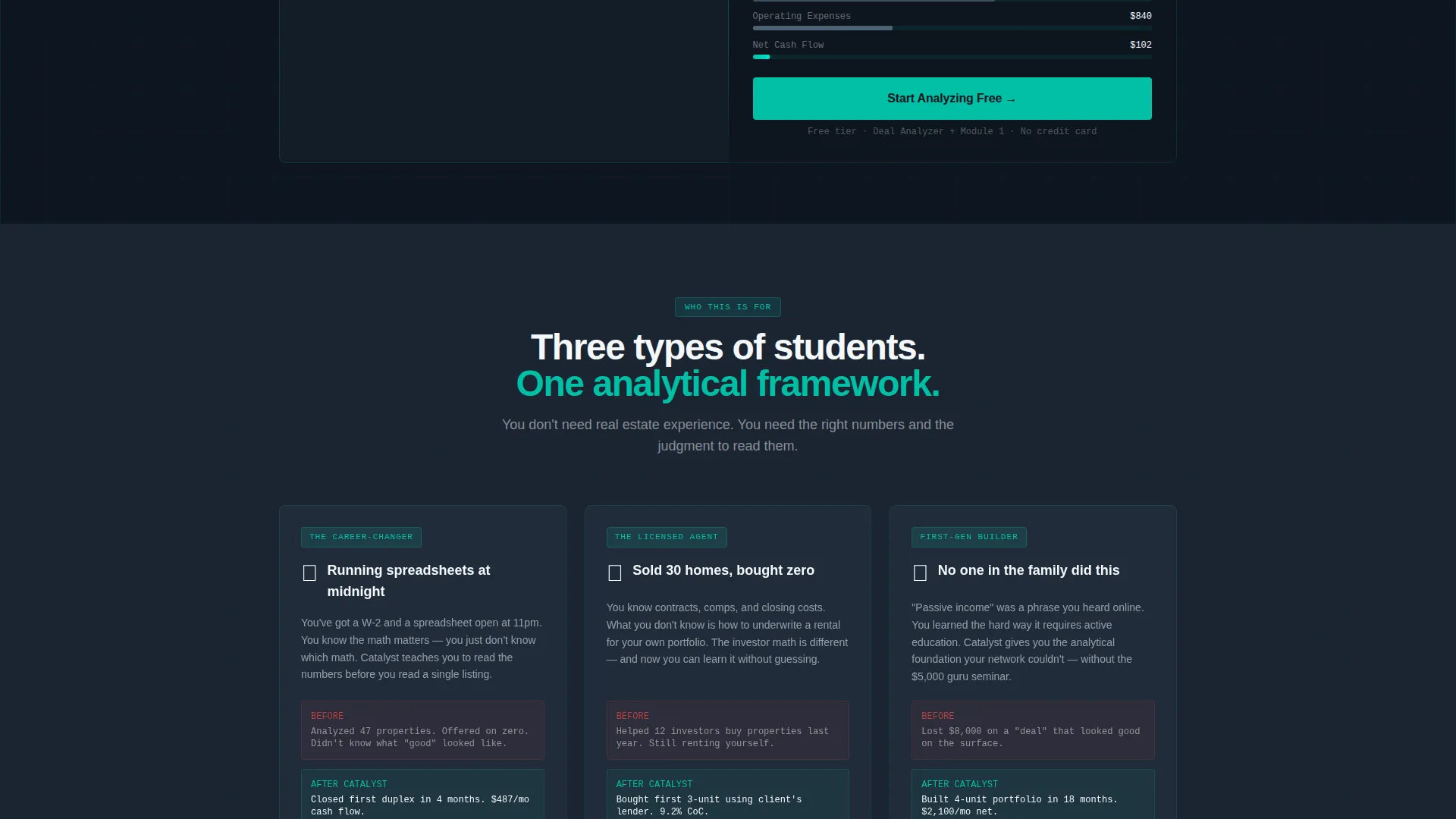
- Career-changers who are studying real estate investing outside of their regular work hours
- Licensed real estate agents who want to add property analysis and deal underwriting to their skill set
- First-generation wealth builders launching a training platform or real estate education course
What problem this template solves
Most real estate course pages ask visitors to trust a pitch before showing any proof of value. Catalyst reverses that order. The tools come first, building credibility before the signup ask ever appears.
- Visitors arrive skeptical and leave without engaging because no proof of competence is shown early
- Passive-income promises feel hollow when the page offers no practical demonstration of the material
- Conversion rates drop when signup forms appear before the visitor has experienced any tangible benefit
What you get with this template
You get a fully structured, single-page layout that guides visitors through an interactive tool-first journey. Every section pairs a functional mini-tool on the left with a course preview or case study on the right.
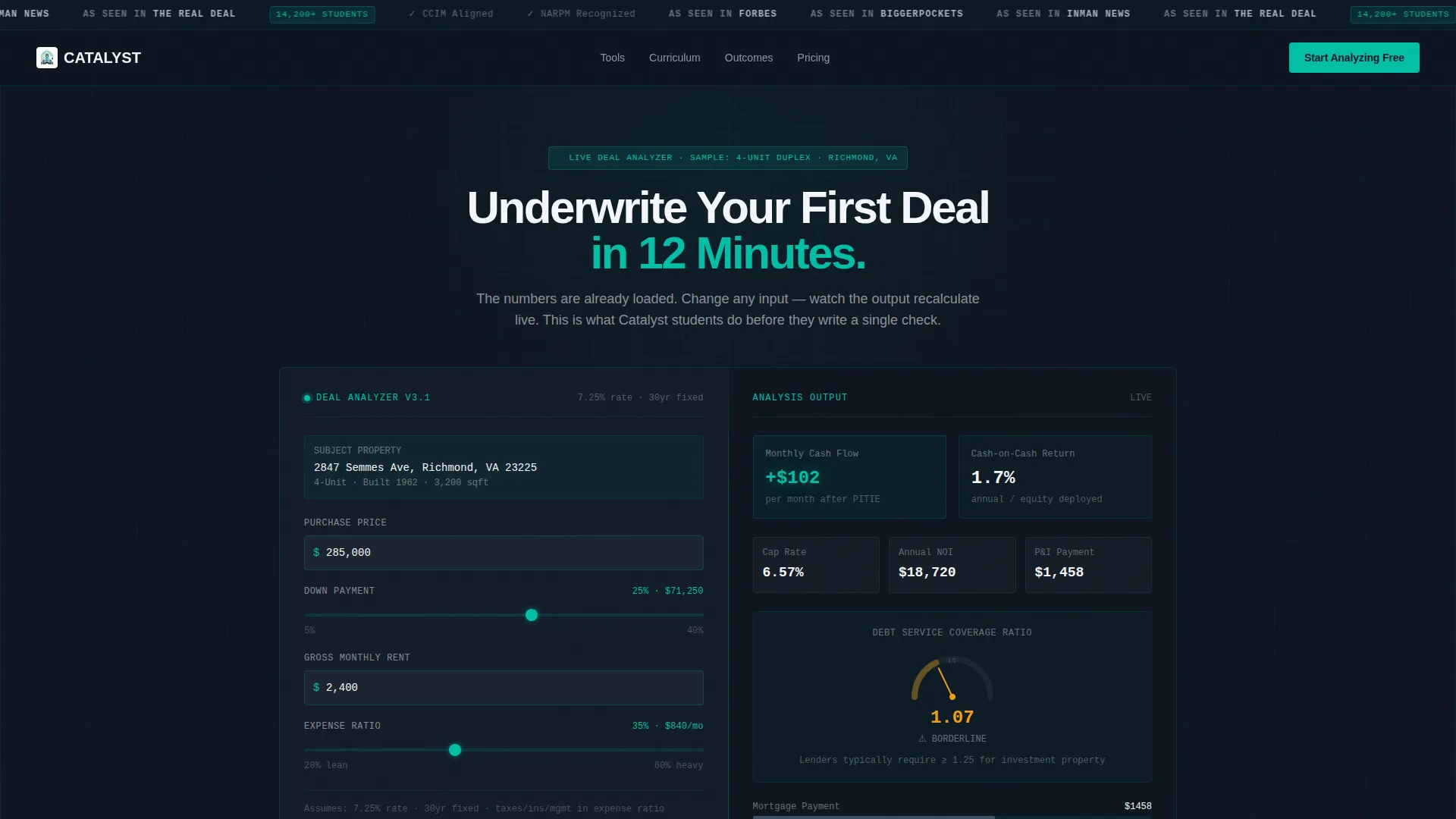
- A live Deal Analyzer pre-loaded with a sample duplex address, showing cash-on-cash return, monthly cash flow, and a debt service coverage ratio (DSCR) gauge
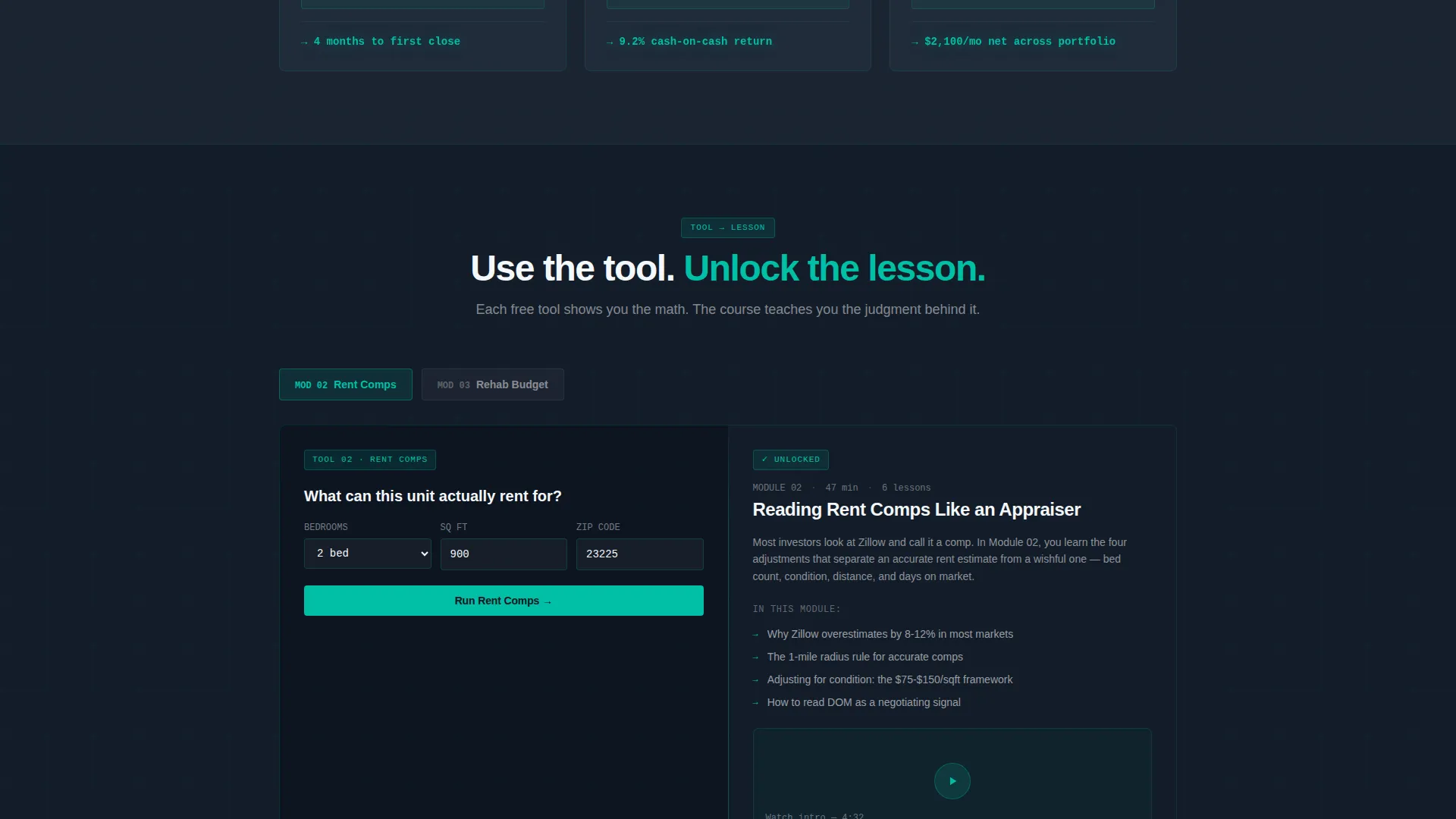
- A scrolling split-screen layout with a Rent Comps Estimator, Rehab Budget Slider, and Amortization Visualizer paired against corresponding course module previews
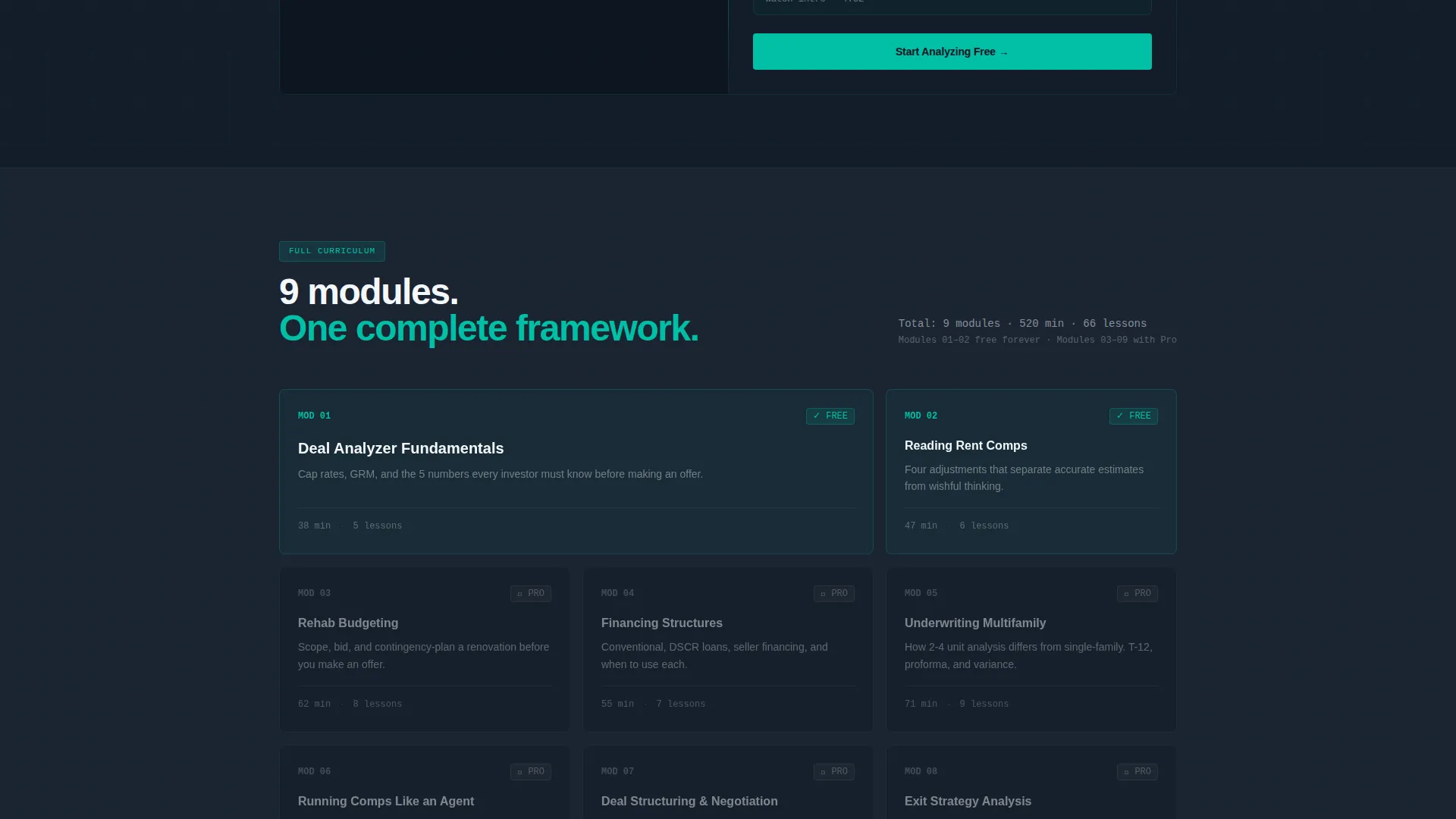
- A freemium conversion flow with a two-field signup form, a "Start Analyzing Free" call to action, and a secondary "See Full Curriculum" prompt that appears after the third tool interaction
Feature list
This section covers the core built-in components that define the Catalyst template experience.
Live Deal Analyzer Panel
The header section features a pre-populated Deal Analyzer on the left panel. It accepts a purchase price, down payment percentage, and estimated rent. The right panel outputs cash-on-cash return, monthly cash flow, and an animated DSCR gauge needle in real time.
Scrolling Split-Screen Tool Sections
Each scroll section pairs a mini-tool on the left with related course content on the right. The progression moves from a Rent Comps Estimator to a Rehab Budget Slider to an Amortization Visualizer, creating a sense of leveling up with each interaction.
Logo Bar Header Strip
A slim horizontal strip above the main headline displays media logos, credential badges, accreditation seals, and a student count. The strip scrolls horizontally and anchors the bold headline: "Underwrite Your First Deal in 12 Minutes."
Freemium Signup Flow
The primary call to action is "Start Analyzing Free," pinned to the bottom of the calculator output and repeated after every tool section. Clicking opens a two-field form collecting an email address and an investing goal from a dropdown menu. No credit card is required.
Secondary Curriculum Prompt
A subtle "See Full Curriculum" call to action slides in after the visitor has interacted with the third tool. It links to a plan comparison view, targeting visitors who are already convinced and ready to explore paid tiers.
Teal Catalyst Color System
Interactive elements, hover states, progress bars, and calculated outputs pulse in electric teal (#00BFA6). Deep command-center charcoal (#1B2432) holds the layout frame. Signal white (#F4F7FA) keeps text and card surfaces readable against the dark background.
Page sections overview
| Section | Purpose |
|---|---|
| Logo Bar Header | Display media logos, credential badges, and student count above the main headline |
| Deal Analyzer Hero | Split-screen calculator pre-loaded with sample duplex data; outputs cash flow and DSCR |
| Rent Comps Section | Left-panel estimator paired with a course module preview on the right |
| Rehab Budget Section | Interactive budget slider paired with an instructor video thumbnail |
| Amortization Visualizer | Scroll-level tool paired with a student case study on the right panel |
| Freemium Signup Section | Two-field email form with investing-goal dropdown; no credit card required |
| Curriculum Reveal Prompt | Secondary call to action that slides in after the third tool interaction |
Design & branding system
The Teal Catalyst palette draws on the visual language of financial data terminals. Every color has a clear functional role, so the design never feels decorative, it feels operational.
- Deep command-center charcoal (#1B2432) as the primary background, keeping the layout steady and distraction-free
- Electric teal (#00BFA6) for all interactive accents, hover states, animated outputs, and progress indicators
- Muted slate (#3D4F5F) for secondary panel backgrounds, with bright signal white (#F4F7FA) reserved for text and card surfaces
Mobile & speed optimization
The split-screen layout is designed to restack cleanly on smaller screens so the tool always appears before the course content. Interactive elements are sized for tap-friendly use on touch devices.
- Tool panels restack vertically on mobile so the calculator leads, followed immediately by its output
- Call-to-action buttons remain full-width and easily tappable at every scroll section
- The two-field signup form is intentionally minimal, reducing friction on small-screen entry
How this template helps you convert
Catalyst earns the conversion by demonstrating competence before making any request. The visitor uses real tools, sees real numbers, and arrives at the signup form already convinced.
- The Deal Analyzer in the header lets visitors run a live calculation before they read any course description, establishing immediate credibility and tool value.
- Each successive tool section deepens engagement, so by the time the "Start Analyzing Free" call to action appears, the visitor has already experienced three working demonstrations of the platform's analytical depth.
- The secondary "See Full Curriculum" prompt activates only after the third tool interaction, targeting high-intent visitors who are ready to compare plans without interrupting early-stage browsers.
Other information about this template
Catalyst is categorized under Technology with a subcategory focus on Real Estate Digital Presence. It is specifically designed for the Real Estate Course and Training Platform niche, making it a focused tool for educators in the investing space.
- The template style is a strict 50/50 Split Screen layout, where every section maintains visual parity between tool and content panels
- The creative direction is Calculator-First, meaning interactive functionality precedes any marketing copy at every scroll level
- The landing page direction is Freemium-Trial, structured to convert visitors into free-tier users before upselling curriculum access
- The header concept is a Logo Bar, using social proof signals like media mentions and student counts to anchor trust before the first scroll
- The theme is Data Command, a visual and structural concept that frames the entire page around the credibility of live numbers rather than testimonials or lifestyle imagery
Theme
Data Command
Creative direction
Calculator/Tool First
Color system
Teal Catalyst
Style
Split Screen (50/50)
Direction
Freemium/Trial
Page Sections
Live Deal Analyzer with Real-time Outputs
Scrolling Split-screen Tool Journey
Logo Bar with Social Proof Signals
Freemium Signup with Goal Dropdown
Triggered Secondary Curriculum Call to Action
Related questions
Who is the Catalyst template designed for?
Do visitors need to sign up before using the tools?
What does the free tier include in the template's conversion flow?
Can I replace the sample property data and course content?
What makes the split-screen layout effective for a real estate course page?



