Command Center Senior Care ERP Landing Page Template
The Census Command Center Senior Care ERP landing page template gives nursing home administrators and assisted living directors one unified screen for their entire facility. It replaces disconnected spreadsheets with an animated, comparison-driven landing page built to earn trust and drive demo bookings. Clean indigo designs, violet calls to action, and status-coded indicators make the value instantly clear.
by Rocket studio
Quick summary
This is a single-page, conversion-focused template built for senior care ERP platforms. It presents a full dashboard screenshot at the top, walks visitors through a staggered comparison table of daily and weekly pain points, and funnels every scroll toward one clear demo booking click. The designs feel like a modern command center, precise, calm, and built for professionals managing elderly care at scale.
Who this template is for
This template is built for companies selling software to senior living and elderly care facility leaders. It speaks directly to the people who run those facilities every day.
- Nursing home administrators preparing for state audits and managing paper medication administration records
- Assisted living directors overseeing 120-bed facilities who need real-time occupancy and staffing data
- Regional operators standardizing care documentation and home care processes across multiple locations
What problem this template solves
Senior care operations create a specific type of administrative overload. Administrators juggle a number of disconnected tools, each one tracking a different slice of the facility's reality. No single screen ties it all together.
- Medication tracking, staffing ratios, billing cycles, and family communication each live in separate spreadsheets or systems
- State survey readiness requires pulling data from multiple sources, costing hours before an auditor arrives
- Multi-location operators cannot easily find consistent reporting across sites without a unified dashboard
What you get with this template
This landing page template is a fully structured, section-led page ready to display your senior care ERP platform. Each section is purposefully ordered to build trust and move visitors toward a demo.
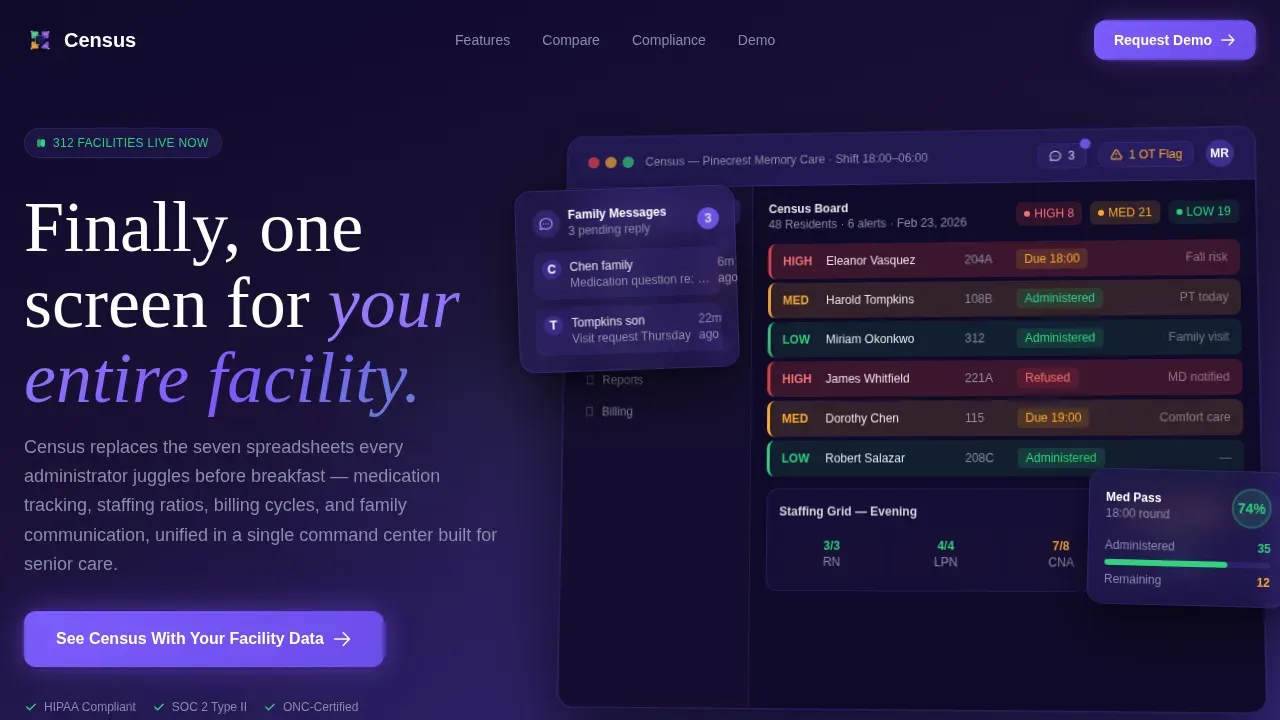
- A hero section with a full-width dashboard screenshot, animated notification badges, and a headline above the fold
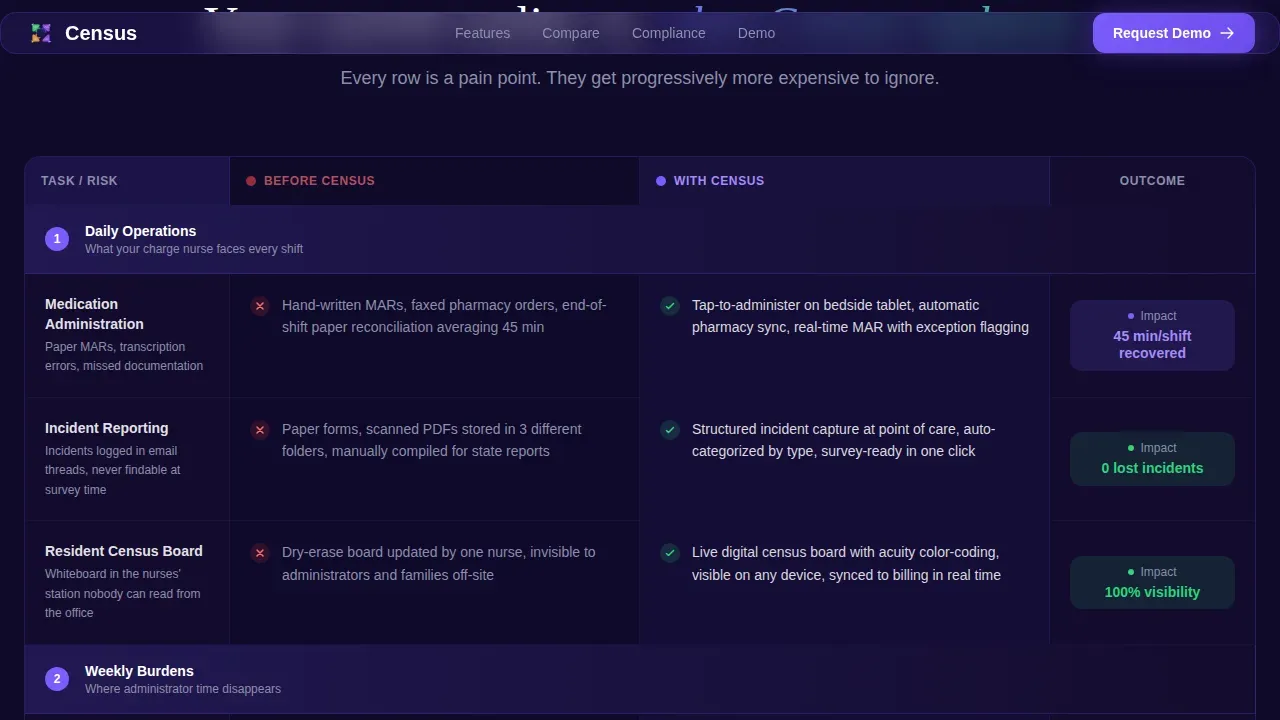
- A before-and-after comparison table with staggered row animations escalating from daily tasks to existential compliance risks
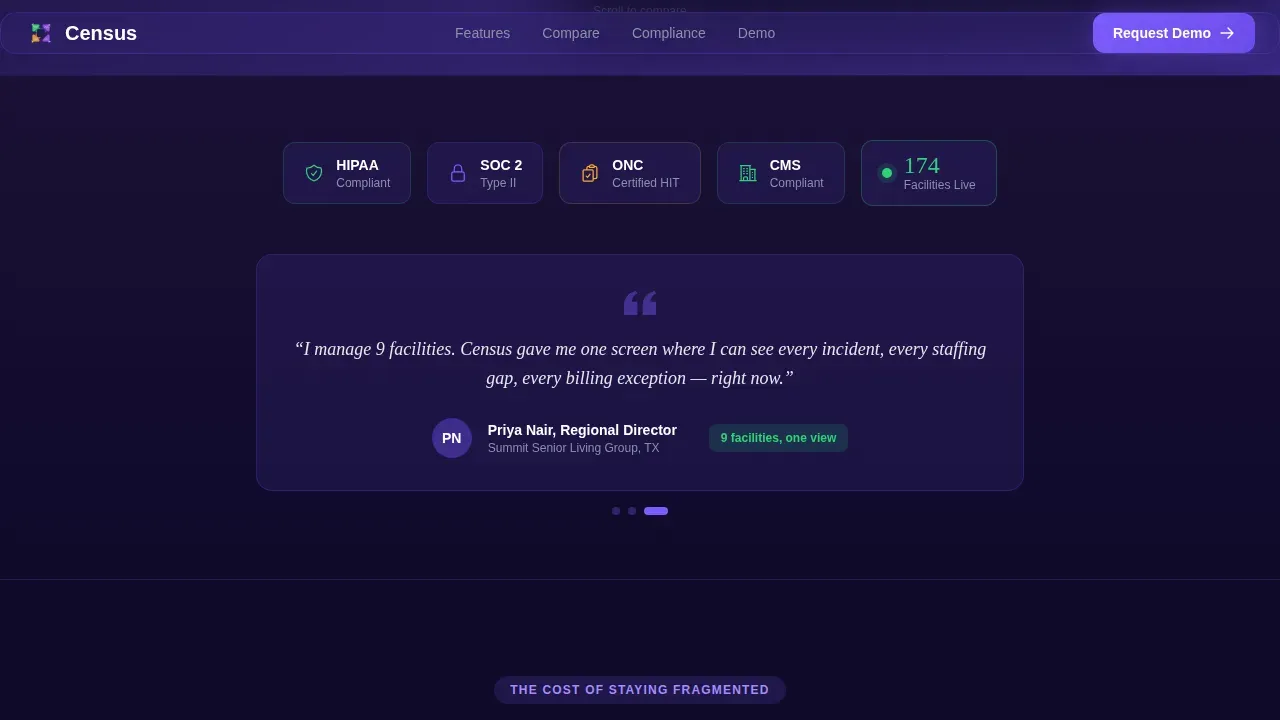
- A trust strip with compliance badge placeholders, a live facilities counter, and a rotating director of nursing quote with specific hours saved
Feature list
This template includes the following built-in sections and design functionalities developed specifically for senior care software marketing.
Animated Comparison Table
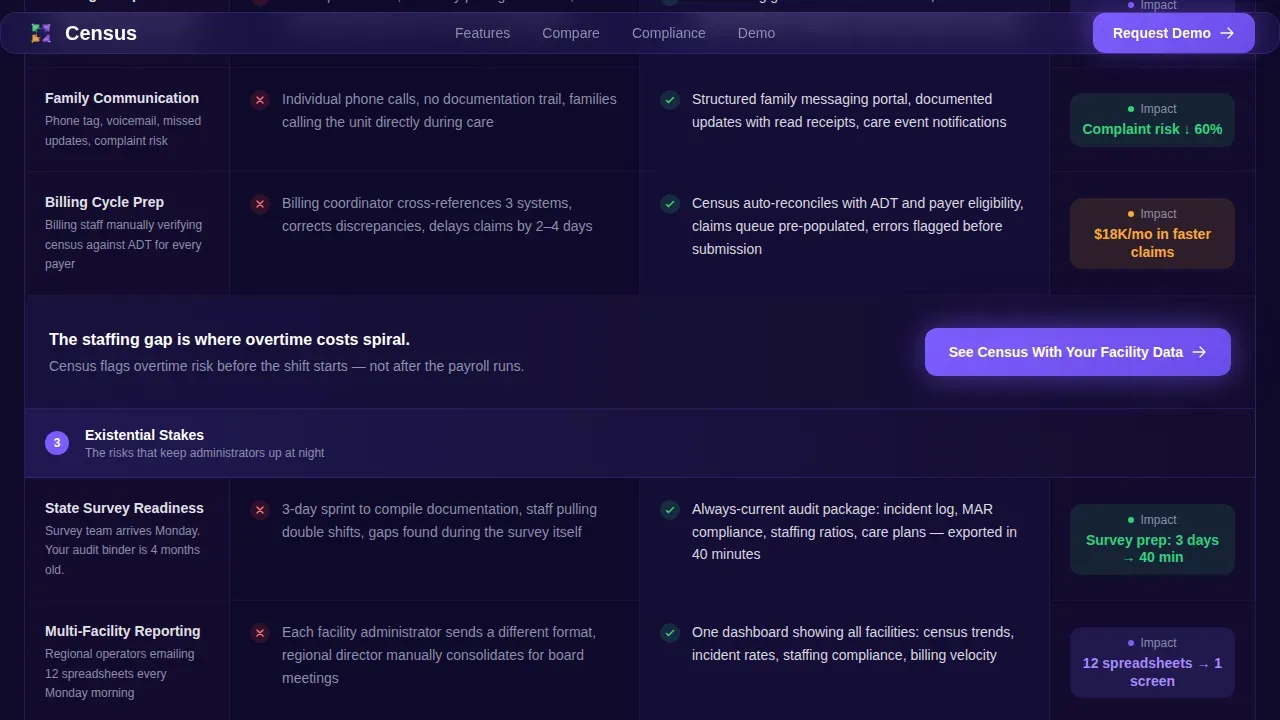
The core of this landing page is a pain-point-by-pain-point comparison table. Each row slides in with the "before" state arriving in muted gray, then the Census column punches in from the right in violet. Rows escalate from daily tasks like medication administration records and incident reporting, through weekly staffing compliance burdens, up to state survey readiness and multi-facility reporting.
Live Dashboard Hero Section
The header opens with a full-width, pixel-sharp product screenshot showing a real resident census board. Color-coded acuity levels, an open medication pass tracker, pending family messages, and a staffing grid with an amber overtime flag are all visible. A parallax float effect and pulsing notification badge micro-animations make the interface feel active rather than frozen.
Sticky Mobile Call to Action Bar
On mobile, a fixed bottom bar keeps the primary call to action button visible at all times. No form is required on this page. The single click leads visitors to a personalized demo booking page, keeping the conversion path easy and uninterrupted.
Trust Strip with Social Proof
Between the hero and the comparison table, a trust strip displays compliance badge placeholders alongside a live facilities counter and a rotating testimonials-style quote from a director of nursing. This set of social proof elements helps protect visitor confidence before the first call to action appears.
Motion Vignettes Between Sections
Short motion vignette segments appear between comparison table sections. Each vignette shows the product in use: a nurse tapping a bedside tablet, an administrator generating a report in two clicks. These micro-scenes add rhythm to the scroll and reinforce real-world service context.
Full-Width Final Call to Action Block
A full-width violet conversion block closes the page. The call to action button reads "See Census With Your Facility Data" and appears here, below the header, and again after the staffing comparison row where the pain is sharpest. Every section funnels toward this single click.
Page sections overview
| Section | Purpose |
|---|---|
| Hero Dashboard Screenshot | Display product mid-shift with animated badges and headline |
| Trust and Compliance Strip | Show HIPAA, SOC 2, ONC badges plus facilities counter and rotating quote |
| Daily Tasks Comparison | Compare medication records and incident reporting before and after |
| Weekly Burdens Comparison | Compare staffing compliance and family update processes |
| Existential Risk Comparison | Compare state survey readiness and multi-location reporting |
| Motion Vignette Breaks | Show product in use between table sections |
| Final Conversion Block | Close with full-width violet call to action button |
| Footer Linear Row | Single-row footer with essential links |
Design & branding system
The visual identity follows a Dynamic Motion theme built around an Electric Indigo color system. The palette feels like a modern hospital wing at night, the glow of monitoring screens, precise and vigilant but never cold.
- Deep indigo (#3D2C8D) anchors backgrounds and navigation; active-pulse violet (#7C5CFC) drives buttons and hover states; clinical white (#F7F8FC) opens up data-dense sections so they breathe
- Vitals-green (#2ED47A) confirms positive status indicators; warm amber (#FFAB2E) flags attention states like overtime or pending alerts
- Typography pairs Fraunces display serif for headlines with DM Sans for clean body text, keeping the page readable and authoritative
Mobile & speed optimization
This template is desktop-first, designed for administrators working at a workstation or computer. It also adapts cleanly for tablet and mobile use cases where on-the-go managers need a quick view.
- Intersection Observer drives scroll animations so sliding rows and staggered reveals only trigger when they enter view, keeping the page smooth
- All animations use CSS transforms only, avoiding layout repaints that could slow the experience on a tablet or mobile device
- The fixed mobile call to action bar stays visible throughout the scroll, so the conversion path is never more than one tap away
How this template helps you convert
Every design decision in this landing page points toward a single goal: getting a qualified senior care operator to book a personalized demo. The page earns trust before it makes the ask.
- The hero section drops visitors immediately into a realistic mid-shift dashboard view, making the value of the service tangible before a single word of copy is read
- The animated comparison table escalates pain progressively, so by the time the staffing and audit rows appear, the reason to act feels self-evident
- Three strategically placed call to action buttons, above the fold, mid-page after the staffing row, and in the closing block, set up multiple natural moments to click without pressuring the visitor
Other information about this template
This template is well-suited for senior living companies that want a modern, optimized marketing presence for their software platform. It can also serve as a reference when creating other elderly care or home care digital marketing pages. Below are additional details worth knowing before you select or edit this template.
- The page is optimized for USA healthcare regulatory context including Centers for Medicare and Medicaid Services (CMS) reporting, HIPAA compliance badge display, and 12-hour time formats used in care facilities
- Elderly care website templates broadly should include user-friendly navigation, large readable fonts, easy appointment booking systems, and prominently displayed contact information and email access, this template's clean designs reflect those standards in a B2B context
- Creating local community pages and keeping content date-relevant is a foundational strategy for senior living companies; this landing page template is built to support those goals as a location-specific or campaign-specific page
- Examples of comparable senior care website template ecosystems include comprehensive multi-page solutions with 18 or more dynamic pages, as well as free drag-and-drop elderly care website builders; this template focuses specifically on a single high-converting landing page rather than a full site
- Role-Based Access adapts the dashboard display based on user roles, showing only relevant widgets to each administrator type
- Average Length of Stay (ALOS) tracking, payer mix analysis, bed hold status, and ADT feed visibility are among the data functionalities this template is designed to showcase inside the comparison table rows
- Blog or resource link placeholders can be added to the footer to support content marketing for senior living and elderly care audiences
- The number of call to action placements is intentional: three appearances across the page set the conversion rhythm without overwhelming the user
Theme
Dynamic Motion
Creative direction
Feature Matrix
Color system
Electric Indigo
Direction
Click-Through
Page Sections
Animated Pain-point Comparison Table
Live Dashboard Hero with Micro-animations
Three-placement Call to Action System
Compliance and Social Proof Trust Strip
Role-based Dashboard Display
Motion Vignette Scene Breaks
Related questions
Is this template designed for a single landing page or a full website?
Can I edit the comparison table rows to match my platform's specific features?
Does the template include social proof elements?
Is this template suitable for regional operators managing multiple locations?
What makes this template different from a general healthcare landing page template?



