CrossFit Trainer Certification Landing Page Template
Certify is a sidebar companion landing page template built for CrossFit trainer certification programs. It combines a kinetic data dashboard header, a fixed 6-step progress sidebar, and a progressive registration form to move serious athletes toward cohort sign-up. The Electric Indigo and electric lime palette gives it an energetic, gym-floor intensity that matches the audience's ambition.
by Rocket studio
Quick summary
Certify is a single-page template designed to market a twelve-week CrossFit coach certification program. It features a fixed sidebar roadmap, animated outcome stats, embedded course previews, and a two-path conversion system. The layout guides competitive athletes and personal trainers from curiosity to cohort registration with clear, escalating commitment at every scroll point.
Who this template is for
This template is built for anyone running a structured CrossFit trainer certification program and needs a high-conviction landing page to fill cohorts fast. The audience it speaks to is specific and motivated.
- CrossFit program operators launching a new certification cohort and needing a dedicated registration page
- Fitness education brands targeting competitive athletes, personal trainers, and box owners ready to upskill their staff
- Coaching course creators who want a visual, step-by-step presentation that builds trust before asking for a commitment
What problem this template solves
Most fitness course pages dump curriculum details into a wall of text and hope visitors scroll far enough to find the sign-up button. That approach loses the people who are most ready to act. Certify solves the credibility and momentum problem at the same time.
- Visitors land with no context and leave before trusting the program; the animated stats dashboard addresses that immediately with real certification outcomes
- Potential students get lost between "what is this course?" and "how do I register?"; the fixed 6-step sidebar keeps them oriented at every section
- Leads who are not quite ready to commit have nowhere to go; the syllabus download path captures them before they bounce
What you get with this template
Certify delivers a fully structured landing page layout with distinct visual zones, each doing a specific job in the conversion sequence. Every component described below comes from the template design as specified in the brief.
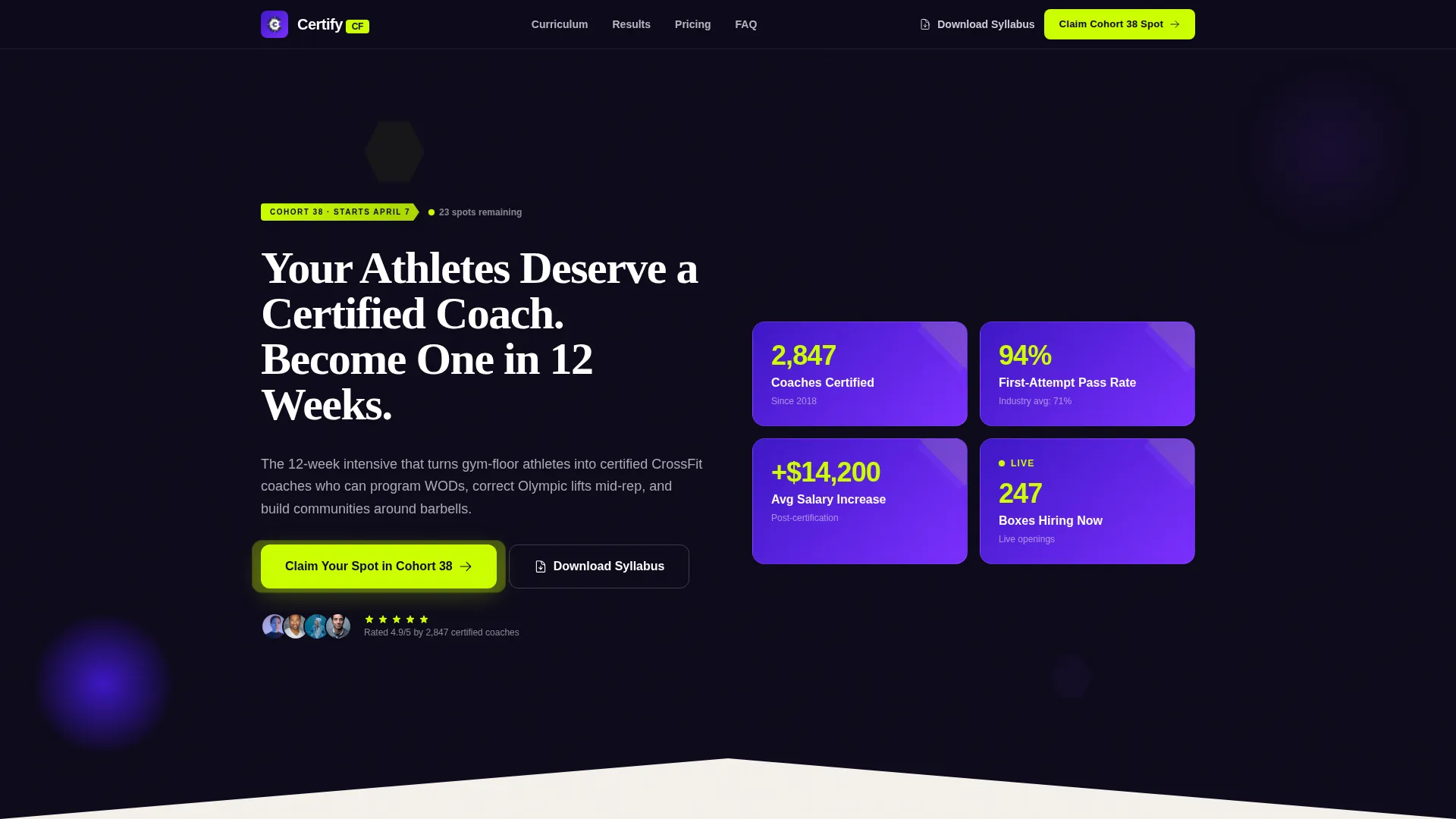
- A kinetic header dashboard with four animated outcome statistics inside bold geometric cards
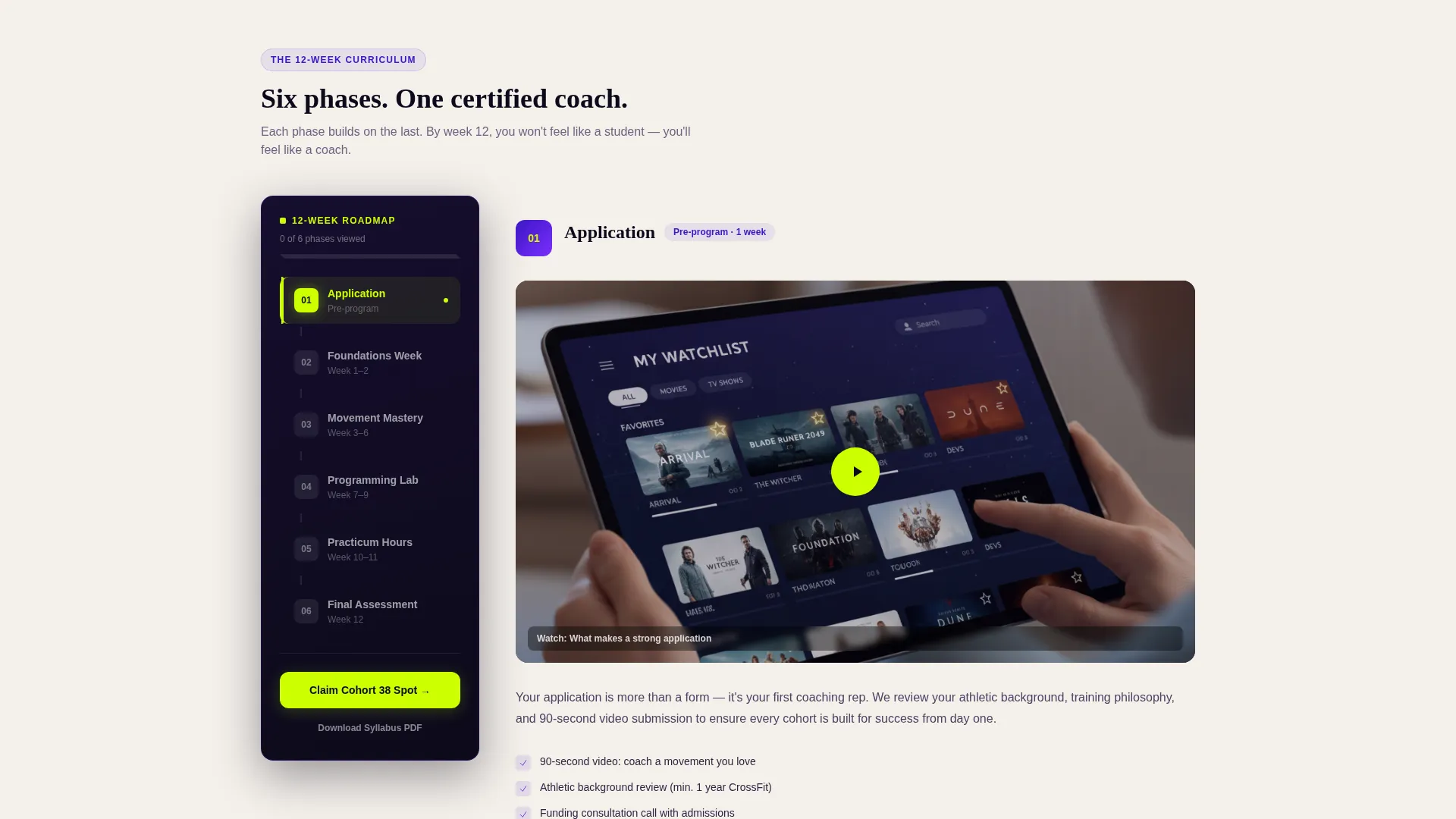
- A fixed sidebar that functions as a live 6-step certification roadmap, lighting up in electric lime as each section enters the viewport
- A progressive disclosure registration form that starts with two fields and expands to capture richer applicant details
- Embedded content zones for video coaching demos, sample programming spreadsheets, and graduate testimonials per course step
- A secondary lead capture path offering a downloadable twelve-week syllabus PDF for visitors not yet ready to register
Feature list
This section covers the core functional components built into the Certify template.
Animated Stats Dashboard Header
The header opens with four live-style counters: 2,847 coaches certified, a 94 percent first-attempt pass rate, an average post-certification salary increase of $14,200, and a live counter of boxes currently hiring. Numbers animate upward like a competition leaderboard, placed inside indigo-to-violet gradient geometric cards arranged asymmetrically on a chalk-white canvas.
Fixed Sidebar Certification Roadmap
The sidebar stays pinned as the visitor scrolls through all six program phases: Application, Foundations Week, Movement Mastery, Programming Lab, Practicum Hours, and Final Assessment. Each step highlights in electric lime when its matching content section enters the viewport, so visitors always know exactly where they are in the journey.
Progressive Disclosure Registration Form
The registration form opens with just two fields: email address and preferred city. Once submitted, it expands to collect current certifications held, years of training experience, and a funding preference dropdown covering self-pay, box-sponsored, and installment plan options. This reduces friction at entry while gathering the detail the program operator needs.
Per-Step Content Zones with Escalating Depth
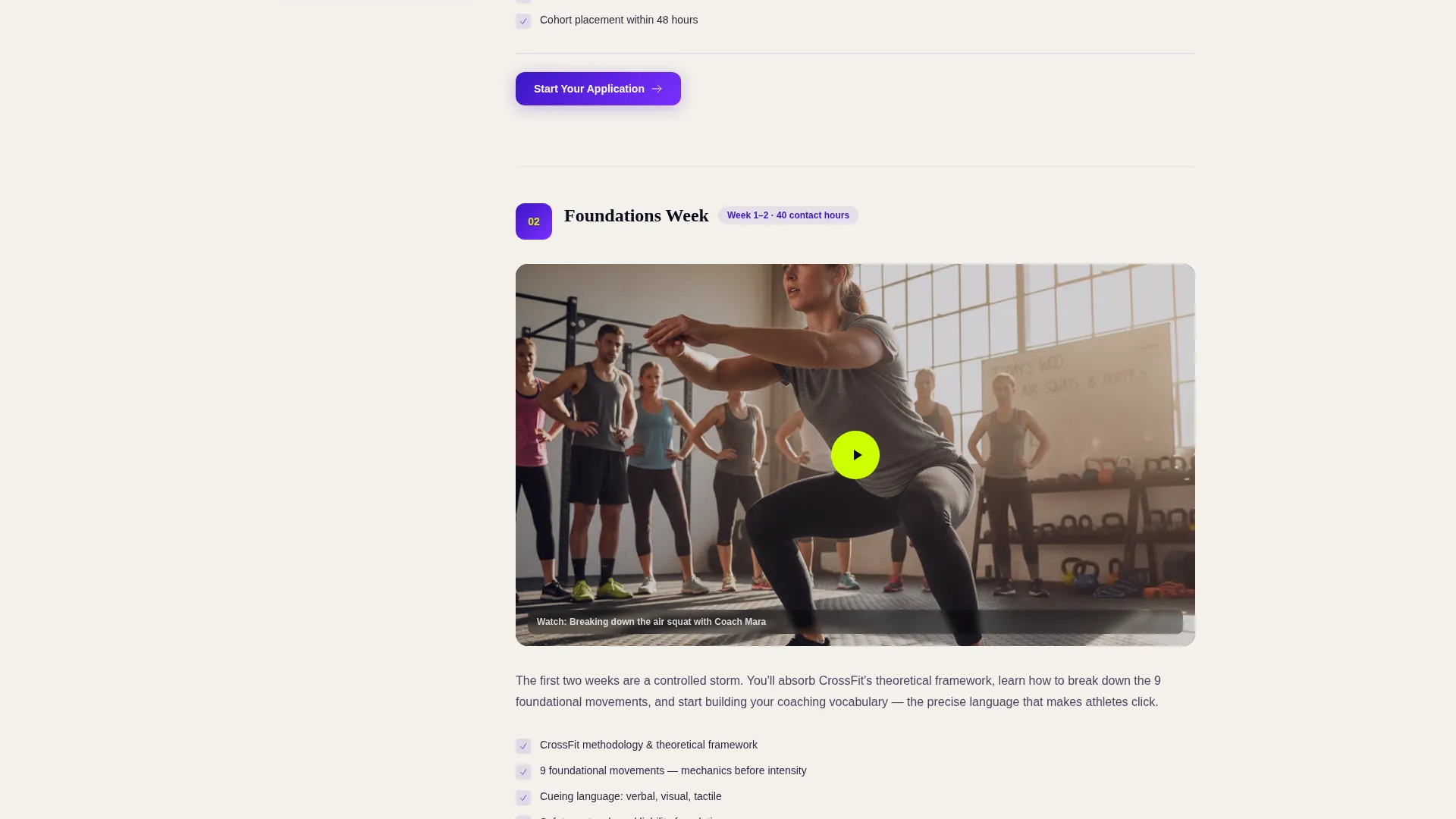
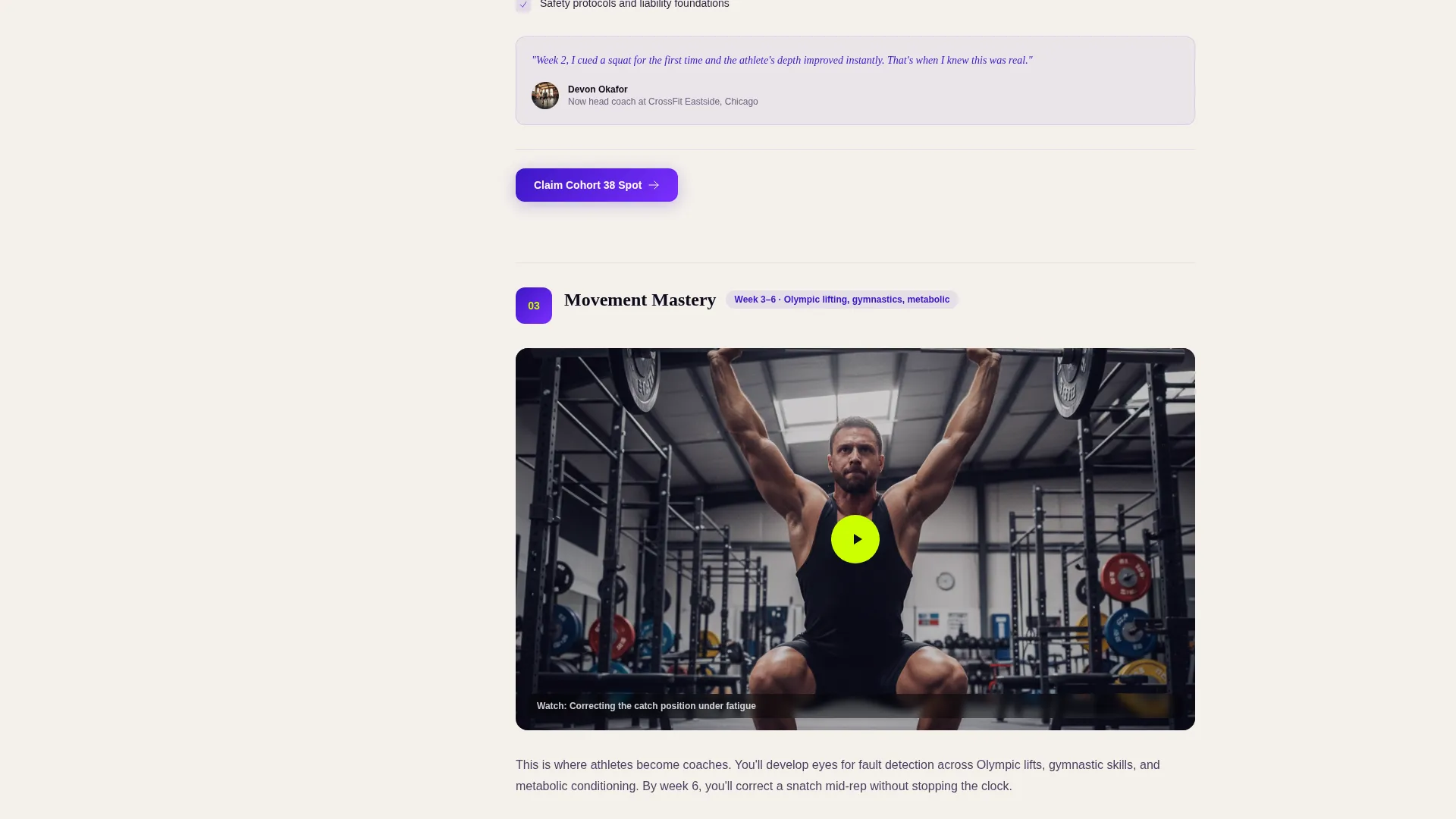
Each of the six course phases has its own content block in the main panel. These blocks support embedded video coaching cue demos, sample programming spreadsheets, and graduate testimonials. The content depth escalates intentionally: early steps are reading-focused, later steps show graduates coaching real classes, shifting the visitor's question from whether to join to which cohort to pick.
Dual Conversion Path Layout
Every step section includes the primary call to action, "Claim Your Spot in Cohort 38," anchored in both the sticky sidebar and the bottom of each content block. A secondary path offers the twelve-week syllabus as a downloadable PDF, capturing leads who need one more nudge before committing to registration.
Playful Geometric Visual System
Hexagons, angular progress bars, and triangular section dividers tile across the background like puzzle pieces. The electric lime accent pops on call-to-action buttons and achievement badges. The overall visual system feels energetic and direct, matching the mindset of athletes who train at 5 AM and expect their tools to match their intensity.
Page sections overview
| Section | Purpose |
|---|---|
| Header Stats Dashboard | Displays animated certification outcome stats to establish credibility immediately |
| Sticky Sidebar Roadmap | Keeps visitors oriented through all six program phases as they scroll |
| Application Phase Block | Introduces the program and triggers the first registration call to action |
| Foundations Week Block | Covers early curriculum content with video demos and coaching cues |
| Movement Mastery Block | Showcases Olympic lift correction techniques with embedded content |
| Programming Lab Block | Previews sample WOD (workout of the day) programming spreadsheets |
| Practicum Hours Block | Features graduate testimonials from coaches now running their own boxes |
| Final Assessment Block | Presents the certification finish line and reinforces the cohort call to action |
| Syllabus Download Gate | Captures leads who want the PDF before committing to full registration |
| Registration Form Section | Collects applicant details through a two-stage progressive disclosure form |
Design & branding system
The Certify template uses an Electric Indigo color system built to feel like neon lights bouncing off rubber flooring at 5 AM. Every color has a job, and every shape has a reason.
- Core palette: deep indigo (#3D17C6) as the primary background, vivid violet (#7B2FFF) for active states and progress indicators, chalk-dust white (#F4F0EB) for content panels, and electric lime (#CCFF00) reserved for call-to-action buttons and achievement badges
- Geometric motifs: hexagons, angular progress bars, and triangular section dividers repeat across backgrounds using a Playful Geometric theme that feels structured and kinetic at once
- Typography driven headline: the hero headline types in letter by letter, reinforcing the intensity of the moment before a heavy lift
Mobile & speed optimization
The Certify layout is built with a single-column scroll experience in mind for smaller screens. The fixed sidebar adapts so it does not obstruct the main content panel on mobile viewports.
- The kinetic stats dashboard and geometric card grid reflow into a stacked vertical layout on narrow screens, keeping stats readable without horizontal scrolling
- Per-step content blocks are designed to load embedded media zones progressively, so early sections are visible and interactive before later sections finish rendering
- Call-to-action buttons in both the sidebar and step footers remain sticky and accessible throughout the scroll on all screen sizes
How this template helps you convert
Certify is structured around a deliberate escalation of commitment, not a single hard sell. Every design and layout decision pushes the visitor one step closer to registration.
- The animated stats dashboard on entry answers the first question any serious athlete has: "Is this program credible?" Four outcome numbers with live-counter animation provide that answer before the visitor reads a single paragraph.
- The fixed sidebar roadmap removes orientation anxiety. Visitors always know which phase they are reading about, which phases are ahead, and how close the finish line is, making the decision to commit feel manageable rather than overwhelming.
- The dual conversion path means no lead is wasted. Visitors ready to register see the cohort call to action at every section. Visitors who need more time see the syllabus download offer and stay in the pipeline.
Other information about this template
Certify is categorized under Education and Training, with a specific focus on the Sports and Fitness Training subcategory. It is purpose-built for the CrossFit trainer certification niche and is not a generic fitness landing page.
- The template style is Sidebar Companion, meaning the fixed side panel is a core structural element, not an optional add-on
- The creative direction follows a Step-by-Step Guide pattern, which means the page narrative builds sequentially through all six certification phases rather than presenting information in parallel blocks
- The header concept is Data Storytelling, grounding the first impression in real program outcomes rather than aspirational copy alone
- The landing page direction is Event Registration, so every layout decision supports filling a specific cohort rather than generating generic interest
- This template is suitable for a twelve-week program format but can be adapted to other structured certification timelines with phase-count adjustments in the sidebar
Theme
Playful Geometric
Creative direction
Step-by-Step Guide
Color system
Electric Indigo
Style
Sidebar Companion
Direction
Event Registration
Page Sections
Animated Stats Dashboard Header
Fixed Sidebar Certification Roadmap
Progressive Disclosure Registration Form
Per-step Escalating Content Zones
Dual Conversion Path Layout
Playful Geometric Visual System
Related questions
Can I change the cohort number and certification stats in the header?
Does the sidebar roadmap work as a standard navigation element?
Is the progressive disclosure form behavior built into the template?
Can I use this template for a certification program that is not CrossFit-specific?
What is the secondary conversion path and how does it work?



