Streamlined Church Governance Landing Page Template
Comply is a church compliance management landing page template built for the administrators who can't afford one more missed filing. It presents a brutally clear, three-column comparison that shows exactly where manual processes and generic nonprofit tools fall short. The Tech Glass design, animated rows, and a sticky audit call-to-action turn a complex compliance story into a high-converting single-page experience.
by Rocket studio
Quick summary
Comply is a single-page landing page template designed for church compliance management software. It opens with a frosted-glass code snippet, drops immediately into an animated three-column comparison table, and closes with a two-step audit form. The result is a focused, trust-building page that gives church administrators and denominational leaders a clear reason to act.
Who this template is for
This landing page template speaks directly to the people managing compliance inside religious organizations. It is designed for operators who live inside these problems every day and need a solution that matches the scale of their work.
- Executive pastors and church bookkeepers handling 501(c)(3) reporting, clergy housing allowance documentation, and state-by-state solicitation registrations
- Denominational chief financial officers overseeing compliance programs across dozens or hundreds of congregations
- Compliance officers and senior management who need audit-ready evidence and clear reporting for the board
What problem this template solves
Many churches manage compliance with a mix of spreadsheets, browser tabs, and inherited filing systems. That process is slow, error-prone, and leaves the organization exposed to audit risk, regulatory violations, and reputational damage. This landing page template exists to show visitors that a better system exists.
- Manual document management and hand-calculated housing allowances create costly errors and gaps in adherence
- Generic nonprofit software tools often lack support for church-specific regulatory requirements such as Unrelated Business Income Tax tracking and denominational roll-up reporting
- Without a structured framework for compliance, staff face an ongoing process of firefighting instead of clean, confident operations
What you get with this template
This template gives you a complete, ready-to-customize landing page built around a Comparison/Versus conversion strategy. Quick setup means you can build your church website presence without starting from scratch.
- A full-page layout with hero section, animated three-column comparison table, role-based testimonial cards, a two-step audit form, and a linear single-row footer
- GSAP ScrollTrigger row-wipe animations, a sticky call-to-action bar, and a frosted-glass terminal hero that signals infrastructure-grade compliance software
- DM Sans typography, a Monochrome Steel color system, and a single compliance-green accent that guides visitors toward the primary action
Feature list
This landing page template ships with a carefully constructed set of features. Each one serves the compliance management story and the conversion goal.
Frosted-Glass Terminal Hero
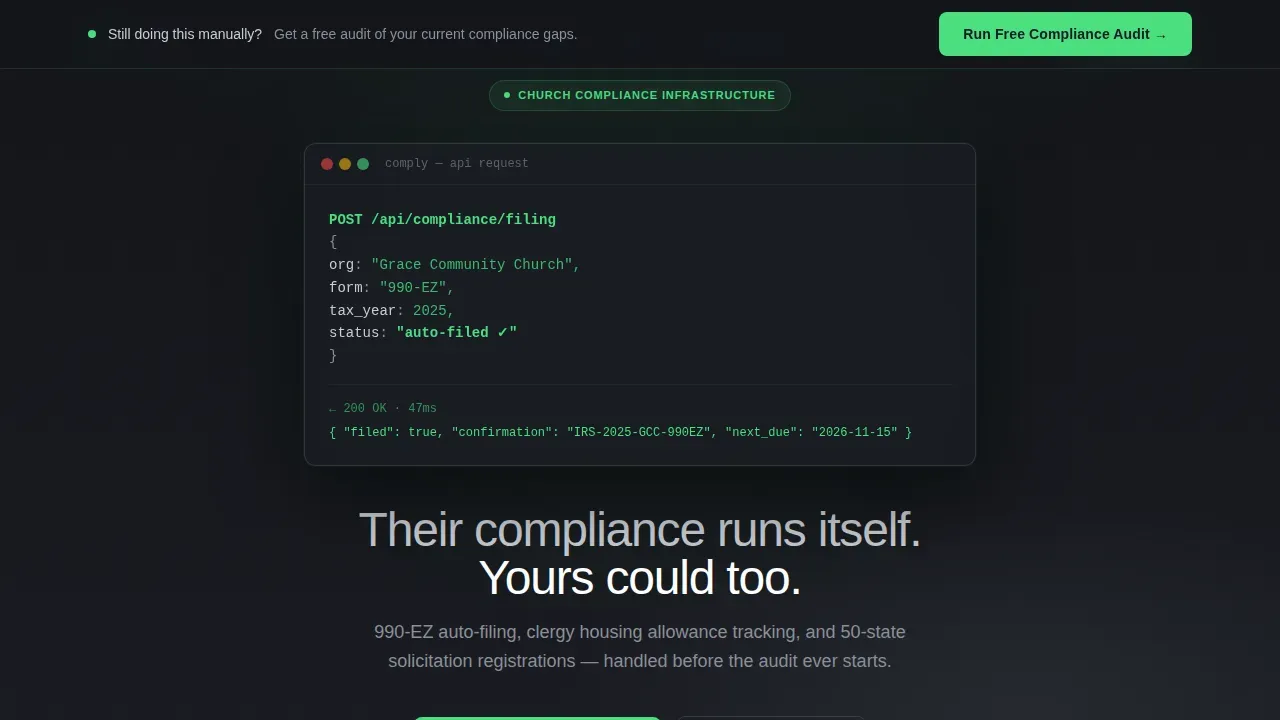
The header opens with a syntax-highlighted API code snippet inside a frosted-glass terminal window. Chrome-white keys and compliance-green success responses communicate that this is a serious compliance system, not a church management app with decorative branding. The headline below reinforces urgency without hype.
Animated Three-Column Comparison Table
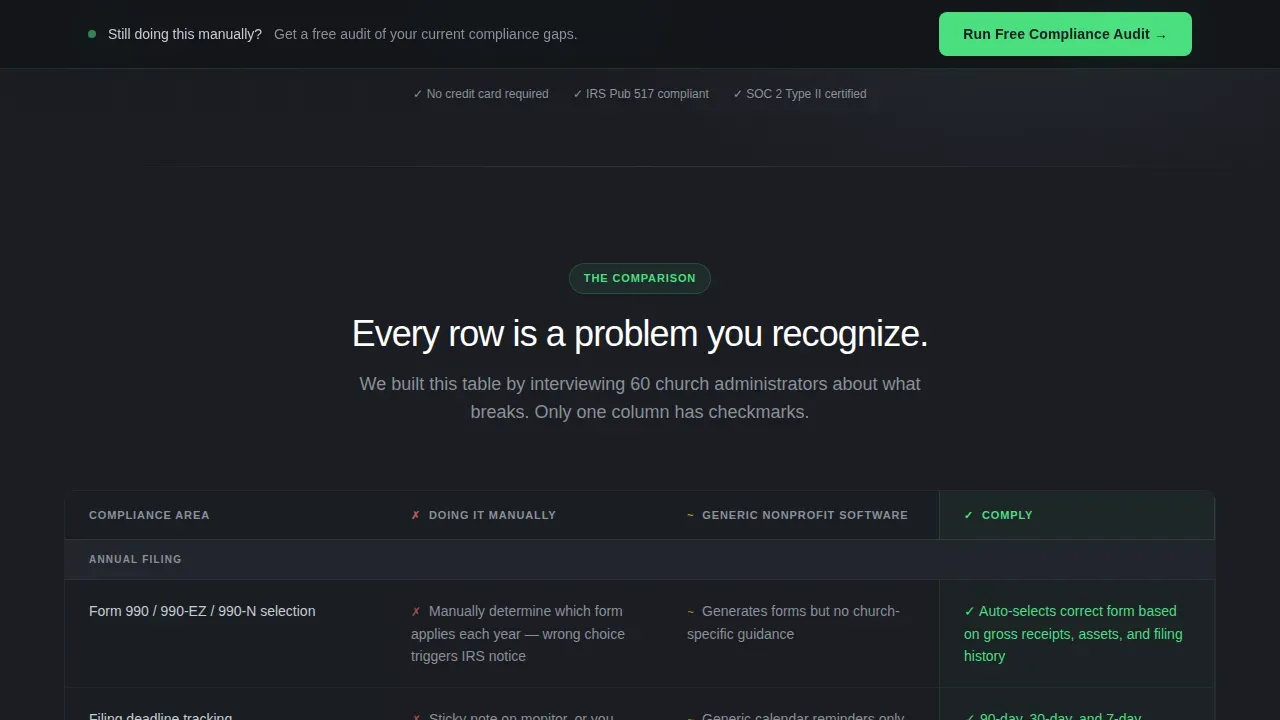
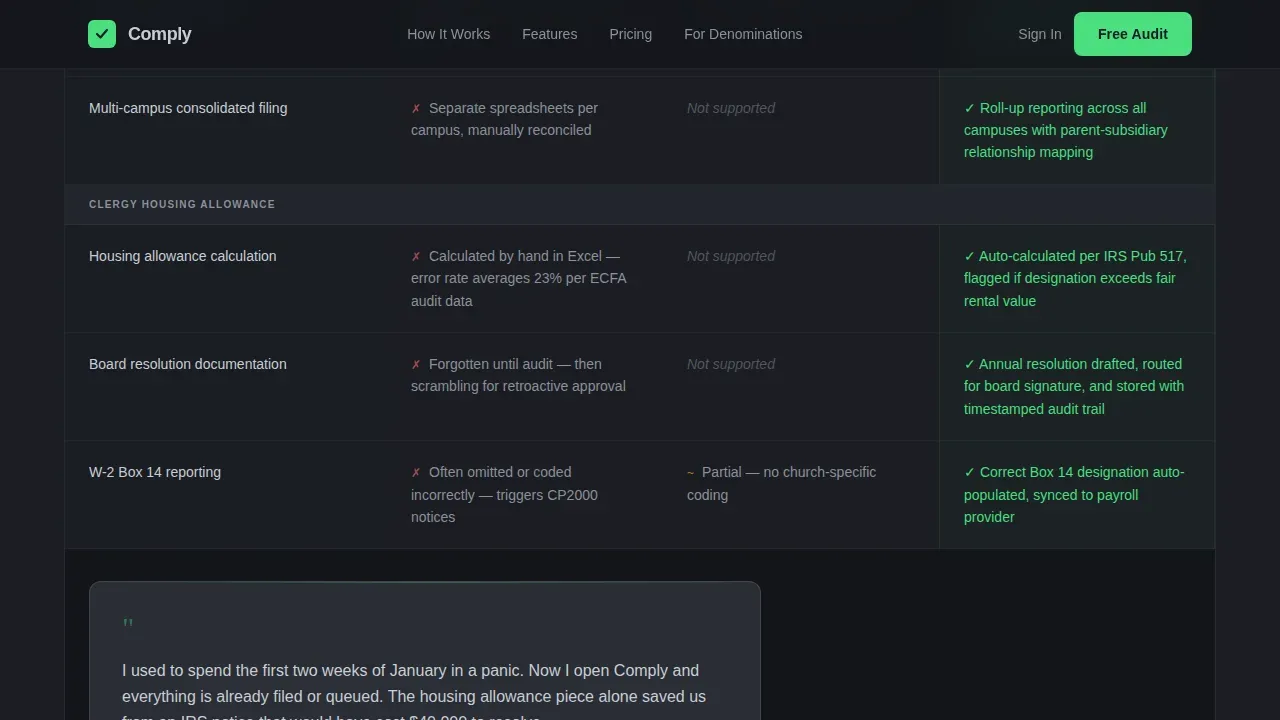
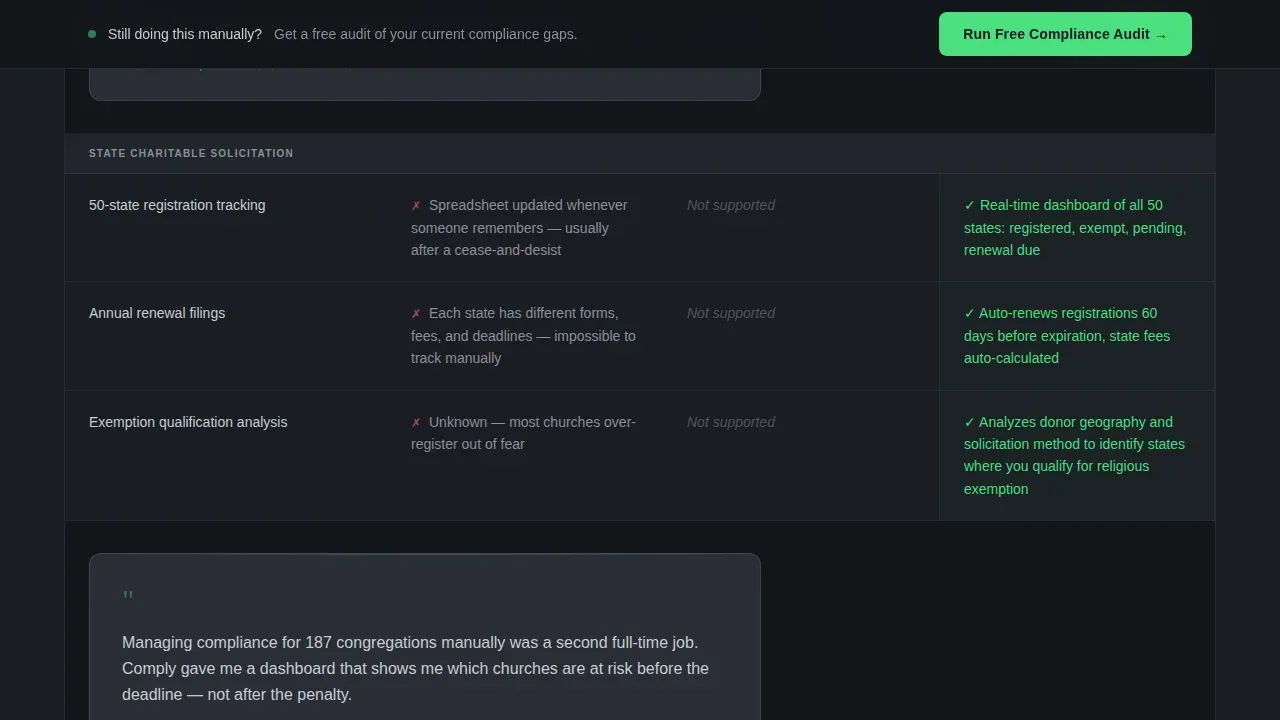
The comparison table is the core of the landing page. Each row animates in with a left-to-right wipe on scroll, driven by GSAP ScrollTrigger. Column one shows manual process failures, column two shows generic software gaps, and column three shows the automated compliance solution. Rows cover housing allowance calculation, annual filing, Unrelated Business Income Tax tracking, state charitable solicitation registration, and denominational roll-up reporting.
Role-Based Testimonial Cards
Between table sections, testimonial cards slide in from role-specific sources such as an executive pastor managing a four-campus church or a denominational treasurer overseeing nearly two hundred congregations. No names are used. The specificity of congregation counts and compliance concerns provides strong social proof while protecting privacy.
Sticky Compliance Audit Call-to-Action Bar
A slim sticky bar appears after the visitor scrolls past the third comparison table row. It reinforces the primary offer at the exact moment frustration with the manual column peaks. The bar stays visible as the visitor continues reading, providing a persistent request prompt without interrupting the scroll experience.
Two-Step Audit Form
The conversion form runs in two steps. Step one collects organization name and Employer Identification Number, then auto-populates public 990 data to demonstrate immediate value. Step two asks for role, congregation count, and the visitor's biggest compliance concern from a dropdown covering housing allowance, state registrations, annual filing, and Unrelated Business Income Tax. This structured collection process reduces errors and keeps the experience focused.
Secondary Competitor Comparison Path
A secondary call-to-action links visitors to a deeper one-on-one versus page for those already evaluating alternatives. This link captures high-intent visitors mid-review and supports the broader risk management positioning of the compliance software.
Page sections overview
| Section | Purpose |
|---|---|
| Hero Terminal Header | Display API code snippet and headline to establish compliance infrastructure credibility |
| Comparison Table Core | Animate three-column rows contrasting manual, generic software, and Comply approaches |
| Testimonial Break Cards | Slide in role-based social proof between table sections to maintain trust and momentum |
| Extended Comparison Table | Cover advanced compliance rows including Unrelated Business Income Tax and state registrations |
| Two-Step Audit Form | Capture organization data and compliance concerns across two focused form steps |
| Linear Footer | Provide single-row footer links and compliance-green branding closure |
Design & branding system
The visual identity follows a Tech Glass theme with a Monochrome Steel color system. Every design decision reinforces the idea that compliance management is serious operational infrastructure, not a ministry app.
- Color palette: forge-black (#1B1D23) as the primary background, brushed gunmetal (#3A3F47) for surface layers, polished chrome (#C8CDD3) for text and borders, and compliance-green (#4ADE80) reserved exclusively for checkmarks, toggle-on states, and the primary call-to-action
- Typography: DM Sans in medium weight with tight tracking, giving the page a clean administrative feel that matches the glass-and-steel aesthetic
Mobile & speed optimization
The template is built desktop-first to match the working environment of executive pastors and denominational chief financial officers, while remaining fully responsive for mobile visitors. Server Components handle static sections for efficient delivery, while Client Components manage animations and the interactive form.
- Desktop-first layout with responsive breakpoints ensures the comparison table and sticky bar display correctly across screen sizes
- GSAP ScrollTrigger animations are applied only to interactive Client Components, keeping static content lightweight and fast to render
How this template helps you convert
This landing page is engineered around the Comparison/Versus conversion model. Every structural decision pushes visitors toward completing the two-step compliance audit form.
- The animated comparison table builds frustration with the status quo row by row, making the compliance-green checkmarks in the Comply column feel like genuine relief rather than marketing claims
- The sticky audit bar appears precisely when that frustration peaks, presenting a focused single action with a clear button that guides users to the next step without distraction
- The two-step form turns the audit request into a value exchange by auto-populating 990 data in step one, which demonstrates the system's capability before the visitor has signed up
Other information about this template
This template represents a practical starting point for any compliance software business targeting the church and religious organization market. It is user-friendly and customizable, so teams can adapt the copy, rows, and form fields to match their specific compliance programs and regulatory requirements.
- The comply automated church compliance management landing page template is designed for quick configuration, eliminating the need to build compliance pages from scratch
- Landing page templates for churches are cost-effective compared to building a church website from scratch, and this template follows that principle with a complete, ready-to-use structure
- The template supports role-specific communication needs, making it easy for compliance officers, employees, and board members to understand what the software solves for their specific context
- Automated notifications for compliance renewals, such as background check updates or filing deadlines, are a key element that the landing page copy highlights as part of the overall system value
- The page structure provides transparency into how the compliance system works, which builds trust with visitors who are evaluating whether they can afford to make a switch from their current process
- Explore the secondary competitor comparison path to talk directly to visitors who are already mid-search and comparing alternatives
Theme
Tech Glass
Creative direction
Launch Energy
Color system
Monochrome Steel
Style
Comparison Table
Direction
Comparison/Versus
Page Sections
Frosted-glass Terminal Hero Section
GSAP Animated Comparison Table
Role-based Testimonial Cards
Sticky Audit Call-to-action Bar
Two-step Lead Capture Form
Secondary Competitor Comparison Link
Related questions
What sections does this landing page template include?
Who is the target audience for this template?
Can I customize the comparison table rows for different compliance topics?
Does the template include a form for capturing leads?
Is this template suitable for denominational organizations managing many congregations?



