PMP Exam Prep Landing Page Template | Hub & Spoke
Charter is a hub-and-spoke landing page template built for PMP exam prep courses. It opens with a multi-step diagnostic form that assembles a personalized study timeline in real time. Anchor navigation guides visitors through curriculum, simulations, instructor credibility, and cohort scheduling. The goal is cohort registration, driven by progressive engagement and a sticky call-to-action bar.
by Rocket studio
Quick summary
Charter is a single-page, hub-and-spoke landing page template designed for project management certification courses. It leads with an interactive multi-step diagnostic form that builds a personalized study plan on screen. Five anchor-nav sections carry visitors from self-assessment through curriculum and live simulations to cohort sign-up, creating a confident, structured path toward exam day.
Who this template is for
This template is built for educators and course creators selling professional certification training. It is specifically designed around the needs of a PMP exam prep program, but the structure fits any cohort-based course that benefits from personalized onboarding.
- Mid-career operations managers and IT leads who study on lunch breaks and need a clear, no-friction enrollment path
- Career-switchers with informal project management experience who need a credential to formalize their skills
- Course creators and EdTech teams who want a high-interactivity landing page that qualifies leads before they register
What problem this template solves
Project managers preparing for the PMP exam face a specific problem: they do not know where to start, how long it will take, or whether a course is actually built for someone at their level. Generic landing pages fail these visitors because they offer no personalization and no proof of fit. Without a structured path forward, even motivated candidates leave without enrolling.
This template solves that trust gap by making the visitor's own answers do the selling.
- Losing structure during the decision phase is common; the multi-step diagnostic keeps visitors engaged by showing them a personalized study timeline before they scroll a single pixel
- Visitors who cannot connect their schedule and weaknesses to a course plan abandon before reaching the call to action
- A static page cannot prove the gap between what a candidate thinks they know and what the PMP exam actually asks
What you get with this template
Charter delivers a fully designed, interaction-rich landing page with five clearly scoped sections connected by an anchor navigation bar. Every component is built to serve a specific job in the conversion flow, from first impression to final registration click.
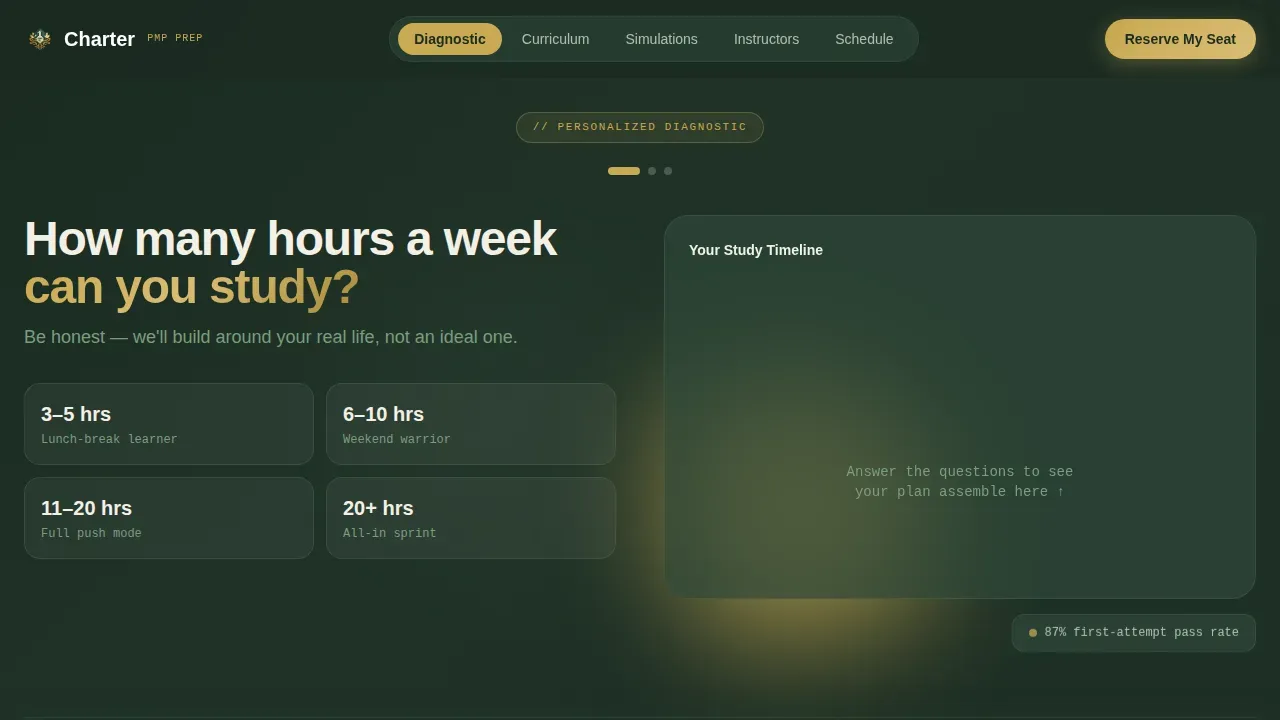
- A multi-step hero form with live calendar assembly animation that builds a personalized study timeline from the visitor's own responses
- Five anchor-linked spoke sections covering diagnostic, curriculum, simulations, instructor credibility, and cohort schedule
- A sticky call-to-action registration bar, an inline five-question quiz with instant scoring, a pre-filled registration form, and a secondary email-capture path for a free resource download
Feature list
Charter combines structured design with high interactivity to move a skeptical project professional from curiosity to commitment. The features below are all drawn directly from the template build.
Multi-Step Diagnostic Hero Form
The header is not a banner; it is a three-step form centered over a deep evergreen field. Visitors answer how many hours a week they can study, their target exam date, and which knowledge area they find most difficult. Each answer triggers a real-time calendar animation where study blocks fall into place like pieces assembling on a grid, giving the visitor a visible, personalized plan before they read a single course description. This approach reduces the gap between landing and intent, because the visitor already sees their own project schedule taking shape.
Anchor Navigation Hub
A fixed navigation bar carries five labeled anchors: Diagnostic, Curriculum, Simulations, Instructors, and Schedule. This hub-and-spoke structure means every section is reachable in one click without losing context. The anchors are styled in deep evergreen and act as both a wayfinding tool and a visual signal of course depth. Visitors can jump directly to the knowledge area or process group that matters most to them, reducing friction for repeat visitors who return after an initial browse.
Inline Quiz with Instant Scoring
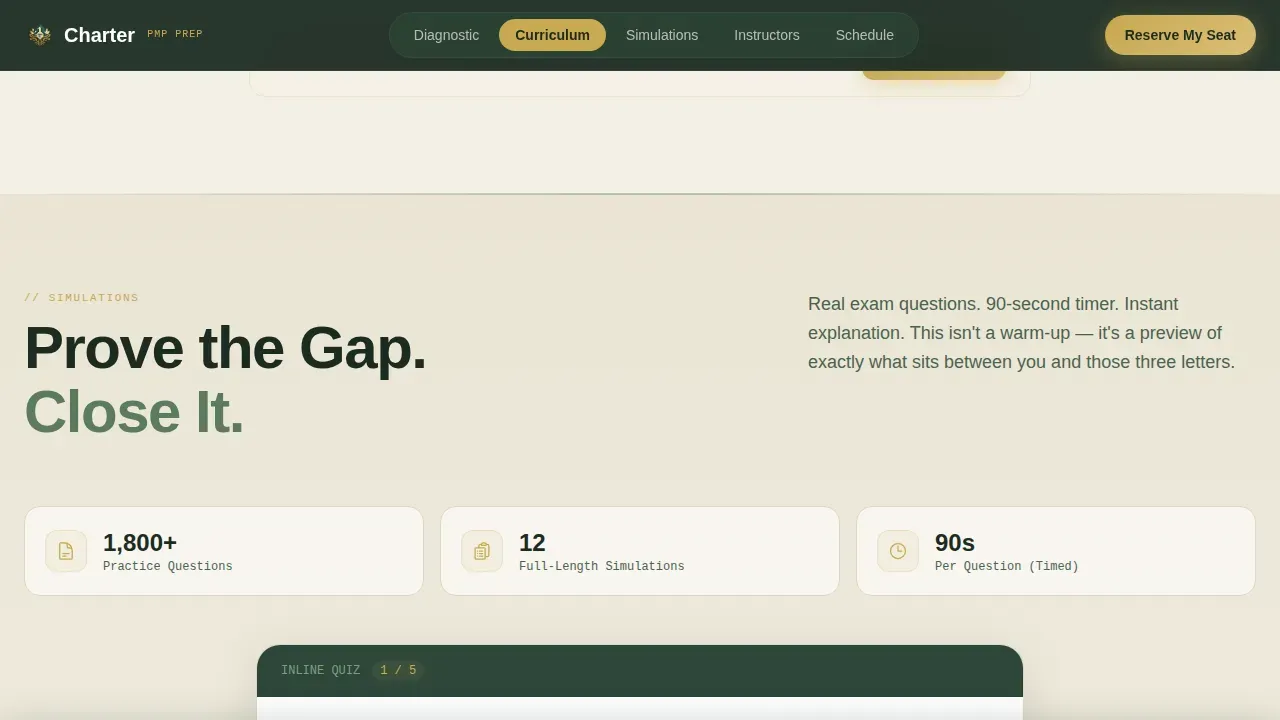
Midway through the page, a five-question inline quiz appears without navigating away. It grades instantly and surfaces the gap between perceived knowledge and actual exam readiness. This is the template's proof mechanism: it does not just claim the course is rigorous; it shows the visitor in real time that their current knowledge has gaps worth closing. The quiz result ties directly into the call to action, making the next step feel logical rather than pressured.
Adaptive Section Weighting
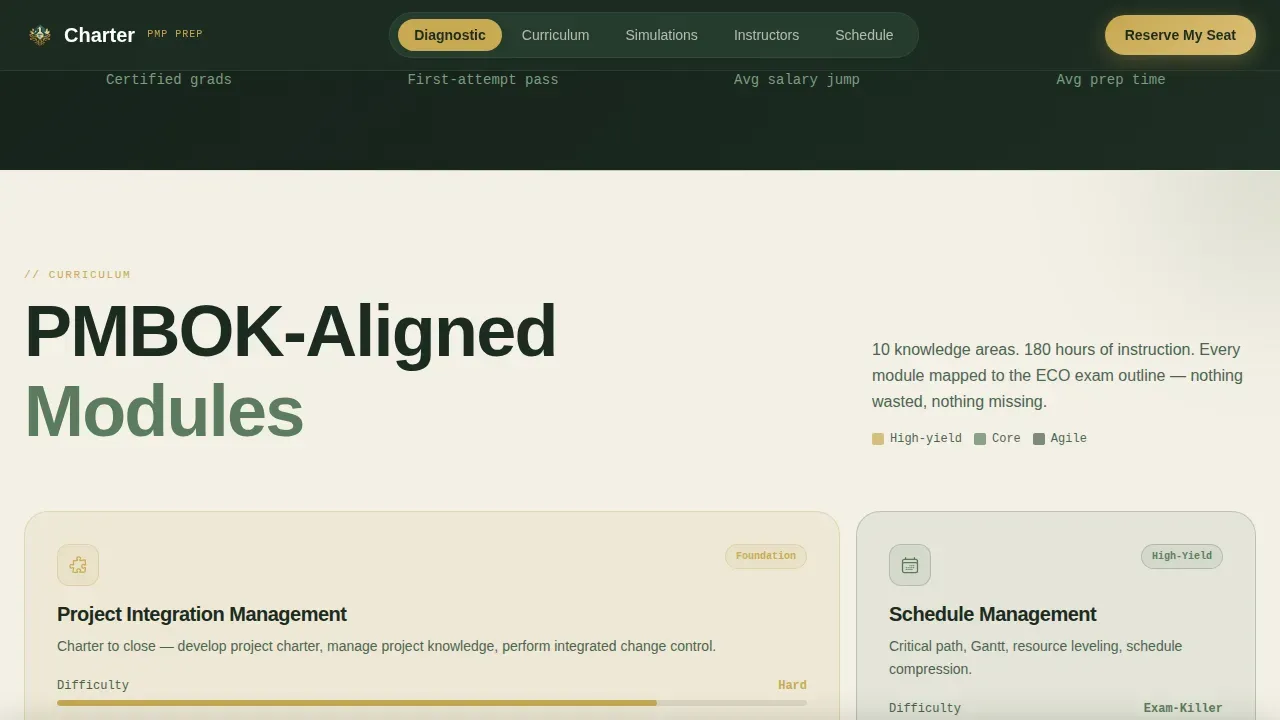
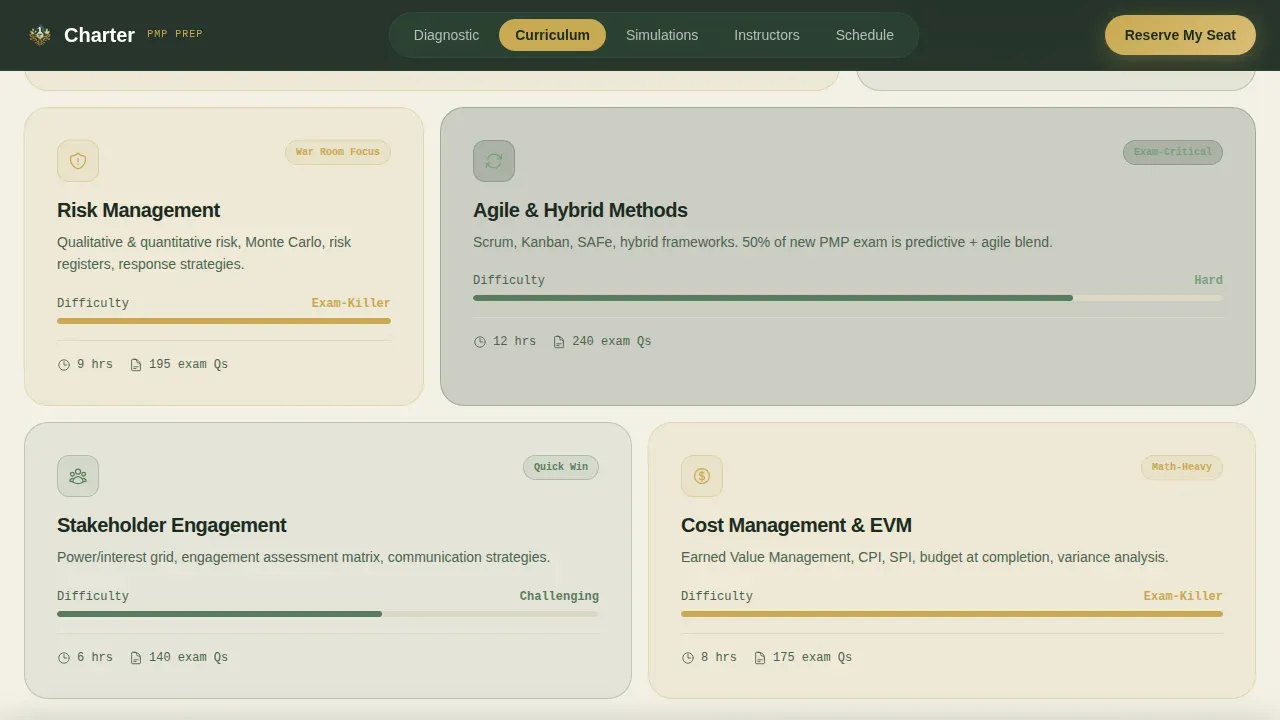
Because the diagnostic form captures which knowledge area the visitor flagged as weakest, each spoke section can surface content weighted toward that area. The curriculum section, for example, uses an asymmetric bento grid of PMBOK-aligned knowledge areas that visually emphasizes the flagged topic. This adaptive display keeps the page feeling personally relevant across different visitor profiles, from a scrum master refreshing agile knowledge to an ops lead focused on risk management and cost management fundamentals.
Sticky Call-to-Action Bar and Pre-filled Registration
After the inline quiz delivers its score, a sticky bar appears at the bottom of the viewport and stays visible as the visitor continues scrolling. The registration form embedded in the cohort schedule section pre-fills the visitor's name, email, and preferred study pace using the data collected in the header diagnostic, reducing the action to a single confirmation click. A secondary path offers a free resource download for visitors not yet ready to commit, capturing their email for a follow-up nurture sequence timed to the cohort calendar.
Marquee Testimonials and Instructor Credibility Section
The Instructors spoke features a scrolling marquee of cohort testimonials alongside structured instructor credibility blocks. Pass-rate statistics and salary-increase data are surfaced here as scannable proof points, giving skeptical project managers the evidence they need before committing. Social proof is presented in a format that feels earned rather than staged, with cohort-specific context rather than generic endorsements.
Page sections overview
| Section | Purpose |
|---|---|
| Hero Diagnostic Form | Capture study schedule via multi-step form and animate a personalized study timeline |
| Anchor Navigation Bar | Provide hub-and-spoke wayfinding across all five course sections |
| Curriculum Bento Grid | Display PMBOK knowledge areas in an asymmetric grid weighted to visitor's flagged topic |
| Inline Simulations Quiz | Deliver a five-question instant-scored quiz to prove exam readiness gaps |
| Instructors and Proof | Show marquee testimonials, pass-rate stats, and instructor credibility blocks |
| Cohort Schedule Section | Present countdown timer, cohort kickoff date, and sticky registration call to action |
| Footer Linear Row | Provide a clean single-row footer with secondary links and email capture |
Design & branding system
Charter's visual identity is built on a Corporate Precision theme expressed through a Botanical color system. The palette feels structured and purposeful without being cold, making it ideal for professionals who associate credibility with order but need warmth to study at midnight.
- Deep evergreen (#2D4739) anchors the primary background and navigation; pressed-fern green (#5B7C5E) handles section dividers and secondary surfaces; warm parchment (#F4F0E6) provides the open, breathable base that prevents visual fatigue during long reading sessions
- Sap-gold (#C8A951) is reserved exclusively for call-to-action buttons and progress indicators, creating an unmistakable visual hierarchy that guides the eye toward every conversion point
- Typography pairs DM Sans for headings with JetBrains Mono for labels and data fields, combining professional readability with a precision-data aesthetic that signals rigor without clinical coldness
Mobile & speed optimization
Charter is built desktop-first to match the primary use case: professionals studying on work laptops during lunch breaks. The layout is structured for widescreen viewing, where the multi-step form and live calendar animation deliver their full impact side by side. At the same time, the template provides solid mobile support so visitors can engage from any device.
- The multi-step form collapses to a single-column flow on smaller screens, with large tap targets and readable input fields that work comfortably on a phone
- Sticky call-to-action behavior and inline quiz scoring are preserved on mobile viewports so no conversion element is lost at smaller sizes
- Interactive components use a server-and-client component split, where static content renders immediately and interactive sections load progressively, keeping the perceived experience fast
How this template helps you convert
Creating an effective landing page for a PMP exam prep course requires a laser-focused, trust-driven design that converts stressed professionals into confident test-takers. Charter is built around a specific conversion logic: personalization first, proof second, action third.
- The multi-step hero form creates immediate investment. Visitors answer three questions and watch their own project schedule take shape on screen. By the time they reach the curriculum section, they are not evaluating the course; they are already planning around it. This reduces the psychological distance between browsing and buying.
- The inline quiz delivers proof at the exact moment doubt is highest. After scanning the curriculum, visitors see a five-question quiz that grades instantly and reveals real gaps. This transforms a skeptical project professional into a motivated one. The sticky call-to-action bar then appears at precisely the right moment, with the registration form already pre-filled from their earlier answers. The path to confirmation is a single click.
Other information about this template
Charter sits within the Education and Training category, specifically designed for the Online Skill Courses subcategory and the Project Management (PMP) Online Course niche. The template draws on a broad range of project management concepts to serve both the course content structure and the visitors who will engage with it. Understanding this context helps builders customize the template effectively.
- The project management body of knowledge underpins the curriculum section structure. Knowledge areas such as scope management, quality management, resource management, cost management, and stakeholder management are treated as first-class content objects in the bento grid, each representing a distinct topic block that visitors can scan quickly.
- Project charter documentation, the project schedule, project deliverables, and acceptance criteria are examples of real-world artifacts that the course content addresses. The template's curriculum section is designed to reference these artifacts clearly so visitors understand the practical depth of the training.
- Risk management is a cornerstone of effective project management. The template's curriculum grid surfaces risk management prominently, covering risk assessment, prioritization, response planning, and the use of a risk register to document and monitor project risk throughout the project lifecycle.
- A well-managed project transforms abstract ideas into real outcomes by applying proven methods, tools, and frameworks. The course content covers Agile, Hybrid, and Waterfall methodologies as part of the latest exam content outline. Agile methodologies emphasize iterative development and flexibility, allowing teams to adapt to changes quickly. Hybrid methodologies combine elements of both Agile and Waterfall to suit specific project needs.
- The project lifecycle consists of five phases: initiation, planning, execution, monitoring and controlling, and closure. Each process group maps to content modules within the curriculum section. Visitors can see which process group their weakest knowledge area belongs to, reinforcing the diagnostic logic established in the hero form.
- Stakeholder management is a critical component of effective project management. The template surfaces stakeholder engagement concepts including identifying stakeholders, managing stakeholder expectations, and maintaining stakeholder confidence throughout the project. These topics appear in the curriculum grid and are referenced in the quiz section.
- A Project Management Office (PMO) provides oversight, governance, and alignment across all project initiatives. PMOs establish standardized processes to ensure projects are executed efficiently and project resources are optimized. The template's content structure acknowledges the role of a project management office audience, including professionals who manage or report to a PMO.
- The project management institute (PMI) sets the standards that the course content aligns to. PMI standards inform the course's treatment of every knowledge area and process group. The template is designed to communicate this alignment clearly, building trust with candidates who know how rigorous the project management professional exam is.
- Project management templates are practical tools that project managers use to ensure consistency across project deliverables, project planning documents, and reporting formats. Using standardized templates helps project teams deliver project outcomes on time and within budget. The template is designed so that course creators can present their own project management templates as part of the course offering.
- The charter precision pmp exam prep landing page template is the specific product this build represents. It brings together the diagnostic form, anchor navigation, quiz, testimonial marquee, and cohort registration into a single cohesive landing page purpose-built for PMP certification courses.
- Strategic thinking is a valued trait in senior project managers and is emphasized throughout the course content. The template's copy structure encourages visitors to think about their career growth trajectory, including the salary data and pass-rate statistics surfaced in the instructor section.
- AI-powered tools can enhance project management by automating repetitive tasks and providing data-driven insights. No-code tools enable users to create applications without traditional programming skills, making project management more accessible to new team members and career-switchers. The template itself is a no-code-friendly build that allows course creators to configure and launch without writing code.
- Practical examples and lessons learned from real project failures are a core feature of the live instructor war rooms described in the course content. The template's instructor section is designed to communicate this approach through marquee testimonials and credibility blocks, so visitors understand they are learning from practitioners, not just instructors.
- Project management software tools, including platforms like Microsoft Project, are referenced in the curriculum as part of the broader project management ecosystem. Visitors who work with project management software daily will recognize the relevance of the course content to their existing tool stack.
- The work breakdown structure, critical path analysis, and project activities management are all topics covered in the curriculum section. The bento grid layout makes it easy to identify these specific content blocks at a glance, supporting meticulous planning decisions by prospective students.
- Performance metrics and performance measurement are woven into the course's simulation section. Timed simulations test recall and application across all knowledge areas, giving candidates a concrete way to monitor progress and identify where more resources are needed before exam day.
- The business case for PMP certification is made visually on the page through salary-jump data and pass-rate statistics. These numbers give skeptical candidates the reassurance they need to move from browsing to enrollment, addressing the core concern that they might waste time or money.
- Scrum master professionals studying for PMP certification will find the Agile domain coverage particularly relevant. The template's curriculum section can highlight Agile and hybrid content blocks to speak directly to this audience segment.
- Quality management, quality assurance, and quality standards are covered as distinct knowledge area blocks. The template gives these topics clear visual weight within the bento grid, ensuring that visitors who identify quality as their weakest area see relevant content immediately.
- Resource allocation and project resources management are addressed in the resource management module. The template's diagnostic form captures whether a visitor views resource management as their most challenging knowledge area and surfaces related content throughout their personalized page experience.
- The template supports a secondary lead capture path through a free resource download. This creates more resources for visitors who are not yet ready to register, entering them into a nurture sequence timed to the cohort calendar. This dual-path approach helps course creators develop their audience while still driving primary event registrations.
Theme
Corporate Precision
Creative direction
Quiz & Personalize
Color system
Botanical
Style
Hub & Spoke (Anchor Nav)
Direction
Event Registration
Page Sections
Multi-step Diagnostic Hero Form
Hub-and-spoke Anchor Navigation
Inline Quiz with Instant Scoring
Adaptive Content Weighting by Knowledge Area
Sticky Call to Action Bar with Pre-filled Registration Form
Marquee Testimonials and Social Proof Section
Related questions
What is included in the hero section of this template?
Can I customize the curriculum section to match my course content?
How does the sticky call-to-action bar work?
Does this template include a path for visitors who are not ready to register?
Is this template suitable for a course covering multiple project management methodologies?



