Intelligent Finance Tracking Landing Page Template
Ledger is a brutalist accounting firm landing page built around a dashboard-style FAQ grid. It pairs a glassmorphic color system with spec-sheet FAQ cards, a compiler-animated code header, and a freemium unlock flow. Designed for accounting firms serving freelancers, restaurant owners, and founders, it turns complex tax questions into structured, scannable data.
by Rocket studio
Quick summary
Ledger is a single-page brutalist accounting landing page template built for firms that handle real tax complexity. It opens with an animated code-snippet header, moves through a searchable FAQ data grid, and converts visitors through a freemium unlock model. The visual identity uses deep charcoal, fluorescent green, and glassmorphic frosted cards to make every answer feel like structured financial data.
Who this template is for
This template is built for accounting firms and tax professionals who serve clients with genuine filing anxiety. It suits practices whose work is specific, technical, and deadline-driven.
- Accounting firms targeting freelancers with 1099 income, self-employment tax questions, and quarterly filing obligations
- Tax professionals working with small business owners, restaurant operators, and limited liability company founders who need clear answers fast
- Practices that want to demonstrate depth before asking for a sign-up, using a freemium content model to build trust
What problem this template solves
Most accounting firm pages lead with credentials and end with a contact form. Visitors arrive with urgent tax questions and leave without answers. This template flips that model.
- Prospective clients cannot find plain-language answers to specific tax questions without booking a paid call
- Generic accounting websites fail to communicate the firm's technical depth or the range of situations they actually handle
- There is no conversion path that lets a visitor self-qualify before committing to a consultation
What you get with this template
You get a complete single-page layout built for an accounting firm FAQ experience. Every section is purpose-built to move a visitor from anxious question to confident sign-up.
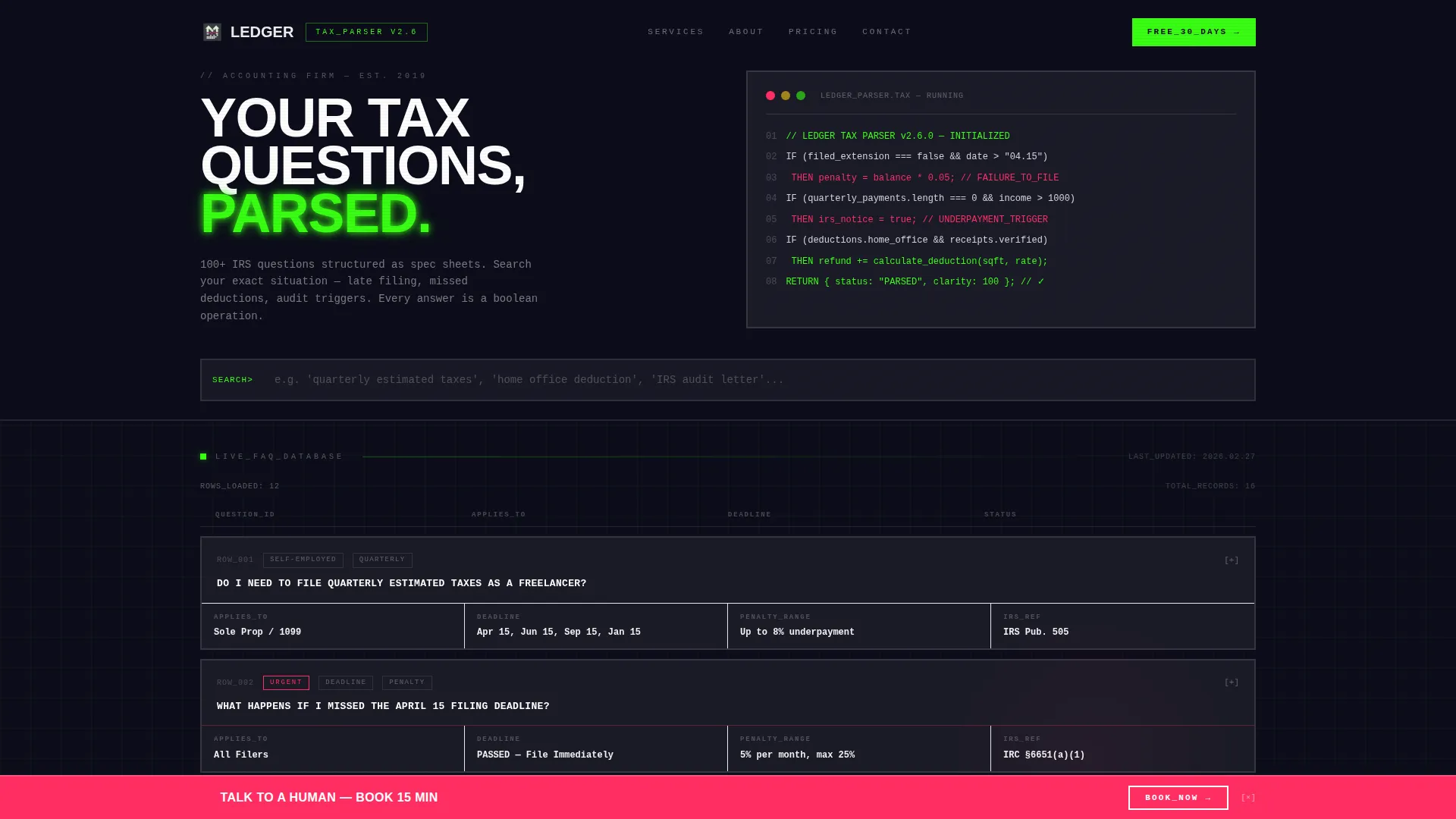
- A full-width brutalist header with an animated pseudo-code block, an 80-pixel uppercase headline, and line-by-line compiler animation
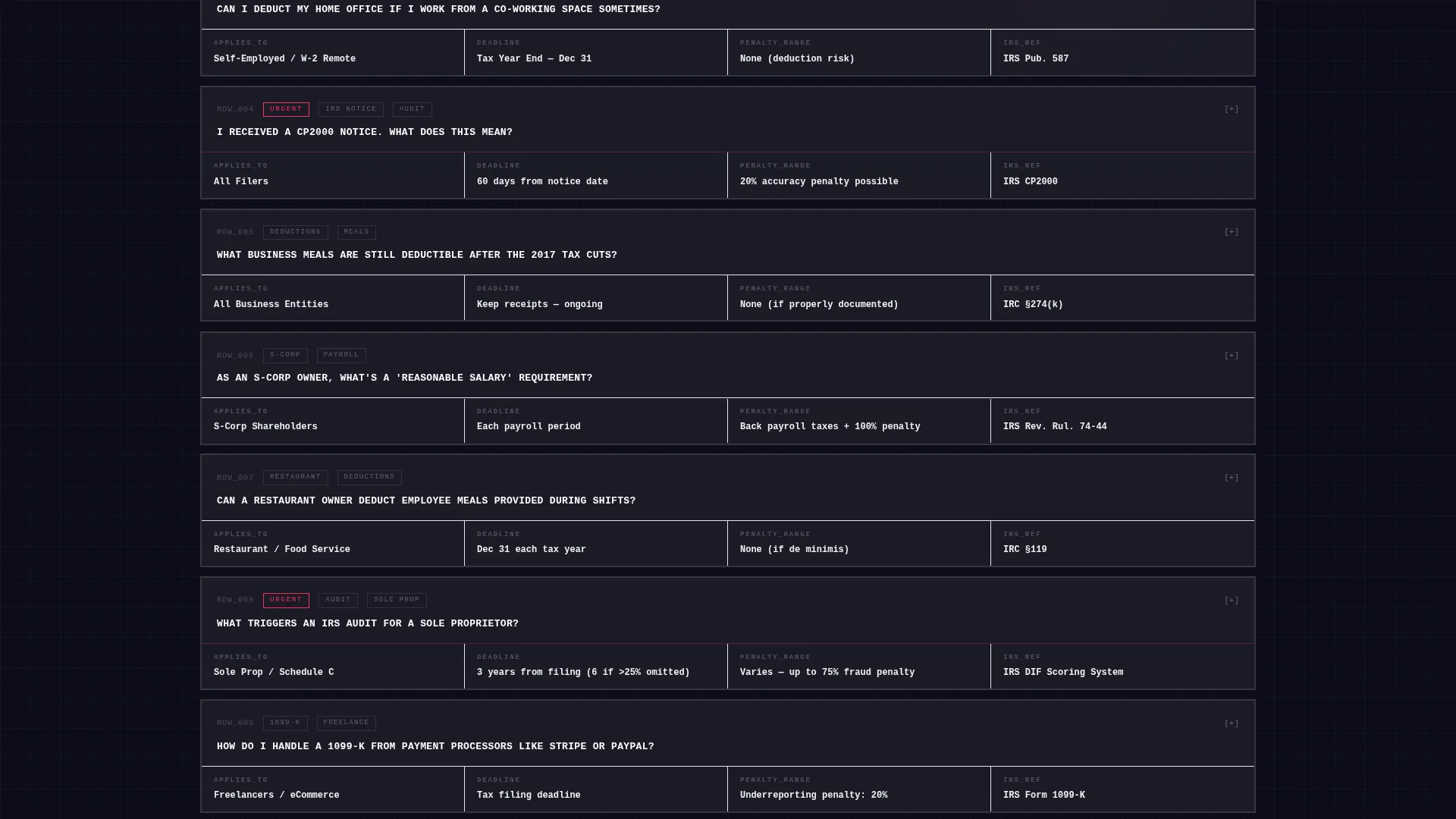
- A searchable FAQ data grid with spec-sheet-style cards, each structured with labeled fields including deadline, penalty range, and action required
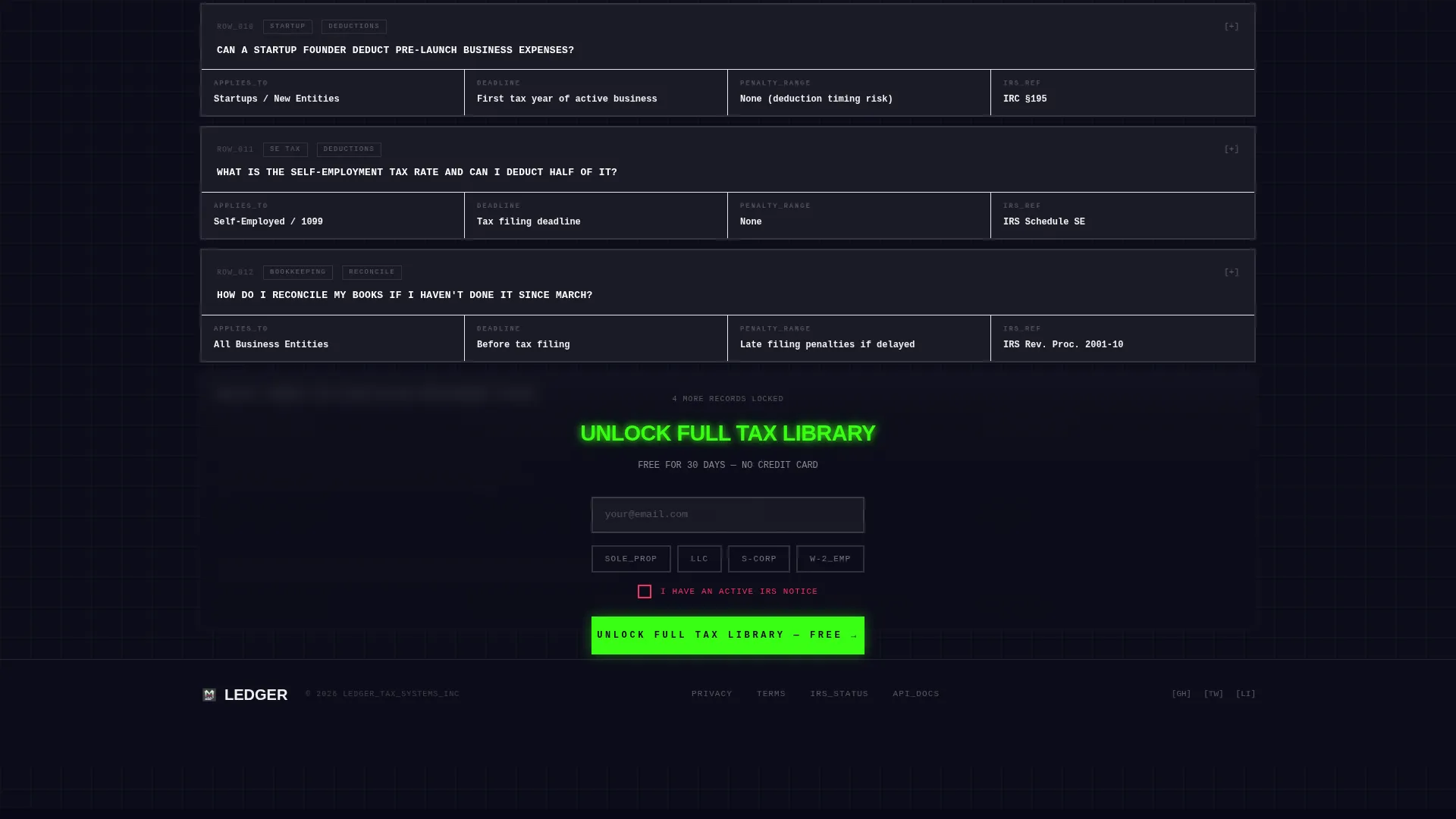
- A freemium gate after the first twelve visible FAQ cards, an email capture form with business-type toggle and an active IRS notice checkbox, and a pinned bottom bar with a booking link
Feature list
This template includes six core design and functional components, each grounded in the source brief.
Animated Code-Snippet Header
The header presents a styled pseudo-code block in monospaced type. Each line animates like a compiler running, resolving common tax fears into boolean logic. The effect runs without images or stock photography, keeping the viewport clean and the message precise.
Searchable FAQ Data Grid
A live search bar at the top filters the full FAQ grid instantly. Questions are ordered from general to highly specific, mimicking a systems manual. The grid reinforces the dashboard metaphor throughout the scrolling experience.
Spec-Sheet FAQ Cards
Each FAQ answer is structured as a technical specification card, not a paragraph. Cards include labeled fields such as APPLIES TO, DEADLINE, PENALTY RANGE, ACTION REQUIRED, and IRS REFERENCE. The monospaced question sits in a top rail above the field grid.
Freemium Content Gate
The first twelve FAQ cards are fully visible. A frosted glass overlay locks the remaining grid and presents the call to action to unlock the full tax library free for thirty days. No credit card is required at sign-up.
Email Capture with Business-Type Toggle
The sign-up form collects an email address first, then asks the visitor to select their business type using a single toggle row. Options cover sole proprietor, limited liability company, S-corporation, and W-2 employee. A checkbox flags whether the visitor has an active IRS notice.
Pinned Booking Bottom Bar
A persistent bottom bar stays fixed to the viewport at all times. It displays a secondary call to action linking to a calendar booking embed for a fifteen-minute consultation. The bar uses magenta type on charcoal to signal urgency.
Page sections overview
| Section | Purpose |
|---|---|
| Animated Code Header | Sets tone with compiler-style tax logic animation |
| Headline Block | Delivers the 80px uppercase primary value statement |
| Live Search Bar | Filters the FAQ grid in real time |
| FAQ Data Grid | Displays spec-sheet tax answer cards row by row |
| Freemium Content Gate | Locks remaining cards behind a thirty-day free unlock offer |
| Email Capture Form | Collects email, business type, and IRS notice status |
| Pinned Booking Bar | Offers a persistent fifteen-minute consultation booking link |
Design & branding system
The template uses a glassmorphic color system layered over a bold brutalist structure. Every surface is intentional and every color carries a specific functional meaning.
- Deep slab charcoal (#1A1A2E) dominates all backgrounds; frosted panel white (#FFFFFF at 12% opacity) floats text cards above the grid with 2-pixel brutal borders and no border-radius
- Fluorescent ledger green (#39FF14) marks active states, hover lines, and the answer-reveal borders on FAQ cards
- Error-state magenta (#FF2E63) signals deadlines, penalties, and urgent calls to action including the pinned booking bar
Mobile & speed optimization
The layout is built to adapt across screen sizes without losing its structural clarity. Glassmorphic cards stack and overlap at breakpoints to preserve depth without added decoration.
- Cards reflow at smaller breakpoints using stacked overlap to maintain the layered glassmorphic depth effect
- The pinned bottom bar remains fixed to the viewport at all screen sizes, keeping the booking path accessible at every scroll position
- The search bar and toggle row are designed for touch interaction, with clear tap targets across the business-type selector
How this template helps you convert
Ledger is built around a value-first conversion model. Visitors experience the product before they are asked to commit.
- The animated header and open FAQ grid demonstrate the firm's technical depth immediately, building confidence before any form appears
- The freemium gate activates only after twelve cards, so the visitor has already searched, read, and self-qualified by the time they see the sign-up prompt
- The pinned magenta booking bar offers a human fallback at every scroll position, capturing visitors who prefer a direct conversation over self-service
Other information about this template
This template is categorized under accounting firm website templates and is specifically designed for the accounting firm FAQ page niche. It is a strong fit for practices that want to modernize their digital presence using a dashboard and data grid aesthetic.
- The template style follows a dashboard and data grid layout, making it a practical choice for firms that want their online presence to reflect analytical precision
- The bold brutalist theme with glassmorphic treatment is a deliberate visual contrast to soft, approachable accounting firm designs, positioning the firm as technically rigorous
- The spec-sheet creative direction is designed to serve visitors who arrive with specific, urgent questions rather than general interest

Theme
Bold Brutalist
Creative direction
Spec Sheet
Color system
Glassmorphic
Style
Dashboard/Data Grid
Direction
Freemium/Trial
Page Sections
Animated Code-snippet Header
Searchable FAQ Data Grid
Spec-sheet FAQ Cards
Freemium Content Gate
Pinned Booking Bottom Bar
Glassmorphic Card System
Related questions
Can I edit the FAQ cards to match my firm's actual tax content?
Does the freemium gate require a payment processor to set up?
Can I replace the Calendly booking link with a different scheduling tool?
Is this template suitable for a solo tax preparer or only larger firms?
What happens to the FAQ grid on smaller screens?



