Retail Software Professional Website Template
The Ledger retail asset management command center landing page template is a scroll-reveal, desktop-first landing page built for retail ops teams tracking thousands of physical assets across hundreds of locations. It features a live interactive dashboard map, progressive spec-sheet modules, a side-by-side comparison matrix, and a two-step audit request form, all rendered in a matte Monochrome Steel palette that feels as precise as the data it displays.
by Rocket studio
Quick summary
This template gives retail operations professionals a landing page that commands attention from the first scroll. Every section earns the next by answering a specific question the ops director already has in mind. The design is utilitarian, the data is live, and the conversion path is clear. It is purpose-built for B2B SaaS platforms that track, audit, and depreciate physical retail assets at scale.
Who this template is for
This template is designed for retail operations software businesses that need to convert a highly skeptical, data-driven buyer. The audience arrives with real pain and leaves with a clear next step.
- Regional retail ops directors managing 200 or more store locations
- Franchise compliance managers who need photographic proof of branded display installation
- CFOs responsible for depreciating large physical asset portfolios they cannot currently locate or verify
What problem this template solves
Retail ops teams lose time and revenue when asset data lives in disconnected spreadsheets. This template helps a business communicate a better way, one that gives every stakeholder a single, accurate record of every fixture, cooler, shelf, and signage unit across the entire network.
- Ops directors cannot verify asset status across hundreds of locations without traveling or calling store managers
- Compliance teams lack documentation when branded displays are missing or incorrectly installed
- CFOs cannot determine depreciation schedules or balance liabilities accurately without a reliable asset register
What you get with this template
This template delivers a comprehensive, scroll-reveal landing page with four major content zones and a sticky comparison bar. Each section builds on the previous one, escalating complexity as the visitor's confidence grows.
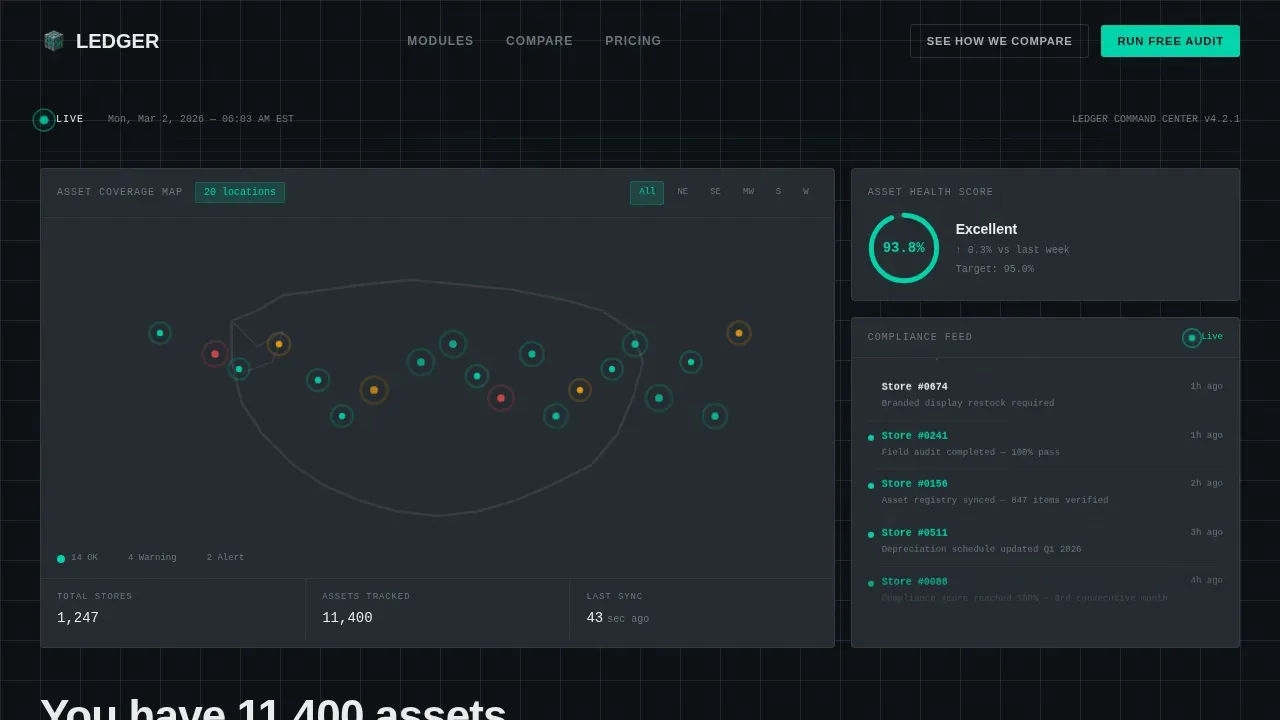
- An interactive hero section with a live-updating U.S. map, pulsing store pins, a ticking asset health score, and a scrolling compliance alert feed
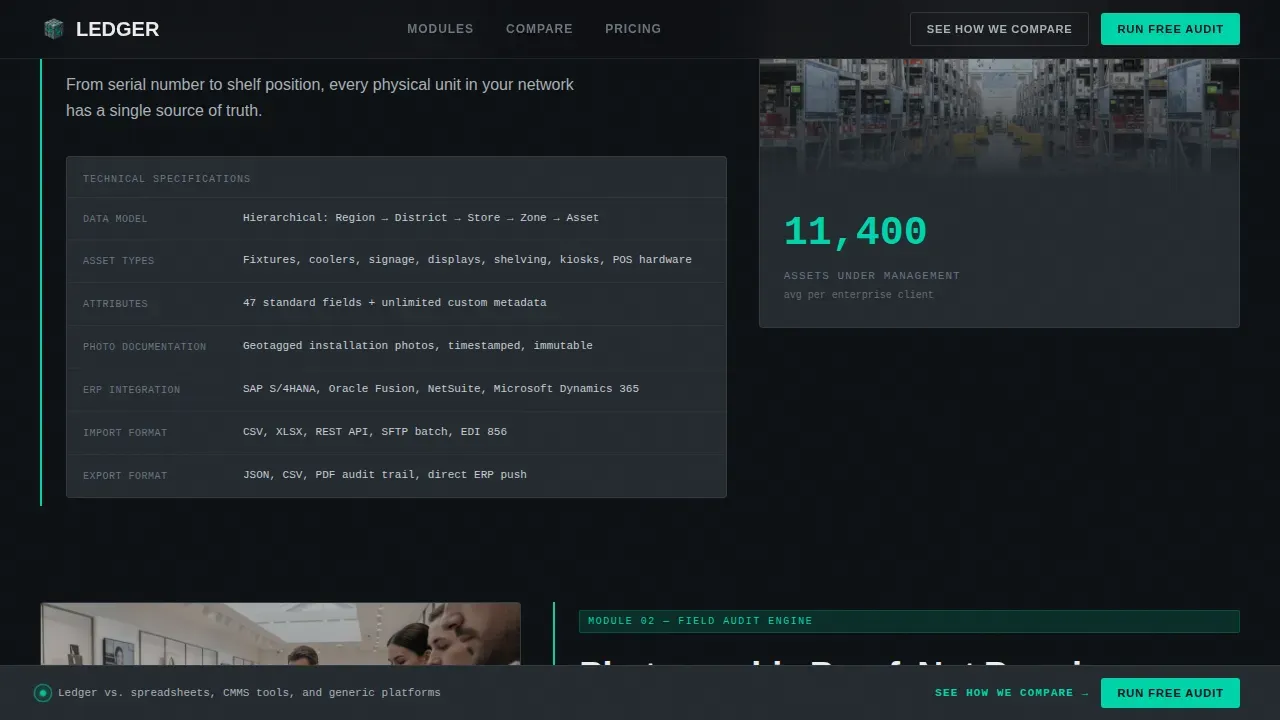
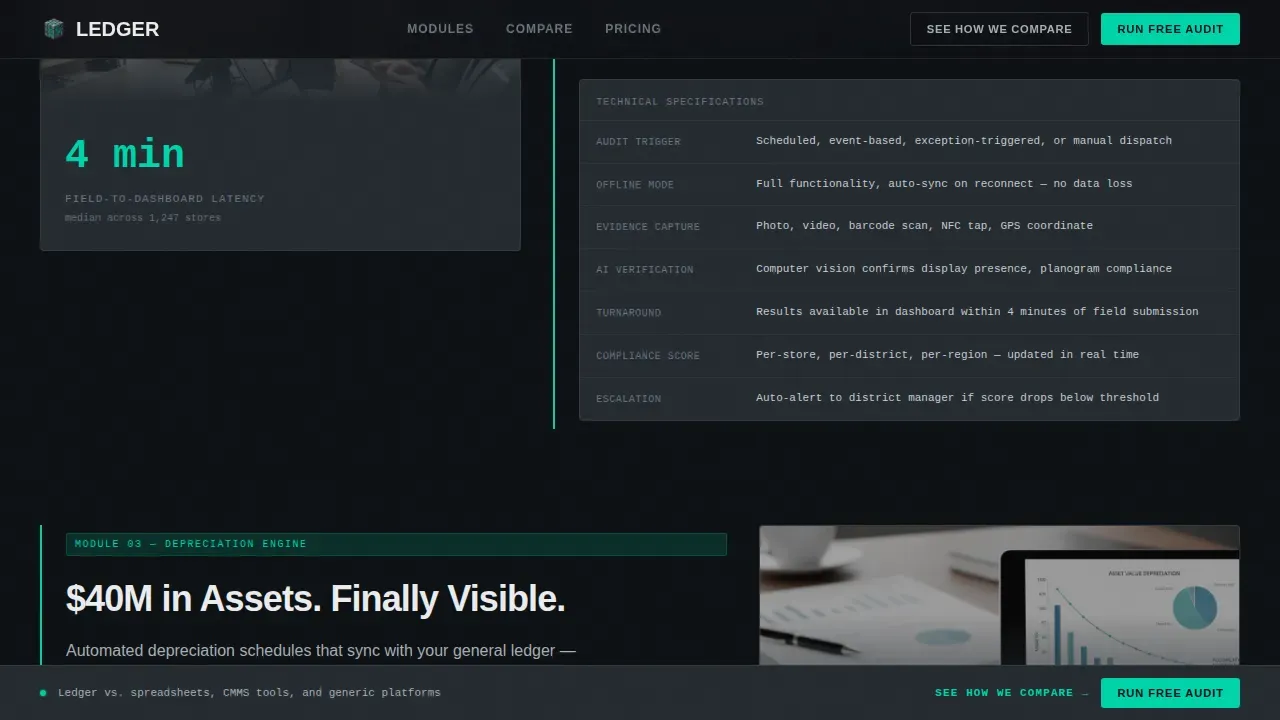
- Four progressive spec-sheet modules covering Asset Registry, Field Audit, Depreciation Engine, and Compliance Scoring, each presented as a technical block with data formats and integration details
- A feature comparison matrix and a two-step "Run a Free Asset Audit" form with a secondary PDF spec sheet download path
Feature list
This template is built around capabilities that directly address the way retail ops teams think, evaluate, and decide. Each module is a spec block, not a marketing claim.
Interactive Live Dashboard Hero
The hero section opens with a functioning dashboard fragment, not a static screenshot. Visitors can hover store pins on the U.S. map, filter by region, and watch the asset health score tick upward in real time. A sidebar feed scrolls live compliance alerts, for example: a missing endcap display flagged by date and store number. The headline types itself below the map, a typewriter effect driven by GSAP ScrollTrigger.
Progressive Spec-Sheet Modules
Each of the four capability modules, Asset Registry, Field Audit, Depreciation Engine, and Compliance Scoring, is revealed as the visitor scrolls. Every block identifies what the module measures, what data format it exports, and which enterprise resource planning (ERP) systems it connects to. This process turns the page into a technical teardown that earns trust through specificity, not storytelling.
Side-by-Side Comparison Matrix
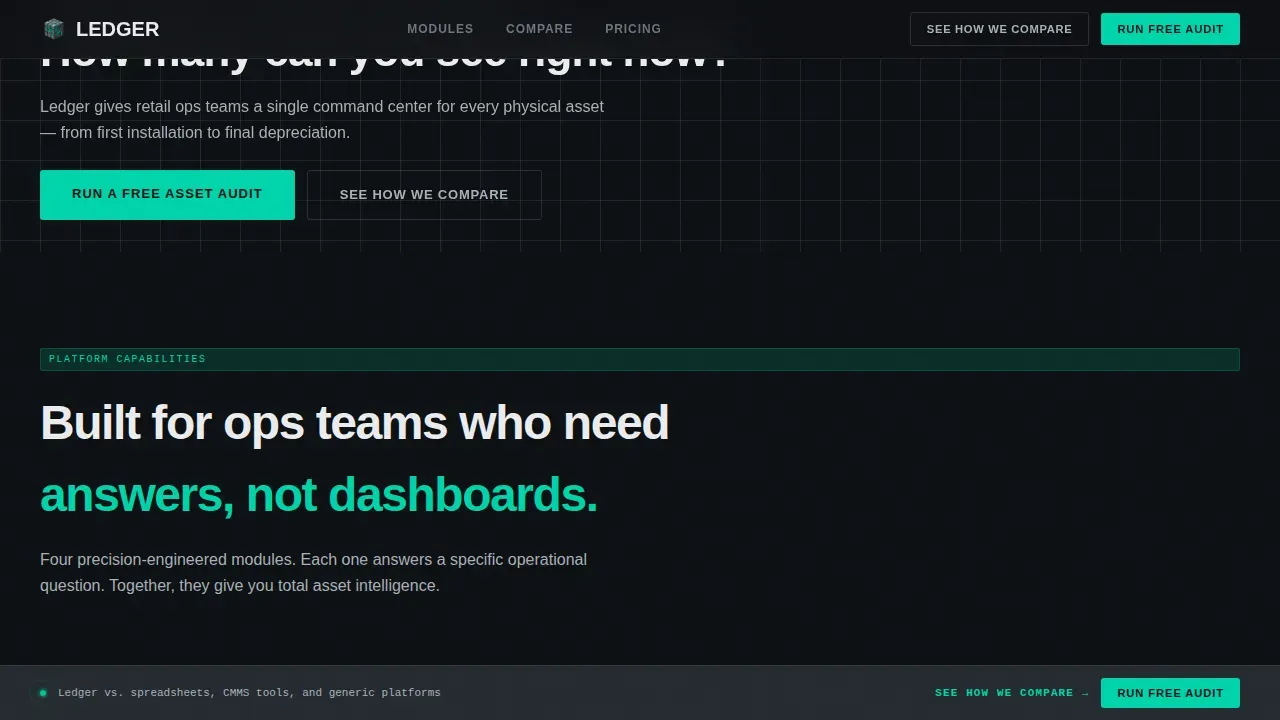
A persistent sticky bar reading "See How We Compare" anchors to a detailed feature matrix. The table pits the platform against spreadsheet tracking, legacy computerized maintenance management system (CMMS) tools, and generic asset platforms. The comparison does the persuading; the call to action simply opens the door.
Two-Step Audit Request Form
The primary call to action, "Run a Free Asset Audit," uses a two-step form. Step one asks for store count and asset categories via dropdowns, zero typing required. Step two requests a work email and preferred demo window. This low-friction process reduces form-abandonment risk and keeps users moving forward.
PDF Spec Sheet Download Path
A secondary conversion path offers a downloadable PDF spec sheet for procurement teams compiling a vendor shortlist. The file download is gated behind an email capture, creating a second account entry point without competing with the primary call to action.
Monochrome Steel Visual System
The color system uses deep gunmetal as the dominant background, brushed aluminum for secondary text and lines, panel white for content surfaces, and status-indicator cyan reserved exclusively for live data points and interactive hover states. Typography pairs DM Sans for body copy with JetBrains Mono for all data fields and spec lines, giving every number a terminal-grade authority.
Page sections overview
| Section | Purpose |
|---|---|
| Hero Dashboard Map | Live interactive asset map with health score and compliance alert feed |
| Typewriter Headline | Animated headline that types itself below the map after load |
| Asset Registry Module | Spec block covering inventory tracking and data export formats |
| Field Audit Module | Spec block covering photographic compliance verification by store |
| Depreciation Engine Module | Spec block covering lifecycle modeling and reorder trigger logic |
| Compliance Scoring Module | Spec block covering brand standard scoring across all locations |
| Comparison Matrix | Feature table versus spreadsheets, CMMS, and generic platforms |
| Sticky Compare Bar | Persistent navigation anchor to the comparison section |
| Two-Step Audit Form | Primary call to action form with dropdown inputs and demo scheduling |
| PDF Download Gate | Secondary email-capture path for spec sheet access |
| Footer | Horizontal flow footer with navigation and contact lines |
Design & branding system
The visual identity follows a Dashboard Pro theme with a Monochrome Steel color system. Every design decision is functional, color only appears when data demands your attention.
- Palette: deep gunmetal (#1B1F23) for backgrounds, brushed aluminum (#A8B0B8) for secondary elements, panel white (#EAECEE) for content surfaces, and status cyan (#00D4AA) reserved for live data and hover states
- Typography: DM Sans for all body and heading copy, JetBrains Mono for data fields, spec lines, and system output, reinforcing the server-rack, utilitarian aesthetic throughout every page section
Mobile & speed optimization
This template is desktop-first by design, built for ops directors working on laptops at 6 AM. However, the layout is structured to remain functional on tablets and smartphones for remote monitoring access.
- The dashboard and map sections use client-side rendering for interactive components, while static sections use server components to keep load times low, a practical split that helps the page stay responsive across device types
- Mobile layout prioritizes thumb zones for easier navigation on handheld devices, keeping the most critical calls to action reachable without requiring awkward stretching or excessive scrolling
How this template helps you convert
This template is engineered around a single conversion goal per screen, reducing cognitive load and keeping visitors focused on the next step.
- The interactive hero immediately communicates the value proposition above the fold, the live map, ticking health score, and compliance feed prove the platform works before a single claim is read, making every subsequent spec block more credible
- The comparison matrix handles the objection that spreadsheets or legacy tools are "good enough," and the two-step form removes friction at the moment of decision, the result is a page where every scroll either builds trust or removes a barrier, and the visitor arrives at the call to action already persuaded
Other information about this template
This template is categorized under Technology and Retail Software, making it relevant for any business building or marketing a retail asset management platform. Several design and content principles are baked into the structure that benefit the overall project beyond aesthetics.
- The general ledger template concept applies here in a physical-asset context: just as a general ledger records every business transaction across accounts receivable, accounts payable, expenses, revenue, equity, and liabilities, this platform tracks every asset event across every store location, the logic of debit and credit becomes the logic of asset in and asset out
- A general ledger must always balance debit and credit amounts; similarly, this template's design insists that every data point displayed is matched by a verifiable record in the system, reducing the risk of error in compliance reporting
- The template's spec-sheet modules mirror the way accountants organize financial information: each module assigns a description to a specific process, identifies the correct data lines, and enables the team to verify outputs without ambiguity
- The JSON data layer referenced in the platform's API context, where the JSON Ledger API allows users to interact with the Canton Ledger from the command line, create contracts, and list active contracts using simple command-line tools, is the kind of technical depth this template is designed to communicate to a procurement audience
- Users discover the platform's depth through progressive disclosure rather than upfront information overload, which is consistent with how high-performing landing pages guide visitors toward one primary goal per screen
- The template can support documentation for payroll-adjacent asset categories such as field technician equipment, giving ops teams a comprehensive list of every assigned resource across the network
- Transactions recorded in the platform are analogous to journal entry records in a general ledger template: each event has a date, a description, a store, a debit-side action (asset deployed), and a credit-side resolution (asset returned or retired)
- Optional sections such as the PDF download gate and sticky compare bar can be adjusted by the team building the final page, giving the project flexibility without sacrificing the core conversion architecture
- The template is classified as the ledger retail asset management command center landing page template in the marketplace, making it easy to find for teams compiling a vendor shortlist or evaluating platform options
Theme
Dashboard Pro
Creative direction
Spec Sheet
Color system
Monochrome Steel
Style
Scroll Reveal (Progressive)
Direction
Comparison/Versus
Page Sections
Interactive Live Dashboard Hero
Progressive Spec-sheet Modules
Side-by-side Comparison Matrix
Two-step Audit Request Form
PDF Spec Sheet Download Gate
Monochrome Steel Visual System
Related questions
What kind of business is this template built for?
Can the interactive dashboard elements be customized?
How does the two-step form process work?
Is this template suitable for procurement teams evaluating multiple vendors?
Does the template include a general ledger or financial tracking component?



