CivicLab — Expert Government Hub Landing Page Template
Civic is a government analytics dashboard landing page template built for municipal and state agencies ready to move beyond spreadsheets. It features an interactive ROI estimator, a three-tier comparison table, and a Feature Tab Switcher header that simulates live dashboard views. The Tech Glass visual identity and freemium-first conversion flow make it easy to earn trust and capture sign-ups from government decision-makers.
by Rocket studio
Quick summary
Civic is a single-page government analytics dashboard template designed to convert city managers, county administrators, and state agency directors. It opens with a Feature Tab Switcher showing live-styled dashboard previews, flows directly into an interactive ROI estimator, and closes with a structured comparison table. The entire page is built to prove value before asking for anything.
Who this template is for
This template is built for software-as-a-service (SaaS) products that serve public sector buyers. It fits teams selling data platforms to government audiences who need to justify every tool through evidence and internal approval chains.
- County administrators and city managers responsible for operational reporting
- State agency directors defending budgets before oversight committees
- City Chief Information Officers (CIOs) modernizing departments still running on legacy systems
What problem this template solves
Government buyers are skeptical and slow to commit. A generic SaaS landing page does not address their specific objections around cost, procurement, and proof of value. This template is built to dismantle those barriers in sequence.
- Decision-makers arrive with hard questions about time savings and compliance readiness
- Standard comparison tables do not reflect the gap between current tools and a modern dashboard platform
- No-credit-card free tiers need to feel credible and frictionless to a government buyer
What you get with this template
You get a fully structured single-page layout designed around a government analytics dashboard use case. Every section is purpose-built to move a skeptical public sector buyer from curiosity to action.
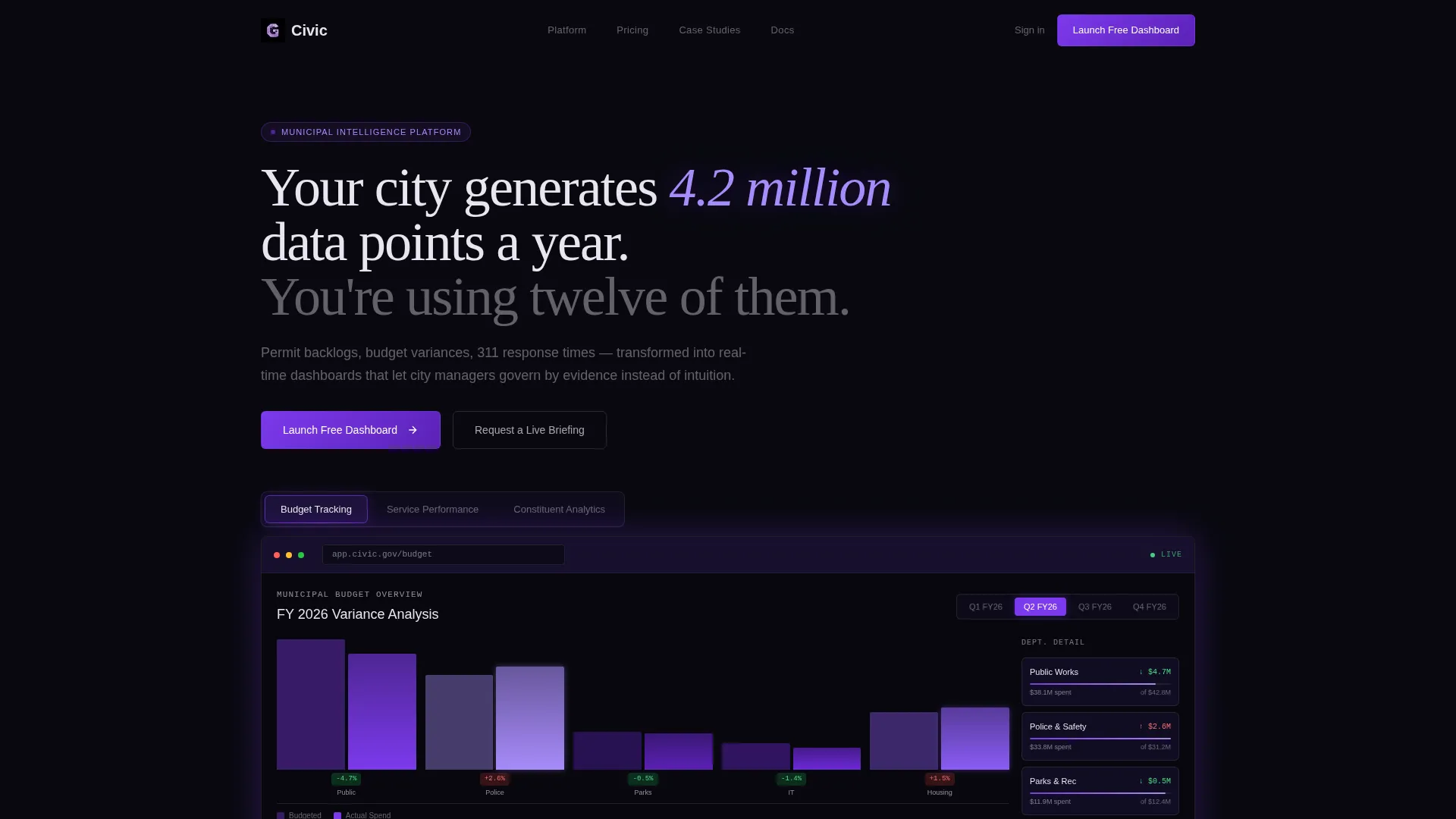
- A Feature Tab Switcher header with three live-styled dashboard previews and an active violet glow state
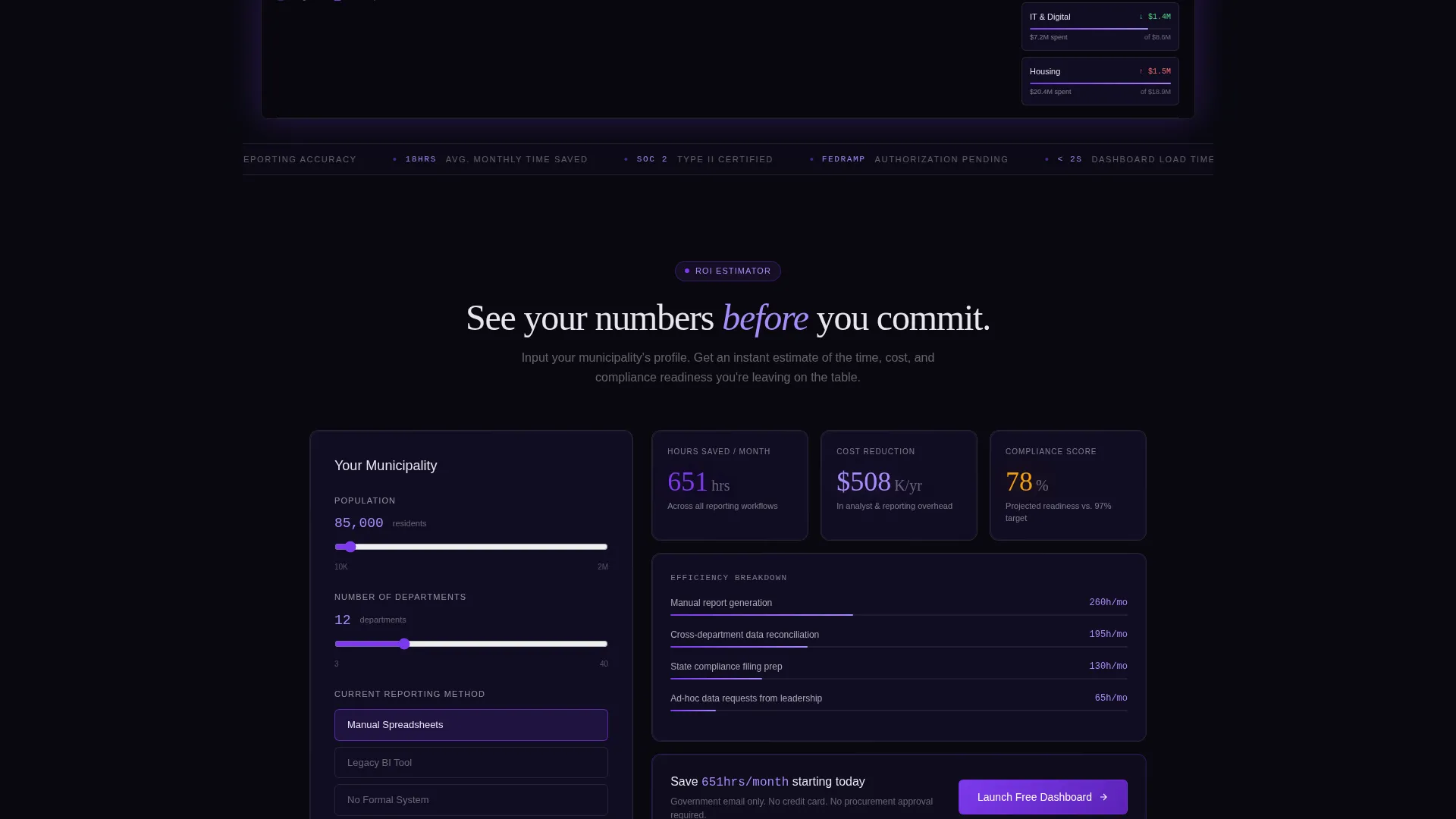
- An interactive ROI estimator that outputs personalized hours-saved, cost-reduction, and compliance readiness figures
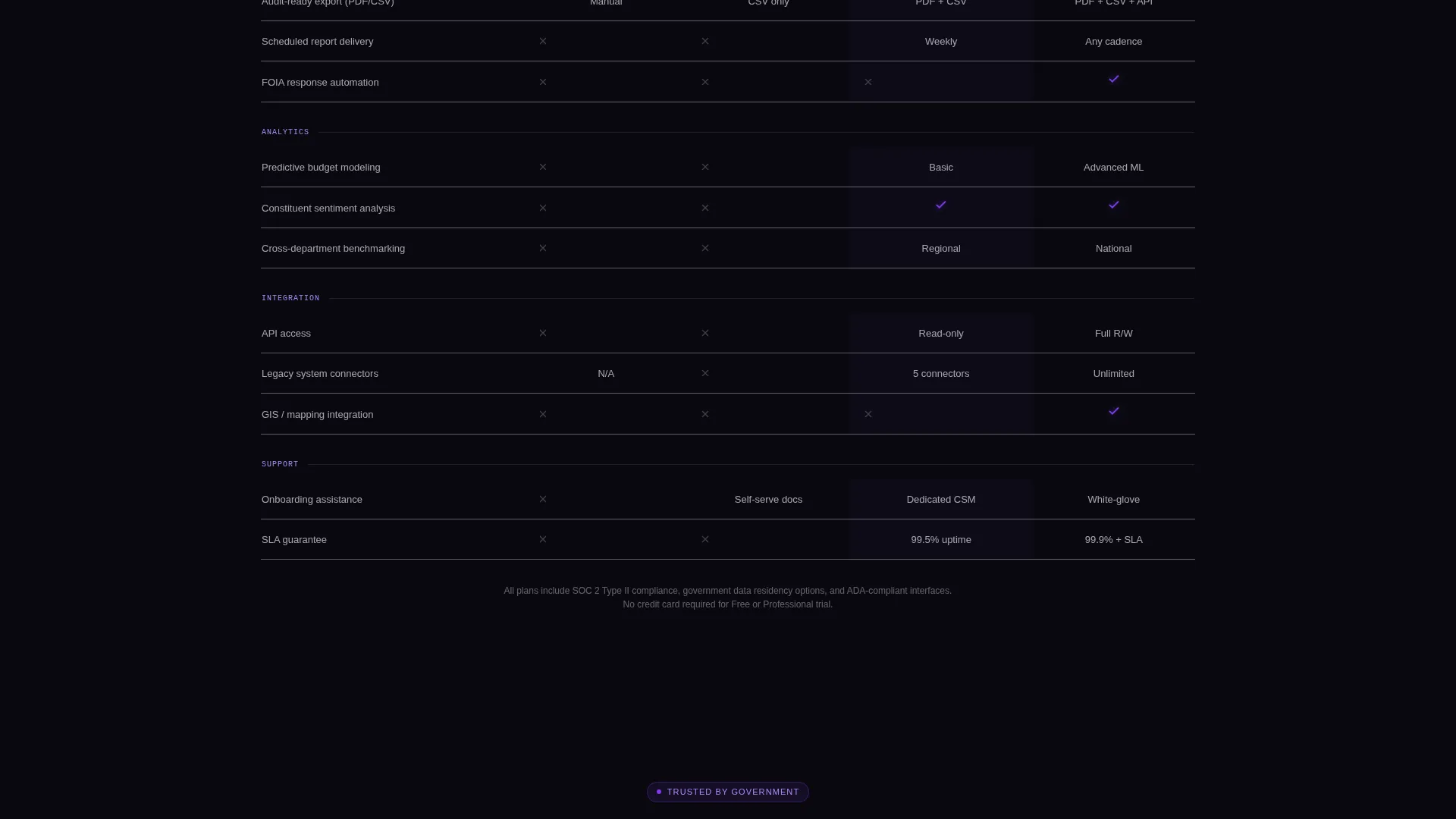
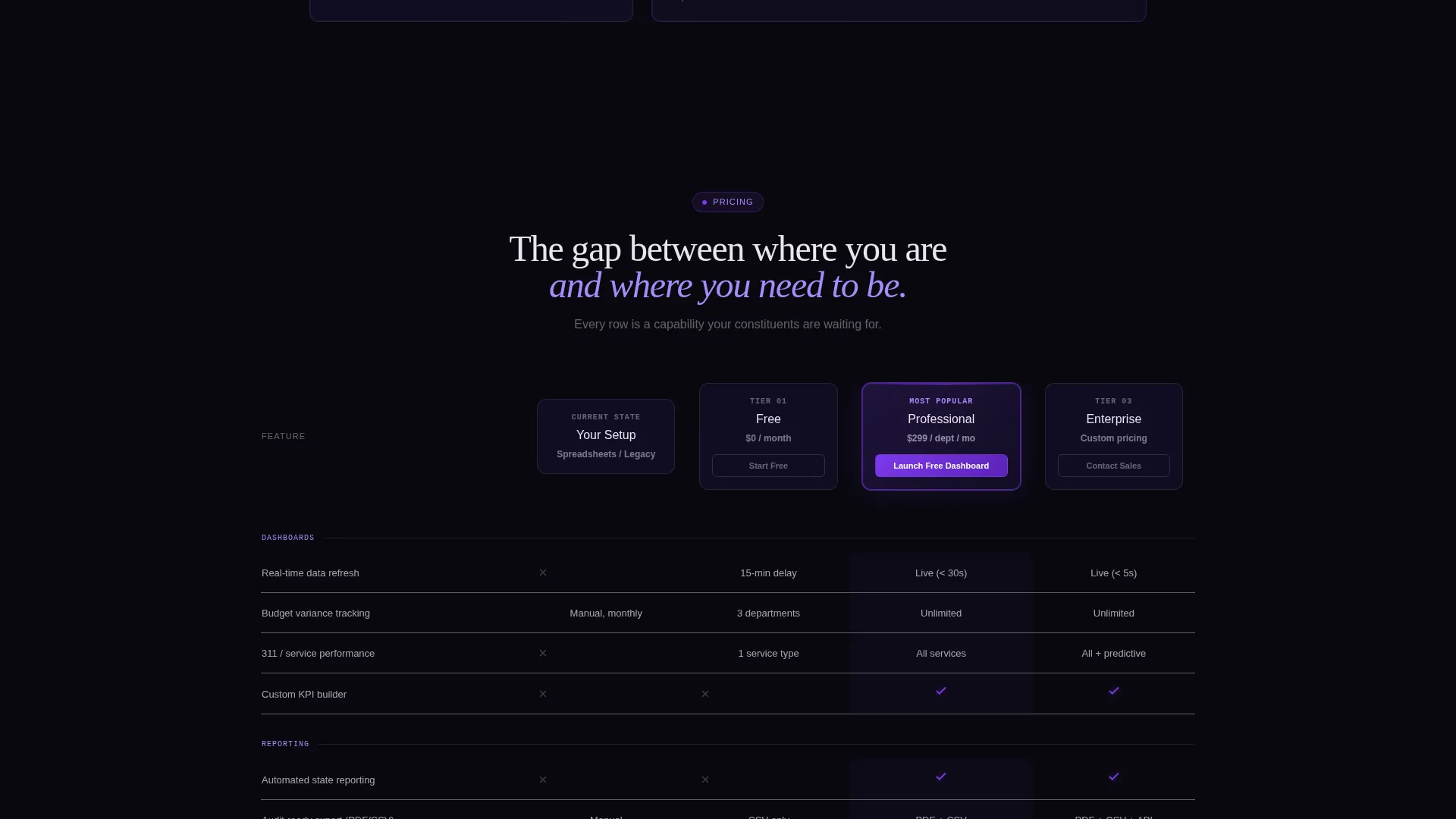
- A three-tier comparison table (Free, Professional, Enterprise) with row-level feature coverage and a highlighted Professional column
Feature list
This template includes a focused set of interactive and visual components, each grounded in the government analytics dashboard use case described in the brief.
Feature Tab Switcher Header
Three clickable tabs labeled "Budget Tracking," "Service Performance," and "Constituent Analytics" sit above a frosted glass browser frame. Each tab reveals a different live-styled dashboard view. The active tab glows violet at its edge, and the default view displays a municipal budget waterfall chart with department color-coding and a fiscal quarter selector.
Interactive ROI Estimator
Before any sales copy, visitors input their municipality's population, number of departments, and current reporting method using a dropdown. The tool instantly calculates estimated hours saved per month, projected cost reduction, and a compliance readiness score. A "Launch Free Dashboard" call to action is embedded directly inside the tool output.
Three-Tier Comparison Table
The comparison table stacks Free, Professional, and Enterprise columns against the visitor's current state. Rows cover real-time dashboards, automated state reporting, predictive analytics, API access, and dedicated onboarding. The Professional column is subtly highlighted with a glass border glow, and violet checkmarks mark available features against void backgrounds.
Freemium Conversion Flow
The primary call to action, "Launch Free Dashboard," appears inside the ROI tool output and is pinned at the Professional column header. Sign-up requests only a government email address and department name. No credit card and no procurement approval are required.
Secondary Briefing Path
A "Request a Live Briefing" option targets directors who need a walkthrough before committing. It links to a calendar-style scheduler. This secondary path captures high-intent buyers who are not yet ready to self-serve.
Tech Glass Visual System
The entire page uses glassmorphic card panels with backdrop blur layered over void-to-ultraviolet gradients. Violet pulses on hover states, active tabs, and live data points. White text floats against dark backgrounds to create a precise, luminous feel without stock imagery.
Page sections overview
| Section | Purpose |
|---|---|
| Feature Tab Header | Showcase live-styled dashboard previews via three interactive tabs |
| ROI Estimator Tool | Deliver personalized value metrics before any sales copy appears |
| Comparison Table | Stack tier features against visitor's current state to highlight the gap |
| Primary call to action Block | Drive free sign-ups with a frictionless government-email-only form |
| Secondary Briefing call to action | Capture high-intent directors via a calendar-style scheduling link |
Design & branding system
The Tech Glass theme uses a Void and Violet color system that evokes a functioning operations center viewed through glass. Every visual decision reinforces precision, data confidence, and quiet authority.
- Color palette: absolute void black (#09090F), deep ultraviolet (#1A1135), electric violet (#7C3AED) for interactive states, and frosted glass white (#E8E5F0) for text and panel surfaces
- Glassmorphic card panels with subtle backdrop blur float over void-to-ultraviolet gradient backgrounds
- Violet activates on hover states, active tabs, and live data point highlights to guide attention without distraction
Mobile & speed optimization
The layout is designed to stay usable and readable across screen sizes without sacrificing the data-forward visual identity. Performance considerations are baked into the design approach rather than added after.
- Glassmorphic panels and gradient layers are structured to remain crisp and legible on smaller viewports
- The ROI estimator inputs and comparison table columns are laid out to reflow cleanly on mobile screen widths
- No stock imagery is used anywhere on the page, keeping visual assets lightweight and software-authentic
How this template helps you convert
The page is built around a deliberate conversion sequence. Each section earns the next click by delivering something useful before asking for anything in return.
- The ROI estimator personalizes the value proposition immediately, giving each visitor a specific number tied to their own municipality before they read a single feature claim.
- The comparison table creates a rational framework by showing exactly what the visitor's current method is missing, row by row, against three clear tiers.
- The frictionless free tier eliminates the most common bureaucratic objection: no credit card, no procurement cycle, just a government email address and a department name.
Other information about this template
This template is well-suited to government analytics dashboard platforms positioning themselves against legacy reporting tools and spreadsheet-based workflows. It is built for a freemium-first go-to-market approach where earning trust comes before asking for commitment.
- The headline "Your city generates 4.2 million data points a year. You're using twelve of them." is included as the primary above-the-fold statement to create immediate relevance for public sector visitors
- The page style and conversion architecture align closely with modern government software and SaaS product pages targeting procurement-aware buyers
- The template can support use cases beyond municipal platforms, including state agency reporting tools, county performance dashboards, and any civic technology product that needs to communicate ROI to non-technical decision-makers
Theme
Tech Glass
Creative direction
Calculator/Tool First
Color system
Void & Violet
Style
Comparison Table
Direction
Freemium/Trial
Page Sections
Feature Tab Switcher with Live Dashboard Views
Interactive ROI Estimator
Three-tier Comparison Table
Freemium Sign-up Flow
Tech Glass Visual Identity
Related questions
What kind of product is this template designed for?
Does the ROI estimator actually calculate values, or is it a visual placeholder?
Can I change the tab labels in the Feature Tab Switcher?
Is there a path for visitors who are not ready to sign up immediately?



