Architecture Firm Software Pricing Website Template
Claimframe is a construction claims management landing page template built for contracts managers, claims consultants, and quantity surveying professionals. It leads with an interactive delay cost estimator, then stacks a sharp comparison table against manual methods and legacy software. The design uses a dark graphite base with violet-to-teal iridescent gradients, driving visitors toward a free app download.
by Rocket studio
Quick summary
Claimframe is a single-page landing page template for a construction claims management application. It opens with a product screenshot hero, moves into a live delay cost calculator, and builds conviction through a structured comparison table. The visual system is dark, precise, and gradient-lit. Every section drives toward one action: downloading and running a first claim.
Who this template is for
This template is designed for software teams and founders building tools for the construction legal tech and contract administration space. It speaks directly to the professionals who use those tools every day.
- Contracts managers and claims consultants assembling extension-of-time submissions under deadline pressure
- Junior quantity surveying professionals who have inherited a disputed final account with no audit trail
- Software product teams who need a high-conversion landing page that earns trust before asking for a download
What problem this template solves
Construction claims work is buried in chaos. Thousands of emails, scattered delay notices, and variation orders spread across lever-arch files make it nearly impossible to build a defensible submission quickly. This template frames that problem clearly and immediately shows the solution.
- Visitors arrive sceptical; the calculator earns attention before a single line of pitch copy appears
- Manual methods and legacy software look weak once the comparison table lays out six honest dimensions side by side
- The download call to action appears at the right moments, after trust is already established
What you get with this template
You get a fully structured, single-page landing page designed around a Calculator/Tool First creative direction. Every section is ordered to build confidence progressively, from interactive proof to direct comparison to a targeted download prompt.
- A hero section with a product screenshot on a 3D tilt, iridescent glow, and a single focused headline
- An interactive delay cost estimator that returns a preliminary entitlement range based on contract value, delay period, and jurisdiction
- A comparison table, a testimonials section, a final call-to-action block with OS-detection logic, and a linear single-row footer
Feature list
This template delivers a focused set of built-in components, each designed to move a sceptical construction professional toward a confident download decision.
Interactive Delay Cost Estimator
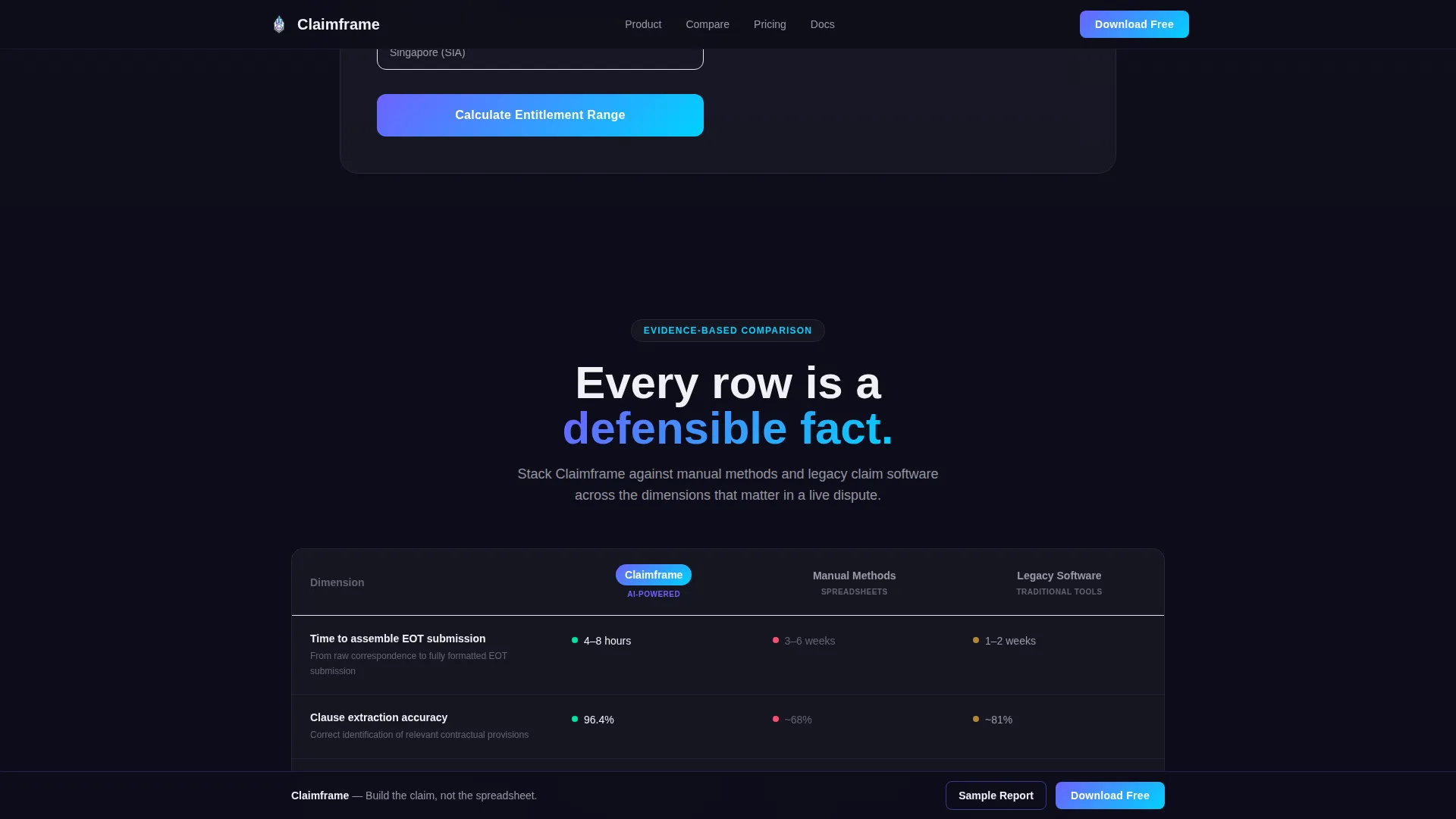
The calculator sits above all pitch copy. Visitors input contract value, estimated delay period, and jurisdiction. The tool returns a preliminary entitlement range instantly, with a personalised prompt tied to the result. This earns attention before asking for anything in return.
Head-to-Head Comparison Table
The comparison table stacks Claimframe against manual methods and legacy claims software across six dimensions. Rows cover time to assemble an extension-of-time submission, clause extraction accuracy, and audit trail completeness, among others. Each row reads like evidence, escalating from convenience to risk mitigation.
Product Screenshot Hero with 3D Tilt
The hero section renders the app's claim dashboard mid-analysis: a Gantt chart with critical path delays highlighted, a sidebar showing AI-extracted contractual clauses with confidence scores, and a live quantum total. The screenshot sits on a slight 3D tilt with a soft iridescent glow behind it.
OS-Detecting Download Call to Action
The primary call to action reads "Download and Run Your First Claim Free." The download button detects the visitor's operating system and adjusts dynamically to show the correct App Store or Google Play link. A secondary path offers a gated sample claim report for visitors not yet ready to install.
Role-Specific Testimonials Block
Three testimonial cards display specific professionals with their role, project type, and a concrete outcome metric. This is not generic social proof. Each card is written to resonate with a different segment of the target audience.
Sticky Final Call-to-Action Bar
A sticky bar persists after the comparison table and reinforces the download prompt without interrupting the reading flow. The primary call to action appears three times in total: pinned after the calculator, after the comparison table, and in the sticky bar.
Page sections overview
| Section | Purpose |
|---|---|
| Hero with Screenshot | Establish credibility instantly with the app dashboard on a 3D-tilted product render |
| Delay Cost Calculator | Let visitors compute a preliminary entitlement range before reading any pitch copy |
| Comparison Table | Show Claimframe's advantage over manual methods and legacy software across six dimensions |
| Testimonials Block | Provide role-specific, outcome-backed social proof from contracts managers and consultants |
| Final Download call to action | Drive the primary conversion with OS-detection logic and a secondary gated PDF path |
| Linear Footer | Close with a clean single-row footer pattern |
Design & branding system
The visual identity follows a Startup Velocity theme built on an AI Iridescent colour system. The palette feels technical and grounded, with an unmistakable shimmer of machine intelligence underneath every interactive state.
- Colours: deep graphite (#1A1A2E) for backgrounds, shifting violet (#6C63FF) as the primary accent, holographic teal (#00D2FF) as the secondary accent, and luminous pearl white (#F0F0F5) for all surface text
- Typography: Manrope at bold weight for all headings, DM Sans for body copy, chosen for their premium and technical character
- Borders and interactive states use iridescent gradient strokes; buttons and active elements pulse with a violet-to-teal gradient shift
Mobile & speed optimization
This template is desktop-first by design. Contracts managers and claims consultants typically assemble extension-of-time submissions at a desk, so the layout prioritises wide-screen clarity and data density. Full mobile support is included.
- Static sections are built as Server Components; the interactive delay cost calculator runs as a Client Component to keep interactivity snappy without slowing the rest of the page
- Animations include iridescent gradient borders, floating card parallax, calculator number count-up, staggered scroll reveals, and shimmer effects, all handled with CSS smooth scroll
How this template helps you convert
Every design and copy decision in this template is sequenced to move a sceptical professional from curiosity to a confirmed download. The order of sections is not decorative. It is a deliberate trust-building progression.
- The calculator creates immediate personal relevance. A visitor who sees their own estimated entitlement range is already invested before they read a comparison row or a testimonial.
- The comparison table removes objections systematically. Six honest dimensions, laid out side by side, make the case without asking the visitor to take anything on faith.
- The repeated and sticky call-to-action placements catch visitors at three different readiness levels, after the calculator, after the table, and in the persistent bar, so no willing converter slips through.
Other information about this template
This template is category-tagged under Technology and the Architecture Firm Software subcategory, with a niche focus on architecture firm claims management. It is localised for English (United Kingdom) use, with GBP currency formatting, DD/MM/YYYY date conventions, and construction industry terminology throughout.
- The footer uses Pattern 1, a linear single-row layout, keeping the page clean and uncluttered at the close
- Animation intensity is set to high, covering gradient borders, parallax floating cards, count-up number animations in the calculator, and shimmer hover states on the comparison table
- The gated secondary conversion path, the sample claim report PDF, gives visitors who are not ready to install a lower-commitment way to stay in the funnel



Theme
Startup Velocity
Creative direction
Calculator/Tool First
Color system
AI Iridescent
Style
Comparison Table
Direction
App Download
Page Sections
Interactive Delay Cost Estimator
Head-to-head Comparison Table
3d-tilted Product Screenshot Hero
Os-detecting Download Button
Role-specific Testimonials
Sticky Conversion Bar
Related questions
Who is this landing page template built for?
Can I customise the delay cost calculator inputs?
How does the OS-detection on the download button work?
Is the comparison table editable for different competitors?
Is this template designed for desktop or mobile use?



