Real Estate Contract Management Landing Page Template
Clause is a bento grid landing page template built for a real estate contract management platform. It pairs a Data Command visual identity with an Interactive Explorer layout to show deal pipelines, deadline tracking, and clause management in one focused screen. The design targets transaction coordinators, solo agents, and brokerage operations managers who need clarity at closing time.
by Rocket studio
Quick summary
Clause is a single-page bento grid template built for a real estate contract management platform. It uses a dark Data Command aesthetic and an Interactive Explorer structure to guide visitors from a striking product screenshot header down through progressively complex feature cards. By the time a visitor reaches the app download call to action, they have already interacted with the product in miniature.
Who this template is for
This template is built for product and marketing teams launching a real estate contract management platform. It speaks directly to the people who use that platform every day.
- Transaction coordinators managing dozens of active closings at once
- Solo real estate agents tracking addenda, contingencies, and counter-offers late at night
- Brokerage operations managers who need early warnings on deals at risk of falling out of escrow
What problem this template solves
Real estate closing workflows are fragmented. Deadlines live in email threads, contract clauses get buried in document stacks, and no one has a single view of where every deal stands. A landing page for this type of platform needs to communicate clarity and control at a glance.
- Visitors struggle to understand complex software from static screenshots alone
- A passive page cannot show the value of a living, interactive deal dashboard
- Without hands-on discovery, the gap between "interesting product" and "download the app" stays wide
What you get with this template
You get a fully structured, single-page bento grid layout designed around product interaction and app conversion. Every section is mapped to a stage in the visitor's decision journey.
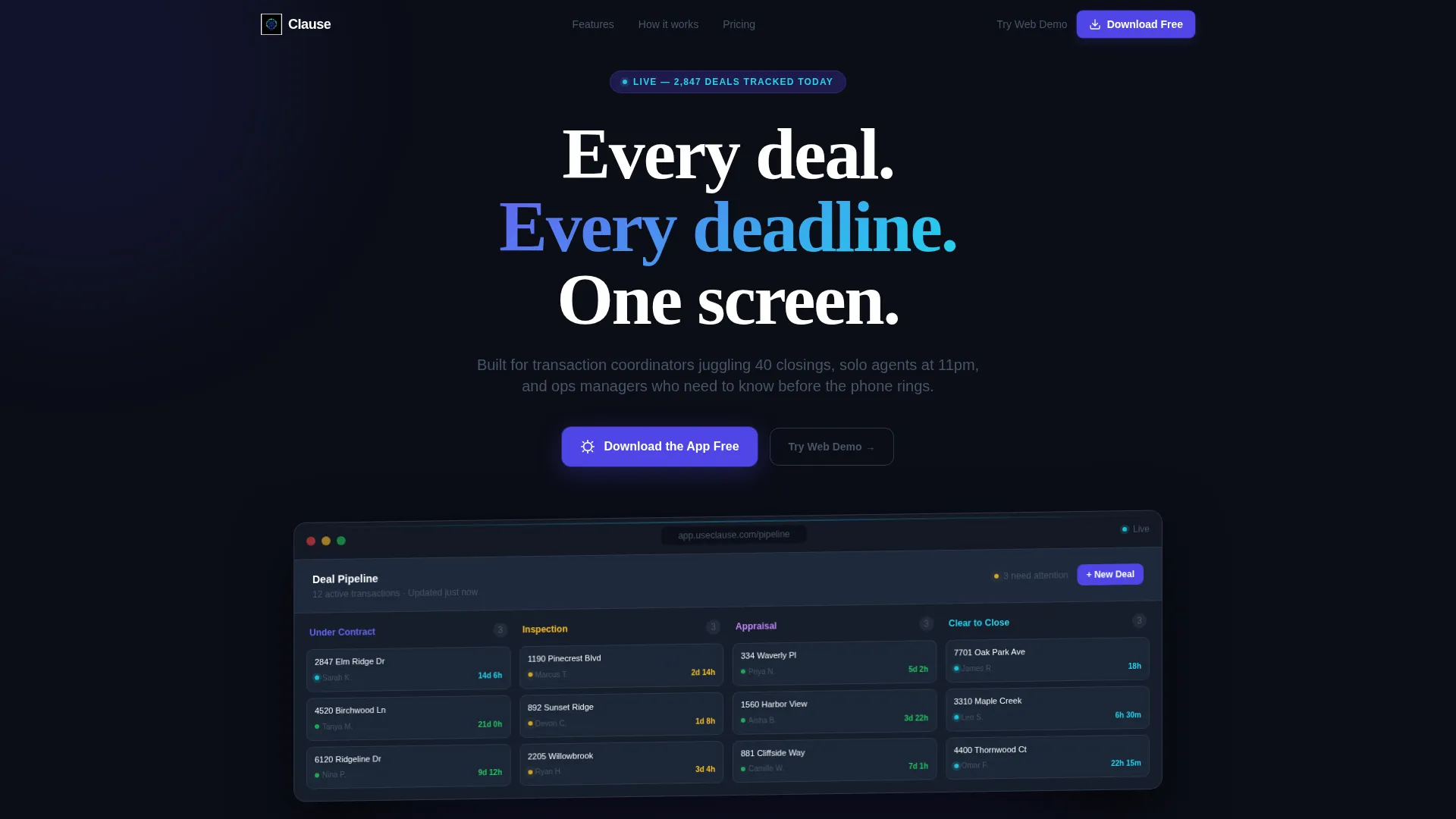
- A pixel-rendered product screenshot header with a 3D-tilted deal pipeline view and a bold headline
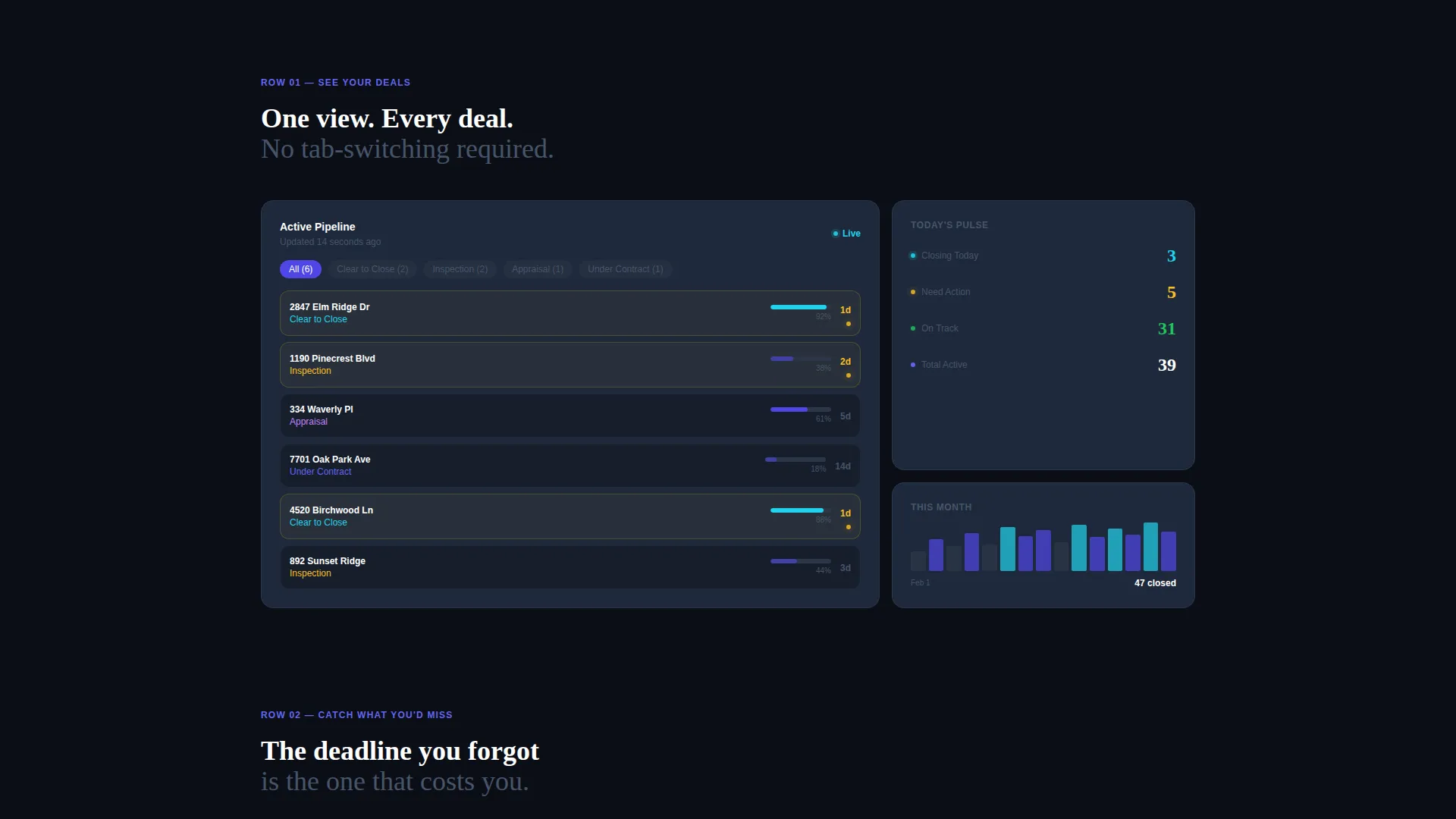
- A three-row Interactive Explorer bento grid where each card is a clickable micro-experience
- A primary app download call to action with App Store and Google Play badge placement, plus a sticky mobile bottom bar and a secondary web demo path
Feature list
This template is built around six distinct design and interaction capabilities drawn directly from the source brief.
Pixel-Perfect Product Screenshot Header
The header places a high-fidelity render of the app's deal pipeline view on a deep void black background. The image is slightly rotated on a subtle 3D axis. Twelve deal cards are visible inside swim lanes labeled "Under Contract," "Inspection," "Appraisal," and "Clear to Close." Each card shows an address, a countdown timer, and colored status dots. The headline "Every deal. Every deadline. One screen." sits above in tight white medium-weight type.
Three-Row Interactive Bento Grid
The bento grid is organized into three escalating rows. The first row focuses on deal visibility. The second row surfaces the details a user might otherwise miss. The third row demonstrates brokerage-level control. Each row increases in complexity so visitors feel they are progressing through the product, not reading about it.
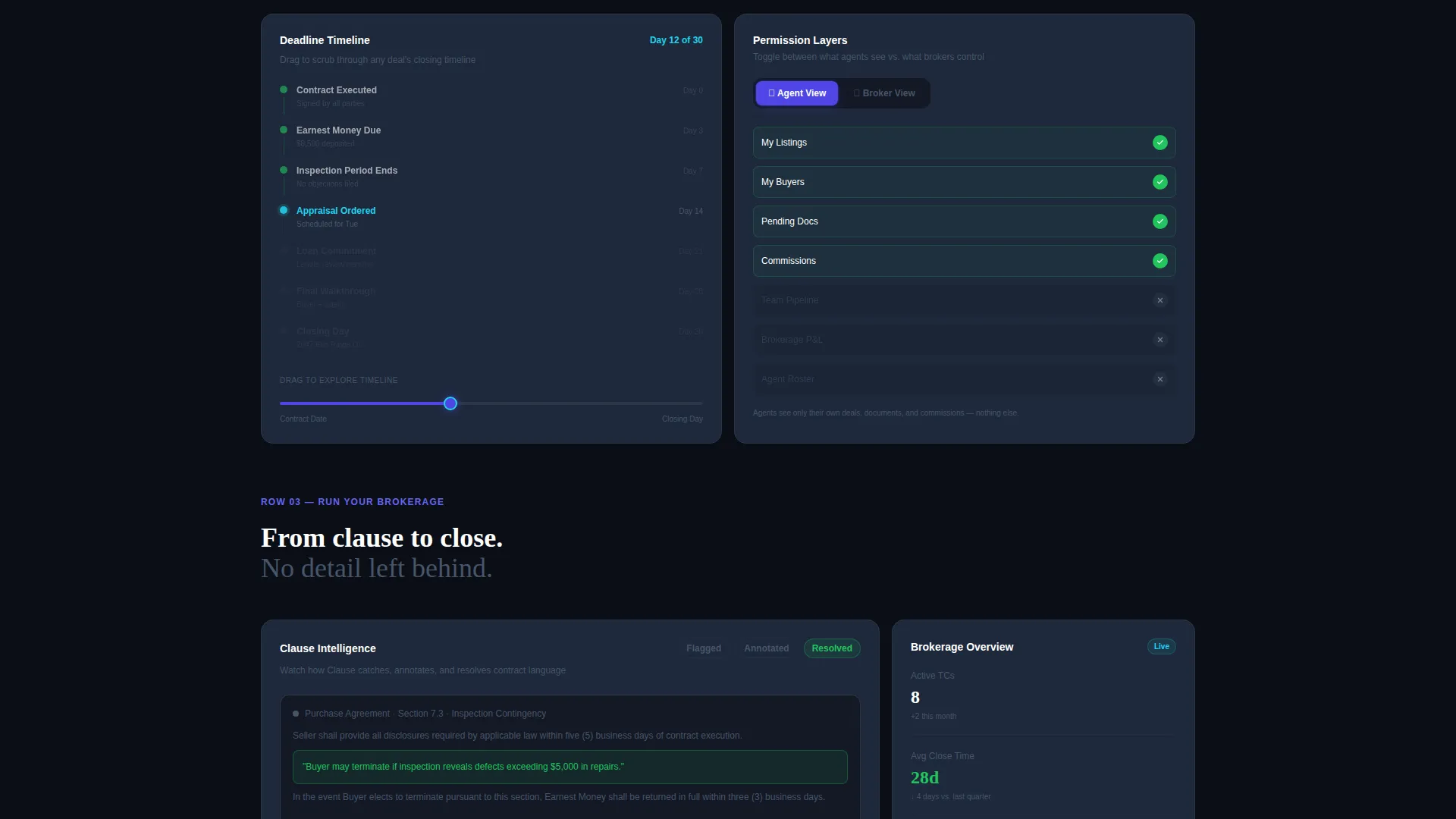
Expandable Deadline Tracking Card
One bento card expands to reveal an automated deadline tracking view with a timeline scrubber. Visitors can drag the scrubber to explore how deadlines shift across the contract lifecycle. This turns a passive feature description into a tactile moment of understanding.
Agent and Broker Permission Toggle
A dedicated card lets visitors toggle between agent view and broker view. The toggle demonstrates how role-based permissions change what each user sees inside the platform. This is especially relevant for brokerage operations managers evaluating the tool for their team.
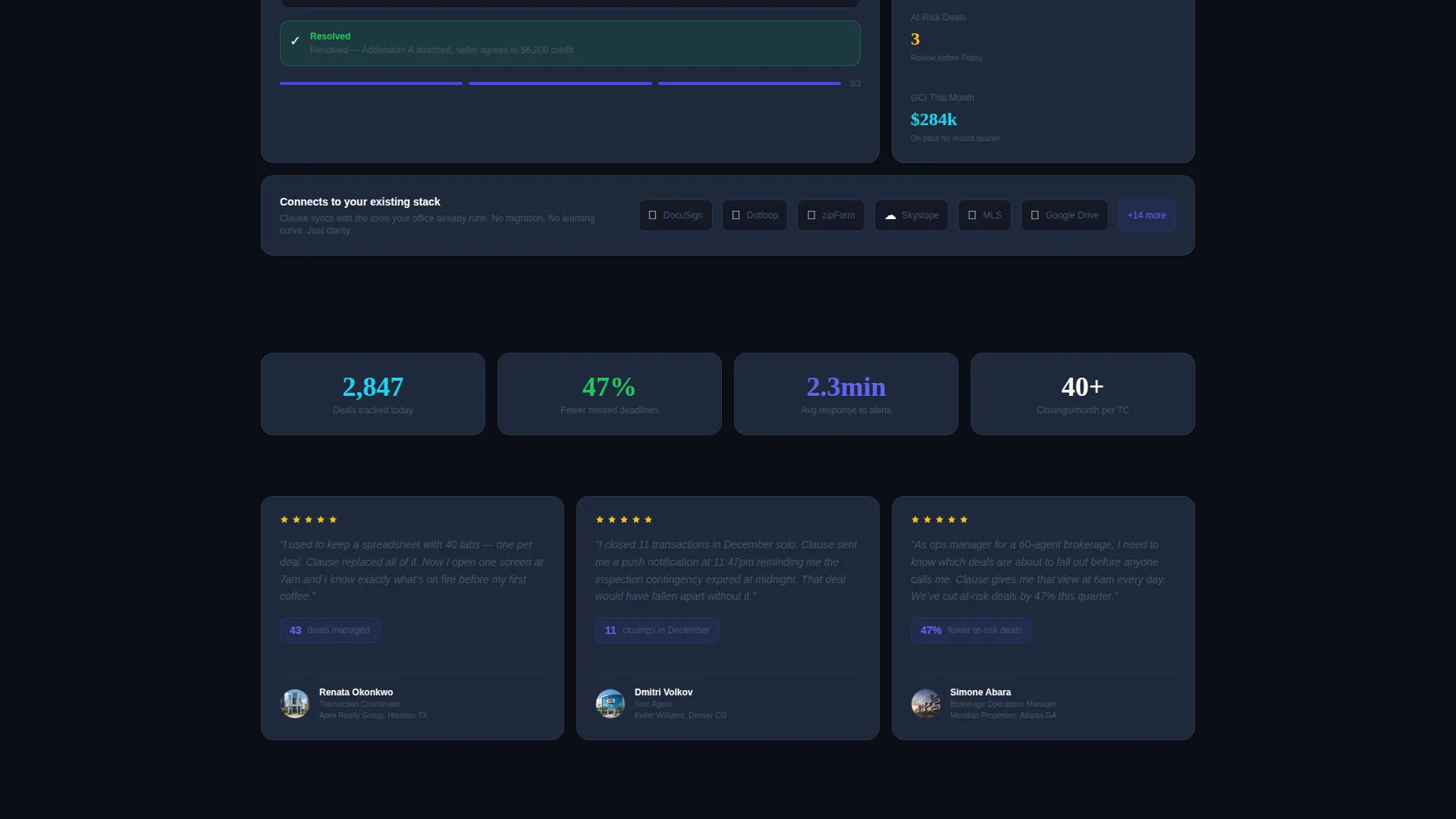
Clause Flagging Animation Loop
A third interactive card plays a five-second loop showing a contract clause being flagged, annotated, and resolved. The loop is self-contained and repeating, so visitors who pause on that card see the full workflow without any extra input required.
Dual-Path App Download Call to Action
The primary call to action reads "Download the App Free" and pairs App Store and Google Play badges in the header. A sticky bottom bar repeats this on mobile. Desktop visitors see a secondary "Try the Web Demo" path. This dual structure captures both ready-to-install visitors and those who prefer to explore first.
Page sections overview
| Section | Purpose |
|---|---|
| Product Screenshot Header | Establishes the platform visually and anchors the headline |
| Primary App Download call to action | Drives immediate installs with badge-linked download buttons |
| Bento Row One | Shows the core deal pipeline view at a glance |
| Bento Row Two | Highlights deadline and clause details visitors would otherwise miss |
| Bento Row Three | Demonstrates full brokerage-level oversight and permissions |
| Secondary Web Demo call to action | Captures desktop visitors who want to explore before committing |
| Mobile Sticky Bottom Bar | Repeats the app download prompt persistently on smaller screens |
Design & branding system
The template uses a Data Command color system built for focus and hierarchy. Every color carries a specific role and nothing is decorative.
- Deep void black (#0B0E17) fills all backgrounds to create a dark, mission-control feel
- Electric indigo (#4F46E5) owns buttons, progress bars, and section dividers to direct attention
- Cool slate (#1E293B) surfaces bento card backgrounds to separate content from the void
- Signal cyan (#22D3EE) appears only on live-state indicators, status dots, hover pulses, and updating counts
Mobile & speed optimization
The template is built with mobile conversion as a first-class concern, not an afterthought. The sticky bottom bar ensures the app download call to action is always within reach on any screen size.
- The sticky app download bar persists at the bottom of the screen on mobile devices throughout the full scroll
- The dual-path call to action adapts so mobile visitors see the download prompt and desktop visitors see the web demo option
- Bento card interactions are designed to remain usable on touch screens without requiring hover states
How this template helps you convert
This template earns the conversion before asking for it. Visitors interact with real product mechanics inside the bento grid, which means the download feels like a natural continuation rather than a leap of faith.
- The product screenshot header immediately communicates the platform's core value by showing the actual deal pipeline, so visitors understand what they are downloading before reading a single word of body copy.
- The escalating bento grid hands visitors controls at each row, letting them drag timelines, toggle permissions, and watch a clause get resolved. By the third row, they have already used the product in miniature.
- The dual call-to-action structure removes friction by offering both a direct app download and a no-commitment web demo, so visitors at different stages of readiness both have a clear next step.
Other information about this template
This template is designed specifically for the real estate software category within the broader technology sector. It is well suited for teams building or marketing a real estate contract management tool.
- The template style is Bento Grid, making it flexible for showcasing multiple platform features without a linear scroll narrative
- The creative direction is Interactive Explorer, meaning the page is built around visitor-driven discovery rather than passive reading
- The header concept is Product Screenshot, which positions the actual software interface as the central visual rather than abstract illustrations
- The landing page direction is App Download, so every structural decision points toward a mobile install or a web demo session
- The theme is Data Command, reflecting a focused, high-information visual language suited to professionals who work with contracts and deadlines under pressure
Theme
Data Command
Creative direction
Interactive Explorer
Color system
Electric Indigo
Style
Bento Grid
Direction
App Download
Page Sections
3D Product Screenshot Header
Escalating Three-row Bento Grid
Draggable Deadline Timeline Card
Agent and Broker View Toggle
Clause Flagging Animation Card
Dual-path App Download Call to Action
Related questions
Who is this landing page template built for?
Does the template include the interactive card behaviors out of the box?
Is the sticky mobile bottom bar included in the template?
Can I use this template for a web platform instead of a mobile app?
Can I customize the bento grid card layout?



