Complete Government Software Privacy Policy & Terms Website Template
Clearance is a scroll reveal landing page template built for government document management platforms. It combines a dark command-center aesthetic with progressive section reveals, animated data widgets, and a multi-step lead capture form. Agencies can use it to present secure document services, compliance tracking, and audit trail capabilities to county clerks, state directors, and municipal IT leads.
by Rocket studio
Quick summary
Clearance is a single-page, scroll-triggered landing page template designed for government document management platforms. It uses a deep navy command-center visual identity, live data widgets, and a step-by-step demo request form to convert agency decision-makers into qualified leads. Every section powers on progressively as the visitor scrolls, building trust before asking for contact details.
Who this template is for
This template serves organizations that sell or deploy document management services to public sector clients. It speaks directly to the people sitting across the table from legacy paper systems every day.
- County clerks and records officers managing high volumes of physical and digital files
- State agency directors and compliance officers facing audit deadlines and retention schedule obligations
- Municipal IT leads tasked with digitizing decades of paper records on a constrained budget
What problem this template solves
Government agencies handle sensitive data across dozens of departments, and the risk of something expiring unnoticed or getting lost between teams is real. Most existing web presences for document management platforms fail to communicate security, compliance, or retrieval speed in a way that resonates with government buyers.
- Agencies need a site that signals security-first practices before a visitor even reads the headline
- Procurement leads need to identify platform capabilities quickly, without wading through generic marketing copy
- Decision-makers need to see retrieval speed and audit capability demonstrated before they decide to request a demo
What you get with this template
This template gives you a fully structured, production-ready landing page layout with every section, animation trigger, and form step already designed. You get a high-fidelity starting point that reflects government web standards and data command aesthetics.
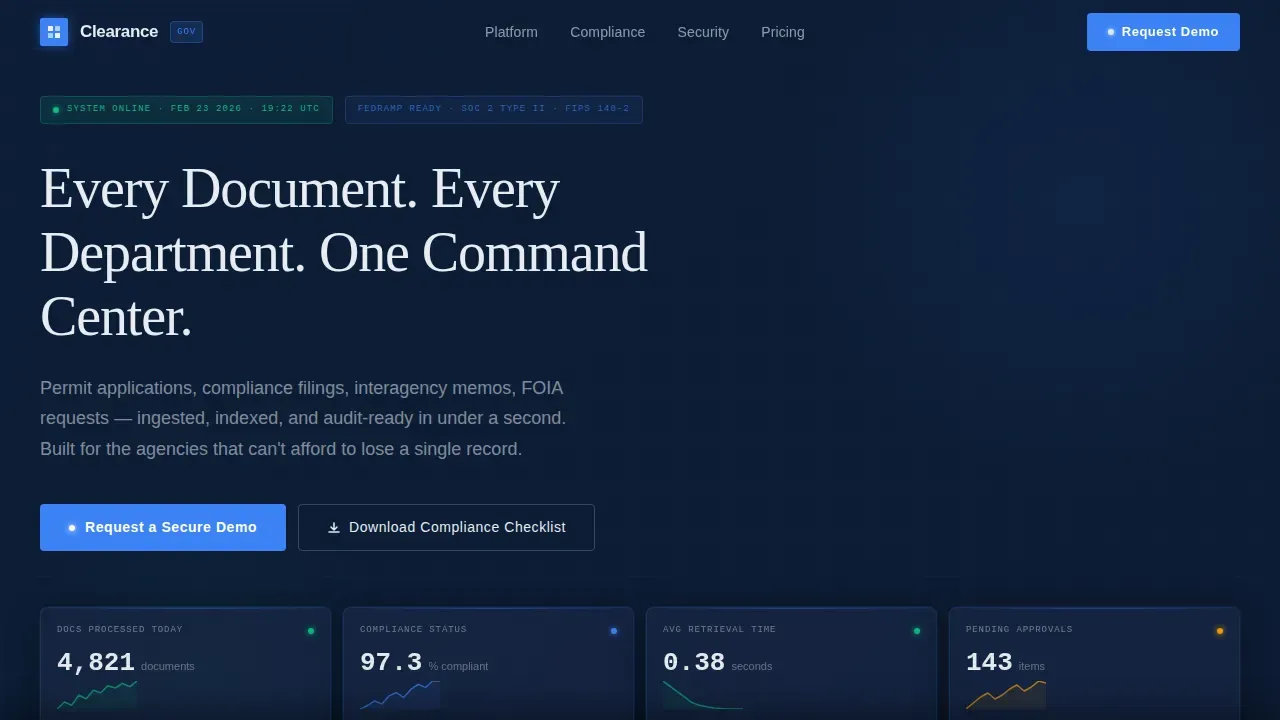
- A hero section with four live data widgets, a typewriter headline, and a clear call-to-action button
- Five progressively revealed content modules covering ingestion, search, compliance tracking, audit trail, and lead capture
- A three-step progressive disclosure form and a secondary gated PDF download path for softer lead capture
Feature list
This template includes a focused set of design and layout features grounded in the needs of government document management marketing. Each element is built to move a cautious public-sector buyer toward action.
Dark Glass Panel Hero
Four translucent frosted-glass rectangles float against a deep navy background, each displaying a different live data widget: documents processed today, compliance status across departments, average retrieval time, and pending approvals by priority. No stock photography is used. The product interface is the visual.
Typewriter Headline Animation
A single headline types itself onto the screen letter by letter on page load. This draws the visitor's eye immediately and sets an operations-center tone that resonates with users accustomed to live-feed dashboards and command interfaces.
Scroll-Triggered Power-On Modules
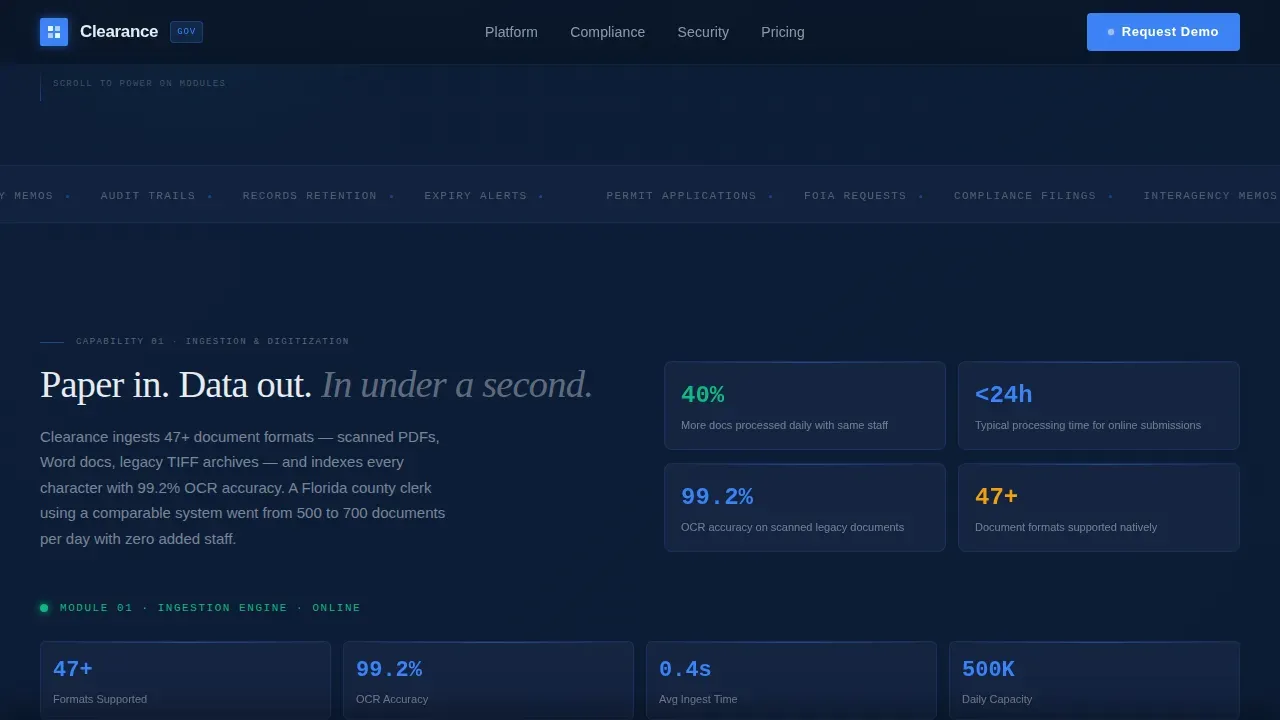
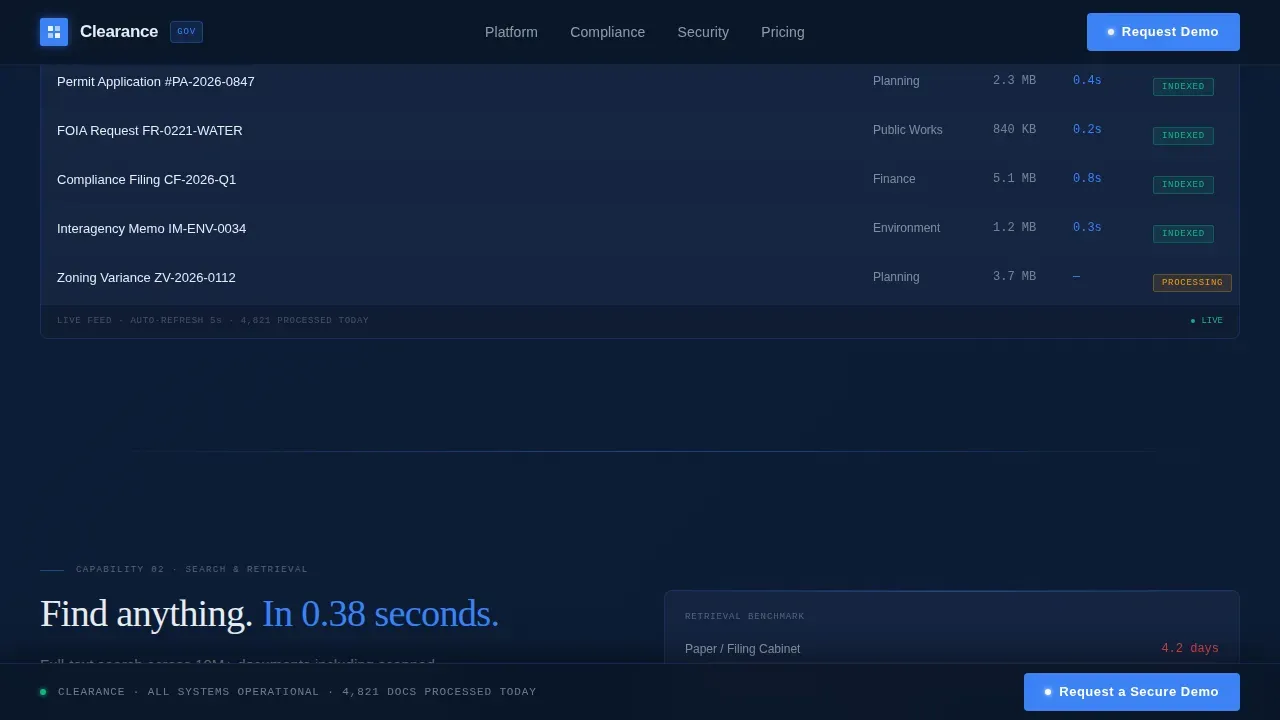
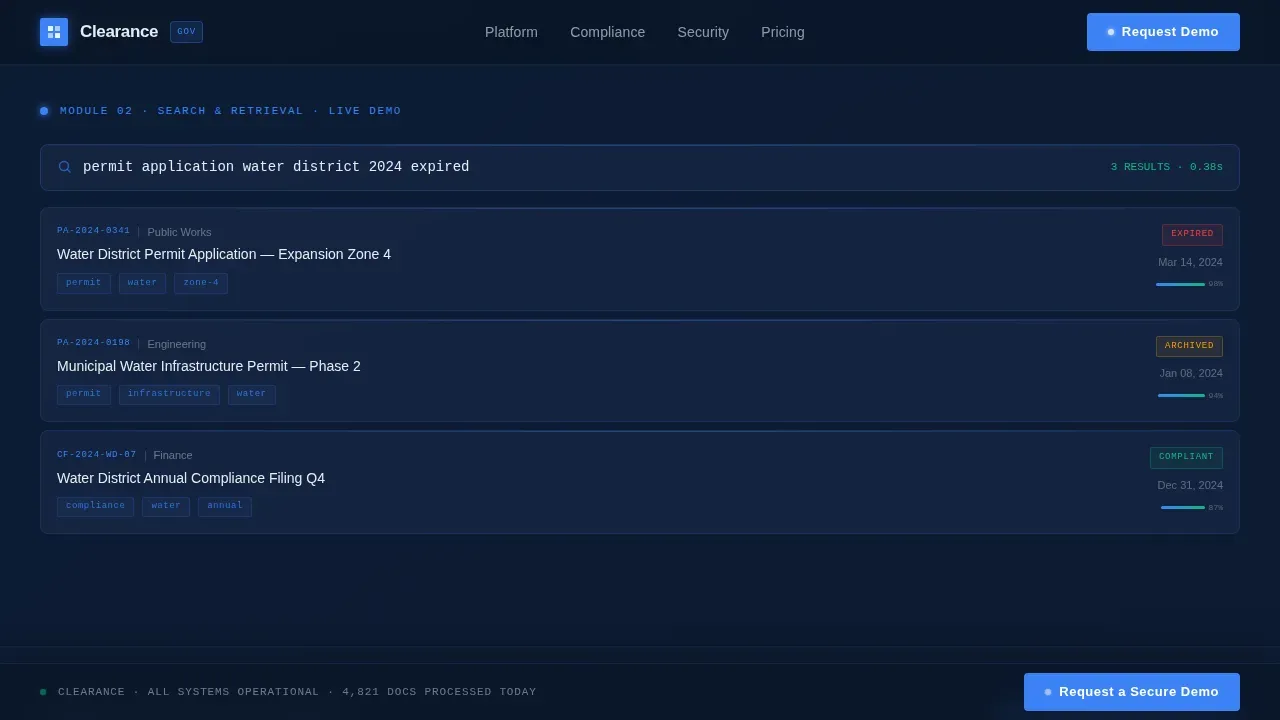
Each content section reveals itself with a subtle power-on flicker as the visitor scrolls. Ingestion and digitization lights up first. Then search and retrieval activates. Then compliance tracking initializes. Then the audit trail unfolds. The sequence builds momentum and explains platform capabilities in a logical order.
Three-Step Progressive Demo Form
The lead capture form uses progressive disclosure across three steps. Step one asks for agency name and state. Step two presents a dropdown for estimated document volume. Step three asks about the current records system. This format reduces friction and helps the platform qualify leads by agency size and maturity.
Gated Compliance Checklist Download
A secondary conversion path offers a downloadable compliance readiness checklist gated behind an email and role title. This captures visitors who are researching but not yet ready to request a demo, keeping them in the pipeline without pressure.
Sticky Call-to-Action Navigation
After the second scroll module, the primary call-to-action button pins to the bottom navigation bar for the remainder of the page. Users never have to scroll back up to take action once the platform has earned their trust through the content modules.
Page sections overview
| Section | Purpose |
|---|---|
| Hero Command Center | Display live data widgets and typewriter headline to establish platform authority |
| Ingestion Module | Show document digitization capability with scroll-triggered power-on animation |
| Search and Retrieval | Demonstrate sub-second search with an animated live demo query |
| Compliance Tracking | Visualize self-managing deadlines via a timeline animation |
| Audit Trail and call to action | Unfold flight recorder playback and present the primary demo request form |
| Footer | Provide linear single-row links and secondary navigation |
Design & branding system
The visual identity follows a Data Command theme rooted in a Midnight Blue color system. Every color choice is engineered to reduce eye fatigue during extended sessions and to convey the calm authority of a well-run operations center.
- Deep command-center navy (#0A1628) dominates backgrounds; tactical slate (#1B2A4A) separates content blocks; cold interface white (#E8ECF1) carries body text and data labels
- Signal-blue (#3B82F6) pulses on buttons, toggle states, and progress indicators, giving users a consistent live-system feedback cue
- Typography uses Manrope for labels and body copy, a display face for headlines, and JetBrains Mono for data and code elements to reinforce the command-interface format
Mobile & speed optimization
The template is built desktop-first to match the operations-center aesthetic, with a mobile responsive fallback ensuring the layout remains functional on tablets and smartphones. Government procurement research happens across devices, so the page stays usable regardless of screen size.
- Scroll-triggered animations and interactive elements use client-side components, keeping static content lean and fast to render
- The sticky call-to-action and progressive form steps are optimized for touch interaction on smaller screens
- High-contrast text and clear visual hierarchy support accessible reading across device types and ambient lighting conditions
How this template helps you convert
The page is structured to earn trust before it asks for anything. This mirrors the deliberate, evidence-first decision-making process that government procurement teams follow.
- The live data widgets and animated demo modules demonstrate platform value visually, so users understand retrieval speed and audit capability before they reach the form
- The three-step progressive form reduces perceived effort and helps qualify leads by volume and current system type, giving the platform team better context for follow-up
- The secondary checklist download gives cautious visitors a low-commitment way to engage, keeping more of the site's traffic inside a conversion path
Other information about this template
This template is designed around real government document management practices and web guidelines. It reflects the kind of clarity and structure that federal websites and state agency web properties are expected to maintain.
- The color contrast ratios and layout structure support accessible, user friendly presentation aligned with government web standards
- The template can support messaging around compliance frameworks such as FedRAMP High, NIST 800-53, and SOC 2 Type II, as well as NARA-compliant retention schedule policies and redaction tools for sensitive data management
- Role-based access control, two-factor authentication messaging, and granular permission language are all accommodated by the copy framework built into this template
- The page explains platform value in plain language, reducing anxiety for citizens and agency staff who are less familiar with technical procedures
- Teams can use the template to streamline their go-to-market launch and scale outreach across multiple government agencies without rebuilding from scratch
- The gated checklist section is well-suited for organizations that need to prepare prospects before a full demo conversation
- Social proof placeholders accommodate benchmark stats, agency logos, and throughput metrics that help build credibility with risk-averse government customers
- The template provides practical guidance and a consistent format for presenting document management services to public sector audiences, whether on premises deployments or cloud-based platforms are being promoted
Theme
Data Command
Creative direction
Launch Energy
Color system
Midnight Blue
Direction
Lead Generation
Page Sections
Dark Glass Panel Hero Section
Scroll-triggered Power-on Animations
Three-step Progressive Demo Form
Sticky Call-to-action Button
Gated Checklist Download Path
Animated Compliance and Audit Modules
Related questions
Who is this landing page template designed for?
What sections are included in the template?
Does the template support lead capture?
Can I use this template to communicate compliance and security standards?
Is this template suitable for promoting cloud-based and on-premises solutions?



