Government Digital Presence Careers Website Template
The Clearance landing page template is built for federal training platforms that need to serve mid-career civil servants, agency coordinators, and contractors at scale. It uses an interactive course discovery header, a sticky anchor navigation bar, and dense specification-style sections to guide every visitor from first impression to app download without friction or guesswork.
by Rocket studio
Quick summary
Clearance is a hub and spoke landing page template designed for government course and training platforms. It combines an interactive course discovery header with spec-sheet section layouts to let federal employees, contractors, and agency coordinators browse a deep training catalog and download the app before they leave the page.
Who this template is for
This template is built for teams launching or scaling a federal training program. Users arrive with specific needs and limited time, so the layout is designed to surface the right course fast.
- Mid-career GS-11 through GS-13 employees pursuing promotion certifications and compliance training before fiscal year close
- Agency training coordinators who need to bulk-enroll cohorts and review department-wide program availability
- Contractors and new hires who need to understand position requirements, clearance procedures, and initial security training obligations before accessing sensitive systems
What problem this template solves
Federal employees and contractors face a fragmented training landscape. They need to find applicable courses fast, understand prerequisites, and confirm that each program aligns with their agency, GS-level, and Office of Personnel Management (OPM) competency framework. A generic landing page cannot do that work.
- There is no clear point of entry for users who arrive without context and need to recognize which training applies to their role
- Agency coordinators cannot efficiently research, request, or release cohort enrollments without structured metadata and a clear process
- The personnel security clearance process involves position designation levels, investigation tiers, and self-reporting responsibilities that new hires need to understand immediately
What you get with this template
This template delivers a complete, structured landing page that guides every audience segment from discovery to download. Each section is developed with dense, scannable layouts rather than marketing prose.
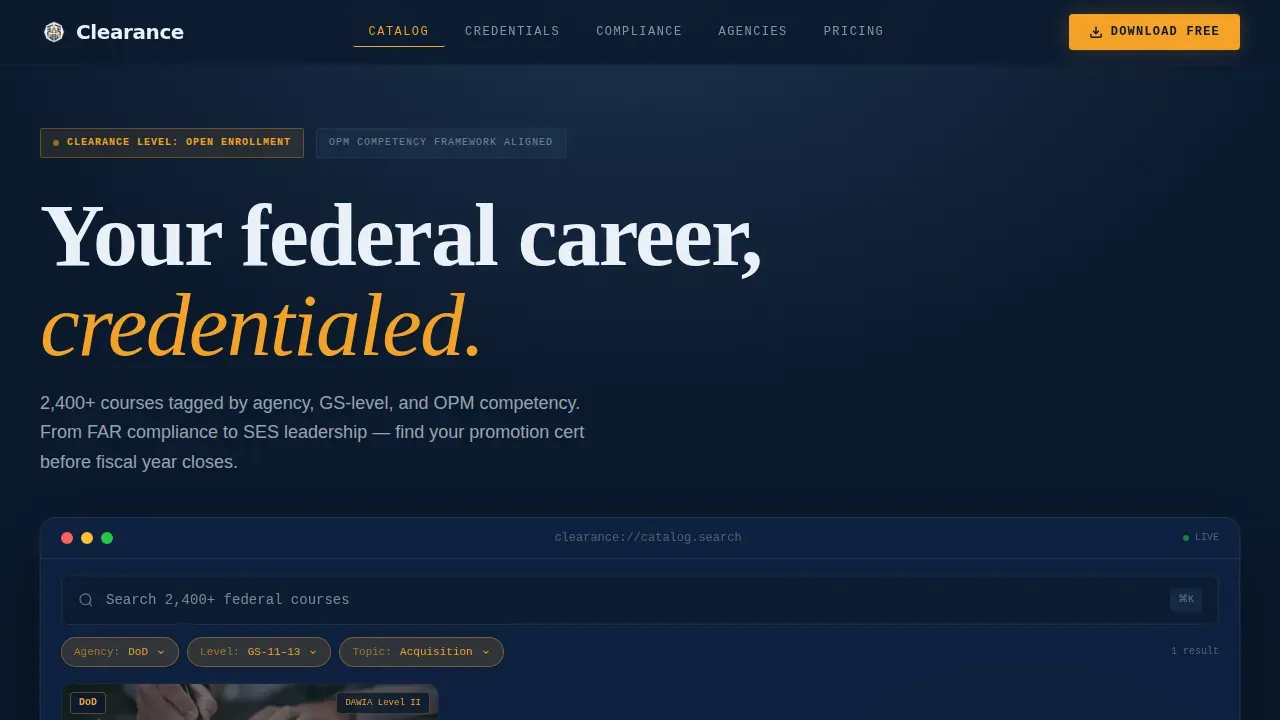
- An interactive header that renders a functioning course discovery terminal with live filter chips, card grid shuffle, and a blinking cursor so visitors can access real catalog data before committing
- Five anchor-linked hub sections covering Catalog, Credentials, Compliance, Agencies, and Pricing, each with structured metadata tables, stat blocks, and a repeated app download call to action
- A download interstitial modal with a platform toggle, agency email domain field for automatic.gov verification, and a GS-level selector that pre-configures the catalog on first launch
Feature list
This template highlights the core capabilities built into the Clearance layout. Each feature is grounded in what the prompt defines and what federal training audiences need.
Interactive Course Discovery Header
The header renders a micro-version of the app's course discovery screen directly in the browser. Visitors see a search bar, three active filter chips (Agency, Level, Topic), and a live card grid that re-sorts as filters are tapped. Each card displays a course seal, hour count, CEU value, and completion badge preview. This is the pitch and the proof in a single section.
Sticky Anchor Navigation Bar
A persistent navigation bar links to each hub section: Catalog, Credentials, Compliance, Agencies, and Pricing. Active states are highlighted in amber. The bar keeps users oriented as they scroll through dense specification content, functioning the way an analyst moves through a capabilities document.
Spec-Sheet Course Catalog Section
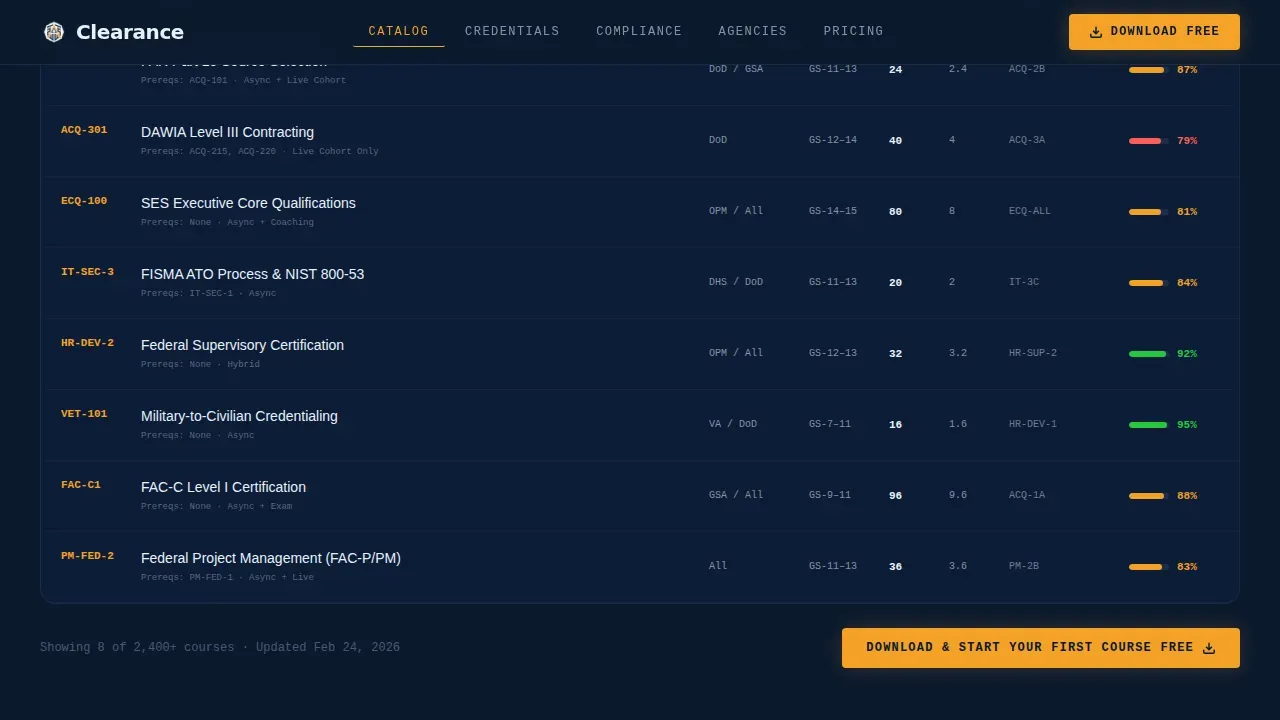
The Catalog hub section presents courses in structured metadata tables. Each row displays prerequisite chains, OPM competency alignment codes, average completion time, and pass rates. This format mirrors how federal procurement documents present information, which builds confidence through completeness rather than persuasion.
Credentials and Compliance Hubs
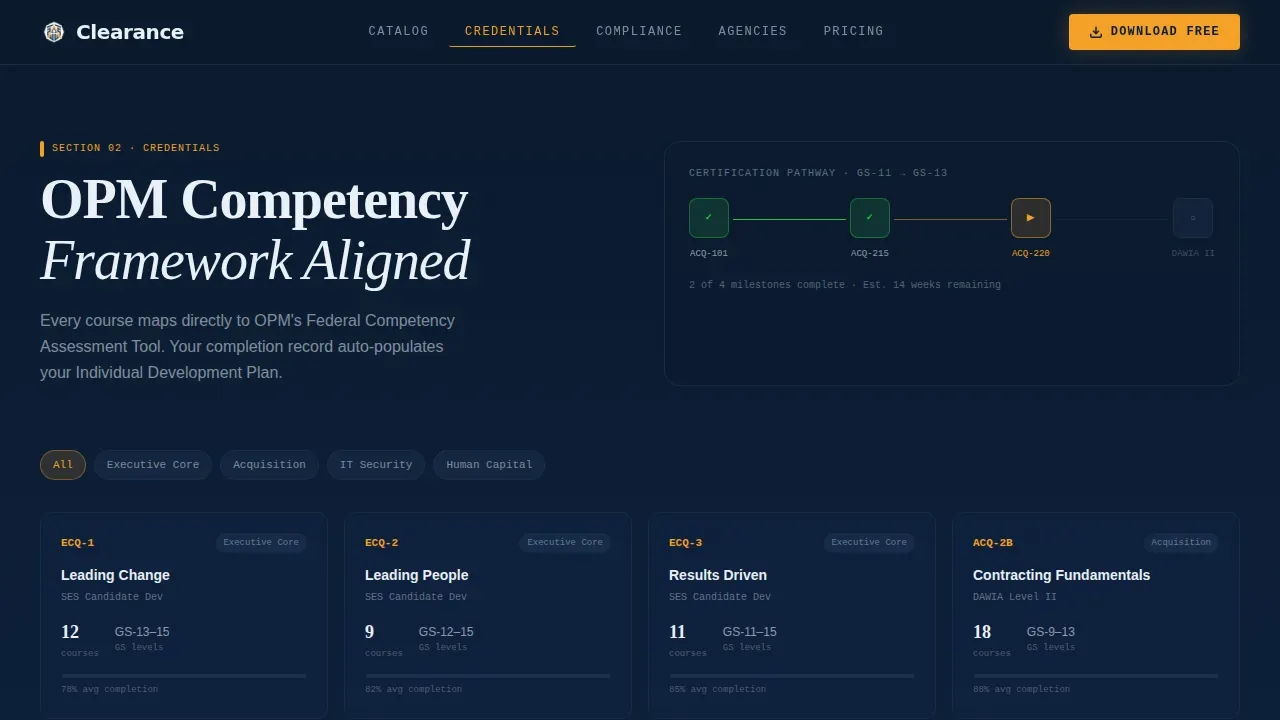
The Credentials section displays OPM competency framework alignment and certification pathways. The Compliance section addresses procedures relevant to federal security training, including annual security refresher training requirements and safeguarding obligations. Both sections use stat blocks and specification tables to keep information dense and scannable.
App Download Interstitial Modal
The primary call to action reads "Download and Start Your First Course Free." On mobile it is pinned to the bottom of the viewport. On desktop it appears inside the interactive header. Tapping opens a slim modal with a platform toggle, a.gov email verification field, and an optional GS-level selector. The app is the full version of what visitors already touched in the header.
Agency Trust and Pricing Sections
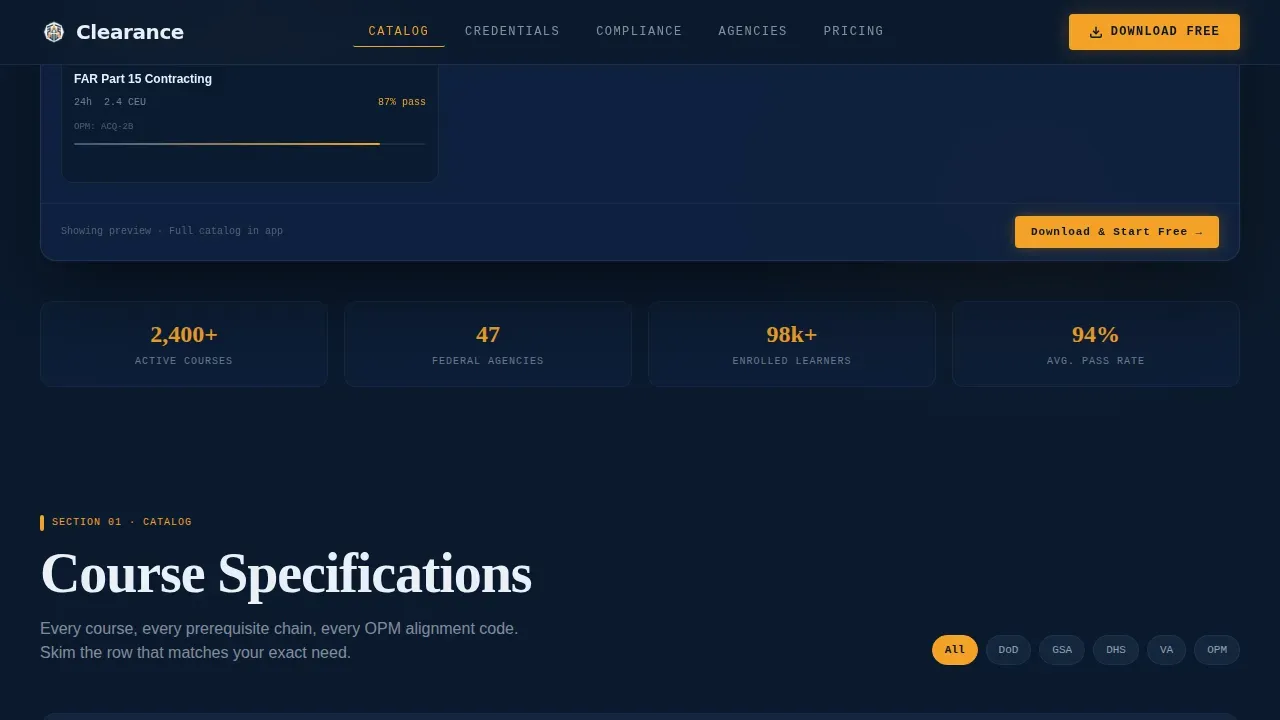
The Agencies section includes a federal agency trust wall and bulk enrollment statistics. The Pricing section uses a tiered table framed by GS-level context. Both sections close with a repeated download call to action so every scroll path ends at the same conversion point.
Page sections overview
| Section | Purpose |
|---|---|
| Hero Interactive Terminal | Live filter and card grid discovery experience |
| Catalog Spec Table | Dense course metadata with OPM codes and pass rates |
| Credentials Pathway Visual | Competency alignment and certification roadmap |
| Compliance Training Hub | Security procedures, safeguarding obligations, annual refreshers |
| Agencies Trust Wall | Federal agency logos and bulk cohort enrollment stats |
| Pricing Tier Table | GS-level framed pricing and download call to action |
| Download Interstitial Modal | Platform toggle,.gov verification, GS-level pre-configuration |
| Footer Linear Row | Single-row footer with contact links and reference details |
Design & branding system
The visual identity follows a Directory and Discovery theme built on a Midnight Blue color system. The palette reads like a secure terminal in a quiet environment: authoritative darkness with precise, intentional highlights.
- Deep federal navy (#0B1A2E) as the primary background, steel-bright white (#EAF0F7) for body text and card surfaces, and muted slate (#3D5A80) for secondary containers and inactive navigation states
- High-clearance amber (#F4A127) reserved exclusively for call-to-action buttons, progress indicators, and active anchor highlights to create clear visual hierarchy
- Typography uses DM Sans for interface and body text, Fraunces for display headlines, and IBM Plex Mono for metadata fields and codes, reinforcing the classified briefing folder aesthetic
Mobile & speed optimization
This template is built mobile-first because mid-career GS-12 employees are enrolling at midnight on their phones. Desktop parity is maintained for agency coordinators who manage bulk enrollment during business hours.
- The app download call to action is pinned to the bottom of the viewport on mobile so the conversion point is always visible without scrolling
- Server Components handle static sections to keep page load lean, while Client Components power the interactive header and sticky navigation for a responsive feel across devices
- Course cards use floating parallax motion and the sticky anchor bar adapts to viewport height, keeping navigation accessible on both small and large screens
How this template helps you convert
The Clearance template earns the download by letting visitors interact with real course data before they commit. Confidence builds through completeness, not persuasion.
- The interactive header functions as the pitch itself. Visitors filter, browse, and engage with actual course cards before ever seeing a traditional call to action. The app is simply the full version of what they already explored.
- Spec-sheet section layouts pre-answer every buyer question. Metadata tables define prerequisites, pass rates, OPM codes, and completion times so users never need to request additional information from a support contact.
- The download interstitial removes enrollment friction at the final step. Agency email verification, platform selection, and GS-level pre-configuration mean the catalog is ready to use the moment the app opens.
Other information about this template
This template is developed with government training compliance context built into the content structure. Several facts about federal security obligations are relevant to how buyers should understand the training catalog this template is designed to present.
- Initial security training must be completed before accessing classified information. Landing pages that serve as a one-stop shop for these modules help implement that requirement efficiently.
- Mandatory annual security refresher training keeps personnel updated on insider threats and counterintelligence. These refreshers can be hosted and surfaced through a structured landing page that defines the applicable program by agency and date.
- The security authorization process must be completed according to DHS policies and procedures. Contractors are required to renew their Authority to Operate (ATO) every three years in accordance with DHS guidelines.
- DHS contractors must adhere to specific security training requirements outlined in their contracts. Contractors are required to provide adequate security to safeguarding controlled unclassified information (CUI) from unauthorized access and disclosure. CUI transmitted via email shall be protected by encryption or transmitted within secure communications systems.
- All known or suspected incidents involving personally identifiable information (PII) or sensitive personally identifiable information (SPII) shall be reported within one hour of discovery to the appropriate security operations center. Contractors shall provide full access and cooperation for all activities required to ensure an effective incident response.
- Contractors shall not use or redistribute any CUI handled, collected, processed, stored, or transmitted except as specified in their contracts. The safeguarding clause must be inserted in all subcontracts when subcontractor employees will have access to CUI.
- The personnel security program establishes standards, criteria, and guidelines for personnel security determinations. The clearance process involves position designation levels, investigation tiers, adjudication using the whole person concept and 13 guidelines, and periodic reinvestigation timelines.
- This template can support landing page goals where the page provides someone's first impression of a training program. Using plain language, active headlines, and clear spacing helps write content that connects with a broad government audience.
Theme
Directory & Discovery
Creative direction
Spec Sheet
Color system
Midnight Blue
Style
Hub & Spoke (Anchor Nav)
Direction
App Download
Page Sections
Interactive Course Discovery Header
Sticky Anchor Navigation Bar
Spec-sheet Catalog with Course Metadata
Credentials and Compliance Hubs
App Download Interstitial Modal
Agencies Trust Wall and Tiered Pricing
Related questions
Who is the primary audience for this template?
Does the template support federal security compliance training contexts?
How does the app download interstitial work?
Can agency training coordinators use this template for bulk enrollment?
Is this template suitable for contractors as well as federal employees?



