Computer Science Education Professional Website Template
Codekids is a sidebar companion landing page built for computer science video lesson libraries targeting kids aged 5 to 12. It guides families through a Scratch-to-Python learning path, showcases an interactive skill-finder quiz, and uses animated data storytelling to build trust. The joyful Dopamine Pop design makes coding feel like Saturday morning fun for the whole family.
by Rocket studio
Quick summary
Codekids is a single-page, sidebar companion landing page for a kids' computer science video lesson library. It combines animated data storytelling, a three-stage learning path, parent testimonials, and a five-question interactive skill finder. The result is a page that meets non-technical parents and curious kids exactly where they are, and guides both toward a personalized lesson plan.
Who this template is for
This template is built for EdTech creators, curriculum developers, and educators who want to sell or promote a computer science video lesson library to families. It speaks directly to parents who care deeply about their child's STEM education, even if they never learned to code themselves.
- Parents of children aged 5 to 12 who want structured, progressive computer science lessons at home
- Homeschool families building a formal STEM curriculum and looking for a clear learning path from beginner to intermediate
- EdTech founders or course creators launching a family-focused coding subscription or lesson library
What problem this template solves
Most parents want their kids to learn computer science but do not know where to start. Generic coding sites overwhelm families with jargon, skip skill assessment, and offer no clear path from beginner blocks to real programming languages. This template solves the confusion by showing exactly what progression looks like, and then proving it with real testimonials and an instant skill assessment.
- Kids and parents arrive with no shared frame of reference, and the page gives them one immediately through a visual, staged learning journey
- Parents worry their own lack of coding knowledge will hold their child back, and the template directly addresses that fear in its testimonials and copy
- Visitors leave other pages uncertain about where their child should start, so the skill finder quiz delivers a personalized lesson path before asking for any commitment
What you get with this template
This template is a fully structured, single-page layout designed for desktop-first display with a persistent sidebar and a mobile stack fallback. Every section is crafted to reduce friction and build confident, forward momentum for both parents and kids.
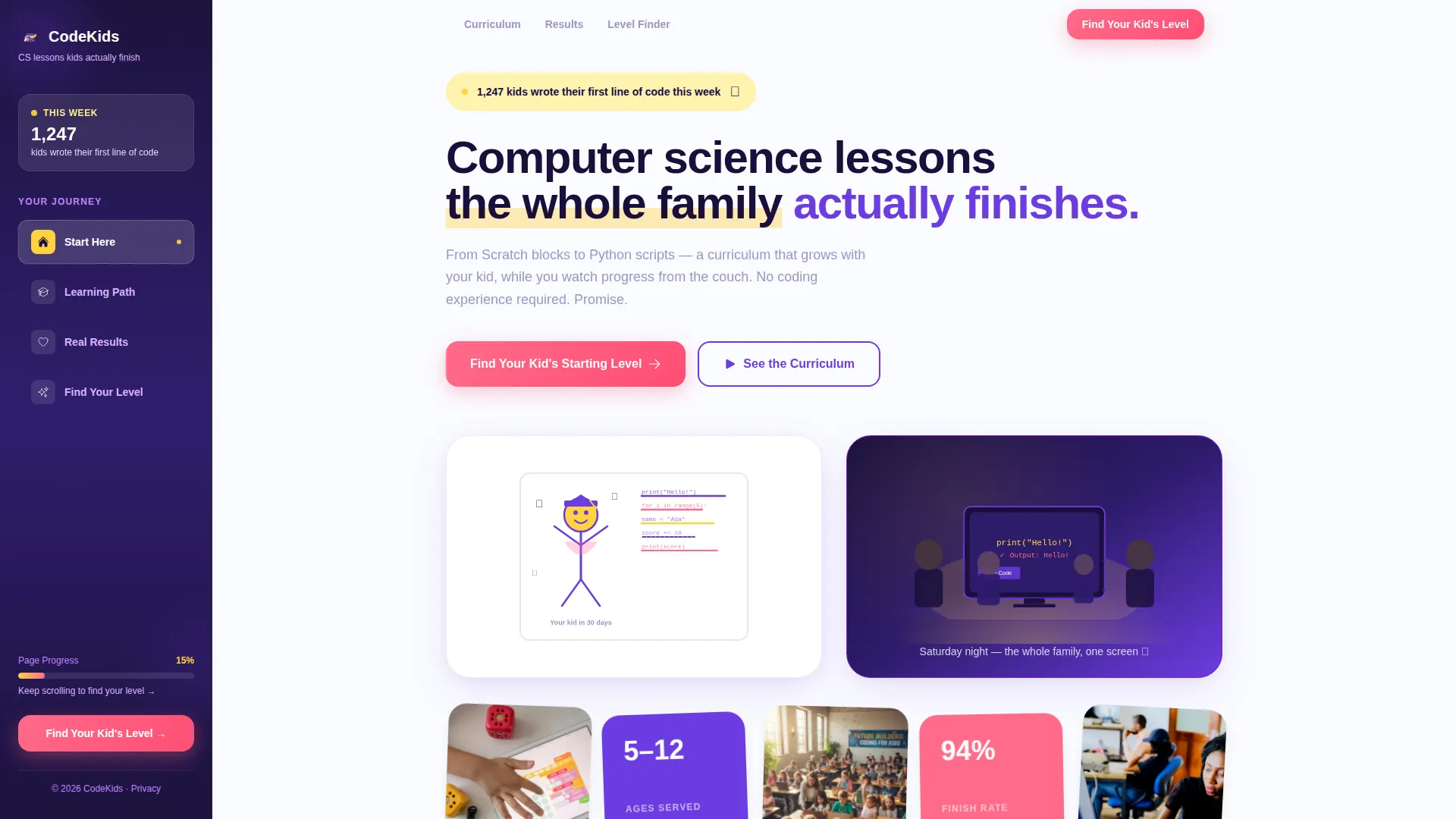
- An animated hero section with a live-tick counter, a self-drawing SVG illustration, and a family silhouette glow scene that sets the emotional tone in seconds
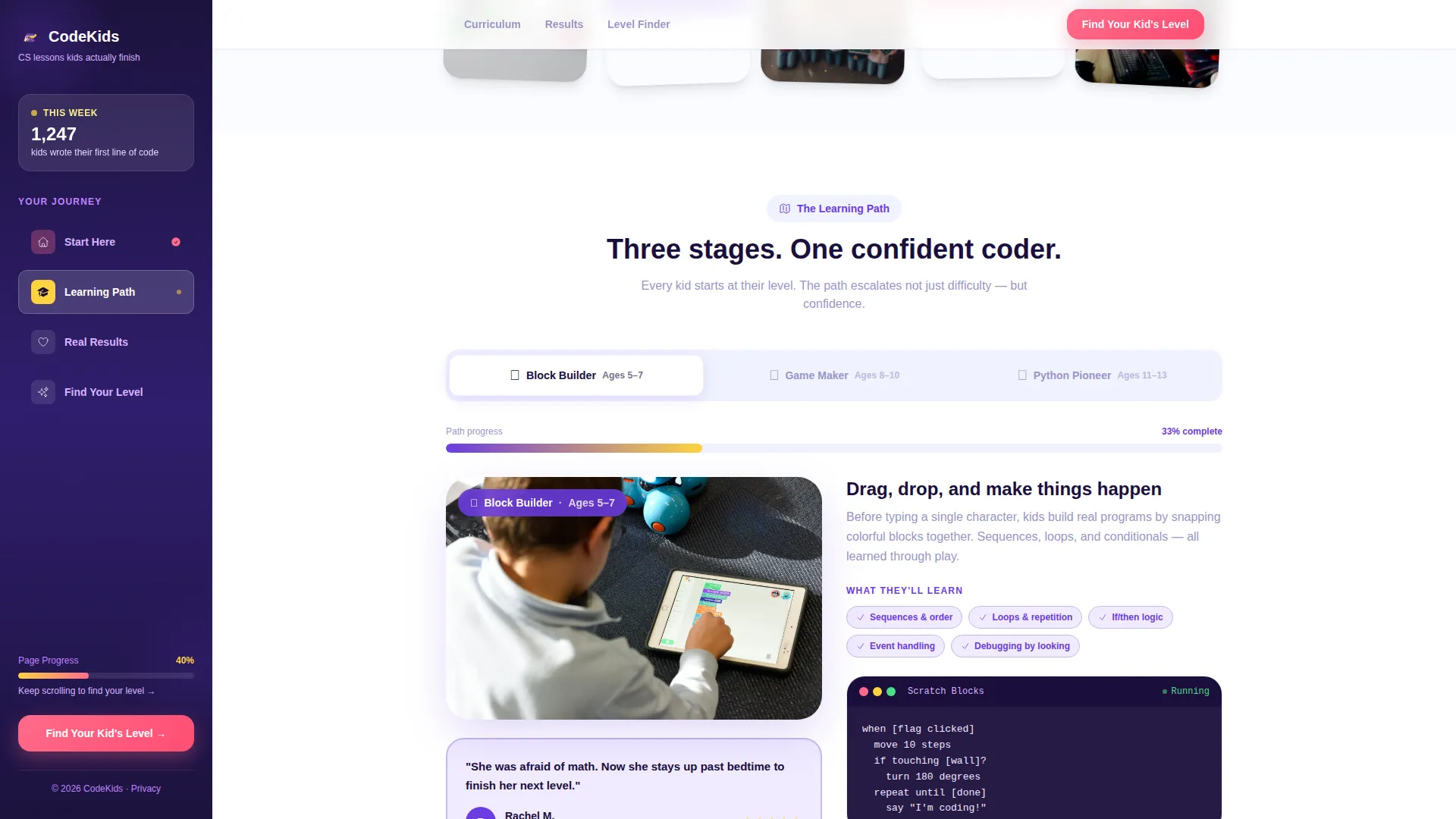
- A three-stage tabbed learning path showing Block coding, Game building, and Python scripting, each with a looping video panel and a glowing sidebar progress tracker
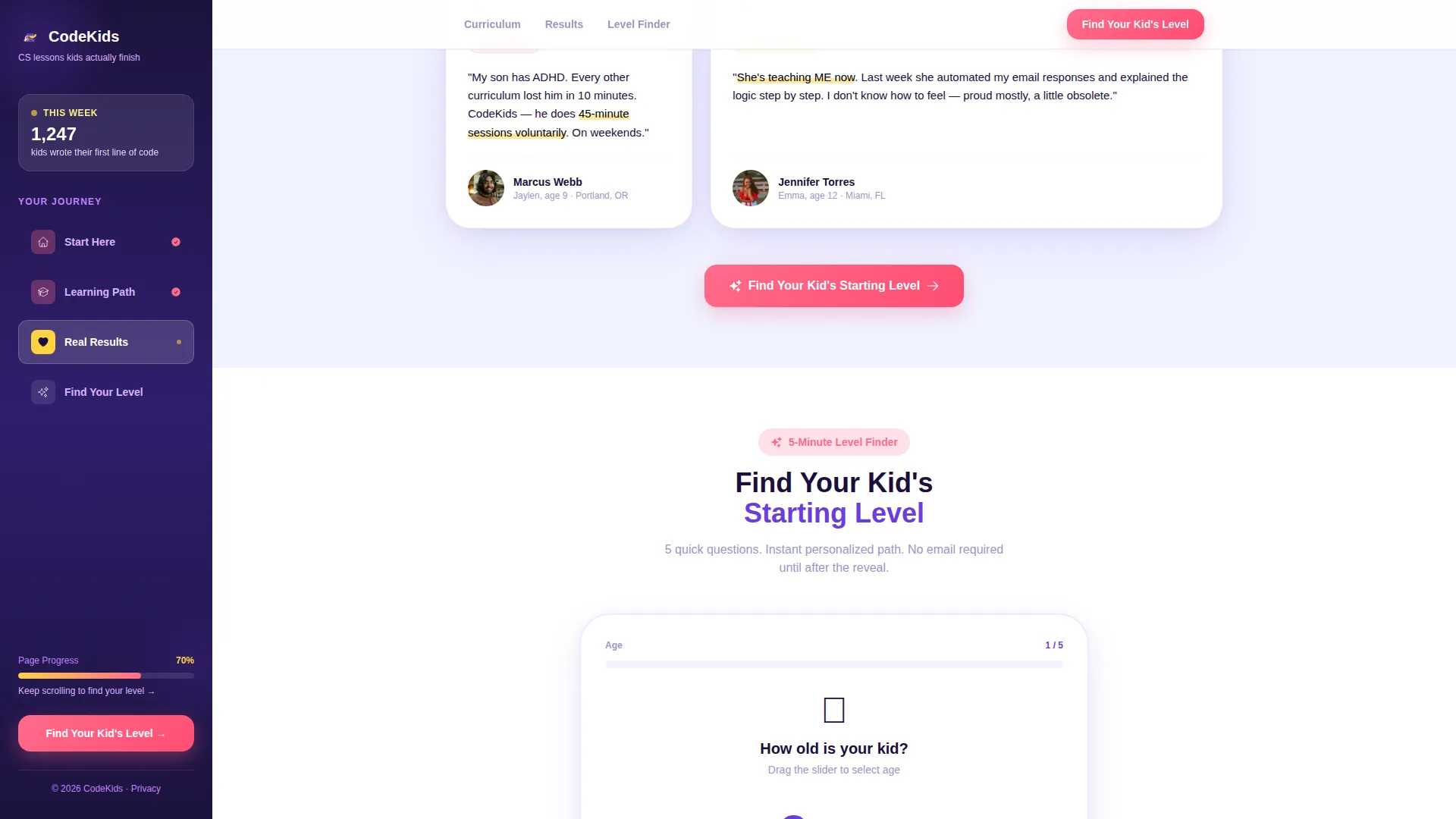
- A five-question interactive skill finder quiz that delivers an instant personalized lesson path, with an optional email capture offered only after the result is revealed
Feature list
Animated Data Counter in Hero
The hero opens with a counter that ticks upward in real time, displaying how many kids wrote their first line of code that week. This live-feel element builds immediate social proof and communicates scale without a single testimonial needed yet.
Self-Drawing SVG Illustration
A looping illustration animates directly on the page, showing a stick-figure character gain color, dimension, and movement as lines of readable, kid-friendly code appear beside it. The animation makes the abstract concept of coding tangible and inviting for kids and parents alike.
Three-Stage Tabbed Learning Path
The page structures the learning journey across three escalating stages: drag-and-drop block coding for beginners, simple game building for intermediate learners, and real Python scripting for advancing kids. Each stage displays a looping video clip in the main content panel while the fixed sidebar tracks the active stage with a glowing progress bar.
Interactive Five-Question Skill Finder
The skill finder is a guided quiz covering the child's age, prior experience, favorite school subject, preferred learning style, and a fun avatar-selection question the child answers themselves. Results appear instantly as a personalized lesson path, and the email capture is offered only after the reveal, removing friction at the most critical conversion moment.
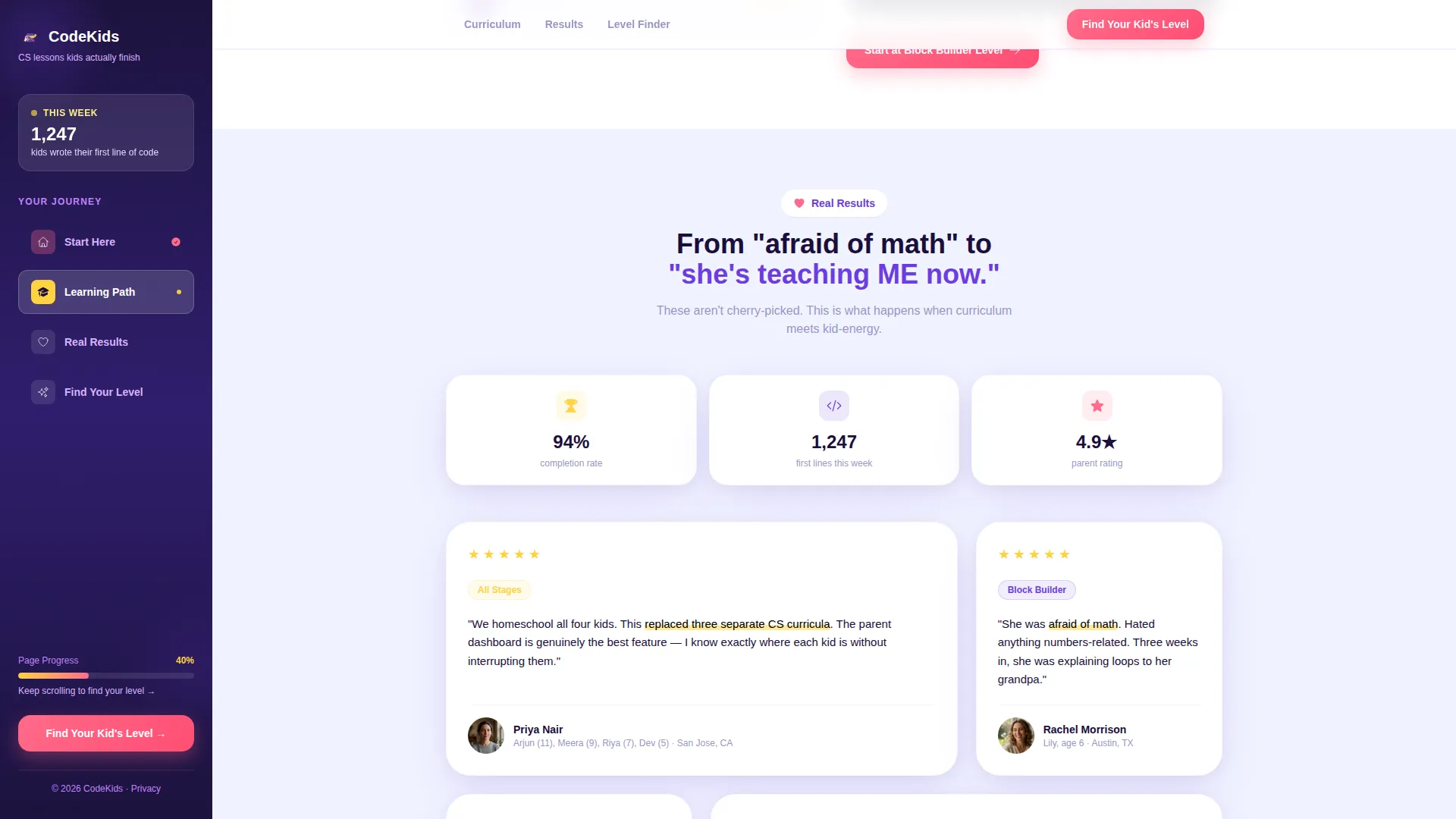
Confidence-Arc Testimonial Section
Parent testimonials are arranged to show a clear emotional progression. Quotes shift from "she was afraid of math" to "he's teaching ME now," mirroring the confidence journey a child takes through the curriculum and making the outcome feel real and achievable.
Persistent Sidebar Navigation
A deep purple sidebar stays fixed as the visitor scrolls, always showing the current learning stage and the distance remaining to the skill assessment. This keeps the page's goal visible at all times and reduces the chance a visitor loses track of why they arrived.
Page sections overview
| Section | Purpose |
|---|---|
| Hero with Counter | Establishes emotional tone and social proof with animated data and family imagery |
| Learning Path Tabs | Shows the three-stage coding journey with video clips and sidebar progress tracking |
| Testimonials Arc | Builds trust through parent quotes that follow a confidence-growth narrative |
| Skill Finder Quiz | Delivers a personalized lesson path through five interactive questions |
| Footer Row | Closes the page with a clean, single-row linear layout |
Design & branding system
The visual identity uses the Dopamine Pop color system paired with a Family First theme. The result is high-contrast, immediately joyful, and designed to feel energetic without being chaotic. Typography uses Plus Jakarta Sans for bold headings and DM Sans for body copy, keeping text readable for both parents skimming on a laptop and kids leaning in on a tablet.
- Deep screen-glow purple (#6C3CE1) fills the persistent sidebar and anchors the layout with warmth and focus
- Sunshine highlighter yellow (#FFD23F) marks progress indicators and active states, while bubblegum click-pink (#FF6B8A) drives every call to action and achievement badge
- Soft whiteboard white (#FAFBFF) covers the main content canvas, giving illustrations and video clips room to breathe
Mobile & speed optimization
The layout is designed desktop-first to support the fixed sidebar and tabbed learning path at full fidelity. On smaller screens, the layout stacks gracefully so no content is lost. Animation-heavy components are scoped to client-side rendering, while static sections use server components to keep the initial load lean.
- The persistent sidebar collapses into an inline progress indicator on mobile, keeping orientation cues visible without consuming screen space
- Quiz state, tab transitions, the animated counter, and the avatar picker all run as client components, isolating interactivity from the static page shell
- Video clips in each learning path stage loop silently and load within their respective tab panel, so only the active stage's media is in view at any moment
How this template helps you convert
Every design and copy decision in this template is structured to lower resistance and raise curiosity at the same time. The page does not ask for an email address until a visitor has already received value: their child's personalized lesson path.
- The animated counter and family glow scene create an immediate emotional connection before any product claim is made, so visitors feel welcomed rather than sold to.
- The three-stage learning path makes the curriculum feel achievable and concrete, answering the parent's unspoken question: "Will my child actually finish this?"
- The skill finder quiz satisfies curiosity first and captures the lead second. The call to action reads "Find Your Kid's Starting Level," which is specific, low-pressure, and directly useful to every parent on the page.
Other information about this template
This template sits at the intersection of EdTech product design and family-focused content strategy. It is built for the computer science education space and reflects the specific expectations of parents shopping for K-12 coding resources in the United States market. A few additional details worth knowing before you use or customize it:
- The template is built for English-language audiences with United States demographics and USD pricing contexts in mind
- The five-question skill finder includes illustrated experience cards (None, Played Games, Tried Coding, Builds Things), a learning-style selector, and a character avatar picker designed for children to interact with directly
- The "Send This Plan to Mom or Dad" email prompt appears only after the quiz result is shown, a deliberate sequence that dissolves friction by letting curiosity do the conversion work first
- The footer follows a linear single-row pattern, keeping the page's close clean and uncluttered
Theme
Family First
Creative direction
Step-by-Step Guide
Color system
Dopamine Pop
Style
Sidebar Companion
Direction
Quiz/Assessment
Page Sections
Animated Data Counter in Hero
Self-drawing SVG Illustration
Three-stage Tabbed Learning Path
Interactive Five-question Skill Finder
Confidence-arc Testimonial Section
Persistent Fixed Sidebar
Related questions
Who is this landing page template designed for?
Does the template include the interactive quiz functionality?
Can I customize the color palette and typography?
What happens on mobile devices?
Do I need coding knowledge to set up this template?



