Immersive Bootcamp Landing Page Template
Paircode is a sidebar companion lead generation landing page built for live coding bootcamps. It opens with an interactive quiz, routes visitors to a personalized cohort track, and collects applicants through a three-step progressive form. The botanical visual system, scroll-linked sidebar, and paired instructor and graduate storytelling work together to convert career-switchers into qualified leads with confidence.
by Rocket studio
Quick summary
Paircode is a single-page lead generation landing page template designed for live coding bootcamps. It combines a personality-driven quiz, paired human storytelling, and a fixed sidebar companion to guide career-switchers from curiosity to application. Every section earns the next click, making the primary call to action feel like a natural step rather than an interruption.
Who this template is for
This template is built for bootcamp operators, independent coding educators, and EdTech teams running live, cohort-based technical programs. It works especially well when your target audience includes people who are emotionally ready to change careers but unsure where to start. If your value proposition rests on live instruction rather than recorded video, this landing page is built to communicate that difference clearly.
- Bootcamp founders and admissions teams who need to generate leads from career-switchers and early-career developers
- EdTech marketing teams running digital marketing campaigns aimed at a broad audience of non-traditional learners
- Independent coding educators who want a high-converting landing page that reflects a human, instructor-led teaching model
What problem this template solves
Most coding bootcamp landing pages read like a sales pitch written for everyone and felt by no one. They list features, drop a sign up form at the bottom, and hope visitors scroll far enough to care. That approach fails the people who need the most reassurance: the retail worker considering a career switch, the designer who wants to stop being told "that's not feasible," and the CS graduate who has never touched a production codebase.
- Generic bootcamp pages fail to personalize the experience, so visitors leave without understanding which track fits their situation
- A long, undifferentiated page buries the value proposition and lets pain points go unaddressed, reducing lead quality
- Weak social proof and no human faces make transformation feel abstract, lowering perceived value and conversion rate
What you get with this template
This template delivers a structured, section-led lead generation landing page with a sidebar companion layout. Everything is designed to convert visitors into qualified leads by pairing emotional resonance with concrete outcome data. The page moves from self-identification through the quiz, into personalized track results, through instructor and graduate credibility, and finally to cohort enrollment details with salary outcomes.
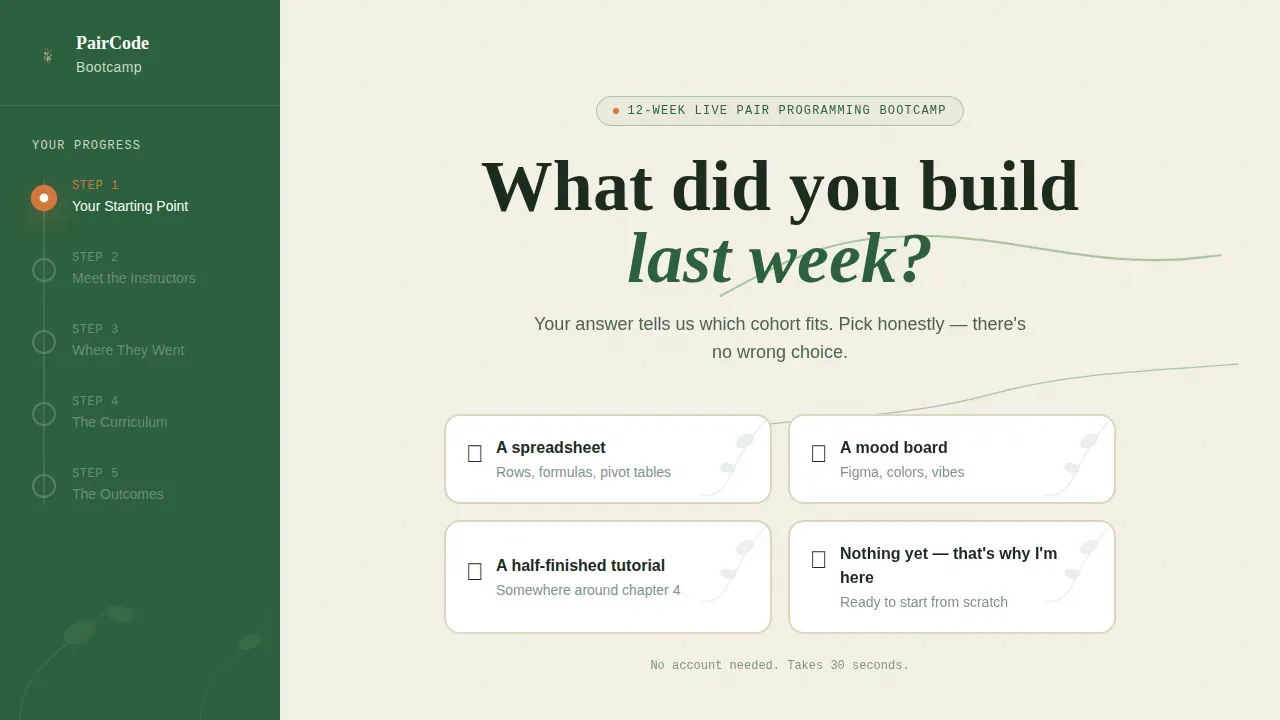
- A hero quiz with four illustrated botanical answer cards that personalize the visitor experience before a single form field appears
- A three-step progressive lead capture form triggered by the quiz result, collecting name, role, track preference, and start date
- A fixed sidebar that tracks scroll progress through the curriculum like a table of contents that fills in with color as visitors read deeper
- Paired instructor and graduate profile sections with real outcome data and a secondary lead magnet offering a free downloadable syllabus
- A salary and cohort section with outcome data, a cohort calendar, and a sticky call to action button in the sidebar
Feature list
This template packs several carefully designed components into one cohesive lead generation landing page. Each feature below is drawn directly from the template brief and reflects what is built into the page.
Botanical Quiz Hero with Personalized Result Routing
The page opens with a single centered question in large serif type: "What did you build last week?" Visitors choose from four illustrated answer cards, each decorated with botanical-sketch borders of trailing leaves and root systems. Selecting any card triggers a vine-growth micro-animation and scrolls the visitor into a personalized result that maps their starting point to a specific cohort track. This approach replaces a cold hero image with an interactive experience that keeps visitors engaged and earns the lead capture form before it appears.
Three-Step Progressive Lead Capture Form
The primary lead capture form unfolds in three steps. Step one collects first name and current role. Step two asks which track interests the visitor, choosing from frontend, backend, or full-stack. Step three asks for a preferred start date and how they heard about the program. Spreading form fields across steps reduces perceived friction and improves form completion rates. The form appears inside the personalized quiz result, so by the time visitors see it, the page has already told them which cohort fits their profile.
Fixed Sidebar Companion with Scroll-Linked Progress
A persistent sidebar anchors the left side of the layout and acts as a live table of contents. As the visitor scrolls, the sidebar fills in with deep fern green to show progress through the curriculum. The primary "Find Your Starting Point" call to action appears as a sticky button inside the sidebar, creating a constant conversion point without interrupting the reading flow. This visual hierarchy makes it easy for high intent visitors to act at any moment.
Paired Instructor and Graduate Storytelling Sections
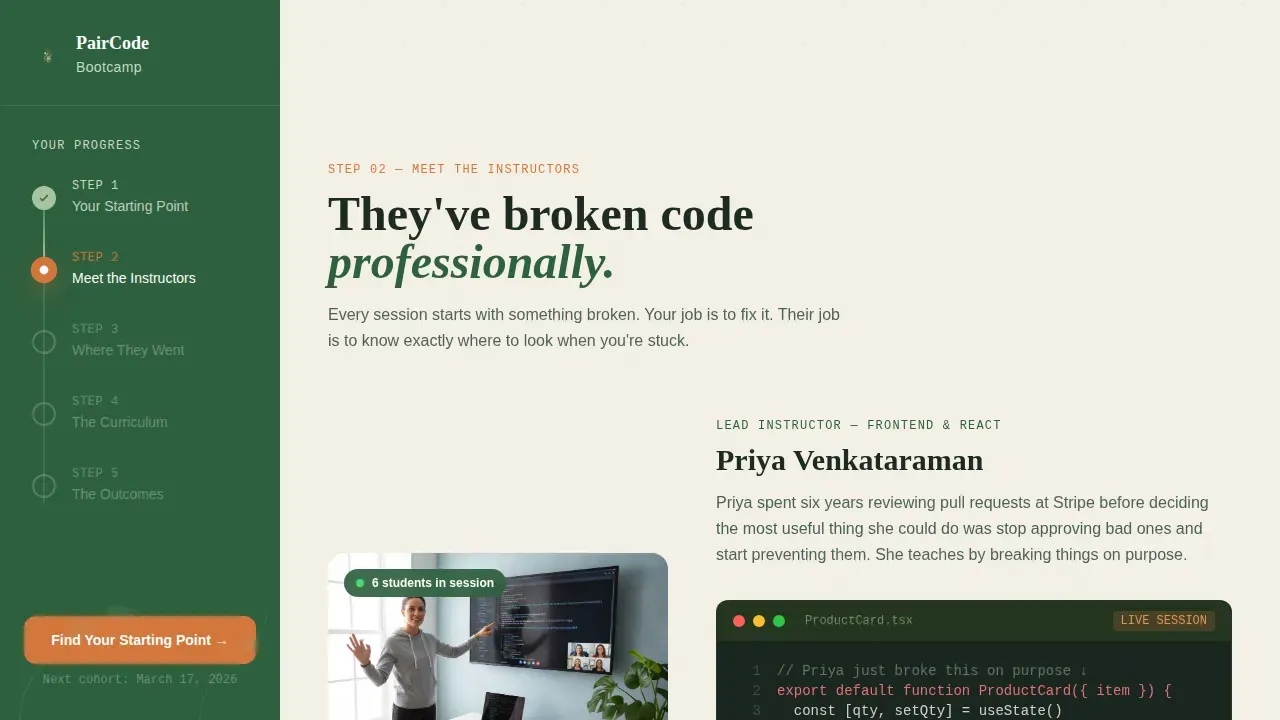
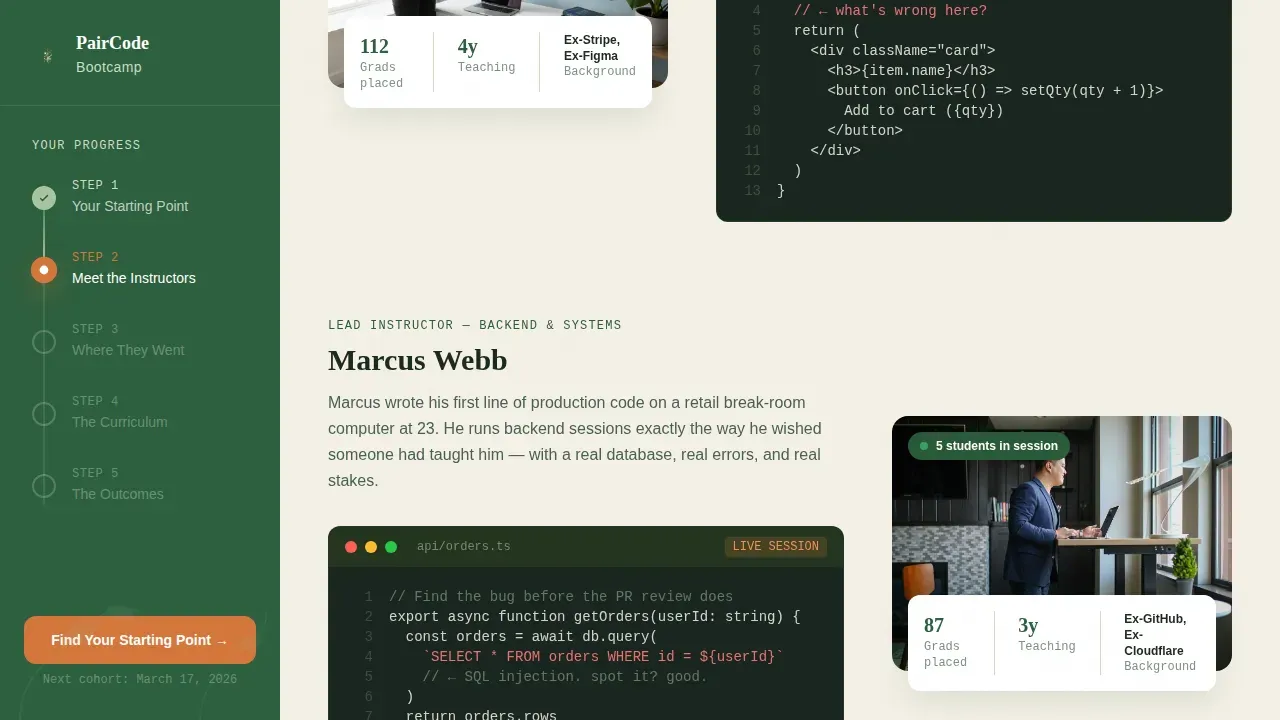
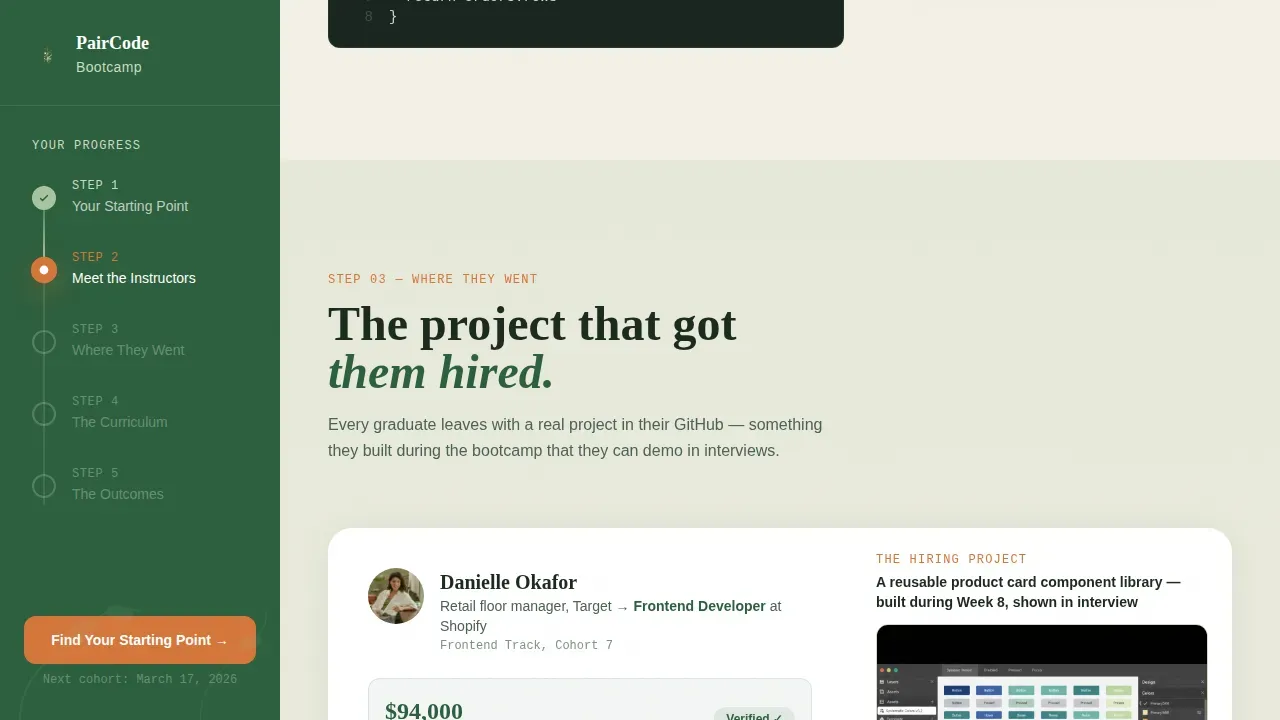
After the quiz result, the page introduces real instructors and real graduates side by side. Each instructor section shows their screen mid-lesson with a code snippet visible. Each graduate section reveals where they work now and the exact project that got them hired. This paired storytelling builds social proof progressively, moving the visitor from "I don't know if this is real" toward "I can see myself doing this." Named outcomes and specific projects replace generic testimonials.
Syllabus Lead Magnet with Lightweight Email Gate
For visitors still in research mode after the instructor profiles, a secondary conversion path offers a free downloadable syllabus. The lead magnet is gated behind a single email field, creating a low-friction value exchange for visitors not yet ready to fill out the full three-step form. This secondary path captures leads who might otherwise leave, giving the admissions team more leads to follow up with across the full conversion funnel.
Salary and Cohort Outcome Section
Near the bottom of the page, outcome data replaces abstract promises with numbers. The salary section pairs real salary ranges with cohort calendar details and limited-seat urgency signals. The stakes escalate naturally as visitors scroll deeper, from "you don't know what you don't know" at the top to concrete hiring data near the bottom. This section is one of the most important conversion points on the page for high intent leads who need one final reason to act.
Page sections overview
| Section | Purpose |
|---|---|
| Hero Quiz Block | Opens with personality quiz; routes visitors to personalized cohort track |
| Personalized Quiz Result | Maps answer to track; triggers three-step lead capture form |
| Instructor Profile Pair | Shows instructors mid-lesson with visible code snippets |
| Graduate Story Pair | Reveals real hire outcomes and project that earned the job |
| Syllabus Download Gate | Secondary lead magnet; single email field for syllabus PDF |
| Salary and Cohort Data | Outcome data, cohort calendar, and sticky sidebar call to action |
| Page Footer | Horizontal flow footer with program links and contact details |
Design & branding system
The visual identity follows an Educational Guide theme built on a Botanical color system. The palette feels like a well-loved programming book left open on a sunlit desk, alive, approachable, and quietly studious. High quality visuals in a botanical-sketch illustration style appear throughout the quiz cards and section dividers, reinforcing the handcrafted feel of the live instruction model. Strong visual hierarchy is maintained by reserving the orange accent color strictly for calls to action.
- Warm parchment (#F4F0E6) dominates all backgrounds; deep fern green (#2D5F3E) anchors the persistent sidebar and section headings; soft moss (#A8C5A0) washes over testimonial and curriculum blocks
- Propagation-root orange (#D4763B) appears only on interactive elements and call to action buttons, ensuring every conversion point is immediately visible without visual noise
- Typography uses Fraunces (display serif) for headings, DM Sans for body copy, and JetBrains Mono for all code snippets, reinforcing the blend of warmth and technical credibility
Mobile & speed optimization
The layout is designed desktop-first around the sidebar companion structure, and it includes a responsive mobile stack for visitors on mobile devices. On smaller screens, the fixed sidebar collapses into an accessible progress indicator at the top of the viewport. The quiz cards reflow into a vertical stack, and the three-step form remains fully functional at any screen width.
- The quiz interaction, progressive form, and sidebar table of contents all reflow cleanly for mobile devices without losing functionality
- Static sections use server-rendered components for fast initial load; the quiz and form use client-side interactivity only where needed, helping the page feel responsive from the first scroll
- The syllabus lead magnet and signup form remain accessible and easy to complete on smaller screens, keeping the signup process friction-free for mobile visitors
How this template helps you convert
A well-optimized lead generation landing page does one thing well: it focuses every element on a single action. This template is designed to attract leads, keep visitors engaged, and move them toward the form without a distracting sales pitch or unnecessary external links. The page removes friction at every stage, from the quiz that personalizes the experience to the progressive form that spreads out form asks across three comfortable steps.
- The quiz result acts as the primary conversion point: by the time the lead capture form appears, the page has already told visitors which cohort fits them, transforming the call to action into a logical next step rather than a cold ask. This approach is a strong landing page example of how personalization can boost conversions and improve lead quality.
- The layered social proof strategy, pairing instructor credentials with named graduate outcomes and salary data, builds deep credibility progressively. Each human story raises the perceived value of the program and reduces the most common pain points around uncertainty and risk.
- The syllabus lead magnet provides a secondary path that helps start generating leads from research-mode visitors, expanding the conversion funnel without requiring a complete application commitment.
Other information about this template
This template is one of the more sophisticated generation landing page examples available for the EdTech and bootcamp niche. It is designed to support high quality content across multiple storytelling layers while maintaining a clean, distraction-free layout that keeps the conversion funnel tightly focused. Several landing page design best practices are built into its structure by default.
- The landing page design eliminates unnecessary secondary links and external links that could pull visitors away before they convert, following the principle that the best landing pages keep visitors focused on one goal
- The sidebar's sticky call to action creates a persistent conversion point, so high intent visitors can act the moment they feel ready, without scrolling back to find a sign up form
- The template supports a clear value exchange at two levels: the full three-step application form for visitors ready to commit, and the syllabus lead magnet for those who need more time, giving the sales team a broader pool of qualified leads to nurture
- As a practical landing page example for live coding bootcamps, it demonstrates how compelling headline copy, relevant images in a distinctive illustration style, and layered social proof work together to generate leads without relying on generic tactics
- The page is built for conversion optimization from the first section to the last, using visual hierarchy, urgency signals near the cohort calendar, and a signup process designed to minimize drop-off at each step
- Visitors must understand the core offer within moments of arriving, and the direct headline approach ("What did you build last week?") combined with the quiz result make the value proposition immediately clear without a traditional hero image opening
- The template suits a lead gen page strategy that prioritizes lead quality over volume, attracting high intent leads from a self-selected audience rather than attempting to appeal to a broad audience with a generic sales pitch
- For teams building or customizing this template, Rocket.new is an AI-powered platform that allows users to build full, production-ready apps and websites from natural-language prompts; it targets serious app makers who want scalable, maintainable products rather than just prototypes, and its subscription plans start at $25 per month with a free trial available
Theme
Educational Guide
Creative direction
Team & People
Color system
Botanical
Style
Sidebar Companion
Direction
Lead Generation
Page Sections
Botanical Quiz Hero with Personalized Routing
Three-step Progressive Lead Capture Form
Fixed Sidebar with Scroll-linked Progress
Paired Instructor and Graduate Profiles
Syllabus Lead Magnet with Email Gate
Salary and Cohort Outcome Section
Related questions
Who is this landing page template designed for?
Can I customize this template without a developer?
What conversion paths does this template include?
How does the quiz improve lead generation results?
Does this template work on mobile devices?



