Comfort HVAC — Landing Page Template
Thermostat is a split-screen HVAC landing page template built for contractors who want a sleek digital service catalog instead of paper rate sheets. It features an interactive service explorer, animated device mockup, tiered pricing display, and a lead-capture form, all wrapped in a dark Carbon Fiber visual identity that feels as precise as the equipment you service.
by Rocket studio
Quick summary
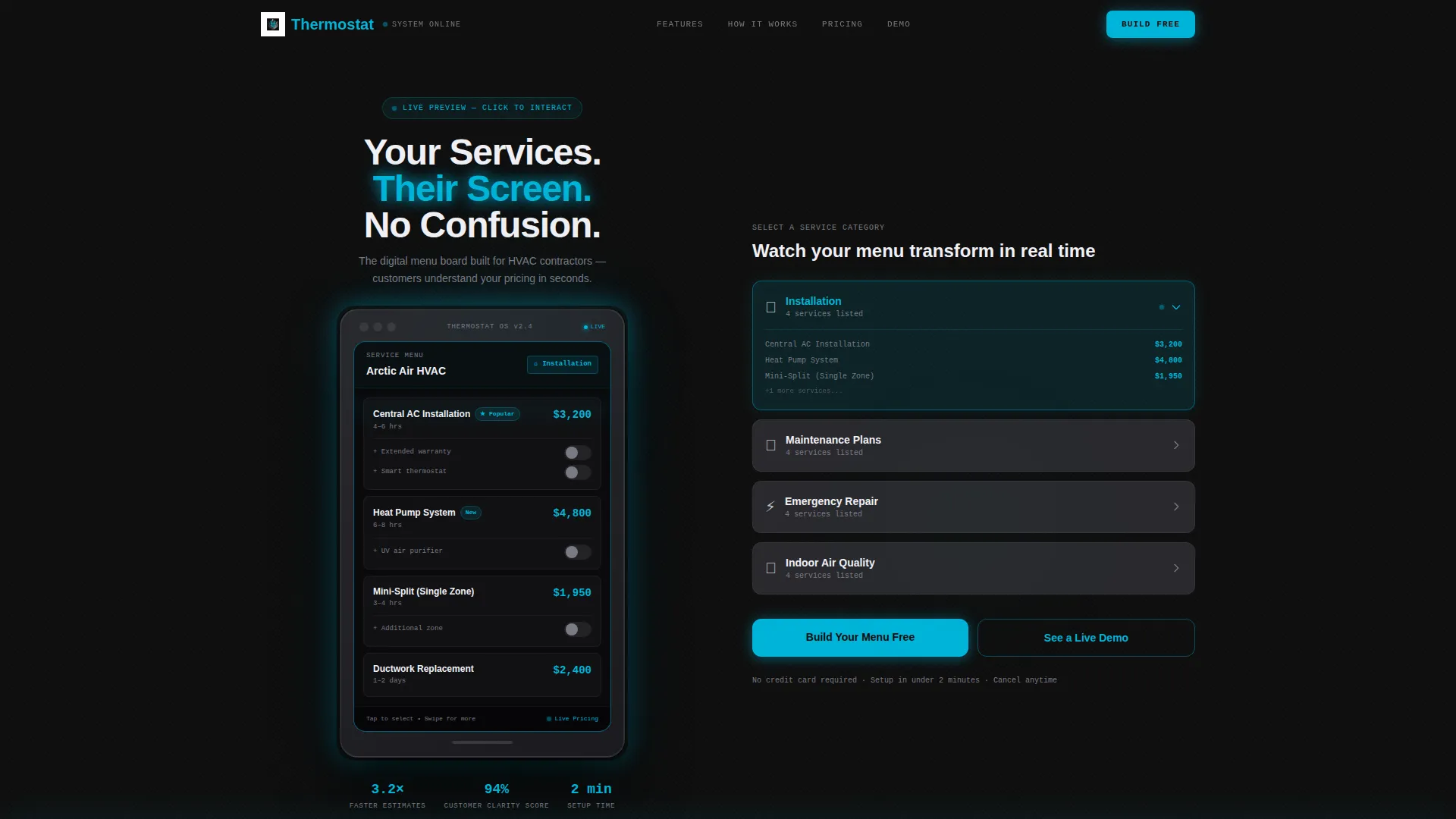
Thermostat is a single-page, split-screen landing page template designed for HVAC businesses. It replaces cluttered paper estimates with a scrollable, interactive digital service menu. The left panel holds a persistent device mockup. The right panel lets visitors explore service categories, toggle pricing tiers, and build their own menu before they ever fill out a form.
Who this template is for
This template is built for HVAC professionals who need a modern, credible way to present their services and capture leads online.
- Residential HVAC company owners running two to six service trucks who want to replace clipboard estimates with a digital catalog
- Commercial facility managers comparing maintenance plan tiers and needing a clear, structured pricing display
- Franchise operators who need a brand-consistent service menu that scales across multiple locations
What problem this template solves
Most HVAC contractors hand customers a printed rate sheet or a rough clipboard estimate. Both create confusion, erode trust, and slow down the sales process. This template replaces that friction with a structured, interactive experience.
- Customers arrive expecting clarity but get vague pricing and hard-to-compare service bundles
- Contractors waste time explaining options verbally instead of letting a well-organized catalog do the work
- Franchise and multi-location operators struggle to maintain consistent pricing displays across every site or truck
What you get with this template
You get a complete, ready-to-customize landing page built around one clear idea: let customers explore your services before they commit to a conversation.
- A 50/50 split-screen layout with a locked device mockup on the left and a clickable service explorer on the right
- An interactive category panel covering installation, maintenance plans, emergency repair, and indoor air quality
- Lead capture form with company name, truck count dropdown, and service mix checkboxes, plus a secondary "See a Live Demo Menu" email gate
Feature list
This template packages several purpose-built components into one cohesive experience.
Interactive Service Category Explorer
Visitors click through service categories on the right panel and watch the device mockup on the left update in real time. Prices rearrange, add-on toggles animate, and seasonal badges appear with each selection.
Persistent Device Mockup Panel
The left half of the split screen locks a tablet mockup showing the live HVAC service menu at all times. Each line item carries a soft blue edge-glow that pulses as visitors interact, keeping the product demo always in view.
Tiered Pricing and Add-On Toggles
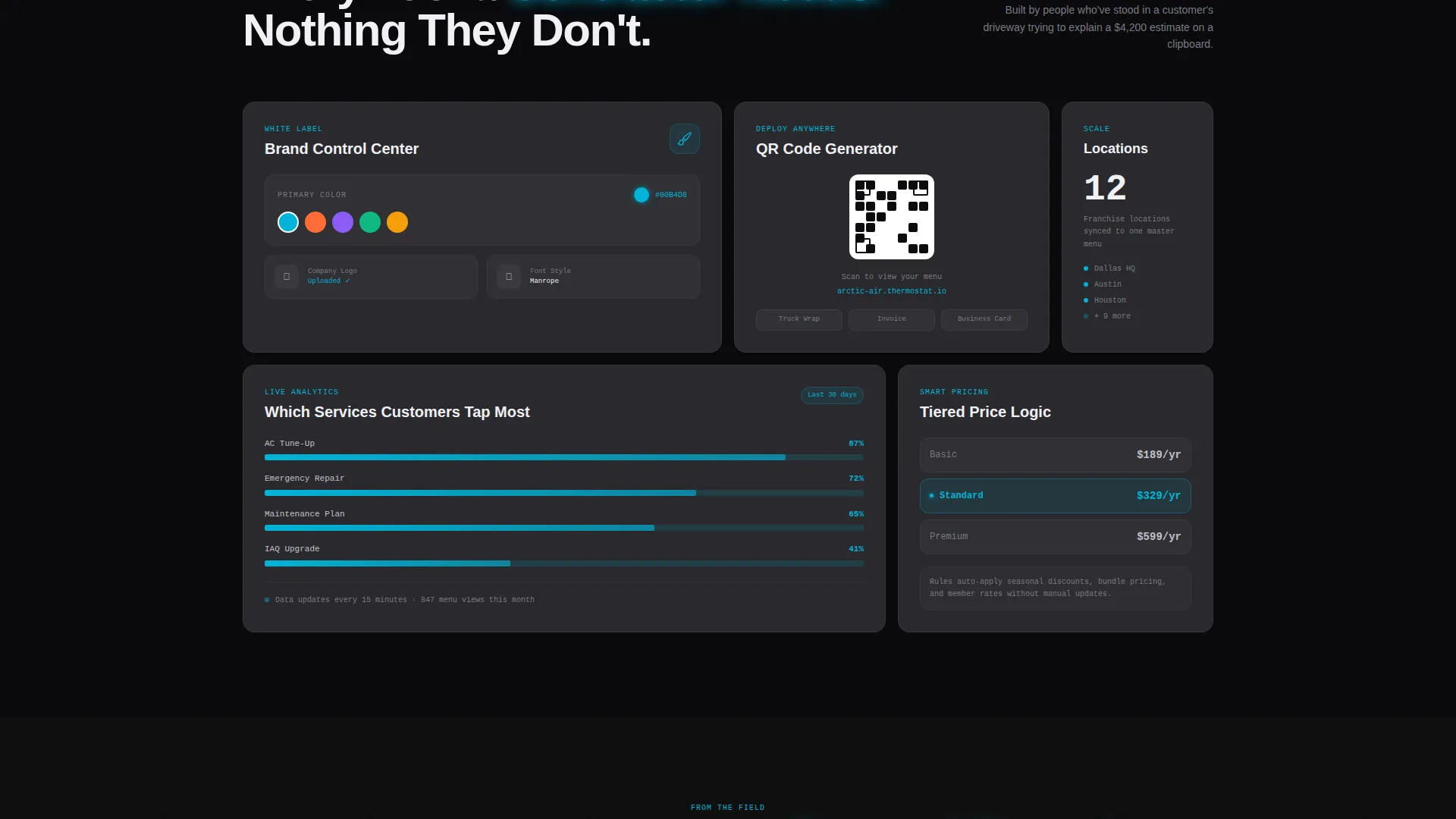
The template includes a tiered pricing logic layer where visitors can see how service bundles change with different plan levels. Add-on toggles animate smoothly to reflect real-time pricing combinations.
QR Code Generation Display
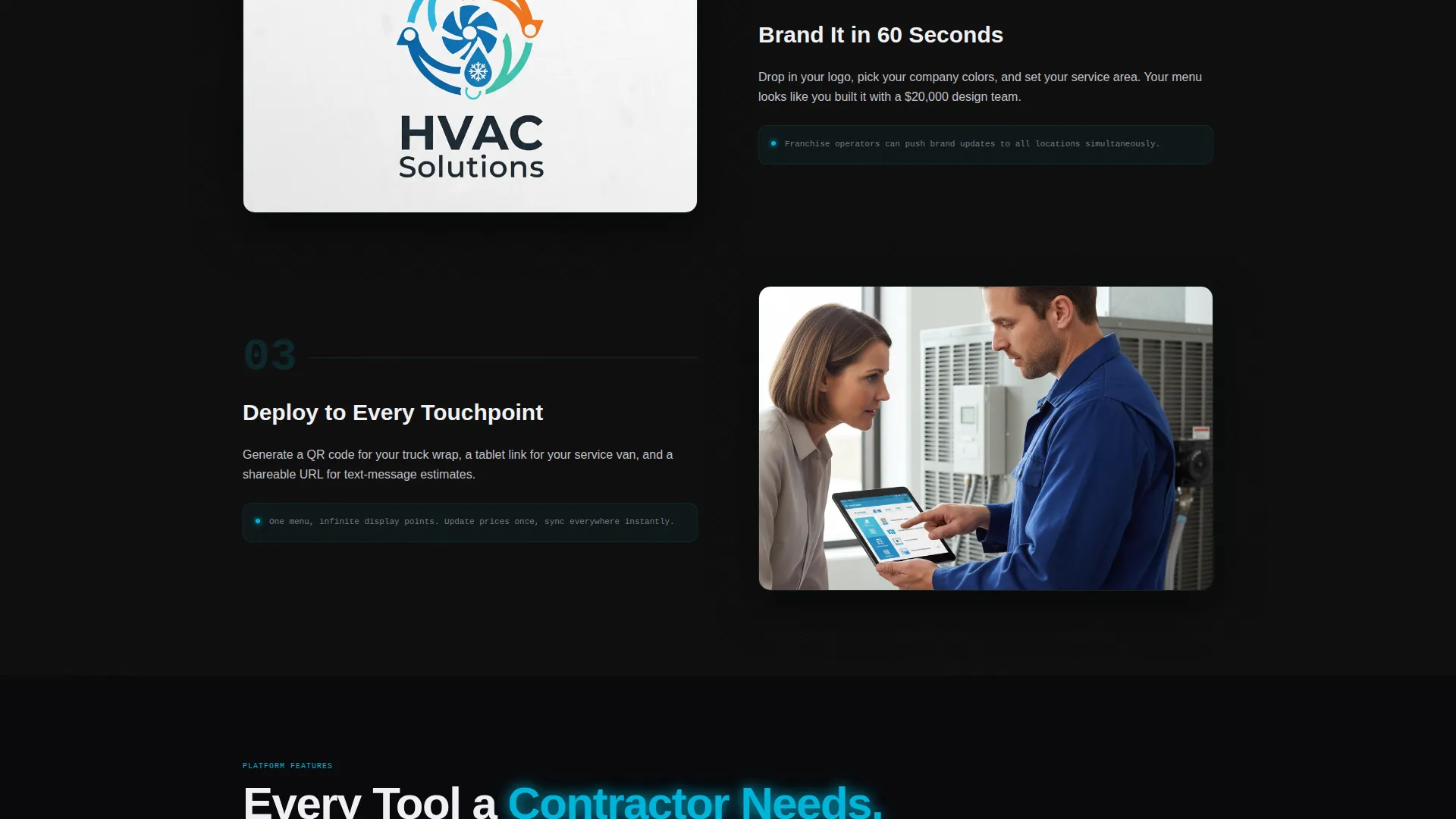
A dedicated customization section showcases QR code generation for truck wraps and field use, letting visitors see exactly how the digital menu extends beyond the screen to physical touchpoints.
Live Analytics Dashboard Preview
A scrollable section reveals a built-in analytics dashboard showing which services customers tap most. This helps contractors understand demand without relying on guesswork.
Sticky Lead Capture Bar
A bottom bar with the primary call to action activates after the visitor makes their first interactive click. The form captures company name, number of service trucks, and primary service mix to qualify leads before handoff.
Page sections overview
| Section | Purpose |
|---|---|
| Dark Full-Bleed Header | Introduces the brand with a glowing tablet mockup and headline fade-in |
| Split-Screen Explorer | Left device mockup and right category panel work together interactively |
| Service Category Panel | Lets visitors browse installation, maintenance, emergency, and air quality |
| Pricing Tier Layer | Displays tiered plan logic with animated add-on toggles |
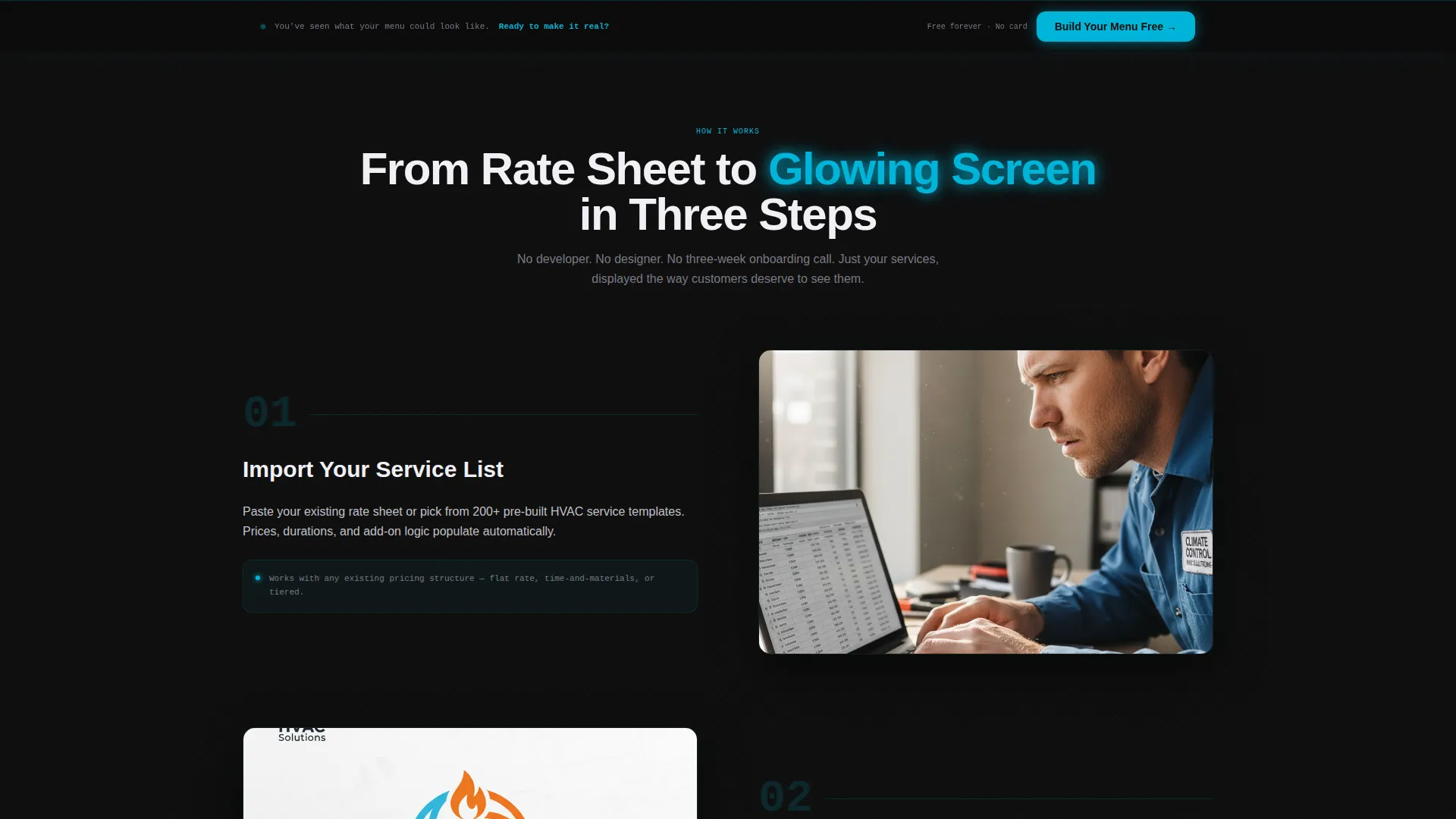
| Branding Controls Section | Shows customization options including colors and logo placement |
| QR Code Generator | Demonstrates menu delivery via QR code for trucks and field use |
| Analytics Dashboard Preview | Highlights which services get the most customer attention |
| Sticky call to action Bar | Anchors the "Build Your Menu Free" form after the first interaction |
| Demo Email Gate | Secondary path to a fullscreen sample menu unlocked by email |
Design & branding system
The visual identity follows a Directory and Discovery theme built on a Carbon Fiber color system. The result is a precise, premium look that feels native to high-efficiency HVAC equipment.
- Color palette: deep carbon black (#0D0D0D), brushed graphite (#2A2A2E), ventilation silver (#C0C0C8), and neon compressor blue (#00B4D8) for hover states and active selections
- Surface texture: matte dark backgrounds with a faint carbon fiber crosshatch pattern, giving depth without visual noise
- Glow system: the neon blue breathes and pulses on active elements, mimicking the rhythm of an air handler cycling on, so the user interface feels alive without being distracting
Mobile & speed optimization
The split-screen layout is designed to adapt gracefully to smaller viewports without losing the interactive core of the experience.
- The persistent device mockup and category panel stack vertically on mobile so visitors still move through the service explorer in a logical sequence
- Interactive elements including toggles, category clicks, and animated badges are built to remain responsive and clear on touch screens
- The sticky lead capture bar stays anchored at the bottom on all screen sizes, keeping the primary call to action within reach throughout the entire scroll
How this template helps you convert
This template earns the lead by letting visitors experience the product before asking for anything in return.
- The interactive explorer lets visitors build their own service menu in real time, so by the time they reach the form they have already seen their own business reflected in the template
- The sticky bottom bar activates only after the first click, timing the ask to the moment of highest engagement rather than interrupting a cold visitor
- The secondary demo path captures emails from visitors who are curious but not yet ready to commit, giving you a second conversion opportunity without a hard sell
Other information about this template
This template sits at the intersection of HVAC digital presence and modern lead generation design. It is built for the Technology category and specifically targets the HVAC digital menu niche.
- The Interactive Explorer creative direction makes this template well-suited for contractors who want prospects to self-qualify through hands-on engagement
- The Dark Full-Bleed and Glow header concept creates an immediate visual impression that sets this page apart from generic service contractor websites
- The template is structured around a single-page flow, making it straightforward to deploy as a standalone campaign page or integrate into an existing contractor website
Theme
Directory & Discovery
Creative direction
Interactive Explorer
Color system
Carbon Fiber
Style
Split Screen (50/50)
Direction
Lead Generation
Page Sections
Interactive Service Category Explorer
Persistent Device Mockup Panel
Tiered Pricing and Add-on Toggles
QR Code Generation Display
Sticky Lead Capture Bar
Secondary Demo Email Gate
Related questions
Who is this landing page template designed for?
Can I show different pricing tiers for different service plans?
How does the lead capture form work?
Is this template suitable for franchise or multi-location HVAC businesses?
What makes this different from a standard contractor website template?



