Full-Stack Bootcamp Landing Page Template
Compile is a single-page landing page template built for full-stack web development bootcamps. It uses a zigzag layout, a dark Slate and Sky color system, and a Problem-to-Solution narrative arc to move career-switchers from hesitation to action. The primary call to action is a syllabus download backed by a lead capture form.
by Rocket studio
Quick summary
Compile is a twelve-week coding bootcamp landing page template designed to convert career-switchers into applicants. It pairs a cinematic half-page photo header with a zigzag scroll narrative, guiding visitors from doubt to proof to action. The primary call to action is a syllabus download gated by a short three-field lead form.
Who this template is for
This template is built for coding bootcamp operators who need to speak directly to adult career-changers. It suits programs offering an intensive, project-based full-stack web development curriculum and seeking qualified leads before enrollment opens.
- Bootcamp founders and admissions teams marketing a twelve-week intensive program
- Education marketers who need a lead generation page with a downloadable syllabus as the anchor offer
- Program directors who want their curriculum detail, student outcomes, and hiring proof presented in one scrollable page
What problem this template solves
Career-switchers rarely trust a bootcamp page on first visit. They arrive skeptical, unsure whether the program is real, rigorous, or worth the risk. Generic template pages with vague promises make that skepticism worse.
- Visitors leave without a clear picture of what the curriculum actually covers week by week
- No tangible offer keeps them on the page long enough to build confidence
- Outcome claims feel empty without graduate stories and hiring evidence presented visibly
What you get with this template
Compile gives you a fully structured single-page layout with every section pre-built to tell a cohesive story. You get a visual system, a lead capture mechanism, and a narrative arc that escalates from problem to proof without requiring custom development work.
- A half-page split header with a photo slot and bold headline area
- Four zigzag content sections covering the problem, curriculum, graduate outcomes, and social proof
- A primary syllabus download call to action with a three-field lead form and a secondary free class registration path
Feature list
This section describes the core functional and design components built into the Compile template.
Half-Page Split Header
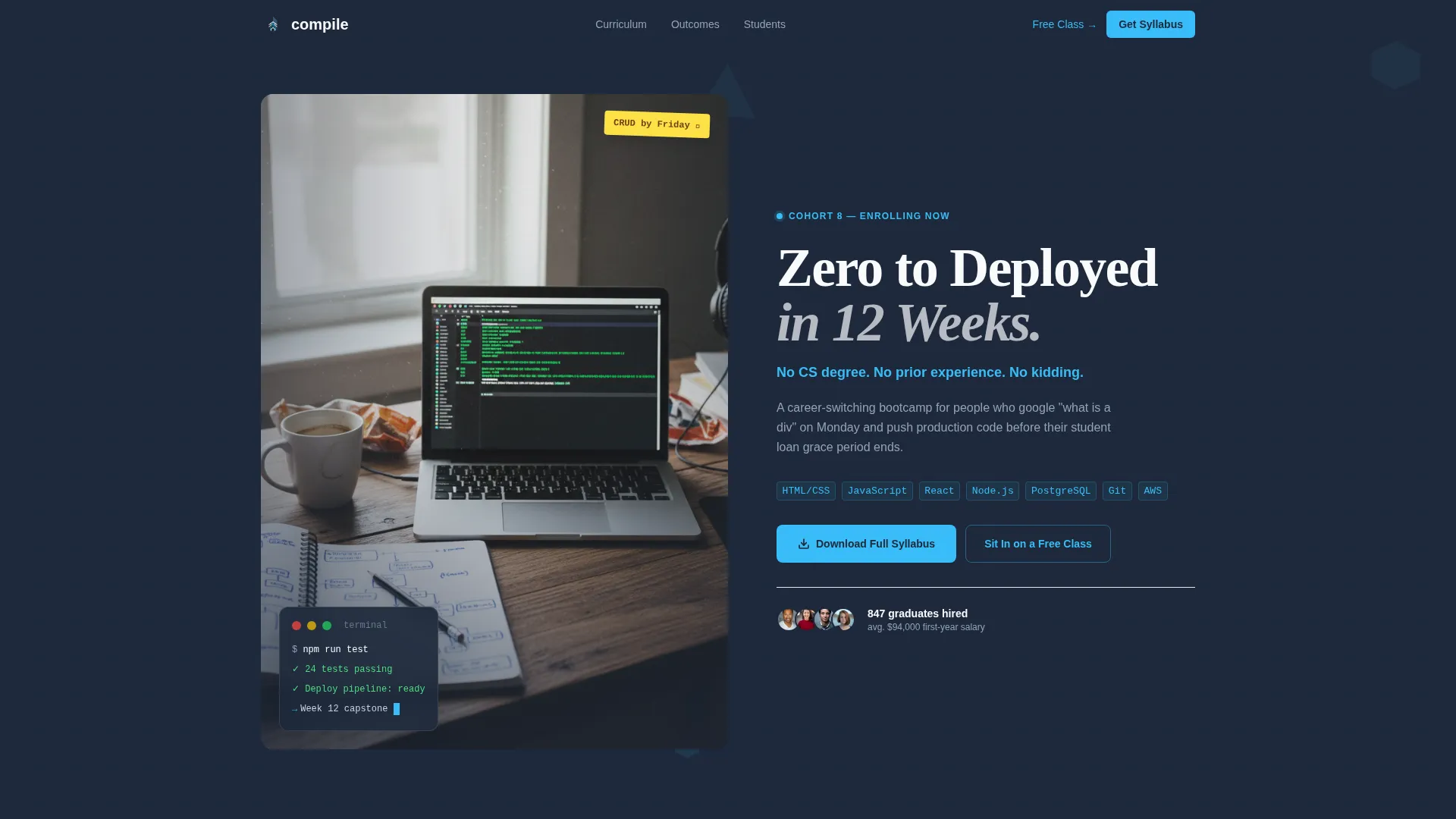
The header divides into two equal columns. The left side holds an overhead desk photograph with a real-session feel. The right side carries the primary headline in a bold geometric sans-serif and a single supporting line in sky blue. The composition signals authenticity before a word is read.
Zigzag Narrative Layout
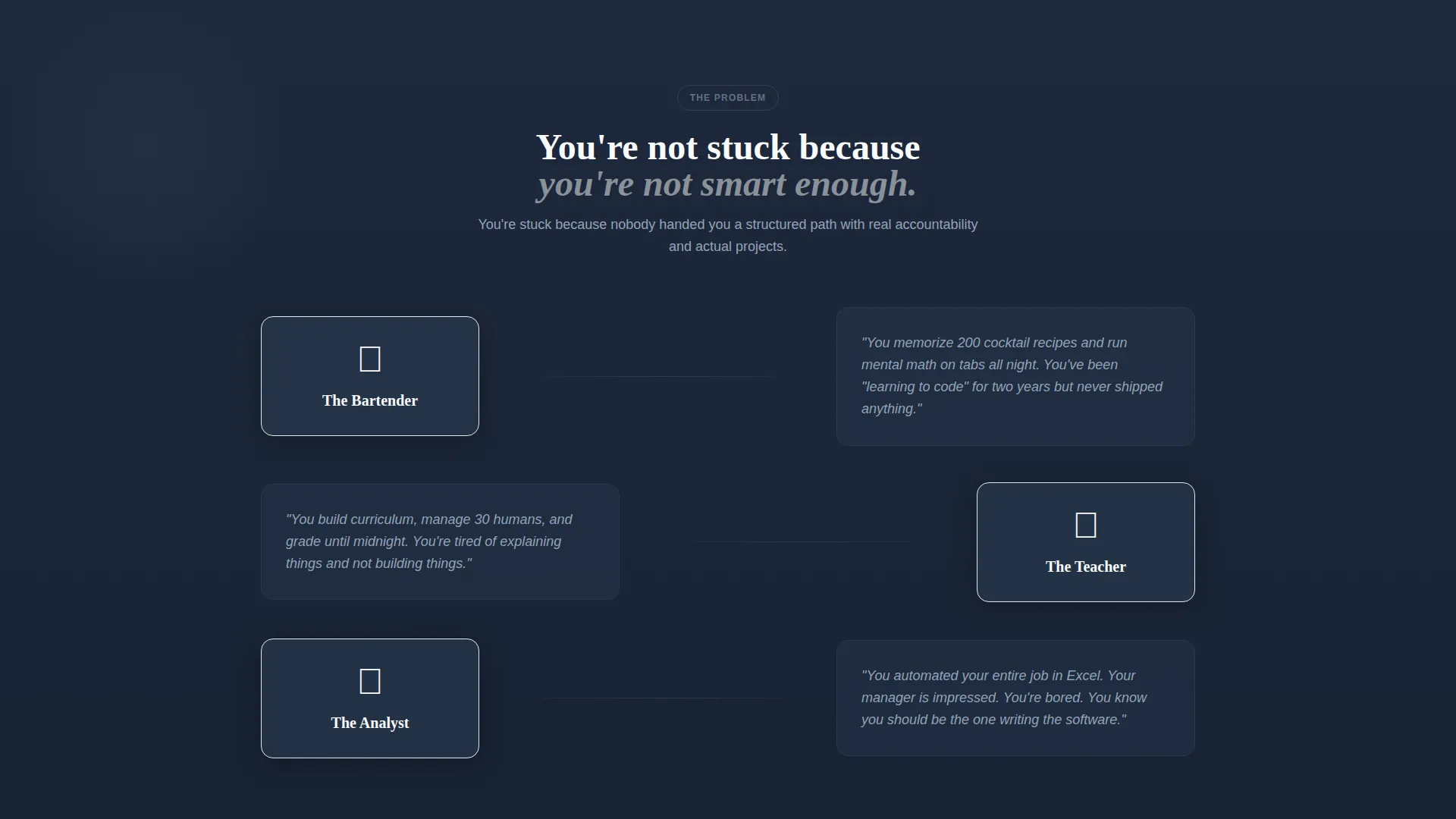
Four alternating content sections drive the scroll from doubt to momentum. Each section swaps image and text placement, creating visual rhythm. The progression moves from a career-problem block through curriculum reveal, student transformation stories, and finally a live proof layer.
Curriculum Module Cards
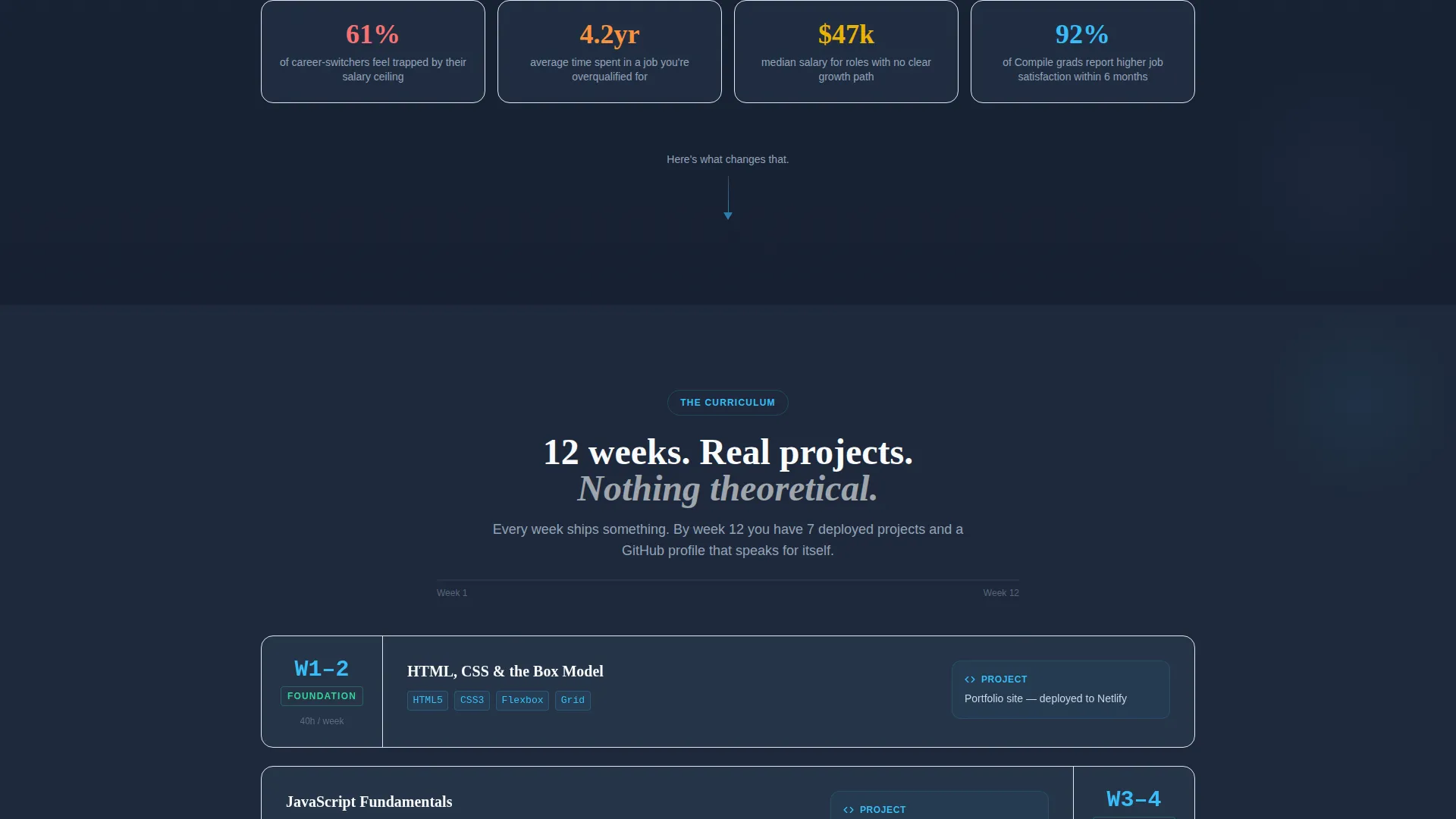
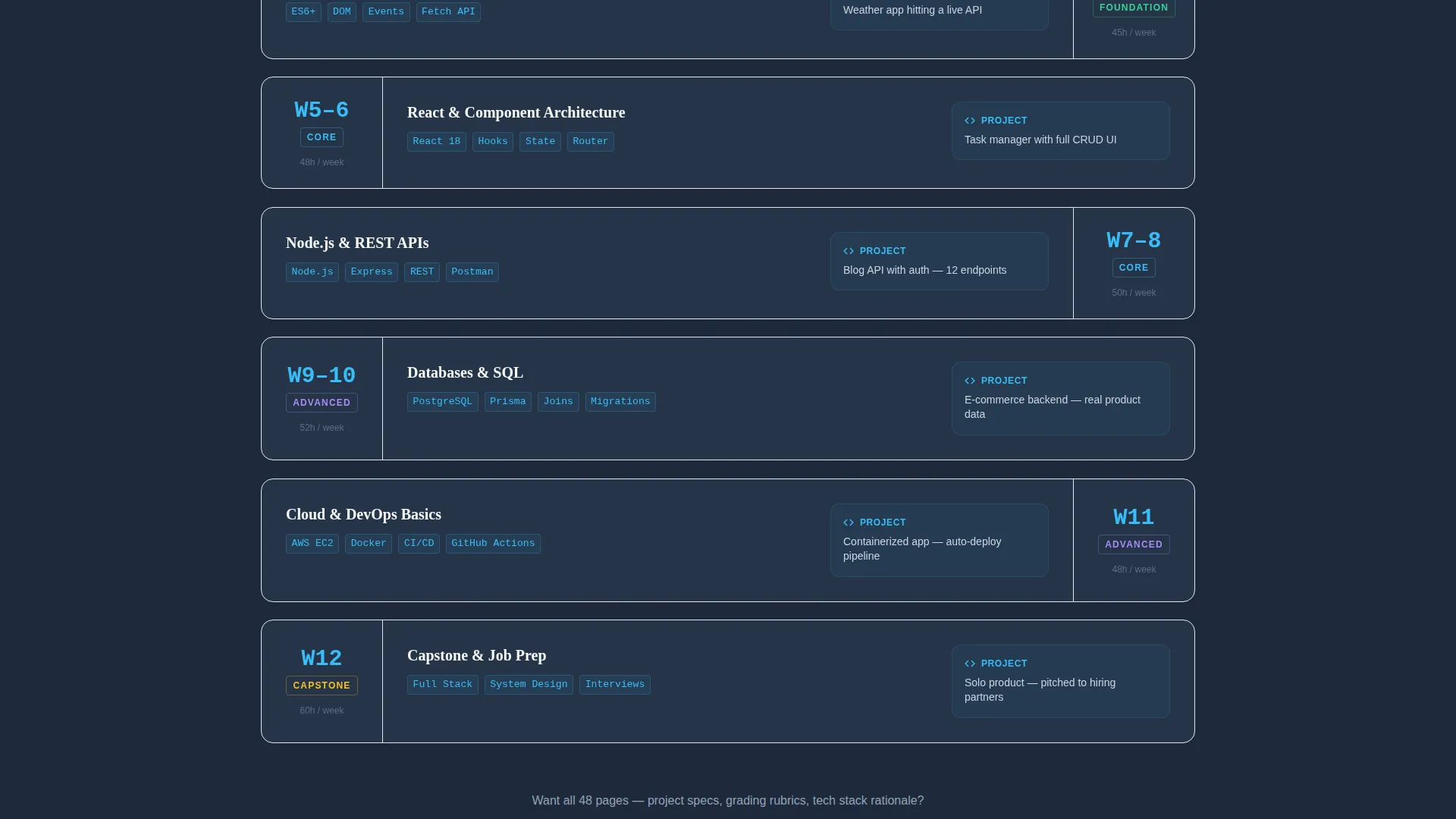
The curriculum section presents each week as a geometric card that tilts on hover. A sky blue progress line connects the cards from Week 1 through Week 12. Actual project names, technologies, and weekly hours are displayed so visitors understand the workload before they apply.
Graduate Outcome Snapshots
The student transformation section pairs before-and-after career labels with a photograph and a pull-quote. Each snapshot names the previous role, the new role, the employer, and the time from graduation. This format turns outcome claims into verifiable career stories.
Syllabus Download Lead Form
The primary call to action is a three-field form collecting first name, email, and a journey-stage dropdown. The dropdown options let visitors self-identify without friction. The form appears first below the curriculum section and again as a pinned bottom bar after 40 percent scroll depth.
Social Proof Ticker and Hiring Block
The proof layer includes a live-updating GitHub commit ticker from the current cohort, a hiring partner logo row, and salary outcome data. These elements are designed to load inside the fourth zigzag section and escalate trust at the moment visitors need final reassurance.
Page sections overview
| Section | Purpose |
|---|---|
| Split hero header | Introduce the program with an authentic desk photo and bold headline |
| Problem zigzag | Surface the career frustration and salary ceiling of the current role |
| Curriculum zigzag | Reveal the twelve-week module sequence with hover cards and a progress line |
| Outcomes zigzag | Show graduate career snapshots with photos and pull-quotes |
| Proof zigzag | Display the commit ticker, hiring logos, and salary outcome data |
| Syllabus download form | Capture leads with a three-field form anchored below the curriculum |
| Pinned bottom bar | Re-surface the syllabus call to action after 40 percent scroll depth |
| Free class link | Offer a secondary path to a live workshop registration |
Design & branding system
The Compile template uses a Playful Geometric visual theme built on a Slate and Sky color system. The palette reads like a dark-mode code editor with one carefully chosen syntax accent, serious in structure but energetic in detail.
- Deep slate (#1E293B) for primary backgrounds, mid-graphite (#475569) for secondary surfaces, open sky blue (#38BDF8) for buttons, code highlights, and hover states, and chalk white (#F8FAFC) for text and whitespace
- Bold geometric sans-serif typography for headlines and a clean body face for readable paragraph text
- Geometric shapes including triangles, hexagons, and offset grids float behind each section as abstract circuit-trace motifs that grow more complex as the visitor scrolls
Mobile & speed optimization
The template layout is structured to reflow cleanly on smaller screens. The zigzag columns stack vertically on mobile, keeping the narrative sequence intact without horizontal scroll or content overflow.
- The half-page split header collapses into a stacked photo-above-text arrangement on narrow viewports
- The curriculum module cards and the pinned bottom bar are sized and spaced for touch interaction
How this template helps you convert
Compile earns the lead by giving visitors real curriculum information before asking for their email. Every structural decision is built to reduce hesitation and increase confidence at the moment the form appears.
- The curriculum zigzag shows actual week-by-week content, project names, and technologies, so the syllabus download feels like a reward rather than a data trap
- The graduate outcome snapshots and the proof layer provide concrete career evidence exactly when visitors are deciding whether to trust the program
- The pinned bottom bar re-surfaces the call to action passively after scroll depth confirms genuine interest, reducing pressure while keeping the offer visible
Other information about this template
Compile was designed specifically for the full-stack web development bootcamp category within the broader education and training market. It is part of a template collection that matches visual theme, creative direction, and lead generation strategy to specific niche audiences.
- The Playful Geometric theme and Slate and Sky color system are part of a matched intersection set pairing the template style, creative direction, and header concept to the coding bootcamp niche
- The template style is Zigzag/Alternating, the creative direction is Problem to Solution Arc, and the header concept is Half-Page Photo and Text, all three are locked to the intersection match for this category
- The landing page direction is Content/Resource, meaning the primary conversion mechanism is a valuable downloadable rather than a hard-sell application form
- This template is built for single-page deployment and does not include a multi-page site structure
Theme
Playful Geometric
Creative direction
Problem→Solution Arc
Color system
Slate & Sky
Style
Zigzag/Alternating
Direction
Content/Resource
Page Sections
Half-page Split Hero Header
Zigzag Alternating Section Layout
Hover-tilt Curriculum Cards
Syllabus Download Lead Form
Graduate Outcome Snapshot Blocks
Social Proof and Hiring Ticker
Related questions
Can I edit the curriculum cards with my own week-by-week content?
What does the lead form collect and where does the data go?
Is the pinned bottom bar shown to all visitors or only after a scroll threshold?
Can I use this template if my bootcamp runs a different number of weeks?
Does the template include the photographs shown in the preview?



