Specialist Micro-SaaS & Developer Tools Professional Website Template
Compile is a bento grid landing page template built for AI code generator products. It uses a Void & Violet dark color system, a spec-sheet layout style, and a live-playground conversion flow. The template targets solo founders, backend engineers, and agency developers who need to ship fast and prove product value before asking visitors to sign up.
by Rocket studio
Quick summary
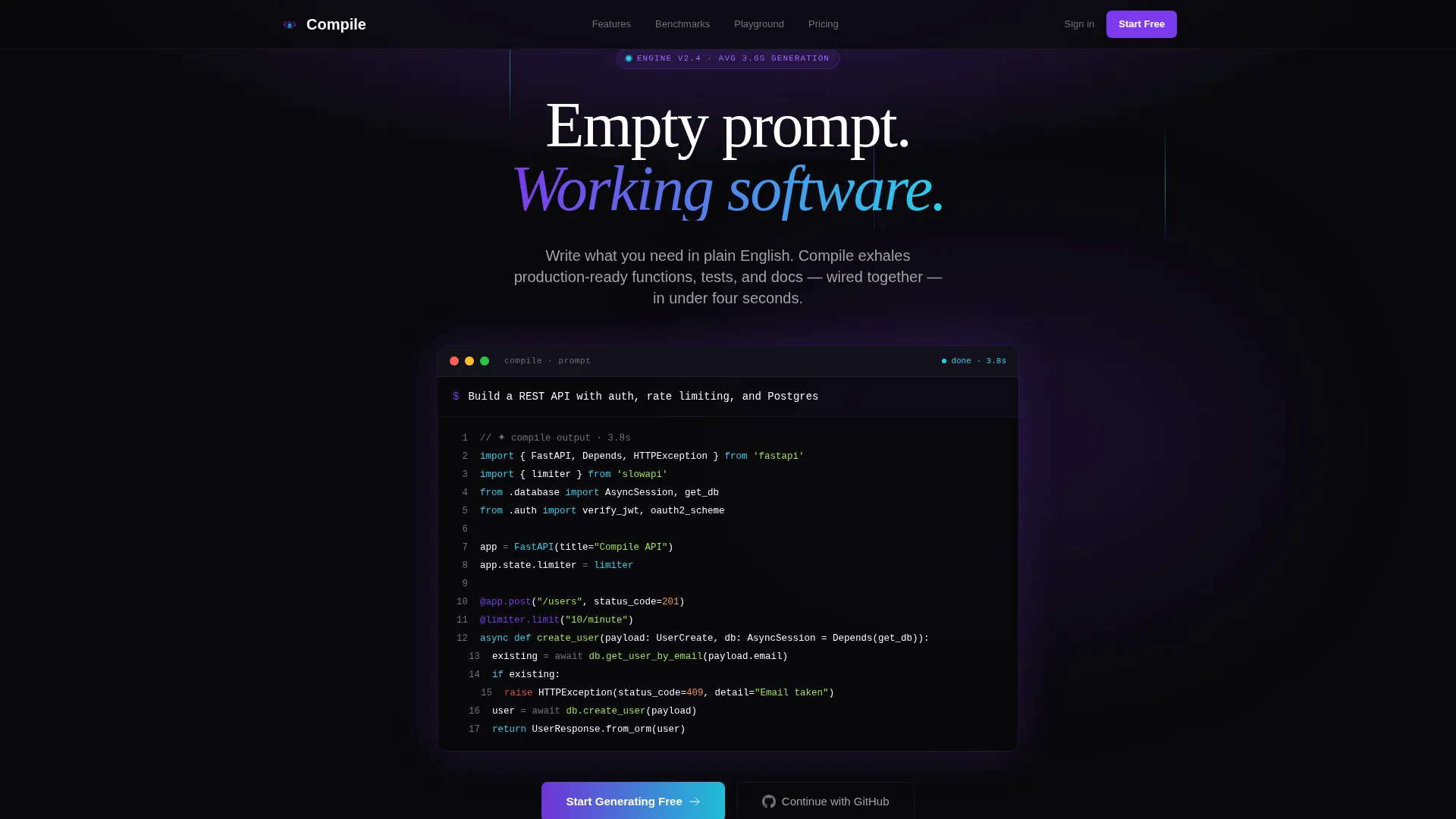
Compile is a single-page bento grid landing page template designed for AI code generator tools. It opens with a dark full-bleed header featuring a violet-to-cyan gradient glow and an auto-typing prompt field. The layout unfolds as a technical spec sheet, rewarding deep readers with hard numbers and live-feeling user interface components that build trust through transparency.
Who this template is for
This template is built for founders and developers who are launching AI-powered developer tools and need a landing page that speaks the language of their technical audience. It skips the fluff and leads with proof.
- Solo founders shipping minimum viable products on a tight budget who need credibility fast
- Backend engineers at early-stage startups who want to showcase code generation speed and output quality
- Agency developers managing multiple client projects who need a polished product page without starting from scratch
What problem this template solves
Most landing pages for developer tools rely on vague promises and stock imagery. Engineers distrust marketing copy. They want specs, benchmarks, and working examples before they commit to anything.
- Generic templates fail to communicate technical depth or earn the trust of a developer audience
- Forcing visitors to sign up before they see real output creates friction that kills conversion
- Disconnected page layouts bury the most compelling proof points below the fold
What you get with this template
You get a complete single-page layout structured to convert skeptical technical visitors into signed-up users. Every section has a defined job, and the design system is consistent from top to bottom.
- A dark full-bleed header with an auto-typing monospaced prompt field and cascading code block reveal
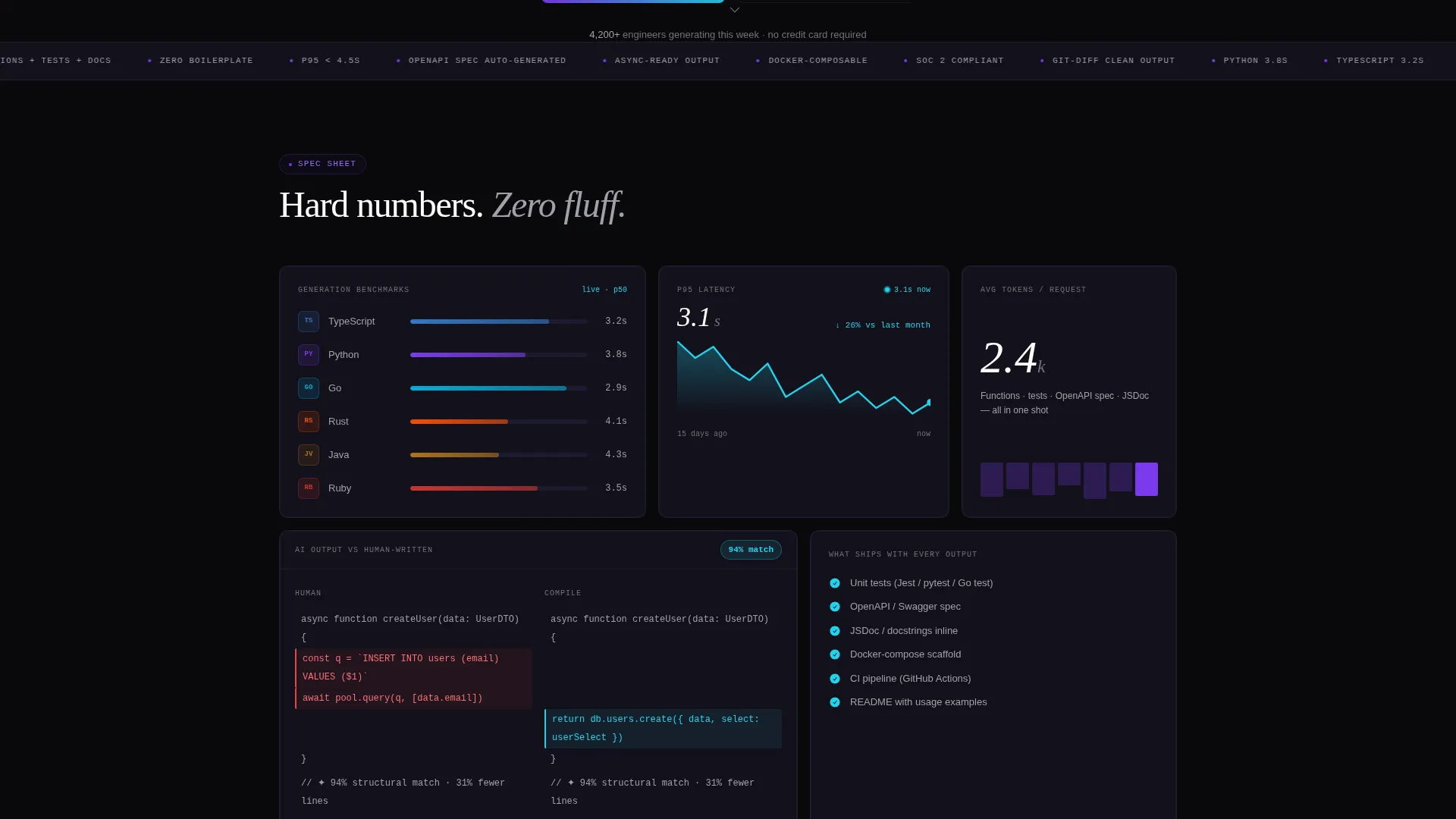
- A bento grid spec sheet mid-page with language benchmarks, a latency graph tile, and a side-by-side code diff tile
- A sticky bottom call-to-action bar, an inline signup form, a GitHub OAuth button path, and a blurred live playground gate
Feature list
This section covers the core template capabilities derived directly from the design brief.
Auto-Typing Hero Prompt Field
The header includes a monospaced input field that auto-types a natural-language instruction in real time. Code blocks then cascade into view with syntax highlighting, making the product itself the visual centerpiece with no stock imagery needed.
Bento Grid Spec Sheet Layout
The page body uses a dense bento grid where each tile is a discrete capability. Tiles include supported language icons with generation benchmarks, a latency graph with a live-updating p95 line, and a side-by-side diff tile with a match percentage badge.
Live Playground with Signup Gate
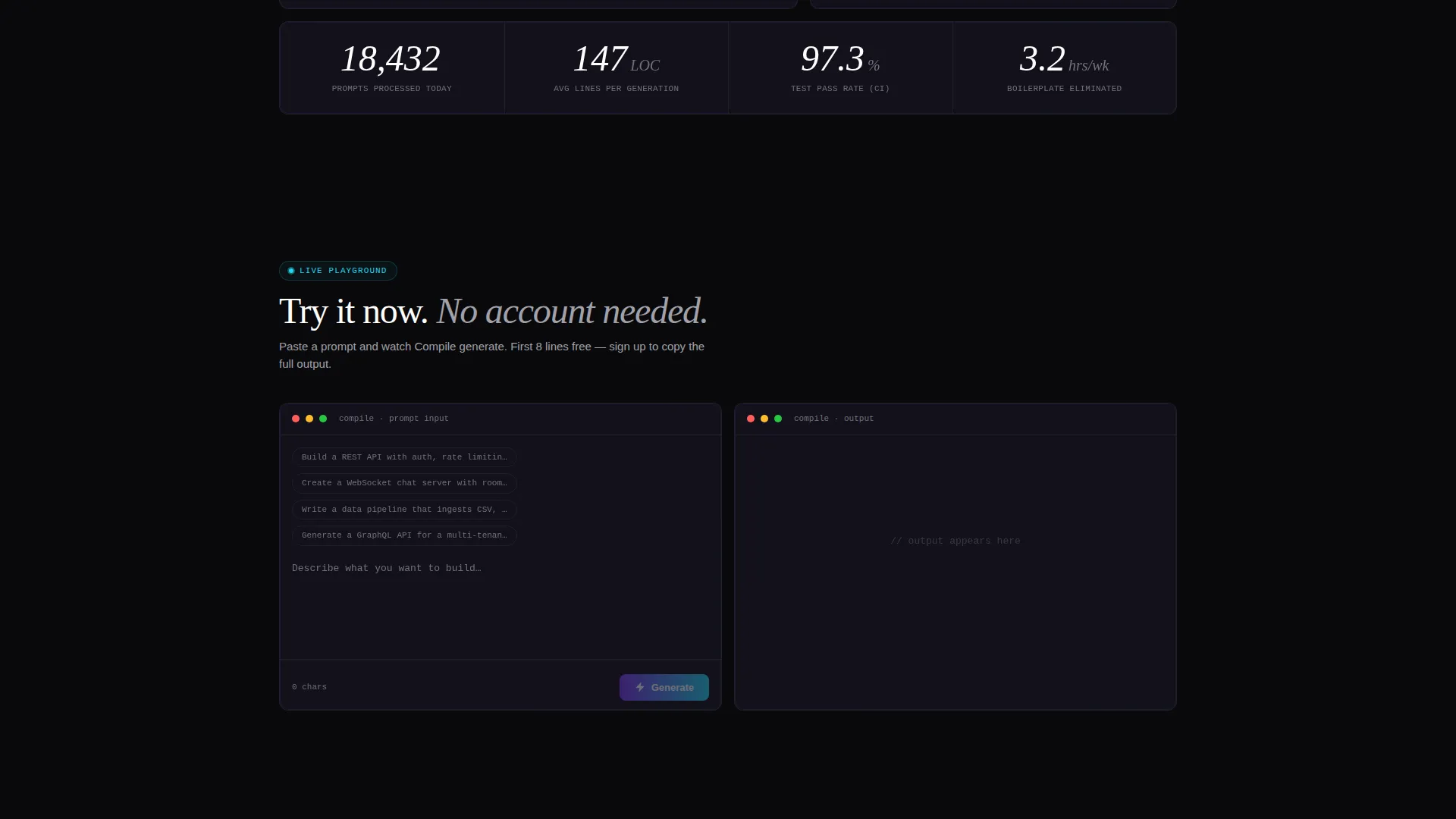
A mid-page tile lets visitors paste their own prompt and see real output. After eight lines, the result is blurred with a "Sign up to copy" prompt. This proves value before asking for anything, reducing signup resistance significantly.
Sticky Bottom Call-to-Action Bar
A persistent bar reading "Start Generating Free" activates after the second scroll fold. It stays visible as the visitor reads deeper into the spec sheet, keeping the primary conversion action always within reach.
Inline Signup with GitHub OAuth
Clicking the call-to-action opens a low-friction inline signup form asking only for a work email and primary programming language. A GitHub OAuth button offers an even faster path, removing the most common barrier to first-time signups.
Void & Violet Dark Design System
The entire template uses a four-color palette: absolute void black, deep interstellar, electric violet, and reactive cyan reserved for hover states and live data pulses. The result is a dark-mode interface that feels like a real code editor environment.
Page sections overview
| Section | Purpose |
|---|---|
| Full-Bleed Header | Introduces the product with an auto-typing prompt and cascading code reveal |
| Language Benchmark Tile | Displays supported languages with real generation time benchmarks |
| Latency Graph Tile | Shows a live-updating p95 latency line to demonstrate speed |
| Code Diff Tile | Compares AI output to human-written code with a match percentage badge |
| Live Playground Tile | Lets visitors test a prompt directly, with output gated after eight lines |
| Sticky call to action Bar | Anchors "Start Generating Free" after the second scroll fold |
| Inline Signup Form | Collects work email and language preference with a GitHub OAuth option |
Design & branding system
The template uses a Startup Velocity theme built on the Void & Violet color system. The palette is minimal and intentional, evoking the atmosphere of a late-night code editor session.
- Core colors include absolute void black (#09090B), deep interstellar (#13111C), electric violet (#7C3AED), and reactive cyan (#22D3EE) used for hover states and data pulse moments
- Typography is monospaced in the hero and prompt field to reinforce the code-native aesthetic throughout the header
- The violet-to-cyan gradient glow bleeds from the center of the header, creating a focal point that draws the eye to the prompt interaction
Mobile & speed optimization
The bento grid layout is structured to reflow cleanly across screen sizes. Tiles stack naturally on smaller viewports without losing the spec-sheet feel or the hierarchy of information.
- The sticky call-to-action bar is designed to remain accessible at mobile viewport widths without obstructing content
- The inline signup form is kept minimal by design, with only two fields and one OAuth button, reducing load and interaction cost on any device
How this template helps you convert
The conversion architecture is deliberate. Every section either builds confidence or removes a barrier, so the decision to sign up feels like the obvious next step.
- The live playground tile delivers a direct product experience before any commitment is required, proving value early and making the signup gate feel fair rather than forced.
- The sticky call-to-action bar ensures the primary action is always visible as the visitor reads deeper, so motivated users never have to scroll back to convert.
- The GitHub OAuth path removes the most common signup friction by letting developers authenticate with one click using a tool they already use every day.
Other information about this template
This template is categorized under Technology, specifically the Micro-SaaS and Developer Tools subcategory with a focus on the AI code generator niche. It is a strong fit for teams preparing a product launch or public beta page.
- The creative direction follows a Spec Sheet approach, meaning the page is structured to communicate technical credibility through measurable claims rather than marketing language
- The header concept is Dark Full-Bleed with Glow, a visual treatment well-suited to developer audiences who spend most of their time in dark-mode environments
- The landing page direction is Lead Generation, and every structural decision supports that goal: from the blurred playground gate to the low-field signup form
- This template is ready to adapt for any AI-powered code generation product, including tools built around large language models or specialized coding models
Theme
Startup Velocity
Creative direction
Spec Sheet
Color system
Void & Violet
Style
Bento Grid
Direction
Lead Generation
Page Sections
Auto-typing Hero Prompt Field
Bento Grid Spec Sheet Layout
Live Playground with Signup Gate
Sticky Bottom Call-to-action Bar
Inline Signup with Github Oauth
Void & Violet Dark Design System
Related questions
Who is this landing page template designed for?
Can I use this template without changing the color scheme?
What makes the live playground tile different from a standard demo section?
Does the template include the GitHub OAuth button?
Is this template suitable for a product that supports multiple programming languages?



