Audit Readiness Compliance Professional Website Template
Comply is a government quality management landing page template built for agencies tired of chasing audits across spreadsheets and binders. It features a live Cost-of-Noncompliance Calculator, animated spec-sheet comparisons, and a sticky Audit Readiness Score form. The template helps compliance teams show regulators clear evidence, close corrective actions faster, and walk into every audit with confidence.
by Rocket studio
Quick summary
Comply is a dashboard-style landing page template designed for government quality management platforms. It combines a real-time calculator header, animated data-grid comparisons, and a progressive lead-capture form into one dark-mode, mission-control layout. Teams can use it to present audit evidence clearly, track corrective action progress visually, and move prospects from curiosity to conversion without friction.
Who this template is for
This template is built for GovTech companies and compliance platform vendors serving public-sector clients. It speaks directly to the people who run quality programs inside government organizations.
- Quality managers at defense contractors preparing for Capability Maturity Model Integration (CMMI) appraisals
- Compliance officers at state Departments of Transportation (DOTs) working toward ISO 9001 recertification
- Municipal IT directors who have recently inherited a neglected compliance program and need to demonstrate audit readiness fast
What problem this template solves
Government agencies rely on fragmented tools to manage audits. Spreadsheets, paper binders, and legacy quality management systems make it hard to identify risks, assign responsibilities, and track progress before an audit deadline arrives.
- Compliance teams waste days pulling together evidence that should be organized and accessible at all times
- There is no clear, visual way to show stakeholders the gap between current compliance posture and a passing audit report
- Prospects visiting a vendor's page cannot see the cost of inaction until someone puts their own numbers in front of them
What you get with this template
This template delivers a fully structured landing page that acts as a centralized proof point for your platform. Every section is built to present data clearly and move visitors toward a decision.
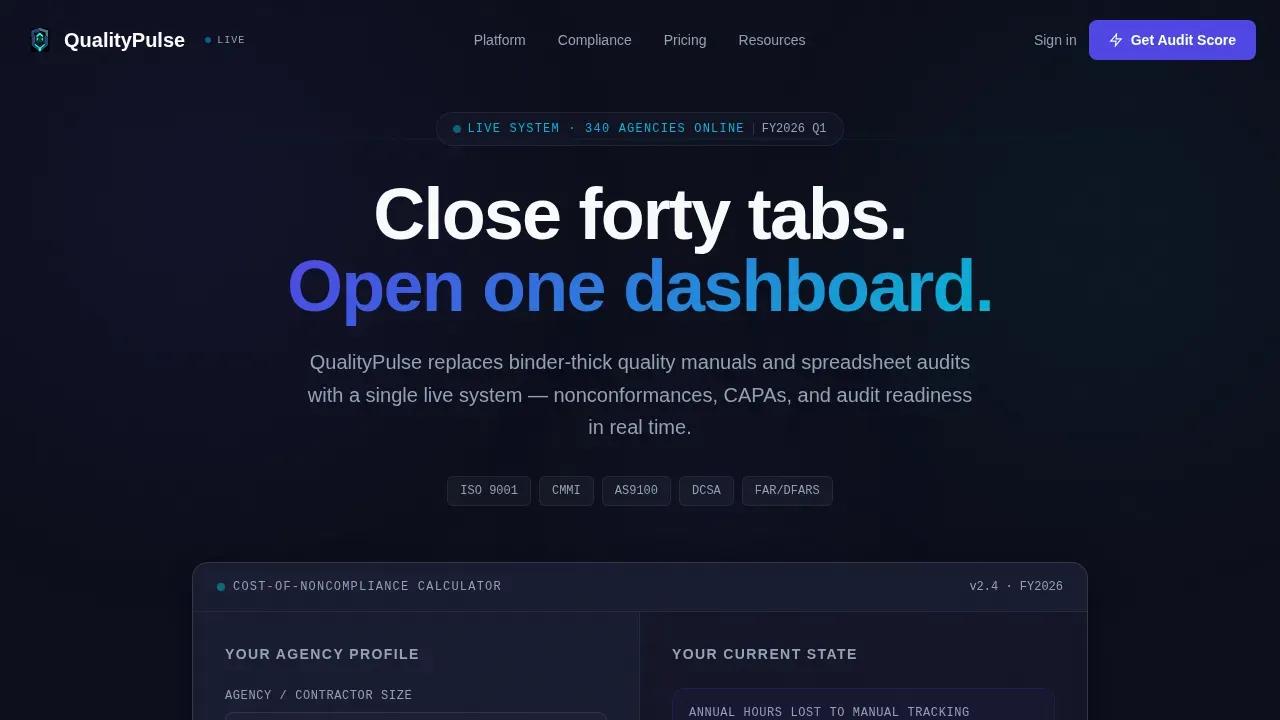
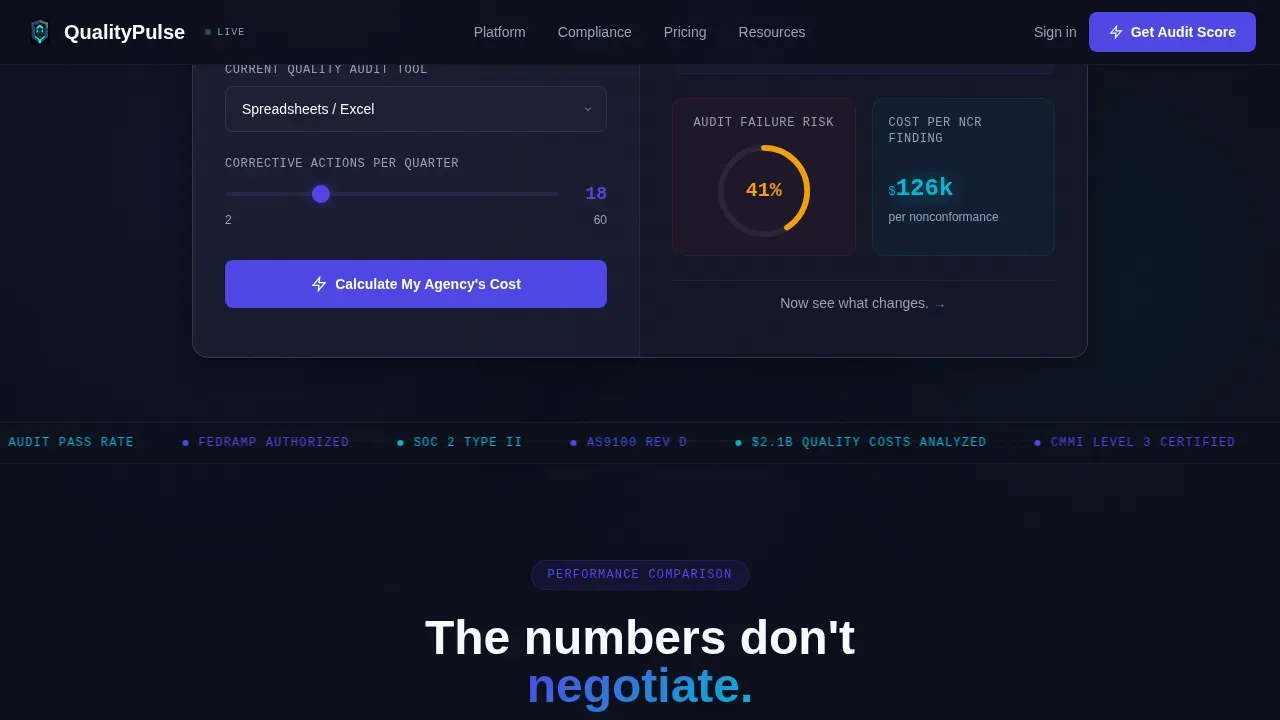
- A working Cost-of-Noncompliance Calculator that renders estimated hours lost, audit failure risk, and dollar cost of a single nonconformance finding in real time
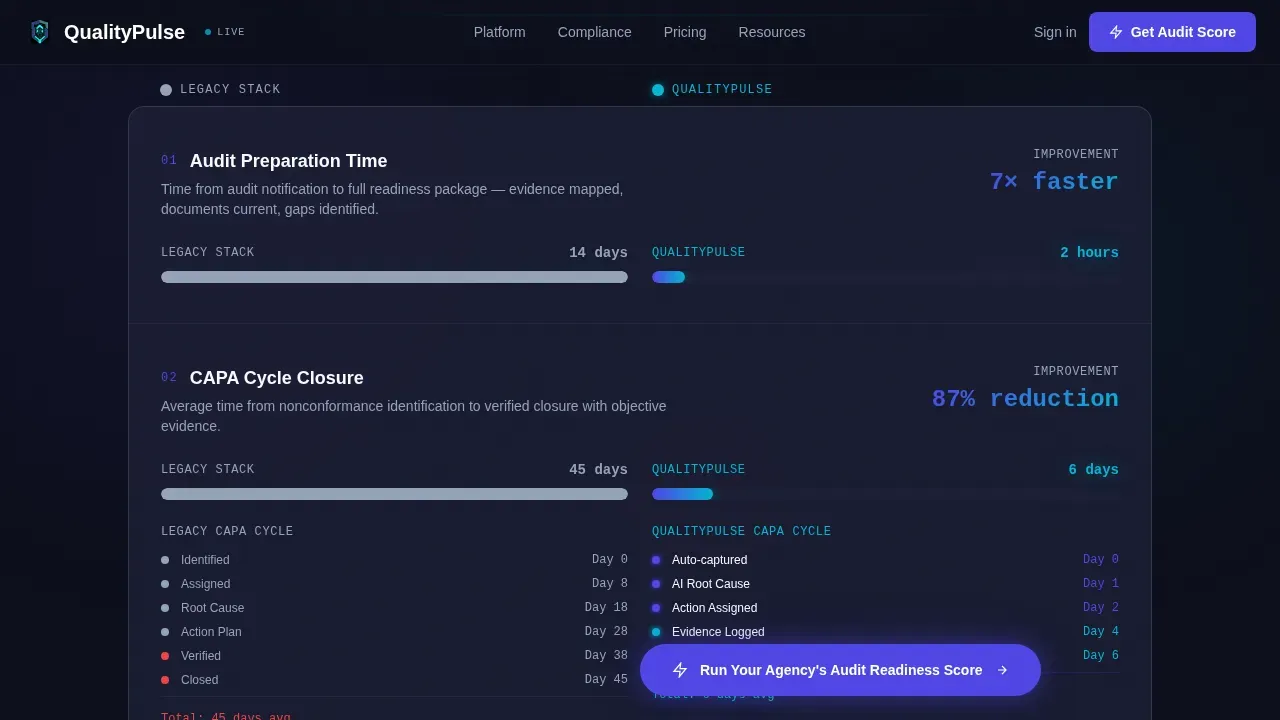
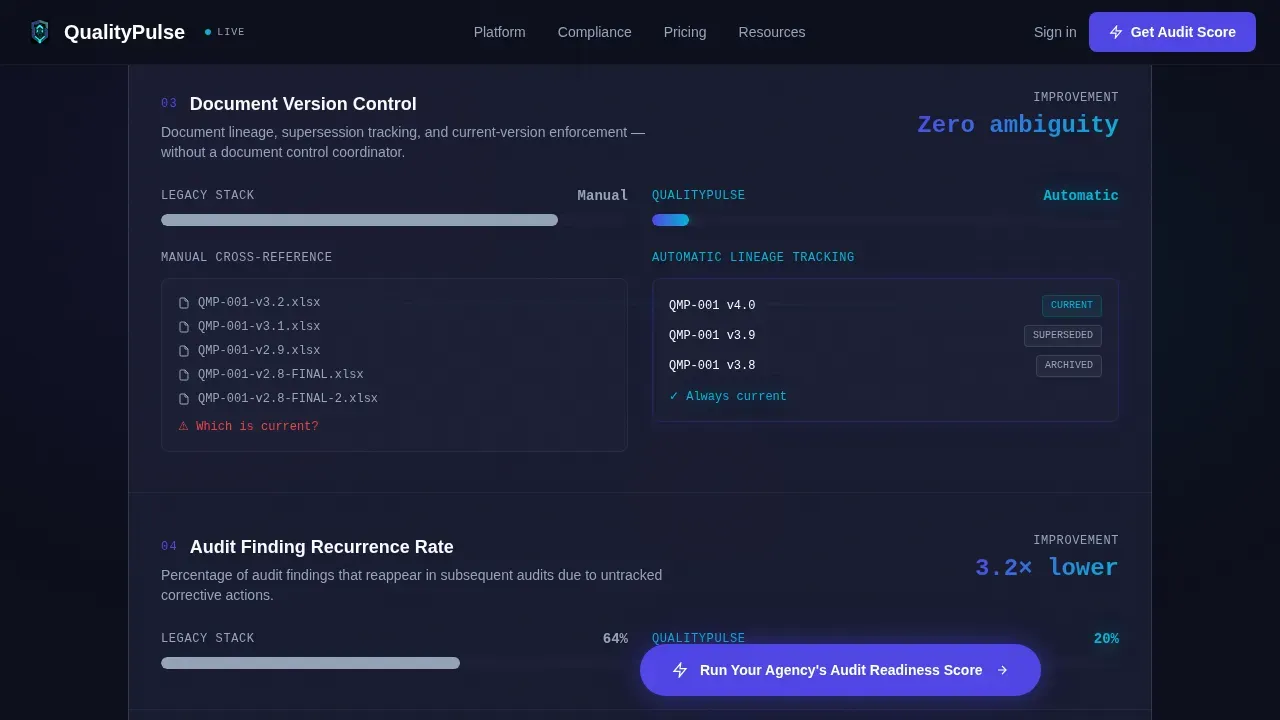
- An animated spec-sheet comparison grid that pits your platform against legacy practices row by row, covering audit prep time, corrective action cycle closure, and document version control
- A three-step progressive lead-capture form gated around the visitor's own compliance framework and pain points, plus a secondary PDF download path for deeper engagement
Feature list
This template ships with purpose-built components that support every stage of a compliance-focused buyer journey. Each section earns its place on the page.
Real-Time Noncompliance Calculator
The header section presents a two-column calculator. Visitors select agency size and current audit tool, then adjust a corrective action volume slider. The right column animates results live, showing annual hours lost, projected audit failure risk as a percentage ring, and the estimated cost of one nonconformance finding. Visitors see their own numbers before the page ever asks for contact details.
Animated Spec-Sheet Comparison Grid
Three data-grid rows compare the platform directly against the legacy stack. Row one covers audit prep time (14 days versus 2 hours), rendered as horizontal bar charts. Row two shows corrective action cycle closure (45 days versus 6 days) with a mini timeline visualization. Row three contrasts manual document cross-referencing against automatic version lineage, using a before-and-after interface screenshot pair. Each row loads with a scroll-triggered micro-animation.
Sticky Audit Readiness Score call to action
After the calculator interaction, a primary call to action pins to the bottom of the viewport and stays visible through the entire spec-sheet scroll. This keeps the conversion path in sight without interrupting the data story being told above it.
Progressive Three-Step Lead Form
Clicking the sticky call to action opens a modal form with three focused steps. Step one collects agency name and compliance framework (ISO 9001, CMMI, AS9100, or custom). Step two presents multi-select checkboxes covering audit prep, corrective action tracking, document control, and training records. Step three asks only for a work email, keeping friction low and completion rates high.
Social Proof and Framework Badges
A dedicated section presents testimonials from quality managers and compliance officers, paired with recognized compliance framework logos. This social proof layer builds trust with regulators and stakeholders who need to see that peer organizations already rely on the platform.
PDF Download Conversion Path
A secondary call to action at the page bottom gates a downloadable benchmark report behind email capture only. This gives visitors who are not ready to run the Audit Readiness Score a lower-commitment path to engage with the company's compliance data and services.
Page sections overview
| Section | Purpose |
|---|---|
| Calculator Hero | Show real-time noncompliance cost before asking for contact info |
| Spec Sheet Grid | Compare platform against legacy audit practices row by row |
| Social Proof | Build trust with testimonials and compliance framework logos |
| Readiness Score Form | Capture qualified leads through a three-step progressive form |
| PDF Download Gate | Offer a secondary, lower-commitment conversion path |
| Footer | Present privacy policy link, legal notices, and company details |
Design & branding system
The visual identity runs on an Electric Indigo color system built to feel like mission-control software rather than a typical government vendor page. Typography combines DM Sans for headings with JetBrains Mono for all data and metrics, giving numbers a precise, technical authority.
- Deep navy (#0D0F1C) dominates all backgrounds, creating the dark-dashboard atmosphere that frames every data element
- Charged indigo (#4F46E5) owns all primary actions and data highlights, while cool slate (#94A3B8) structures grid lines and secondary text
- Reactor-bright cyan (#06B6D4) fires only on live status badges and animated metric pulses, ensuring that active data always draws the eye first
Mobile & speed optimization
The template is designed desktop-first, reflecting the reality that government dashboard users typically work on large screens where data grids and comparison tables need space to breathe. Mobile layouts are still accounted for in the component structure.
- Calculator inputs, comparison rows, and the sticky call to action reflow cleanly for smaller viewports without losing core functionality
- Scroll-triggered animations and counter reveals are built as client-side components, keeping static sections lean and fast to load
- The progressive form modal is optimized for touch input, reducing friction for users who access the page from a tablet or mobile device in the field
How this template helps you convert
Every section of this template is ordered to earn the click, not demand it. The page builds a personal, data-driven case for change before any form appears.
- The calculator puts the visitor's own cost of noncompliance on screen first. Seeing projected fines, lost hours, and audit failure risk tied to their own agency size makes the gap between current practices and a compliant program feel real and expensive.
- The spec-sheet grid then shows the exact factors that drive that gap, row by row, with animated evidence that the platform closes each one. By the time the visitor reaches the bottom, the data is difficult to dismiss.
- The sticky Audit Readiness Score call to action and the gated PDF download give two different confidence levels of conversion path, capturing both ready buyers and early-stage researchers in the same visit.
Other information about this template
This template supports a broad range of compliance program presentations. The layout can be adapted to document different regulatory frameworks, map company policies to specific regulations, and present version-controlled records to auditors. Teams that rely on clear communication between employees and regulators will find the grid-based structure useful for showing before-and-after workflow improvements.
- The page layout follows accessibility best practices, including proper header hierarchy and descriptive image alt text, so the page remains navigable for all users
- The footer includes space for a privacy policy link, cookie consent notice, and data retention disclosures, supporting GDPR and CCPA-aligned data collection practices
- Version control and approval history elements can be incorporated into document sections, showing authorized personnel, approval dates, and document lineage for every policy the company publishes
- Visible compliance badges and trust signals, such as security certification logos, can be placed near conversion points to enhance confidence among cautious government buyers
- The comply audit readiness compliance landing page template is built to present a consistent, professional audit report to regulators, whether the underlying compliance program covers ISO 9001, CMMI, AS9100, or a custom framework
Theme
Startup Velocity
Creative direction
Spec Sheet
Color system
Electric Indigo
Style
Dashboard/Data Grid
Direction
Comparison/Versus
Page Sections
Real-time Noncompliance Cost Calculator
Animated Spec-sheet Comparison Grid
Sticky Audit Readiness Score Call to Action
Progressive Three-step Lead Capture Form
Social Proof and Trust Signal Section
Gated PDF Secondary Conversion Path
Related questions
Can this template support multiple compliance frameworks at once?
Is the Cost-of-Noncompliance Calculator functional out of the box?
How does the spec-sheet section help with compliance audit conversations?
What kind of social proof does the template include space for?
Can the PDF download section be used to gate other compliance resources?



