Fleet & Transportation Management Directory Website Template
Comply is a fleet management dashboard landing page built for ELD and hours-of-service compliance in trucking. It uses a cinematic windshield hero, side-by-side comparison grids, and a two-step compliance check form to convert fleet managers, owner-operators, and safety directors into qualified leads before they ever leave the page.
by Rocket studio
Quick summary
Comply is a single-page dashboard landing page template for an Electronic Logging Device (ELD) and hours-of-service compliance platform. It puts a fleet management dashboard front and center, walking visitors through head-to-head comparison grids, real data benchmarks, and a gated spec sheet before asking for a single keystroke.
Who this template is for
This template is built for trucking-industry businesses that need to win buyers before a competitor does. It speaks directly to people who live inside a fleet management system and feel the pressure of every DOT audit cycle.
- Owner-operators running one truck who need proof that this device keeps them compliant without complexity.
- Mid-size fleet dispatchers managing dozens of vehicles across multiple time zones who need hard data fast.
- Safety directors at carriers with prior Compliance, Safety, Accountability (CSA) score history who need audit-ready documentation on demand.
What problem this template solves
Fleet managers often lose prospects because their website shows features instead of answers. Buyers arrive at 1 a.m. comparing providers and leave when they cannot quickly determine which solution actually covers their compliance gaps.
- Most landing pages bury the comparison data that drivers and dispatchers actually need to make a decision.
- Visitors in research mode abandon pages that ask for contact details before delivering value.
- Safety directors cannot justify a switch without seeing cost-per-truck and install-time figures side by side.
What you get with this template
This template delivers a complete, conversion-focused fleet management dashboard landing page. Every section is structured to help visitors self-qualify and move toward a form submission or spec sheet download.
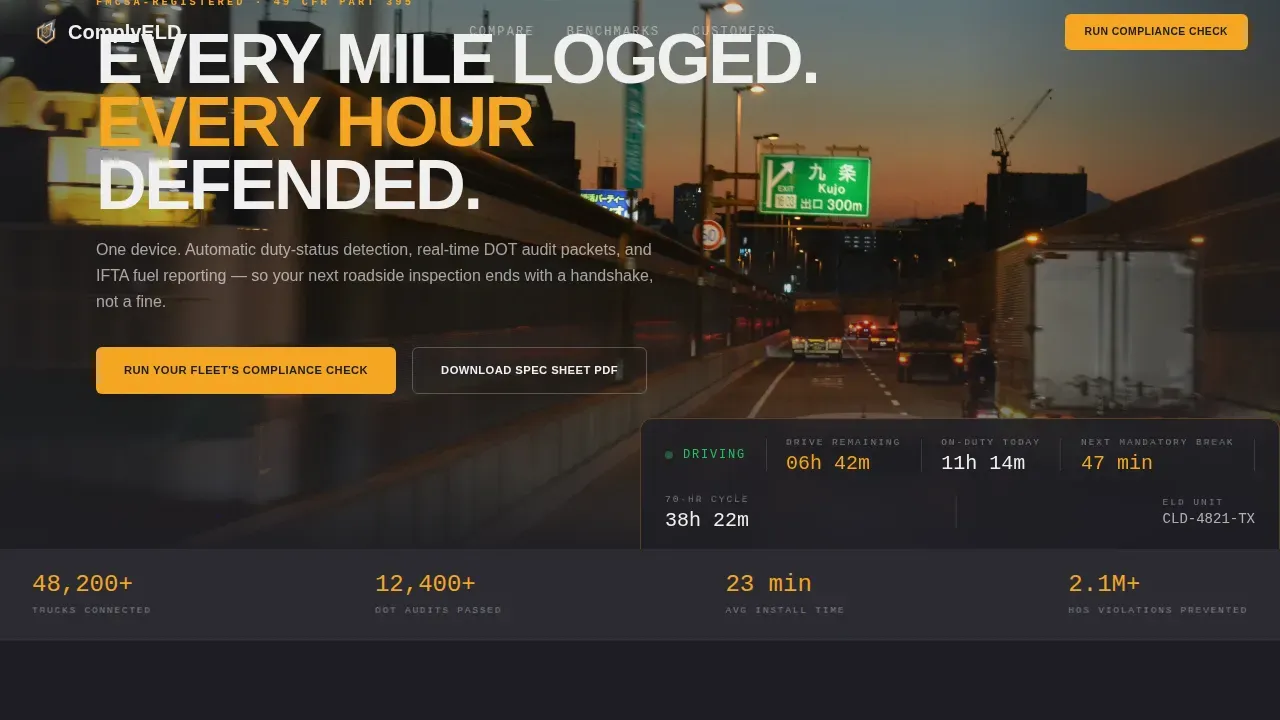
- A cinematic 21:9 windshield hero with a floating hours-of-service overlay displaying live drive-time, on-duty totals, and duty status.
- Two data-dense comparison grids that track feature presence and hard benchmarks, with an amber-accented design that makes gaps impossible to miss.
- A two-step compliance check form and a secondary email-gated spec sheet PDF capture path built into the same page.
Feature list
This template includes purpose-built sections and components designed around fleet compliance sales. Each element earns the visitor's trust before asking for contact details.
Cinematic Hero with Live HOS Overlay
The header uses a panoramic 21:9 windshield shot at dusk. A translucent dashboard overlay floats at the bottom of the frame and displays real hours-of-service data: remaining drive time, on-duty hours, and next mandatory break. A headline fades in over the road. This section sets the dashboard tone immediately and signals to fleet managers that this page understands their world.
Head-to-Head Comparison Grids
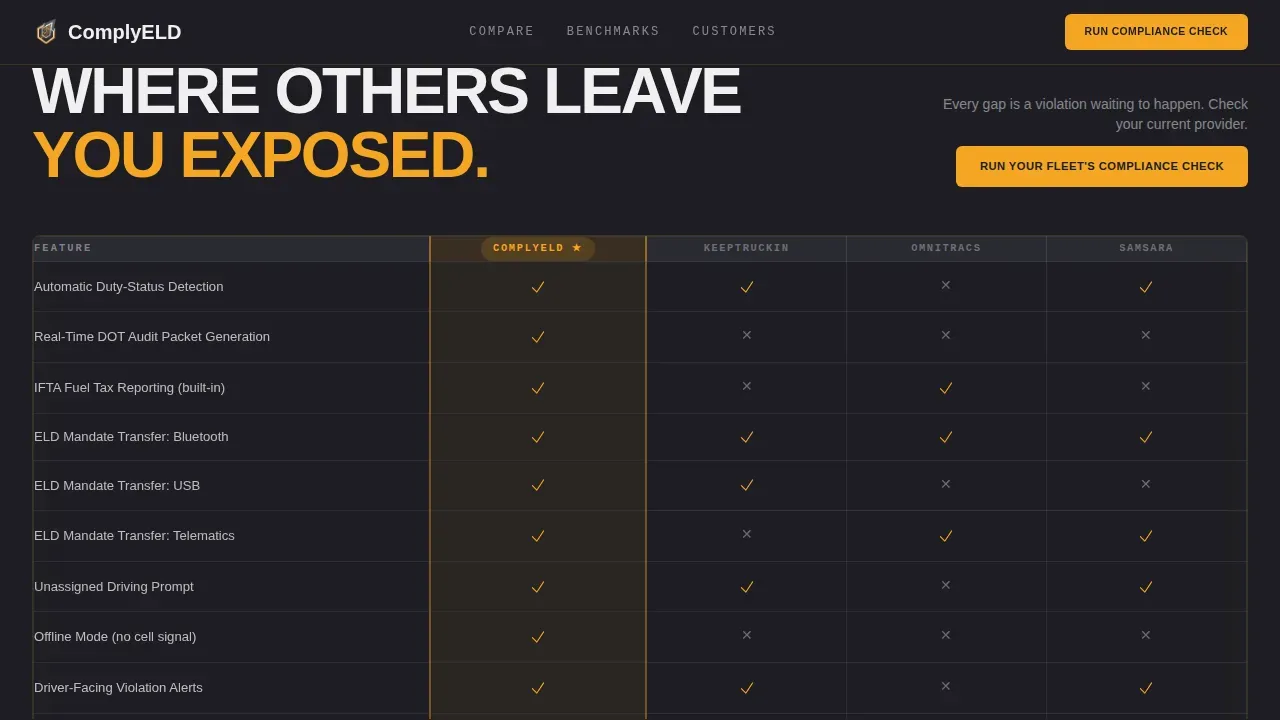
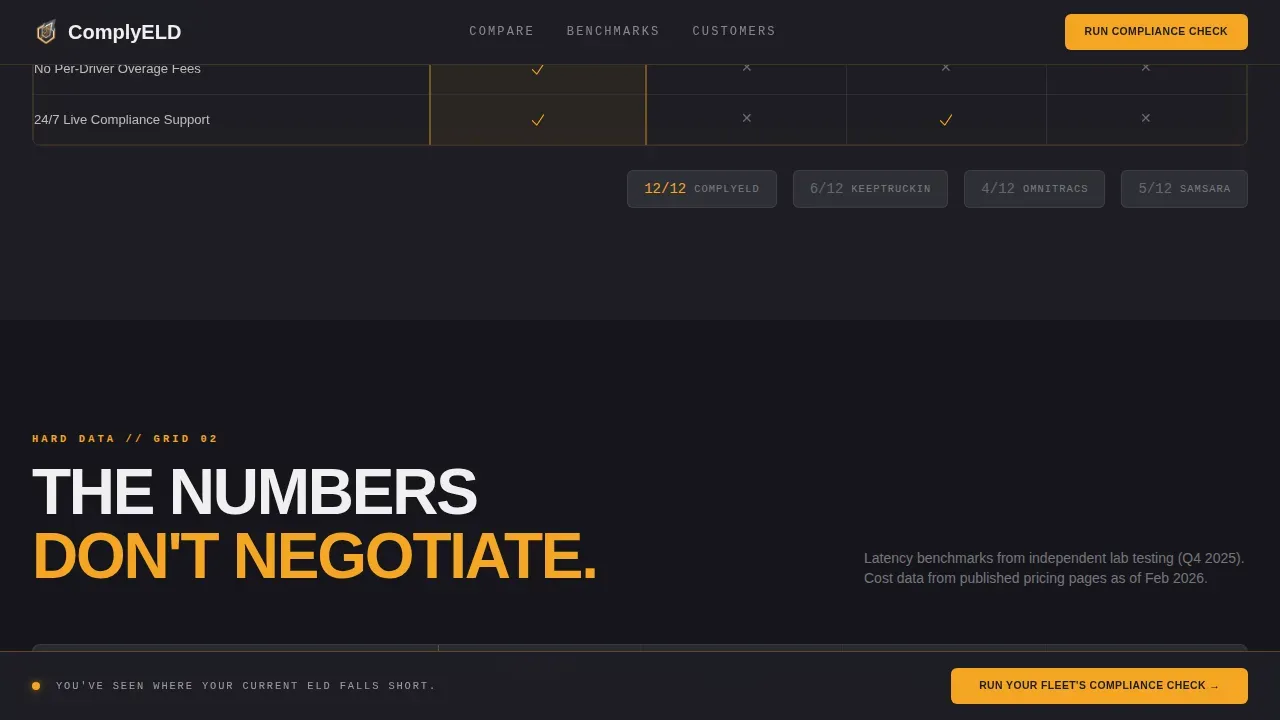
Two full-width comparison tables let visitors monitor feature gaps row by row. The first grid covers feature presence: automatic duty-status detection, IFTA fuel reporting, real-time DOT audit packet generation, and ELD mandate transfer modes including Bluetooth, USB, and telematics. Amber checkmarks and charcoal Xs fill each cell, making it easy to identify where rival devices fall short. This section directly supports data driven decisions for buyers evaluating providers.
Hard Data Benchmark Table
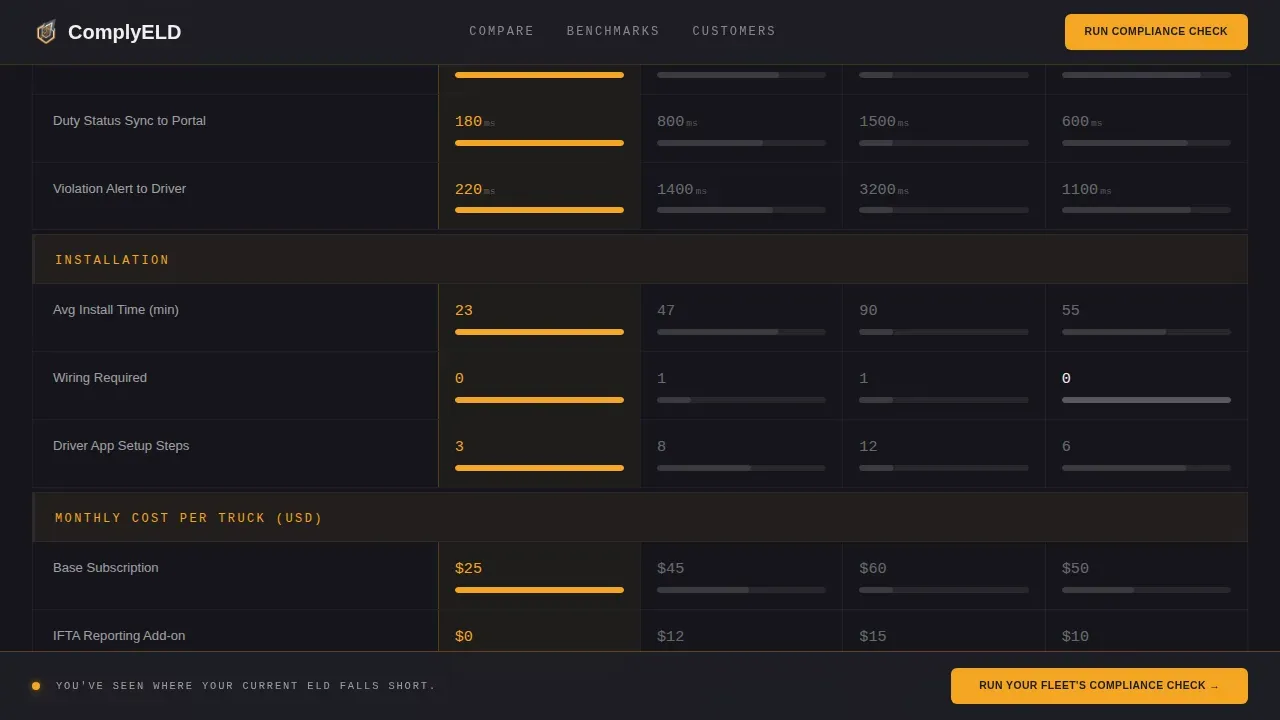
The second comparison grid increases data density as the visitor scrolls. It covers latency benchmarks, install time comparisons, and monthly cost breakdowns per truck. Monitoring these key metrics side by side helps fleet managers assess maintenance costs, fuel efficiency differences, and total ownership costs across competing devices. A sticky call-to-action bar slides in after this table to capture momentum.
Two-Step Compliance Check Form
The primary conversion path uses a two-step modal form. Step one asks fleet size and current ELD provider. Step two requests name, email, and Motor Carrier (MC) or Department of Transportation (DOT) number. This staged approach reduces friction and helps the business qualify leads by fleet size before any follow-up.
Social Proof and Metric Callouts
Three testimonials from an owner-operator, a dispatcher, and a safety director anchor the page with role-specific outcomes. Three metric callouts display trucks connected, audits passed, and average install time. Together, these sections build trust and reinforce the fleet management dashboard's real-world effectiveness before the final call to action.
Spec Sheet PDF Capture
A secondary conversion path offers a full specification sheet download gated behind email-only capture. This serves visitors still in research mode and helps logistics companies collect leads who are not yet ready to run a compliance check. The spec sheet path keeps fleet utilization of the page high across all buyer stages.
Page sections overview
| Section | Purpose |
|---|---|
| Windshield Hero | Display cinematic HOS overlay and headline |
| Comparison Grid One | Feature presence versus. competitors |
| Comparison Grid Two | Benchmark data and cost breakdowns |
| Social Proof | Testimonials and metric callouts |
| Compliance Check Form | Two-step lead qualification modal |
| Spec Sheet Capture | Email-gated PDF download path |
| Linear Footer | Single-row links and legal text |
Design & branding system
The visual identity follows a Service Utility theme. Every color choice and type decision reflects an industrial instrument cluster: functional, zero-decoration, and built for people who read gauges for a living.
- Color system: deep asphalt charcoal (#1E1E24) as the primary background, highway-stripe amber (#F5A623) for alerts and active states, diesel smoke gray (#3A3A42) for card surfaces and table rows, and high-beam white (#F0F0F0) for text and dividers.
- Typography: Plus Jakarta Sans in heavy weights for headings, JetBrains Mono for all data fields and numbers, keeping the dashboard aesthetic consistent across every row and metric callout.
- Animation layer: medium-high intensity with a hero overlay count-up, scroll-reveal comparison rows, amber glow pulses on active cells, and a sticky bar slide-in triggered after the second comparison table.
Mobile & speed optimization
The template is built desktop-first to serve fleet managers working at a desk late at night, with a solid mobile layout for owner-operators checking the page on a phone between routes. Performance relies on a static hero image and CSS animations rather than heavy JavaScript libraries, keeping load behavior predictable across devices.
- Desktop layout prioritizes data density: wide comparison tables, side-by-side columns, and sticky navigation all render cleanly on larger screens.
- Mobile layout stacks comparison rows vertically so drivers and dispatchers can scroll through vehicle records and benchmark data without horizontal scrolling.
How this template helps you convert
The page is structured around a Comparison/Versus conversion model. Every section earns the next click by delivering value before making a request.
- The hero section anchors the visitor with a real hours-of-service dashboard overlay, establishing credibility and signaling that this page knows fleet operations inside out before a single word of copy is read.
- The two comparison grids do the selling: visitors can monitor feature gaps, identify cost differences, and assess delivery performance benchmarks all in one scroll, so by the time the sticky call-to-action bar appears, the decision is already forming.
- The two-step form and spec sheet path serve different buyer stages simultaneously, so the page captures both ready-to-switch fleet managers and researchers still building a business case, without losing either group.
Other information about this template
This template fits naturally into the broader category of fleet management dashboard solutions used across logistics, transportation, and supply chain businesses. It can serve as a standalone landing page for a company launching or repositioning an ELD device, or as a campaign page driving paid traffic from fleet management system comparison searches.
- The comply fleet compliance dashboard landing page template is designed specifically for the ELD and hours-of-service niche, with section logic that reflects real DOT compliance workflows rather than generic SaaS patterns.
- Dashboard sections display key metrics that align with what fleet managers actually monitor: fuel consumption per vehicle, maintenance history, inspection completion rates, driver behavior scorecards covering speeding and harsh braking, and licensing and vehicle records status.
- The template supports effective fleet management storytelling by covering fleet utilization data, delivery performance benchmarks, and maintenance costs in the comparison grids rather than reserving them for a separate page.
- Organizations using this template can document their compliance advantage clearly: assets covered, inspections logged, repairs tracked, and fees avoided all become visible proof points within the dashboard grid layout.
- No-code platforms and AI-assisted tools make it straightforward for businesses to adapt this template to changing fleet management needs without traditional programming skills, keeping the page current as regulations or competitive comparisons evolve.
- Logistics companies and carriers can use the spec sheet capture path to build an email list of prospects researching ELD solutions, giving the sales team a pipeline of contacts segmented by fleet size and current provider before the first call.
- The template covers driver information fields, vans and Class 8 trucks alike, and supports payments and fees transparency through the cost-per-truck breakdown rows in the benchmark grid.
Theme
Service Utility
Creative direction
Spec Sheet
Color system
Charcoal & Amber
Style
Dashboard/Data Grid
Direction
Comparison/Versus
Page Sections
Cinematic HOS Hero with Dashboard Overlay
Head-to-head Feature Comparison Grid
Hard Data Benchmark Table with Sticky Call to Action
Two-step Compliance Check Form
Role-specific Social Proof and Metric Callouts
Email-gated Spec Sheet PDF Capture
Related questions
Who is this landing page template designed for?
Can I customize the comparison grid rows for my own feature set?
Does the template include the two-step form layout?
What makes this template different from a generic SaaS landing page?
Is this template suitable for both small fleets and large carriers?