Construction Software & SaaS Privacy Policy Website Template
Comply is a single-page compliance landing page template built for construction software platforms. It features an animated code-snippet header, a scrollable feature comparison table, and a freemium trial conversion flow. The layout targets project managers, code consultants, and general contractors who need a fast, credible way to present automated building code lookup to serious buyers.
by Rocket studio
Quick summary
Comply is a high-impact landing page template designed for construction compliance software. It opens with a live-style code-snippet header, leads visitors through an animated feature comparison table, and converts through a low-friction freemium trial model. The layout is direct, evidence-led, and built for buyers who already know the pain of missed building code updates.
Who this template is for
This template is built for teams marketing compliance-focused construction software. It speaks directly to the people who feel the cost of manual code lookups every working day.
- Project managers handling multi-trade submittals across active job sites
- Code consultants who spend billable hours on searches they want automated
- General contractors who have absorbed costly penalties from missed amendment cycles
What problem this template solves
Manual building code research is slow, error-prone, and expensive. A single overlooked fire-separation update buried in an amendment cycle can trigger a six-figure change order. This template gives compliance software a conversion-ready page that makes that problem impossible to ignore.
- Visitors see the gap between manual lookup and automated compliance instantly
- The comparison table makes the inefficiency of competing approaches visible row by row
- The trial flow removes friction so skeptical buyers can verify the tool before committing
What you get with this template
You get a fully structured, single-page layout with every section designed around the compliance software buyer journey. Nothing is generic. Every element connects to a real workflow decision.
- An animated code-snippet header that demonstrates the product concept before a word is read
- A scrollable, row-by-row feature comparison table with kinetic cell animations
- A pinned freemium call-to-action and a secondary jurisdiction-coverage modal path
Feature list
This template ships with purpose-built components that mirror the compliance research experience your buyers already live inside.
Animated Code Snippet Header
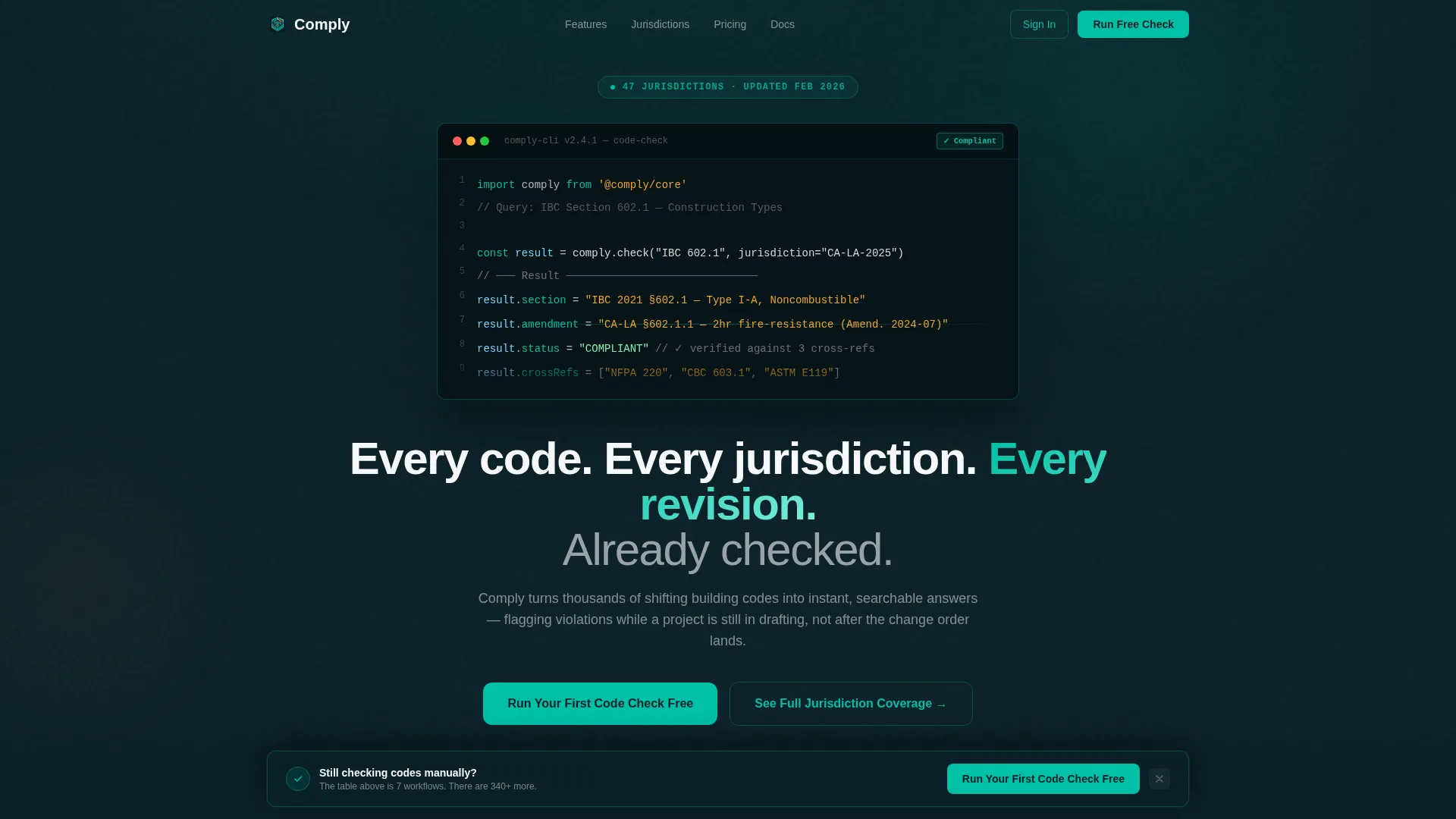
The header renders a styled code block showing a live International Building Code (IBC) Section 602.1 query being parsed in real time. Characters stream in like a terminal prompt. The software returns the applicable clause, jurisdiction-specific amendments, and a compliance status badge that transitions from amber "Checking..." to teal "Compliant" with a micro-animation. The header communicates product value before the visitor reads a single headline.
Scrollable Feature Comparison Table
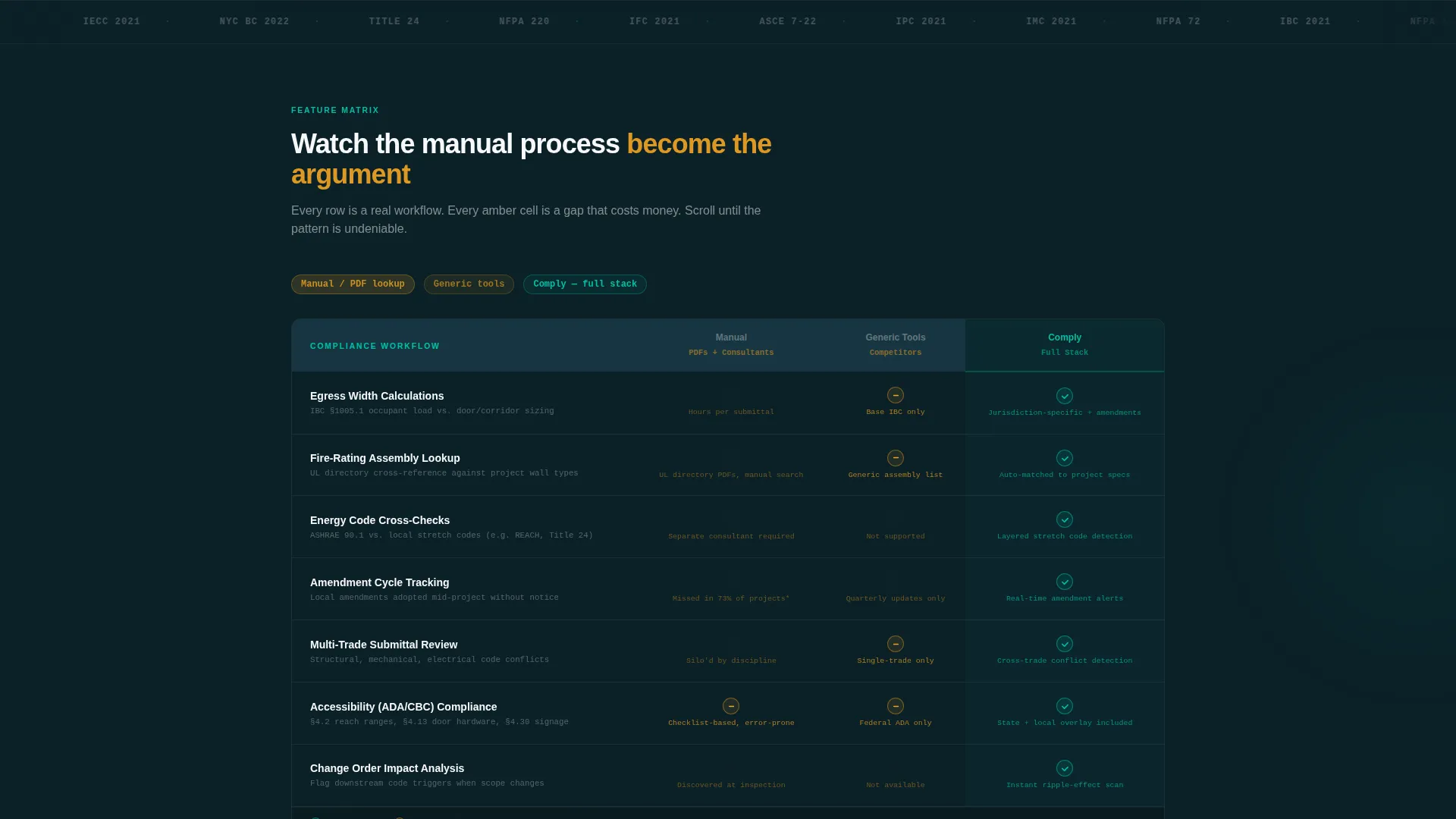
The core of the page is a feature matrix where each row maps to a real compliance workflow: egress calculations, fire-rating lookups, energy code cross-checks, and amendment tracking. Columns compare manual lookup, competitor tools, and the platform. Cells animate into view as the visitor scrolls. Checkmarks snap in with kinetic motion and gap cells pulse in amber, so the table itself builds the argument rather than just stating it.
Pinned Freemium Trial call to action
A "Run Your First Code Check Free" call-to-action pins to the page after the third table row. It grows more visually prominent as the comparison deepens. The trial form asks only for email and primary jurisdiction, then places the visitor directly into a live query sandbox. Minimal friction keeps conversion rates from stalling on the heaviest decision point.
Secondary Jurisdiction Coverage Modal
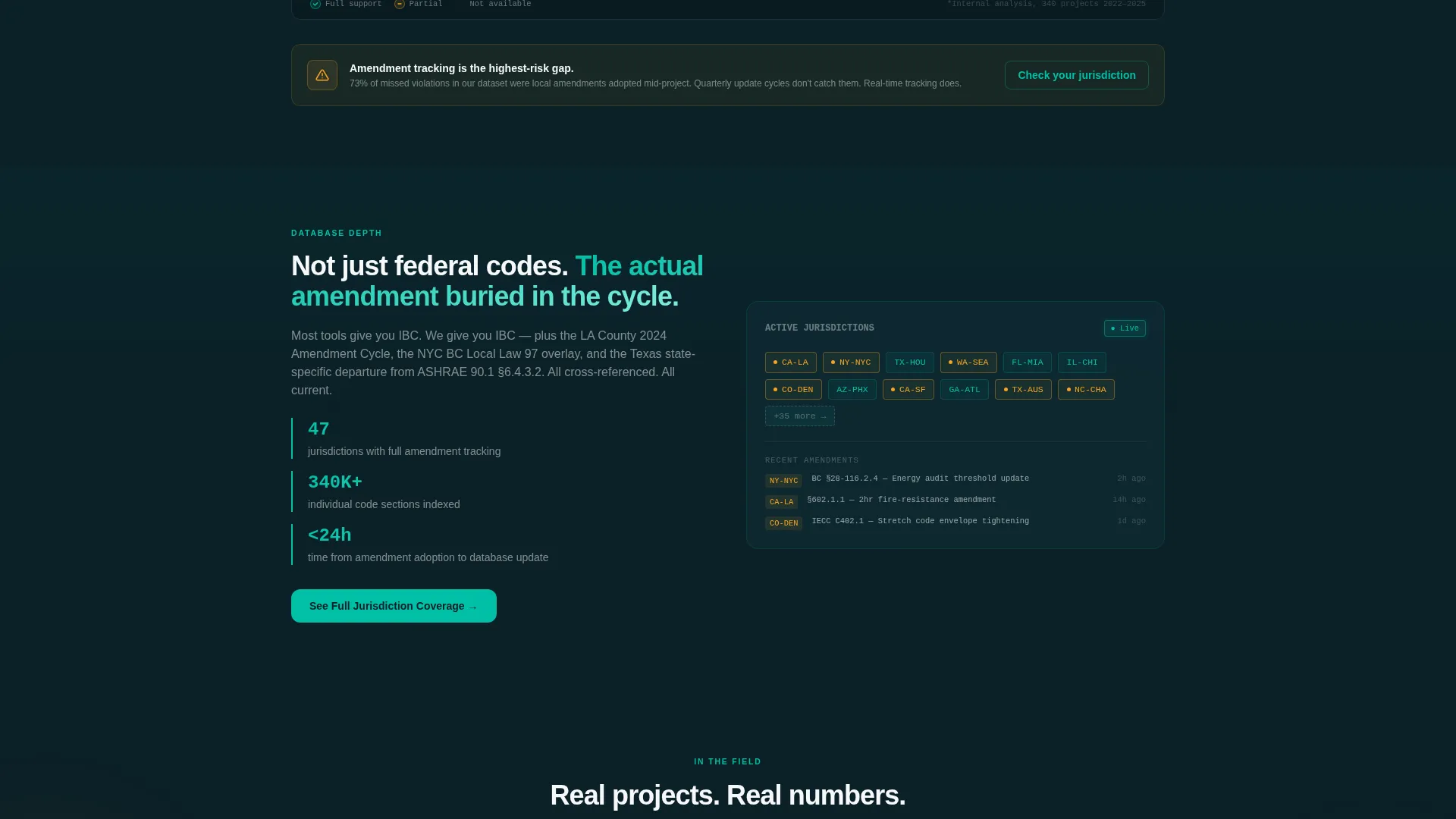
A "See Full Jurisdiction Coverage" secondary path opens a searchable database modal. Visitors can explore code depth without signing up. When they type a code section themselves and find the result, the need to save it becomes their own idea. This path warms skeptical buyers who are not yet ready for the primary trial flow.
Dynamic Motion Theme
Every interactive state uses the Teal Catalyst color system with purposeful motion. Teal marks pass indicators and active states. Amber flags warnings and upgrade prompts. Row-by-row scroll animations and status badge transitions give the page a sense of the software actually working, not just being described.
Page sections overview
| Section | Purpose |
|---|---|
| Code Snippet Header | Opens with a live-style IBC query animation and compliance status badge |
| Hero Headline Block | Delivers the core value statement after the code animation resolves |
| Feature Matrix Table | Compares manual, competitor, and platform workflows row by row |
| Pinned Trial call to action | Converts visitors with a minimal email and jurisdiction form |
| Jurisdiction Coverage Modal | Lets skeptics explore code depth without signing up |
Design & branding system
The Teal Catalyst color system is built around a dark, data-dense aesthetic that feels like a digital plan review station running before dawn. Every color has a defined role so the visual hierarchy never competes with the compliance data.
- Deep site-plan navy (#0B2027) anchors all backgrounds and primary typography
- Active compliance teal (#00BFA6) leads interactive states, pass badges, and checkmarks
- Caution-flag amber (#F4A523) marks warnings, gap cells in the comparison table, and upgrade prompts
- Permit-paper white (#F7F8FA) provides breathing room inside data-dense table cells
Mobile & speed optimization
The Dynamic Motion theme is designed to remain legible and purposeful on smaller screens. Scroll-triggered animations are contained to their sections so they do not interfere with reading flow on touch devices.
- The comparison table is structured for horizontal scrollability on narrow viewports
- The pinned trial call to action maintains its position and prominence across screen sizes
- Status badge micro-animations are lightweight and scoped to their trigger zones
How this template helps you convert
This template is structured as a staged evidence argument. Each section does conversion work before the next one loads.
- The animated header demonstrates the product concept in the first five seconds, creating curiosity and trust before any claim is made in plain text.
- The scrollable comparison table accumulates evidence row by row, making the manual process look progressively less defensible until the trial call to action feels like the only reasonable next step.
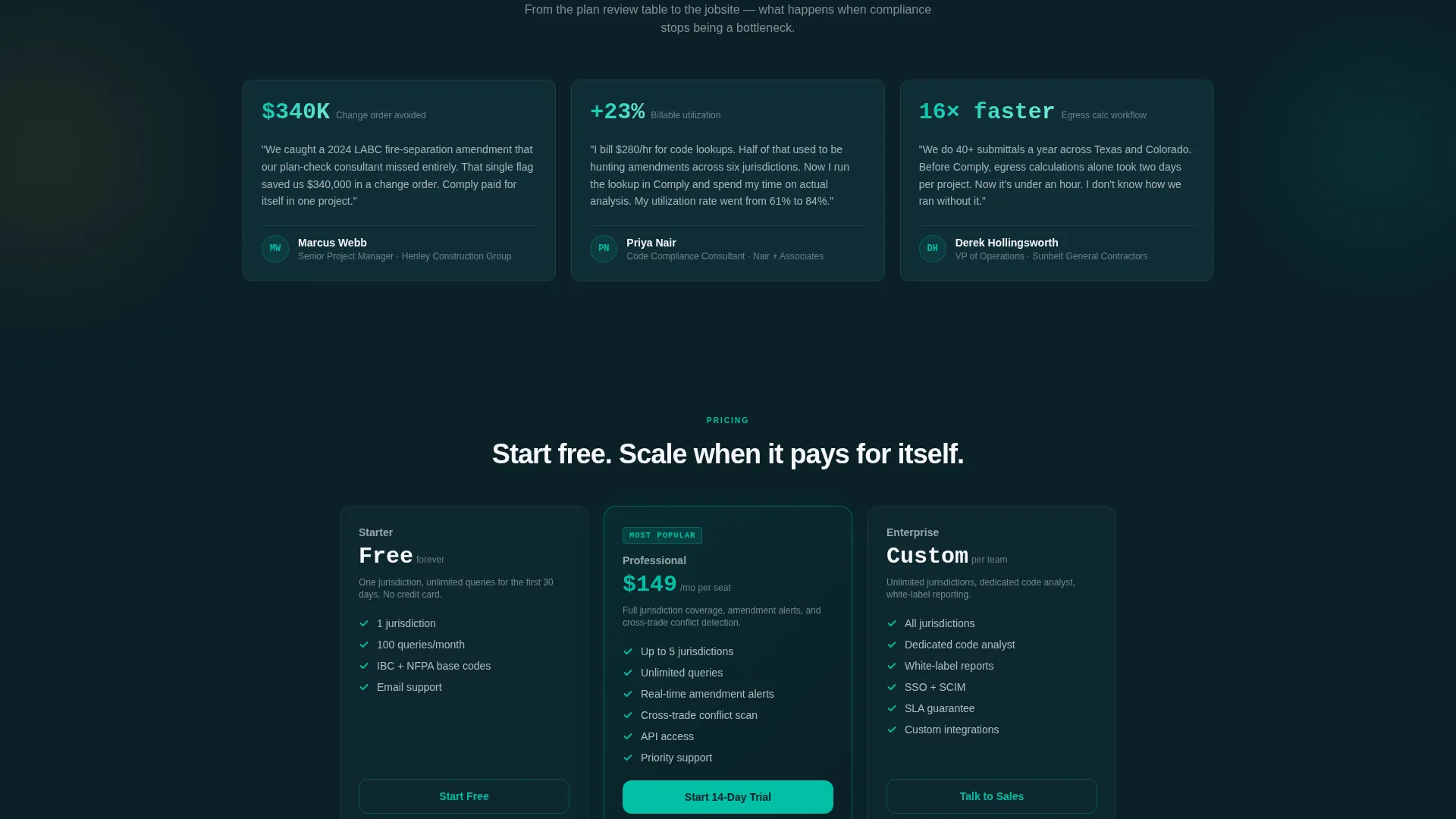
- The dual conversion paths serve two buyer types at once: the trial form captures ready buyers while the jurisdiction modal warms skeptics who need to verify depth before committing.
Other information about this template
This template is part of the broader Dynamic Motion template family and uses the Teal Catalyst design system consistently across all interactive states.
- The template is categorized under Construction Software and Software as a Service (SaaS) within the Technology segment
- It is built around a freemium and free-trial conversion model, making it a natural fit for compliance platforms offering a sandbox or query-limited free tier
- The Feature Matrix creative direction is intentional: the comparison table format is one of the highest-trust layouts in the SaaS category because it lets the product speak through contrast rather than assertion
- Page type is a single-page landing page, not a multi-page website, so every section contributes to one continuous scroll-to-convert flow
- The Comply template name reflects the construction compliance software niche it is designed to serve
Theme
Dynamic Motion
Creative direction
Feature Matrix
Color system
Teal Catalyst
Style
Comparison Table
Direction
Freemium/Trial
Page Sections
Animated Code Snippet Header
Scrollable Feature Comparison Table
Pinned Freemium Trial Call to Action
Secondary Jurisdiction Coverage Modal
Teal Catalyst Color System
Related questions
Can I customize the comparison table rows for my own compliance workflows?
Does the code snippet header require a live backend connection?
How does the dual conversion path work in practice?
Is this template suitable for a compliance platform targeting multiple jurisdictions?
What conversion model does this template support?



