Local Optometry Software Cost Estimator Website Template
Comply is a dashboard-style landing page template built for optometry safety management platforms. It combines a Feature Tab Switcher header, an interactive compliance risk calculator, and a lead generation flow to turn practice managers and group COOs into audit request leads. The Acid Digital color system and dark mission-control aesthetic make every compliance metric feel urgent and real.
by Rocket studio
Quick summary
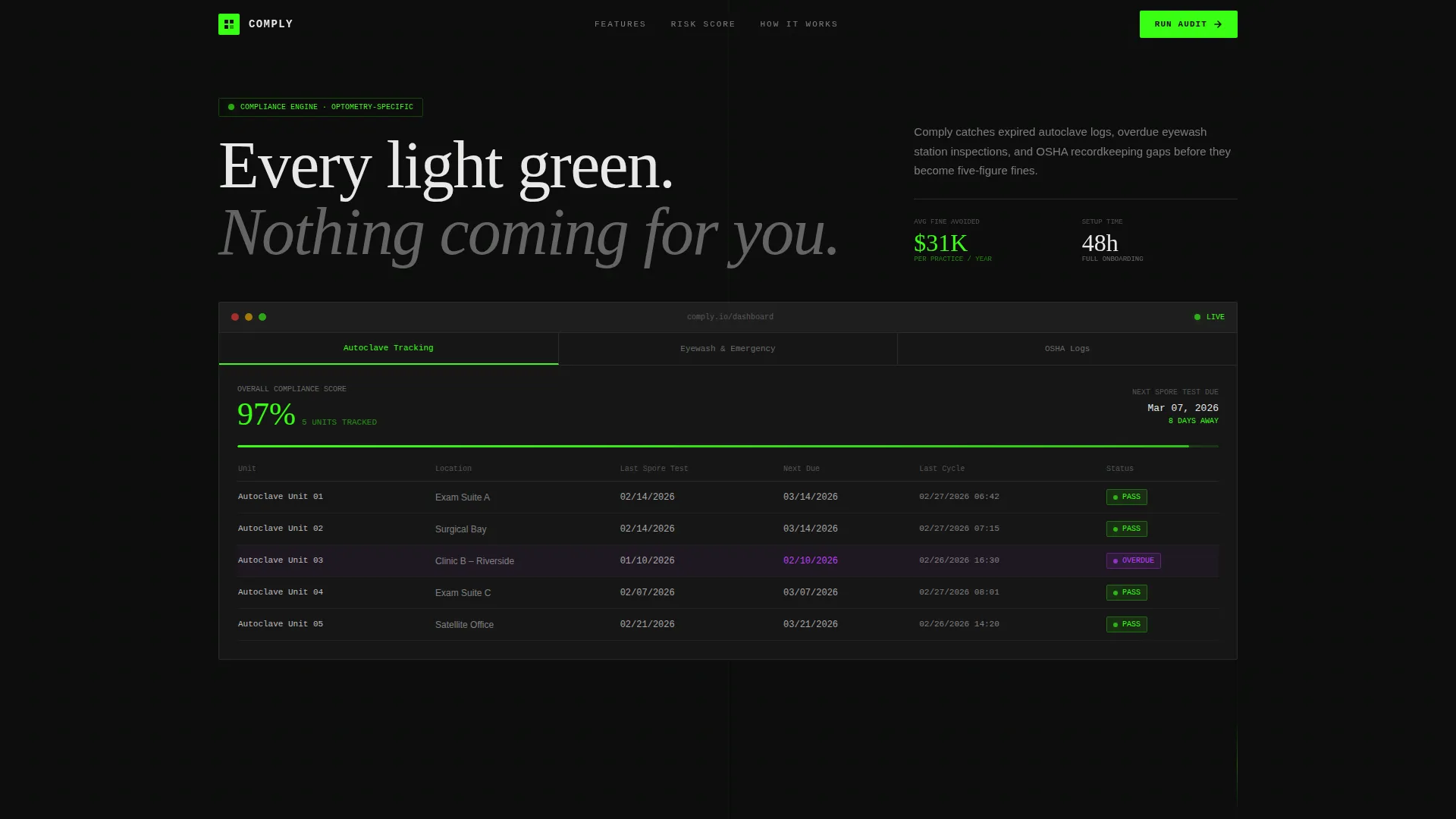
Comply is a single-page, dashboard-driven landing page template for optometry safety compliance software. It opens with a tabbed mock dashboard showing live autoclave logs, eyewash inspections, and OSHA recordkeeping data. An interactive risk calculator sits below, generating a real fine-exposure dollar figure that drives visitors straight into an audit request form.
Who this template is for
This template is built for software teams and founders selling compliance tools directly to optometry practices. It speaks to decision-makers who feel the weight of regulatory risk every day.
- Practice managers overseeing multi-doctor offices and safety documentation cycles
- Optometry group COOs standardizing compliance protocols across dozens of locations
- Solo practitioners who received a citation and need a system to prevent the next one
What problem this template solves
Manual tracking in spreadsheets creates gaps. Expired autoclave logs, missed eyewash station inspections, and incomplete Occupational Safety and Health Administration (OSHA) recordkeeping can result in five-figure fines. This template gives the platform a page that makes those risks visible and immediate.
- Visitors often leave before understanding what a compliance gap actually costs them
- Traditional software landing pages bury the risk behind feature lists and pricing tables
- This template puts the dollar figure front and center, before any sales pitch begins
What you get with this template
You get a fully structured, single-page landing page built around a dark dashboard aesthetic and a calculator-first content flow. Every section is designed to convert cold visitors into audit request leads.
- A three-tab mock dashboard header showing autoclave tracking, eyewash and emergency equipment, and OSHA logs with populated data
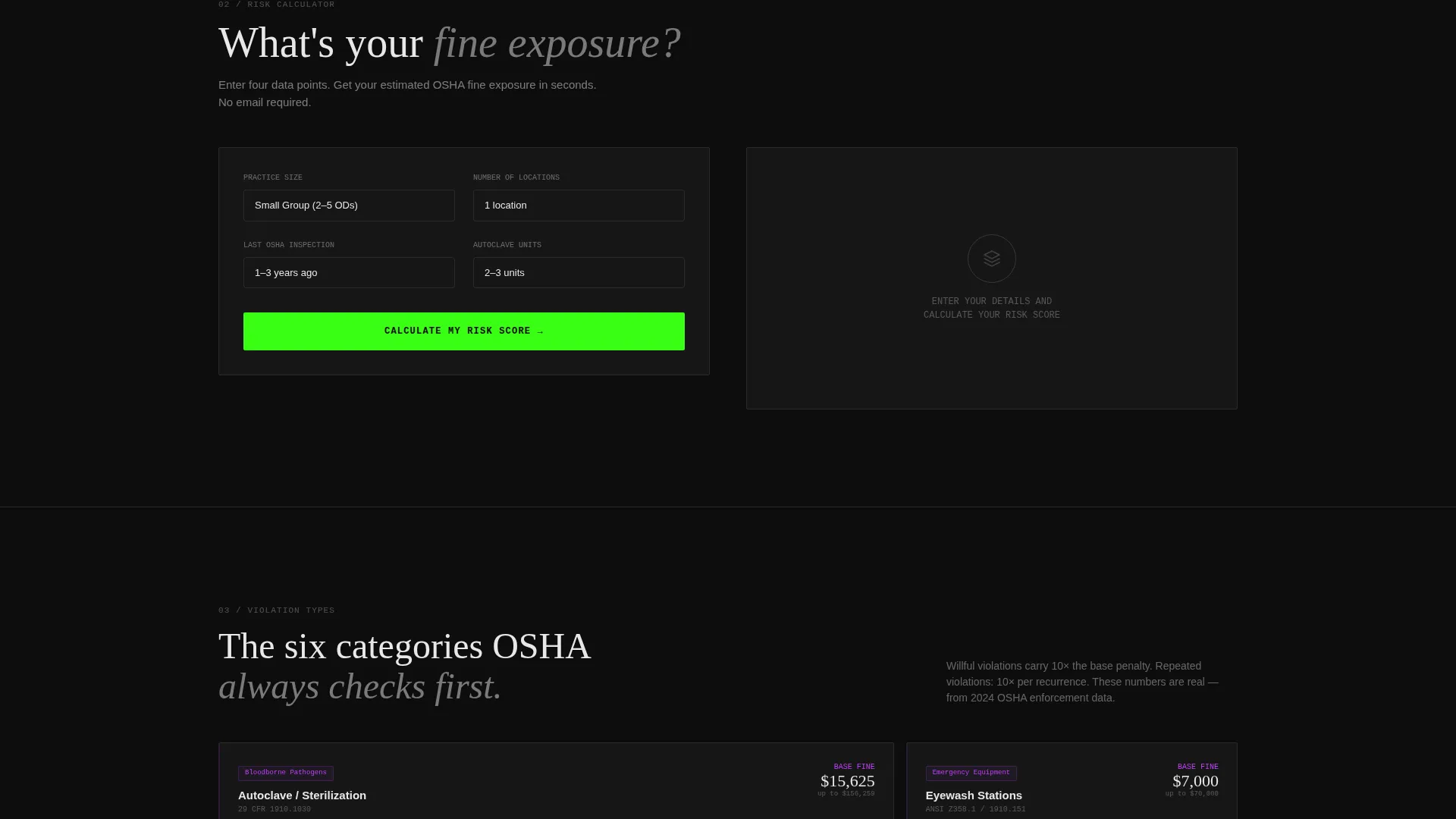
- An interactive compliance risk calculator that outputs a color-coded risk score and a potential fine dollar estimate
- A dual conversion path: a primary audit request form and a secondary gated PDF checklist download
Feature list
This template is built around six core structural and functional features drawn directly from the source brief.
Three-Tab Dashboard Header
The header uses a Feature Tab Switcher with three clickable tabs inside a mock dashboard frame. Each tab reveals a different live data view: spore test dates with status indicators on the autoclave tab, a location grid with timestamps on the eyewash tab, and a document checklist with auto-generated form previews on the OSHA tab. The dashboard feels populated and mid-use, not like a placeholder wireframe.
Interactive Compliance Risk Calculator
Visitors select their practice size, number of locations, last OSHA inspection date, and autoclave count. The tool instantly produces a color-coded risk gauge and a dollar figure estimating potential fine exposure. That number, whether it reads $14,200 or $38,500, becomes the emotional engine that drives the rest of the page.
Violation Breakdown Grid
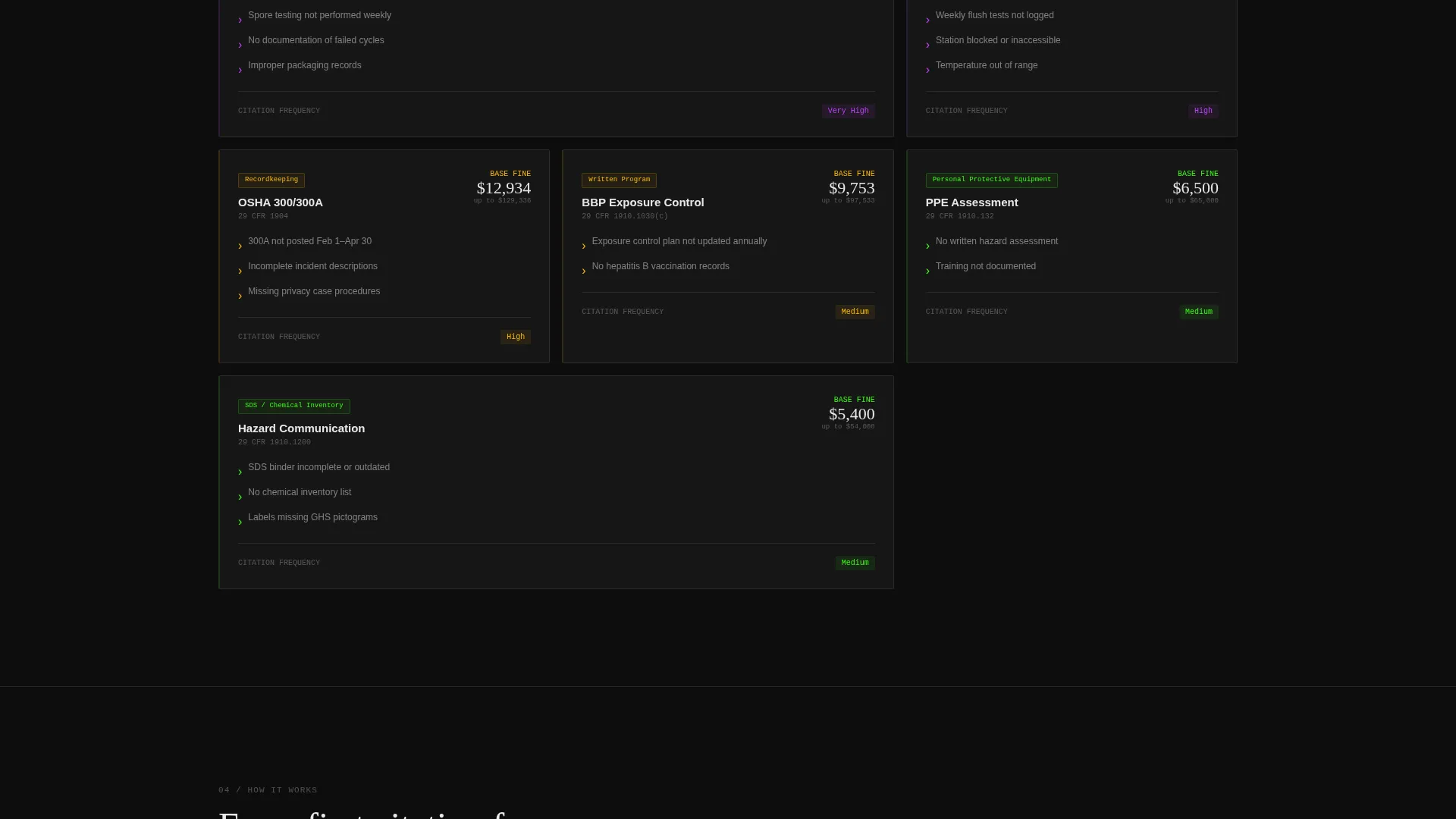
Below the calculator, a structured grid breaks down compliance violations by type. This section adds specific evidence to the risk score and helps visitors connect their real operational gaps to the platform's tracking capabilities.
Inspection Timeline Display
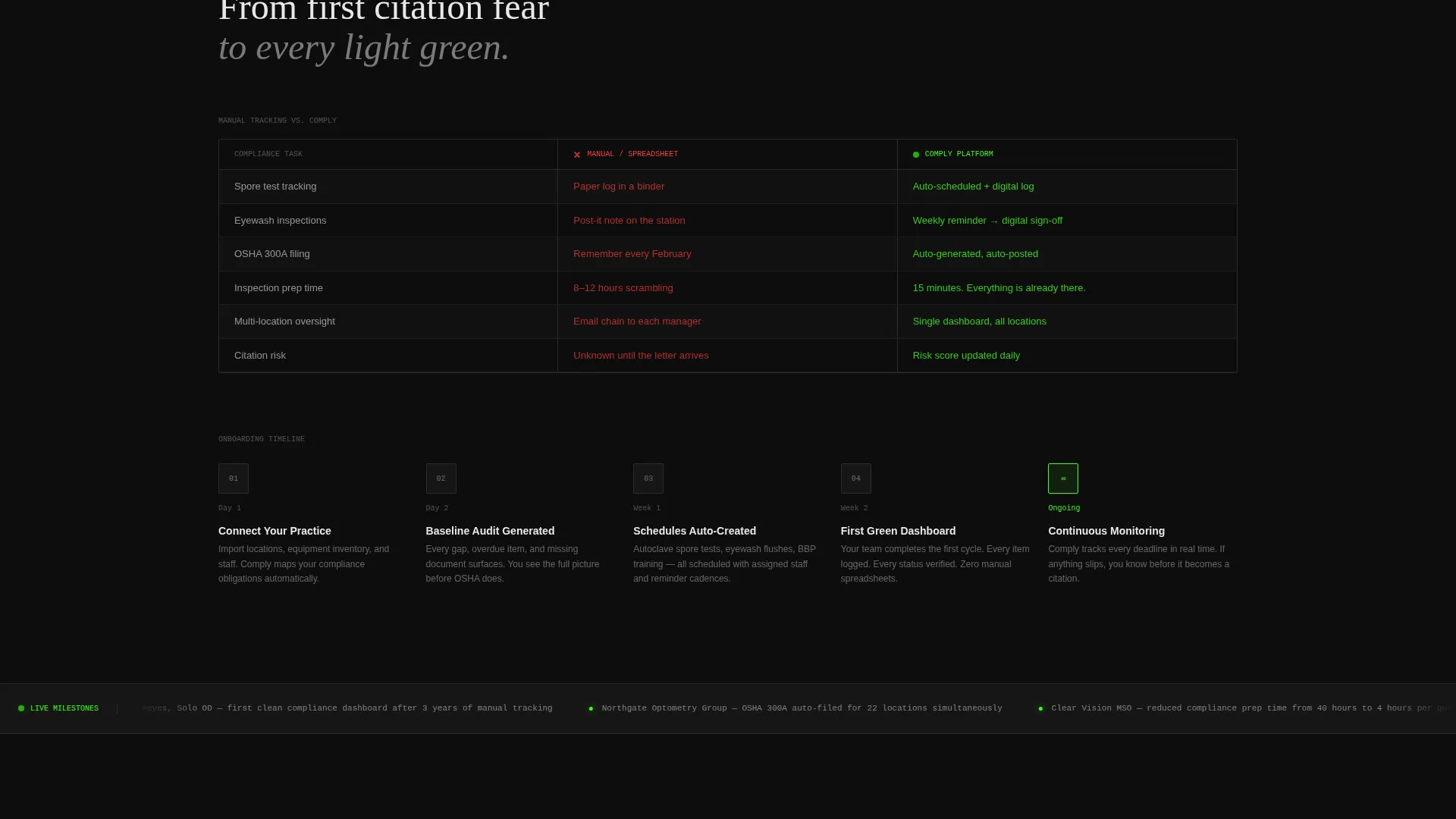
A visual timeline shows how the platform auto-schedules every inspection cycle. This builds confidence that nothing will fall through the cracks once a practice is using the system.
Manual versus. Dashboard Comparison
A side-by-side layout contrasts manual spreadsheet tracking with the live compliance dashboard. The visual comparison makes the platform's value immediately clear without requiring visitors to read dense copy.
Compliance Milestones Ticker
A scrolling ticker displays real compliance milestones achieved by current users. It adds social proof at a glance and reinforces that the platform is already in active use across real practices.
Page sections overview
| Section | Purpose |
|---|---|
| Tab Switcher Header | Shows live autoclave, eyewash, and OSHA data views |
| Risk Calculator Tool | Generates fine-exposure score from practice inputs |
| Audit Request Form | Captures practice name, email, and state for lead |
| Violation Breakdown Grid | Categorizes compliance gaps by violation type |
| Inspection Timeline | Visualizes auto-scheduled inspection cycle cadence |
| Spreadsheet versus. Dashboard | Side-by-side comparison of manual versus live tracking |
| Milestones Ticker | Scrolling feed of real user compliance achievements |
| PDF Checklist call to action | Secondary gated download for lower-intent visitors |
Design & branding system
The visual identity follows the Startup Velocity theme with an Acid Digital color palette. The overall feel is a mission control screen: dark, electric, and clinically readable across dense data grids.
- Void black (#0D0D0D) dominates every background surface, keeping focus on data
- Terminal phosphor green (#39FF14) pulses on status indicators, progress bars, and compliance percentages
- Ultraviolet (#BF40FF) tags overdue items and critical alerts, while interface white (#E8E8E8) keeps body text and data labels scannable
Mobile & speed optimization
The Dashboard and Data Grid template style is designed to remain legible and navigable on smaller screens. Dense data views are structured to reflow cleanly without losing their visual clarity.
- Tab switcher and calculator inputs are sized for touch interaction on mobile devices
- Data grids and comparison layouts adjust column structure for narrower viewport widths
How this template helps you convert
The conversion architecture is built around the calculator's output. Once a visitor sees their fine-exposure number, the next step feels logical rather than pushy.
- The risk calculator result primes visitors emotionally before any form appears, making the audit request feel like a natural follow-up rather than a cold ask
- The primary lead form is pre-filled with data the visitor already entered in the calculator, reducing friction to just three additional fields: practice name, email, and state
- The secondary PDF download path captures visitors who are not ready to request an audit, keeping them inside the conversion funnel at a lower commitment level
Other information about this template
This template is part of the Comply product concept, a compliance engine designed specifically for optometry safety management. It is built as a single-page landing page using the Dashboard and Data Grid template style.
- The Startup Velocity theme drives the overall layout energy: fast-reading, data-dense, and built for high-stakes software products
- The Acid Digital color system is consistent across every component, from the tab switcher down to the fine-exposure calculator gauge
- The template is suitable for optometry software vendors, health and safety SaaS founders, and compliance technology companies targeting regulated clinical environments
- The jurisdiction-aware state field in the lead form acknowledges that OSHA rules vary by location, adding a layer of credibility to the audit request flow
Theme
Startup Velocity
Creative direction
Calculator/Tool First
Color system
Acid Digital
Style
Dashboard/Data Grid
Direction
Lead Generation
Page Sections
Three-tab Dashboard Header
Interactive Compliance Risk Calculator
Violation Type Breakdown Grid
Auto-scheduled Inspection Timeline
Manual Versus. Live Dashboard Comparison
Dual Conversion Path Design
Related questions
Who is this landing page template designed for?
Can I customize the calculator inputs and risk score output?
Does the template include the PDF checklist content?
How does the tab switcher work in the header?
Is this template suitable for a multi-location optometry group?



