Comply - Powerful Restaurant Compliance Landing Page Template
Comply is a restaurant compliance landing page template built for software platforms that help operators stay inspection-ready at all times. The split-screen layout pairs pain-state visuals with live software user interface, guiding visitors from problem to solution in one scroll. It is designed for multi-unit operators, franchise directors, and independent restaurateurs who need a cleaner path to daily compliance confidence.
by Rocket studio
Quick summary
Comply is a single-page, split-screen landing page template for restaurant compliance software. It pairs a dark Tech Glass visual identity with a scroll-driven, problem-to-solution layout that builds urgency and earns trust before asking for a sign-up. The page is built around a Freemium/Trial conversion model with a low-friction sign-up form.
Who this template is for
This template is built for SaaS founders, product marketers, and agency teams launching or repositioning a restaurant compliance platform. It speaks directly to the operators who will use the software, so the copy tone and visual structure already match the audience.
- Multi-unit restaurant operators managing compliance across dozens of locations
- Franchise directors preparing for corporate audit cycles
- Independent restaurateurs who have received a critical health violation and are looking for a better system
What problem this template solves
Compliance software is a hard sell because the pain is invisible until an inspector walks in. Most landing pages lead with feature lists, which fail to connect with the operator's actual fear. This template flips that structure.
- It leads with the messy reality of paper logbooks, violation notices, and last-minute scrambles
- It pairs each pain point with a live software user interface answer, so the visitor sees the solution before reading a single bullet point
- It removes purchase friction by showing the product working before asking for any information
What you get with this template
You get a fully structured, single-page layout that is ready to be filled with your brand assets and real product user interface. Every section has a defined role in moving visitors toward sign-up.
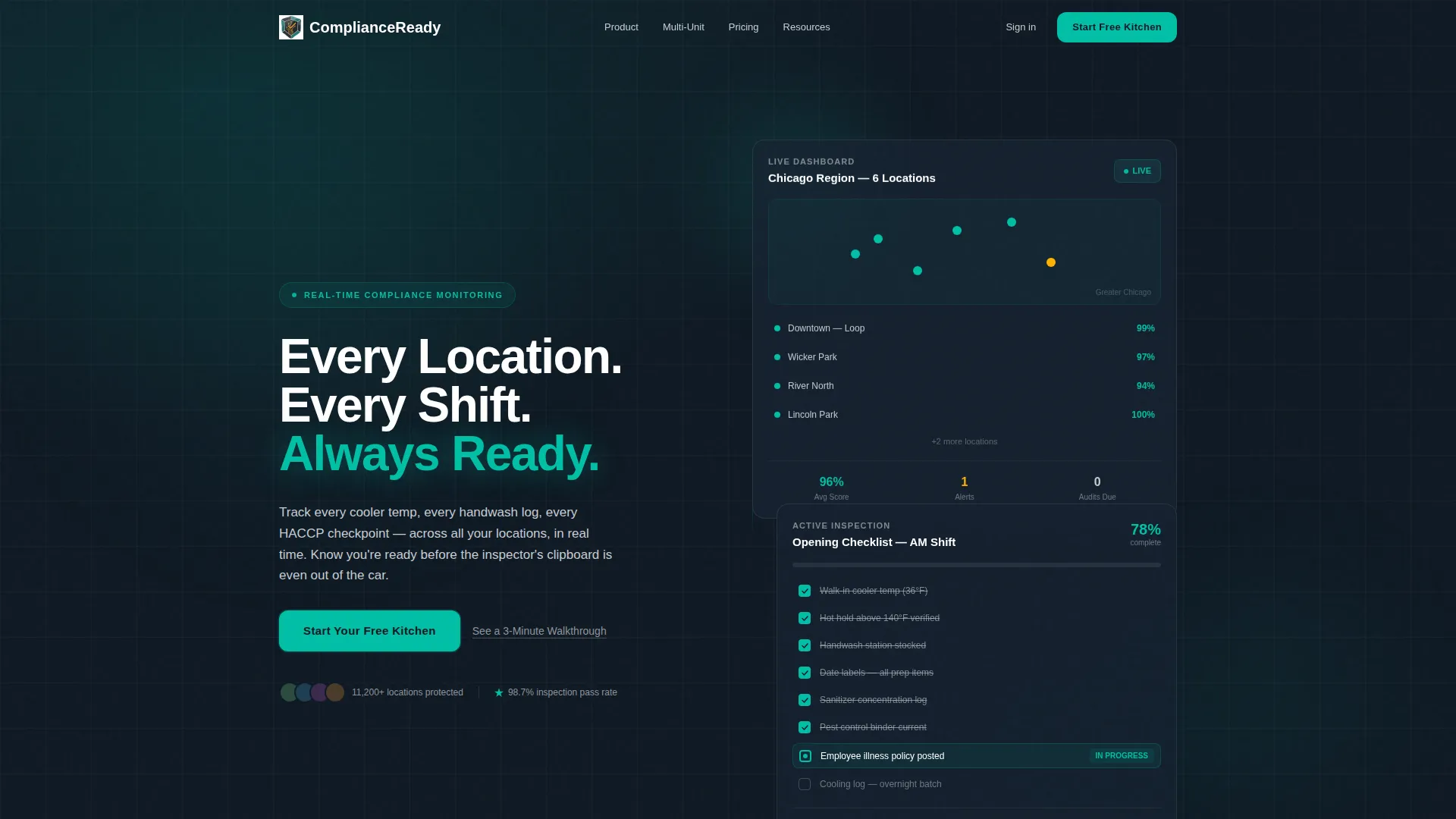
- A Dark Glass Panels hero section with two floating frosted-glass user interface cards and a white headline
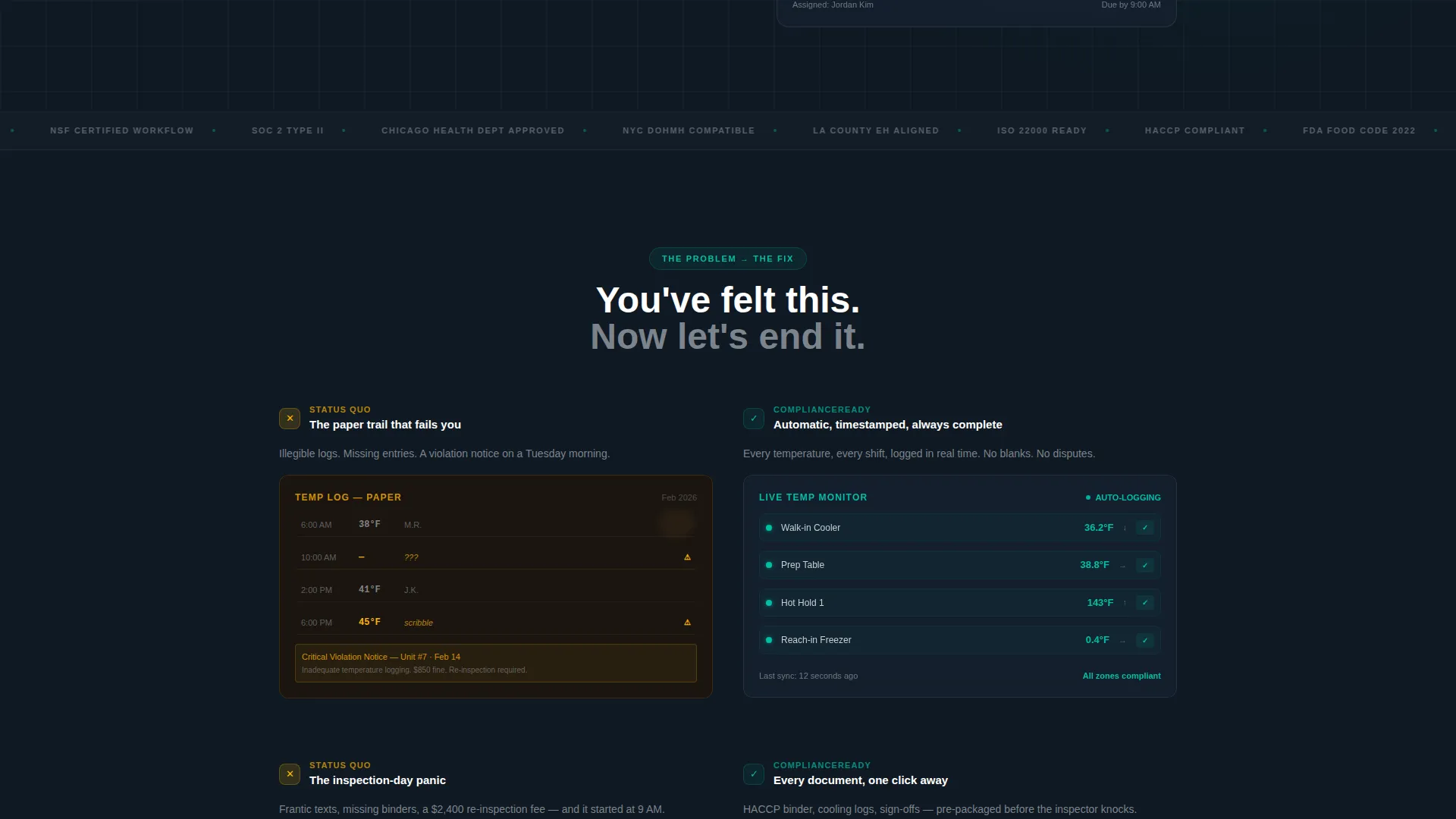
- A scroll-driven, split-screen body with left-side pain states and right-side live software responses
- A Freemium/Trial conversion system with a primary call to action, a secondary text-link path, and a single-step sign-up form
Feature list
This section describes the core built-in capabilities delivered by the Comply template.
Split-Screen Problem-Solution Layout
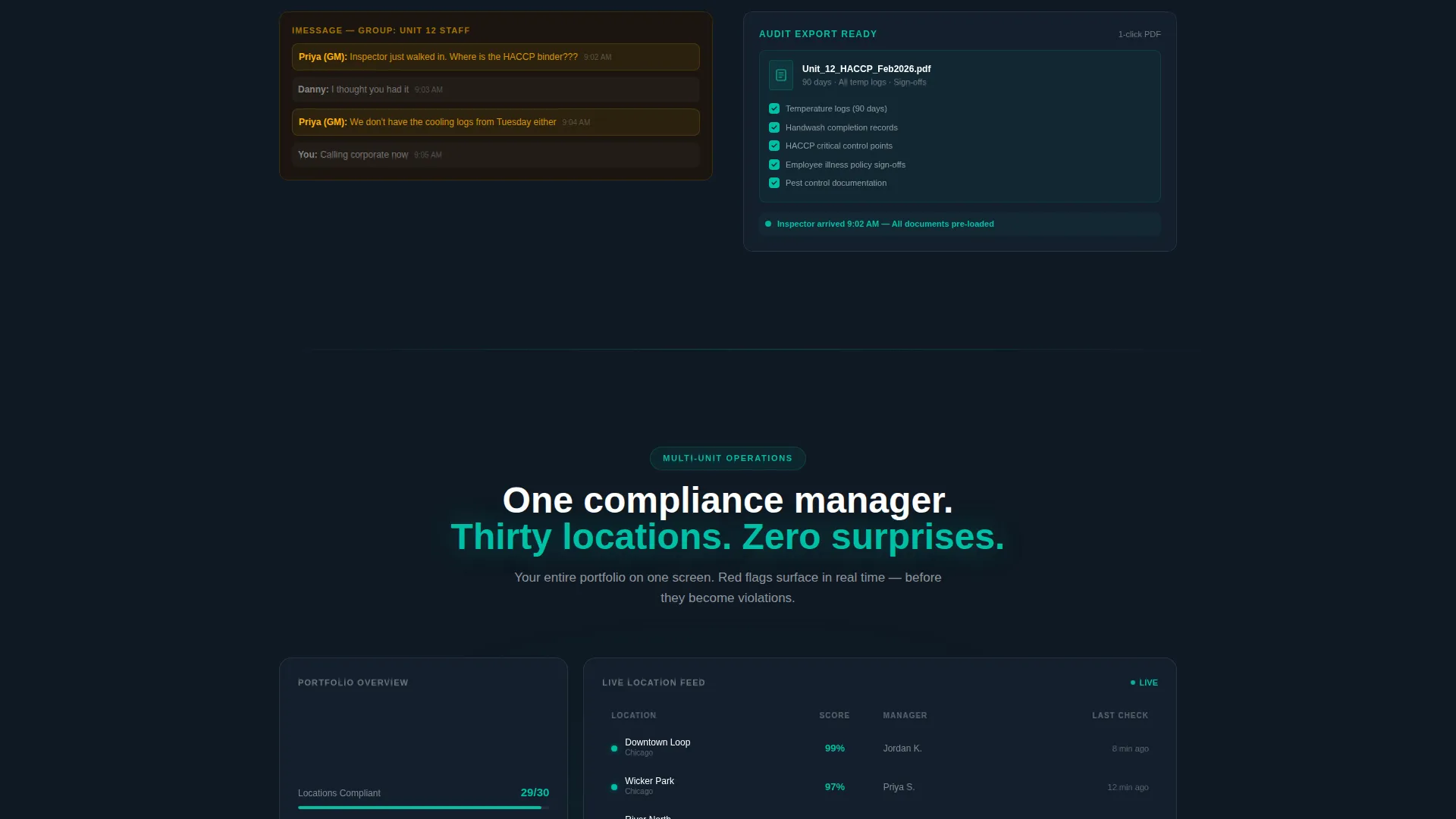
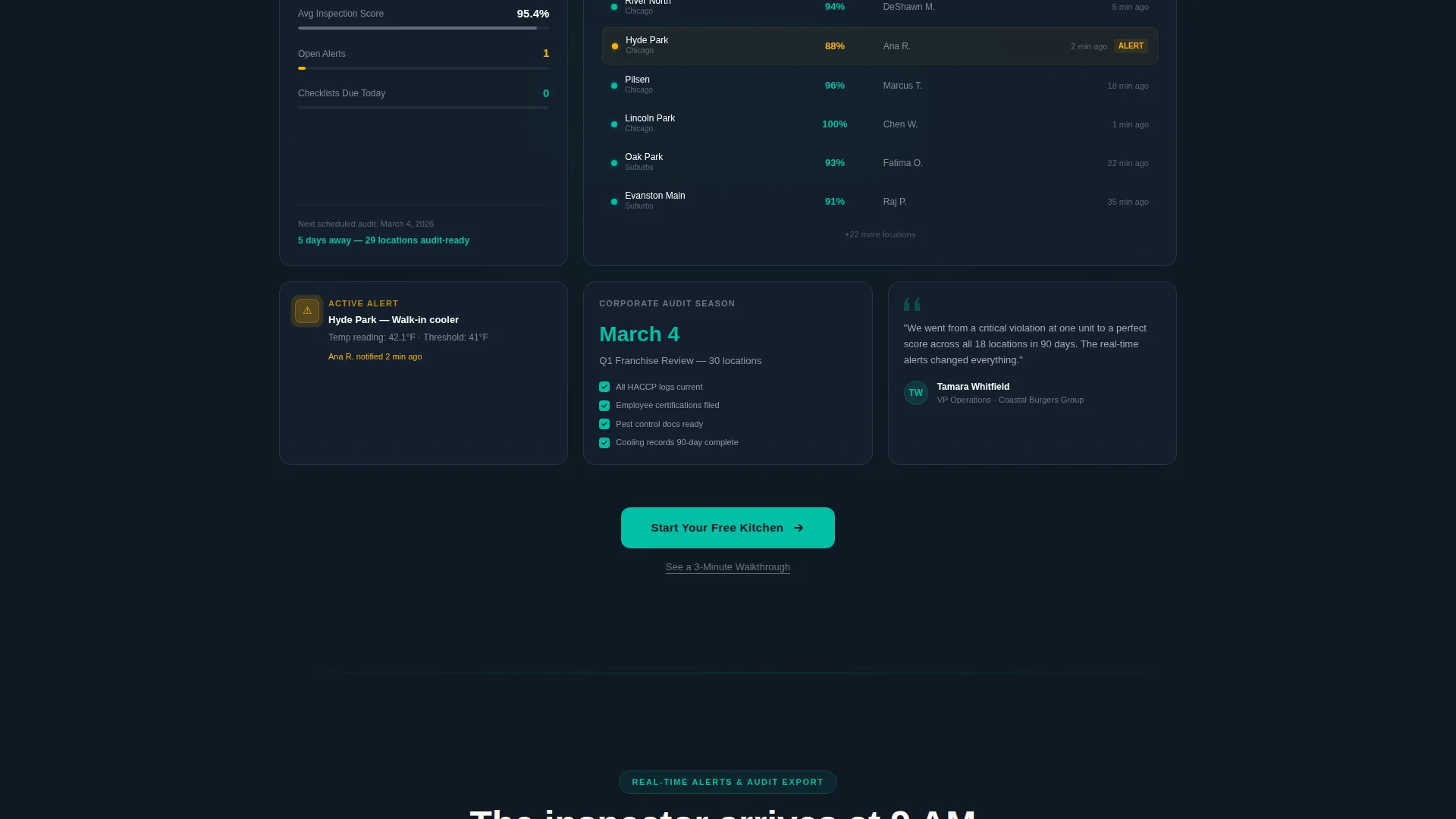
Each scroll section locks the left panel to a real pain-state visual and the right panel to the corresponding software answer. The structure runs from single-unit compliance, through multi-unit dashboards, to corporate audit exports, to real-time phone alerts. The rhythm makes the status quo feel unsustainable.
Dark Glass Panels Hero Section
The header uses two translucent, frosted-glass user interface cards floating on a near-black background. One card shows a real-time compliance dashboard with location pins on a map. The other shows an active inspection checklist at 78% completion. A subtle light bloom from the upper left catches the panel edges in faint teal, and the headline sits cleanly between them in white.
Freemium/Trial Conversion System
The primary call to action, "Start Your Free Kitchen," appears at the header fold, after the multi-unit dashboard section, and at the final section. A secondary text link, "See a 3-Minute Walkthrough," sits beneath each primary call to action for visitors who are not yet ready to commit.
Low-Friction Sign-Up Form
Clicking the primary call to action opens a single-step form with three fields: restaurant name, number of locations (1, 2-10, or 11 and above), and work email. There is no credit card field and no phone number field. The form is designed to capture intent without adding hesitation.
Launch Energy Scroll Momentum
The scroll progression escalates deliberately. Each new section raises the stakes from one location to many, from a single shift to a corporate audit, creating a countdown feeling that builds urgency without a single pressure tactic.
Teal Catalyst Color-Role System
Every color in the palette has a strict role. Charcoal anchors full-bleed backgrounds, teal drives interactive elements and positive data states, silver handles body text and dividers, and amber appears only for warning states and hover accents. The system trains the visitor's eye the same way the software trains the workflow.
Page sections overview
| Section | Purpose |
|---|---|
| Dark Glass Hero | Introduce the product with two floating user interface cards and the core headline |
| Pain State Row | Show a paper logbook, violation notice, and frantic message thread |
| Single-Unit Solution | Pair single-location compliance pain with the software's real-time checklist answer |
| Multi-Unit Dashboard | Reveal the multi-location dashboard and repeat the primary call to action |
| Corporate Audit Export | Escalate the stakes to franchise-level audit readiness |
| Real-Time Alerts | Show mobile alerts firing to a manager's phone as the final escalation |
| Final Conversion Section | Close with the primary call to action and secondary walkthrough link |
Design & branding system
The template uses a Tech Glass theme built around the Teal Catalyst color system. Every visual decision reinforces the feeling of a kitchen where everything is in order before the inspector arrives.
- Deep charcoal (#0F1923) for full-bleed backgrounds, reactor-core teal (#00BFA6) for all interactive and data-positive elements, stainless-surface silver (#C8CDD3) for body text and dividers, and critical-alert amber (#FFB300) reserved only for warning states and hover accents
- Frosted-glass card panels with a subtle upper-left light bloom and faint teal edge refraction give the user interface a clinical, control-room quality
- Typography is clean white for headlines, silver for body text, keeping contrast high against dark backgrounds throughout
Mobile & speed optimization
The split-screen layout is structured so that panels stack cleanly on smaller screens. The visual hierarchy remains clear whether a visitor is on a desktop monitor or a mobile browser.
- The 50/50 split collapses to a single-column stacked flow on narrow viewports, keeping pain states above their matching solution panels
- Lightweight frosted-glass styling avoids heavy image assets, keeping the visual quality high without burdening load times
- The single-step form is touch-friendly with large tap targets and minimal input requirements
How this template helps you convert
The page earns the click before it asks for anything. Every structural decision is designed to lower resistance and raise motivation at exactly the right moment.
- Visitors see the product user interface working in the hero before they read a single marketing claim, building credibility immediately
- The scroll escalation moves visitors through progressively higher-stakes scenarios, making the software feel necessary rather than optional by the time the call to action appears
- The three-field sign-up form removes every common friction point, and the secondary walkthrough link catches visitors who need more proof before committing
Other information about this template
This template is a strong fit for teams building in the restaurant compliance software space and for agencies pitching SaaS clients in the food service industry. It is built on a single-page, section-led structure that is straightforward to customize with real product screenshots and brand assets.
- The amber color is strictly reserved for warning and hover states, so it never competes with positive compliance signals elsewhere on the page
- The template style is Split Screen (50/50), which makes it well-suited for any software product that has a clear before-and-after story
- The "See a 3-Minute Walkthrough" secondary path can be linked to a video, a demo booking page, or a guided product tour depending on your conversion strategy
Theme
Tech Glass
Creative direction
Launch Energy
Color system
Teal Catalyst
Style
Split Screen (50/50)
Direction
Freemium/Trial
Page Sections
Split-screen Problem-solution Layout
Dark Glass Panels Hero Section
Freemium/trial Conversion System
Low-friction Sign-up Form
Launch Energy Scroll Progression
Teal Catalyst Color-role System
Related questions
Who is the Comply template designed for?
Can I use this template for a single-location restaurant software product?
What does the built-in sign-up form collect?
How does the split-screen layout behave on mobile devices?
Can the secondary call to action link be changed?



