Privacy-First Enterprise Software Cost Calculator Website Template
Comply is a privacy-first human resources management landing page template built for security-conscious teams. It features a Feature Tab Switcher hero, an interactive Data Exposure Calculator, and a hub and spoke anchor navigation layout. Every section reinforces data protection credibility, guiding compliance officers, CTOs, and HR directors toward a confident, risk-aware conversion.
by Rocket studio
Quick summary
Comply is a single-page HRM landing page template designed for privacy-first enterprise software. It opens with a three-tab product hero, drops visitors into a personalized risk calculator before any sales copy appears, then unfolds a structured comparison architecture across five spoke sections. The visual system evokes a submarine control room: dark, deliberate, and purposeful.
Who this template is for
This template is built for teams selling security-forward human resources software to buyers who already know the stakes. It speaks to people who have lived through audits, fielded vendor breach calls, or spent afternoons answering security questionnaires instead of doing real people strategy.
- Compliance officers at mid-market healthcare firms managing HIPAA audit cycles
- Startup chief technology officers burned by a previous vendor security breach
- Human resources directors at financial institutions who prioritize data protection
What problem this template solves
Most human resources platform pages bury security claims in a footnotes section. Visitors leave without understanding their actual exposure. Comply flips that sequence entirely: it surfaces the visitor's personal risk number first, then presents the product as the answer.
- Prospects cannot see their own data exposure risk before engaging with a typical product page
- Generic feature lists fail to resonate with compliance-driven buyers who need specifics
- Legacy comparison pages do not connect the visitor's named vendor to concrete breach-cost estimates
What you get with this template
You get a fully structured, single-page layout that prioritizes trust and comparison over generic persuasion. Every section is pre-wired to move a security-aware buyer from risk awareness to conversion without ever feeling pushy.
- A three-tab Feature Tab Switcher hero showing Encrypt, Manage, and Audit product states
- An interactive Data Exposure Calculator with a personalized exposure score and annual breach-cost projection
- Five spoke sections with side-by-side comparison tables, micro-calls to action, and a persistent conversion bar
Feature list
This template packages several purpose-built components that work together to earn buyer trust before asking for anything.
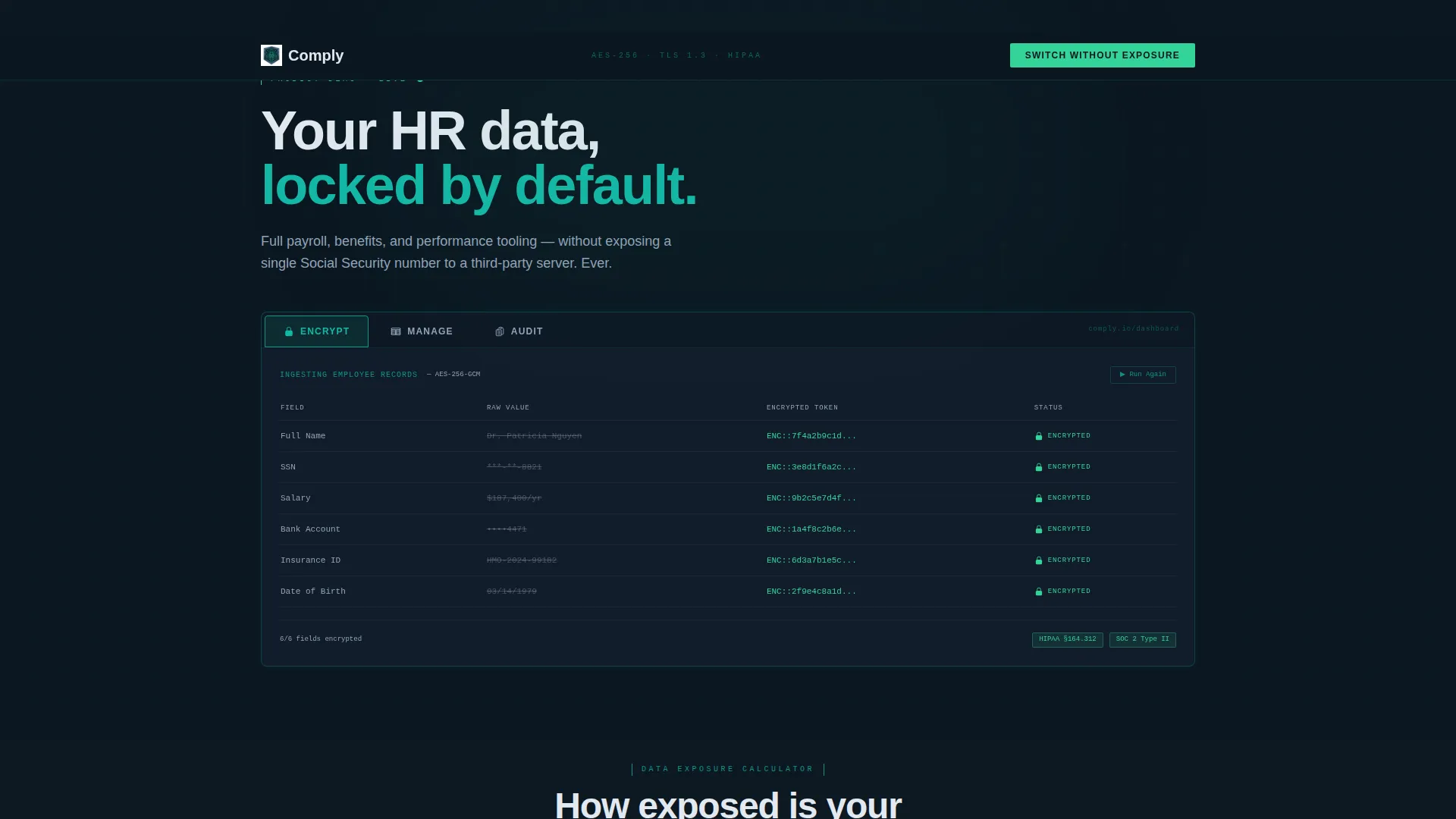
Three-Tab Product Hero
The header uses a Feature Tab Switcher with three labeled tabs: Encrypt, Manage, and Audit. The default Encrypt view shows employee records being ingested with each field hashing into encrypted tokens in real time, with green lock icons snapping shut row by row. Clicking Manage reveals a payroll and benefits dashboard with redacted fields. Clicking Audit shows a compliance log with timestamped access events and zero-knowledge proof badges.
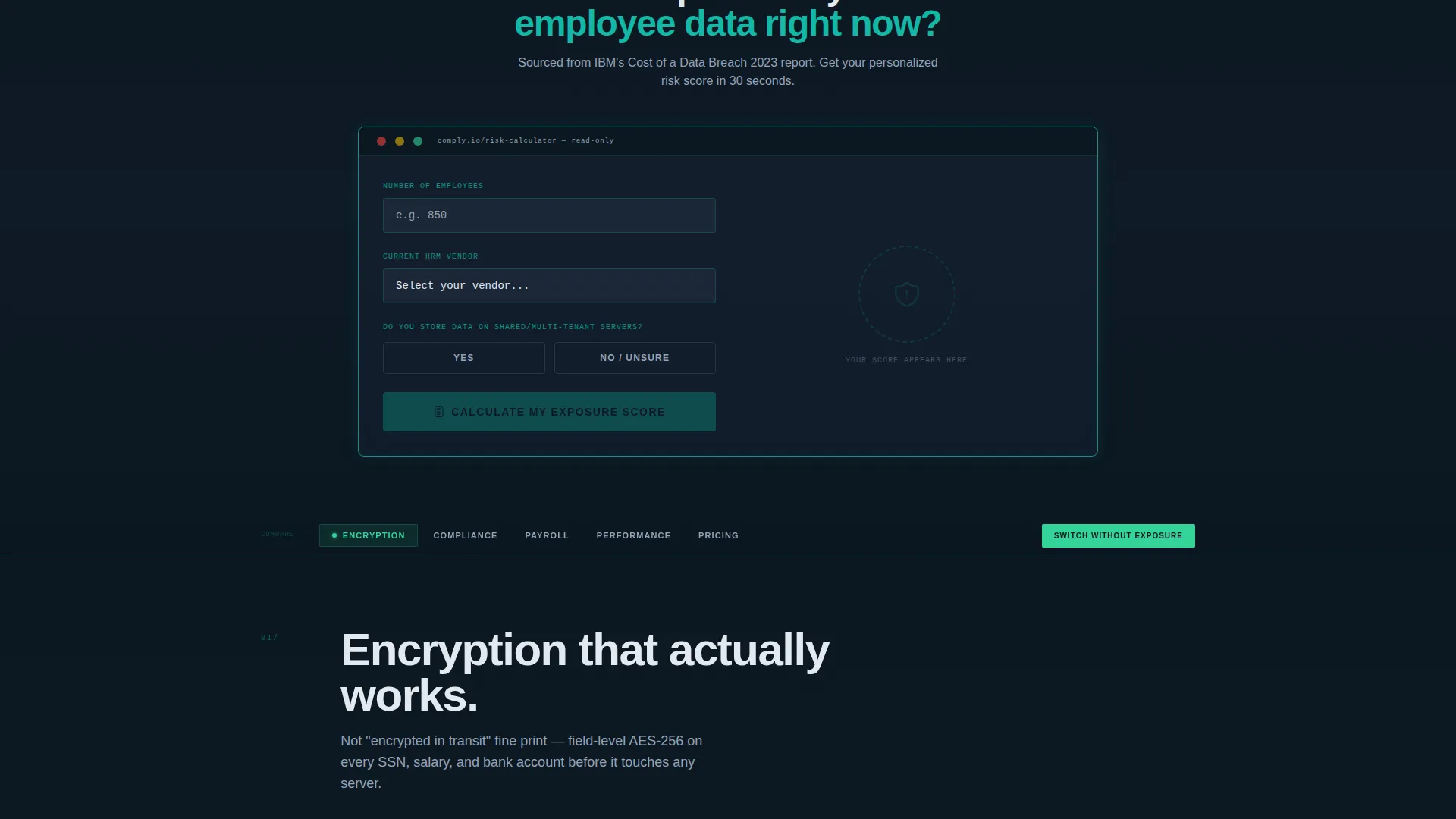
Interactive Data Exposure Calculator
Placed directly below the header, this tool lets visitors input employee count, select their current vendor from a dropdown of fifteen common human resources management platforms, and indicate whether they store data on shared servers. The output includes an estimated exposure score, number of unencrypted fields at risk, and an annual breach-cost projection drawn from IBM's Cost of a Data Breach report.
Hub and Spoke Anchor Navigation
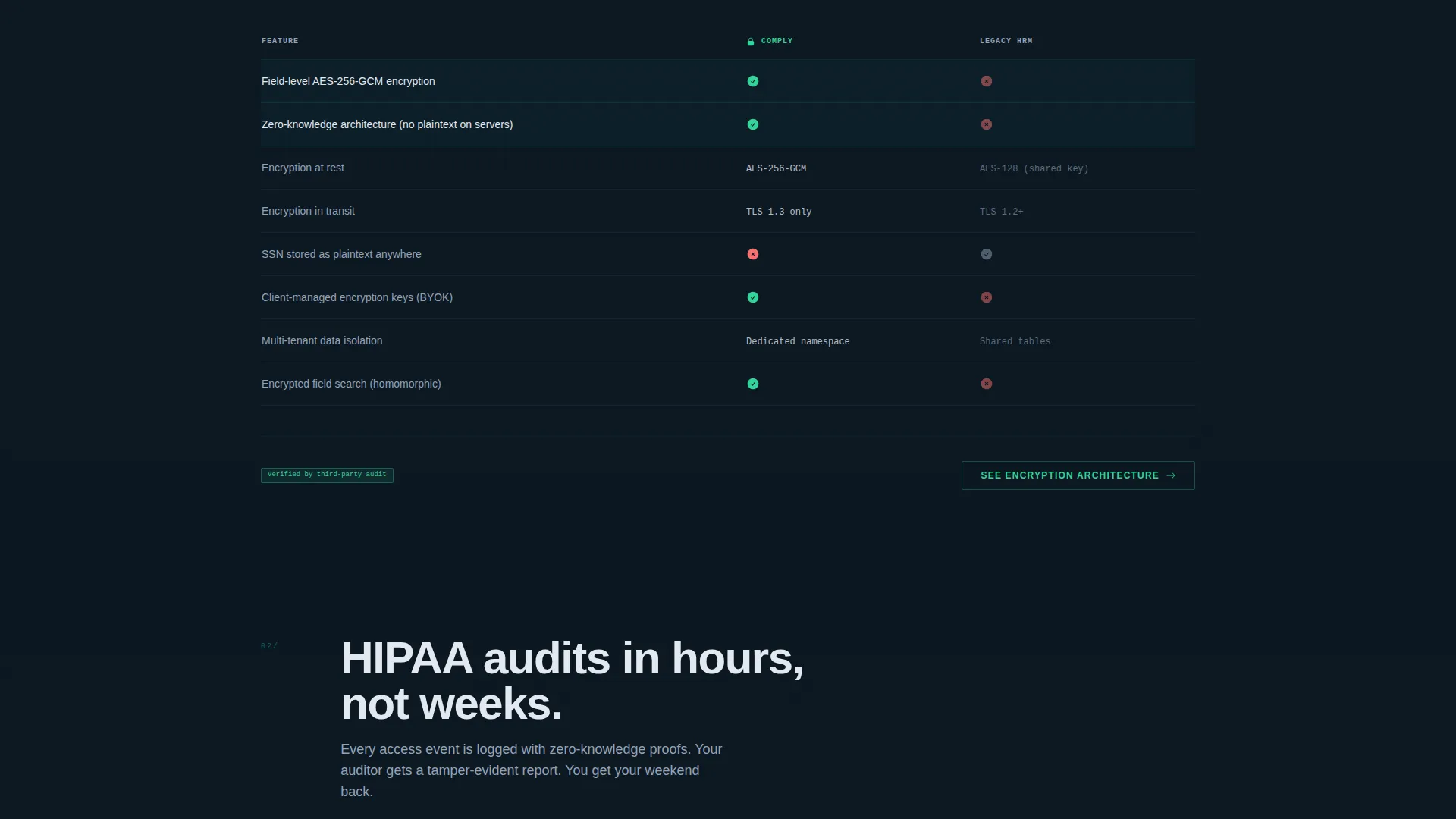
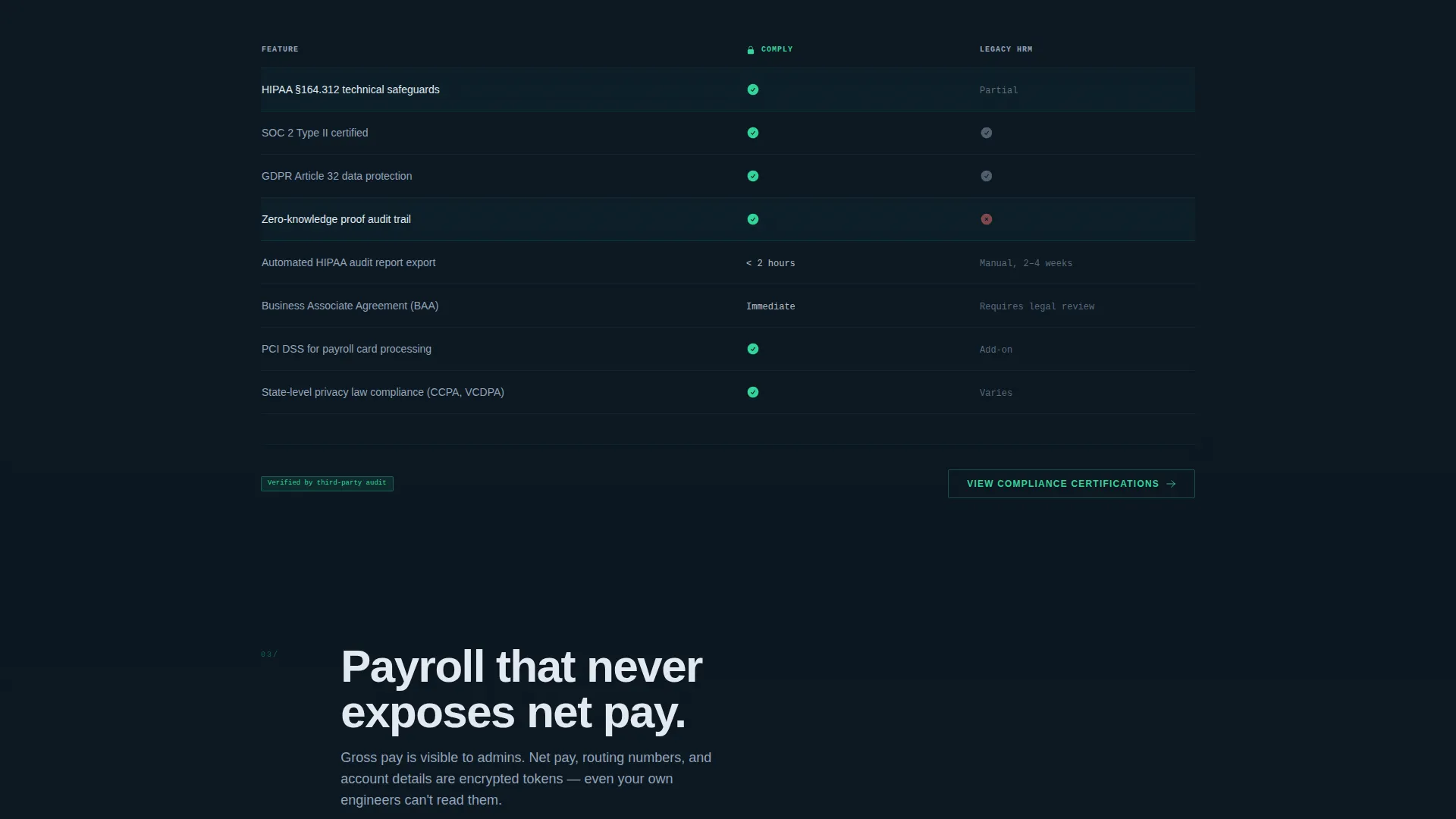
A sticky anchor navigation bar locks to the top of the page after the calculator interaction. It carries five spoke links: Encryption, Compliance, Payroll, Performance, and Pricing. Each spoke section scrolls into a side-by-side versus table that compares Comply directly against the legacy platform the visitor named in the calculator.
Persistent Conversion Bottom Bar
After the calculator interaction, a fixed bottom bar appears carrying the primary call to action. The button reads "Switch Without Exposure" in clearance-granted green. Clicking opens a two-step form: step one is pre-filled with current platform and employee count from the calculator, and step two requests a work email and preferred migration window.
Secondary Lead Capture Path
Visitors not ready to commit can take a softer path. A secondary call to action offers a downloadable Compliance Comparison PDF, capturing only a work email. This keeps a lower-intent buyer inside the funnel without requiring the full two-step conversion flow.
No-Photography Visual System
The template uses zero stock photography. Every visual element inside the page is a product interface frame, a data visualization, or a comparison table. The hero, the calculator output panel, and each spoke section all rely on the product itself as the primary visual, which reinforces credibility with technical buyers.
Page sections overview
| Section | Purpose |
|---|---|
| Feature Tab Switcher Hero | Demonstrates Encrypt, Manage, and Audit product states interactively |
| Data Exposure Calculator | Delivers a personalized risk score before any persuasion copy appears |
| Anchor Navigation Bar | Lets visitors jump directly to Encryption, Compliance, Payroll, Performance, or Pricing |
| Encryption Spoke | Side-by-side comparison table for data encryption capabilities |
| Compliance Spoke | Side-by-side comparison covering audit logs and zero-knowledge proof features |
| Payroll and Benefits Spoke | Compares payroll tooling with redacted-field handling against legacy platforms |
| Performance Management Spoke | Compares employee performance features in a privacy-safe context |
| Pricing Spoke | Side-by-side cost and feature comparison to support final purchase decisions |
| Persistent Conversion Bar | Fixed bottom bar with the primary "Switch Without Exposure" call to action |
| Secondary PDF Capture | Email-only form offering a downloadable Compliance Comparison PDF |
Design & branding system
The visual identity follows a Data Command theme built on a Teal Catalyst color system. Every color choice is intentional: nothing is decorative, every illuminated element earns its place on the page.
- Background and structure: command-line dark (#0B1721) as the base, encrypted-field slate (#1E293B) for card surfaces and data panels
- Active and interactive elements: operational teal (#0D9488) for links, toggle states, and the anchor navigation active pip; clearance-granted green (#34D399) for confirmation states and the primary conversion button
- Body text in soft white (#E2E8F0) to maintain contrast and readability across dark surfaces
Mobile & speed optimization
The template is structured to perform cleanly across screen sizes without sacrificing the interactive components that make it effective. The calculator, tab switcher, and comparison tables all adapt to narrower viewports.
- The sticky anchor navigation collapses gracefully on smaller screens, keeping spoke navigation accessible without crowding the layout
- Comparison tables reflow into scrollable panels on mobile so side-by-side data remains readable
- The persistent conversion bottom bar remains fixed and visible on all screen sizes, keeping the primary call to action in reach at every scroll depth
How this template helps you convert
The conversion architecture is sequenced deliberately. The visitor earns their risk number before the product asks for anything, which changes the emotional context of every section that follows.
- The Data Exposure Calculator makes the visitor's specific risk tangible using their own inputs, so the comparison sections feel like a direct answer rather than generic marketing
- The hub and spoke structure with a sticky anchor nav lets buyers navigate directly to the feature category they care most about, reducing friction for compliance-first and payroll-first decision makers
- The two-path conversion system captures both high-intent visitors through the two-step "Switch Without Exposure" form and lower-intent visitors through the email-only PDF download, maximizing the number of qualified leads the page produces
Other information about this template
This template is categorized under Technology with a subcategory of Privacy-First Enterprise Software and a niche focus on Privacy-First HRM. It is designed as a hub and spoke anchor navigation landing page, not a multi-page site.
- The template's creative direction is Calculator and Tool First, meaning the interactive risk tool is the primary engagement mechanism before any product copy appears
- The Comparison and Versus landing page direction means every spoke section is structured around a direct competitor table, making this template particularly effective for buyers already evaluating alternatives
- The Data Command theme and Teal Catalyst color system are purpose-built to signal technical credibility to security-sensitive buyers in healthcare, finance, and high-growth technology companies
- The template includes no stock imagery by design; all visuals are product interface frames, reinforcing authenticity with technical audiences
Theme
Data Command
Creative direction
Calculator/Tool First
Color system
Teal Catalyst
Style
Hub & Spoke (Anchor Nav)
Direction
Comparison/Versus
Page Sections
Three-tab Feature Switcher Hero
Interactive Data Exposure Calculator
Hub and Spoke Anchor Navigation
Persistent Conversion Bottom Bar
Dual Lead Capture Paths
Product-only Visual System
Related questions
Can I customize the vendor dropdown in the Data Exposure Calculator?
Does the template require photography or custom illustrations?
Who is this landing page template best suited for?
How does the two-step conversion form work?
Can this template capture leads who are not ready to switch platforms yet?



