Micro-SaaS & Developer Tools Professional Website Template
Compress is a Dynamic Motion glassmorphic landing page template built for image compression and optimization tools. It features an animated code-snippet hero, a modular card grid that moves visitors from pain to proof, and a floating click-through call-to-action. No signup gate, no fluff, just a fast, visually sharp page designed to turn skeptics into users.
by Rocket studio
Quick summary
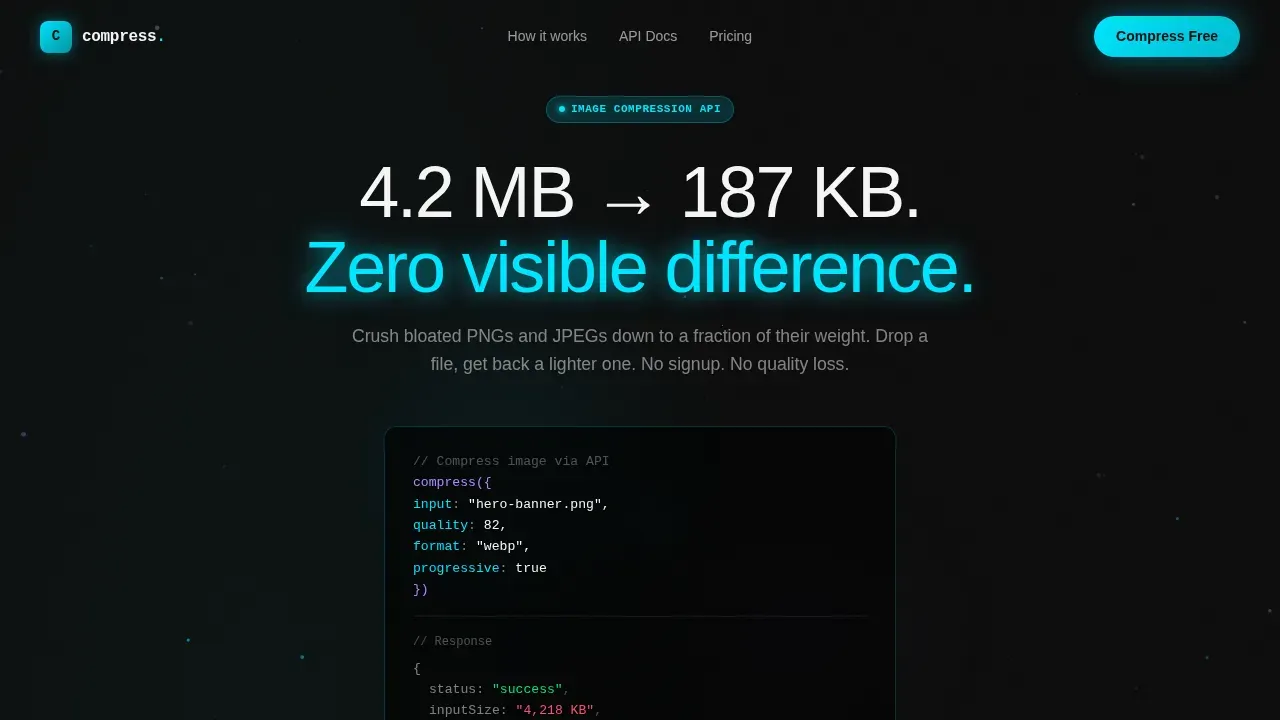
Compress is a single-page, card-grid landing page template purpose-built for image compression and image optimization products. It opens with a live-styled code snippet that counts a file down from 4,218 KB to 187 KB in real time, moves through a Problem-to-Solution card arc, and closes with a floating glass button that drops visitors directly into the tool. Every section earns the next click.
Who this template is for
This template was designed with a specific target audience in mind: people who feel the weight of bloated images every single day. If slow page load times are costing you conversions, this landing page is your pitch deck.
- Frontend developers who ship production builds and need a clean API-first page that speaks their language with monospaced code blocks and real compression ratios.
- E-commerce managers whose product pages crawl under unoptimized hero banners, hurting core web vitals scores and draining content delivery network budgets.
- Indie creators and portfolio owners who need their site to load faster on mobile devices and spotty connections without sacrificing image quality.
What problem this template solves
Images are the single heaviest asset on most web pages. Unoptimized png images and jpeg images silently inflate file size, slow page load, and kill user experience before a visitor reads one headline. Landing page optimization starts with fixing what visitors never see: the byte count behind every visual.
- Slow load times and high bounce rate caused by oversized images that inflate the total page weight and push largest contentful paint scores into the red zone.
- Failed core web vitals metrics and disappearing search engine rankings because images are not properly sized, lazy loaded, or converted to next gen formats.
- Bloated content delivery network bills from serving the same image at desktop resolution to every visitor, including those on mobile devices with limited bandwidth.
What you get with this template
This is a complete, production-ready landing page with every section pre-built and every animation pre-wired. Instant optimization of your pitch starts the moment you drop in your copy and brand colors.
- A fully animated hero section with a live code block, a countdown file size animation, and a circular progress ring that collapses as the compression completes, all without a single stock photo.
- A modular glassmorphic card grid that flows from diagnostic pain-point cards through animated before-and-after compression demos to a bento-grid feature showcase, so users scroll through a logical proof arc.
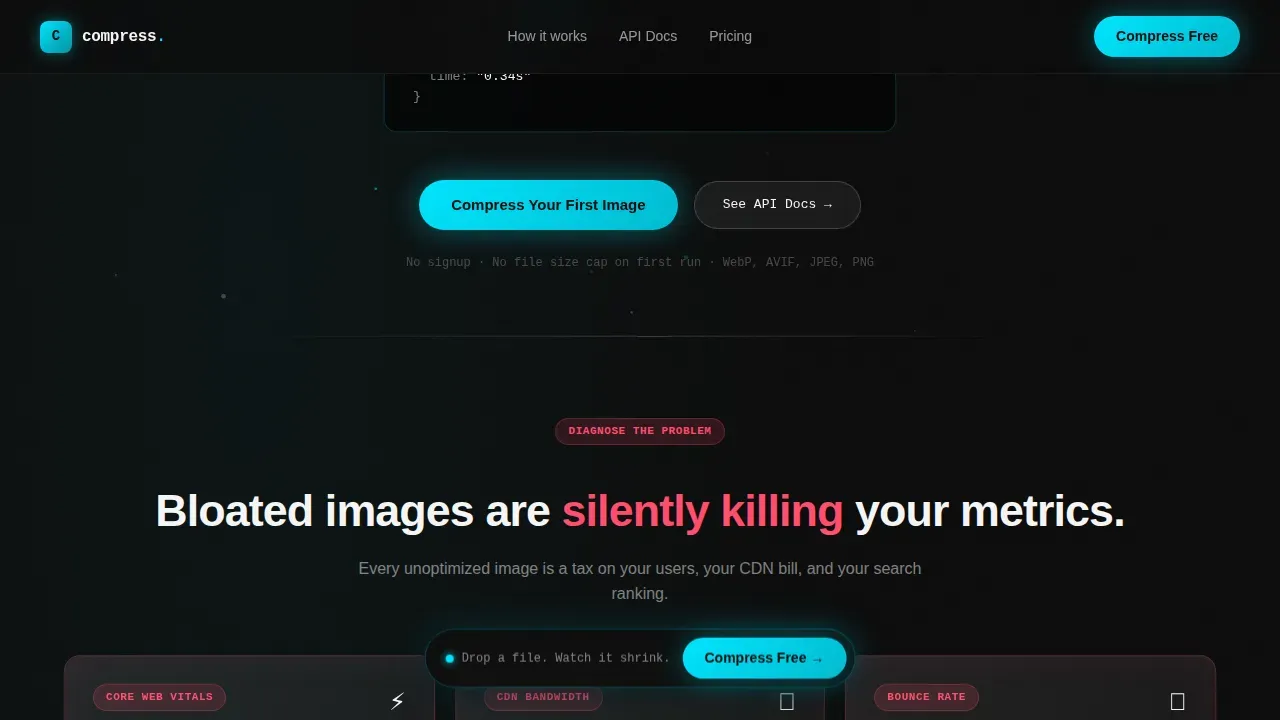
- A floating click-through call-to-action button pinned after the second card row, reading "Compress Your First Image," paired with a secondary "See API Docs" link for developer-first visitors.
Feature list
Every capability in this template was chosen to serve one goal: move a visitor from curiosity to commitment without friction. Below are the core optimization features baked into the design.
Animated Code-Snippet Hero
The header opens with a center-screen monospaced code block showing a real API call. The response object animates line by line, and the output file size value counts down smoothly, from 4,218 KB to 187 KB, while a circular progress ring collapses inward. Background particles drift like data packets in transit. No stock imagery is used; the product is the visual, which is a strong choice for landing page optimization because it shows the tool working before the visitor reads a single bullet point.
Problem-to-Solution Card Arc
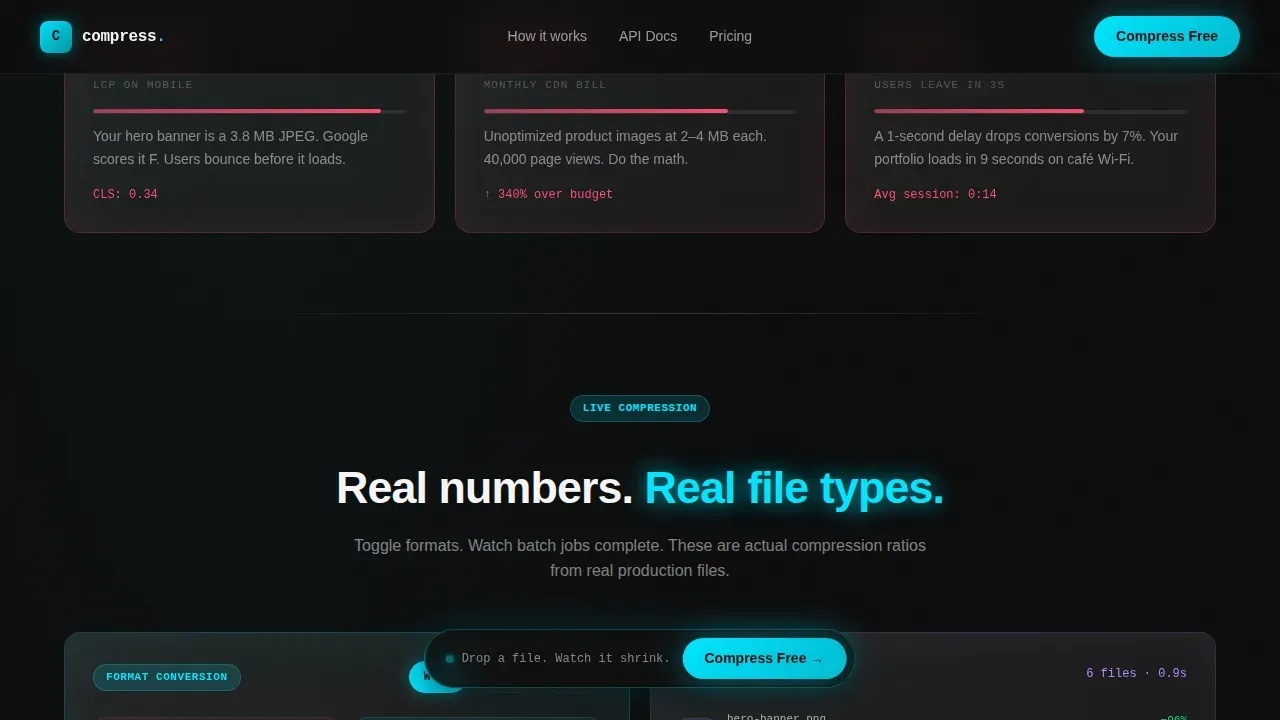
The first row of cards presents pain in sharp, quantified terms: slow load times, failed core web vitals, oversized image sizes eating CDN budgets. Each card displays a red metric that feels personally familiar to any developer or e-commerce manager. As users scroll through subsequent rows, the tone shifts from diagnostic to transformative. Cards show animated before-and-after file size comparisons, format conversion toggling between webp images, avif images, and jpeg output, and batch processing visualized as a grid of thumbnails shrinking simultaneously. The arc turns passive readers into engaged prospects.
Format Conversion Toggle
A live interactive toggle lets visitors switch between image format outputs in real time, webp format, avif images, and standard jpeg images, while animated compression ratios update instantly. This directly demonstrates the value of converting to next gen formats, where webp or avif images can reduce file size by up to 34% compared to a jpeg equivalent without visible quality loss. Seeing the same image shrink differently under each format is more persuasive than any written claim.
Floating Glass Call-to-Action
A frosted-glass primary button pins itself to the viewport after the second card row and stays with the visitor as they continue reading. The primary call-to-action reads "Compress Your First Image" and lands directly on the tool with a drag-and-drop upload zone already active, no form, no signup gate. A secondary "See API Docs" text link serves developers who prefer integration over interface, keeping both segments of the target audience moving forward without friction.
Batch Processing Visualization
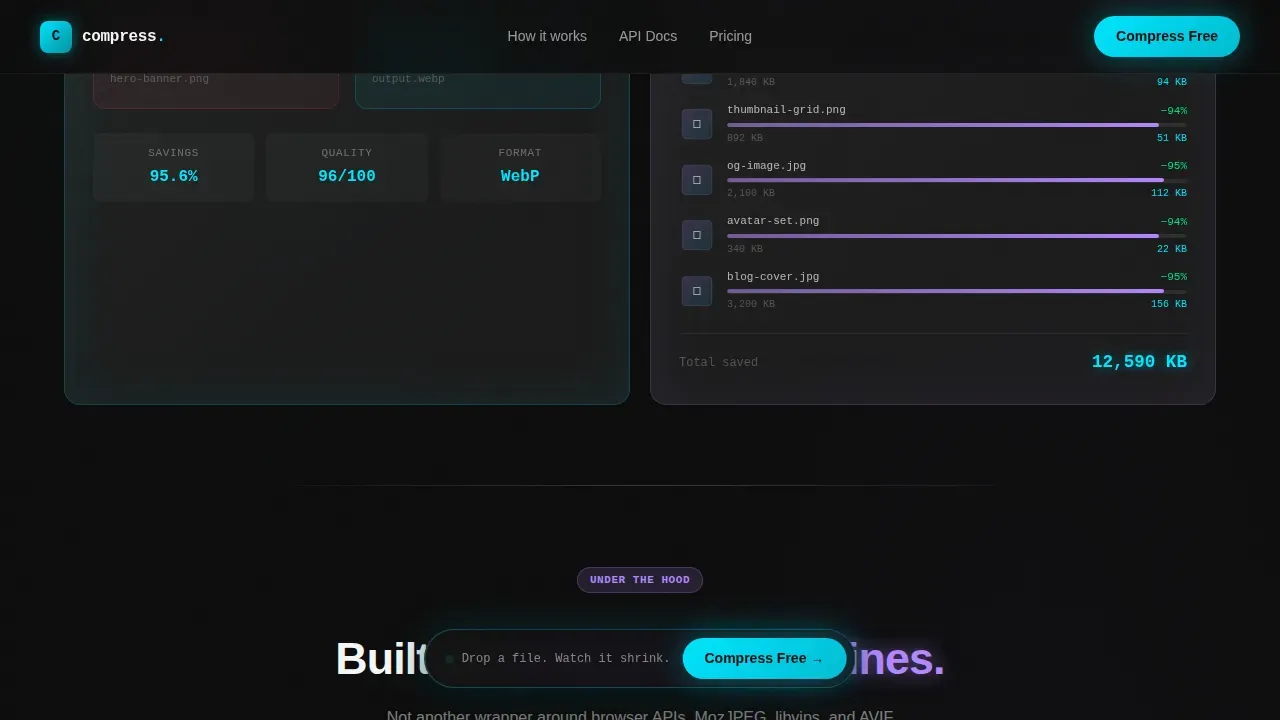
The features section uses a bento-grid layout to showcase batch image compression. A grid of thumbnails shrinks simultaneously in a coordinated animation, communicating that the tool handles many images at once rather than forcing the user to process files one at a time. This section also covers the API access card and format conversion card, so the bento grid functions as a self-contained proof cluster rather than a flat feature list.
Social Proof Section
A dedicated section presents compression ratios from real file types alongside developer and e-commerce team testimonials with company names attached. Specific numbers, not vague claims, appear here. Showing real output sizes from real inputs is what converts a skeptical frontend developer or e-commerce manager. This section establishes trust before the visitor reaches the footer, which follows a horizontal flow layout with a final call-to-action reinforcement.
Page sections overview
| Section | Purpose |
|---|---|
| Hero Code Block | Animate a live compression call and file size countdown to hook visitors immediately |
| Pain Point Cards | Surface red metrics around slow load times, core web vitals failures, and CDN cost |
| Compression Demo Cards | Show before-and-after file size comparisons with live image format toggle |
| Features Bento Grid | Present batch processing, API access, and format conversion as visual proof points |
| Social Proof Section | Build trust with real compression ratios and developer testimonials |
| Footer Flow | Reinforce the primary call-to-action and provide navigation with a horizontal layout |
Design & branding system
The visual identity runs on a Dynamic Motion glassmorphic system. Every design element is built to feel translucent, layered, and alive, like neon reflections sliding across a rain-streaked window at night.
- Color palette: Deep void black (#0D0D0D) as the base layer, frosted glass white (#FFFFFF at 12% opacity) for card surfaces, electric cyan (#00E5FF) for interactive states and data visualizations, and soft lavender (#B388FF) for hover trails and micro-animations. Body text sits in crisp white (#F5F5F5) against the dark field, readable at any hour like clean terminal output.
- Typography: JetBrains Mono handles all code blocks and numeric counters, giving the page a developer-native feel. DM Sans handles body copy, keeping prose sections readable and approachable for non-technical visitors. Cards float on blurred backdrops with 1px luminous borders that pulse faintly on scroll, adding subtle depth without distracting from image content or calls-to-action.
- Motion system: High-intensity animation throughout, counter animations, progress ring collapse, particle drift, and card pulse borders, all handled via GPU-accelerated transforms and CSS custom properties to keep the page load itself fast while the visual experience feels premium and brand consistent.
Mobile & speed optimization
While the template is designed desktop-first for developers working late-night production builds, it is fully responsive. The card grid reflows cleanly for mobile devices, and touch-friendly interactions are preserved throughout.
- Responsive image handling: The template is structured to serve different image sizes based on the visitor's device. Proper width and height attributes are included in the layout to prevent layout shifts as images load, protecting core web vitals scores. Lazy loading is applied to offscreen images, including cards below the fold, so initial page load is fast even when the grid runs deep.
- Performance architecture: Animations use GPU-accelerated transforms, and the Intersection Observer API controls when scroll-triggered effects fire. This keeps the page from doing expensive work for content the visitor has not reached yet. Offscreen images are deferred until they approach the viewport, which decreases total page load time and supports a strong largest contentful paint score from the very first render.
How this template helps you convert
Landing page optimization for a developer tool requires proof before the ask. This template is structured to earn every click through progressive credibility, not persuasion pressure.
- The hero earns attention immediately. The animated code block and file size countdown replace a static headline with a live demonstration. Visitors see image compression working before reading a single feature bullet. This removes the skepticism that kills most tool landing pages in the first three seconds.
- The card arc converts curiosity into commitment. As users scroll through pain-point cards to demo cards to feature cards, each row makes the tool feel more indispensable. The cumulative momentum means that by the time the floating call-to-action is visible, visitors interact with it from a position of informed interest rather than blind trust. The page earns the click by showing real compression ratios on real file types before ever asking for commitment, turning curiosity into a dropped file.
Other information about this template
This section covers additional practical context for buyers evaluating the Compress template for their image optimization product or developer tool landing page.
- Optimization tools and plugin context: If your product functions similarly to an image optimization plugin or a WordPress image compression plugin that automates compression on upload, this landing page template is built to communicate that workflow clearly. The demo section can highlight how your optimization plugin processes images upon upload, reducing unnecessary data by 50% or more, without requiring manual intervention from the user. Image optimization plugins that strip unnecessary metadata from images and apply lossless compression or lossy compression depending on the image type are well-served by this template's proof-arc structure.
- Lazy loading and offscreen images: The template layout accounts for lazy loading behavior, which defers loading offscreen images until they are near the viewport. This is a standard best practice: lazy loading images can significantly decrease total page load time, which directly improves user experience for visitors on slower connections or mobile devices. Explicitly setting width and height attributes on every image block prevents layout shifts, which is critical for passing core web vitals checks. Proper lazy loading of offscreen images also reduces unnecessary bandwidth consumption for users who do not scroll the full page.
- Next gen formats and content delivery network integration: Using avif images and webp images alongside a content delivery network is one of the most effective image optimization strategies available today. A content delivery network improves image load times by caching assets on servers close to the user, regardless of geographic location. Image CDNs can automatically resize, compress, and convert images to next gen formats on the fly, removing the need for different tools at each step. This template's format-toggle demo section makes it easy to explain that value to visitors who may not yet understand why webp format or avif images outperform traditional formats in file size.
- Google Images and search engine visibility: Using descriptive file names and alt text on every image helps search engines index image content accurately, which contributes to visibility in search results. Search engines prioritize fast-loading pages, so a site running optimized images also tends to rank better than a site serving the same image at full uncompressed weight. The Compress template is designed to communicate these speed optimization benefits to both technical and non-technical visitors.
- Google Analytics integration: Teams running landing page optimization programs often integrate Google Analytics to track how visitors interact with the page, conversion rate, bounce rate, scroll depth, and call-to-action click events. The template's clean semantic structure makes it straightforward to attach Google Analytics event tracking without modifying core layout files. Google Analytics data can then inform usability tests and multiple variations of the page for A/B comparison, helping marketers understand which message performs best for their specific traffic source.
- Media library and file management: Products that maintain a media library of processed images benefit from showing that workflow on their landing page. The batch-processing visualization in the features bento grid communicates at a glance that users are not forced to compress images one at a time. A well-organized media library of optimized images reduces server burden and can meaningfully lower hosting expenses over time.
- Lossless compression and lossy compression modes: Image compression can be either lossy or lossless, and the right mode depends on the image type and use case. Lossy compression significantly reduces file size at the cost of some quality, while lossless compression preserves every detail of the original file at a smaller file size. The Compress template is designed to communicate both modes clearly, the format-toggle and before-and-after demo cards can illustrate the difference without losing quality from the visual presented to the visitor.
- Responsive images and modern browsers: Responsive images served with appropriate image sizes for each breakpoint prevent mobile users from downloading assets sized for desktop screens. Modern browsers support srcset and the picture element, which serve the most efficient image format and size for each device automatically. The template layout is structured with responsive images in mind, so the featured image slots and card visuals resize without quality loss across breakpoints.
- Advanced features for developer audiences: Developers evaluating this template for their image optimization product will appreciate the API-access card in the bento grid, the monospaced code block in the hero, and the "See API Docs" secondary link. These advanced features speak directly to developers who want integration over interface. Showing the compress API call,
compress({ input: "hero-banner.png", quality: 82 }), directly in the hero is a basic feature no other generic SaaS template offers out of the box, and it signals immediately that this page was built for a technical target audience. - Artificial intelligence in landing page development: Artificial intelligence has become a powerful tool in landing page optimization. AI-powered optimization tools allow marketers to perform sophisticated usability tests with less effort and to build multiple variations of a page for different traffic sources. AI optimization can automatically send each visitor to the landing page variant where they are most likely to convert, which makes a structured, modular template like Compress easier to adapt and test at scale. AI tools can assist in creating production-ready pages quickly, particularly in no-code environments where speed matters.
Theme
Dynamic Motion
Creative direction
Problem→Solution Arc
Color system
Glassmorphic
Style
Card Grid (Modular)
Direction
Click-Through
Page Sections
Live Code-snippet Hero with Countdown
Problem-to-solution Modular Card Grid
Live Image Format Toggle
Batch Processing Bento Grid
Floating Glass Call-to-action Button
Social Proof with Real Compression Ratios
Related questions
Does this template require a signup gate before the call-to-action?
Can I adapt this template if my tool uses lossless compression instead of lossy compression?
Is the template optimized for both desktop and mobile devices?
Can I use this template to promote an image optimization plugin rather than a standalone tool?
How does the animated hero communicate image quality to non-technical visitors?



