Policy & Legal Documentation Privacy Policy Website Template
Conduct is a single-page landing page template built for policy teams, compliance officers, and team leads who need instant answers under pressure. It replaces static PDF rulebooks with a living, searchable interface. The design uses a dark Data Command aesthetic with glowing violet and teal accents, an interactive Conduct Checker tool, and a three-tier comparison table that escalates stakes row by row.
by Rocket studio
Quick summary
Conduct is a dark, high-contrast single-page landing page template designed for code of conduct apps. It leads with an interactive Conduct Checker tool, moves into a three-tier comparison table, and drives visitors toward an app download. The visual identity is bold and precise: void black backgrounds, holographic violet, and plasma teal glow accents that shift as you scroll.
Who this template is for
This template is built for teams and individuals who work with workplace policy under real pressure. It speaks directly to people who need answers fast, not after three clicks through a PDF.
- Compliance officers drafting violation responses outside business hours
- New hires reviewing acceptable-use policies before their first day on the job
- Team leads who need a clear harassment-reporting workflow before an urgent HR call
What problem this template solves
Workplace policies are often buried in PDFs, shared drives, or intranet pages nobody bookmarks. When an incident happens, no one can find the right clause quickly enough to act with confidence. This template solves that gap directly.
- It replaces static, hard-to-search policy documents with a living, interactive page
- It gives managers and compliance officers a fast path to violation categories and recommended actions
- It removes the friction between "something happened" and "here is what we do next"
What you get with this template
You get a fully structured single-page layout that earns the app download before asking for it. Every section is designed to demonstrate value while the visitor is still scrolling.
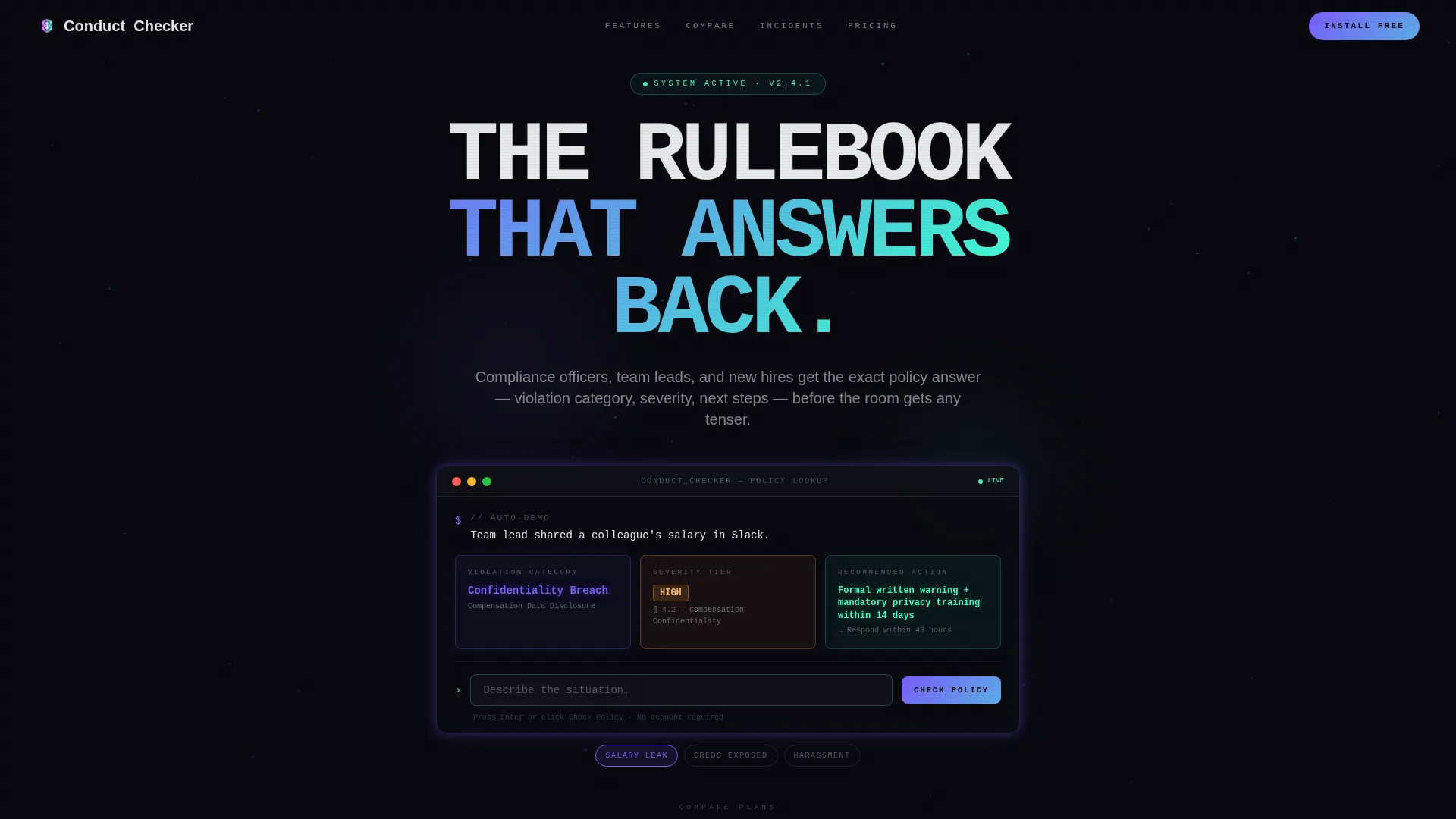
- A hero section built around the Conduct Checker tool, with an auto-typed sample query and glowing response cards
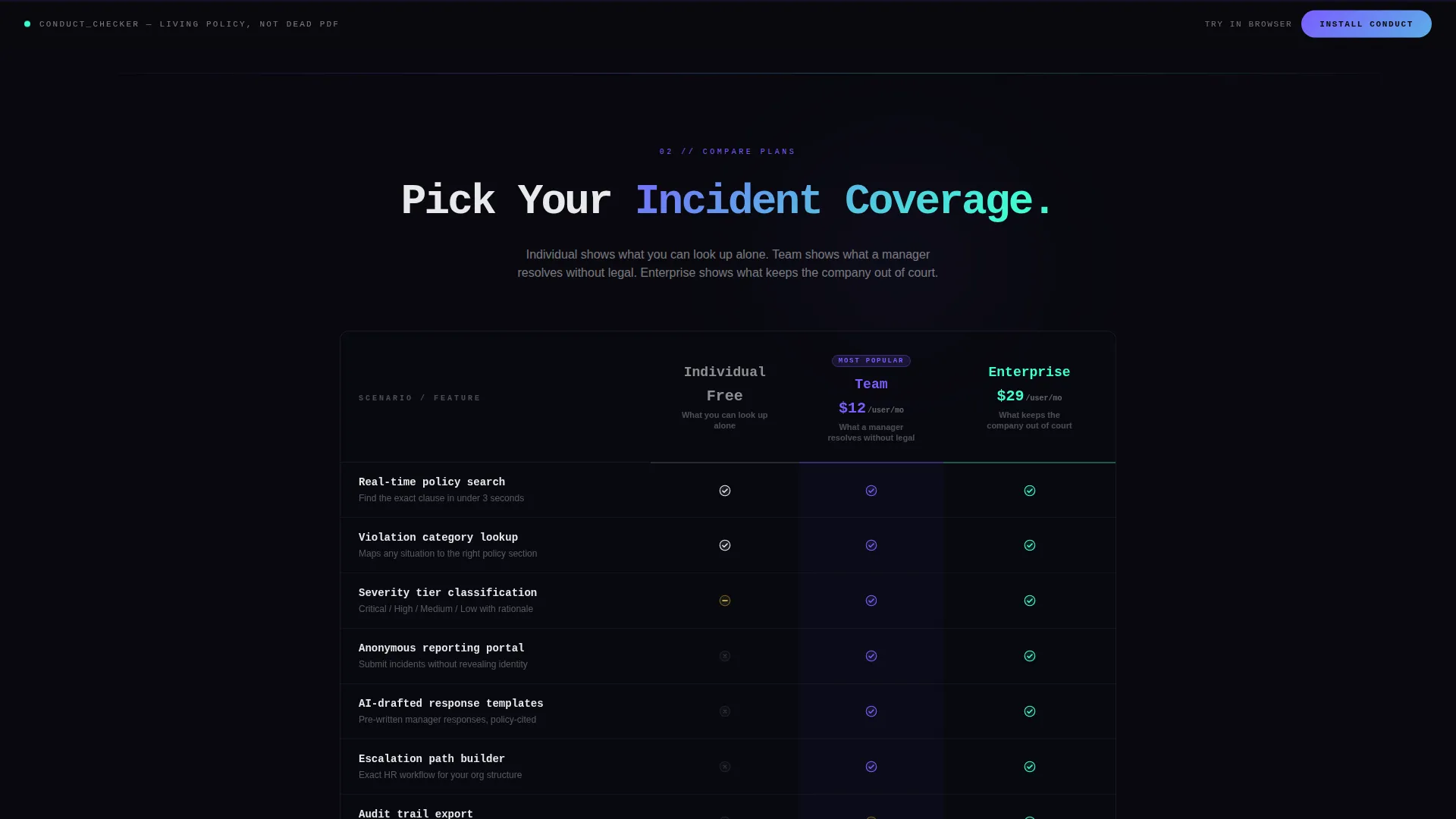
- A three-tier comparison table covering Individual, Team, and Enterprise plans with scenario-based rows and micro-animations
- A sticky app download call to action and a frictionless browser demo path that requires no credentials
Feature list
This template delivers a tightly sequenced set of interactive and visual components, all grounded in the source brief.
Interactive Conduct Checker Hero
The header is a full-bleed dark canvas with no image. A centered input field prompts visitors to describe a situation. A sample query auto-types in real time: "Team lead shared a colleague's salary in Slack." The tool returns a violation category, severity tier, and recommended action rendered as glowing comparison cards that assemble like a hologram.
Scenario-Based Comparison Table
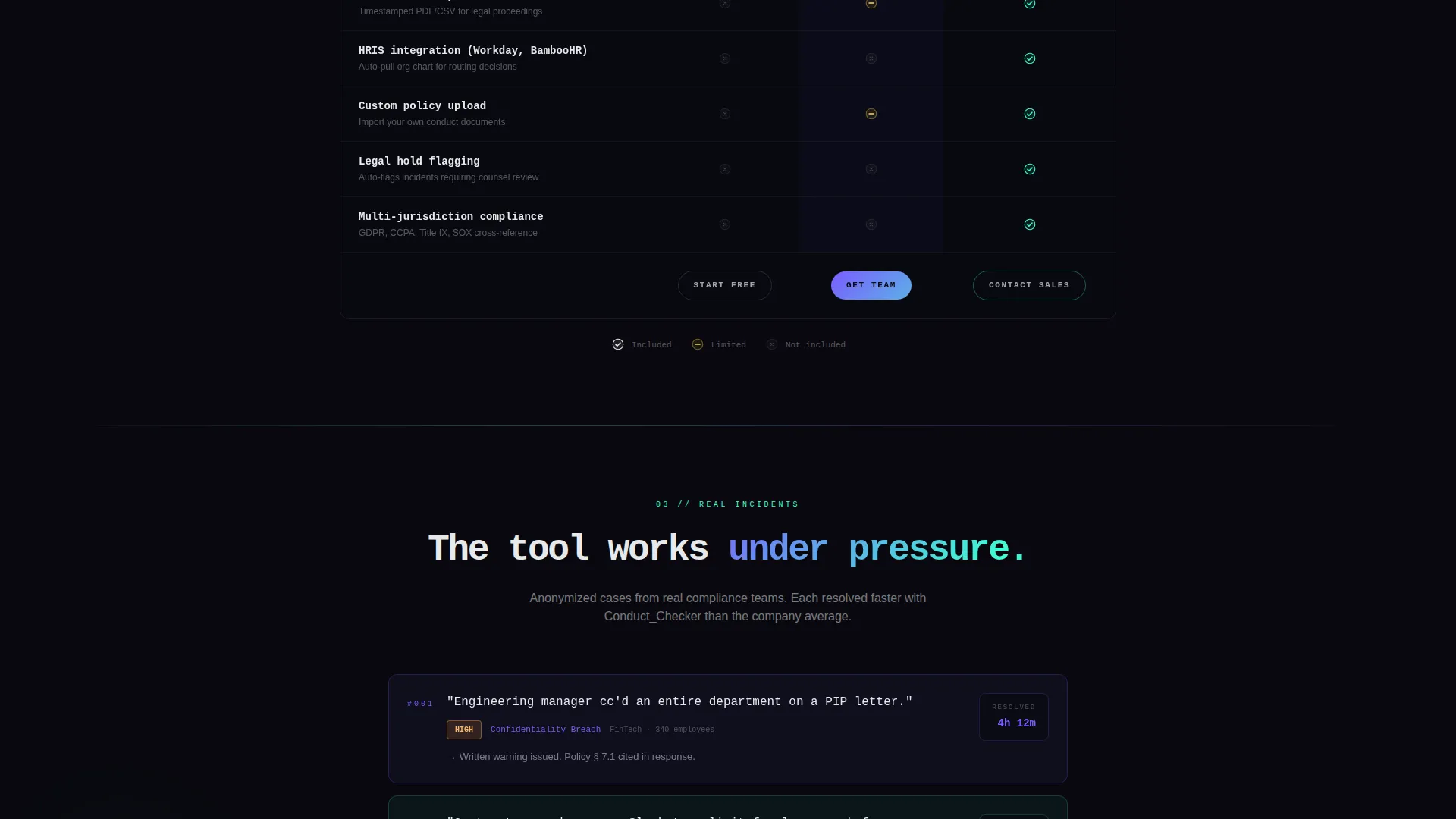
Three plan tiers sit side by side as translucent glass cards on a dark field. Rows cover real scenarios such as anonymous reporting, real-time policy search, AI-drafted response templates, and audit trail export. Each row lights up on scroll entry, and micro-animations show each feature in action. The narrative escalates: Individual, Team, then Enterprise.
Case Study Strip Inserts
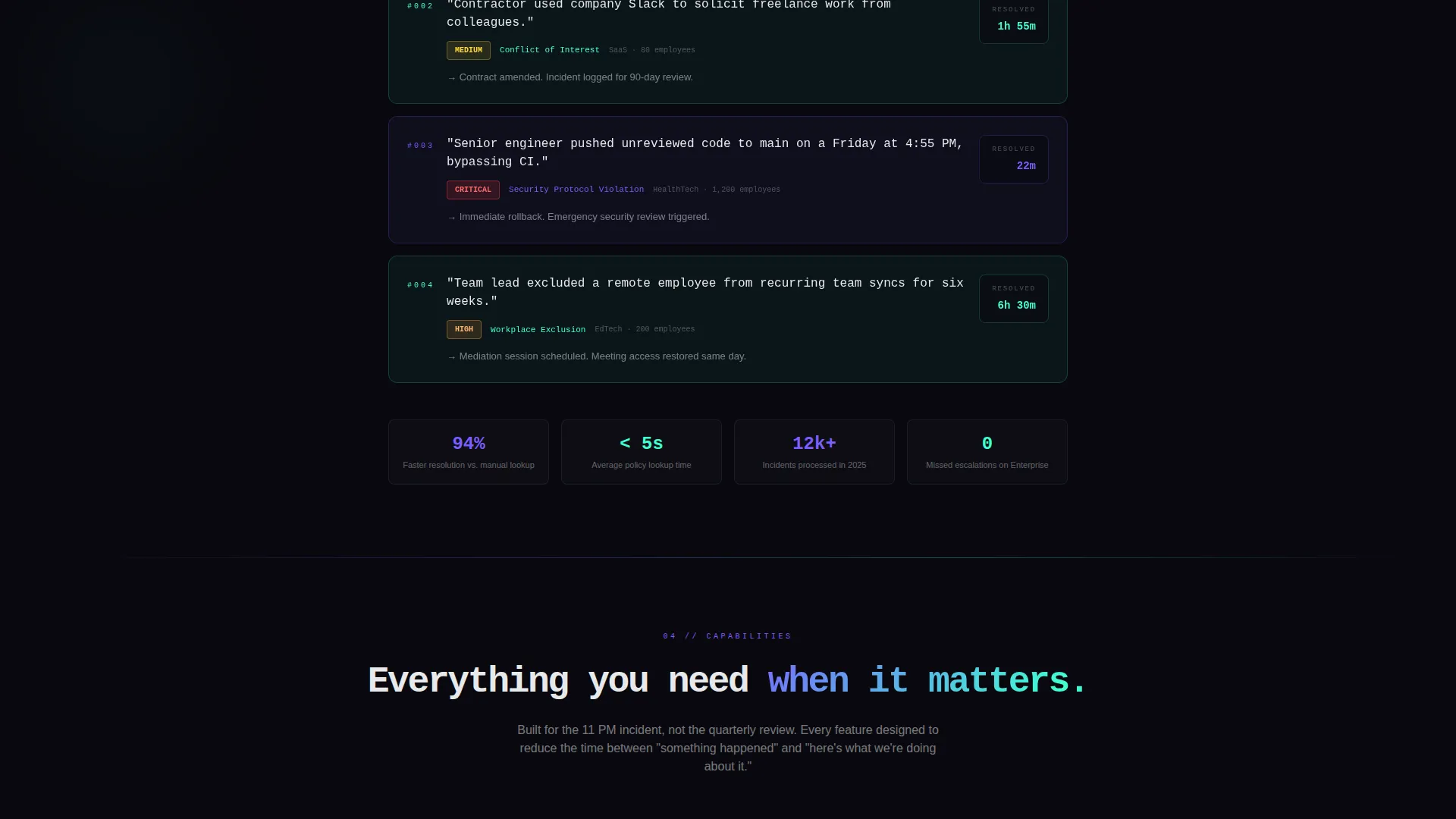
Short case-study strips appear between table sections. Each strip shows a single sentence, a severity badge, and a resolution time. These strips serve as proof points that the tool performs under actual incident pressure, not just in ideal conditions.
Sticky App Download Call to Action
A primary call to action reading "Install Conduct" is pinned to the bottom of the viewport after the first scroll. It opens a platform selector for iOS, Android, and Desktop with one-tap deep links. The button uses a violet-to-teal gradient pill style on a signal white label.
Frictionless Browser Demo Path
A secondary conversion path invites visitors to try the Conduct Checker without installing anything. No credentials are required. This path converts skeptical visitors into active users before they ever reach an app store page.
Iridescent Scroll-Reactive Gradients
Interactive elements pulse with a subtle gradient that shifts between violet and teal as the visitor scrolls. Table headers alternate between violet and teal dominance section by section. The effect creates a sense that the interface is alive and responsive to attention.
Page sections overview
| Section | Purpose |
|---|---|
| Conduct Checker Hero | Demonstrates the core tool with a live auto-typed query and glowing response cards |
| Comparison Table | Compares three plan tiers using real policy scenarios with scroll-triggered row animations |
| Case Study Strips | Provides short incident proof points between table sections to build credibility |
| Sticky Download call to action | Keeps the primary app install action visible throughout the scroll journey |
| Browser Demo Path | Offers a no-install preview to convert visitors who are not yet ready to download |
Design & branding system
The visual identity follows a Data Command theme built on the AI Iridescent color system. Every background defaults to void black, keeping the interface focused and immersive. Accent colors trade dominance section by section rather than competing.
- Void black (#09090F) as the dominant background on every section, holographic violet (#7B5EFF) and plasma teal (#3EFFD1) as alternating glow accents on borders, hover states, and active table headers
- Signal white (#E8E9EB) for all body text, sitting clean and readable against the dark field at every text size
- A violet-to-teal iridescent gradient applied to interactive elements, shifting on scroll to create a sense of live responsiveness
Mobile & speed optimization
The layout is single-page and section-led, which keeps the structure lean. The dark-canvas approach avoids heavy hero images, and the tool-first direction means visitors see value immediately without waiting for decorative assets to load.
- The sticky call to action is viewport-pinned so it remains reachable on any screen size without extra scrolling
- Comparison cards use a translucent glass treatment that renders cleanly across modern mobile and desktop displays
- Micro-animations on table rows are tied to scroll entry, so they fire only when visible rather than all at once on load
How this template helps you convert
This template is structured so that value arrives before the ask. By the time a visitor reaches the download button, the tool has already answered a real question for them.
- The Conduct Checker hero demonstrates immediate utility by returning a violation category and recommended action before the visitor scrolls once, making the app feel essential rather than optional.
- The escalating comparison table raises the stakes row by row, moving from what one person can look up to what keeps a company out of legal exposure, naturally qualifying visitors into the right plan tier.
- The frictionless browser demo path removes the biggest conversion barrier by letting skeptical visitors experience the tool without committing to a download or creating an account.
Other information about this template
This template fits within the Documentation and Support category, specifically the Policy and Legal Documentation subcategory. It is purpose-built for the code of conduct page niche. The Comparison Table template style makes it well suited for apps that offer tiered plans with meaningfully different capabilities at each level.
- The Data Command theme and AI Iridescent color system give it a distinct visual identity that stands apart from standard corporate policy pages
- The Calculator and Tool First creative direction means the interactive element leads, which is especially effective for apps whose core value is instant lookup and decision support
- The App Download landing-page direction and Dark Full-Bleed with Glow header concept are matched to the intersection context, making this template a precise fit for its niche and audience
Theme
Data Command
Creative direction
Calculator/Tool First
Color system
AI Iridescent
Style
Comparison Table
Direction
App Download
Page Sections
Interactive Conduct Checker Hero
Scenario-based Comparison Table
Case Study Strip Inserts
Sticky App Download Call to Action
Frictionless Browser Demo Path
Iridescent Scroll-reactive Interface
Related questions
Who is this template designed for?
Does this template include real policy content?
Can I use this template without offering multiple pricing tiers?
What makes the hero section different from a standard header?
Is there a way to let visitors try the tool before downloading?



