Micro-SaaS & Developer Tools Professional Website Template
Verify is a bento grid landing page template built for email verification tools. It features a Feature Tab Switcher hero, interactive CSV validator, live API playground, and a deliverability score simulator. The Tech Glass design uses a Carbon Fiber color system. The primary call to action, "Verify 100 Emails Free," requires only a work email and password to get started.
by Rocket studio
Quick summary
Verify is a single-page bento grid template designed to showcase a real-time email verification engine. It turns the landing page itself into a live product demo, letting visitors run checks, explore the API, and simulate deliverability outcomes before they ever create an account. The result is a signup that feels earned, not gated.
Who this template is for
This template is built for teams and founders who need to communicate the value of email validation quickly and credibly. If your product checks whether an email address exists, removes invalid email addresses, or protects a sender's reputation, this template speaks directly to your buyers.
- Growth engineers running cold-outbound who need to verify email addresses at scale before sending emails to large lists
- Lifecycle marketers cleaning six-figure CRM databases ahead of product launches, where invalid addresses destroy email deliverability
- SaaS founders and developers who want to confirm their bounce rate is under control and need a free email verification template to launch fast
What problem this template solves
Every company that sends email at scale faces the same threat: a database full of unverified, invalid, or disposable email addresses. More than 20% of email addresses become invalid each year. Sending to those addresses damages a sender's reputation, drives up bounce rates, and can get a domain blacklisted.
The core challenge is not just having an email verification tool. It is convincing potential customers that the tool works, fast, before they leave the page. Generic templates bury the product behind marketing copy. Visitors leave without understanding the value.
- The template replaces passive copy with interactive proof, letting the user run a live verification check the moment they land on the page
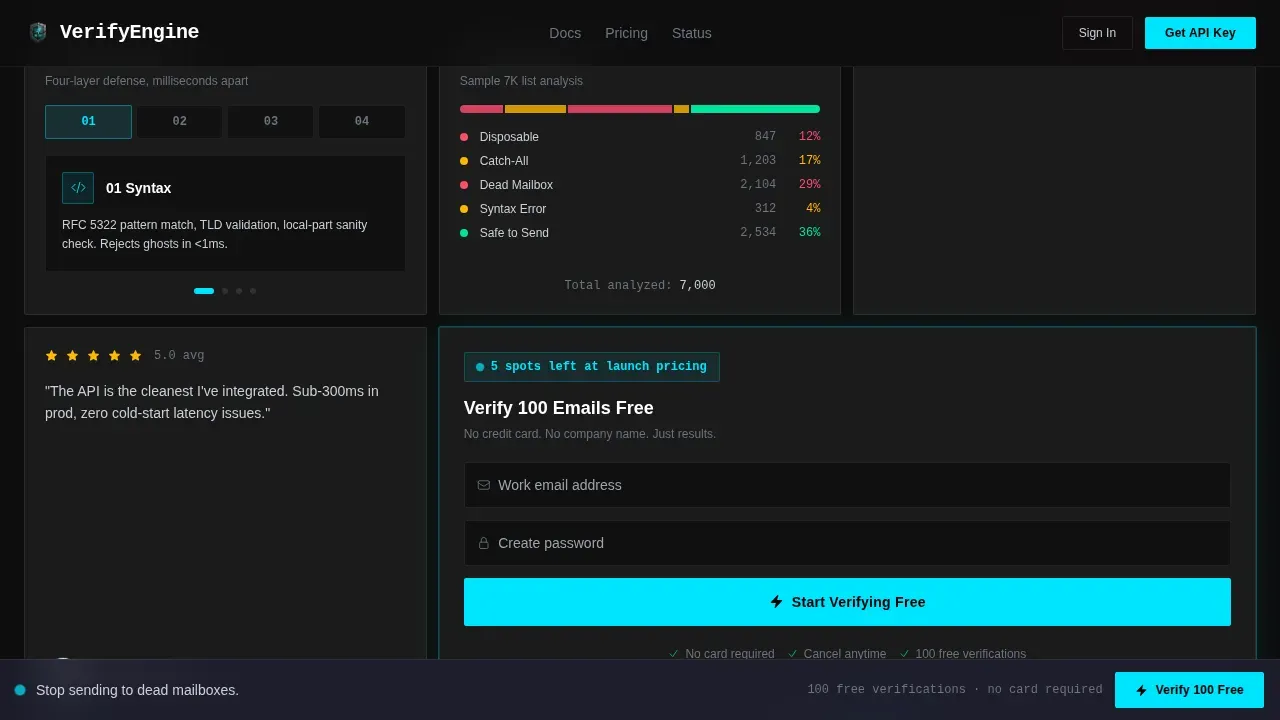
- It removes friction from the signup process by asking only for a work email and password, with no credit card and no company name required
What you get with this template
This template gives your team a complete, production-ready bento grid layout that functions as both a marketing page and a live product demonstration. Every section is designed to confirm trust and reduce hesitation for potential customers evaluating an email validation service.
- A Feature Tab Switcher hero with three tabs: Single Check, Bulk Upload, and API Playground, each revealing a distinct product surface without a page reload
- An interactive bento grid with a CSV validator card, a live API request and response block, and a deliverability score simulator with a draggable slider
- A full conversion flow: the "Verify 100 Emails Free" call to action appears in the hero tab, in a floating bottom bar after scroll, and in the final grid card
Feature list
The Verify template includes a focused set of interactive components drawn directly from the product brief. Each one is designed to let the user experience the email verification process before they register.
Feature Tab Switcher Hero
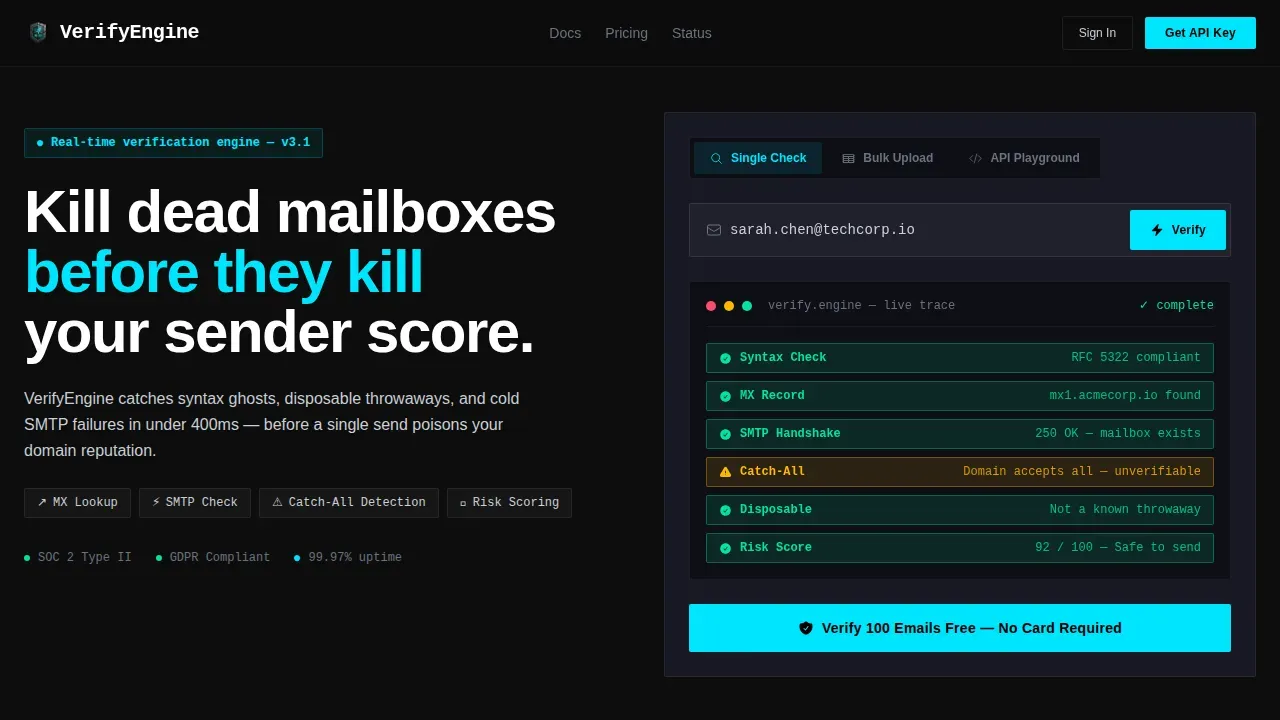
The header presents three glass-morphism tabs labeled "Single Check," "Bulk Upload," and "API Playground." The active tab shows a single email input field with a live verification animation. As a user types an address, micro-status pills appear in sequence: MX record found, SMTP handshake confirmed, catch-all detected, risk score rendered. Switching tabs swaps the entire hero content without a page reload.
Interactive CSV Validator Card
One bento card lets visitors paste a mini CSV and watch row-by-row validation light up green or red in real time. This gives the marketing team an immediate way to demonstrate bulk email list cleaning to potential customers who manage large databases of email addresses.
Live API Request and Response Block
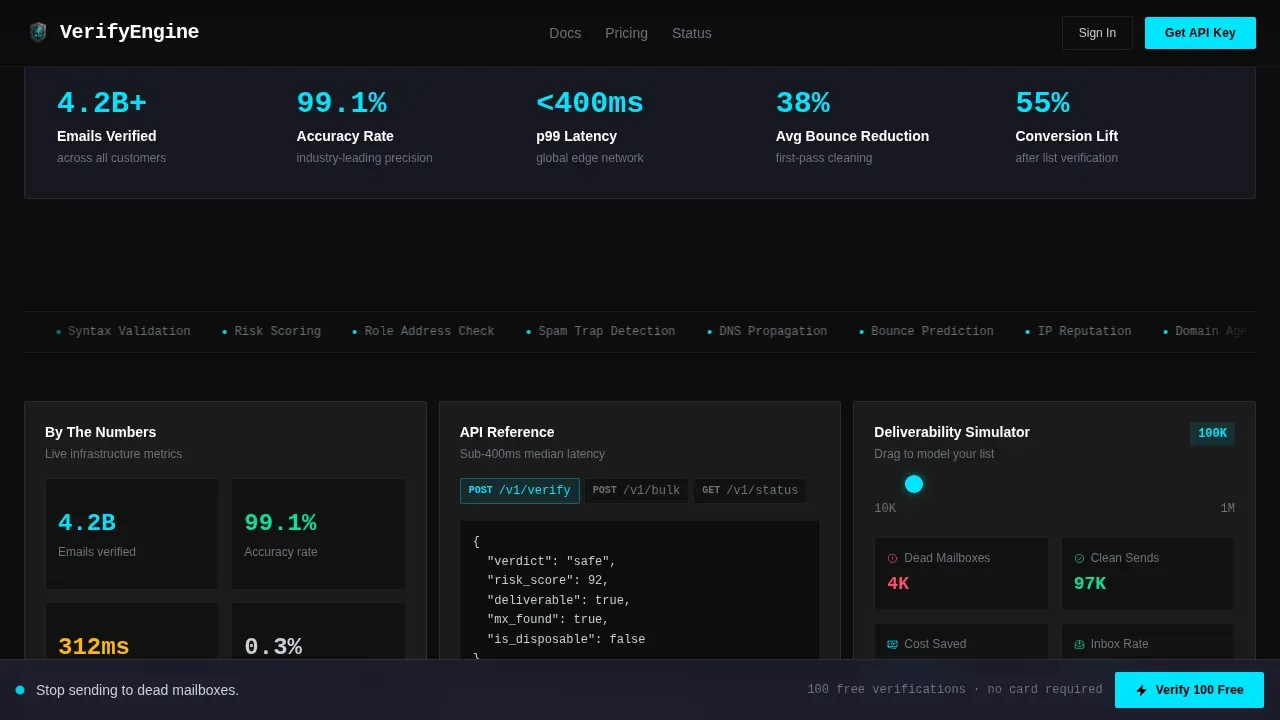
A dedicated card exposes a live API request and response block. Toggling parameters changes the JSON output instantly. Developers can see exactly how to send verification emails through the API, request a verification check, and read the structured response, before they ever request an API key.
Deliverability Score Simulator
A slider card lets visitors drag from 10K to 1M list size. The template recalculates estimated bounces, cost savings, and projected inbox placement as the slider moves. This makes the business case for email validation concrete and personal, showing each user what they stand to gain by removing invalid email addresses from their list.
Floating call to action Bar and Conversion Flow
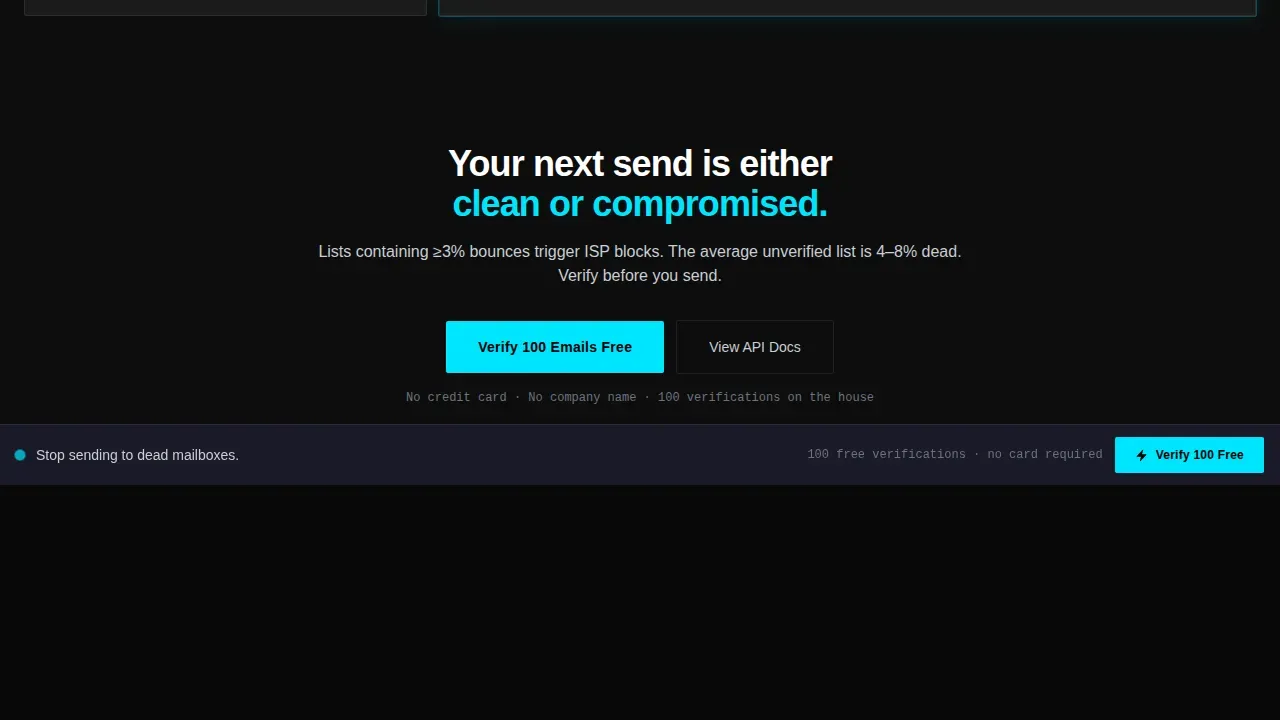
After a visitor scrolls past the hero, a floating bottom bar pins the "Verify 100 Emails Free" call to action in view. The same message repeats at the final grid card. The signup form asks only for a work email and password. A secondary path, "Grab Your API Key," targets developers and leads to a docs-integrated onboarding flow.
Tech Glass Bento Grid Layout
The full layout uses a bento grid structure with glass-morphism card surfaces rendered in translucent glass white at 8% opacity over a deep carbon black background. The grid organizes the stats section, how-it-works pipeline, and interactive cards into a dense, readable canvas that communicates precision and reliability.
Page sections overview
| Section | Purpose |
|---|---|
| Feature Tab Hero | Introduces three product surfaces via tab switching with live verification animation |
| CSV Validator Card | Lets visitors paste a list and watch row-by-row email validation results appear live |
| API Playground Card | Shows live JSON request and response output with toggleable parameters |
| Deliverability Simulator | Slider-driven calculator for bounce estimates and inbox placement projections |
| Stats and Social Proof | Displays concrete metrics including bounce thresholds and conversion lift figures |
| How It Works | Sequential pipeline: Syntax check, MX lookup, SMTP handshake, risk score |
| Final call to action Card | Repeats "Verify 100 Emails Free" with a minimal work email and password form |
| Floating Bottom Bar | Keeps the primary call to action visible throughout the scroll experience |
| Footer | GitHub Developer Minimal pattern with secondary links and developer resources |
Design & branding system
The visual identity follows a Tech Glass theme built on a Carbon Fiber color system. The aesthetic is intentionally dark and dense, designed to feel like the inside of a matte-black server rack lit by a single status indicator. Every surface communicates precision.
- Core palette: deep carbon black (#0D0D0D) for the background, brushed graphite (#1E1E2E) for card containers, translucent glass white at 8% opacity for card surfaces, cool silver (#C9CED6) for body text, and electric cyan (#00E5FF) reserved for interactive states, verification-pass indicators, and primary calls to action
- Typography: DM Sans is used for all user interface text; JetBrains Mono is used for code blocks, API responses, and terminal-style verification logs
- A clean, minimalist aesthetic keeps the layout free of marketing clutter, placing data and interactive components at the center of the visual hierarchy
Mobile & speed optimization
The template is built desktop-first to honor the DevTools-style, data-dense interface its target users expect. However, the layout is fully responsive so the page remains usable on smaller screens, because many users access and forward links from mobile devices.
- The bento grid reflows gracefully on smaller viewports, keeping the CSV card, simulator, and call to action bar accessible without horizontal scrolling
- Server Components handle all static sections such as the stats block and the how-it-works pipeline, while Client Components power the interactive tabs, CSV validator, API playground, and deliverability simulator
- Trust and security indicators, including subtle brand marks and connection security signals, are included in the layout to confirm the site is legitimate across all screen sizes
How this template helps you convert
The template is engineered so that every scroll interaction moves a visitor closer to submitting their work email. The core insight is that the best way to send verification emails about a product is to let the product speak for itself before asking for any commitment.
- The hero tab demonstrates the full email verification process live: a typed address triggers syntax checking, domain MX lookup, SMTP handshake confirmation, and risk scoring, all rendered as sequential status pills that make the pipeline visible and trustworthy
- The interactive bento grid keeps visitors inside the product experience, each card teaching a different use case: bulk list cleaning, API integration, and deliverability forecasting, so potential customers self-qualify before they sign up
- The floating call to action bar and repeated "Verify 100 Emails Free" placements reduce decision fatigue by making the next step obvious at every scroll depth, while the minimal form (work email and password only) removes the last barrier to registration
Other information about this template
This section covers additional context that helps teams make the most of the Verify template and the email verification practices it is designed to support.
- A verification email template is a pre-designed email format used to send verification emails to users after registration. A short verification email template typically includes a greeting, a message about the registration, and a clear verification link. A verification email template with a confirmation link requires the user to click a link to confirm their email address, while a version with a verification code provides a one-time password (OTP) for account activation.
- Effective verification emails should be sent immediately after a new user signs up. Subject lines matter: a clear subject line directly affects whether a confirmation email is opened. The expiration time for verification links and OTP codes should ideally fall between 5 and 30 minutes to keep the email verification process secure.
- The template layout supports best practices for confirmation emails: an instant confirmation message tells the user that verification was successful, visual cues such as checkmarks reinforce the result, and a prominent call to action guides the user to the next step such as completing their profile or accessing their account dashboard.
- For users who did not receive a verification email, the design supports options like a "Resend Link" flow and a "Change Email" option, reducing drop-off during registration. A contact link or support team reference can be included in the footer to handle technical errors.
- The Verify template is well suited for teams implementing a double opt in flow, where a user signs up, receives a confirmation email, and must click a verification link before their address is added to the active email list. This process confirms that real email addresses are being collected and reduces spam registrations in the database.
- Email verification widgets are snippets of code embedded in a webpage that enable real-time email validation at the point of entry. The Verify template design is compatible with embedding such widgets in the registration form, helping eliminate invalid email addresses before they reach the database. Implementing a widget is straightforward and does not require extensive coding knowledge.
- The template also includes a manual "Verify" button pattern, which is useful when email clients might consume a verification token before the user can act on it. This extra layer of control protects the integrity of the email verification process.
- For teams managing email marketing campaigns, keeping a clean email list is foundational to a healthy email marketing strategy. Email validation reduces bounce rates, improves open rates, and keeps the sender's domain in good standing. Sending emails to valid addresses also protects the company from being flagged as a source of spam.
- Postmark is referenced in the source brief as an example delivery provider whose bounce rate thresholds are relevant to this template's target audience of SaaS founders and growth engineers.
Theme
Tech Glass
Creative direction
Interactive Explorer
Color system
Carbon Fiber
Direction
Freemium/Trial
Page Sections
Feature Tab Switcher with Live Verification Animation
Interactive CSV Validator Card
Live API Playground Card
Deliverability Score Simulator
Floating Call to Action Bar and Minimal Signup Form
Tech Glass Bento Grid with Carbon Fiber Palette
Related questions
What interactive components does this template include?
What does the signup flow look like?
Is this template suited for developer-focused audiences?
How does the template handle email verification best practices in its design?
Can I use this template to support a double opt-in registration flow?



