IoT Vertical SaaS Booking Website Template
Uplink is a dark-terminal, dashboard-style landing page template built for IoT facility booking platforms. It opens with a live API code snippet, flows through six animated metric tiles, and drills into occupancy heatmaps, energy graphs, and Gantt-style booking timelines. A freemium signup form closes the page. Every pixel is configured to earn the click before the visitor reaches the form.
by Rocket studio
Quick summary
Uplink is a single-page, data-dense landing page template designed for IoT booking platforms that connect facility devices into one unified control layer. The design opens with a live API terminal, displays real-time metric tiles, and walks visitors through occupancy, energy, and booking data panels before presenting a freemium call to action. It is configured to convert technically minded buyers who need proof before they commit.
Who this template is for
This template is built for B2B software-as-a-service teams selling smart facility management tools to operations-heavy buyers. It speaks directly to the people who manage large device estates and need a booking interface that can match their complexity.
- Facilities managers overseeing 200-plus connected device estates across corporate campuses who need a single controller view for every room, desk, and piece of equipment.
- IT directors who are done stitching together platform chains and want an API-first booking gateway they can deploy without additional middleware.
- Coworking operators who need device-aware booking logic so a thermostat can respond to a meeting end event and energy savings can be tracked per booking duration.
What problem this template solves
Most IoT booking platforms suffer from the same core issue: the product is technically impressive but the landing page fails to display that capability to buyers. Visitors arrive, see generic copy, and leave before they discover what the platform actually does. This template solves that visibility gap.
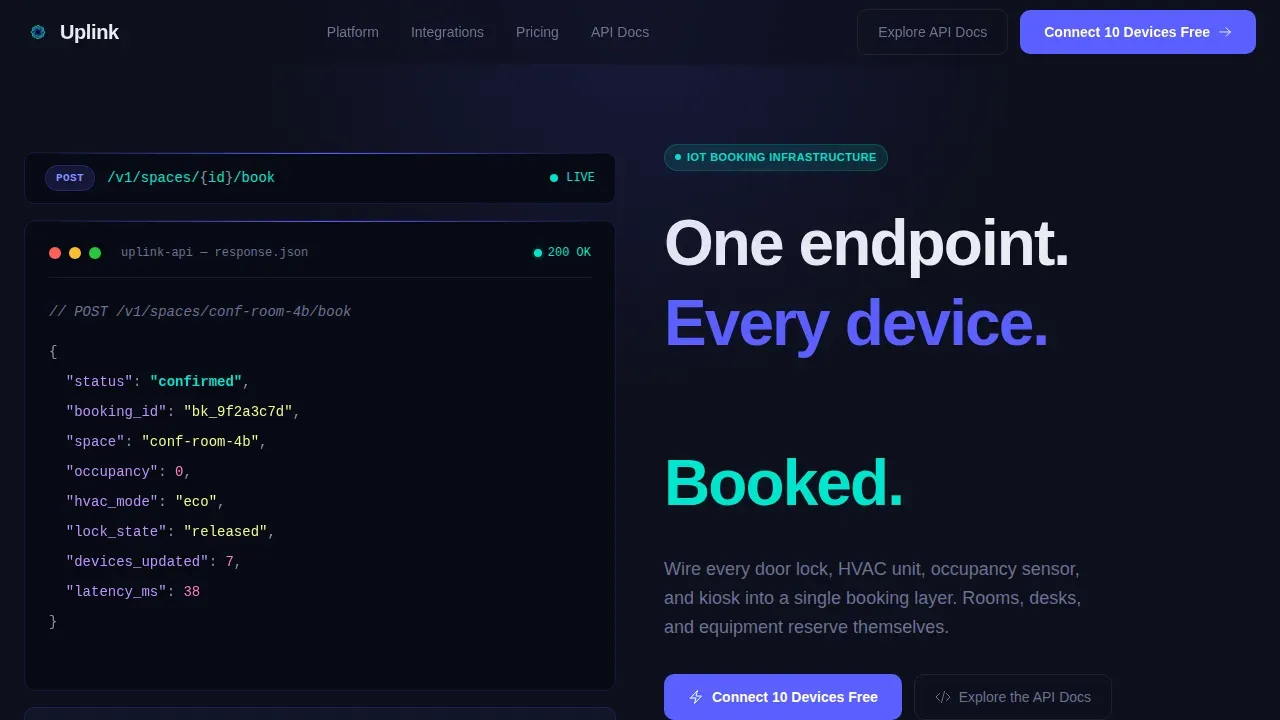
- Proof before persuasion: The page leads with a syntax-highlighted API code block and a live JSON response, so a technical evaluator can determine product capability before reading a single line of marketing copy.
- Data density without clutter: A single-pane-of-glass design groups complex figures into scannable, high-contrast sections, reducing cognitive load and supporting long-term operation of the page as a marketing asset.
- Conversion path for two audiences: A freemium signup form captures operators ready to connect devices now, while an API documentation link gives technical evaluators a secondary path to explore before they commit.
What you get with this template
The template delivers a complete, pre-configured landing page layout with all sections, animations, and design tokens included. No blank-canvas decisions are required. Users can customize copy, device count figures, and brand colors and then deploy the page without writing a single line of code from scratch.
- Seven pre-built page sections covering the hero terminal, metric grid, occupancy heatmap panel, booking timeline, energy graph, freemium signup form, and a developer-minimal footer.
- Full Electric Indigo design system with four configured color tokens, two typeface pairings, and a dark terminal visual style built for data-dense interfaces.
- High-interactivity animation set including a typewriter headline, count-up metric tiles, JSON line-by-line reveal, and IntersectionObserver-triggered scroll animations across every data panel.
Feature list
This template ships with a focused set of features, each configured to serve a specific role in the conversion process. Every feature described below is grounded in the original design brief and present in the template as built.
Animated API Terminal Hero
The header section displays a syntax-highlighted code block showing a real API call format: POST to a spaces endpoint with a live JSON response that animates line by line. Device telemetry values populate in sequence, showing occupancy state, HVAC mode, and lock state. This gives a technical evaluator immediate, concrete detail about how the booking interface works. The headline types itself beneath the terminal block, reinforcing the single-endpoint value proposition without a hero image or stock photography.
Live Stats Grid with Count-Up Tiles
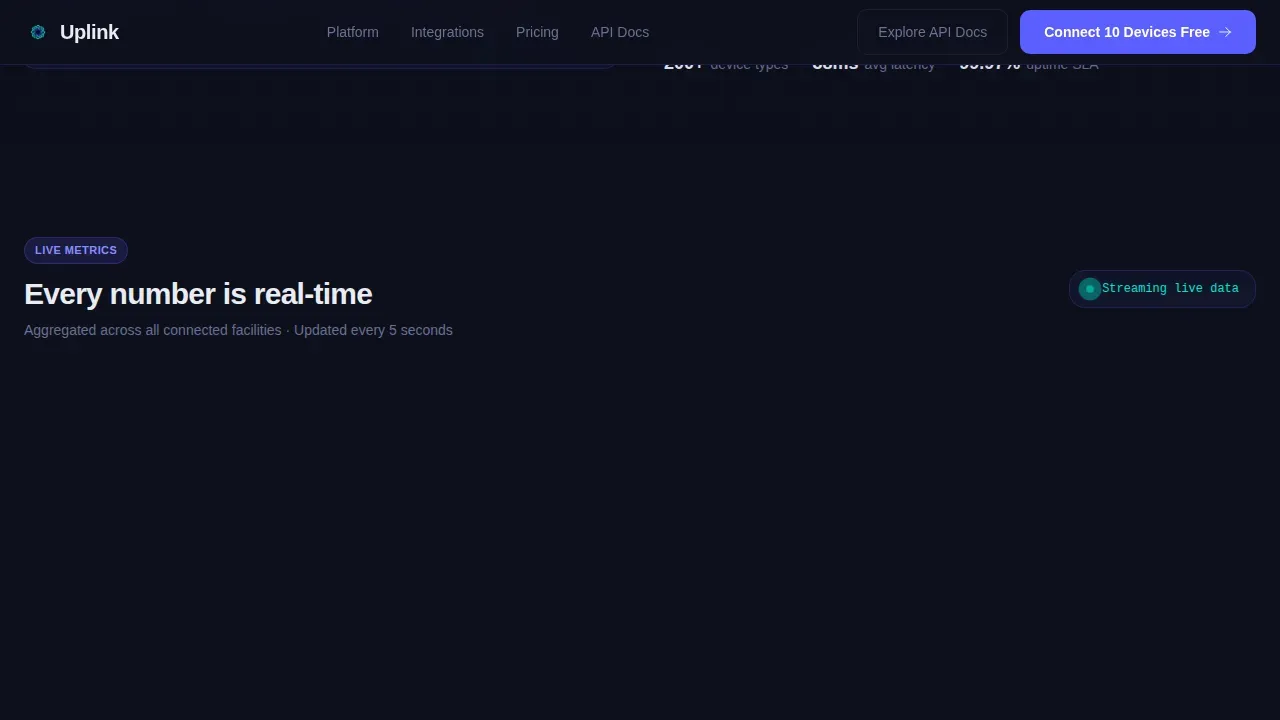
Immediately below the hero, a data grid displays six metric tiles. Each tile tracks a distinct operational figure: total number of devices connected, bookings completed today, energy saved, average check-in duration, no-show rate, and API uptime percentage. The count-up animation triggers on viewport entry using IntersectionObserver, so the numbers appear to populate live. This section sets the data-credibility tone and makes the platform's scale instantly readable to any visitor.
Occupancy Heatmap Panel
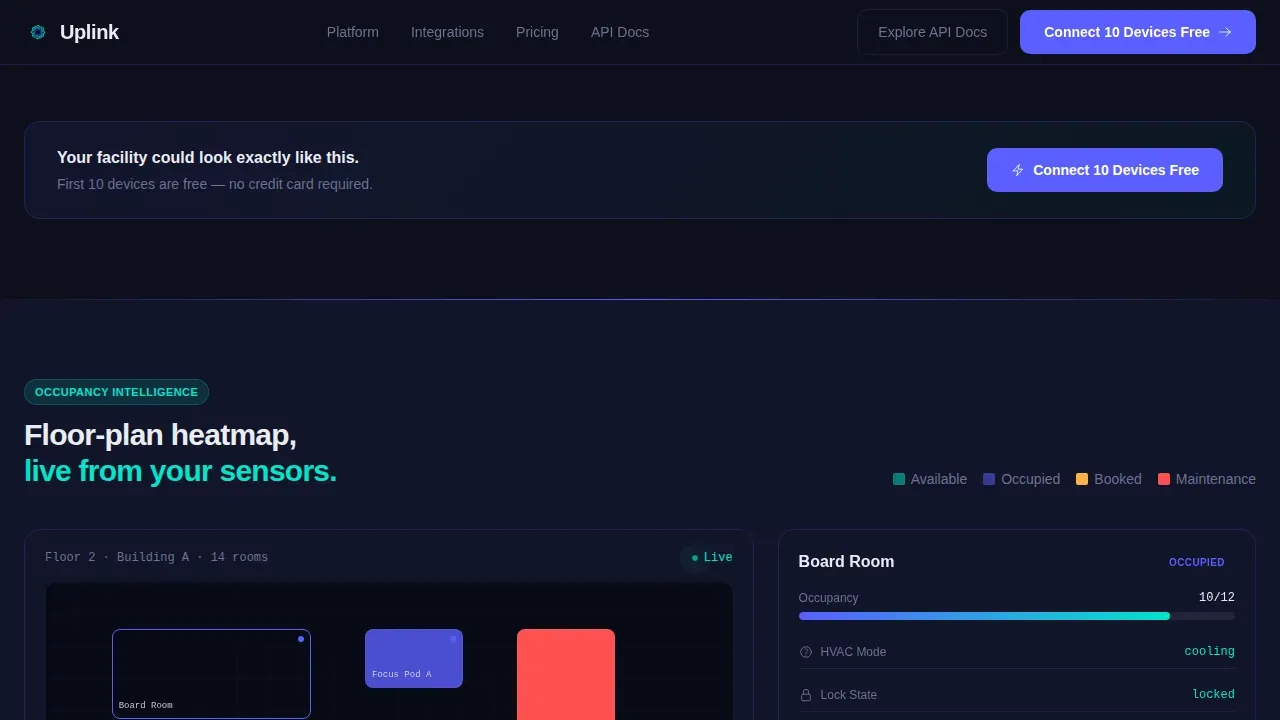
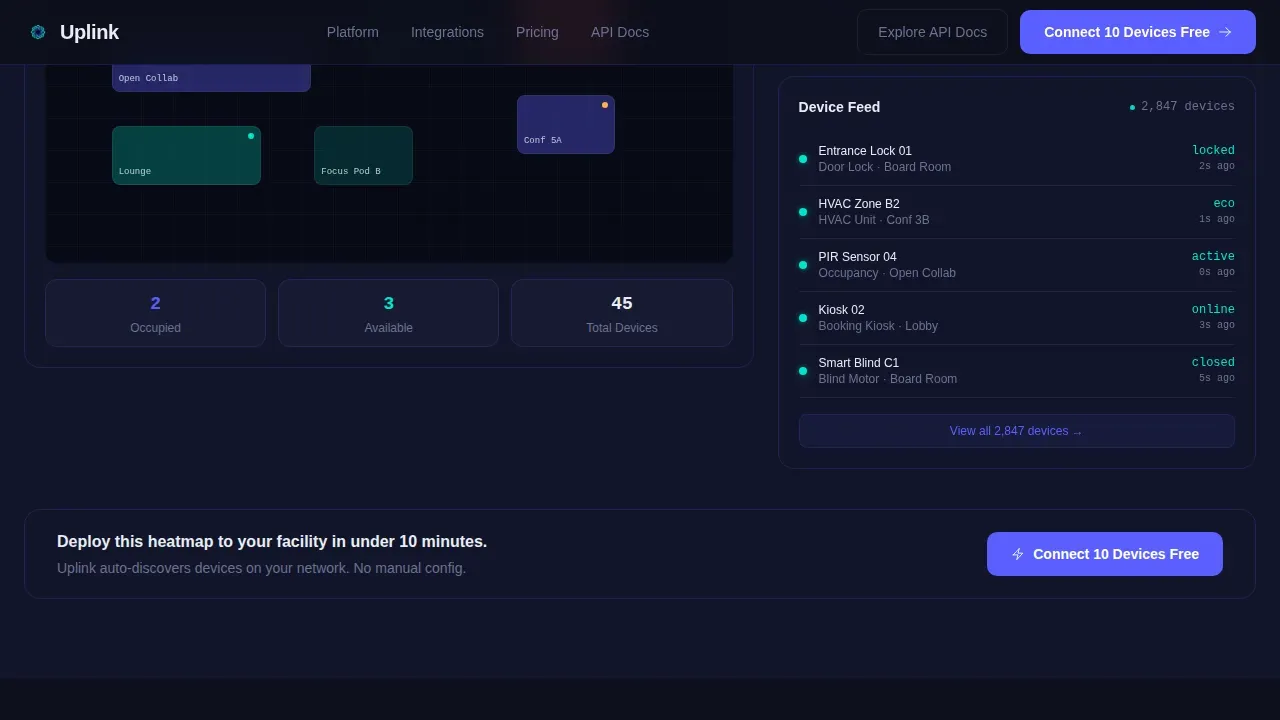
The first deep-dive section expands the occupancy metric into a floor-plan visualization. Room and desk status indicators display across a facility layout, with hover states active on each zone. Visitors can see how the device network maps to physical space. The panel acts as a gateway into the platform's real-time monitoring capabilities, showing connected device states in a format that facilities managers and coworking operators immediately recognize from their own workflows.
Booking Timeline and Energy Graph
A Gantt-style booking density chart and a time-series energy savings graph sit side by side in the third data section. The booking timeline shows how space utilization groups across a working day, while the energy graph traces savings figures over a configurable duration. Together, these two panels give the visitor the kind of operational figures that support an internal business case. The data is displayed in a format that matches how facilities reports are typically structured.
Freemium Signup Form with Device Count Selector
The call-to-action section presents a two-field signup form. Users enter a work email and select an estimated device count from a dropdown with four configured bands: 1 to 10, 11 to 50, 51 to 200, and 200 plus. A secondary link to API documentation sits below the primary submit button, giving technical evaluators a clear path to explore before they commit. The form is designed to reduce friction and prevent form fatigue by limiting the total number of required fields.
Sticky Navigation with Persistent Call to Action
The navigation bar remains active and visible throughout the full page scroll. It carries the primary call-to-action button alongside standard navigation links, so the freemium offer is always one click away regardless of where in the page a visitor is reading. This design pattern ensures that buyers who are convinced mid-scroll do not need to navigate back to the top to take action.
Page sections overview
| Section | Purpose |
|---|---|
| API Terminal Hero | Display live API call and animated JSON device telemetry |
| Stats Metric Grid | Show six count-up operational figures on scroll entry |
| Occupancy Heatmap | Visualize floor-plan device states with hover interactions |
| Booking Timeline | Display Gantt-style booking density across a working day |
| Energy Savings Graph | Show time-series energy figures from device-aware bookings |
| Freemium Signup Form | Capture work email and device count for free-tier access |
| Developer Minimal Footer | Provide navigation links and secondary API documentation path |
Design & branding system
The template uses the Electric Indigo color system, a four-token palette designed to carry meaning at every layer of the interface. The visual style references a server room at 2 a.m.: cool LED glow on dark glass, every color assigned a specific functional role. Typography pairs JetBrains Mono for code blocks and terminal elements with DM Sans for interface labels and body copy.
- Color tokens: Terminal black (#0D0F1C) as the page background; live-wire indigo (#5B5FFF) for interactive elements and data highlights; sensor-pulse cyan (#00E5CC) for real-time status indicators and success states; status-bar white (#EAEDF3) for labels and secondary text.
- Typography: JetBrains Mono handles all code, telemetry values, and terminal-style display; DM Sans handles all interface labels, descriptions, and body paragraphs, keeping the design readable without sacrificing its data-dense character.
- Animation tokens: Typewriter headline, count-up numbers, line-by-line JSON reveal, and parallax scroll layers are all GPU-accelerated transforms, keeping the page smooth without compromising render performance.
Mobile & speed optimization
The template is built desktop-first to match the primary audience of facilities managers working at fixed workstations, while remaining fully responsive for mobile access. Mobile-friendly accessibility ensures that managers can check device availability and make changes from any device, which is a real operational requirement for teams that also manage sites from the field.
- GPU-accelerated animations: Every animated element uses CSS transforms and GPU-accelerated compositing so the interface stays responsive even with multiple active animation layers running simultaneously.
- IntersectionObserver triggers: Count-up tiles, chart reveals, and JSON animations fire only when the relevant section enters the viewport, reducing unnecessary processing and keeping the page fast on first load.
- Responsive layout: All panels, data grids, and form sections are configured to reflow cleanly on smaller screens, so the core conversion path remains intact regardless of the device a visitor is using.
How this template helps you convert
The template is structured around a Stats-First Impact rhythm, a scroll sequence that front-loads proof and delays the ask until the visitor has already seen the platform working. This approach is grounded in how technical buyers actually evaluate tools: they want evidence before they engage with a sales form.
- Front-load credibility: The API terminal and live JSON response give a technical evaluator everything they need to determine product capability in the first viewport. By the time they scroll, they are already qualifying the product, not questioning it.
- Build conviction through data depth: Each subsequent section drills deeper into one operational figure, turning a single metric tile into a full dashboard panel. The process feels like exploring a real product, not reading a brochure, which significantly reduces the friction a buyer feels before submitting a form.
- Present a low-commitment ask: The freemium form asks only for a work email and a device count estimate. No payment details are required to start. The secondary API documentation link means even visitors who are not ready to sign up can take a meaningful step toward conversion by exploring the technical source material.
Other information about this template
This template is designed to support teams that want to deploy a high-credibility landing page for an IoT booking platform without commissioning a custom build. The following notes cover practical deployment, customization scope, and platform context that buyers commonly want to confirm before they select a template.
- Customization scope: All text, color tokens, figures, and metric descriptions are editable. The configurations are set up so that a single switch of the brand color propagates across all indigo and cyan usage in the interface. Multiple switches in the color system can be modified independently if a team needs to match an existing brand guide.
- No-code deployment: This template is built for platforms that enable rapid deployment without extensive coding knowledge. Users can create a production-ready page by editing the pre-built sections and publishing directly. No-code and low-code environments that support pre-built templates allow teams to build and deploy quickly, which is particularly valuable when marketing timelines are tight.
- API documentation link: The secondary call to action connects to an API documentation source. The destination URL is configured as a placeholder that the deploying team replaces with their actual API docs gateway or developer portal link. Note that the template does not host or generate API documentation itself.
- Backend integrations: Backend integrations are essential for connecting the form submission to a data source or customer relationship management system. The template's signup form is configured with a standard POST action that can connect to any backend endpoint. APIs are commonly used to facilitate these integrations, and the template's form structure supports that pattern without modification.
- Payments and refunds: The template does not include a payment flow or a refunds policy section by default. Teams that need to display payment plans, subscription tiers, or a refunds policy can add those sections to the page using the platform's section builder. The existing design system provides enough visual structure to host a pricing table without requiring custom design work.
- Marketing and analytics: Monitoring and analytics can be integrated into the page by adding a tracking script to the page host. The template does not include a pre-configured analytics instance, but its section structure supports any tag-based marketing or event tracking approach. Teams can sync their preferred analytics platform with the page without modifying the design.
- VLAN and network context: The booking command center concept this template represents operates across a facility network where devices communicate through segmented network zones. In a real deployment, each device group may sit on a separate VLAN to control traffic between the booking controller and the physical hardware. The template's visual language reflects this network architecture through its port-style status indicators and gateway-style data panels, though the template itself is a front-end design asset and does not configure or manage actual network infrastructure.
- Uplinks visual metaphor: The template uses uplinks as a visual metaphor throughout its design, representing the data connections between devices and the central booking controller. The concept of an uplink carries meaning in both network engineering and in the product's brand story: every device uplinked to the system is one fewer device managed manually.
- Template deployment consistency: Using a pre-built template in deployment helps ensure consistency across multiple instances of a booking platform, particularly when a team is managing multiple site deployments simultaneously. The same base configurations can be modified per site without rebuilding the page from scratch each time.
Theme
Dashboard Pro
Creative direction
Stats-First Impact
Color system
Electric Indigo
Style
Dashboard/Data Grid
Direction
Freemium/Trial
Page Sections
Animated API Terminal Hero Section
Six-tile Live Stats Metric Grid
Occupancy Heatmap Floor Plan Panel
Gantt Timeline and Energy Graph
Freemium Two-field Signup Form
Sticky Navigation with Persistent Call to Action
Related questions
Can I change the color scheme to match my brand?
Does this template include real device data or live API connectivity?
Who is the primary audience this landing page is designed to convert?
Can I add a pricing or payments section to this template?
Is this template suitable for a no-code deployment environment?



