Micro-SaaS & Developer Tools Professional Website Template
Consentguard is a scroll-reveal landing page template built for cookie consent managers. It follows a Problem-to-Solution arc, opening with a live tracker simulation and progressively revealing auto-scanning, geo-targeted banners, preference storage, and audit log features. The Tech Glass visual system and phosphor green accents give it instant developer credibility.
by Rocket studio
Quick summary
Consentguard is a single-page, scroll-reveal template designed for cookie consent manager products. It leads with a browser inspector showing unconsented trackers firing on load, then walks visitors through auto-scanning, banner customization, and proof-of-consent records. The design follows a Tech Glass aesthetic with acid-green accents and glass-panel user interface cards.
Who this template is for
This template is purpose-built for teams selling or launching a cookie consent manager. It speaks directly to technically fluent buyers who need compliance solved fast and credibly.
- Startup CTOs patching consent compliance the week before a product launch
- Data Protection Officers at mid-market software-as-a-service companies managing both GDPR (General Data Protection Regulation) and CCPA (California Consumer Privacy Act) simultaneously
- Agency developers handling multiple client domains who need one centralized compliance dashboard
What problem this template solves
Most compliance landing pages describe their product in abstract terms. Buyers leave unsure whether the tool actually works. Consentguard flips that by showing the product in action, section by section, before asking for anything.
- Visitors see unconsented trackers firing on load, making the problem feel immediate and quantifiable
- Each scroll reveal adds a layer of the solution, reducing cognitive load and building trust progressively
- The "Scan My Site Free" call to action lets buyers see their own cookie count before committing
What you get with this template
You get a fully structured, single-page scroll-reveal layout wired for lead generation. Every section is designed to move a skeptical technical buyer from awareness to action without friction.
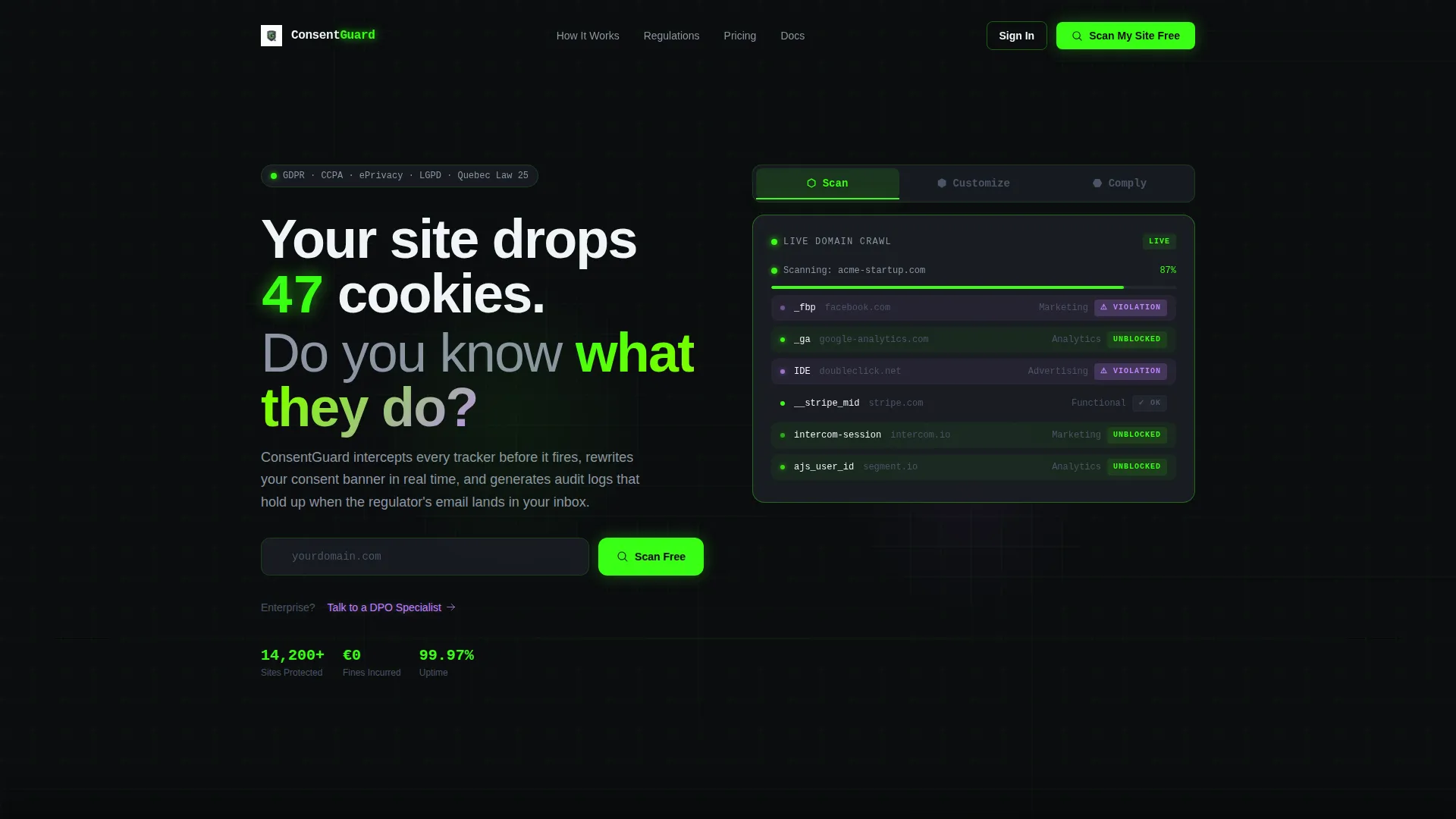
- A Feature Tab Switcher header with three interactive glass-panel tabs: Scan, Customize, and Comply
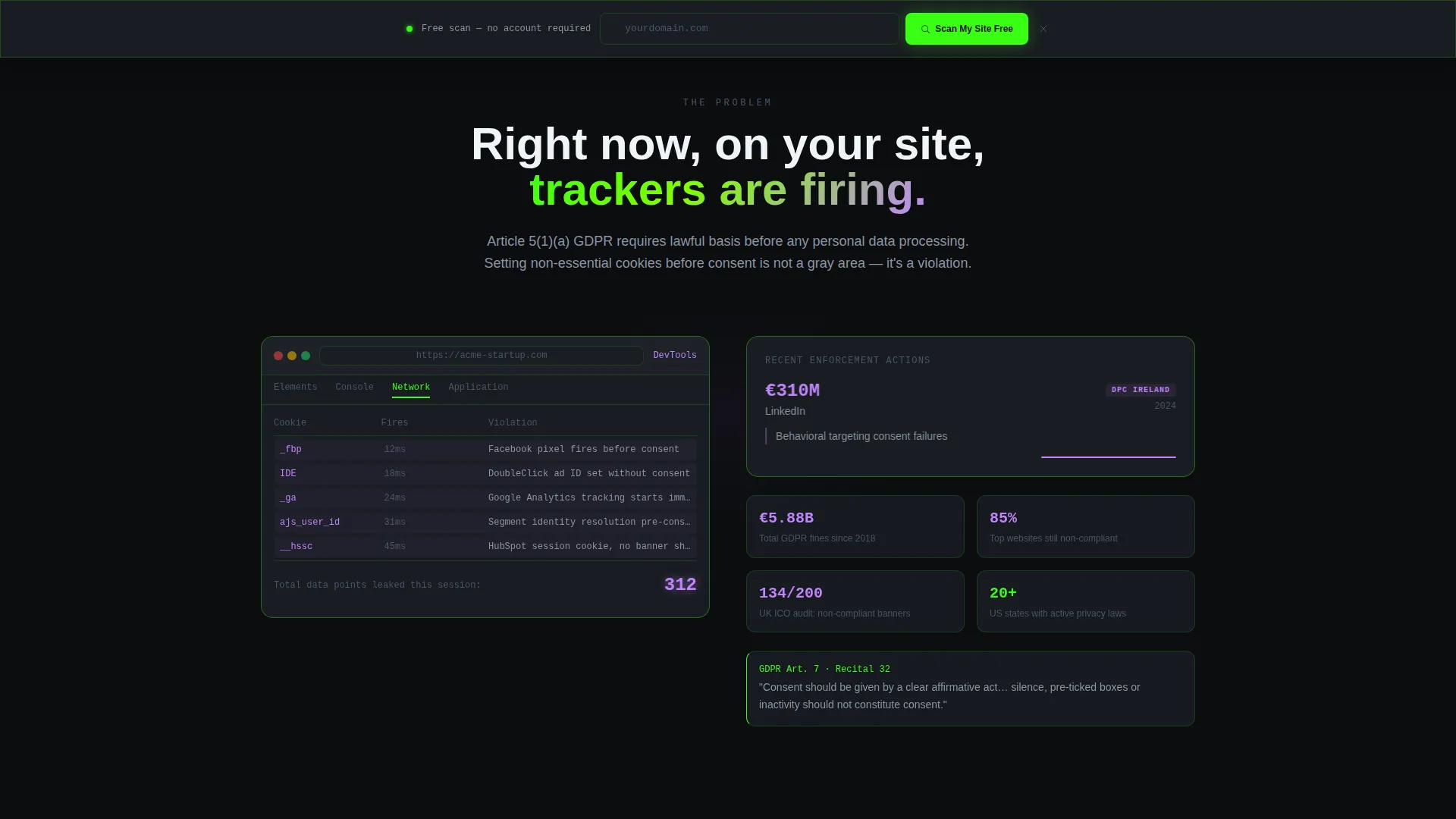
- A sticky bottom bar with a domain input field that appears after the second scroll reveal
- A secondary enterprise path gated behind a short form for company size and primary regulation
Feature list
This template ships with purpose-built sections and interactive components. Each one earns its place in the Problem-to-Solution arc.
Feature Tab Switcher Header
Three glass-panel tabs sit above the headline. Clicking "Scan" reveals a domain crawl with cookies categorized in real time. "Customize" opens a drag-and-drop banner builder. "Comply" shows an audit log timeline with regulation badges including GDPR, CCPA, and ePrivacy snapping into place. Each tab surfaces a different live-user interface preview.
Scroll Reveal Progressive Layout
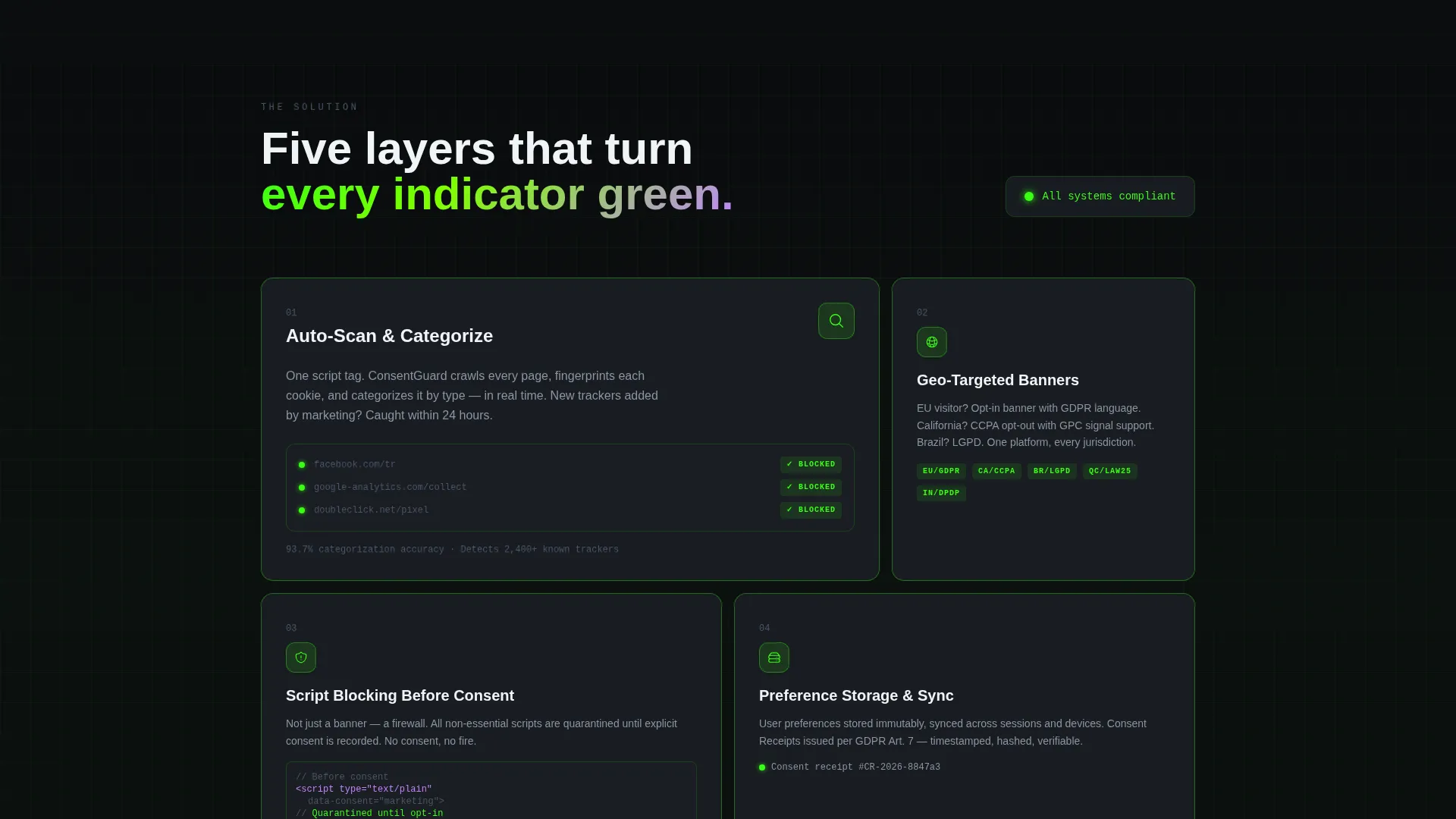
The page opens with a simulated browser inspector showing unconsented trackers firing, with numbers climbing like a damage counter. Each subsequent section peels back a new layer of the solution. Auto-scanning, geo-targeted banners, preference storage, and proof-of-consent records are revealed in sequence.
Dual Call-to-Action System
The primary call to action, "Scan My Site Free," uses a single domain URL input field. It appears in the header and repeats as a sticky bottom bar after the second scroll reveal. Entering a domain triggers an instant mini-audit teaser showing cookie count and compliance score.
Enterprise Lead Capture Path
A secondary conversion path targets enterprise visitors. A short form asks for company size and primary regulation, then routes them to "Talk to a DPO Specialist." This keeps the high-intent enterprise segment separate from self-serve users without cluttering the main flow.
Audit Log Timeline Section
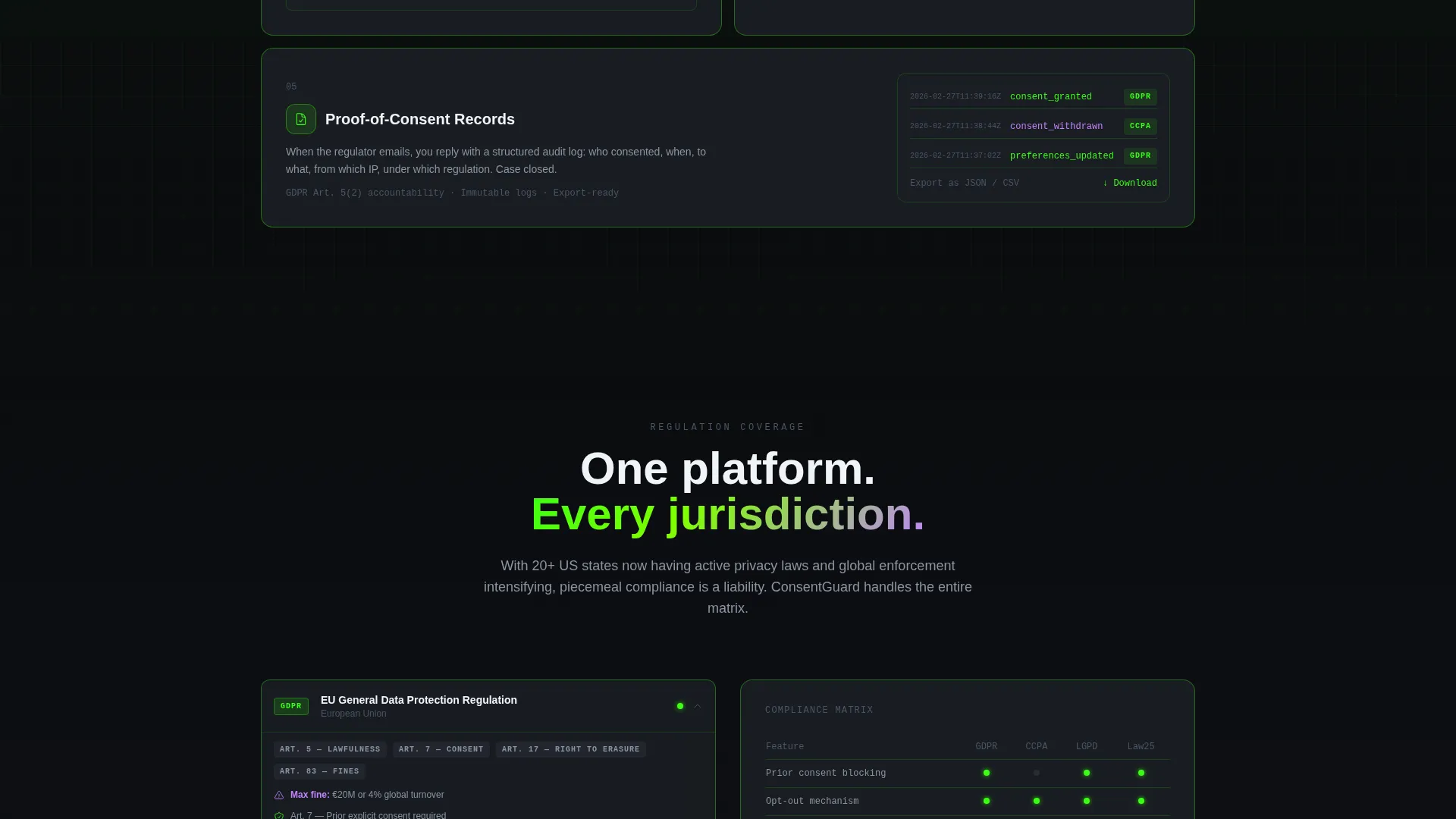
A dedicated section presents an audit log timeline as a visual proof point. Regulation badges for GDPR, CCPA, and ePrivacy snap into the timeline, referencing real regulation article numbers, real fine amounts, and real implementation timelines to earn trust through specificity.
Tech Glass Visual System
The template uses layered backgrounds: a pure black base, semi-transparent glass-panel cards at 85% opacity, and phosphor green (#39FF14) tracing user interface element edges like circuit paths. Electric lilac (#C084FC) activates on hover states and toggle interactions, keeping the interface alive without visual clutter.
Page sections overview
| Section | Purpose |
|---|---|
| Feature Tab Header | Introduces Scan, Customize, and Comply tabs with live-user interface previews |
| Hero Headline | States the core problem with a specific, attention-grabbing cookie count |
| Tracker Simulation | Shows unconsented trackers firing on load as a live damage counter |
| Auto-Scan Reveal | Demonstrates real-time cookie categorization and tracker flagging |
| Geo-Banner Builder | Displays drag-and-drop consent category customization |
| Preference Storage | Explains how user consent choices are saved and respected |
| Audit Log Timeline | Presents proof-of-consent records with regulation badges |
| Domain Scan call to action | Primary lead capture with a single domain URL input field |
| Enterprise Form | Secondary path for company-size and regulation intake |
| Sticky Bottom Bar | Persistent domain scan input appearing after second scroll reveal |
Design & branding system
The visual identity follows a Tech Glass theme built on an Acid Digital color system. The palette is designed to feel like a terminal window floating inside frosted glass: dark enough to signal developer credibility, bright enough that every accent line commands attention.
- Core colors are void black (#0B0D0F), phosphor green (#39FF14), glass-panel translucent gray (#1A1D23 at 85% opacity), and electric lilac (#C084FC) reserved for hover and active toggle states
- Backgrounds are layered with a pure black base, semi-transparent glass cards sitting above it, and phosphor green tracing the edges of user interface elements like circuit paths
- The overall feel is a breaker-switch moment: one clean click and every indicator light turns green
Mobile & speed optimization
The scroll-reveal structure is designed to deliver each section at the right moment, keeping mobile users engaged without overwhelming them with content on first load.
- Sections reveal progressively as the user scrolls, reducing initial visual load on smaller screens
- The sticky bottom bar with the domain scan input remains accessible throughout the scroll journey on any viewport
- Glass-panel cards and layered backgrounds are structured to maintain visual hierarchy on narrow screens
How this template helps you convert
The page is engineered around a single insight: once a visitor sees their own cookie count, they need the fix. Every structural decision flows from that principle.
- The mini-audit teaser triggered by the "Scan My Site Free" input creates a personalized compliance moment, turning passive browsers into motivated leads before any sales conversation starts.
- The sticky bottom bar keeps the primary call to action visible throughout the entire page, so a visitor who scrolls past the header is never more than one click away from scanning their domain.
- The enterprise form provides a low-friction secondary path that captures high-value leads without disrupting the self-serve flow for smaller teams.
Other information about this template
This template is built specifically for cookie consent manager products competing in the developer tools and micro-SaaS space. It is structured to support teams that need a fast, credible launch page without building from scratch.
- The creative direction follows a strict Problem-to-Solution arc, which is well suited to compliance tools where urgency and proof both matter
- The template style is Scroll Reveal (Progressive), meaning sections animate into view as the user moves down the page
- The header concept is a Feature Tab Switcher, a pattern that works well for products with distinct workflow stages like scanning, customizing, and achieving compliance
- The lp direction is Lead Generation, so every section decision prioritizes capturing a domain URL or qualifying an enterprise visitor above other goals
Theme
Tech Glass
Creative direction
Problem→Solution Arc
Color system
Acid Digital
Style
Scroll Reveal (Progressive)
Direction
Lead Generation
Page Sections
Feature Tab Switcher Header
Scroll Reveal Progressive Layout
Dual Call-to-action System
Enterprise Lead Capture Form
Audit Log Timeline Section
Tech Glass Visual System
Related questions
Who is this template designed for?
What makes the scroll-reveal layout effective for compliance tools?
Can the template support two different types of leads?
What regulations does the audit log section reference?
How does the sticky bottom bar work?



