Expert Consulting Firm Software Professional Website Template
Consult is a dashboard-style landing page template built for consulting firm email marketing platforms. It pairs a Data Command visual theme with a Spec Sheet scroll structure, putting live campaign metrics, segmentation logic, and sequence flowcharts front and center. The result is a high-credibility, click-through-optimized page that earns trust before it asks for anything.
by Rocket studio
Quick summary
Consult is a single-page, data-forward landing page template designed for consulting firm email marketing platforms. It opens on a full-width dashboard preview loaded with real campaign metrics and closes with a glowing cyan call-to-action. Every scroll section reads like a product specification, rewarding analytical visitors with escalating proof before the click.
Who this template is for
This template is built for teams who need to win over analytically minded buyers. It speaks directly to people who evaluate tools by their depth, not their branding.
- Managing directors at mid-market strategy firms who need pipeline attribution evidence
- Business development leads at boutique advisory shops currently running campaigns from spreadsheets
- Marketing coordinators at large advisory subsidiaries who must prove campaign impact to senior partners
What problem this template solves
Consulting firms lose pipeline opportunities when follow-up emails land in spam folders or get sent at the wrong stage of the buying cycle. Generic marketing pages fail to convince detail-oriented buyers who want proof, not promises.
- No live product preview means visitors leave before they trust the offer
- Scattered campaign management makes it hard to demonstrate system depth to skeptical stakeholders
- A missing attribution story leaves marketing coordinators unable to justify spend to partners who only believe numbers
What you get with this template
You get a fully structured, dashboard-style landing page that presents the platform as a live command center. Every section is built to show the product working, not just describe it.
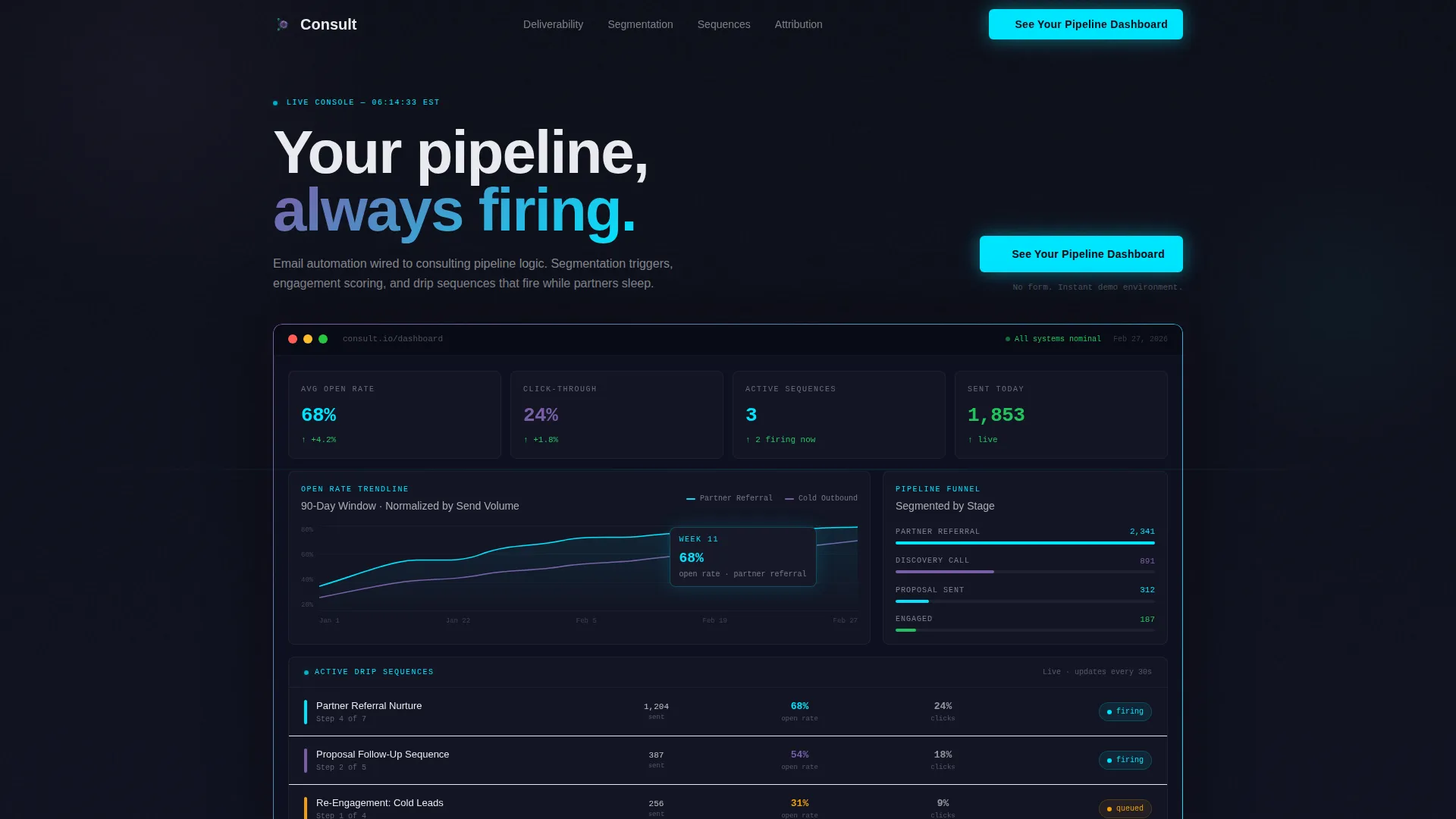
- A full-width header console showing open rate trendlines, a segmented pipeline funnel, active drip sequences, and an industry engagement heatmap
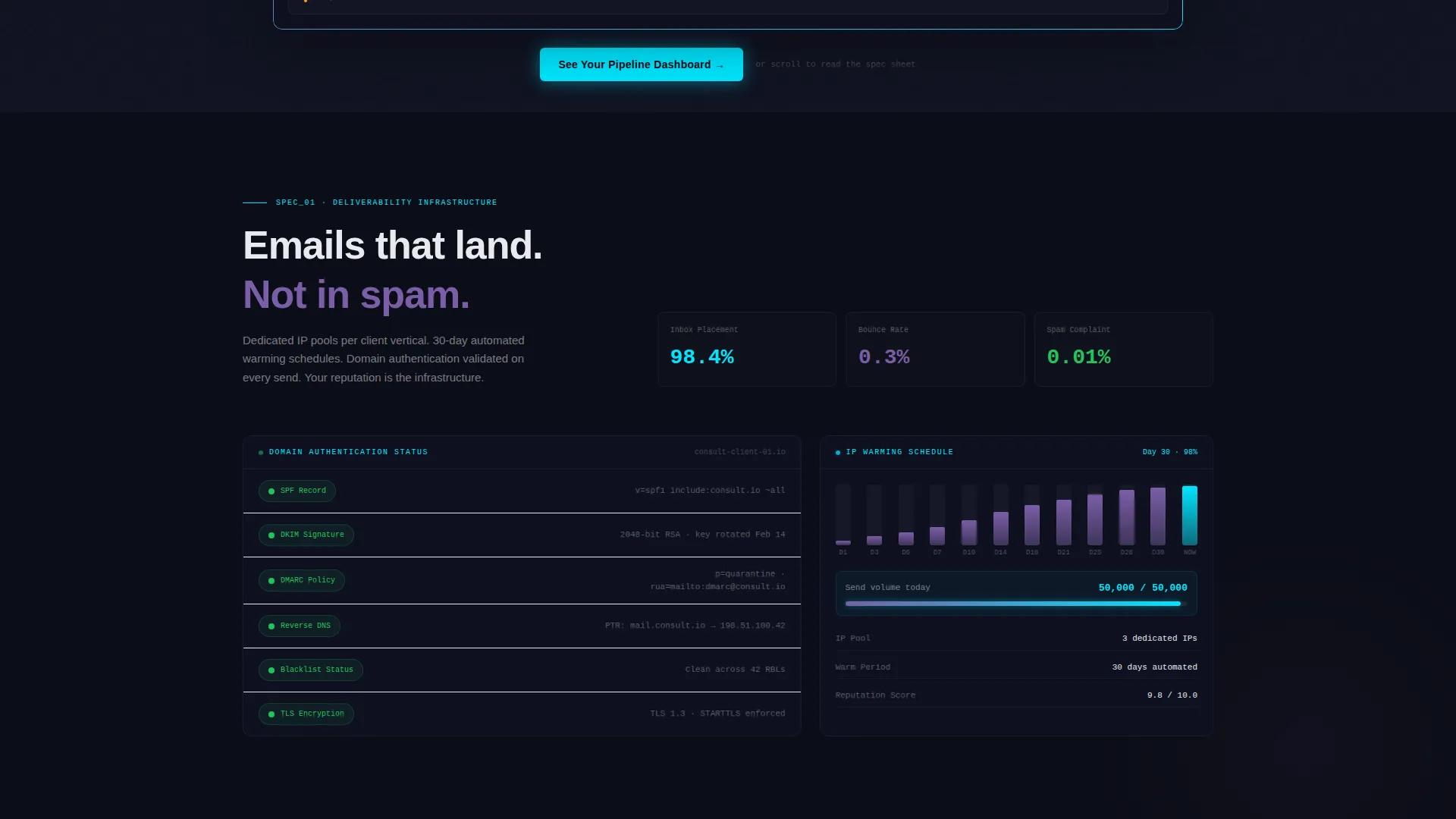
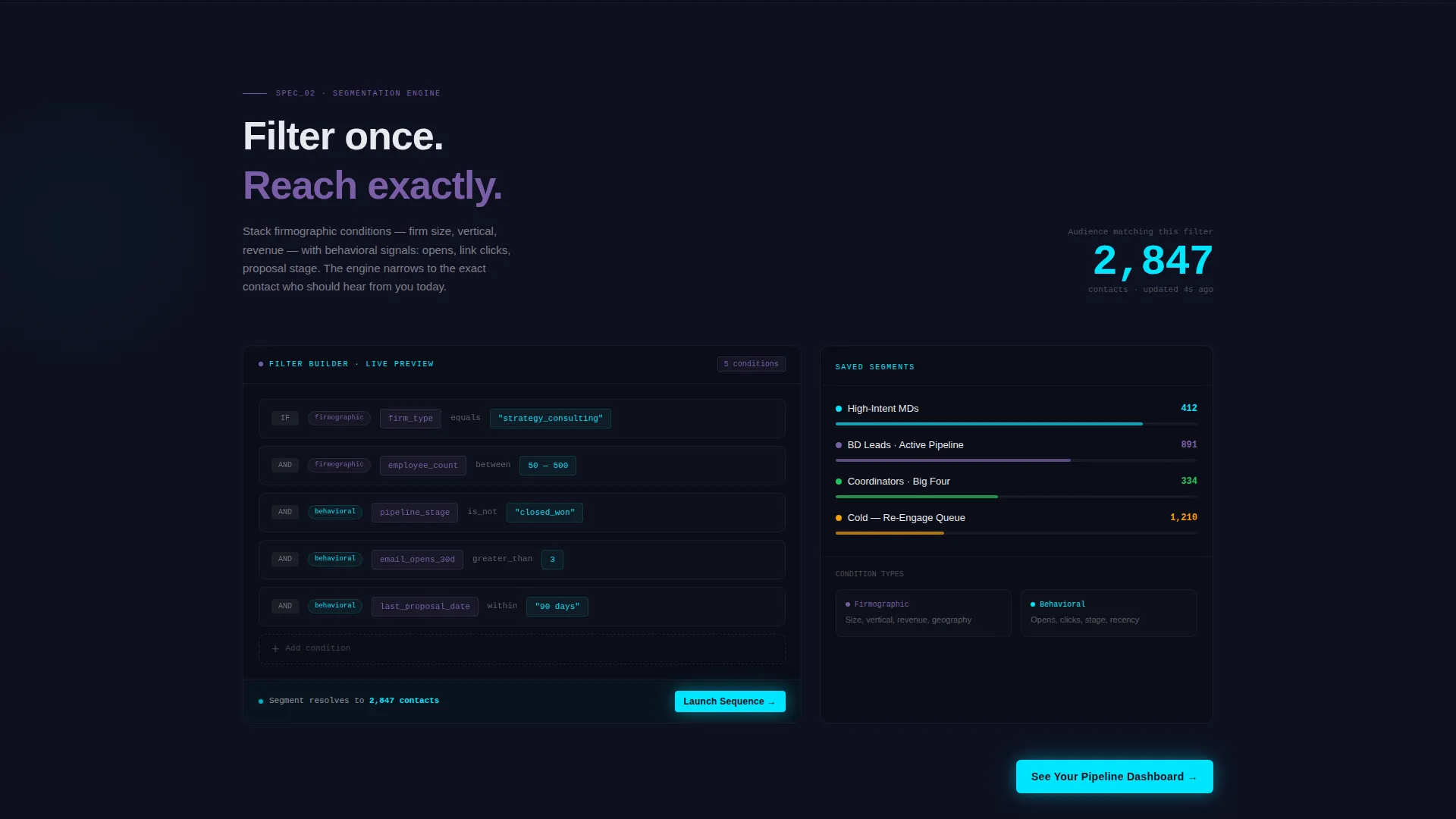
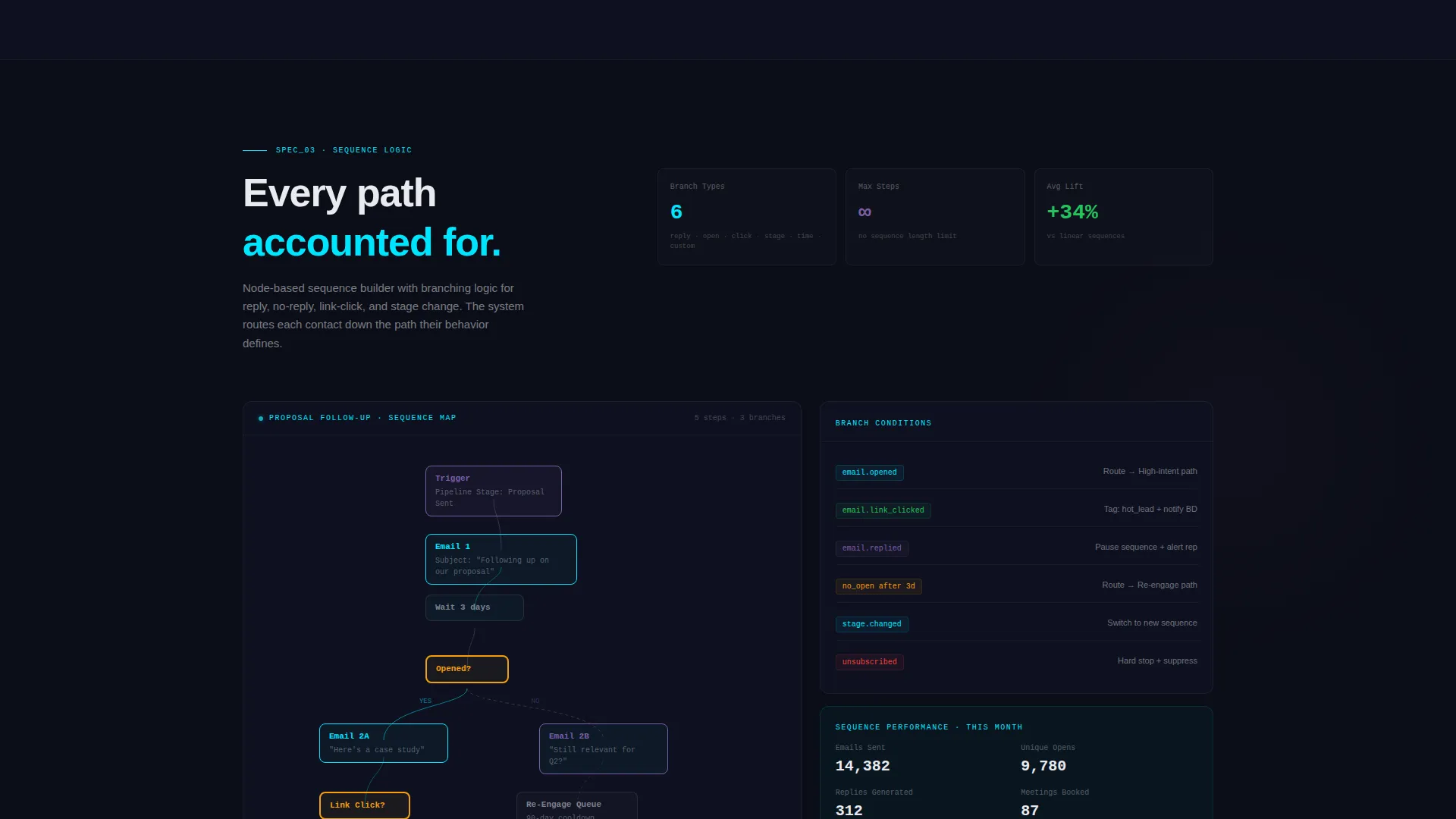
- Three Spec Sheet scroll sections isolating deliverability infrastructure, segmentation engine, and sequence logic as technical specifications
- A click-through conversion system with a primary call-to-action embedded in the header and repeated after every second spec section, plus a secondary inline capture field styled as a terminal command line
Feature list
This template delivers six tightly scoped capabilities drawn directly from the platform's brief. Each one is rendered as a visible, legible component inside the page layout.
Full-Width Dashboard Header
The header renders a pixel-perfect console showing a consulting firm's live campaign ecosystem. It includes open rate trendlines across a 90-day window, a four-stage pipeline funnel, three active drip sequences with ticking send counts, and an industry engagement heatmap. A tooltip mid-hover reveals a 68% open rate, making the product feel alive before the visitor reads a single word of copy.
Segmented Pipeline Funnel Display
The funnel component labels four buying-cycle stages: Partner Referral, Discovery Call, Proposal Sent, and Engaged. This gives visitors an immediate visual model of how the platform maps email activity to real consulting pipeline milestones, which is the exact language managing directors and business development leads already use internally.
Spec Sheet Scroll Sections
Each scroll section isolates one platform capability and presents it as a technical specification. The deliverability section shows IP warming schedules and domain authentication status lights. The segmentation section displays a live filter builder stacking firmographic and behavioral conditions. The sequence section renders branching logic as a node-based flowchart with paths for reply, no-reply, and link-click events.
Dual Call-to-Action Architecture
The primary call-to-action, labeled "See Your Pipeline Dashboard," appears first inside the header preview as a glowing cyan button and then repeats anchored to the grid's right column after every second spec section. No form is required on this page. The click routes visitors to a personalized demo environment, lowering friction for high-intent buyers.
Terminal-Style Secondary Capture
Visitors who are not ready to click through can request a Deliverability Audit via a single-field inline input styled as a terminal command line. This secondary path captures email addresses without interrupting the data-forward experience or breaking the page's command-center aesthetic.
AI Iridescent Color System
The visual identity uses four defined values: void black (#0B0D17) for backgrounds, holographic violet (#7B5EA7) for strategy metrics, signal cyan (#00E5FF) for live activity and interactive states, and phosphor white (#E8EAED) for typography. Cards and grid cells lift with faint violet-to-cyan gradient borders. Interactive elements pulse cyan on hover, making the interface feel responsive to the visitor's attention.
Page sections overview
| Section | Purpose |
|---|---|
| Dashboard Header Console | Renders live campaign metrics and embeds the primary call-to-action |
| Pipeline Funnel Display | Visualizes four buying-cycle stages from referral to engagement |
| Deliverability Spec Section | Shows IP warming schedules and domain authentication status lights |
| Segmentation Engine Section | Displays a live filter builder with firmographic and behavioral conditions |
| Sequence Logic Section | Presents branching sequence paths as a node-based flowchart |
| Repeated call to action Column | Anchors the primary call-to-action after every second spec section |
| Terminal Capture Field | Offers the Deliverability Audit via a single-field inline input |
Design & branding system
The template follows a Data Command theme that makes the interface feel like a live operational console rather than a marketing page. Every color decision serves a functional signal: violet marks strategy context, cyan marks live activity.
- Void black (#0B0D17) backgrounds keep all data elements visually dominant and reduce eye fatigue during analytical review
- Holographic violet (#7B5EA7) and signal cyan (#00E5FF) create gradient borders on cards and grid cells, giving the layout depth without decorative clutter
- Phosphor white (#E8EAED) body text floats above dark surfaces like projected data, and cyan hover states make every interactive element feel like a system responding in real time
Mobile & speed optimization
The template is designed so that its data-dense layout remains legible and navigable across screen sizes. The grid structure adapts to smaller viewports without losing the command-center aesthetic.
- Dashboard components and spec sections are structured for responsive reflow, keeping metric cards and funnel labels readable on tablet and mobile screens
- The single-page, section-led scroll structure avoids unnecessary page-load complexity, keeping the experience focused and the path to conversion short
- Inline call to action placement at multiple scroll depths means mobile visitors encounter the call-to-action without needing to reach the page footer
How this template helps you convert
The page is engineered to remove doubt before it removes friction. By the time a visitor reaches the first repeated call-to-action, they have already spent time inside a working product preview.
- The header dashboard immerses visitors in live-looking campaign data immediately, establishing platform credibility in the first few seconds without requiring them to read a single marketing claim
- The Spec Sheet scroll cadence builds layered proof across three capability sections, matching the way analytically minded buyers evaluate software by asking increasingly detailed questions as they scroll
- The dual call-to-action architecture captures both high-intent visitors ready to see a demo and research-stage visitors willing to share an email for the Deliverability Audit, covering two distinct buyer moments in one page
Other information about this template
This template is part of a broader family of technology-category templates designed for niche software platforms. It fits naturally within the consulting firm software segment and is purpose-built for the consulting firm email marketing use case.
- The template style is classified as Dashboard and Data Grid, making it well suited for platforms where data visualization is a core product differentiator
- The creative direction follows a Spec Sheet cadence, which is distinct from narrative or story-led landing page formats and is specifically effective for technical and analytical audiences
- The intersection match between the Data Command theme, AI Iridescent color system, and click-through landing page direction was scored at 13, indicating a strong alignment between the visual system and the conversion goal
Theme
Data Command
Creative direction
Spec Sheet
Color system
AI Iridescent
Style
Dashboard/Data Grid
Direction
Click-Through
Page Sections
Full-width Dashboard Header Console
Spec Sheet Scroll Architecture
Dual Call-to-action Placement
Terminal-style Email Capture Field
Node-based Sequence Flowchart
AI Iridescent Visual Identity
Related questions
Who is this template designed for?
Does this template include a contact form?
What sections are included in this template?
Can the color system be adjusted for a different brand?
Is this a single-page layout or a multi-page template?



