Consulting Digital Presence Appointment Booking Website Template
Consult is a scroll-reveal landing page template built for consulting booking and scheduling sites. It opens with a live consultant-matching tool above the fold, then progressively reveals social proof, spotlight profiles, and a three-step session timeline. The result is a polished, directory-style page that earns trust through utility and pushes visitors toward booking a session.
by Rocket studio
Quick summary
Consult is a single-page, scroll-reveal template designed for consulting booking and scheduling platforms. It leads with a functional specialty-matching tool, then unfolds trust signals, consultant profiles, and session guidance section by section. Every scroll feels intentional, building confidence until the visitor is ready to browse, book, and meet.
Who this template is for
This template is built for platforms and independent operators who connect clients with professional consultants. It suits anyone running a consulting booking or scheduling site where trust and speed both matter.
- Platforms matching clients with fractional executives, legal advisors, or leadership coaches
- Founders and operators building a consulting directory with live availability and session reviews
- HR leads and team managers sourcing vetted consultants for structured professional engagements
What problem this template solves
Most consulting site designs bury the actual service behind introductory copy and generic hero images. By the time a visitor finds a consultant profile, they have already lost interest. This template removes that friction entirely.
- Visitors land directly inside a working specialty-matching tool, not a marketing headline
- Social proof, verified ratings, and live availability appear before any call to action
- The progressive scroll structure guides visitors from discovery to booking intent without dead ends
What you get with this template
You get a complete, scroll-reveal landing page layout built around a consultant-matching interaction. Every section is designed to earn trust before asking for a click.
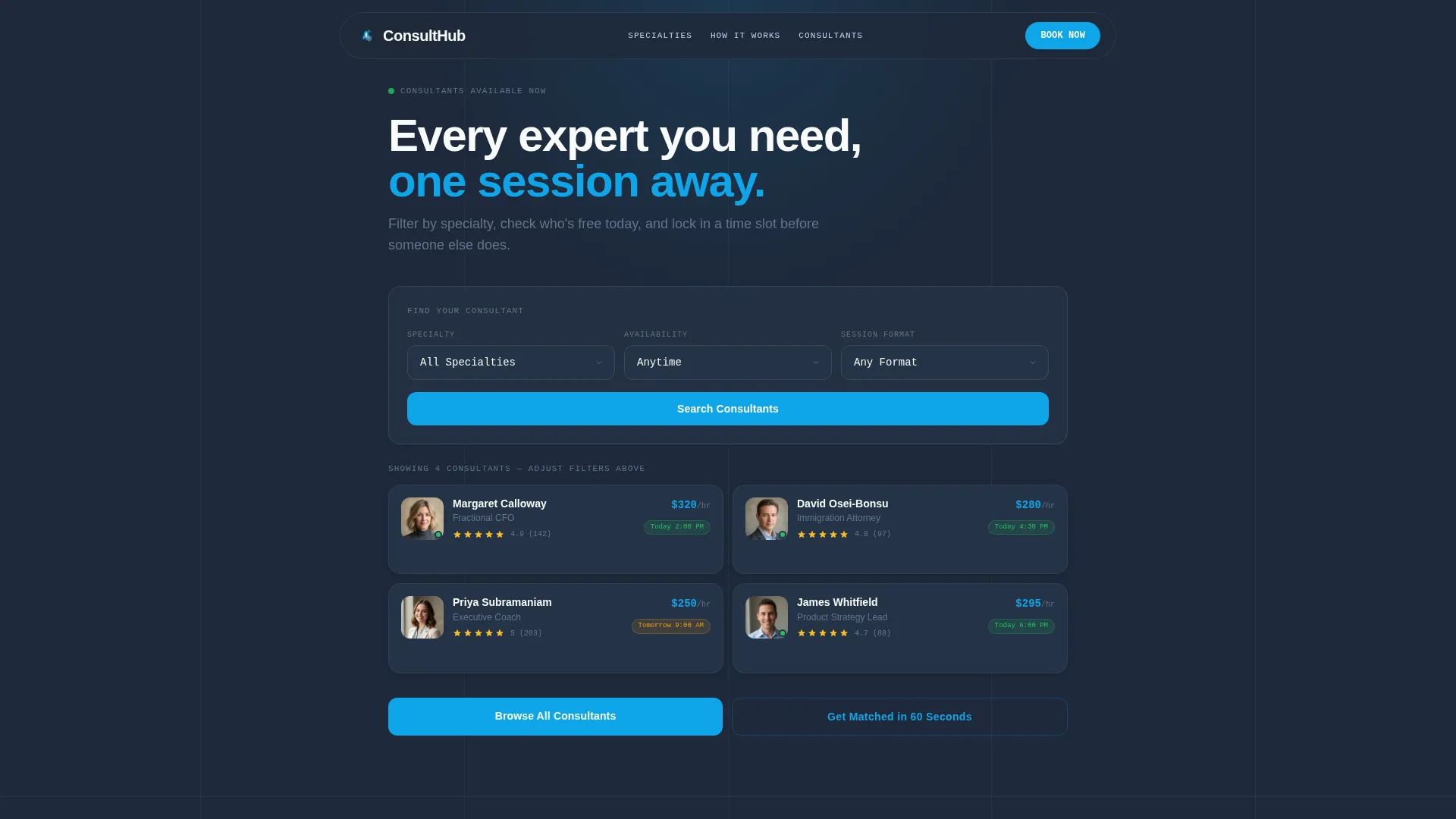
- An above-the-fold interactive matcher with specialty, availability, and session format fields
- Animated consultant profile tiles with headshots, star ratings, hourly rates, and next-available timestamps
- A sticky mobile call-to-action bar, a three-step session timeline, and a live sessions counter
Feature list
This template packages several purpose-built components into one cohesive consulting booking layout.
Above-the-Fold Matching Tool
A three-field row sits at the very top of the page. Visitors select a specialty from a dropdown, choose an availability window, and pick a session format. The tool does not require a scroll or a sign-in to start filtering.
Skeleton-Loader Profile Cards
The moment a visitor interacts with the matching tool, skeleton-loader cards animate into view below. They resolve into full consultant tiles showing a headshot, star rating, hourly rate, and a green "Next Available" timestamp. The animation signals that real results are loading, not static content.
Consultant Spotlight Section
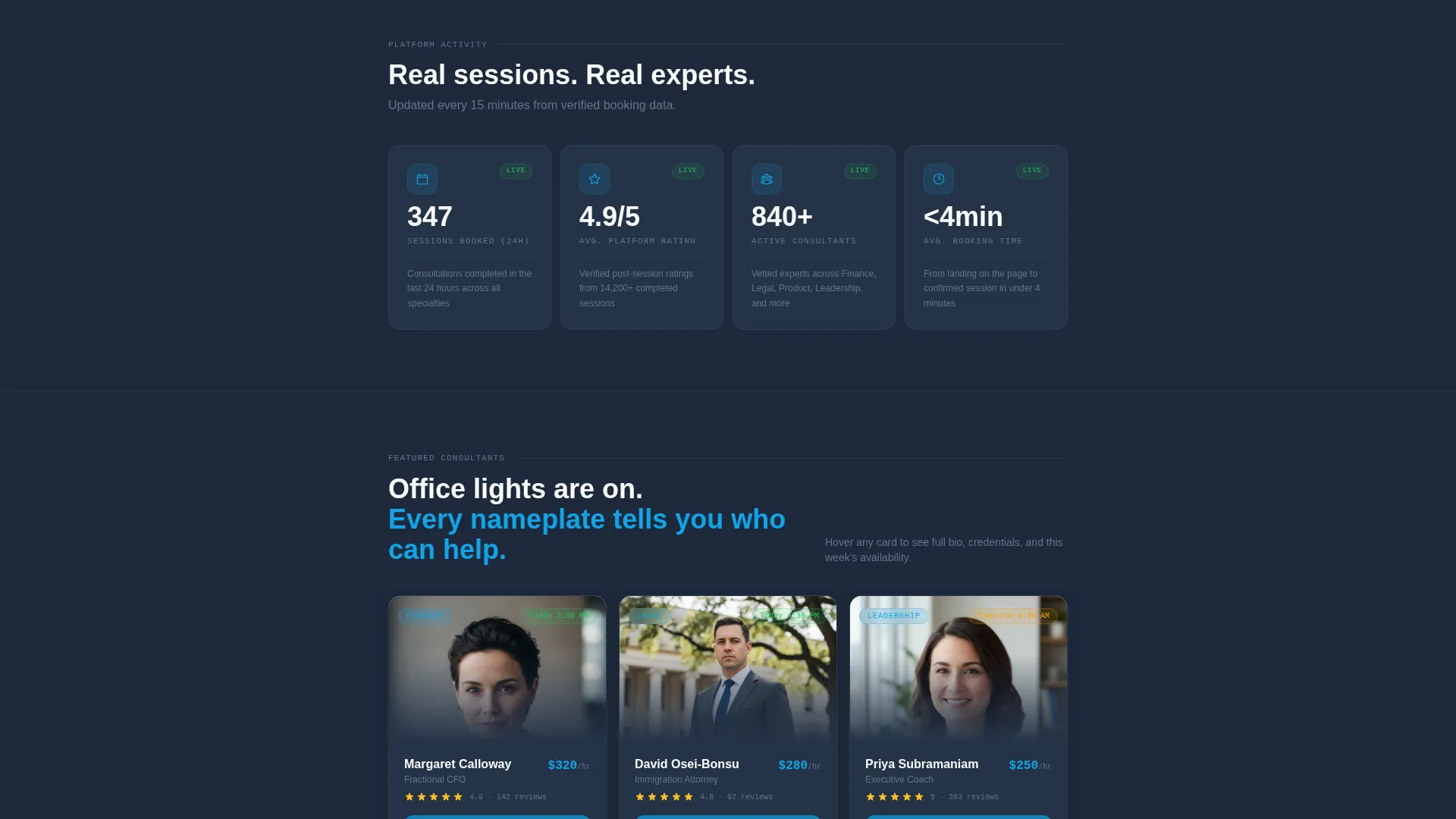
Three expanded consultant cards sit below the live counter. Each card opens on hover to reveal a bio, credentials, and a mini-calendar heat map showing availability density. This section turns browsing into genuine discovery.
Live Sessions Counter
A prominent counter displays the number of sessions booked in the last 24 hours alongside the average rating across all consultants. It serves as persistent, passive social proof without requiring the visitor to read a testimonial block.
Three-Step Session Timeline
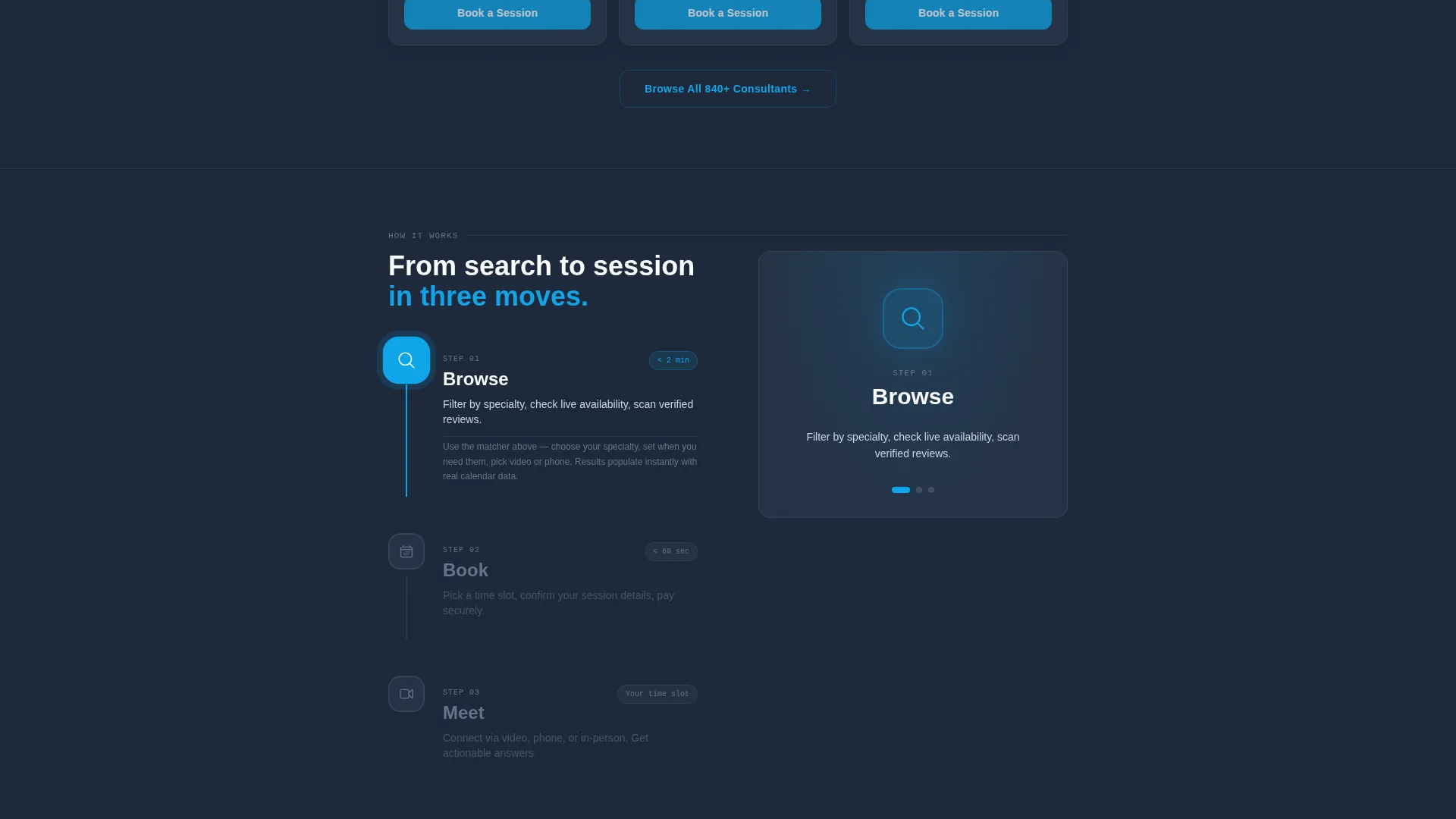
A "Browse, Book, Meet" timeline animates step by step as it enters the viewport. Each step appears only when the visitor scrolls to it, pacing the trust-building narrative and reducing decision anxiety.
Sticky Mobile Call-to-Action Bar
On mobile viewports, a bottom bar stays pinned to the screen at all times. It carries the primary "Browse All Consultants" action in sky blue on slate, ensuring the path to the full directory is never out of reach.
Page sections overview
| Section | Purpose |
|---|---|
| Interactive Matching Tool | Filter consultants by specialty, availability, and session format above the fold |
| Animated Profile Tiles | Display consultant headshots, ratings, rates, and next-available times after filtering |
| Live Sessions Counter | Show real-time booking activity and average rating as passive social proof |
| Consultant Spotlight Cards | Expand on hover to reveal bios, credentials, and availability heat maps |
| How a Session Works | Animate a three-step Browse, Book, Meet timeline as it enters the viewport |
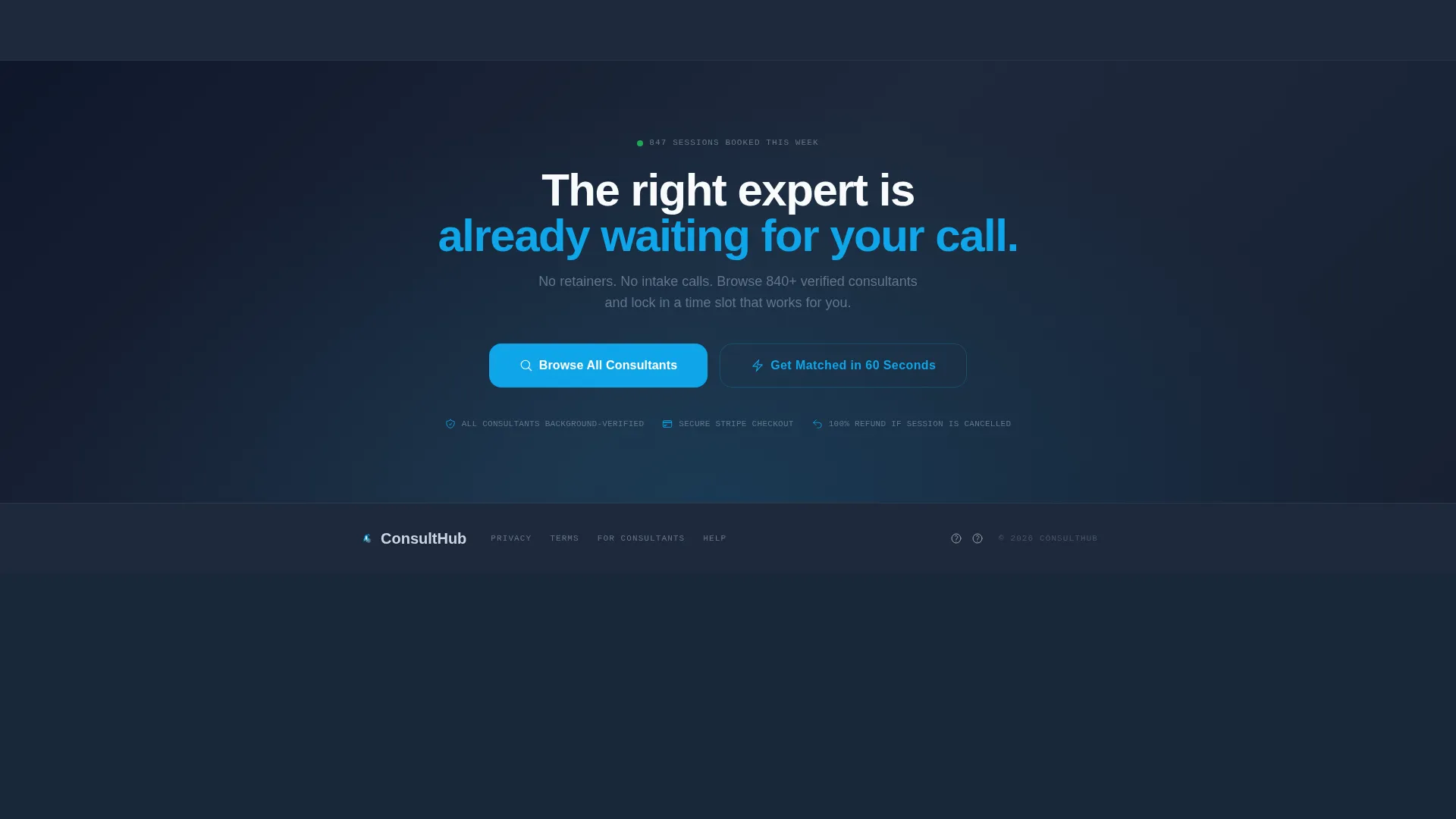
| Primary Call to Action | Reinforce "Browse All Consultants" after matcher results with a sky blue button |
| Secondary Matched Path | Offer a "Get Matched in 60 Seconds" quiz link as an alternative entry point |
| Sticky Mobile Bar | Pin the primary call to action to the bottom of the screen on mobile |
Design & branding system
The visual identity follows a Directory and Discovery theme using the Slate and Sky color system. The palette feels like a polished departures board: authoritative dark panels, crisp white type, and a single electric blue accent that commands attention without noise.
- Deep charcoal slate (#1E293B) for primary backgrounds, mid-tone graphite (#475569) for card surfaces, and cloud white (#F8FAFC) for all body text and spacing
- Open sky blue (#0EA5E9) reserved exclusively for interactive states, active buttons, and the "Next Available" indicator
- Typography and spacing choices reinforce a clean, directory-style layout where every nameplate and data point is instantly legible
Mobile & speed optimization
The template is structured with mobile visitors in mind. The scroll-reveal behavior and sticky bar adapt to smaller screens so the booking path stays clear at every viewport size.
- Skeleton-loader animations provide immediate visual feedback while profile tiles resolve, keeping the experience feeling responsive
- The sticky bottom bar on mobile ensures the primary call to action is always one tap away, regardless of scroll depth
- Section-by-section progressive reveal keeps the page feeling lightweight and focused rather than overwhelming on a small screen
How this template helps you convert
The Calculator and Tool First creative direction means this template earns conversions through demonstrated utility, not persuasion copy. Visitors interact with the product before they encounter a single call to action.
- The above-the-fold matcher gives visitors an immediate, tangible result, which builds confidence that the platform holds real, relevant consultants for their specific need.
- The live sessions counter and star ratings provide passive social proof that real bookings happen daily, reducing hesitation before the visitor reaches the primary call to action.
- The sticky mobile bar and repeated "Browse All Consultants" button after matcher results create multiple, low-friction entry points into the full consultant directory.
Other information about this template
This template is categorized under Technology with a subcategory focus on Consulting Digital Presence. It is built as a single-page, scroll-reveal layout and is well-suited to consulting booking and scheduling site projects of varying scale.
- The secondary call-to-action path, "Get Matched in 60 Seconds," links to a guided quiz for visitors who prefer a curated recommendation over self-directed browsing
- The Click-Through landing page direction means the template is optimized to move visitors into a full consultant directory, not to complete a transaction on-page
- The Intersection Match Score of 13 reflects a strong alignment between the Directory and Discovery theme, the Calculator and Tool First creative direction, and the consulting booking niche
Theme
Directory & Discovery
Creative direction
Calculator/Tool First
Color system
Slate & Sky
Style
Scroll Reveal (Progressive)
Direction
Click-Through
Page Sections
Above-the-fold Matching Tool
Skeleton-loader Animated Profile Tiles
Live Sessions Counter
Consultant Spotlight Cards
Animated Three-step Session Timeline
Sticky Mobile Call-to-action Bar
Related questions
What kind of consulting platform is this template designed for?
Does the template include consultant profile data or is that placeholder content?
Can the matching tool fields be customized for different consulting specialties?
Is this template suitable for a single consultant rather than a directory?
Where does the primary call to action point?



