Consulting Firm Software Booking Website Template
Slate is a consulting firm appointment scheduling landing page template built around an interactive dashboard preview and a sticky three-tier comparison table. Designed for operations managers, boutique partners, and executive assistants, it drives freemium and trial signups through a live calendar demo, scroll-animated feature rows, and inline demo booking, all in a sharp Monochrome Steel visual system.
by Rocket studio
Quick summary
Slate is a single-page template for a consulting-focused scheduling platform. It opens with a live micro-dashboard the visitor can actually click, then walks them through a sticky three-tier feature matrix that makes the value of upgrading obvious row by row. The design is precise and restrained, built to earn trust from operations-minded buyers fast.
Who this template is for
This template is built for B2B software teams selling scheduling tools specifically to consulting firms. The audiences it speaks to are high-stakes and time-sensitive, so every section is structured to match how they evaluate software.
- Operations managers at large consulting firms who manage multiple consultant calendars at once
- Boutique strategy partners who self-book discovery calls and need a fast, credible way to demo their tool
- Executive assistants and IT or procurement leads evaluating an enterprise scheduling tier
What problem this template solves
Scheduling platforms selling into consulting lose buyers when their landing pages look generic. A partner's idle time has a real dollar cost per hour, and buyers at this level will not wait for a slow or cluttered page to make the case.
- Visitors do not connect with abstract feature lists when they need proof the tool handles real consulting complexity
- Generic freemium signup pages fail to show the difference between tiers clearly enough to drive upgrades
- Enterprise prospects need a way to experience the product before booking a sales call, not after
What you get with this template
This template gives you a complete, conversion-focused landing page with every section already structured and wired for interactivity. You are not starting from a blank canvas or assembling disconnected blocks.
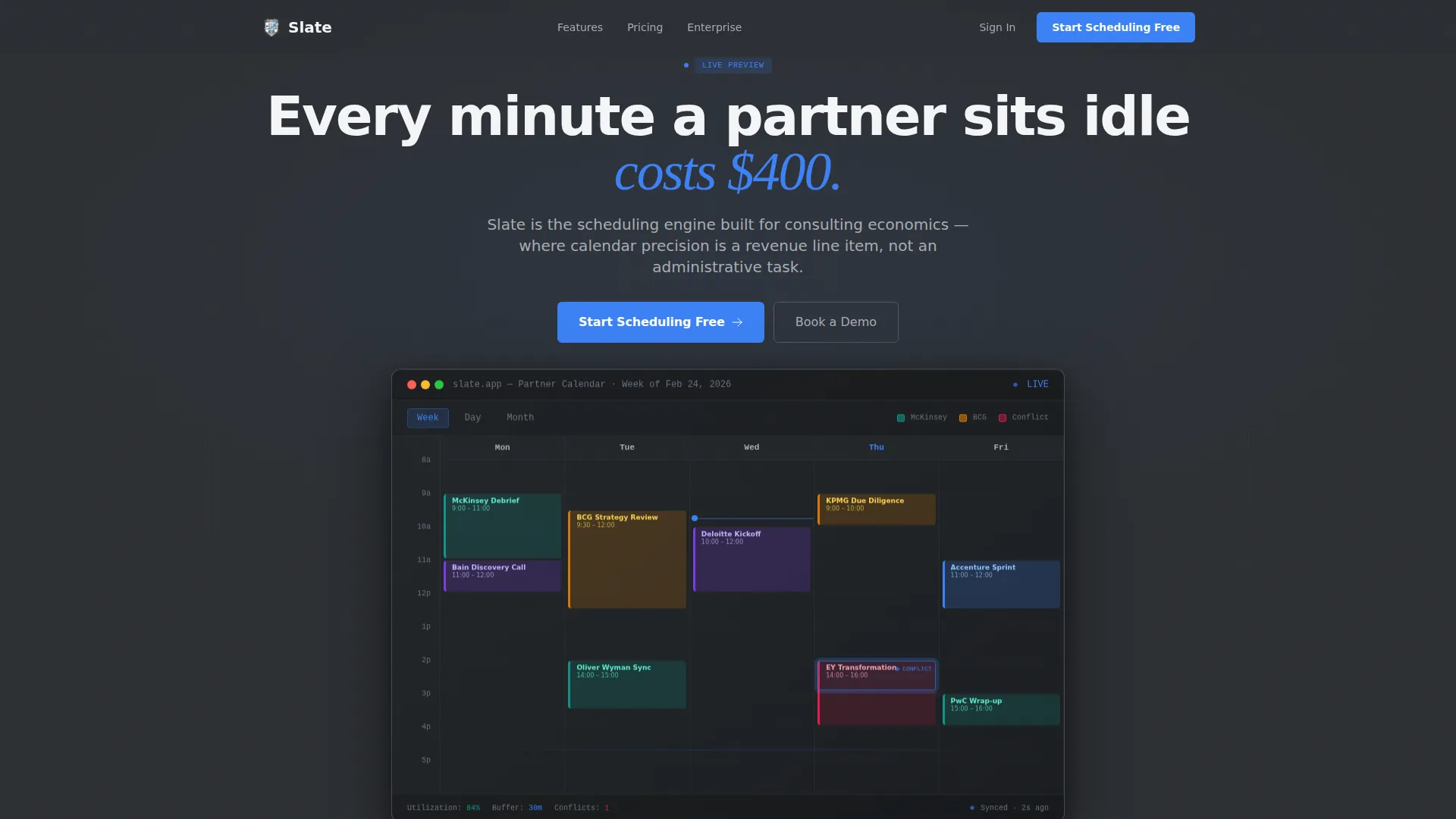
- A hero section with a functioning micro-dashboard preview, including a clickable calendar, conflict pulse animation, and booking confirmation slide
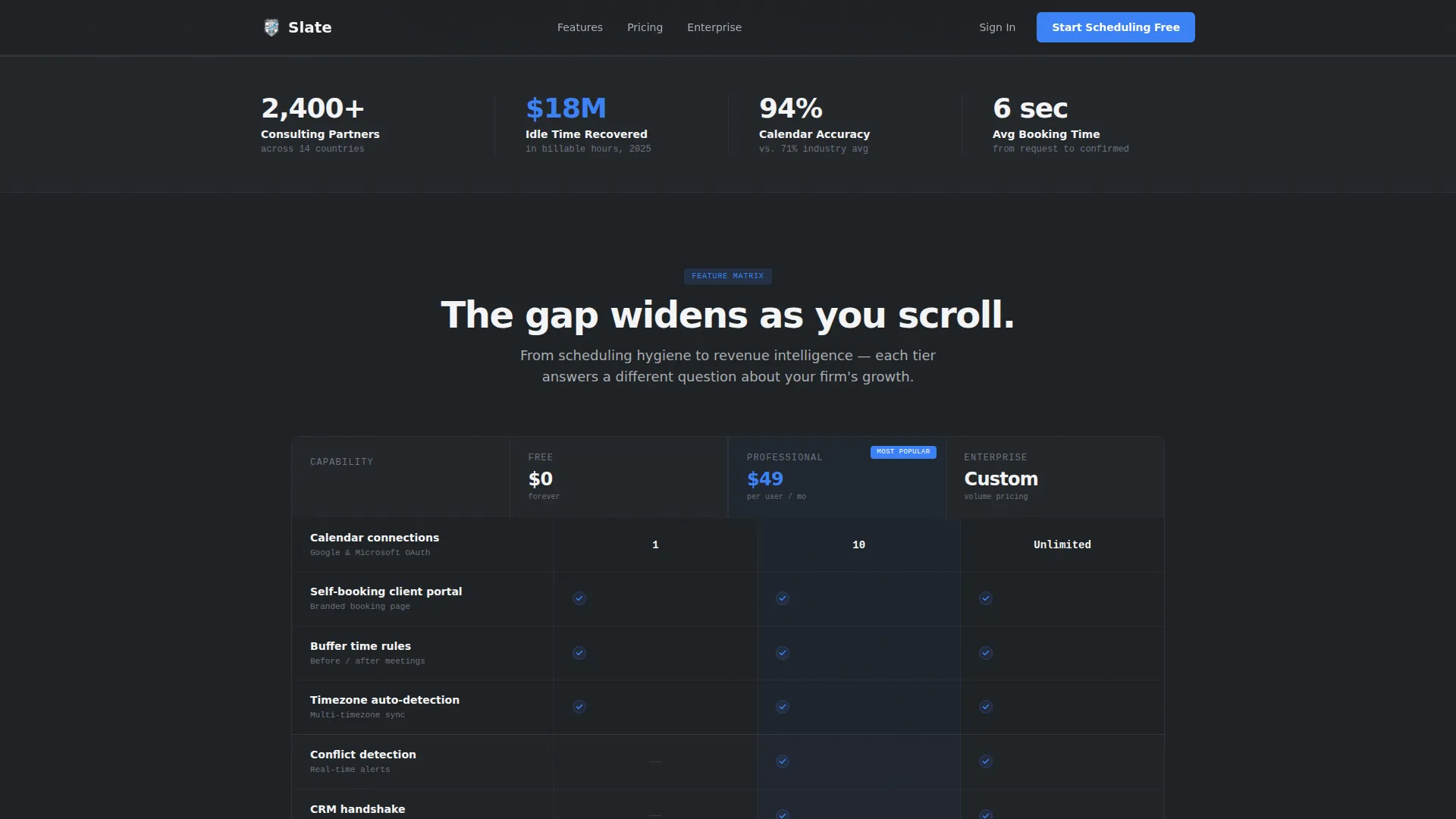
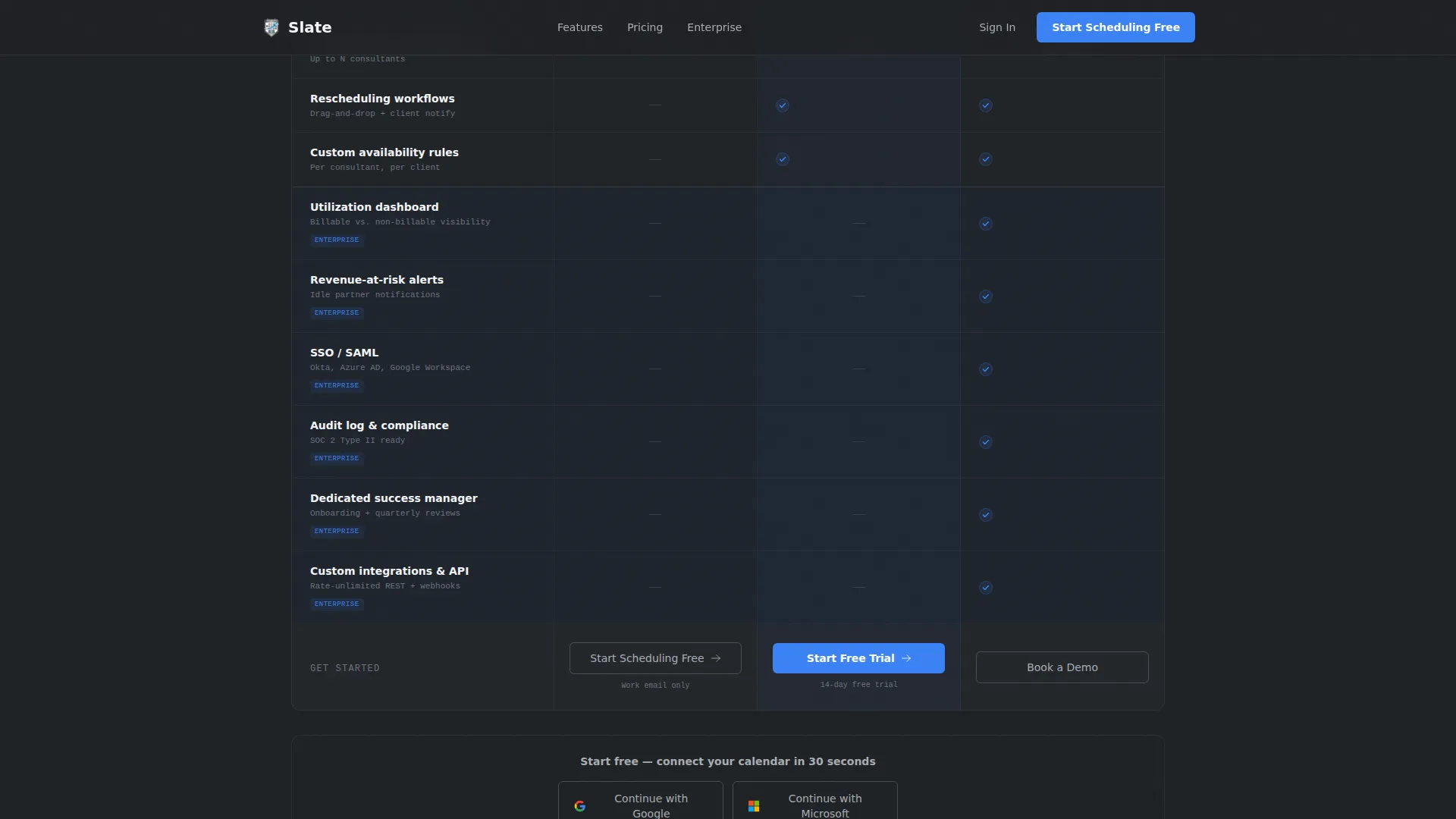
- A sticky three-column comparison table covering Free, Professional, and Enterprise tiers with scroll-animated capability rows
- An inline demo booking widget in the Enterprise column so prospects book a call using the product itself
Feature list
This template is built around four tightly scoped capabilities that work together to move a consulting buyer from first impression to signed-up.
Live Interactive Dashboard Preview
The header renders a 70%-scale micro-version of the scheduling dashboard floating over the gunmetal background. Visitors can click time slots and watch a booking confirmation animate in real time. The calendar shows a realistic week view: color-coded client blocks, a drag-trail rescheduling interaction, and a conflict flag pulsing in signal-blue on a specific day and time.
Sticky Three-Tier Comparison Table
A feature matrix locks to the top of the viewport as the visitor scrolls. Rows animate into view one by one, moving from basic scheduling hygiene at the top to advanced analytics at the bottom. Checkmarks appear in signal-blue for available features; unavailable features are rendered in ghosted steel, making the gap between tiers visually clear without a word of copy.
Freemium Signup and OAuth Entry Flow
The primary call to action reads "Start Scheduling Free" and stays pinned to the top-right from the first scroll. It reappears at the footer of each tier column in the comparison table. The free tier entry requires only a work email and a calendar connection via Google or Microsoft OAuth, with no password creation step required.
Inline Enterprise Demo Widget
The Enterprise column includes a secondary conversion path labeled "Book a Demo With Our Team." This opens the product's own scheduling widget inline, so the prospect books the discovery call by using the exact tool they are evaluating. No redirect, no separate form.
Scroll-Animated Stats Bar
A consulting-specific social proof bar sits between the hero and the comparison table. It surfaces utilization percentages, hours recovered, and firms onboarded as discrete metric tiles, reinforcing trust before the visitor reaches pricing decisions.
Persona-Driven Testimonials
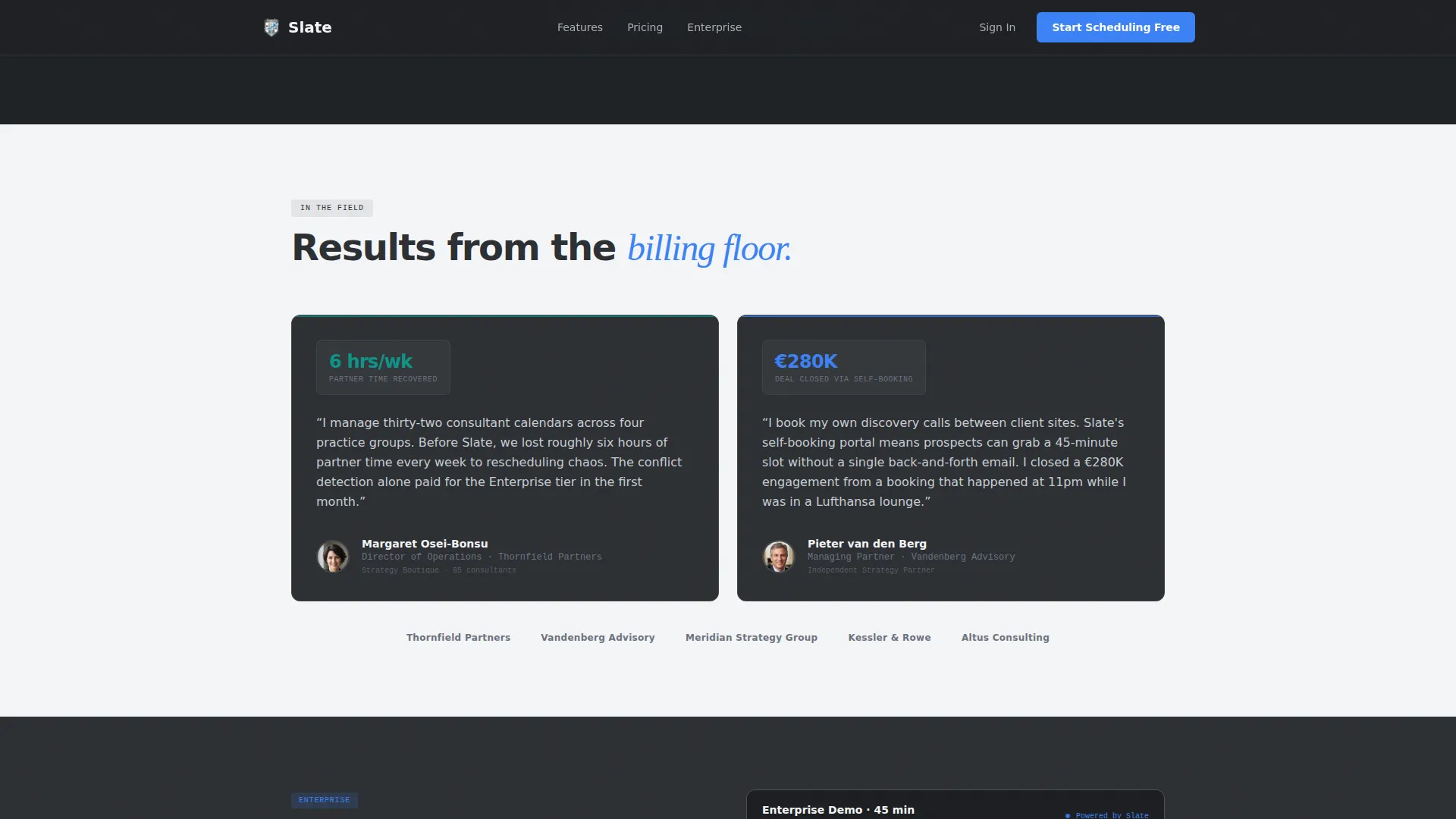
Two testimonial blocks, each tied to a named consulting persona, appear below the comparison table. Each outcome is specific: a metric, a role, and a firm context. This keeps social proof grounded and credible rather than generic.
Page sections overview
| Section | Purpose |
|---|---|
| Hero Dashboard Preview | Lets visitors interact with a live calendar micro-demo before reading a single feature claim |
| Consulting Stats Bar | Delivers social proof through specific utilization and time-recovery metrics |
| Sticky Comparison Table | Escalates tier value row by row with scroll-animated feature rows across three columns |
| Persona Testimonials | Anchors trust with named, outcome-specific quotes from consulting roles |
| Inline Demo Booking | Converts enterprise prospects by letting them book a sales call inside the product widget |
| Linear Footer | Closes the page with a single-row footer keeping the layout clean and uncluttered |
Design & branding system
The visual identity follows a Dashboard Pro theme built on a Monochrome Steel palette. Every color choice is functional: backgrounds alternate to create depth, the accent is reserved for actions only, and typography enforces hierarchy through weight alone.
- Color system: gunmetal base (#2C2F33), brushed aluminum (#A8ADB3), panel white (#F4F5F7), and signal-blue (#3B82F6) used exclusively for interactive states, calls to action, and live-data indicators
- Typography: DM Sans for primary interface copy and Fraunces as a serif accent, creating contrast between functional and expressive moments without competing
- Background alternation between gunmetal and panel white sections creates visual depth without decorative elements
Mobile & speed optimization
The template is designed desktop-first, matching how operations managers and executive assistants actually use scheduling software, on large monitors with multiple windows open. Responsive behavior is included so the layout holds on smaller screens.
- GSAP ScrollTrigger drives the row-by-row table animation and conflict pulse keyframe without blocking the main thread during static section rendering
- Server Components handle all static sections; Client Components are scoped to the interactive dashboard preview and the comparison table to keep rendering efficient
- The sticky table and inline widget are built to respond to viewport changes without layout shifts on tablet or mobile breakpoints
How this template helps you convert
Every structural decision in this template is aimed at reducing the distance between a skeptical visitor and a signed-up user. The page earns trust before it asks for anything.
- The interactive dashboard preview lets visitors use the product in the first few seconds. By the time they reach the call to action, they have already experienced the core scheduling flow, which lowers the perceived risk of signing up.
- The scroll-animated comparison table builds urgency gradually. Each new row widens the visible gap between tiers, so a Professional or Enterprise buyer feels the cost of staying on Free without being told directly.
- The inline demo widget inside the Enterprise column removes the friction of a separate sales form. Booking the demo IS the product demo, which shortens the enterprise evaluation cycle and makes the call to action feel natural rather than pushy.
Other information about this template
This template is categorized under Technology and Consulting Firm Software, targeting the consulting firm appointment scheduling niche. It is a single-page landing page structure, not a multi-page website.
- Template style: Comparison Table layout with a Feature Matrix creative direction
- Header concept: Interactive Preview using a floating, animated scheduling dashboard
- Conversion direction: Freemium and trial signup with a secondary enterprise demo path
- Animation library: GSAP ScrollTrigger for scroll-based row reveals, a conflict pulse keyframe, and a booking confirmation slide
- Localization: English language, USD pricing references, United States date format
- Build approach: React Server Components for static sections, React Client Components for the dashboard preview and interactive table
Theme
Dashboard Pro
Creative direction
Feature Matrix
Color system
Monochrome Steel
Style
Comparison Table
Direction
Freemium/Trial
Page Sections
Live Interactive Dashboard Preview
Sticky Three-tier Comparison Table
Freemium Signup with Oauth Entry
Inline Enterprise Demo Widget
Scroll-animated Social Proof Bar
Persona-driven Testimonial Blocks
Related questions
Who is this template designed for?
Can I customize the tier names and features in the comparison table?
Does the interactive calendar preview require real calendar data?
How does the inline demo booking widget work?
Is this template suitable for a non-consulting scheduling product?



