Certified Micro-SaaS & Developer Tools Professional Website Template
Convert is a split-screen landing page template built for a browser-based PDF toolkit. It showcases a tool-card layout with hard specs, a product screenshot header, and a clear app-download flow. The Electric Indigo color system and Spec Sheet creative direction make every section feel focused, trustworthy, and ready to drive installs.
by Rocket studio
Quick summary
Convert is a single-page landing page template designed for a browser-based PDF converter and editor. It uses a 50/50 split-screen layout, a Spec Sheet creative rhythm, and an Electric Indigo color system to present each PDF tool with precise specs and contextual download calls to action. The result is a page that feels sharp, credible, and built for real work.
Who this template is for
This template suits founders, developers, and product teams launching a browser-based PDF utility app. It works equally well for indie developers shipping their first micro-tool and small software teams promoting an existing product to new audiences.
- Office productivity app creators targeting professionals who handle documents daily
- Freelance developers building and marketing a PDF converter or editor tool
- Micro-SaaS teams who need a polished, conversion-focused app download landing page
What problem this template solves
Most tool landing pages either over-explain or under-prove. Visitors arrive skeptical and leave before they commit. This template solves that trust gap by leading with a live-action product screenshot and backing every feature claim with real numbers.
- Removes vague marketing copy by replacing it with format specs, file size limits, and processing times
- Reduces decision friction by placing the primary call to action at the header, mid-scroll, and in a sticky mobile bar
- Gives desktop visitors a low-commitment entry point through a secondary "Try in Browser" text link
What you get with this template
You get a fully structured, single-page landing page layout built around a PDF converter and editor use case. Every section is pre-designed and ready to be populated with your own screenshots, specs, and copy.
- A split-screen hero with a product screenshot on the left and headline copy on the right
- A series of tool cards, each pairing a user interface screenshot with a tight feature specification block
- Platform download badges, micro-calls to action per tool card, and a sticky bottom bar for mobile visitors
Feature list
This template gives you a focused set of design and layout features grounded in the source brief. Each one serves the goal of turning a curious visitor into an app download.
Split-Screen Hero Layout
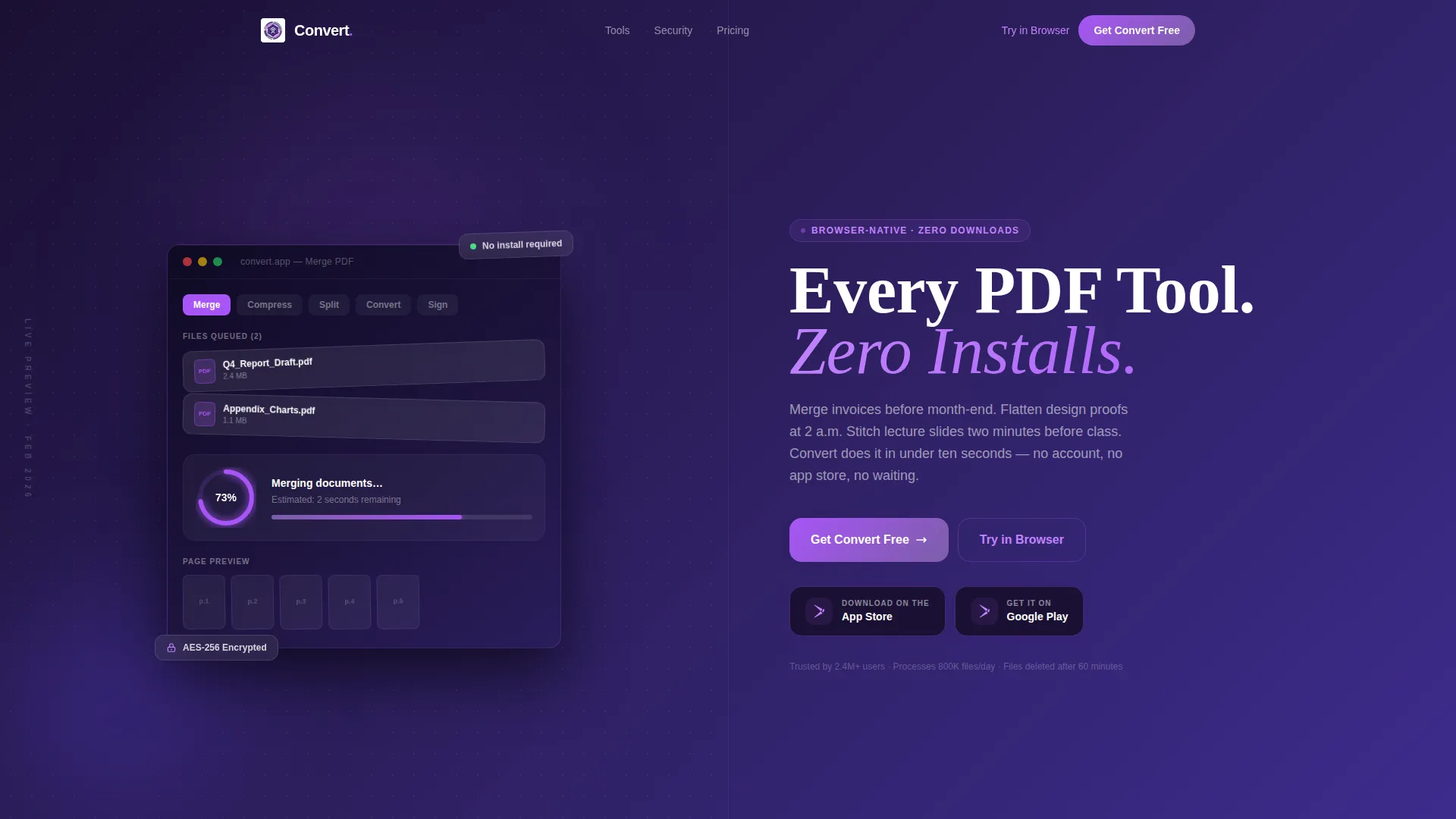
The header divides the viewport evenly. The left panel holds a product screenshot showing the converter dashboard mid-action, complete with a visible PDF thumbnail strip, a "Merge" operation in progress, and a progress ring at 73 percent. The right panel carries the headline, a subline, and platform download badges.
Tool Card Spec Sections
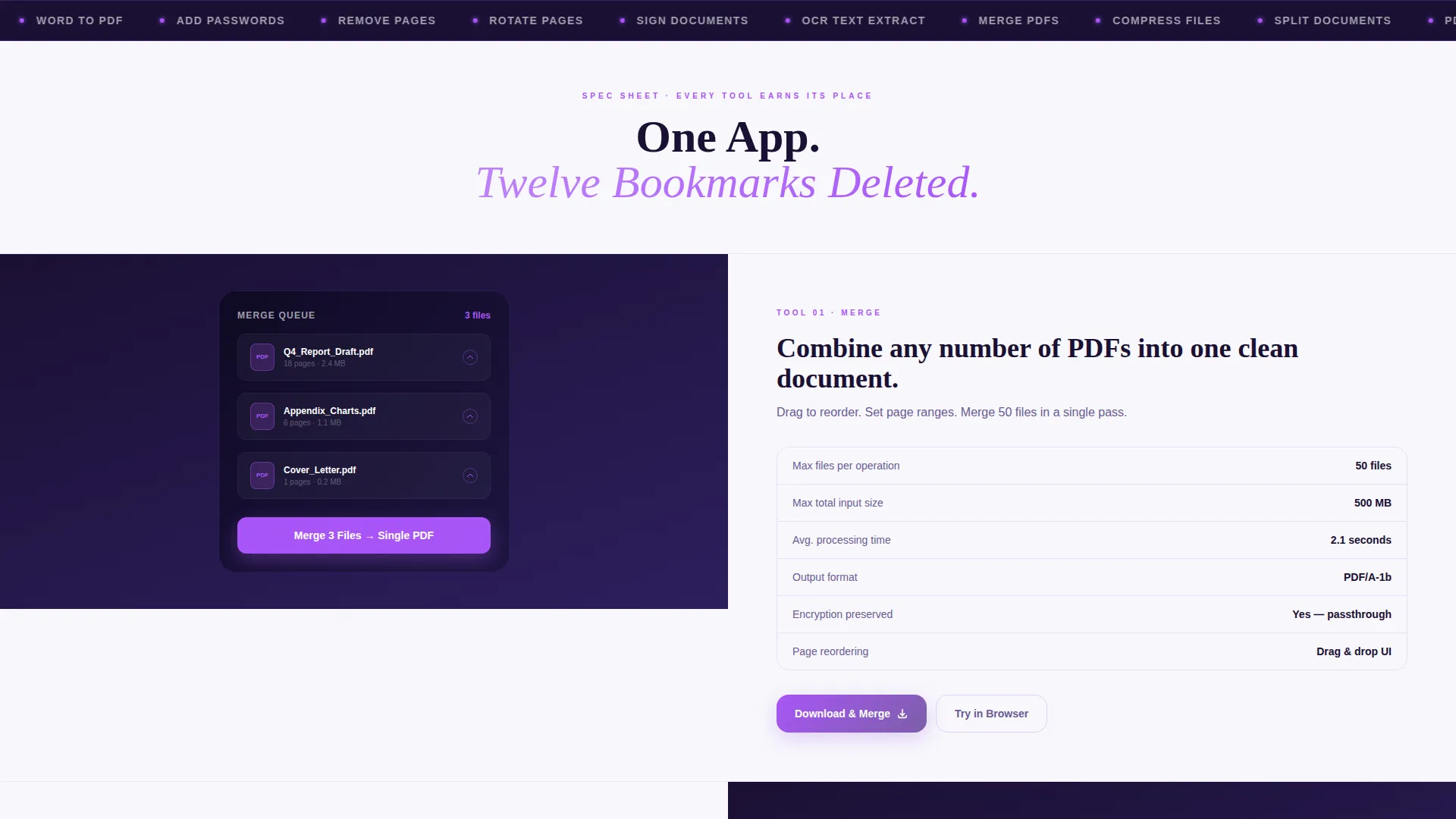
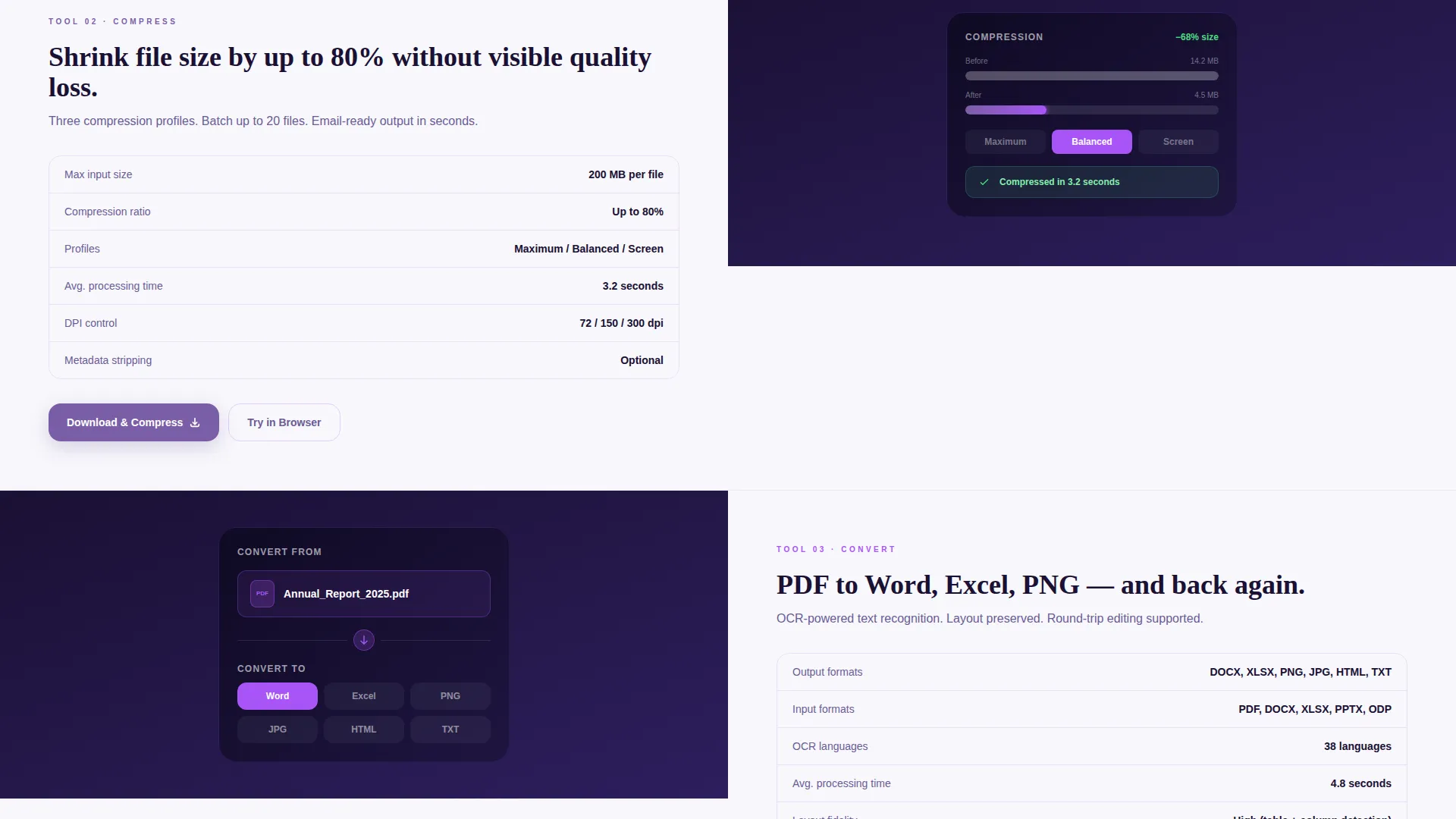
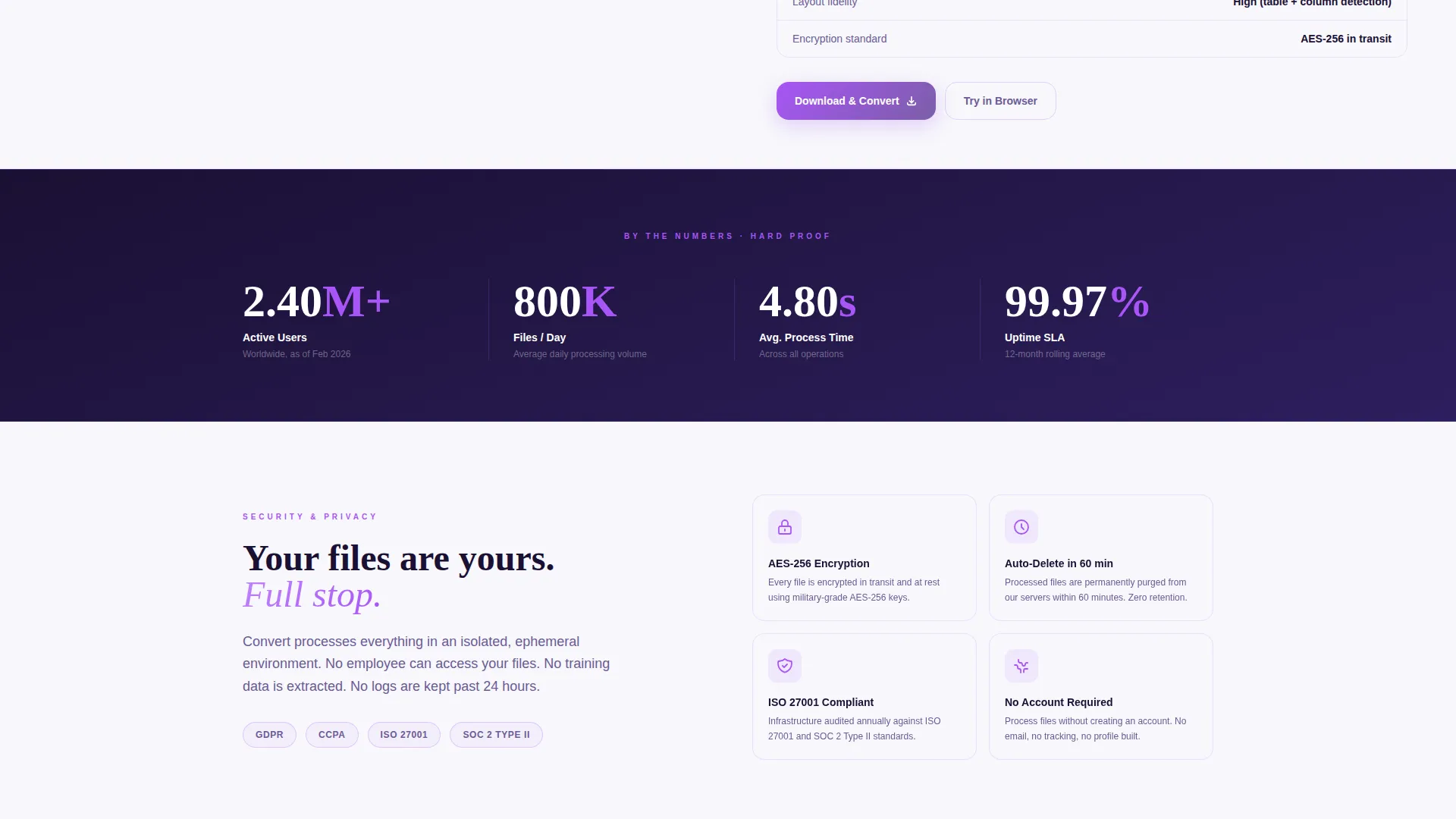
Each scroll section is a discrete tool card in a 50/50 layout. One side shows a user interface screenshot; the other presents a tight specification block covering supported formats, maximum file size, average processing time, and encryption standard. The catalog-like rhythm builds cumulative proof across every card.
Contextual Micro-calls to action
Every tool card ends with a task-specific call to action such as "Download and Merge" or "Download and Compress." This approach connects the install action directly to the exact task the visitor arrived to solve, reducing the mental gap between interest and commitment.
Primary and Secondary call to action Architecture
The primary call to action "Get Convert Free" appears three times: in the header, mid-scroll after the merge tool card, and in a sticky bottom bar on mobile. A secondary "Try in Browser" text link sits alongside it for desktop visitors who want to test before downloading.
Electric Indigo Color System
The page uses a four-color palette built around deep workspace indigo, bright action violet, crisp interface white, and a high-voltage accent purple. The accent color fires specifically on buttons, progress bars, and conversion-complete checkmarks, creating a consistent visual cue for every interactive element.
Directory and Discovery Theme
The overall layout follows a Directory and Discovery theme, meaning each tool earns its place in a browsable, catalog-style flow. Visitors can scan down the page and find the specific PDF task they need without reading every word, lowering the barrier to engagement.
Page sections overview
| Section | Purpose |
|---|---|
| Split-screen hero | Anchors the page with a live product screenshot and headline |
| Platform badge pair | Directs visitors to iOS and Android download actions |
| Merge tool card | Showcases the PDF merge feature with specs and micro-call to action |
| Compress tool card | Presents the compression feature with file size and time specs |
| Convert tool card | Covers format conversion with supported types and processing data |
| Mid-scroll call to action | Repeats the primary download prompt after the merge tool section |
| Sticky mobile bar | Keeps the primary call to action visible while scrolling on mobile |
Design & branding system
The Electric Indigo palette gives the page the feel of a focused late-night workspace. Every color choice has a functional role rather than a decorative one, keeping the interface legible and action-forward.
- Deep workspace indigo (#3D2C8D) grounds the background panels and gives the page visual weight
- Bright action violet (#7B5EA7) guides the eye to every clickable surface and interactive element
- High-voltage accent purple (#A855F7) fires on buttons, progress bars, and conversion-complete checkmarks, with a gentle pulse on download buttons
- Crisp interface white (#F7F7FB) provides contrast for body copy, spec text, and screenshot frames
Mobile & speed optimization
The template is structured for mobile visitors who arrive mid-task and need a fast path to the download. The sticky bottom bar keeps the primary call to action in reach at all times without interrupting the scroll experience.
- The sticky bottom bar on mobile pins "Get Convert Free" to the viewport edge throughout the page
- The 50/50 layout stacks vertically on smaller screens, keeping screenshots and spec blocks readable at any size
- Platform badge pairs for iOS and Android are placed in the hero so mobile visitors can tap directly to the relevant store
How this template helps you convert
The conversion strategy is built into the page structure. Every layout decision reduces hesitation and shortens the path from arrival to install.
- The product screenshot hero opens with visible proof of the tool in action, showing real file names and a live progress ring, so visitors trust the product before reading a single word of copy.
- The Spec Sheet tool card rhythm replaces marketing language with hard numbers, building credibility across each scroll section and making it easy for visitors to self-qualify around their specific task.
- The layered call to action architecture (header, mid-scroll, sticky mobile bar, and per-card micro-calls to action) ensures the download prompt is always within reach without feeling aggressive.
Other information about this template
This template is part of the Technology category and sits within the Micro-SaaS and Developer Tools subcategory. It is purpose-built for the PDF converter and editor niche, with an Intersection Match Score of 13 reflecting a tight alignment between the template style, creative direction, and niche intent.
- The template style is Split Screen (50/50), the theme is Directory and Discovery, and the creative direction is Spec Sheet
- The header concept is Product Screenshot, and the landing page direction is App Download
- The color system is Electric Indigo, referencing a palette that feels like a late-night monitor glow: focused, luminous, and high-contrast
Theme
Directory & Discovery
Creative direction
Spec Sheet
Color system
Electric Indigo
Style
Split Screen (50/50)
Direction
App Download
Page Sections
Split-screen Hero with Live Dashboard Screenshot
Spec Sheet Tool Card Layout
Layered Call-to-action Architecture
Contextual Per-card Micro-ctas
Electric Indigo Branding System
Directory and Discovery Browse Flow
Related questions
What type of page is this template designed for?
Can I use this template to promote a desktop app instead of a mobile app?
How many tool card sections does the template include?
Do I need design or coding experience to customize this template?
Is this template suitable for a PDF tool with multiple features?



