AI & Machine Learning Professional Website Template
Copilot is a scroll-reveal landing page template built for AI code assistant products. It features a live interactive code editor hero, a Problem-to-Solution visual arc, and a teal-on-black dark-mode palette. Designed for developer-focused startups, it guides visitors from curiosity to a free trial click with zero friction and no on-page form.
by Rocket studio
Quick summary
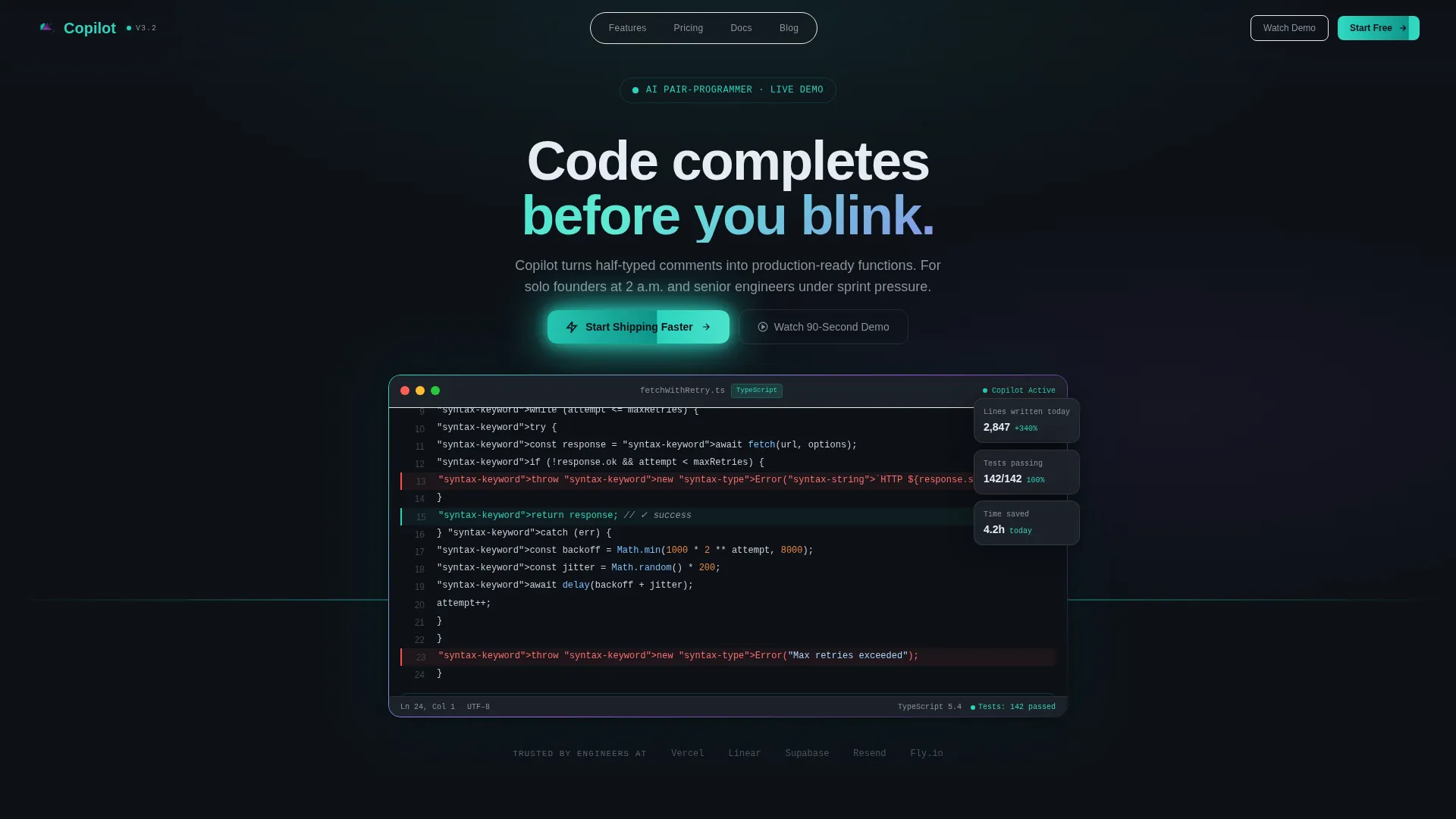
Copilot is a single-page, scroll-reveal landing page template for AI code assistant products. The hero drops visitors into a live code editor demo that autocompletes a JavaScript function in real time. Every scroll section tightens the Problem-to-Solution story, culminating in a click-through call to action that activates a free trial. No forms, no stock images, just the product performing live.
Who this template is for
This template is built for teams and individuals who ship code-first products and need a landing page that speaks directly to a technical audience. The layout respects developer instincts by leading with proof before pitch.
- Solo founders building and launching minimum viable products under tight deadlines
- Senior engineers or engineering leads promoting internal tools or side projects
- Seed-stage development teams where every new signup directly affects runway
What problem this template solves
Most software product landing pages rely on abstract promises. Developers scroll past marketing copy looking for something concrete, and a vague headline about "boosting productivity" rarely earns a click. This template fixes that by letting the product demonstrate itself immediately.
- Visitors lose trust when a page describes features instead of showing them
- Generic hero sections fail to communicate technical depth or real workflow value
- Conversion stalls when visitors cannot picture the tool inside their own environment
What you get with this template
You get a fully structured, dark-mode landing page built around a progressive scroll-reveal flow. Every section is purpose-built to reduce doubt and increase intent, moving the visitor from first impression to free trial activation.
- An interactive code editor hero with animated AI autocomplete running above the fold
- Three problem-solution scroll sections: error dissolution, boilerplate compression, and commit timeline
- Two optimized call-to-action placements plus a secondary ghost-button for hesitant visitors
Feature list
This template includes six purpose-built sections and a unified visual system designed to earn developer trust at every scroll depth.
Live Code Editor Hero
The header embeds a dark-themed, interactive code editor above the fold. A half-written JavaScript function is visible with a blinking cursor. As the visitor watches, the AI completes the function line by line, adding type annotations, error handling, and a docstring at human-readable speed with teal syntax highlighting.
Progressive Scroll-Reveal Sections
Each content section loads only as the visitor scrolls into view. This mirrors the product promise: complexity disappears exactly when you need it to. The reveal sequence escalates from a minor bug fix to a full feature ship to an entire product launch.
Problem-to-Solution Visual Arc
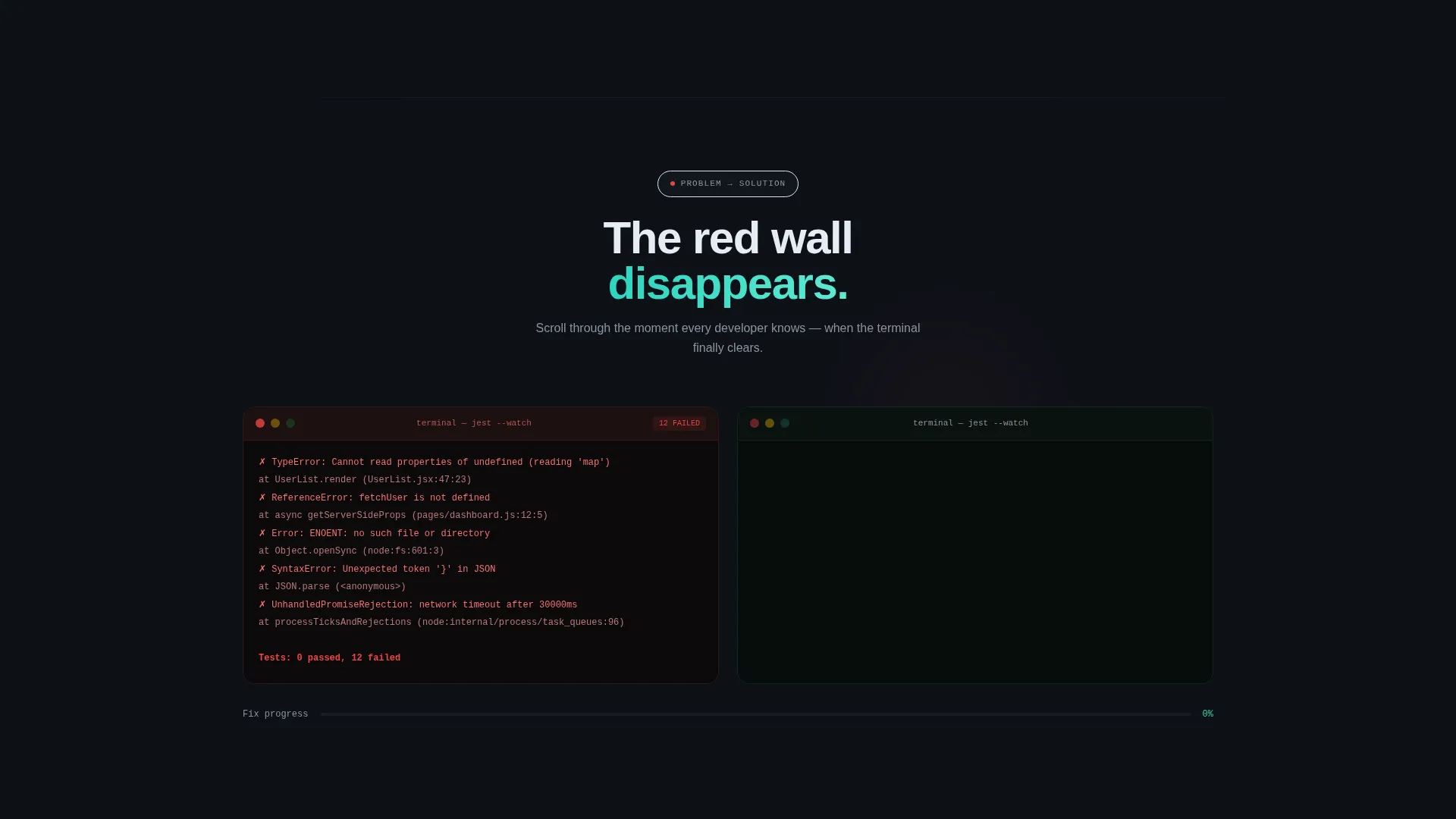
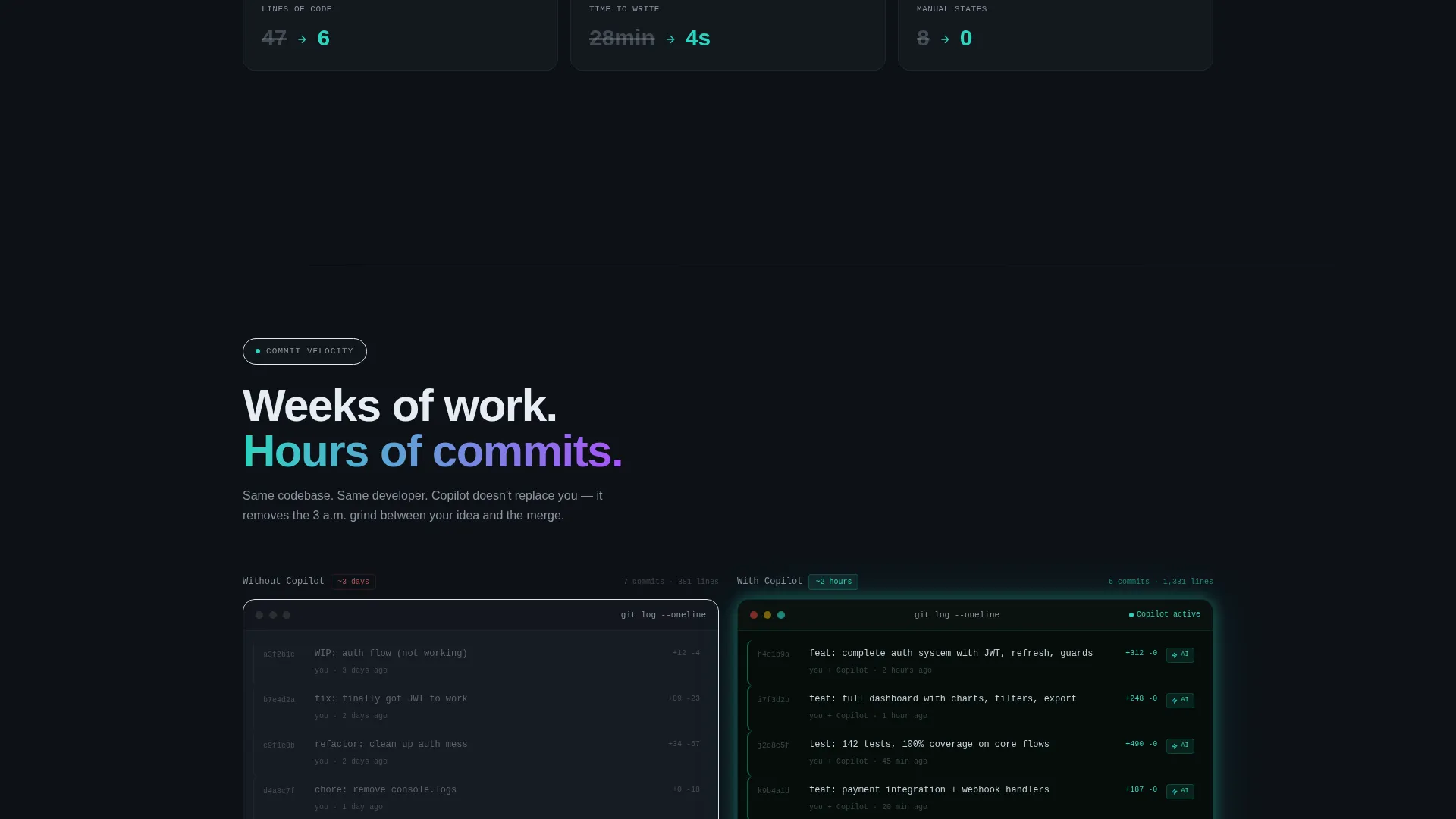
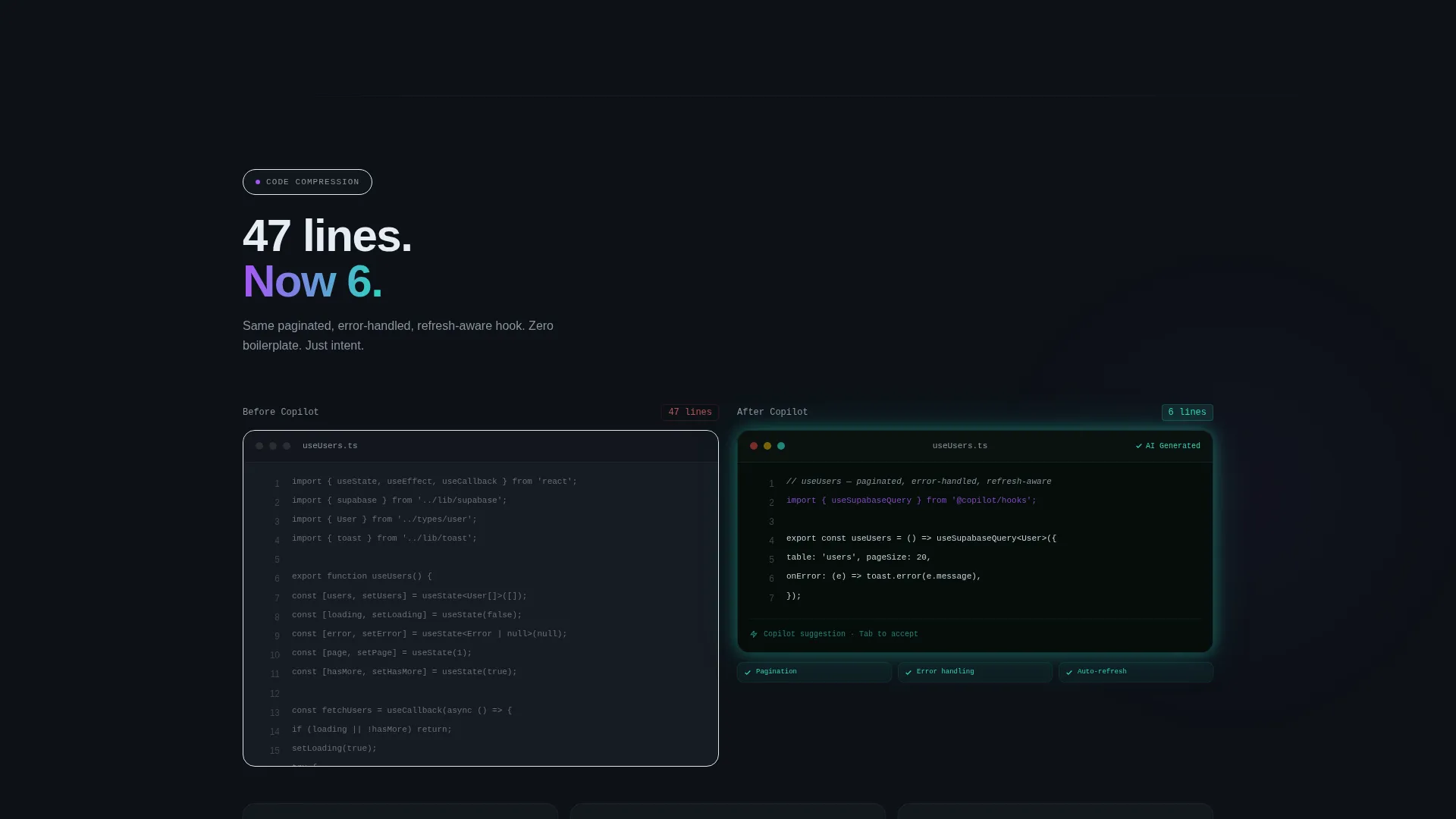
Three distinct panels show the transformation from broken to working code. A wall of red error messages dissolves into passing tests. Forty-seven lines of hand-written boilerplate collapse into six AI-generated lines. A commit timeline compresses weeks of work into hours.
Sticky and Full-Width Call-to-Action
The primary call to action, "Start Shipping Faster," first appears pinned to the bottom of the viewport after the hero demo. It reappears as a full-width block after the final section. The button transitions from muted gray to catalyst teal as the visitor scrolls, reinforcing the moment of commitment.
Ghost-Button Secondary call to action
A secondary ghost-button labeled "Watch the 90-Second Demo" gives hesitant visitors a lower-commitment path. It sits alongside the primary call to action and keeps momentum moving forward without forcing a decision too early.
Dark-Mode Teal Catalyst Palette
The entire page uses a dark terminal color system: deep black for backgrounds, catalyst teal for highlights and active states, muted syntax gray for body text, and hot merge purple reserved for hover states and conversion moments. Every color choice reinforces a familiar, high-focus coding environment.
Page sections overview
| Section | Purpose |
|---|---|
| Interactive Code Editor Hero | Demonstrates AI autocomplete live above the fold |
| Error Dissolution Panel | Shows red errors fading into passing tests on scroll |
| Boilerplate Compression Panel | Compares 47-line manual code to 6-line AI output |
| Commit Timeline Section | Compresses weeks of commits into hours visually |
| Sticky Primary call to action | Keeps "Start Shipping Faster" visible after the hero |
| Full-Width call to action Block | Reinforces the trial activation after the final section |
Design & branding system
The visual identity is built around a dark-mode editor aesthetic called Teal Catalyst. Every color choice is intentional and tied to developer-familiar cues from real coding environments.
- Deep terminal black (#0D1117) for all primary backgrounds, keeping focus on content
- Catalyst teal (#2DD4BF) for syntax highlights, active user interface elements, and the primary call-to-action button
- Muted syntax gray (#8B949E) for body copy and secondary labels, reducing eye strain
- Hot merge purple (#A855F7) reserved for hover states and high-conversion interaction moments
Mobile & speed optimization
The template is structured for responsive viewing across device sizes. The scroll-reveal behavior and animated sections are designed to feel smooth and intentional on smaller screens without breaking the visual hierarchy.
- Progressive section loading ensures content appears only when the visitor reaches it, keeping the page feel light and focused
- The interactive code editor hero scales cleanly so the animation remains readable on both desktop and mobile viewports
- Call-to-action placements are repositioned on smaller screens to stay accessible and prominent throughout the scroll journey
How this template helps you convert
This template earns the click before it asks for one. The conversion strategy is built into the scroll sequence itself, not bolted on at the end.
- The live code editor hero creates immediate product proof in the first seconds, reducing skepticism before any marketing copy appears
- The three progressive problem-solution sections escalate the stakes with each scroll, building emotional investment and purchase intent organically
- The primary call to action transitions from gray to teal only after the visitor has seen the full demonstration, timing the ask to peak confidence
Other information about this template
This template is part of a curated set of AI and machine learning landing page templates designed for the developer tools and technology niche. It is suited for products that operate inside the development workflow and benefit from a show-don't-tell presentation.
- The Scroll Reveal (Progressive) template style means the page builds its narrative with every scroll event, keeping bounce rates low by rewarding curiosity
- The Click-Through landing page direction means no form fields appear on this page; all conversion happens through a direct button link to the signup or trial flow
- The Startup Velocity theme prioritizes momentum, urgency, and the feeling that shipping fast is not just possible but expected
- This template is well-suited for AI pair-programmer tools, AI code assistant products, and related developer productivity software
Theme
Startup Velocity
Creative direction
Problem→Solution Arc
Color system
Teal Catalyst
Style
Scroll Reveal (Progressive)
Direction
Click-Through
Page Sections
Live Code Editor Hero Section
Progressive Scroll-reveal Layout
Problem-to-solution Visual Arc
Sticky and Full-width Call to Action Placements
Ghost-button Secondary Call to Action
Teal Catalyst Dark-mode Design System
Related questions
Does this template include a signup form?
Can I replace the code editor demo with my own product example?
What type of product is this template designed for?
Is the scroll-reveal animation built into the template?
Can I update the color scheme to match my own brand?



