IoT & Hardware Professional Website Template
Forge is a split-screen landing page template built for 3D printing and precision manufacturing platforms. It pairs a live slicer interface visual with bold data-driven copy, guiding manufacturing engineers, prototyping leads, and operations managers from first scroll to a free build analysis. The Midnight Blue color system and Dynamic Motion theme make every section feel purposeful and production-ready.
by Rocket studio
Quick summary
Forge is a single-page, split-screen landing page template designed for additive manufacturing and 3D printing technology platforms. It leads with a product screenshot header, builds trust through an industry-report scroll structure, and converts visitors through a freemium trial flow. The result is a page that feels as precise and credible as the parts it helps sell.
Who this template is for
This template is built for companies and teams selling or promoting additive manufacturing services and 3D printing technology. It speaks directly to the people who evaluate production options on technical and financial merit.
- Manufacturing engineers comparing per-unit costs against injection molding and traditional tooling methods
- Prototyping leads who need functional parts delivered quickly, often within days rather than weeks
- Operations managers scaling production volumes without retooling an entire manufacturing line
What problem this template solves
Most manufacturing technology pages either bury the data or oversell the vision. Buyers in this space need hard numbers and clear timelines before they commit to anything. Forge closes that gap.
- Engineers and procurement leads arrive skeptical, needing cost curves and material specs before they trust a claim
- Traditional landing pages force visitors to contact sales before receiving any useful estimate or comparison
- The gap between a promising technology pitch and a practical production decision loses potential customers early
What you get with this template
Forge delivers a complete, structured landing page layout ready to represent a precision manufacturing or 3D printing platform. Every section is purpose-built to move a technical buyer from awareness to action.
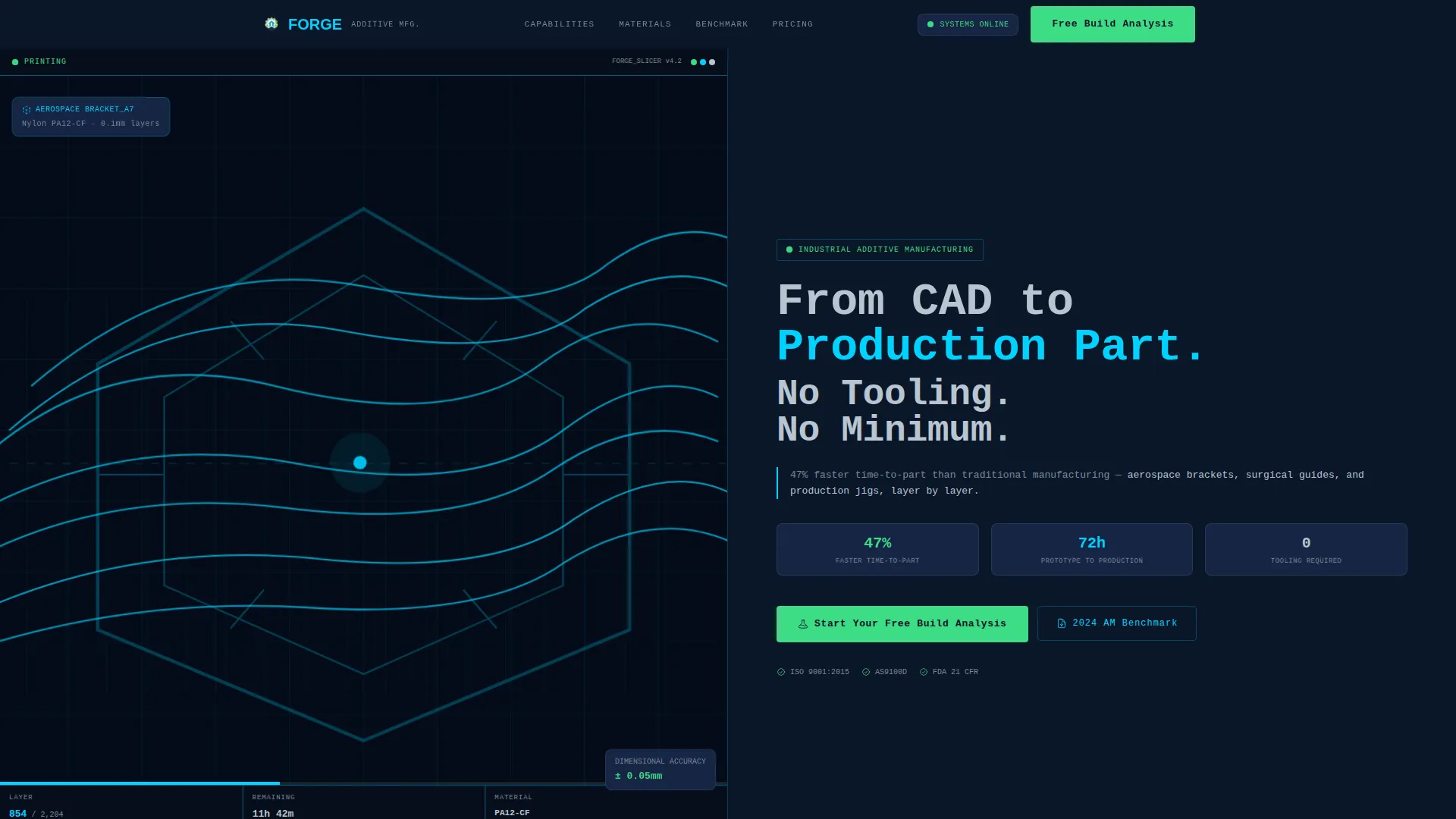
- A 50/50 split-screen header showing the slicer interface alongside a bold headline and a data-backed subheadline
- An industry-report scroll structure with cost comparison, material data, and timeline graphics across three dedicated sections
- A two-step freemium trial conversion flow with file upload and instant cost-per-part estimate, plus a secondary email-capture offer
Feature list
This section covers the core built-in capabilities that make Forge a production-ready template for additive manufacturing platforms.
Split-Screen Product Header
The header divides into two equal panels. The left panel renders the slicer interface at native resolution, showing a complex lattice structure mid-slice with cyan toolpath lines, a live layer count at 847 of 2,204, and an estimated print time of 11 hours and 42 minutes. The right panel holds a mono-industrial headline and a stat-backed subheadline that grounds the value proposition immediately.
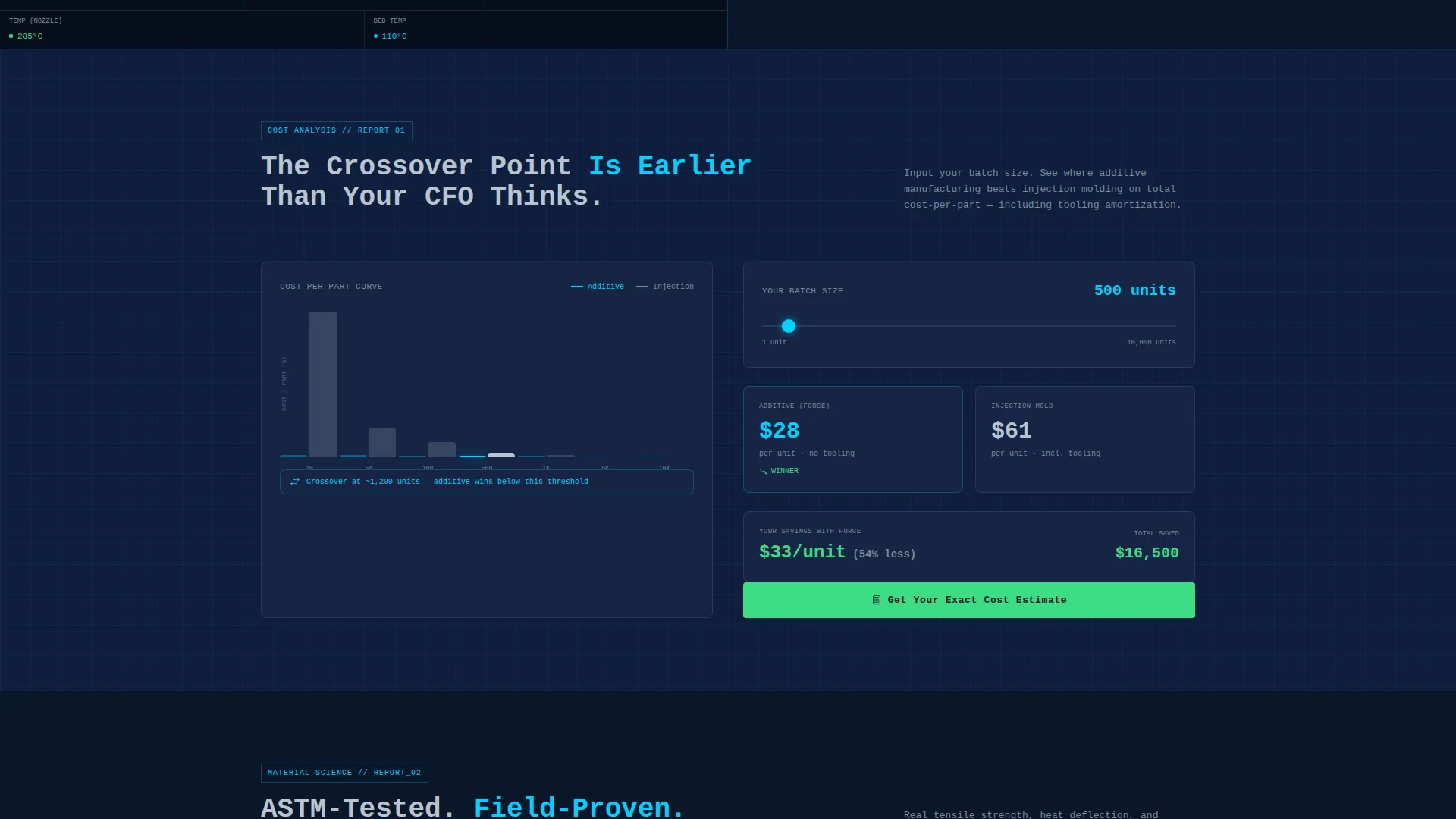
Interactive Cost Comparison Section
Section one presents cost-per-part curves that cross at volume thresholds. Visitors can use an interactive slider to input their own batch size and see where additive manufacturing becomes the more economical choice against legacy production methods.
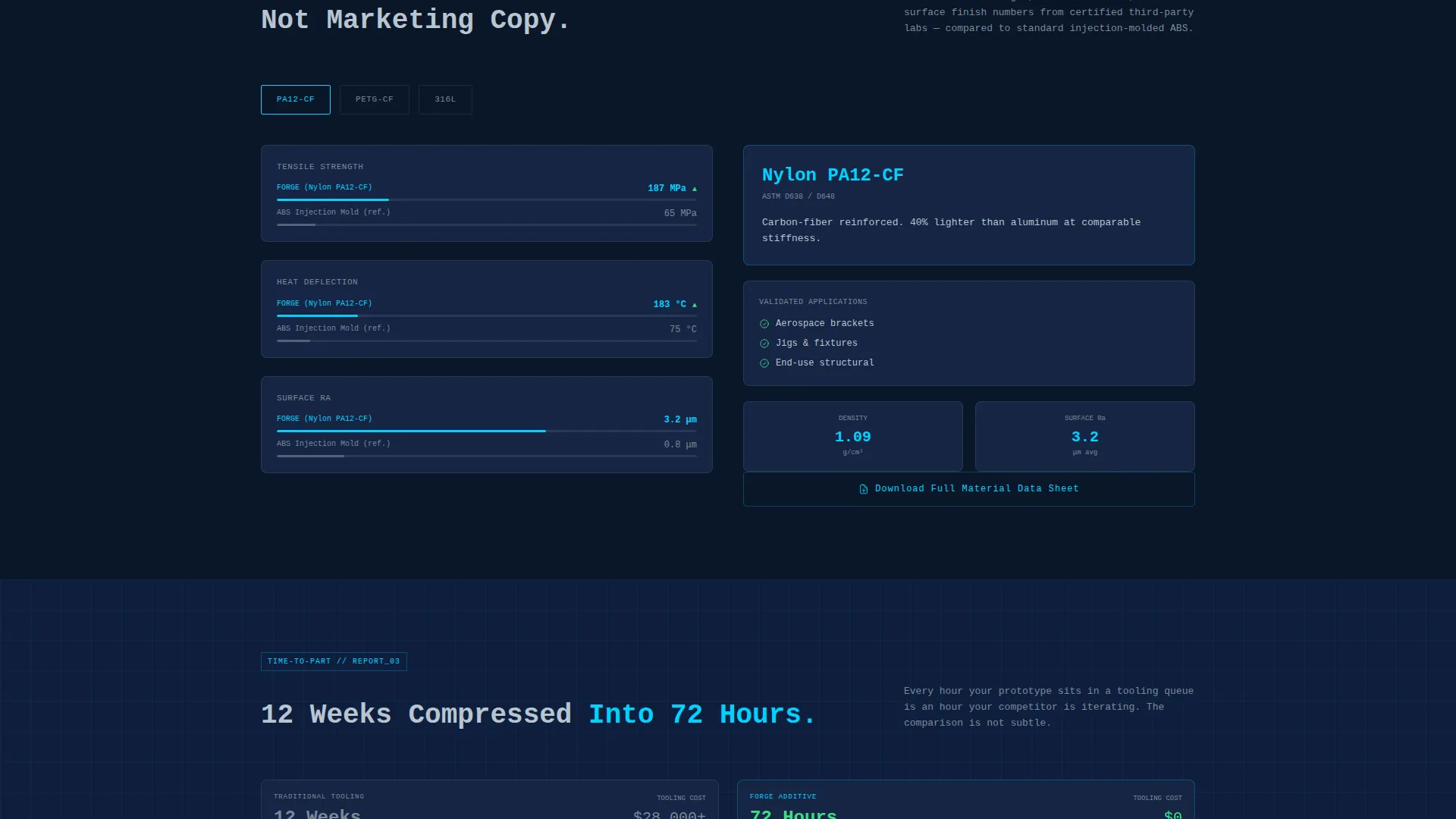
Material Comparison Panel
Section two is a split-screen material comparison displaying tensile strength, heat deflection, and surface finish data drawn from real ASTM (American Society for Testing and Materials) test numbers. Nylon PA12, PETG-CF, and 316L Steel are the three featured material options, giving technical buyers the specifics they need.
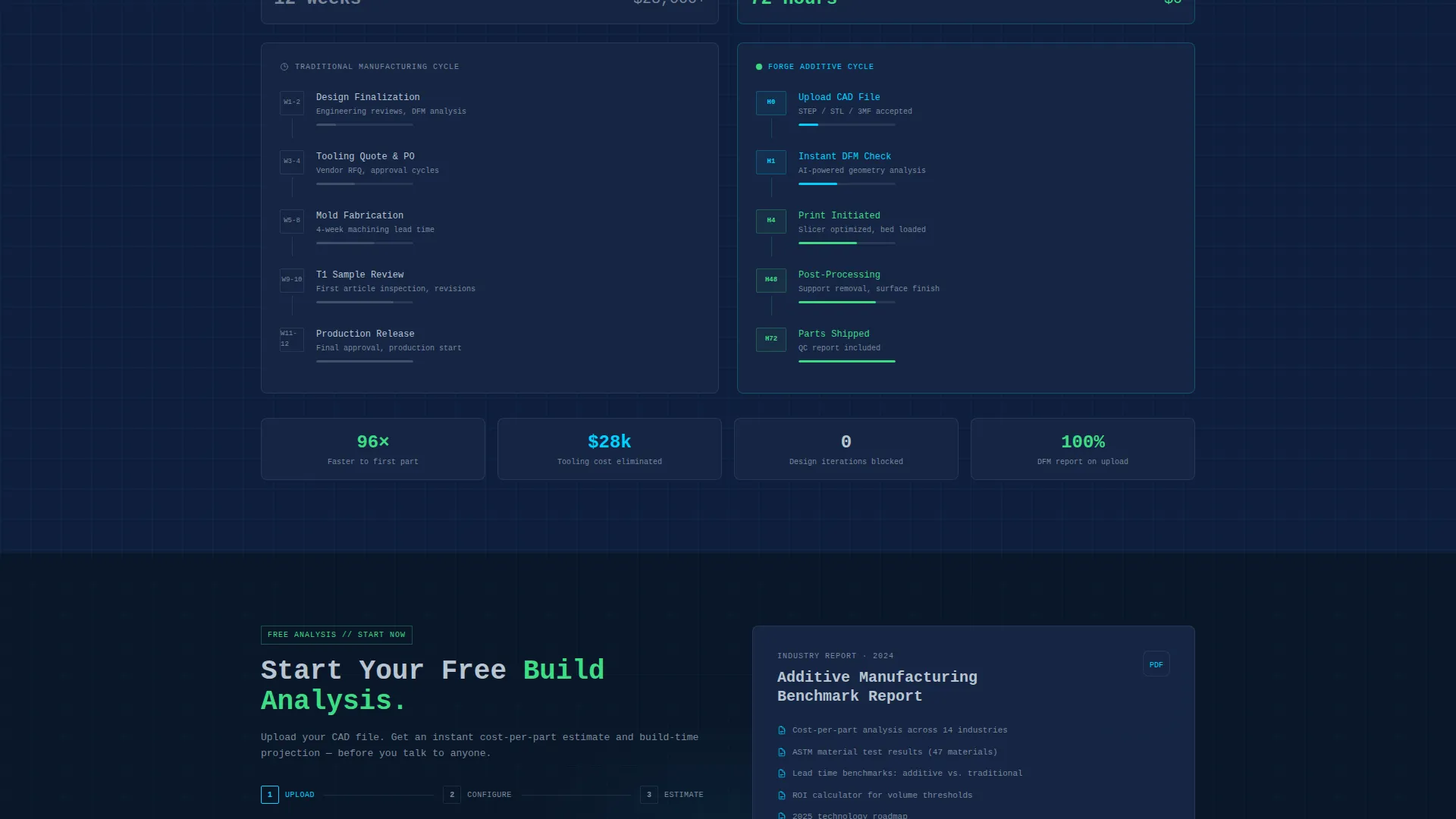
Timeline Compression Graphic
Section three features a visual timeline that compresses a twelve-week traditional tooling cycle into a seventy-two-hour print-to-post-process window. The graphic makes the speed advantage tangible and easy to share with decision-making teams.
Two-Step Build Analysis Flow
The primary conversion path is a two-step flow triggered by the "Start Your Free Build Analysis" call to action. Step one is a drag-and-drop file upload zone accepting STEP and STL formats. Step two collects material preference and annual volume estimate, then returns an instant cost-per-part estimate and build-time projection.
Secondary Email Capture
A secondary call to action, "Download the 2024 Additive Manufacturing Benchmark," captures email addresses from visitors who are not yet ready to upload a file. This keeps the lead funnel active with content that matches the data-driven tone of the entire page.
Page sections overview
| Section | Purpose |
|---|---|
| Split-Screen Header | Pairs slicer interface screenshot with headline and key stat |
| Cost Comparison Slider | Lets visitors compare per-unit costs at their own batch size |
| Material Data Panel | Shows ASTM-backed specs for three production materials |
| Timeline Compression Graphic | Visualizes speed advantage over traditional tooling cycles |
| Pinned Primary call to action | Anchors the free build analysis offer after the first scroll |
| Two-Step Upload Flow | Collects file, material choice, and volume for instant estimate |
| Benchmark Download call to action | Captures email from leads not yet ready to upload a file |
Design & branding system
The visual identity follows a Dynamic Motion theme built on a Midnight Blue color system. The palette is designed to feel like a factory floor after hours, lit only by machine interfaces: cool, electric, and precisely controlled.
- Deep terminal navy (#0A1628) dominates backgrounds and section dividers, providing a focused dark canvas
- Toolpath cyan (#00D2FF) traces interactive lines, hover states, and toolpath visuals like a laser sinter path moving across the build plate
- Machined aluminum (#B8C4D0) carries body text and secondary panel content, while status-green (#3DDC84) activates only on live data points and actionable call-to-action states
Mobile & speed optimization
The template layout is structured to maintain visual clarity and hierarchy when rendered on smaller screens. The split-screen format adapts to keep both content panels readable without losing the data-first impact.
- The 50/50 split-screen header is designed to reflow gracefully so that the slicer screenshot and headline remain legible on mobile viewports
- Interactive elements such as the batch-size slider and drag-and-drop upload zone are sized and spaced for touch-friendly use
- Section-by-section scroll pacing keeps the industry-report structure intact on any screen size, preserving the evidence-building flow
How this template helps you convert
Forge is built around a single conversion principle: deliver real value before asking for any commitment. The page structure earns trust at each scroll section so that the call to action feels like a natural next step rather than a cold ask.
- The pinned "Start Your Free Build Analysis" call to action appears after the first data section, catching visitors at peak curiosity before they scroll past the evidence
- The two-step upload flow gives visitors an instant cost-per-part estimate and build-time projection with no sales call required, removing the friction that loses technical buyers at the decision stage
- The secondary benchmark download keeps the lead funnel warm for visitors who need more evidence, capturing their email with content that reinforces the page's data-driven credibility
Other information about this template
Forge is categorized under Technology, within the IoT and Hardware subcategory, and is specifically matched to the 3D Printer and Manufacturing Technology niche. A few additional details worth knowing before you use or customize this template:
- The template style is Split Screen (50/50), meaning both panels carry equal visual weight and are intended to be used together, not independently
- The creative direction is Industry Report, so the scroll sequence is designed to build an evidence case section by section rather than rely on emotional or lifestyle visuals
- The header concept is Product Screenshot, which means the template expects a real interface image, not an abstract illustration, in the left panel
- The landing page direction is Freemium/Trial, so the conversion flow is built around zero-commitment value delivery rather than a direct sales or booking model
- The mono-industrial typeface treatment in the headline panel is intentional to the theme and should be preserved when swapping in your own brand copy
Theme
Dynamic Motion
Creative direction
Industry Report
Color system
Midnight Blue
Style
Split Screen (50/50)
Direction
Freemium/Trial
Page Sections
Split-screen Slicer Interface Header
Interactive Batch-size Cost Slider
Astm-backed Material Comparison Panel
Timeline Compression Infographic
Two-step Free Build Analysis Flow
Secondary Benchmark Email Capture
Related questions
What kind of business is this template designed for?
Do I need design experience to customize this template?
Can I use my own material options in the comparison section?
What file formats does the upload flow accept?
Is the cost estimate in the conversion flow generated automatically?



