Cultivar - Powerful Agriculture Landing Page Template
Cultivar is a Dashboard/Data Grid landing page template built for agriculture enterprise resource planning (ERP) platforms. It opens with a live-styled metrics header, moves into a filterable feature matrix, and closes with a progressive lead capture form. The design uses deep soil black, electric indigo, and young-shoot green to give operations-focused buyers an immediate sense of clarity and control.
by Rocket studio
Quick summary
Cultivar is a single-page, data-forward landing page template for agriculture ERP software. It leads with six animated key performance indicators, flows into a self-guided feature matrix covering six operational modules, and ends with a two-path conversion system. The template is built for teams that manage row crops at scale and need a page that speaks the language of acres, yield, and cost-per-bushel.
Who this template is for
This template is designed for software companies, agribusiness ventures, and platform builders targeting the professional farm management market. It speaks directly to buyers who already live inside operational data and will reject vague, generic product pages.
- Operations managers running 500 to 5,000-acre row crop farms who need a solution overview they can actually evaluate.
- Cooperative directors managing data across twenty or more growers who are scanning for compliance and traceability tools.
- Agribusiness finance leaders who need yield-per-acre figures and cost metrics that hold up under audit scrutiny.
What problem this template solves
Most mid-size farm operations still rely on a patchwork of spreadsheets, messaging apps, and handwritten ledgers. A marketing page for an ERP platform needs to make the alternative feel real, organized, and immediately trustworthy. Generic software landing pages fail this audience because they speak in abstractions, not acres.
- Buyers arrive skeptical and data-driven; a hero illustration or vague tagline loses them in seconds.
- Each operational role, from the co-op director to the fleet manager, has a different first question; one static page cannot answer all of them equally.
- Research-mode visitors need a low-commitment way to evaluate ROI before they will ever fill out a contact form.
What you get with this template
You get a fully structured, single-page layout that guides an agricultural software buyer from first impression to form submission. Every section is purposefully sequenced to build confidence before asking for commitment.
- A live-styled stats header with six key performance indicator (KPI) cards, each featuring a micro sparkline chart and a count-up number animation on load.
- A filterable six-module feature matrix with expandable cards, contextual proof stats, and space for a single supporting screenshot per module.
- A dual conversion system: a progressive three-step diagnostic form and a midpage email-gated ROI calculator download.
Feature list
This section covers the core functional components built into the Cultivar template, each grounded in the source brief.
Animated KPI Header Panel
The full-width header displays six real-time-styled metrics: acres under management, equipment uptime percentage, cost-per-bushel, active crop cycles, monthly work orders completed, and year-over-year yield increase. Each card includes a micro sparkline chart beneath the number. Numbers count up on page load, creating the feeling that the visitor just logged into a live dashboard.
Filterable Feature Matrix
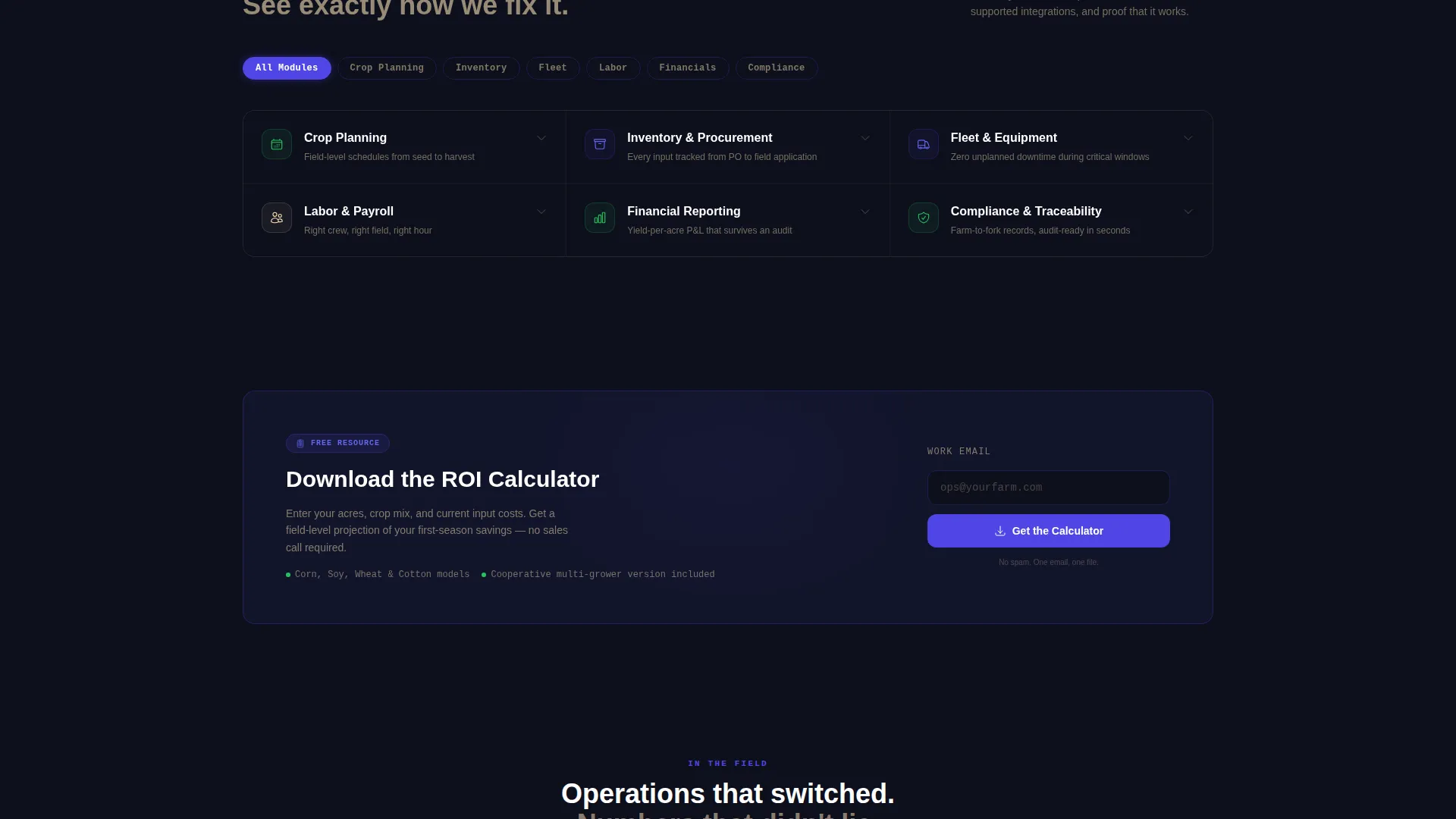
A scrollable grid lets visitors toggle between six operational modules: Crop Planning, Inventory and Procurement, Fleet and Equipment, Labor and Payroll, Financial Reporting, and Compliance and Traceability. Each card expands on click to reveal sub-features, supported integrations, and a screenshot. A contextual proof stat at the bottom of each expanded card builds cumulative evidence as visitors explore.
Progressive Lead Capture Form
The primary conversion path uses a three-step progressive form. Step one captures operation size via an acre slider. Step two offers a multi-select crop type interface covering corn, soy, wheat, cotton, and specialty crops. Step three presents a checkbox list of current software tools so the platform can tailor its follow-up.
Midpage ROI Calculator Gate
A secondary conversion option sits at the midpoint of the feature matrix. Visitors in research mode can download the ROI calculator by entering only an email address. This low-friction path captures leads who are not yet ready for a full diagnostic request.
Electric Indigo Interactive System
Toggle switches, filter pills, and column sort controls all use electric indigo as their active-state color. Young-shoot green appears only on positive data points and growth metrics, training the visitor's eye to associate green with good news. The color logic is consistent throughout every interactive element.
Module-Level Proof Statistics
Each expanded feature card closes with a specific, module-tied outcome stat drawn from the platform's own data story. For example, the Procurement module card references an 18% reduction in input costs in the first season. These stats compound as the visitor explores more modules, building trust progressively.
Page sections overview
| Section | Purpose |
|---|---|
| KPI Stats Header | Displays six animated metrics to establish platform credibility immediately |
| Headline Fade-In | Introduces the core value proposition below the metrics panel |
| Feature Matrix Grid | Lets visitors self-navigate six operational modules by role or pain point |
| Expandable Module Cards | Reveals sub-features, integrations, and a screenshot per module on click |
| Midpage ROI Download | Captures research-mode email leads with a low-commitment gated asset |
| Farm Diagnostic Form | Collects operation size, crop types, and current software via a progressive form |
Design & branding system
The visual identity follows a Directory and Discovery theme rendered in an Electric Indigo color system. The overall feel references a satellite view of farmland at twilight: dark earth interrupted by the sharp geometry of irrigated fields under grow lights.
- The primary background is deep soil black (#0D0F1C), giving the dashboard a control-room weight without feeling heavy or inaccessible.
- Electric indigo (#4F46E5) drives all interactive surfaces, including toggle switches, filter pills, and sort controls, while warm harvest wheat (#F5DEB3) handles secondary text and divider lines.
- Young-shoot green (#22C55E) is reserved strictly for positive metrics and growth indicators, so every green element carries immediate positive meaning for the reader.
Mobile & speed optimization
The Cultivar template is structured to remain clear and functional across screen sizes. The data-dense header and matrix layout are organized so key content stays legible when the viewport narrows.
- The KPI card grid and feature matrix use a responsive layout that reflows naturally on smaller screens without hiding critical information.
- The progressive form's slider, multi-select pills, and checkbox inputs are sized for comfortable touch interaction on mobile devices.
- The expandable module cards collapse and expand cleanly on touch, maintaining usability without requiring hover states.
How this template helps you convert
The conversion architecture in Cultivar is deliberate. Every section is placed to reduce friction and increase confidence before the visitor reaches a form.
- The animated KPI header creates an immediate proof moment: the visitor sees real-sounding operational numbers before reading a single marketing sentence, anchoring trust from the first scroll.
- The self-guided feature matrix lets each visitor type, whether an operations manager or a cooperative director, find their own relevant pain point and explore at their own pace, so the form feels like a natural next step rather than an interruption.
- The dual conversion paths, the diagnostic form and the ROI calculator download, give both decision-ready buyers and research-mode visitors a meaningful way to engage, reducing the risk of losing either audience.
Other information about this template
Cultivar is built around the intersection of agriculture software, enterprise resource planning for farm operations, and data-forward product marketing. It is well suited for teams launching or repositioning a farm management platform.
- The template's module structure maps directly to the functional areas farm operations buyers search for: crop planning, fleet management, labor and payroll, financial reporting, and compliance and traceability.
- The Directory and Discovery theme means the page behaves more like an interactive product catalog than a static brochure, encouraging longer session engagement.
- The template supports use cases ranging from a standalone agriculture ERP product launch to a feature expansion announcement for an existing farm management software platform.
- Teams using tools such as farm accounting software or established field management platforms can use the current software checklist section to position their product as a compatible or superior alternative within the buyer's existing stack.



Theme
Directory & Discovery
Creative direction
Feature Matrix
Color system
Electric Indigo
Style
Dashboard/Data Grid
Direction
Lead Generation
Page Sections
Animated Six-metric KPI Header
Filterable Six-module Feature Matrix
Progressive Three-step Diagnostic Form
Midpage ROI Calculator Download
Module-level Proof Statistics
Electric Indigo Interactive Color System
Related questions
Who is this template designed for?
Can I edit the KPI metrics shown in the header?
How does the filterable feature matrix work?
Is the ROI calculator a ready-to-use tool?
What conversion paths does this template include?



