Agriculture Digital Menu Landing Page Template
Cultivar is a split-screen landing page template built for agricultural digital menu platforms. It helps seed dealers, co-op supply managers, and ag retailers replace printed catalogs with a sleek, tap-friendly ordering experience. With a built-in ROI calculator, dynamic motion effects, and a lead-capture form, it turns curious visitors into qualified prospects fast.
by Rocket studio
Quick summary
Cultivar is a single-page, split-screen landing page template designed for agriculture digital menu platforms. It leads with a working ROI calculator, uses a dark Electric Indigo visual system, and drives lead generation through a slide-in form. Regional ag retailers, co-op managers, and independent seed dealers are the core audience.
Who this template is for
This template is built for businesses in the agricultural supply space that are ready to move beyond printed catalogs and texted PDFs. If you sell inputs, seeds, or fertilizers to growers, this page speaks your buyers' language.
- Regional ag retailers and independent seed dealers looking to offer digital ordering
- Co-op supply managers who want growers to build custom input plans on a phone
- Crop consultants and agricultural supply businesses replacing static catalogs with live menus
What problem this template solves
Many ag retailers still rely on printed tri-folds and PDF attachments to communicate their product catalog. That approach creates friction for growers who are in the field at dawn and need fast, accurate ordering options. This template addresses that gap directly.
- Static catalogs slow down reorders and create version-control headaches for reps
- Farmers cannot browse or order from printed materials while operating equipment
- Competitors offering digital ordering tools are pulling ahead while traditional methods stall
What you get with this template
This template delivers a fully structured, single-page lead generation experience. Every section is designed to move a visitor from skepticism to action, using real calculator outputs as the persuasion engine.
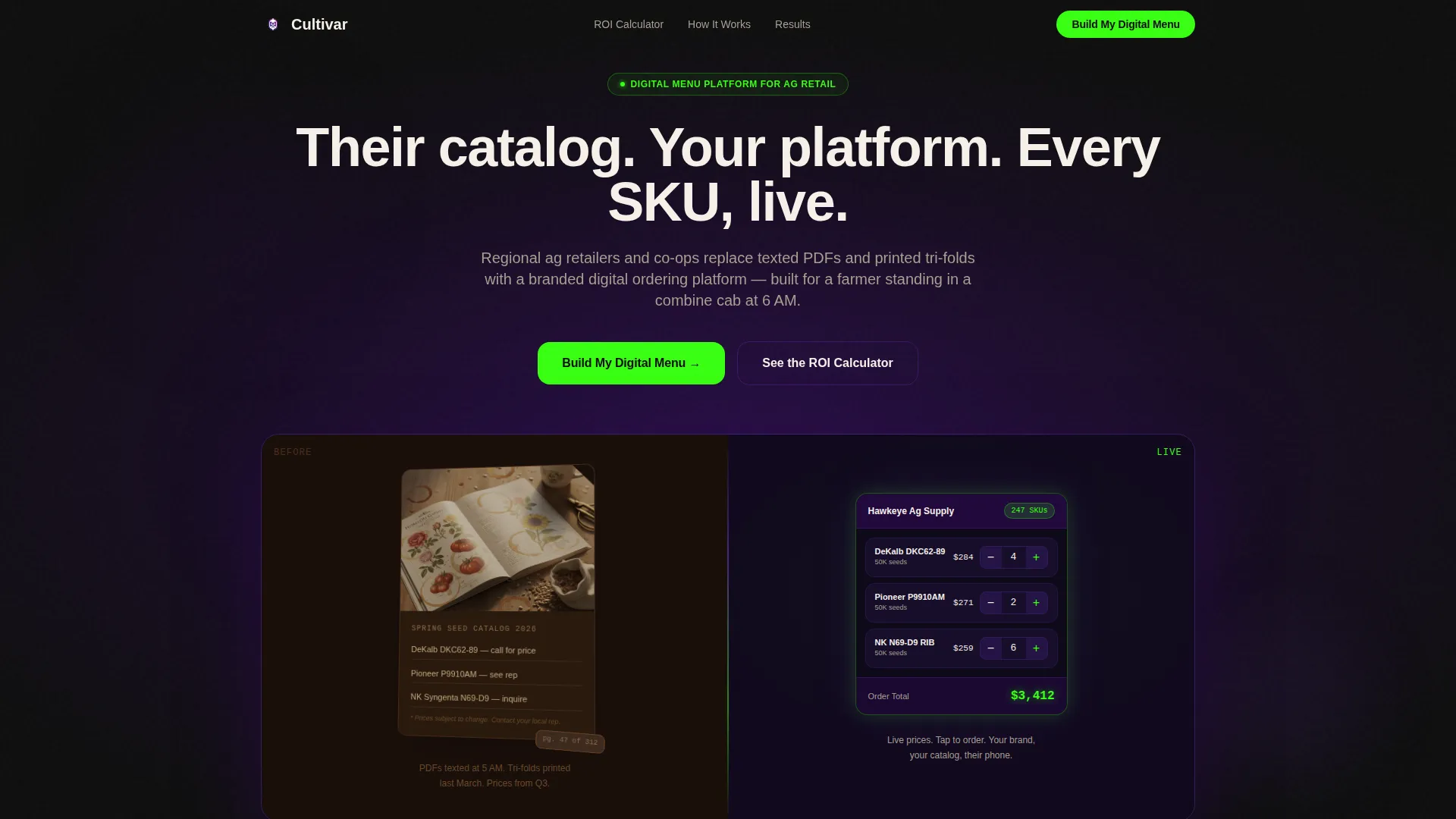
- A split-screen header with a 3D-animated before/after catalog comparison and a self-typing headline
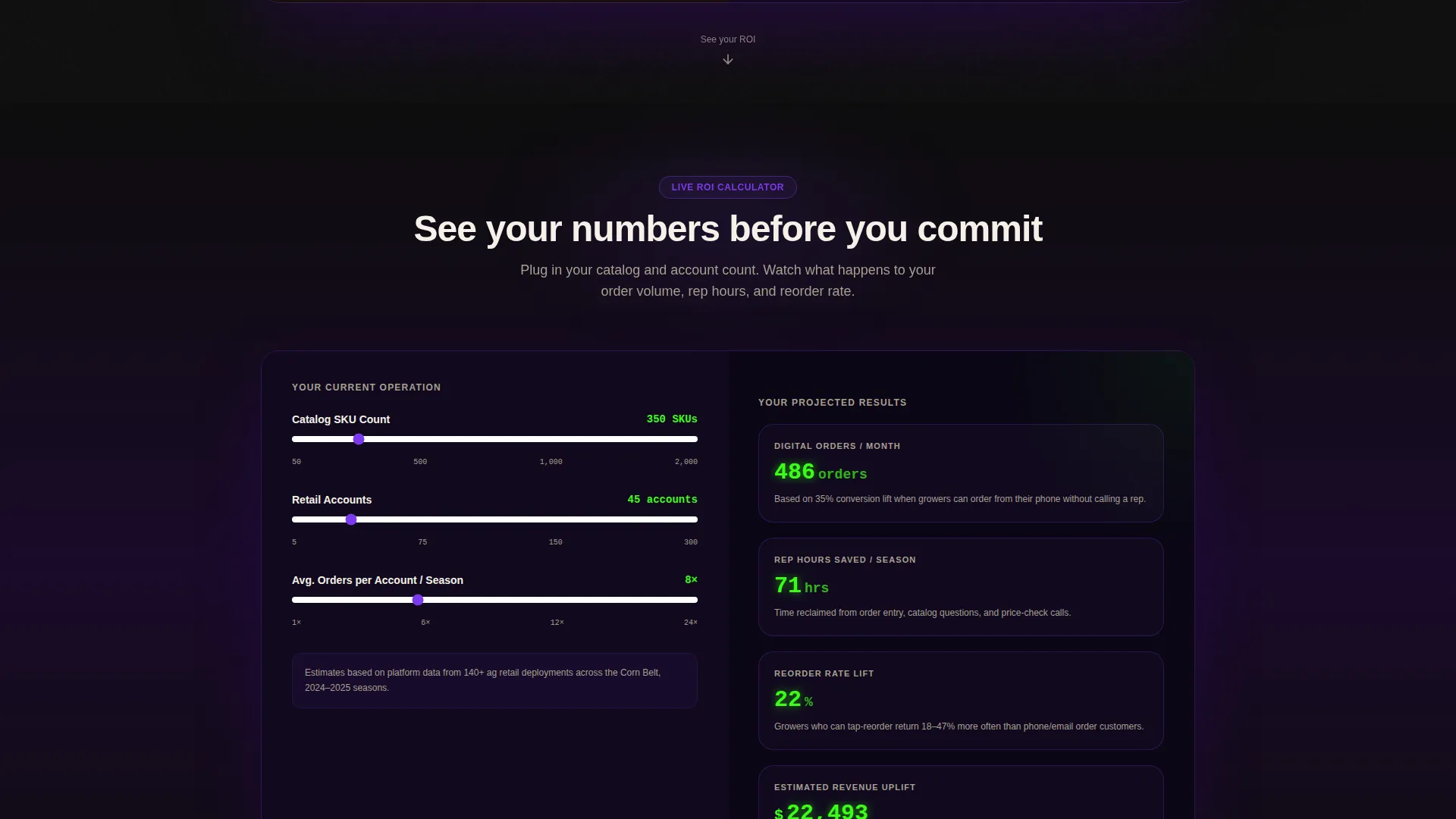
- A live Digital Menu ROI Calculator with animated output fields and phosphor green counter animations
- A slide-in lead capture form with four targeted fields and a secondary demo path for exit intent
Feature list
This template packs purposeful components into a focused single-page flow. Each element is built around the goal of converting ag retailers into qualified leads.
Split-Screen Hero Interface
The header fills the full screen with a dark background and an Electric Indigo breathing glow. A printed seed catalog rotates in 3D on the left while the right side shows the same catalog transformed into a glowing digital menu with product cards, quantity steppers, and a live order total.
Live ROI Calculator Panel
The calculator spans both screen halves and lets visitors enter their catalog size, number of retail accounts, and average order frequency. The right panel animates outputs in real time, showing projected digital orders per month, time saved per rep, and reorder rate lift using phosphor green counter animations.
Dynamic Scroll Narrative
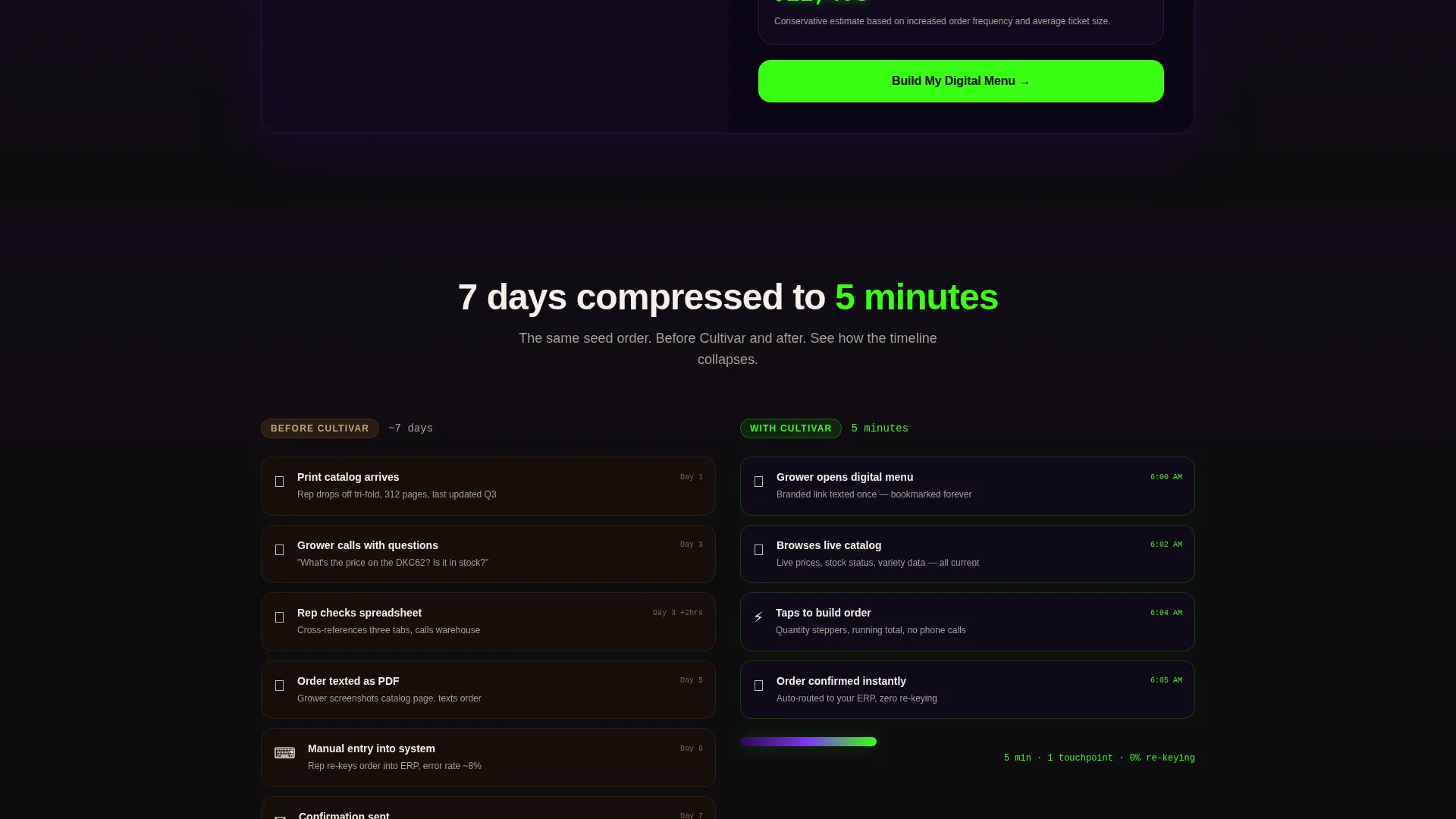
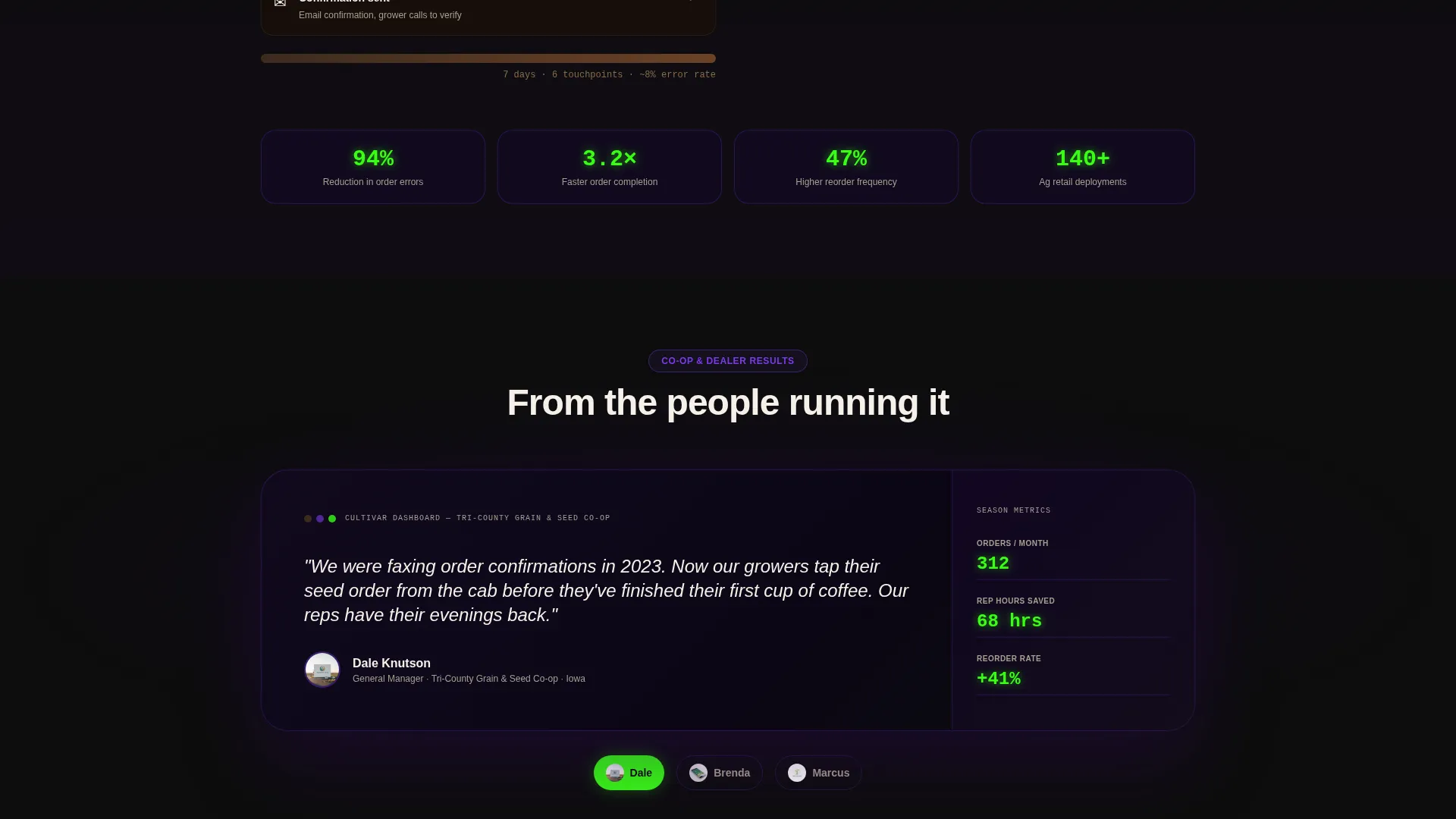
Sections cascade down the page with alternating slide-in product cards, a before/after ordering timeline that compresses as the visitor scrolls, and testimonial panels from co-op managers displaying order volume stats styled as dashboard readouts.
Slide-In Lead Capture Form
The primary call-to-action, labeled "Build My Digital Menu," triggers a slide-in panel. The form collects business name, business type via dropdown, catalog size range, and email address. The form appears after the calculator, so visitors arrive with their own numbers already in mind.
Sticky Call-to-Action Bar
After the page midpoint, a sticky bottom bar keeps the primary call-to-action visible. This ensures the "Build My Digital Menu" prompt stays accessible without interrupting the scroll narrative above it.
Secondary Demo Path
A secondary call-to-action, "See a Live Demo Menu," links to a sandboxed interactive sample. It captures email on exit intent, offering a lower-commitment entry point for visitors who are not yet ready to fill out the full form.
Page sections overview
| Section | Purpose |
|---|---|
| Dark Full-Bleed Header | Introduces the platform with a split catalog-to-digital animation and self-typing headline |
| ROI Calculator Panel | Lets visitors input their business data and see animated, real-time output metrics |
| Product Card Cascade | Showcases digital menu product cards sliding in from alternating sides on scroll |
| Before/After Timeline | Compresses a visual ordering timeline to show the speed advantage of digital menus |
| Testimonial Dashboard | Displays co-op manager quotes with order volume stats styled as glowing readouts |
| Lead Capture Form | Slide-in panel triggered by the primary call to action with four targeted input fields |
| Sticky call to action Bar | Persistent bottom bar keeping the primary call-to-action visible past the midpoint |
Design & branding system
The visual identity uses a Dynamic Motion theme built on an Electric Indigo color system. The palette evokes a county road at twilight when center-pivot irrigation lights click on across the horizon, combining electric precision with a vast dark backdrop.
- Core colors: soil-dark black (#0D0D0D) for backgrounds, deep field-at-dusk indigo (#2E0854) for full-bleed sections, charged violet (#7C3AED) for section transitions and active states, phosphor green (#39FF14) for calls-to-action, hover states, and calculator outputs, and warm grain-white (#F5F0E8) for body text
- Motion language: breathing glow animations, 3D catalog rotation, counter tick-up animations, alternating slide-in card entrances, and a scroll-driven timeline compression
- Typography and user interface: product cards with quantity steppers, a running order total display, dashboard-style readout panels, and dropdown selectors in the lead form
Mobile & speed optimization
This template is designed with field conditions in mind. Farmers accessing digital menus from a tractor cab need large tap targets, readable text, and fast-loading screens, and the layout reflects those priorities.
- Tap-friendly interface elements including quantity steppers, large call to action buttons, and the slide-in form are sized for use with gloves or in bright outdoor light
- The split-screen layout adapts for smaller screens, keeping the calculator and form usable without pinching or horizontal scrolling
- Motion effects are purposeful and contained, so the page remains navigable even on slower rural connections
How this template helps you convert
Conversion in this template is not left to a single call-to-action button. The page builds momentum through a sequence of proof and personalization before ever asking for contact details.
- The ROI calculator personalizes the pitch by showing each visitor their own projected metrics, making the value concrete before the form appears
- The sticky call-to-action bar and slide-in form work together to present the ask at the right moment, after the visitor has engaged with data, product cards, and real testimonials
- The secondary demo path captures intent from visitors who are curious but not yet committed, lowering the barrier to first contact through an interactive sample experience
Other information about this template
Cultivar is built for a niche where digital adoption is still early. That timing is an advantage for any ag retailer or seed dealer who moves first. A few additional details worth knowing:
- The template is designed as a single-page, section-led landing page, not a multi-page website
- The Electric Indigo color system is a defined visual kit included with the template, not a custom design service
- The slide-in form uses a dropdown for business type covering seed dealers, co-ops, ag retailers, and crop consultants
- The calculator fields cover three inputs: current catalog size, number of retail accounts, and average order frequency
- This template fits the Agriculture Digital Presence subcategory within the broader Technology category on the marketplace
Theme
Dynamic Motion
Creative direction
Calculator/Tool First
Color system
Electric Indigo
Style
Split Screen (50/50)
Direction
Lead Generation
Page Sections
Split-screen Catalog-to-digital Hero
Live Digital Menu ROI Calculator
Dynamic Scroll Motion Narrative
Slide-in Lead Capture Form
Sticky Bottom Call to Action Bar
Exit-intent Demo Path
Related questions
Who is this landing page template designed for?
What does the ROI calculator show visitors?
How does the lead capture form work?
Is this template suited for mobile and field use?
Can the colors and branding be customized?



