Cultivate - Dynamic Agridirectory Landing Page Template
Cultivate is a card-grid landing page template built for agriculture directory and listing sites. It pairs a bold Acid Digital color system with dynamic motion design to let farmers, equipment dealers, seed suppliers, and agronomists list operations and browse live inventory. A freemium model gets any user started with three free listings instantly.
by Rocket studio
Quick summary
Cultivate is a single-page, card-grid landing page template for agriculture directory and listing platforms. It opens with a styled terminal code snippet that sets a technical, data-driven tone immediately. Dynamic motion, modular listing cards, live counters, and a two-step inline form work together to move visitors from browsing to listing without friction.
Who this template is for
This template is built for founders and developers launching an agriculture directory or listing platform. It serves anyone connecting buyers and sellers across the agricultural supply chain.
- County extension agents searching for certified organic suppliers across a region
- Ranch managers and equipment dealers comparing rental inventory across multiple states
- Small-holding families and independent growers ready to list heritage breed livestock or seasonal produce
What problem this template solves
Agriculture marketplaces often look outdated, static, or generic. They fail to communicate that real, live data is powering the platform. Cultivate solves that trust gap from the very first screen.
- Visitors land on a terminal code snippet that proves the directory runs on real infrastructure before any marketing copy appears
- A freemium entry point removes signup hesitation by letting any user list three operations at no cost
- Modular category cards and live listing counters show platform depth immediately, so browsers become believers before they commit
What you get with this template
You get a fully structured, single-page landing page designed specifically for agriculture directory and listing use cases. Every section is purposeful and ordered to build confidence, then action.
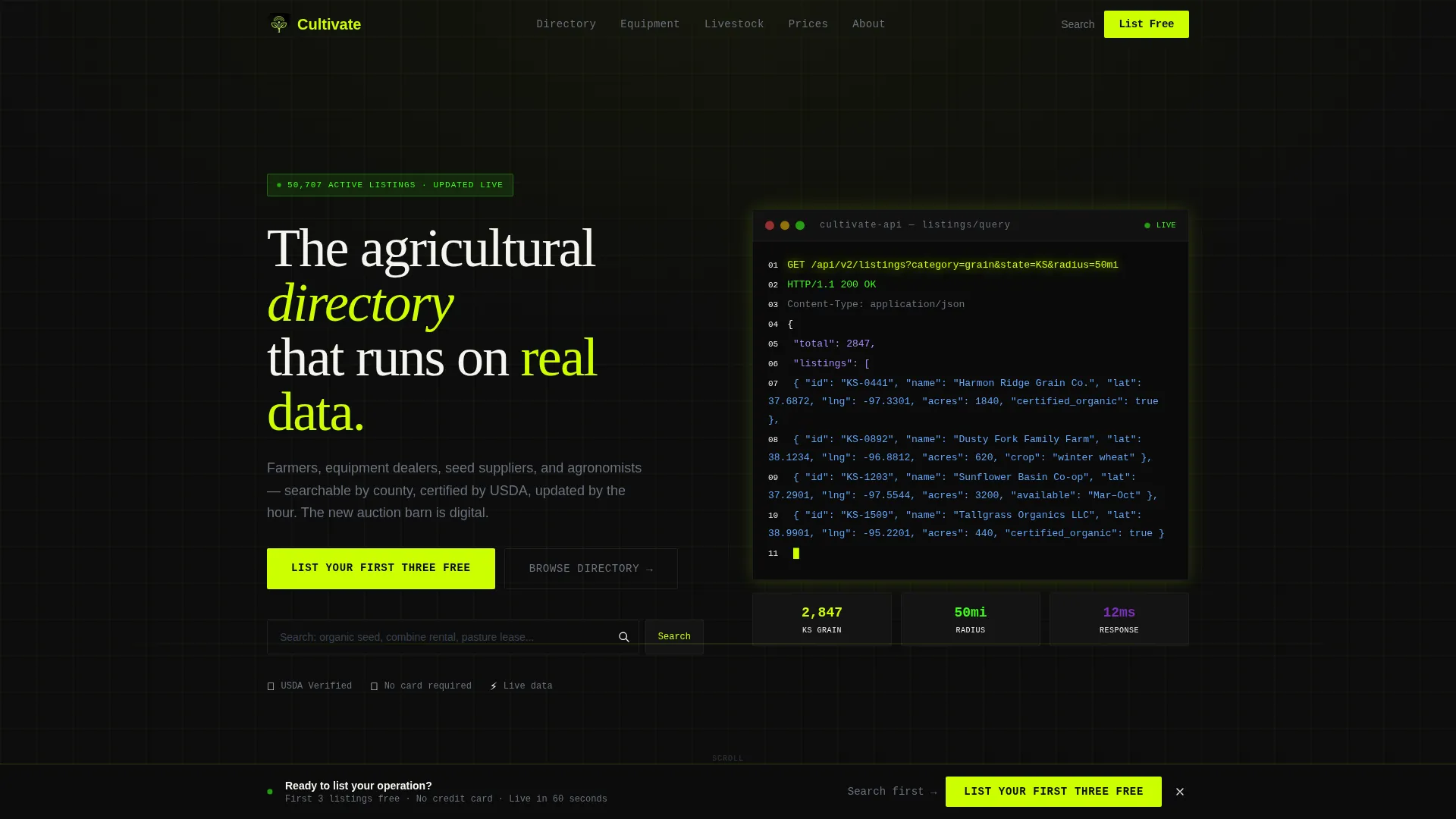
- A header terminal block with a typing animation simulating a live application programming interface (API) call pulling listing data by category, state, and radius
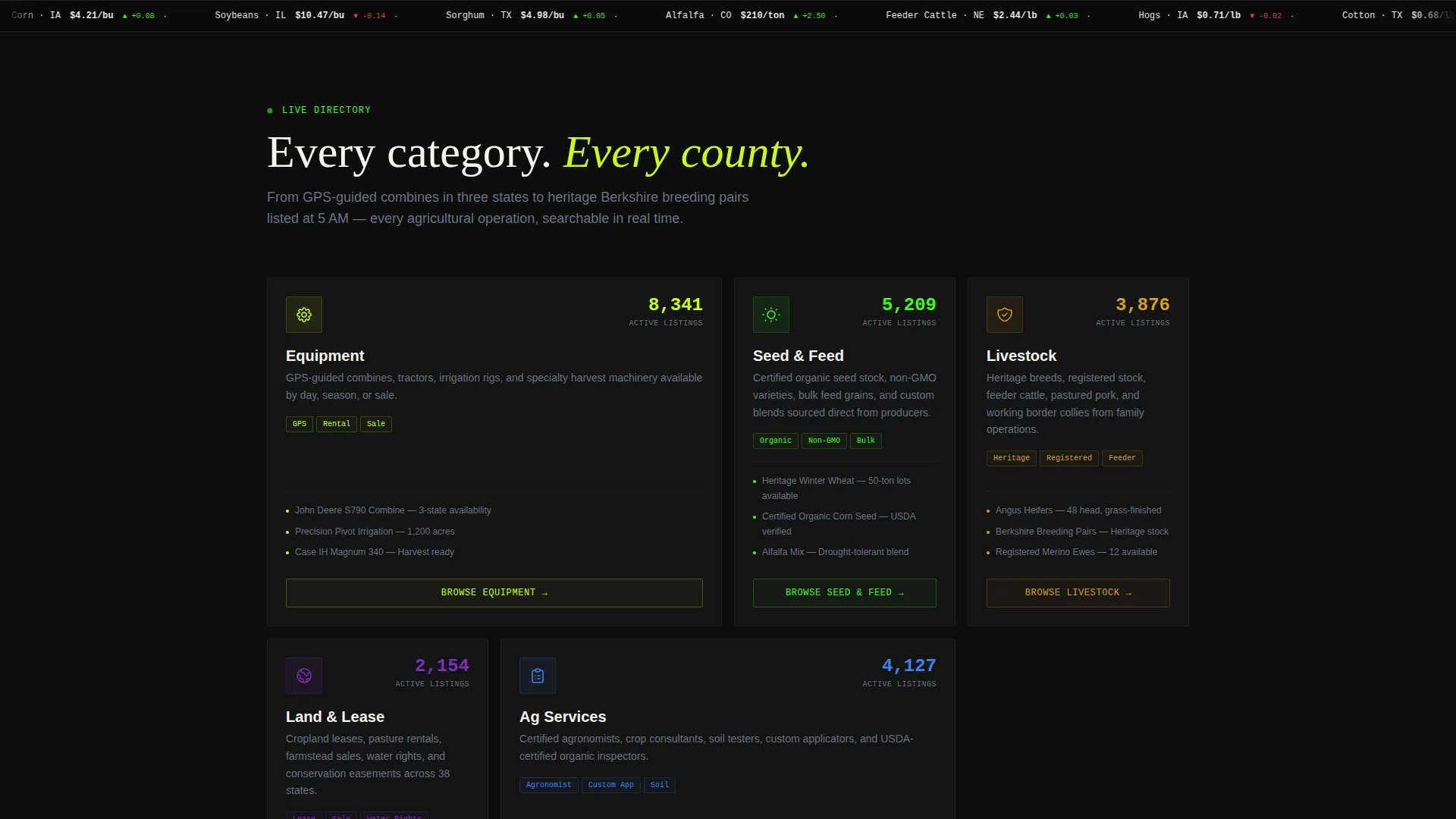
- Five modular listing category card groups covering Equipment, Seed and Feed, Livestock, Land, and Services, each with live counter displays
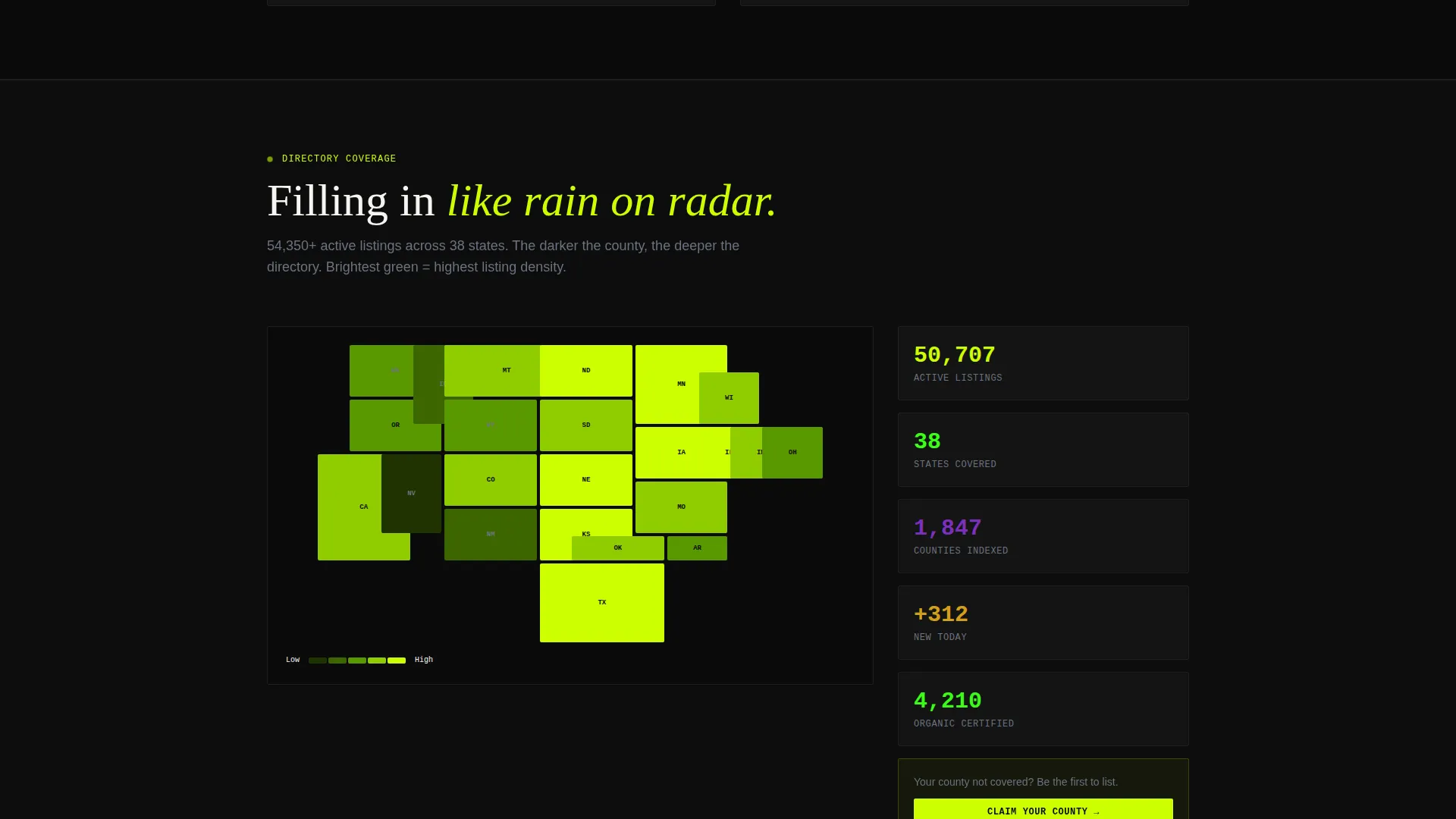
- A two-step inline listing form, a floating conversion bar, a county-level coverage heatmap section, and a live sandbox demo panel
Feature list
This template brings together several purpose-built components that serve the agriculture directory use case directly. Each one is designed to communicate platform credibility and drive action.
Terminal Code Snippet Header
The header opens with a styled terminal block showing a live API call: GET /api/v2/listings?category=grain&state=KS&radius=50mi. JSON response fragments cascade below it with a typing animation, and actual farm names and coordinates populate in real time. Chartreuse syntax highlighting pulses against pure black, establishing technical credibility before a single line of marketing copy appears.
Modular Category Card Grid
Five listing category cards tile across the viewport: Equipment, Seed and Feed, Livestock, Land, and Services. Each card displays a live counter ticking upward to show total active listings. The card grid is the visual backbone of the page, designed to feel like a newly opened auction barn with every stall numbered and ready.
Launch Energy Scroll Sequence
The page builds momentum as users scroll. The code snippet detonates into an expanding card grid, sections escalate from browsing to listing creation, and a county coverage heatmap fills in like radar rain across the screen. Motion easing drives every element entrance, with cards flipping and counters spinning to maintain energy.
Two-Step Inline Listing Form
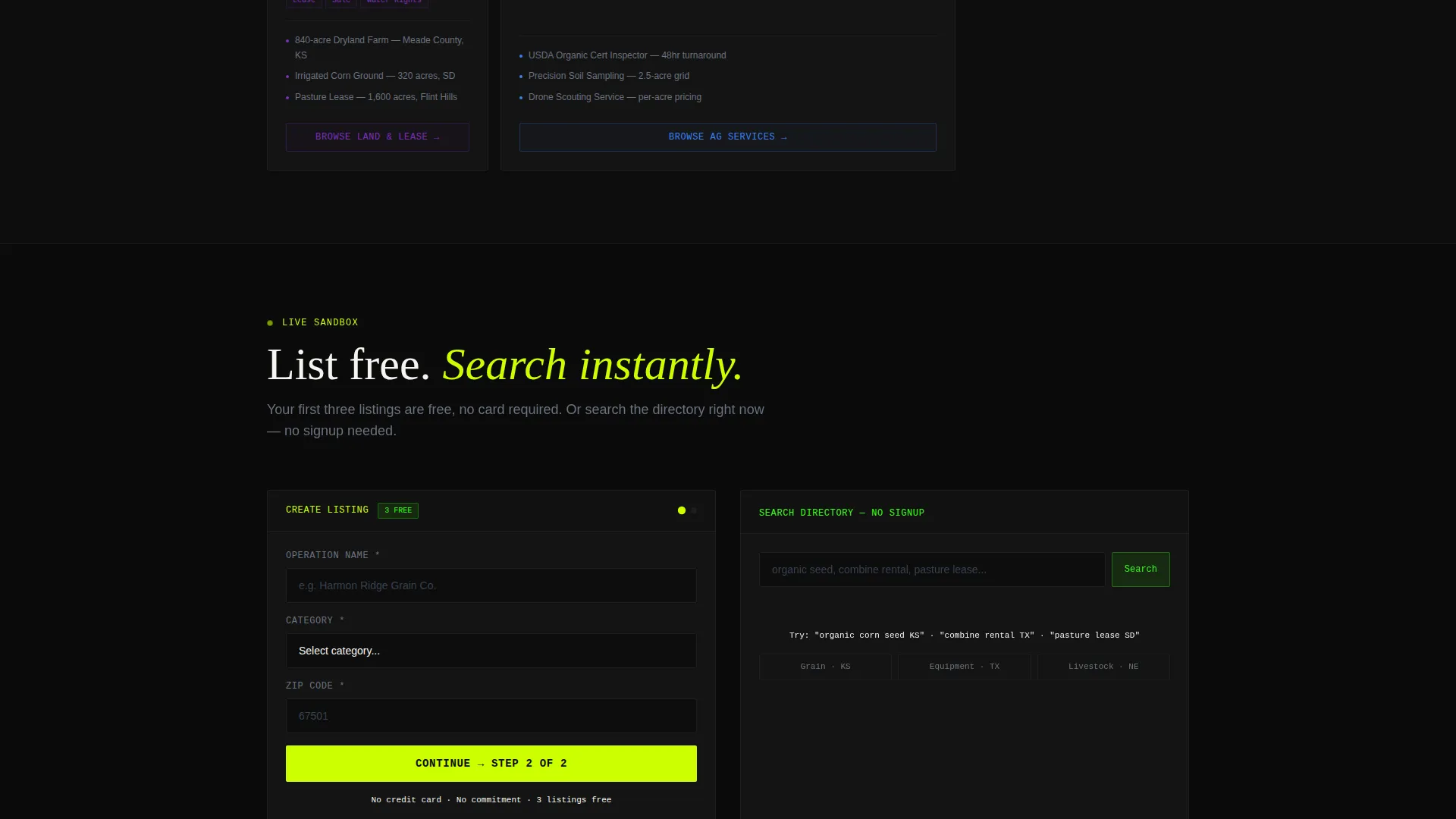
The primary conversion form is embedded inline and split into two focused steps. Step one captures operation name, category dropdown, and zip code. Step two asks for email and an optional phone number. Keeping the form lightweight reduces drop-off and gets new listers onto the platform quickly.
Floating Freemium Conversion Bar
After the second scroll section, a pinned bottom bar appears carrying the primary call to action: "List Your First Three Free." It stays visible as users continue browsing, keeping the conversion moment accessible without interrupting the discovery flow.
Live Directory Search Path
A secondary conversion path lets visitors search the directory immediately without creating an account. This seeds engagement before any commitment is required. The free listings demonstrate platform value, and the search experience proves directory depth, making the upgrade to premium placement a natural next step.
Page sections overview
| Section | Purpose |
|---|---|
| Terminal Header Block | Opens with a live API code snippet and typing animation to establish data credibility |
| Primary call to action Strip | Places "List Your First Three Free" directly beneath the header for immediate action |
| Category Card Grid | Tiles five listing categories with live counters to show platform breadth |
| Live Demo Sandbox | Lets visitors simulate creating a listing before committing to sign-up |
| County Coverage Heatmap | Visualizes directory reach by county, filling in like a radar screen on scroll |
| Floating Bottom Bar | Pins the freemium call to action persistently after the second scroll section |
| Two-Step Listing Form | Captures operation details and contact info across two lightweight steps |
Design & branding system
The visual identity follows an Acid Digital color system built to feel like a soil sensor dashboard glowing in a dark tractor cab at midnight. Agricultural grit collides with sharp interface energy across every component.
- Black (#0D0D0D) dominates all backgrounds; electric chartreuse (#CCFF00) drives headlines, card borders, and syntax highlighting; phosphor green (#39FF14) animates loading states and live-data indicators
- Data-stream violet (#7B2FBE) is reserved for hover states and notification pulses, rewarding every click with a distinct visual response
- The Dynamic Motion theme applies easing on all element entrances, card flips, counter spins, and heatmap fill sequences to sustain energy throughout the full scroll
Mobile & speed optimization
The card grid layout is modular by design, which makes it naturally adaptable across screen sizes. Sections reflow cleanly so the directory feels usable whether a rancher is on a desktop at the office or a phone in the field at 5 AM.
- Modular card components stack and reflow across viewport widths without breaking the category or counter structure
- The floating bottom bar remains pinned and accessible on smaller screens, keeping the freemium entry point always within reach
- Motion sequences are structured to entrance elements progressively, so the scroll experience remains legible even on narrower displays
How this template helps you convert
The template is built around a freemium model that lowers the barrier to entry while demonstrating platform value before asking for anything beyond a zip code.
- The "List Your First Three Free" call to action appears beneath the header and again in the floating bottom bar, giving visitors two low-friction moments to start listing without a credit card or account creation wall
- The live directory search path lets visitors explore real listings before signing up, proving the platform has depth and building trust that makes the two-step form feel worthwhile
- The upgrade to premium placement surfaces only after a user has already created listings, meaning the upsell moment arrives when the user already has something worth promoting
Other information about this template
Cultivate is built for the agriculture technology space, where the intersection of digital presence tools and agricultural directory platforms is growing. This template fits that niche directly.
- The template style is Card Grid (Modular), suited to directory and marketplace use cases where listings span multiple categories
- The header concept is a Code Snippet, a deliberate choice to signal that the platform is data-driven and infrastructure-backed from the first second of every visit
- Creative direction follows Launch Energy, a scroll-paced escalation pattern that mirrors the excitement of a new marketplace opening its doors for the first time
- The freemium and trial landing page direction is baked into the layout, making it straightforward to adapt the template for other directory or listing platform launches beyond agriculture
Theme
Dynamic Motion
Creative direction
Launch Energy
Color system
Acid Digital
Style
Card Grid (Modular)
Direction
Freemium/Trial
Page Sections
Terminal Code Snippet Header
Modular Category Card Grid
Launch Energy Scroll Sequence
Two-step Inline Listing Form
Floating Freemium Conversion Bar
Live Directory Search Path
Related questions
Who is this landing page template designed for?
Can visitors search the directory without creating an account?
How does the two-step listing form work?
What are the five listing categories in the card grid?
When does the upgrade prompt to premium placement appear?



