Curate - Powerful Subscription Box Landing Page Template
Curate is a split-screen landing page template built for subscription box CRM platforms. It opens with a live revenue calculator that hooks visitors with their own numbers, then guides them through a narrative scroll showing messy data transformed into clean, actionable intelligence. The design uses a deep Midnight Blue palette with electric teal accents, targeting subscription box operators ready to replace spreadsheets with a real nerve center.
by Rocket studio
Quick summary
Curate is a single-page template for subscription box CRM platforms. It pairs an interactive revenue calculator with a guided scroll experience that contrasts raw, cluttered data against organized platform views. Built on a Midnight Blue color system with electric teal accents, it earns the app download by showing visitors their own potential revenue recovery before asking for anything.
Who this template is for
This template is built for teams selling a vertical SaaS platform to subscription box operators. It speaks directly to the real frustrations of the people running these businesses every day.
- Small two-person teams running niche curation boxes who track subscribers in spreadsheets
- Mid-stage direct-to-consumer brands scaling past 5,000 subscribers who have lost a major cohort and need answers
- Agency operators managing multiple white-label subscription boxes who need one unified dashboard
What problem this template solves
Subscription box operators manage subscriber data across too many disconnected tools. The result is late-night spreadsheet sessions, missed churn signals, and no clear picture of revenue health.
- Visitors arrive unsure whether the platform is worth the switch from their current patchwork setup
- They need to see their own numbers in motion before they trust a new tool
- The page must earn a download without burying the value behind generic feature lists
What you get with this template
You get a full single-page layout designed around conversion through demonstrated value. Every section is structured to move a skeptical operator from "interesting" to "I need this."
- A live calculator header with pre-filled defaults and animated real-time results on the right panel
- A narrative scroll experience with tabbed split-screen sections showing raw data versus the CRM view
- A sticky bottom call-to-action bar, a modal demo sandbox path, and integration badges alongside every call to action instance
Feature list
This template is built around five core functional building blocks, each grounded in the prompt brief.
Live Revenue Calculator Header
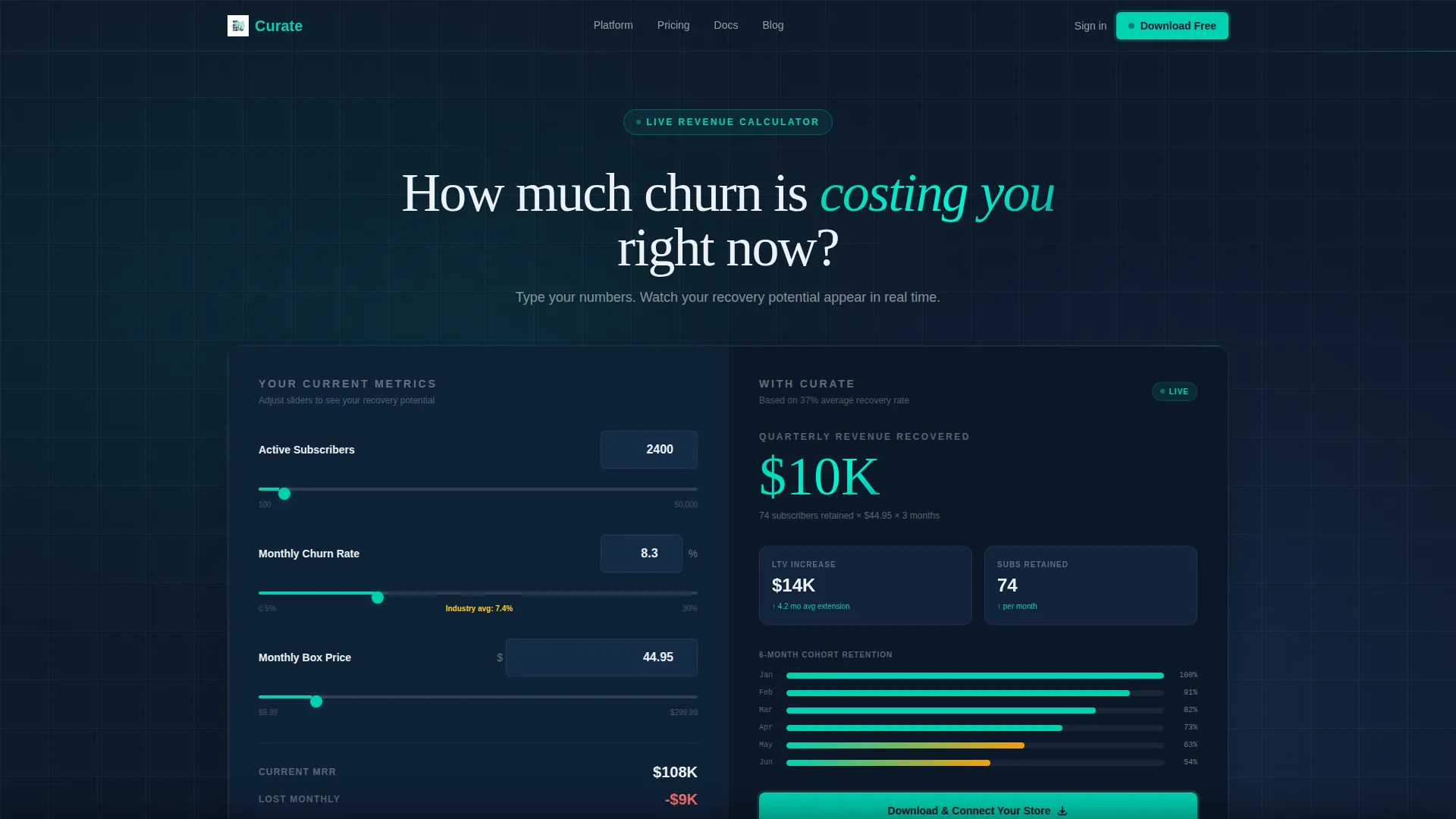
The header splits the viewport 50/50. On the left, visitors enter their subscriber count, monthly churn percentage, and box price. The right panel animates recovered revenue per quarter, projected lifetime value increase, and a cohort chart whose bars grow in real time as sliders are adjusted. Pre-filled defaults (2,400 subscribers, 8.3% churn, $44.95 per box) make the tool feel immediately relevant.
Narrative Scroll with Split-Screen Panels
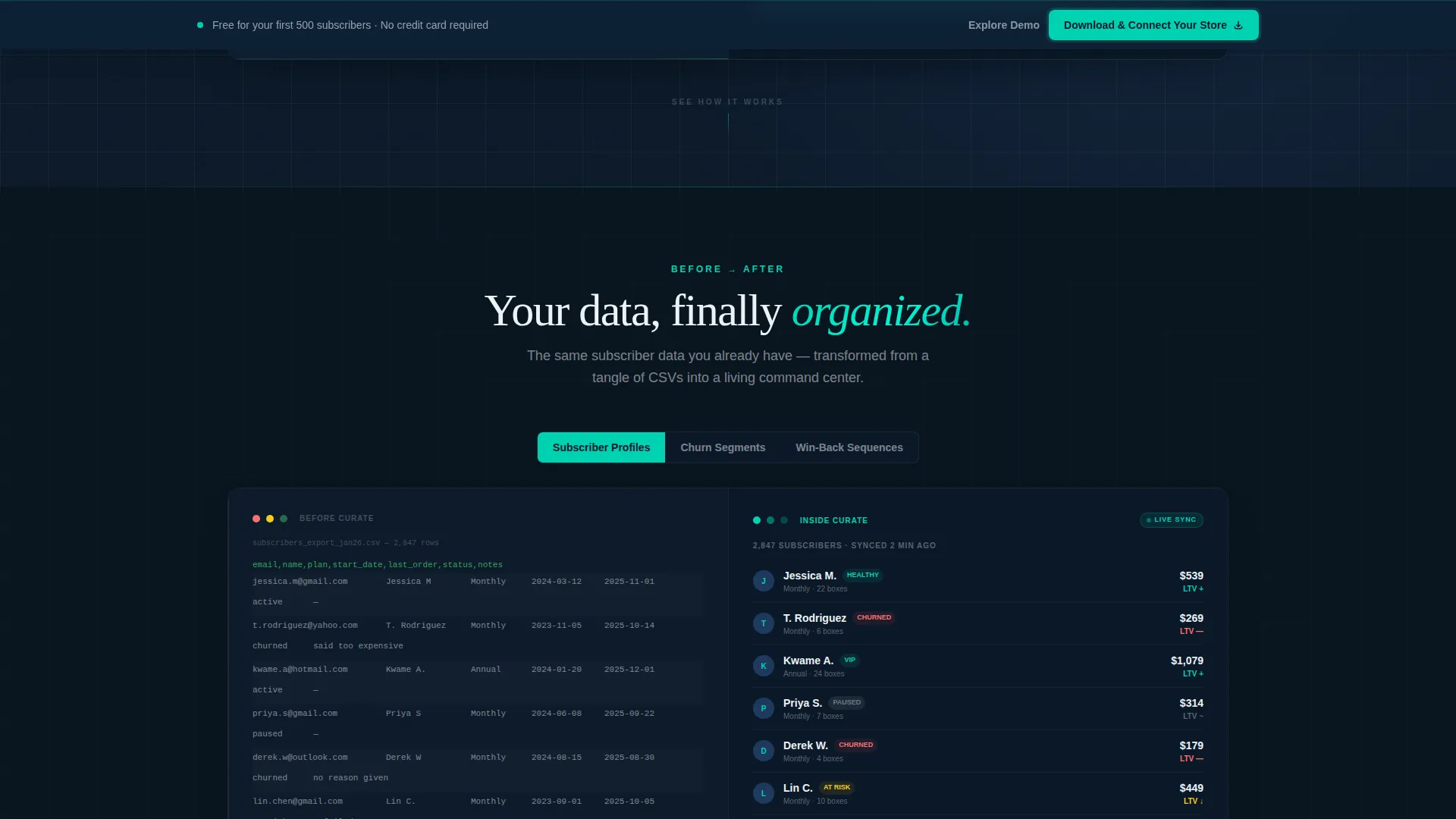
After the calculator, the scroll becomes a guided platform tour. Each section pairs a left panel showing messy source data (a CSV export, a cluttered inbox, a raw order list) against a right panel showing the same data inside the CRM, organized and color-coded. The narrative escalates from clean data, to working data, to predictive data.
Tabbed Module Explorer
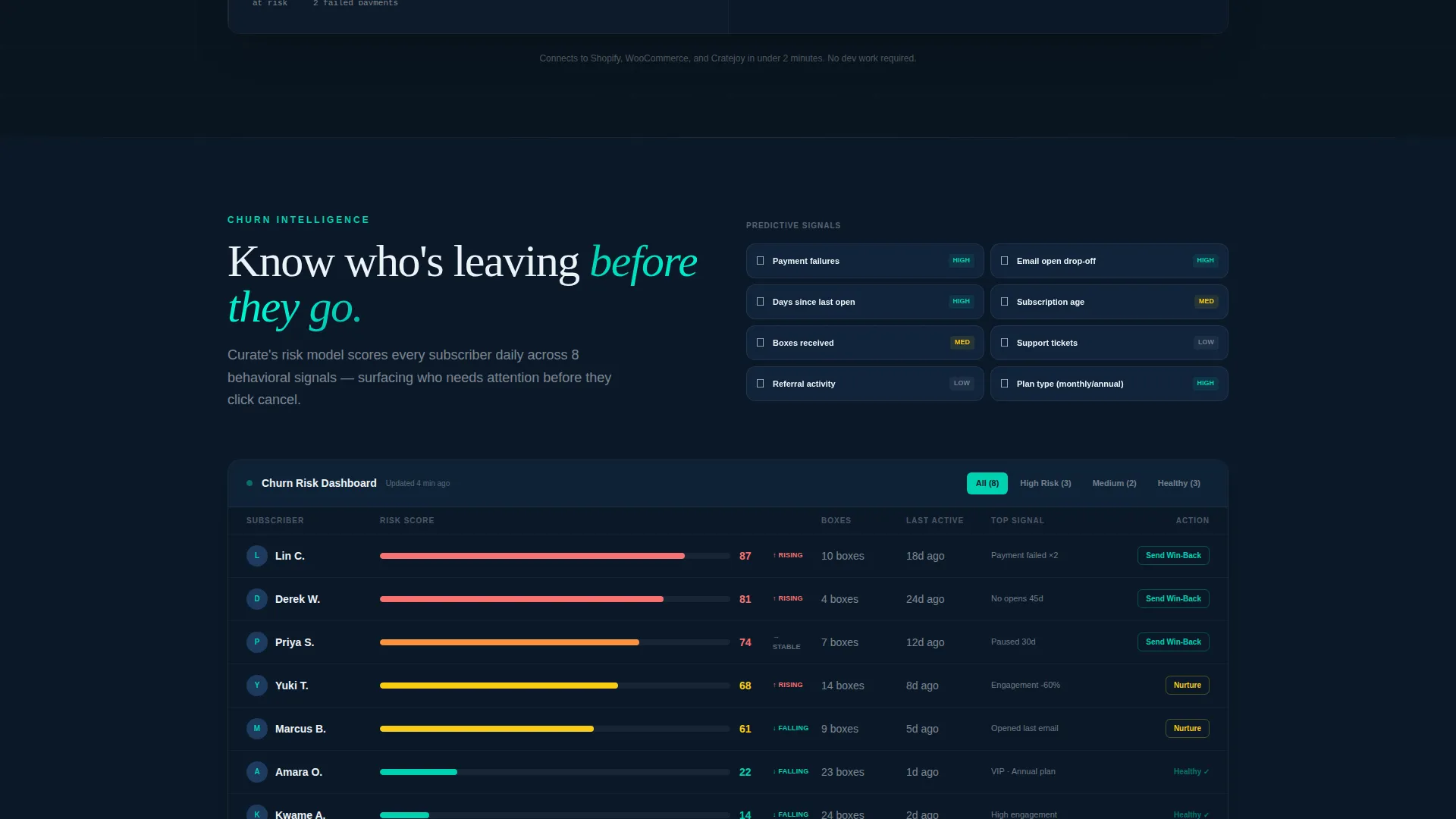
Within each split-screen scroll section, visitors can click tabs to explore subscriber profiles, churn prediction dashboards, and automated win-back sequences. This keeps the page tight while letting curious visitors go deeper into specific platform modules without leaving the page.
Sticky call to action Bar with Dual Paths
A sticky bottom bar appears after the second scroll section and persists as the visitor continues reading. It carries the primary call-to-action "Download and Connect Your Store" alongside a secondary "Explore the Demo Dashboard" link that opens an interactive sandbox in a modal overlay.
Trust and Friction-Reduction Layer
Every call-to-action instance displays one-click integration badges for the two major commerce platforms referenced in the brief, plus a "free for your first 500 subscribers" commitment. This reduces hesitation at the exact moment a visitor is deciding whether to act.
Page sections overview
| Section | Purpose |
|---|---|
| Calculator Header | Show real-time revenue recovery using visitor's own numbers |
| Animated Results Panel | Display recovered revenue, lifetime value lift, and cohort chart |
| Raw versus. CRM Split | Contrast messy data exports with organized CRM views |
| Tabbed Module Explorer | Let visitors browse subscriber profiles and churn dashboards |
| Win-back Sequence Panel | Demonstrate automated re-engagement flows inside the platform |
| Sticky call to action Bar | Keep the primary download action visible throughout scroll |
| Demo Modal Path | Offer an interactive sandbox for visitors not ready to install |
| Integration Badges Row | Reduce friction with one-click commerce platform connections |
Design & branding system
The visual identity follows a Directory and Discovery theme anchored in a Midnight Blue palette. The overall feel is described as the bridge of a ship at night, where every light is meaningful and nothing is decorative.
- Deep command-center navy (#0B1929) anchors all backgrounds; steel-slate (#1E3A5F) surfaces cards and secondary panels
- Crisp lunar white (#EDF2F7) handles all typography and breathing space throughout the layout
- Electric teal (#00D1B2) fires on every interactive element, toggle, hover state, and the pulsing "Calculate" action
Mobile & speed optimization
The split-screen layout is designed with responsive stacking in mind, so the 50/50 viewport split reflows naturally on smaller screens without losing the visual narrative logic.
- The calculator and results panel stack vertically on mobile so both sides remain fully readable
- Tabbed sections collapse cleanly, keeping module exploration functional on touch devices
- The sticky call to action bar is sized for thumb reach and remains visible without obscuring core content
How this template helps you convert
The conversion strategy is built into the page's structure rather than bolted on at the end. Visitors earn their own reason to act before the template ever asks them for a click.
- The calculator opens with pre-filled defaults, so visitors see a meaningful revenue number within seconds of landing, creating immediate personal relevance before any feature is described.
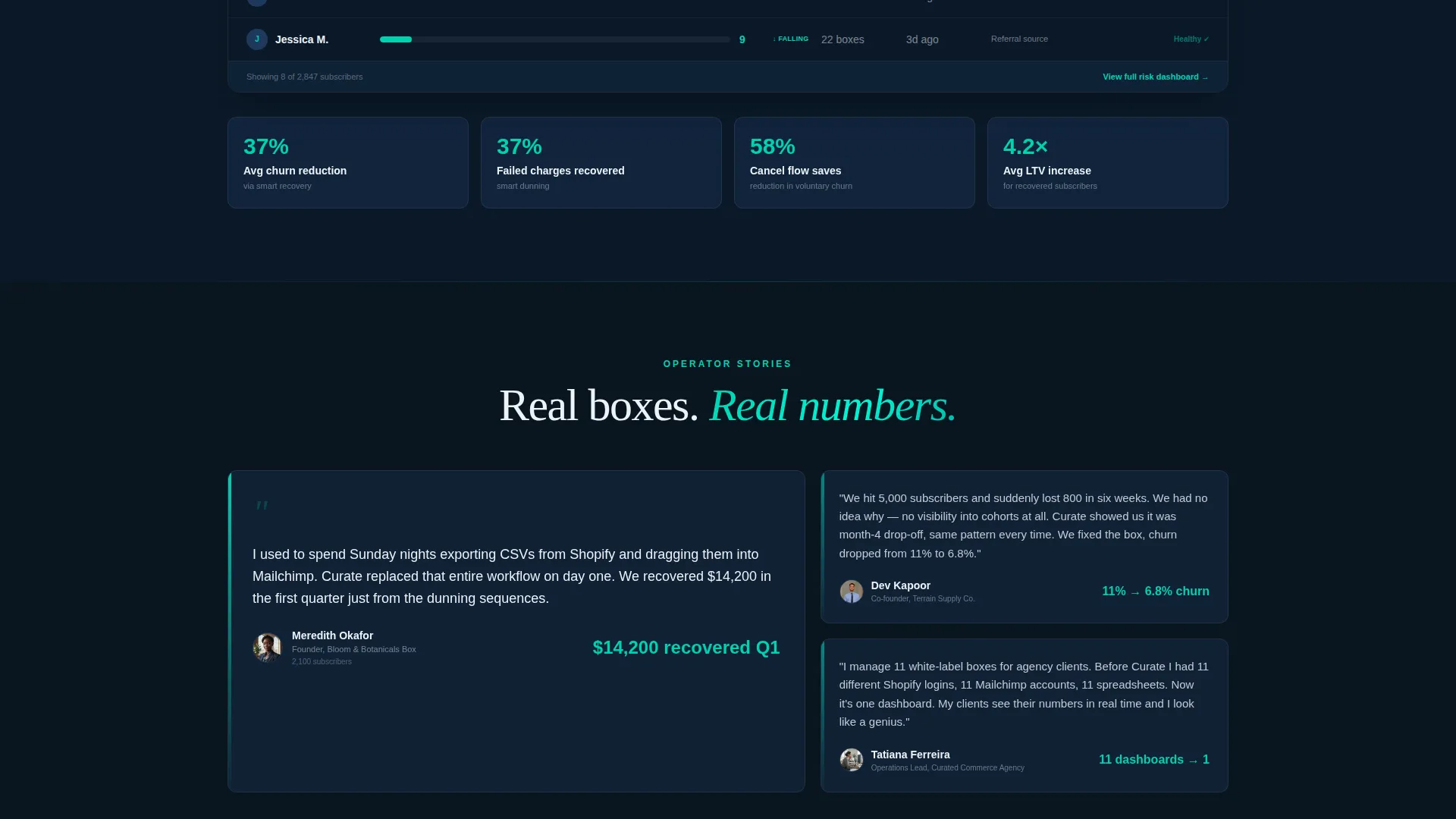
- The narrative scroll moves from "see your data clean" to "see your data predicting what happens next," building trust in layers so that by the time the sticky call to action bar appears, the visitor has already seen the platform work.
- The dual call to action paths (download or explore the demo) remove the binary pressure of a single ask, giving hesitant visitors a lower-commitment option that still moves them into the product experience.
Other information about this template
This template is categorized under Technology, specifically the Subscription Box Vertical SaaS subcategory. It is designed for teams building or marketing a subscription box CRM platform.
- The template style is Split Screen (50/50), and the creative direction is Interactive Explorer
- The header concept is a Calculator and Estimator, and the primary landing page direction is App Download
- The theme is Directory and Discovery, which informs the structured, shelf-labeled visual organization of every section
Theme
Directory & Discovery
Creative direction
Interactive Explorer
Color system
Midnight Blue
Style
Split Screen (50/50)
Direction
App Download
Page Sections
Live Revenue Calculator with Animated Results
Narrative Split-screen Scroll Sections
Tabbed Module Explorer
Sticky Call to Action Bar with Dual Conversion Paths
Friction-reduction Trust Layer
Related questions
Can I adjust the calculator defaults to match my platform's typical customer profile?
Does the template include actual CRM or dashboard functionality?
How does the dual call to action path work for visitors not ready to install?
When does the sticky call to action bar appear during the scroll?
Who is this template designed for?



