Micro-SaaS & Developer Tools Professional Website Template
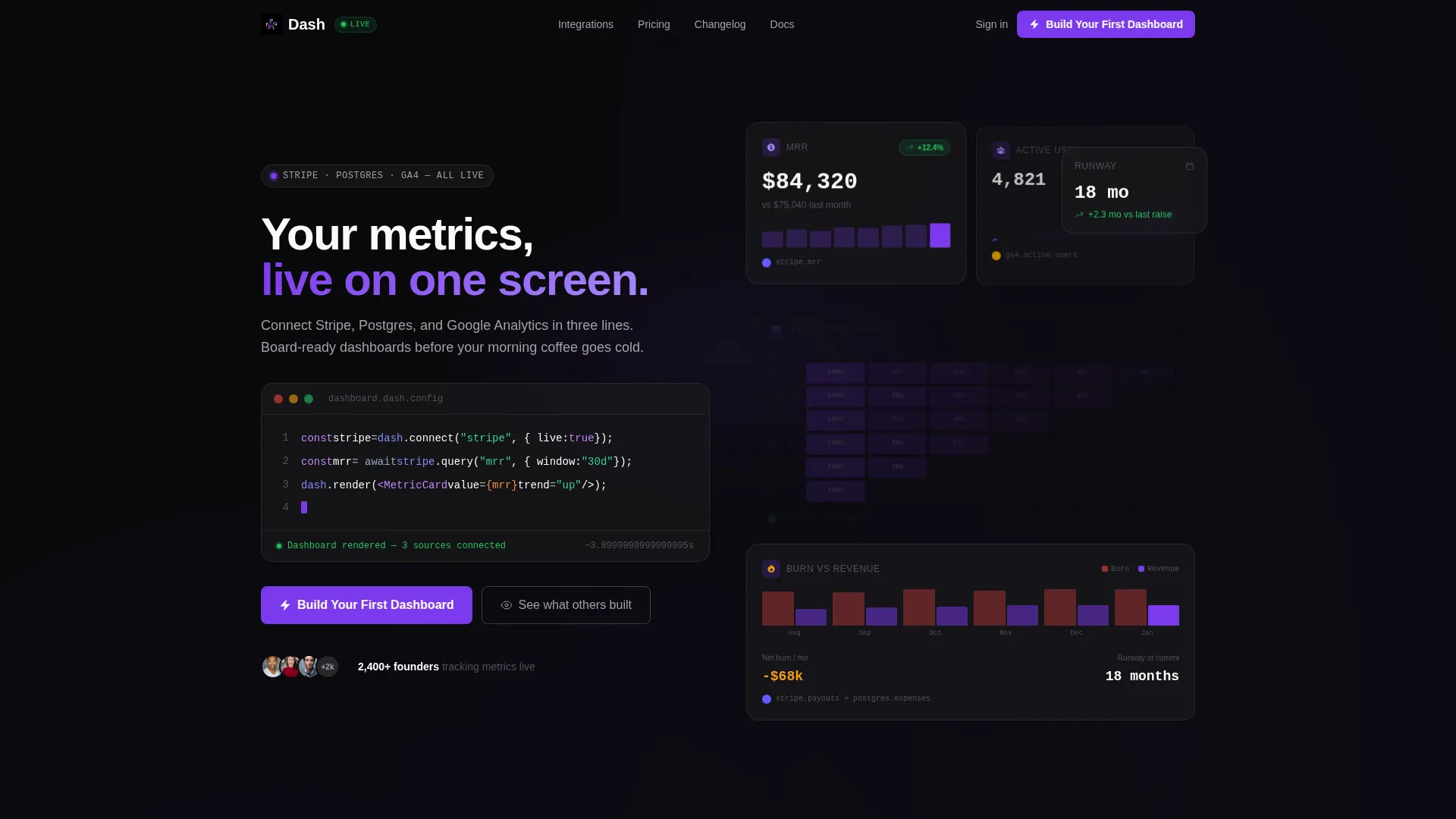
Dash is a bento grid landing page template built for dashboard builder products. It targets seed-stage founders, growth leads, and technical operators who need one screen that shows everything. The design uses a dark Void and Violet color system, a live code-snippet hero, and a click-through structure that puts the product experience before the marketing pitch.
by Rocket studio
Quick summary
Dash is a single-page bento grid template designed for dashboard builder platforms. It opens with a syntax-highlighted, animated code snippet that doubles as the hero. Visitors interact with sample data sources before they read a single marketing line. The color system is permanently dark, the type is phosphor white, and every interactive surface pulses in electric violet.
Who this template is for
This template is built for founders and technical teams launching a dashboard or data tool to a developer-leaning audience. It speaks the visual language that seed-stage operators already trust.
- Seed-stage founders and CTOs who need to communicate product value fast
- Growth leads and operators who run activation funnels and burn-rate tracking
- Solo builders shipping a data product to a technical early-adopter audience
What problem this template solves
Most landing pages for data tools describe the product instead of showing it. Visitors leave before they feel anything. Dash flips that sequence by leading with an interactive bento grid. The product is the hero, not a screenshot of it.
- Founders lose conversions because a form or a video stands between the visitor and the product feeling
- Technical audiences distrust marketing copy that does not show real capability
- Generic light-mode templates feel wrong for a tool that lives in dark mode and terminal windows
What you get with this template
You get a fully structured bento grid landing page with every section pre-built and ready to customize. The layout escalates capability as the visitor scrolls, from one card to a full composable grid.
- An animated code-snippet hero block with live typing effect and bento cards that populate beside it
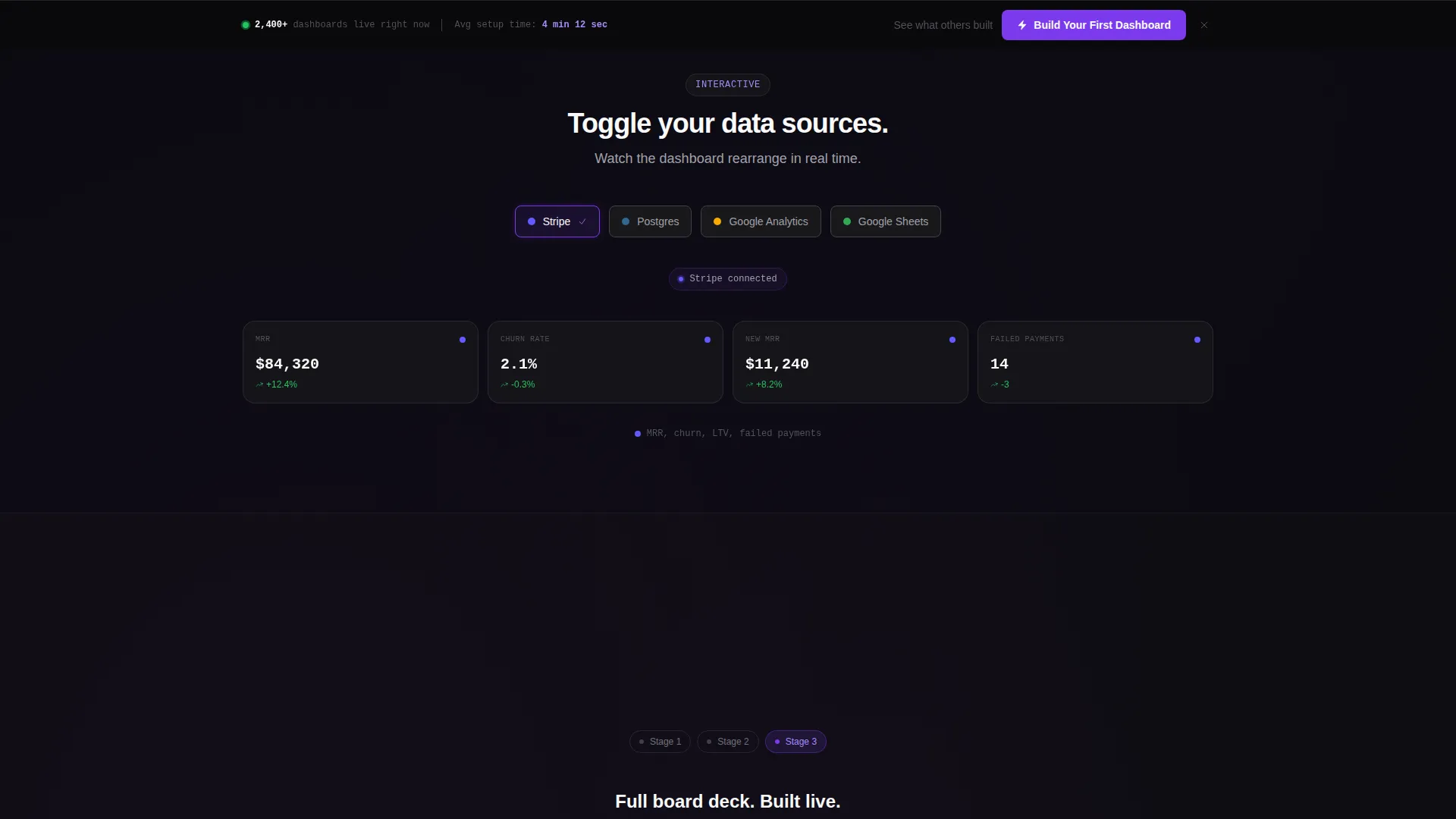
- An interactive data-source toggle section where visitors switch between sample sources and watch cards rearrange
- A persistent bottom bar with a primary call-to-action and a secondary text link pointing to a customer dashboard gallery
Feature list
This template ships with focused, purpose-built components that match the needs of a dashboard builder product page.
Animated Code Snippet Hero
The header displays a real, syntax-highlighted code block in a clean monospaced font against void black. It animates line by line as if being typed live. Each line triggers a neighboring bento card to populate, turning the hero into a working product demo.
Interactive Bento Grid Layout
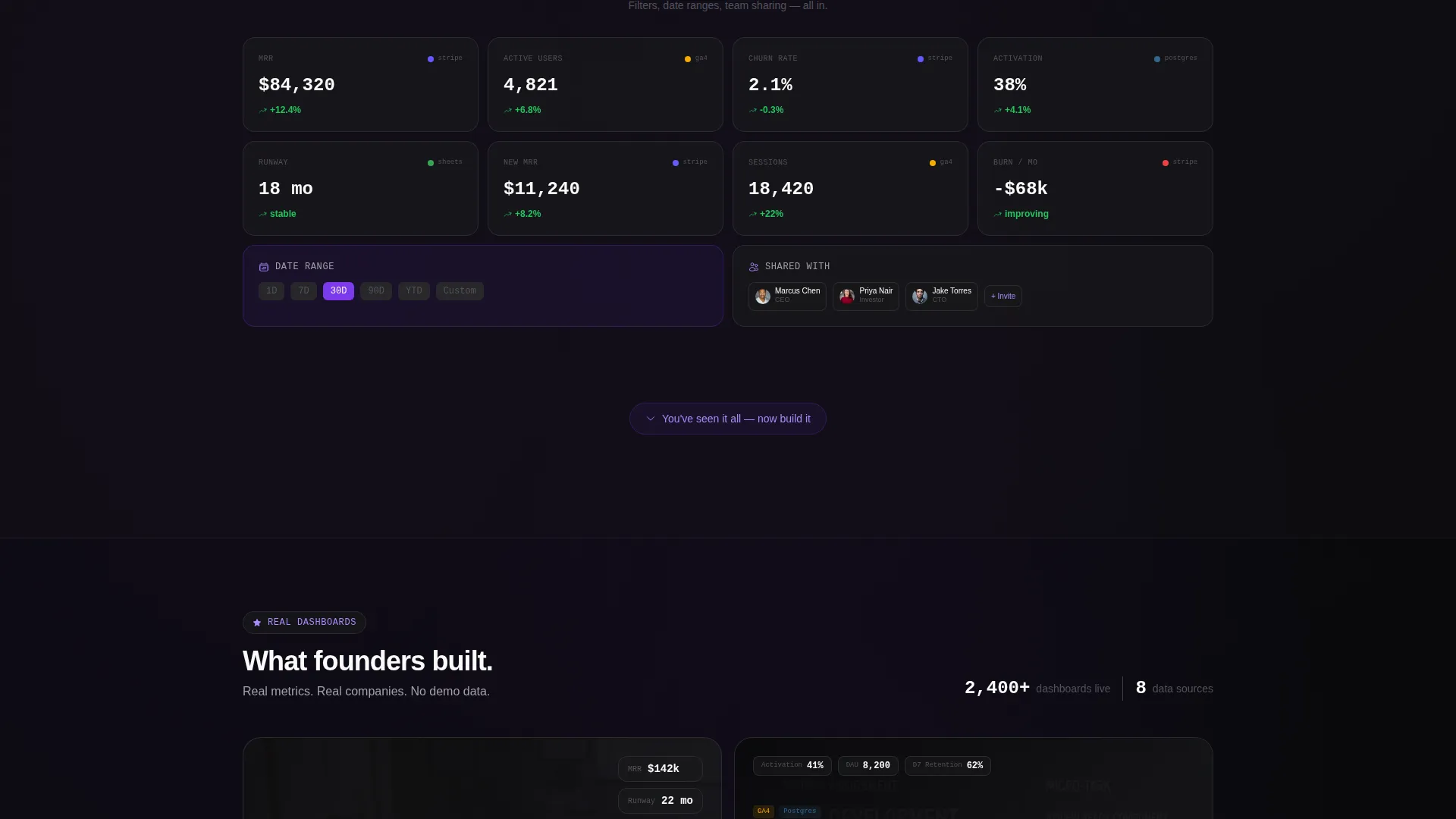
Visitors can toggle between sample data sources and watch dashboard cards rearrange and fill with data in real time. The grid starts with one metric card and expands across scroll depth to show filters, date ranges, and team-sharing states.
Scroll-Escalating Capability Sections
Each scroll section reveals a more capable version of the same tool. The sequence moves from a single metric to a four-card grid, then to a full dashboard view with filters and sharing controls. The structure builds confidence without a single feature bullet.
Persistent Click-Through Call-to-Action
The primary call-to-action button appears inside the header tool and again as a sticky bottom bar after the first scroll. One click drops the visitor into a pre-seeded workspace with demo data already connected. No form fields appear anywhere on the page.
Customer Dashboard Gallery
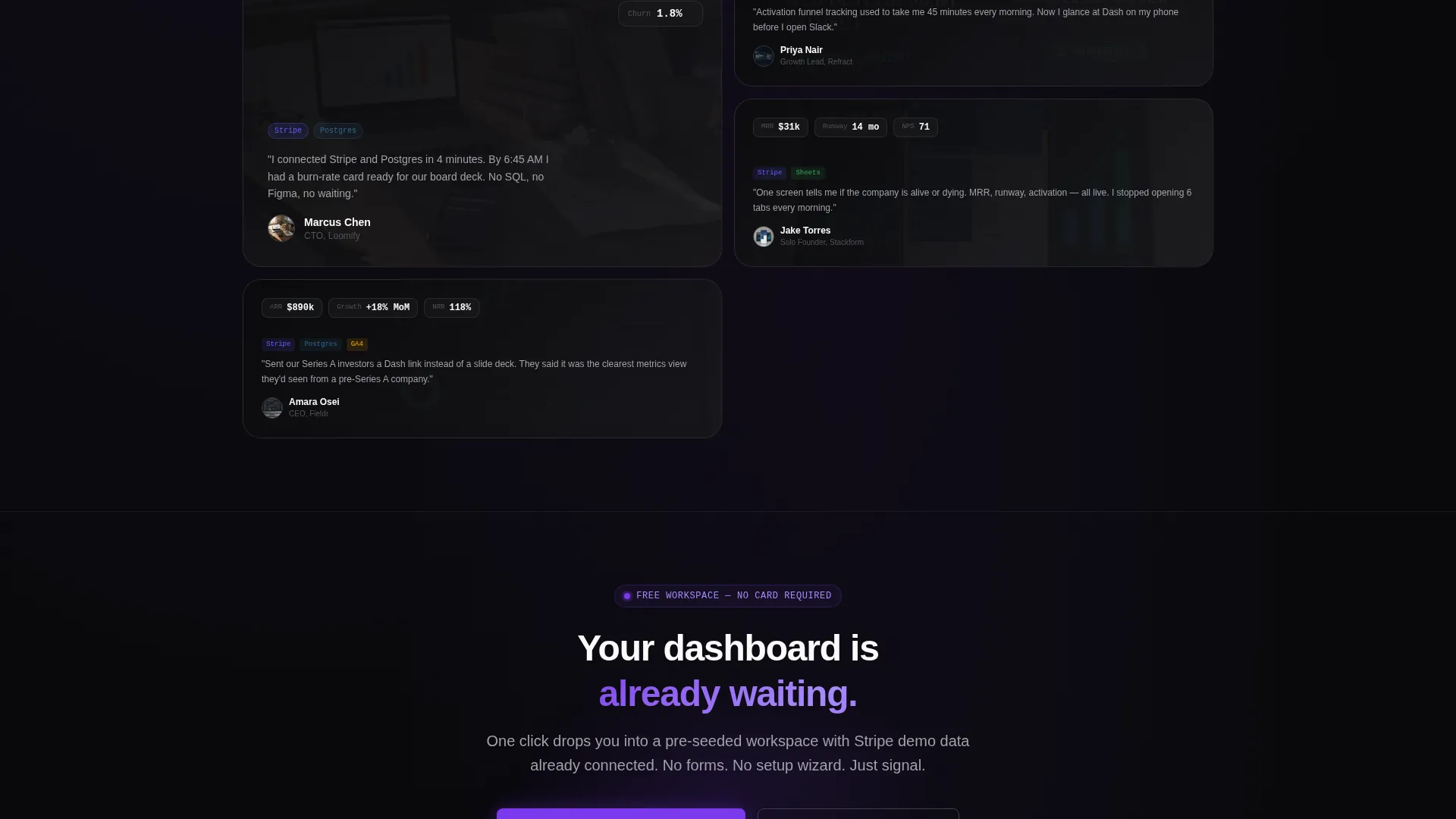
A secondary text link scrolls the visitor to a gallery of real customer dashboards. The gallery answers the implicit question of what others have built. It reduces hesitation by showing social proof in the form of actual output, not testimonials.
Void and Violet Visual System
Every interactive surface and data highlight uses electric violet. Background layers use absolute void black and deep space gray. Metric values and body type render in phosphor white. The palette is consistent across cards, buttons, code blocks, and hover states.
Page sections overview
| Section | Purpose |
|---|---|
| Animated Code Hero | Opens with live typing code snippet that populates bento cards beside it |
| Interactive Data Toggle | Lets visitors switch sample sources and watch cards rearrange in real time |
| Single Metric Card | First scroll section showing one live metric to establish the product feeling |
| Four Card Grid | Expands the grid to show a composed dashboard view |
| Filters and Sharing | Reveals advanced controls and team-sharing states as capability escalates |
| Primary call to action Bar | Persistent bottom bar with the main click-through action after first scroll |
| Dashboard Gallery | Customer-built dashboard examples linked from the secondary text action |
Design & branding system
The template uses a Startup Velocity theme built entirely around the Void and Violet color system. The visual language feels like a developer tool left in dark mode permanently.
- Absolute void black (#09090B) and deep space gray (#18181B) form all background layers and card surfaces
- Electric violet (#7C3AED) is applied to every interactive element, data highlight, and call-to-action surface
- Phosphor white (#FAFAFA) is used exclusively for metric values, body type, and code text to maintain contrast
Mobile & speed optimization
The bento grid layout is designed to reflow cleanly across screen sizes. Interactive elements remain accessible on smaller viewports without losing the dark-mode visual identity.
- Bento cards stack responsively so the escalating scroll sequence still reads correctly on mobile
- The code snippet hero adapts to narrower containers while preserving the monospaced font and syntax highlighting
- The persistent bottom bar stays visible across all viewport sizes so the primary action is always reachable
How this template helps you convert
The template earns the click by letting the visitor feel the product working before they encounter any sign-up friction. The conversion path is designed around one clear action with no form fields in the way.
- The interactive header demo gives visitors a hands-on product sense before any copy loads, building immediate trust with technical audiences who distrust pure marketing
- The scroll-escalating structure creates a progressive reveal that makes the product feel deeper and more capable the further a visitor reads, increasing intent before the call-to-action appears
- The one-click drop into a pre-seeded workspace removes all sign-up friction at the moment of highest intent, letting the product close the conversion instead of a form
Other information about this template
This template is categorized under Technology, specifically the Micro-SaaS and Developer Tools subcategory, with a niche focus on dashboard builder products. It is built for the intersection of technical credibility and fast conversion.
- The template style is Bento Grid, which is well-suited for data-dense products that benefit from card-based visual organization
- The landing page direction is Click-Through, meaning no lead-capture form appears on the page and the entire experience points toward one workspace action
- The header concept is a Code Snippet, which signals to developer audiences that the product understands their workflow before a single word of copy is read
- The creative direction is Calculator and Tool First, meaning the interactive product demo precedes any feature explanation
- This template fits well alongside tools in the broader dashboard builder and data visualization space, where visitors arrive with high intent and low patience for slow onboarding
Theme
Startup Velocity
Creative direction
Calculator/Tool First
Color system
Void & Violet
Style
Bento Grid
Direction
Click-Through
Page Sections
Animated Code Snippet Hero
Interactive Bento Grid with Data Toggles
Scroll-escalating Section Structure
One-click Click-through Conversion Path
Customer Dashboard Gallery
Void and Violet Design System
Related questions
What type of product is this template designed for?
Does this template include any form fields or sign-up flows?
Can I update the color system to match my own brand?
Who is the intended visitor for a page built on this template?
How does the scroll structure guide the visitor?



