Modern Warehouse Landing Page Template
The Lakehouse landing page template is built for data platform teams who need to communicate a unified data architecture in one compelling scroll. It pairs a live-typed SQL hero, an animated chaos-to-clarity architecture diagram, and a freemium trial conversion flow to turn skeptical engineers and budget-conscious CTOs into active sign-ups.
by Rocket studio
Quick summary
This is a single-page, scroll-reveal landing page template designed for a unified data lakehouse platform. It opens with a syntax-highlighted SQL hero that types itself live into the viewport, walks visitors through a Problem→Solution arc, and closes with a two-step freemium sign-up flow. Every section earns the next scroll through alternating technical proof and plain-language payoffs.
Who this template is for
This template is built for technical product teams that need to communicate serious data infrastructure in a way that converts. It speaks fluently to both the engineers evaluating the platform and the executives signing the invoice.
- Data platform leads and analytics engineers who need to show, not just tell, what a unified lakehouse solves
- CTOs and technical decision-makers comparing data infrastructure costs and stack complexity
- Product marketers launching a data platform product who want a page that feels credible to a deeply technical audience
What problem this template solves
Modern data stacks have become sprawling collections of warehouses, lakes, streaming tools, and transformation pipelines that rarely talk to each other cleanly. Teams duplicate work, schemas drift, and no single surface gives everyone a consistent view of the data. A landing page that glosses over this complexity loses the engineer's trust immediately.
- Visitors arrive skeptical; generic hero sections and abstract gradients fail to prove technical credibility
- The real pain, fragmented tooling, redundant models, runaway cloud costs, is rarely shown visually before asking for a sign-up
- Conversion paths often force a binary choice between "contact sales" and nothing, losing the self-serve engineer entirely
What you get with this template
You get a fully structured, single-page scroll-reveal layout purpose-built for a data lakehouse platform. Every section is pre-wired with a specific job: establish pain, demonstrate the solution, prove each capability layer, and capture a qualified lead.
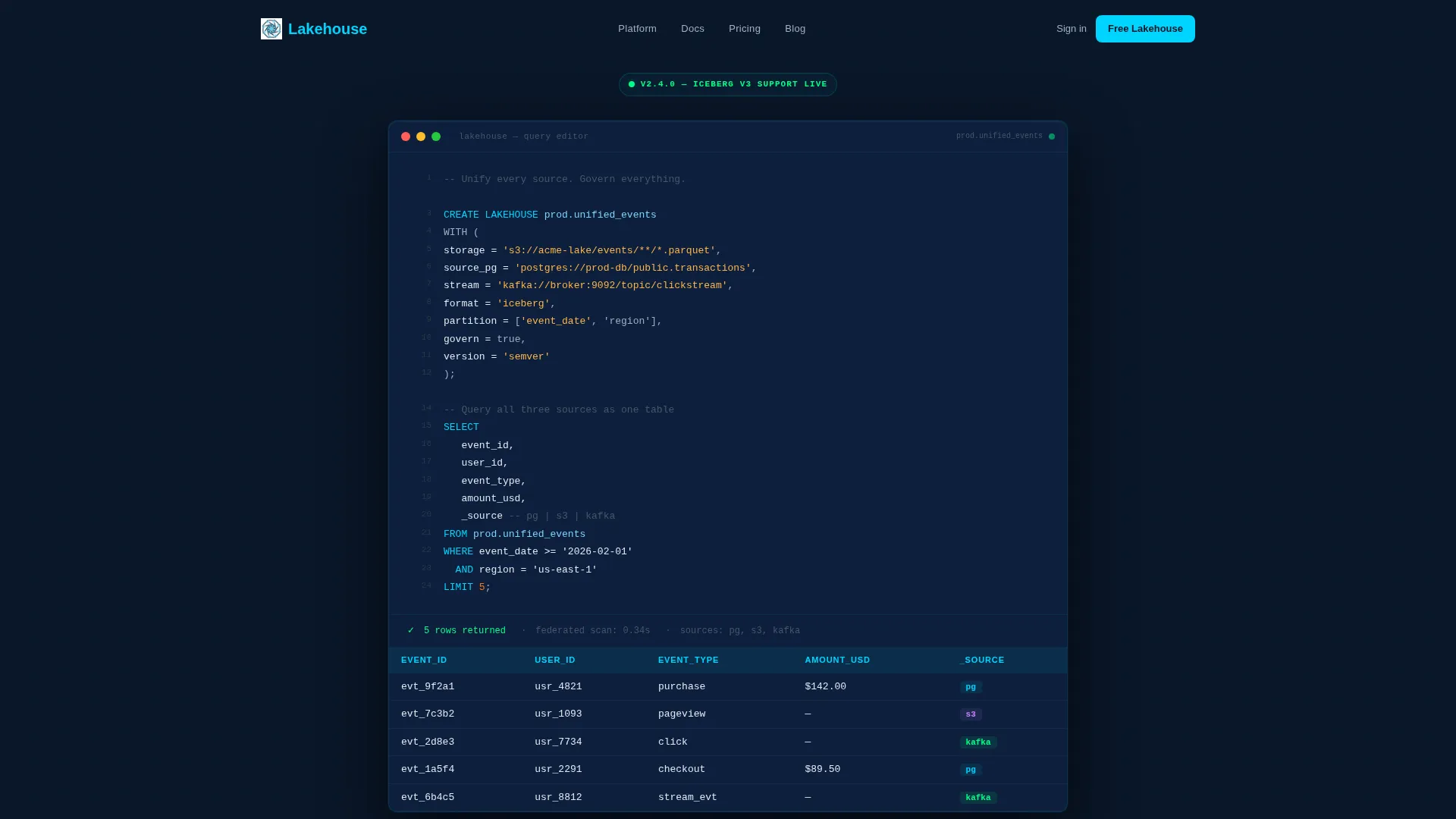
- A live-typing SQL hero block with a rendered results table and a tagline that fades in after execution
- An animated architecture diagram that builds into visual chaos and then collapses into a single unified node on the next scroll
- A two-step freemium sign-up form with cloud provider selection and a pre-configured sandbox starter template chooser
Feature list
This template ships with the following built-in design and layout capabilities, each grounded directly in the brief.
Live-Typed SQL Hero Block
The header opens with a fully syntax-highlighted CREATE LAKEHOUSE SQL statement that animates line by line as if someone is typing it live. The query unifies three real data sources, a transactional database, a parquet lake, and a streaming topic, and finishes with a SELECT * that renders results in a table below. A blinking cursor holds for one beat, then the tagline fades in beneath.
Animated Chaos-to-Clarity Diagram
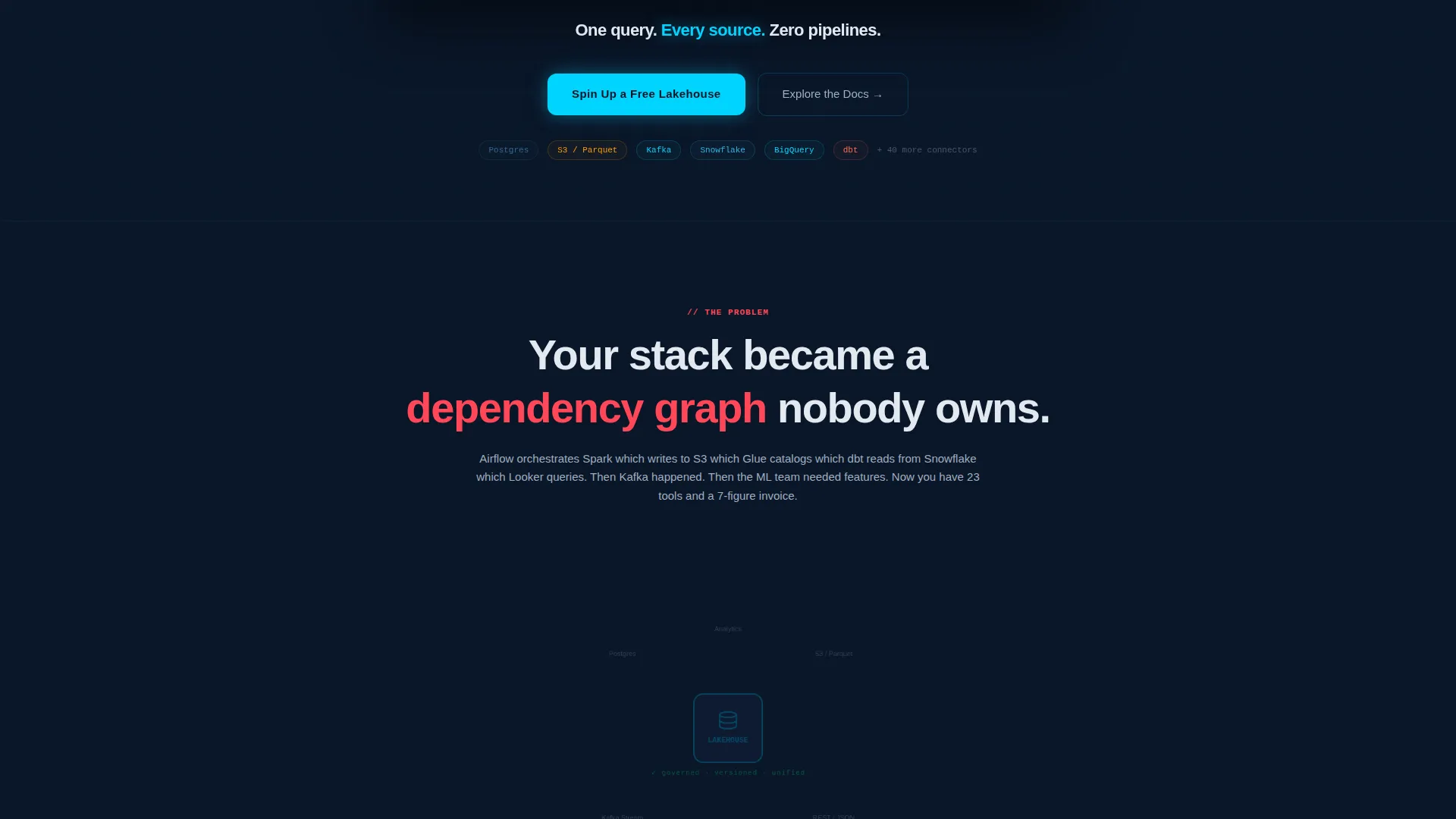
Section one uses a scroll-triggered architecture diagram that progressively fades in twelve disconnected tool logos connected by tangled red dependency lines. One more scroll collapses the whole diagram into a single unified node with clean radiating lines. The relief is visual and immediate, no explanation needed.
Capability Layer Reveal Sections
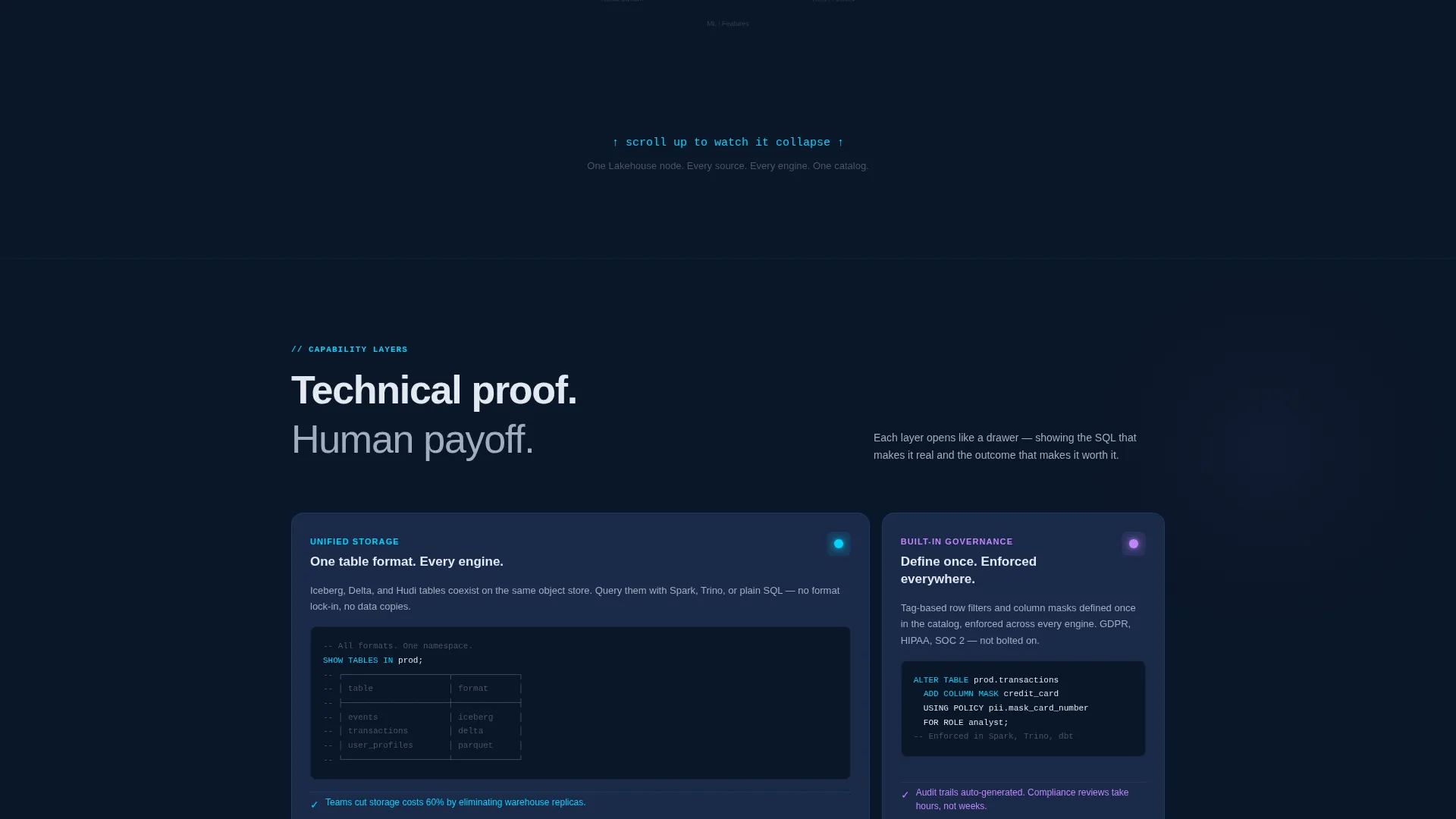
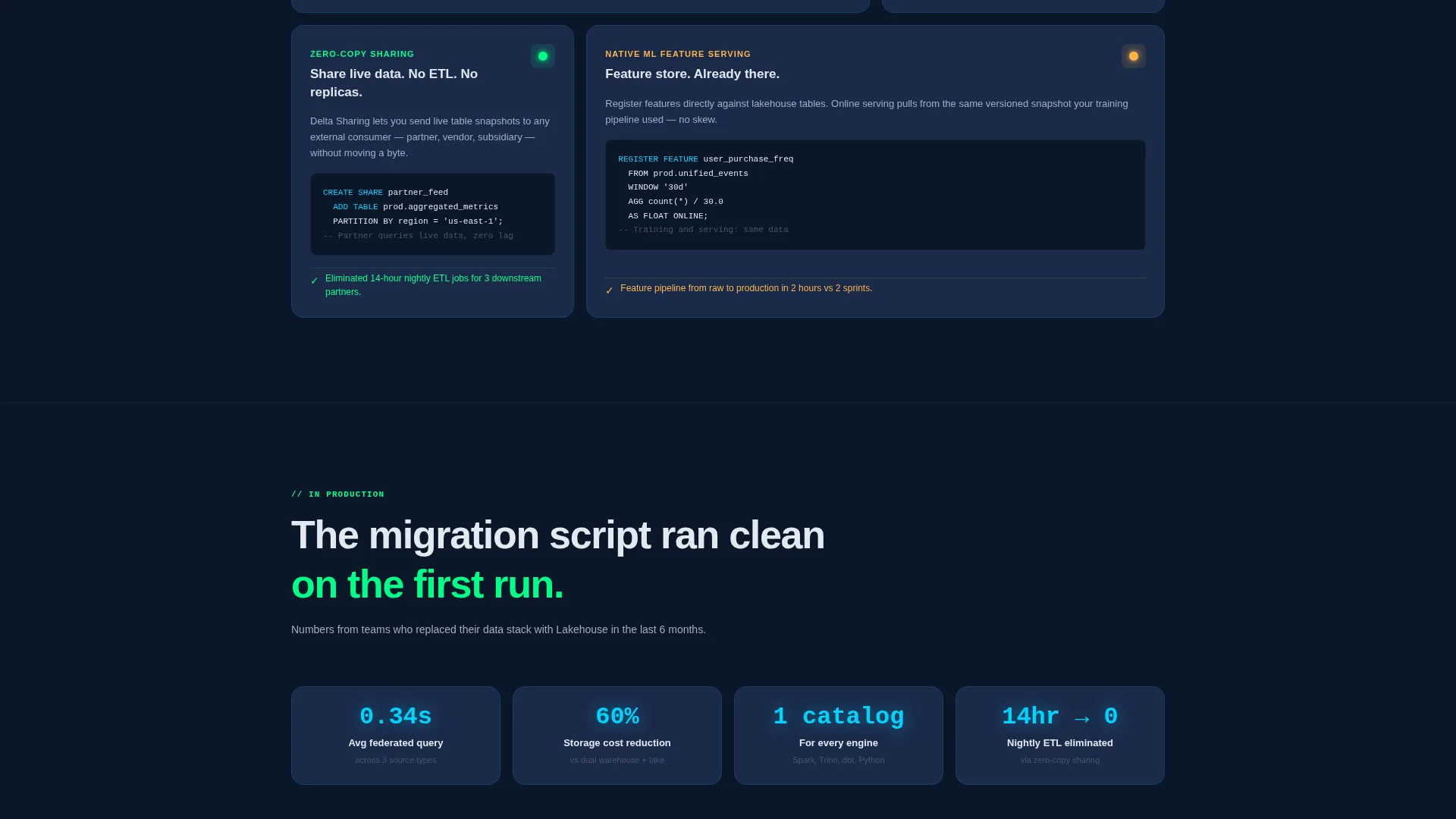
Each capability, unified storage, built-in governance, zero-copy sharing, native machine learning feature serving, scrolls in like a drawer opening. Every layer pairs a mini code snippet with a plain-language outcome sentence, keeping the rhythm of technical proof followed by human payoff consistent throughout.
Two-Step Freemium Conversion Form
The primary call to action opens a two-step form. Step one collects a work email and cloud provider preference (AWS, GCP, or Azure). Step two presents a starter template selector so the sandbox environment arrives pre-configured for the visitor's actual use case.
Floating Call-to-Action Bar
After the second scroll, a persistent floating bar pins the primary call to action to the viewport. It keeps the conversion entry point visible without interrupting the reading flow, re-surfacing at exactly the moment credibility has been established.
Secondary Documentation Path
A secondary call to action, "Explore the Docs", provides an escape hatch for engineers who need to read before they commit. This path leads to an interactive schema browser, giving self-serve visitors a meaningful next step that still moves them toward the platform.
Page sections overview
| Section | Purpose |
|---|---|
| Live SQL Header | Establishes technical credibility instantly with a typed query and rendered results |
| Tagline Reveal | Delivers the core value proposition after the query executes |
| Pain Architecture Diagram | Visualizes stack sprawl to create visceral recognition of the problem |
| Collapse to Lakehouse | Resolves the diagram into one unified node, communicating the solution architecturally |
| Unified Storage Layer | Proves the first capability with a code snippet and plain-language outcome |
| Built-in Governance Layer | Shows schema versioning and table governance with a paired snippet |
| Zero-Copy Sharing Layer | Demonstrates data sharing without pipeline duplication |
| ML Feature Serving Layer | Covers the machine learning operations use case with a code and outcome pairing |
| Primary call to action Section | Drives freemium sign-up with the two-step form |
| Floating call to action Bar | Keeps the sign-up action pinned after the second scroll |
| Secondary Docs Path | Offers the interactive schema browser for self-serve engineers |
Design & branding system
The visual identity follows a Directory and Discovery theme built on a Midnight Blue color system. Every color choice is intentional, the palette reads like a well-organized integrated development environment at midnight, where information glows against controlled darkness rather than competing with decoration.
- Background uses void-dark navy (#0A1628) as the primary canvas, with deep steel (#1B2A4A) for card surfaces and section dividers, so the page feels like a live terminal session
- Electric cyan (#00D4FF) handles syntax highlights, interactive accents, and the primary call-to-action button, making every actionable element instantly recognizable
- Body text in muted silver (#A0AEC0) floats cleanly against the dark field, keeping long technical copy readable without harshness
Mobile & speed optimization
The scroll-reveal animation system and dark-field layout are designed to translate clearly across screen sizes. The progressive reveal structure means content loads in staged sections rather than all at once, keeping the experience manageable on smaller viewports.
- Each capability layer section is designed as a self-contained drawer, so it stacks cleanly on mobile without losing the snippet-plus-outcome pairing
- The floating call-to-action bar is viewport-relative, meaning it remains accessible on both desktop and mobile scroll without obscuring content
How this template helps you convert
This template is built around a deliberate conversion architecture. Every design and copy decision moves the visitor from skeptic to sign-up through earned trust.
- The live-typed SQL hero creates immediate technical credibility, engineers recognize real syntax and a real problem being solved before they read a single marketing sentence
- The chaos-to-clarity architecture diagram converts an abstract product promise into a felt experience, making the value of unification visceral rather than theoretical
- The two-step form with a pre-configured sandbox removes the friction of a blank-slate trial by delivering an environment already shaped around the visitor's specific pain point
Other information about this template
This template is categorized under Technology, specifically within the Data Lakehouse Technology subcategory and the Data Lakehouse Platform niche. It is well-suited for teams building or marketing platforms in the modern data stack space.
- The template style is Scroll Reveal (Progressive), meaning sections animate into view as the visitor scrolls rather than loading all content at once
- The header concept is a Code Snippet, no stock photography or abstract gradients are used anywhere on the page; the code itself serves as the hero image
- The creative direction follows a Problem→Solution Arc, a structure proven to resonate with technical buyers who distrust marketing claims unsupported by architectural evidence
- The landing page direction is Freemium and Trial conversion, with a primary call to action of "Spin Up a Free Lakehouse" and a secondary path to interactive documentation
Theme
Directory & Discovery
Creative direction
Problem→Solution Arc
Color system
Midnight Blue
Style
Scroll Reveal (Progressive)
Direction
Freemium/Trial
Page Sections
Live-typed SQL Hero with Results Table
Animated Chaos-to-clarity Architecture Diagram
Progressive Capability Layer Reveals
Two-step Freemium Sign-up Form
Persistent Floating Call to Action Bar
Secondary Documentation Conversion Path
Related questions
Who is this landing page template designed for?
Does the hero section use stock photography or abstract visuals?
What does the two-step freemium sign-up form include?
Is there a conversion path for engineers who are not ready to sign up immediately?
What capability sections are included in the scroll-reveal layout?



