Cloud & DevOps Professional Website Template
Deploy is a single-page serverless platform landing page template built for speed-first storytelling. It combines an interactive terminal header, a live comparison table, and a sticky install call-to-action into one high-momentum scroll experience. Designed for Cloud and DevOps audiences, it guides backend engineers, startup founders, and platform teams from curiosity to CLI install in one focused flow.
by Rocket studio
Quick summary
Deploy is a comparison table landing page template built for serverless platforms. It opens with an interactive terminal where visitors deploy a sample function live, then scrolls through benchmark data, animated charts, and a competitive comparison table. The goal is direct: prove speed, remove doubt, and earn the CLI install before the visitor reaches the bottom.
Who this template is for
This template is built for technical product teams who need to convert skeptical, hands-on buyers. It speaks the language of engineers and founders, not marketing generalists.
- Backend engineers who are tired of managing container orchestration and want a faster path to production
- Startup founders and early-stage CTOs who need to ship a working product quickly without infrastructure overhead
- Platform teams at mid-size software companies migrating from monolithic architectures to event-driven, function-based systems
What problem this template solves
Most developer tool landing pages describe speed but never demonstrate it. Visitors read bullet points and leave unconvinced. This template flips that pattern by leading with a live, interactive proof point before asking for anything.
- Engineers arrive skeptical and need to feel the product before they trust the pitch
- Comparison shopping is common in this category, and most pages bury or avoid direct competitor comparisons
- The install step is a known drop-off point, so the template removes friction by detecting the visitor's operating system and presenting the right command instantly
What you get with this template
You get a fully structured, single-page layout that carries the visitor from live demo to confident install decision. Every section is designed to build on the one before it.
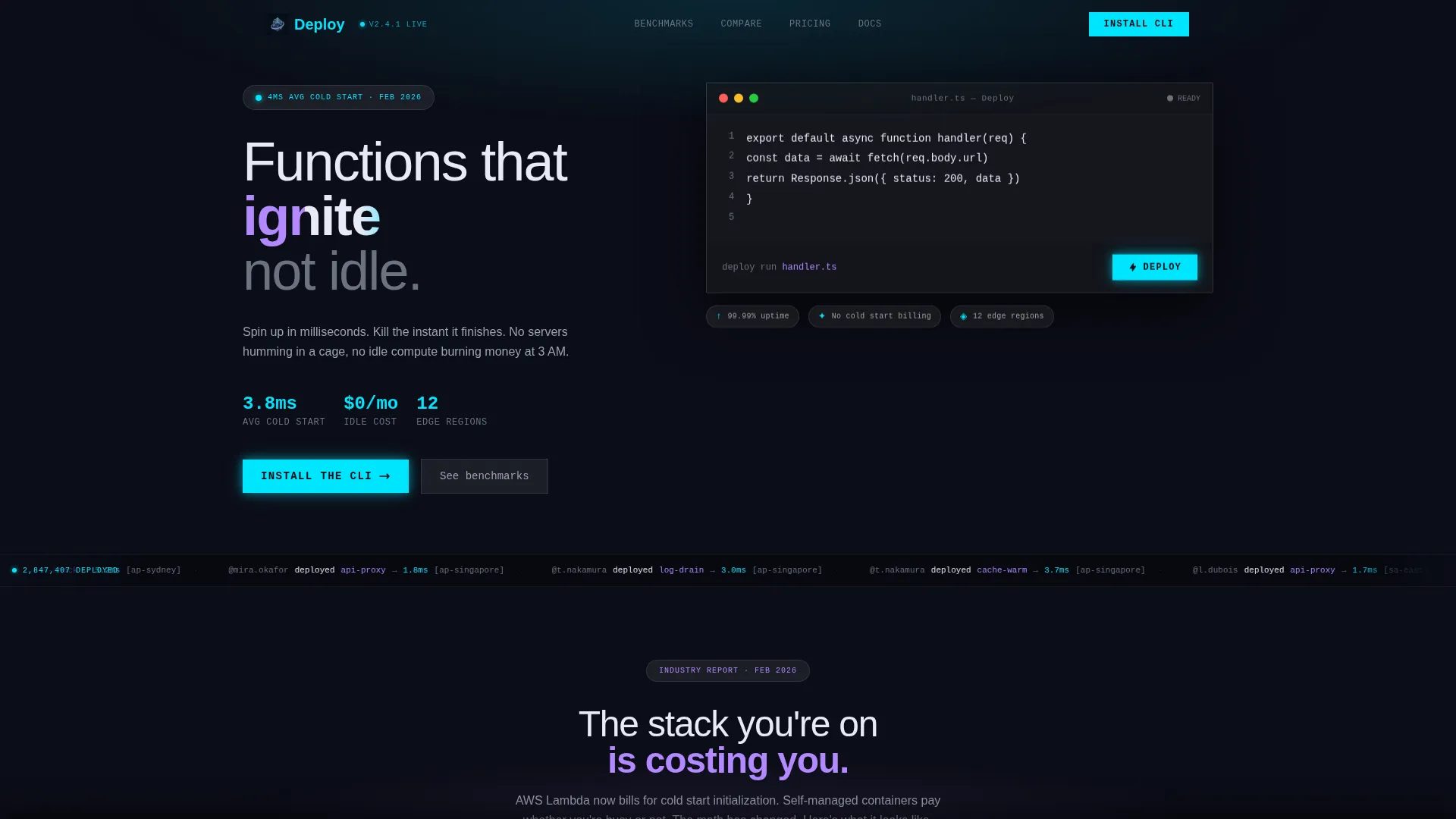
- An interactive terminal header with animated latency metrics, a pre-loaded sample function, and a pulsing deploy button
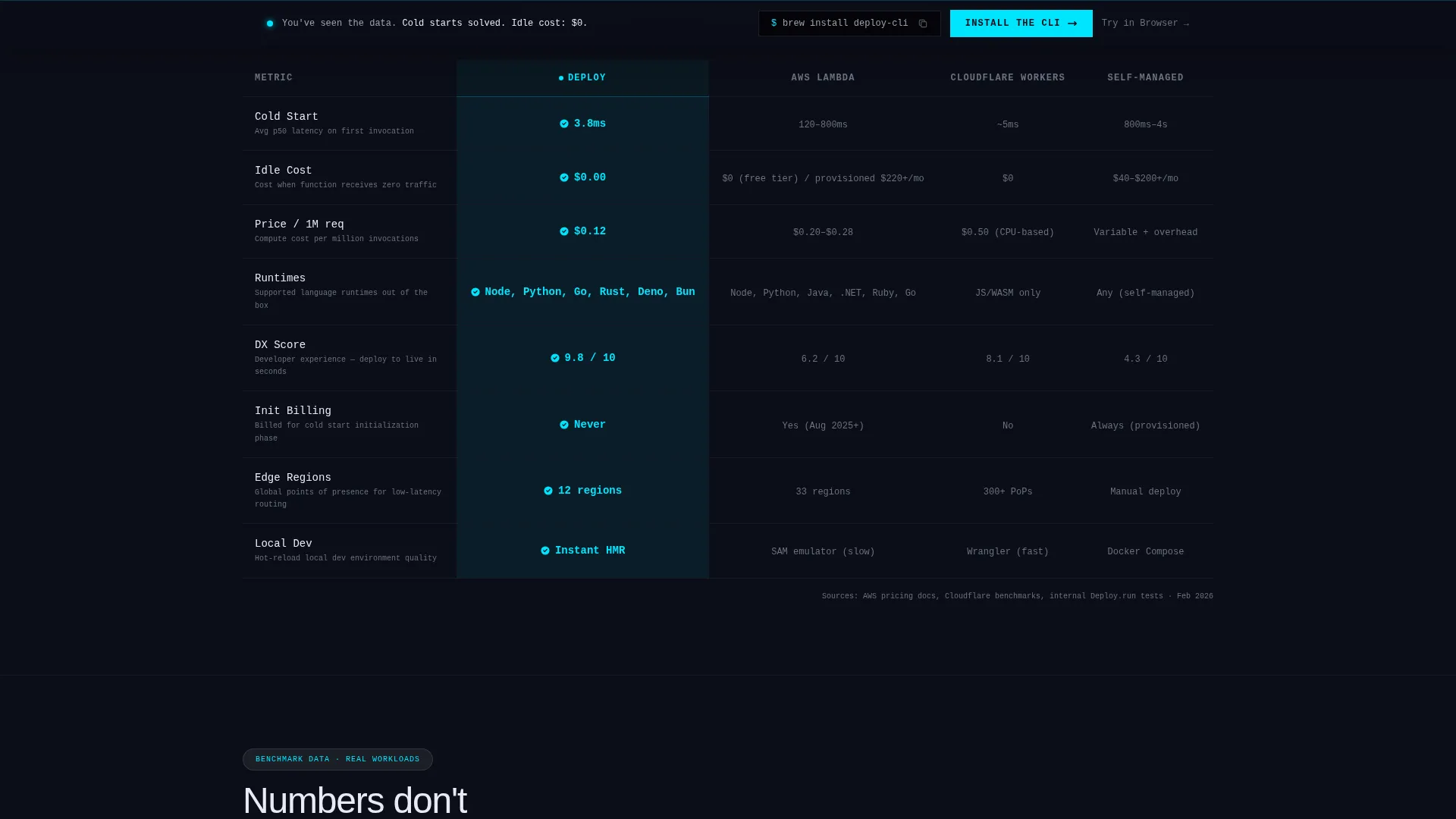
- A frosted glass comparison table pinning the platform against competitor services across cold start speed, pricing, supported runtimes, and developer experience score
- A sticky bottom call-to-action bar with operating system detection, a copyable install command block, and a secondary browser sandbox path
Feature list
This section covers the core functional and design components included in the Deploy landing page template.
Live Interactive Terminal Header
The header embeds a manipulable terminal directly in the viewport. Visitors can deploy a sample function in real time and watch animated latency metrics cascade below, including cold start time, execution duration, and memory consumed. The metrics settle into place like arrivals on a departures board.
Frosted Glass Comparison Table
A full-width comparison table presents the platform against competitor services side by side. Cells glow cyan when this platform wins a category. The table covers cold start speed, pricing per million invocations, supported runtimes, and developer experience score.
Animated Benchmark Charts
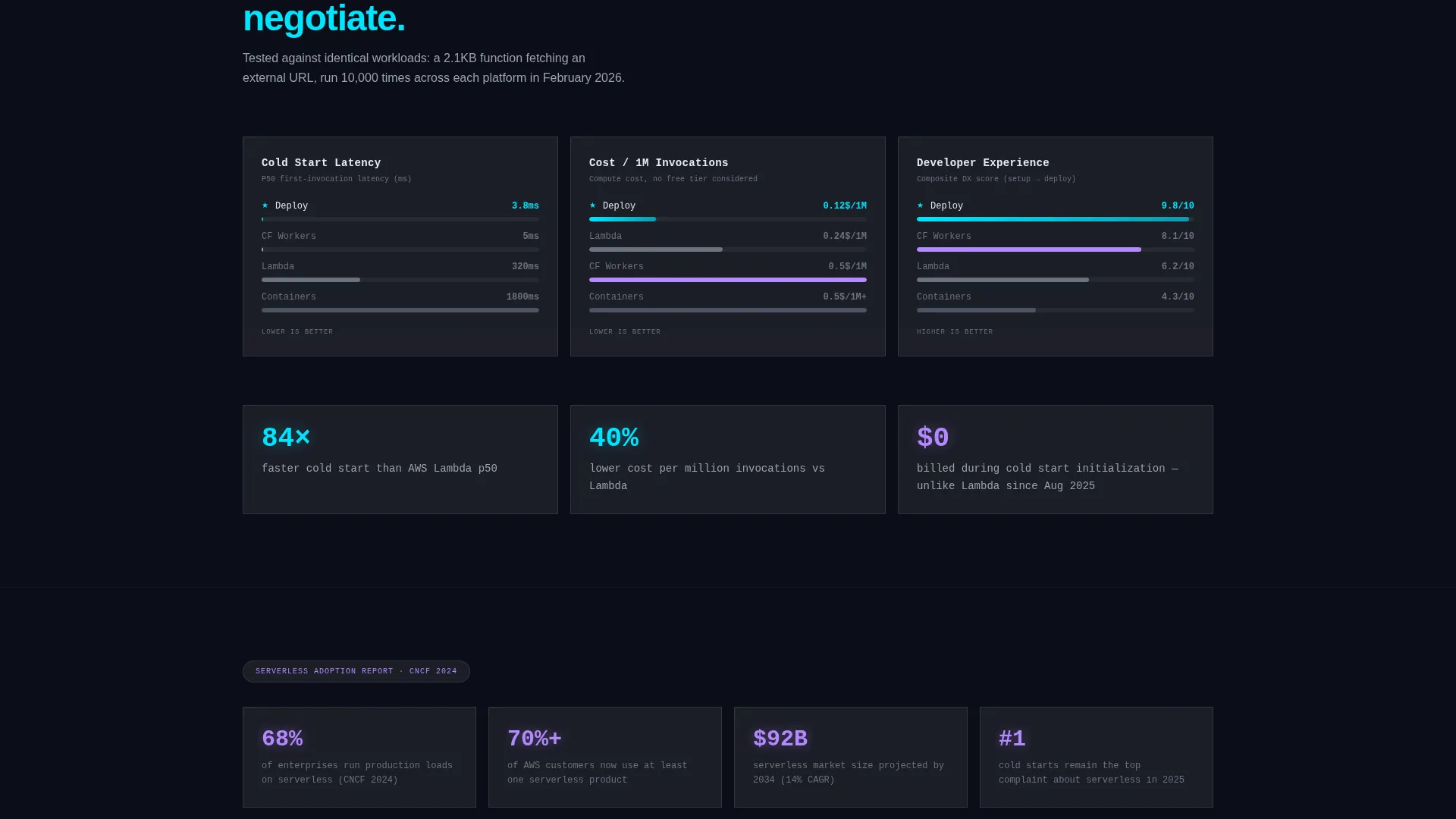
Scrolling bar charts visualize real benchmark data as the visitor moves down the page. Each chart is motion-traced and triggered on scroll, building the case for switching incrementally rather than asking for trust all at once.
Global Deployment Ticker
A scrolling real-time ticker displays deployments happening globally. It reinforces platform scale and activity without requiring the visitor to read a case study or trust a static number.
OS-Detecting Install Flow
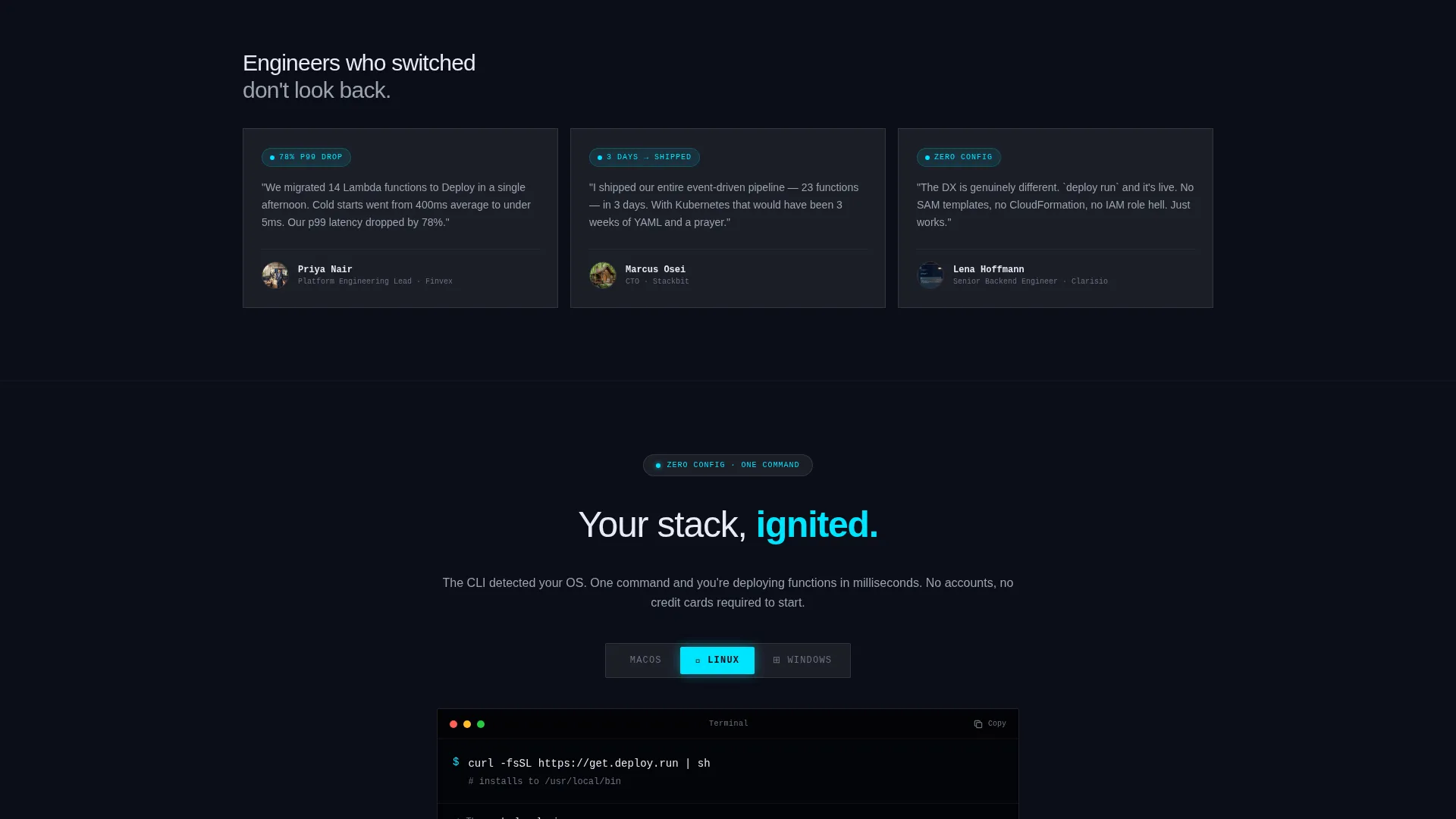
Clicking the primary call-to-action triggers an operating system detection step. The correct install command for the visitor's system, whether that is a Homebrew command, a curl script, or a Windows installer, appears inside a copyable code block immediately.
Sticky Install Call-to-Action Bar
After the visitor scrolls past the comparison table, a sticky bar anchors to the bottom of the viewport. It keeps the primary install path visible without interrupting the reading flow, and it includes the secondary "Try in Browser" path for zero-commitment exploration.
Page sections overview
| Section | Purpose |
|---|---|
| Interactive Terminal Header | Opens with live deploy demo and animated latency metrics |
| Comparison Table Block | Benchmarks platform against competitors across four categories |
| Animated Bar Charts | Visualizes benchmark data on scroll to build evidence |
| Global Deployments Ticker | Shows real-time deployment activity to signal platform scale |
| Infrastructure Survey Quotes | Provides third-party findings to support adoption narrative |
| OS-Detecting Install Flow | Delivers the correct CLI install command for each visitor |
| Sticky Install Bar | Keeps primary and secondary calls to action visible after the table |
Design & branding system
The visual system follows a Dynamic Motion theme expressed through a Glassmorphic color language. Every layer is intentional, with translucent surfaces floating over deep darkness and every glow serving a functional purpose.
- Base layer is deep void black at hex value 0B0D17, frosted glass panels sit at 12 percent white opacity, electric cyan at 00E5FF marks live-state indicators and interactive edges, and soft lavender at B388FF activates on hover states and data highlights
- The overall palette is described as peering through a rain-streaked cockpit window at a runway of lights, translucent layers over darkness where nothing decorative exists
- Motion is central to the identity: metrics animate into position, chart bars trace on scroll, and the deploy button pulses to signal interactivity without demanding attention
Mobile & speed optimization
The layout is structured to preserve the interactive and motion-heavy experience across viewport sizes. Core interactions are designed to remain functional and readable at smaller screen widths.
- The terminal header, comparison table, and sticky install bar are each built to reflow cleanly on mobile viewports
- Animated elements and scroll-triggered charts are structured to maintain their narrative sequence on touch devices
- The OS-detection install flow functions on mobile, presenting the appropriate install path based on the detected environment
How this template helps you convert
The conversion strategy in this template is built on accumulation. Each section adds a new layer of evidence before the ask arrives.
- The interactive terminal at the top lets visitors experience deployment speed firsthand, earning trust before any claim is made in text
- The comparison table and animated benchmark charts replace self-reported marketing copy with structured, visual data the visitor can evaluate directly
- The sticky install bar with OS detection removes the last point of friction at the moment the visitor is most ready to act, and the browser sandbox option catches anyone not yet ready to install locally
Other information about this template
This template sits at the intersection of the Technology category, Cloud and DevOps subcategory, and the Serverless Platform niche. It is designed specifically for the App Download landing page direction, meaning the entire scroll flow is engineered to earn a CLI install or sandbox session rather than a form submission or newsletter sign-up.
- The template style is Comparison Table, making it well suited for markets where buyers are actively evaluating multiple platforms before committing
- The Industry Report creative direction means the page presents serverless adoption as a data-backed inevitability rather than a feature list, which fits the skeptical, research-driven mindset of the target audience
- The header concept is Interactive Preview, a format that leads with a working product experience rather than a hero image or marketing headline, which is particularly effective for developer tool platforms
Theme
Dynamic Motion
Creative direction
Industry Report
Color system
Glassmorphic
Style
Comparison Table
Direction
App Download
Page Sections
Live Interactive Terminal Header
Frosted Glass Comparison Table
Scroll-triggered Benchmark Charts
Os-detecting Install Command Flow
Sticky Install Bar with Dual Call to Action
Global Deployment Ticker
Related questions
Who is this landing page template designed for?
Can I edit the comparison table to reflect my own platform's benchmarks?
Does the interactive terminal require a live backend connection to work?
What is the primary call-to-action in this template?
What does the Try in Browser option do?



