Self-Hosted Enterprise Software Privacy Policy Website Template
Deploy is a bento grid landing page template built for self-hosted product lifecycle management (PLM) platforms. It combines a Feature Tab Switcher header, animated capability cards, and a sticky lead-capture bar to convert engineering managers, compliance officers, and CTOs into qualified demo requests. The design runs on a Midnight Blue palette that feels like mission control at full readiness.
by Rocket studio
Quick summary
Deploy is a single-page, bento grid landing page template designed for self-hosted PLM software. It opens with an interactive Feature Tab Switcher, escalates through animated capability cards using Launch Energy pacing, and closes every scroll fold with a clear path to request a private instance. The visual system is built around a deep terminal navy and status-light cyan palette.
Who this template is for
This template is built for teams selling or showcasing self-hosted enterprise software to highly technical buyers. It speaks directly to people who make infrastructure decisions, not just software choices.
- Engineering managers at mid-size manufacturers who have outgrown spreadsheet-driven change orders
- Compliance officers at medical device firms who need verifiable audit trails for regulatory review
- CTOs at defense subcontractors whose data must remain on-premises or in a private environment
What problem this template solves
Most software landing pages treat the product as secondary. They lead with marketing copy and bury the capability proof below the fold. Technical buyers need to see function before they trust a form.
- Visitors leave before converting because the page never demonstrates what the product actually does
- Lead forms collect unqualified contacts because they ask too little about deployment context
- A generic hero image sends the wrong signal to buyers who care about infrastructure, not aesthetics
What you get with this template
You get a fully structured, single-page bento grid layout ready to present a self-hosted PLM platform with confidence. Every section is designed to reduce skepticism and build trust through demonstrated capability.
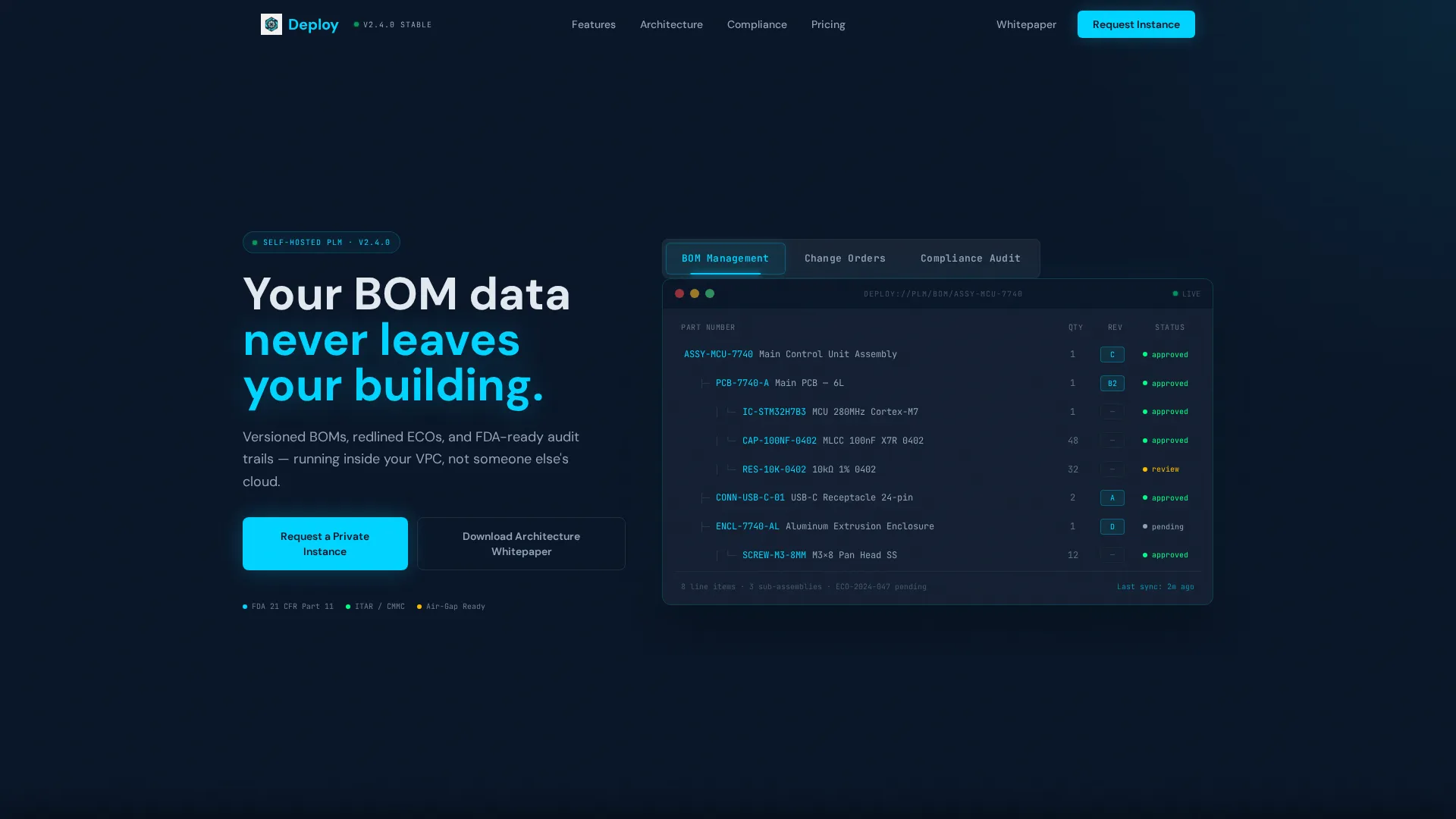
- A Feature Tab Switcher header with three tabs that swap a live bento-grid dashboard mockup
- Animated capability cards covering deployment architecture, change order review, compliance timelines, and performance benchmarking
- A sticky bottom bar with a multi-field lead capture form and a secondary whitepaper download path
Feature list
This template ships with purpose-built components matched to the sales journey of a technical enterprise product.
Interactive Feature Tab Switcher
Three clickable tabs labeled "BOM Management," "Change Orders," and "Compliance Audit" sit above a bento-grid dashboard mockup. Each tab swaps the displayed content live, showing a multi-level bill of materials (BOM) tree with revision badges and supplier status indicators by default. No hero image is used. The product interface is the hero.
Animated Bento Grid Capability Cards
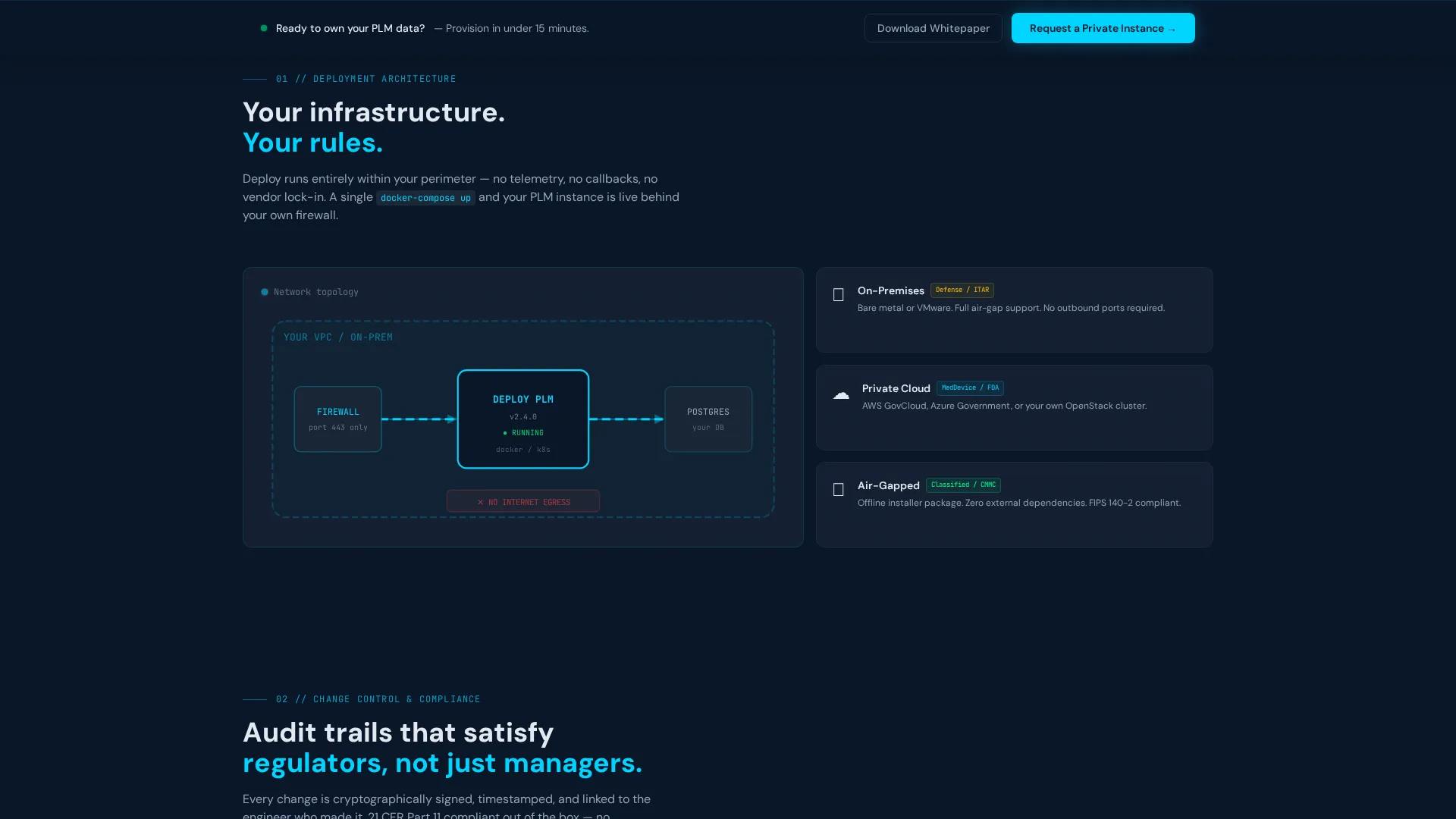
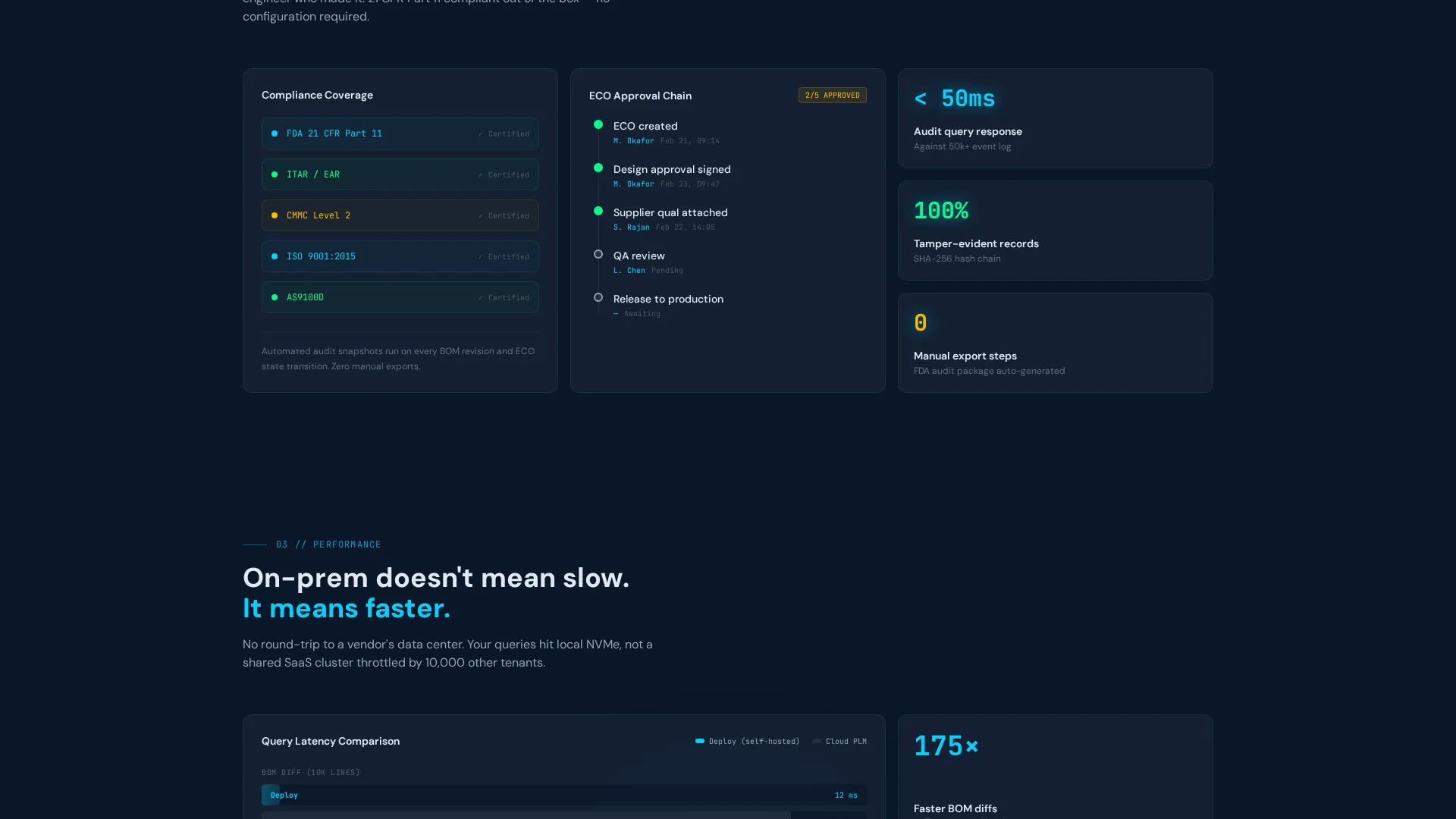
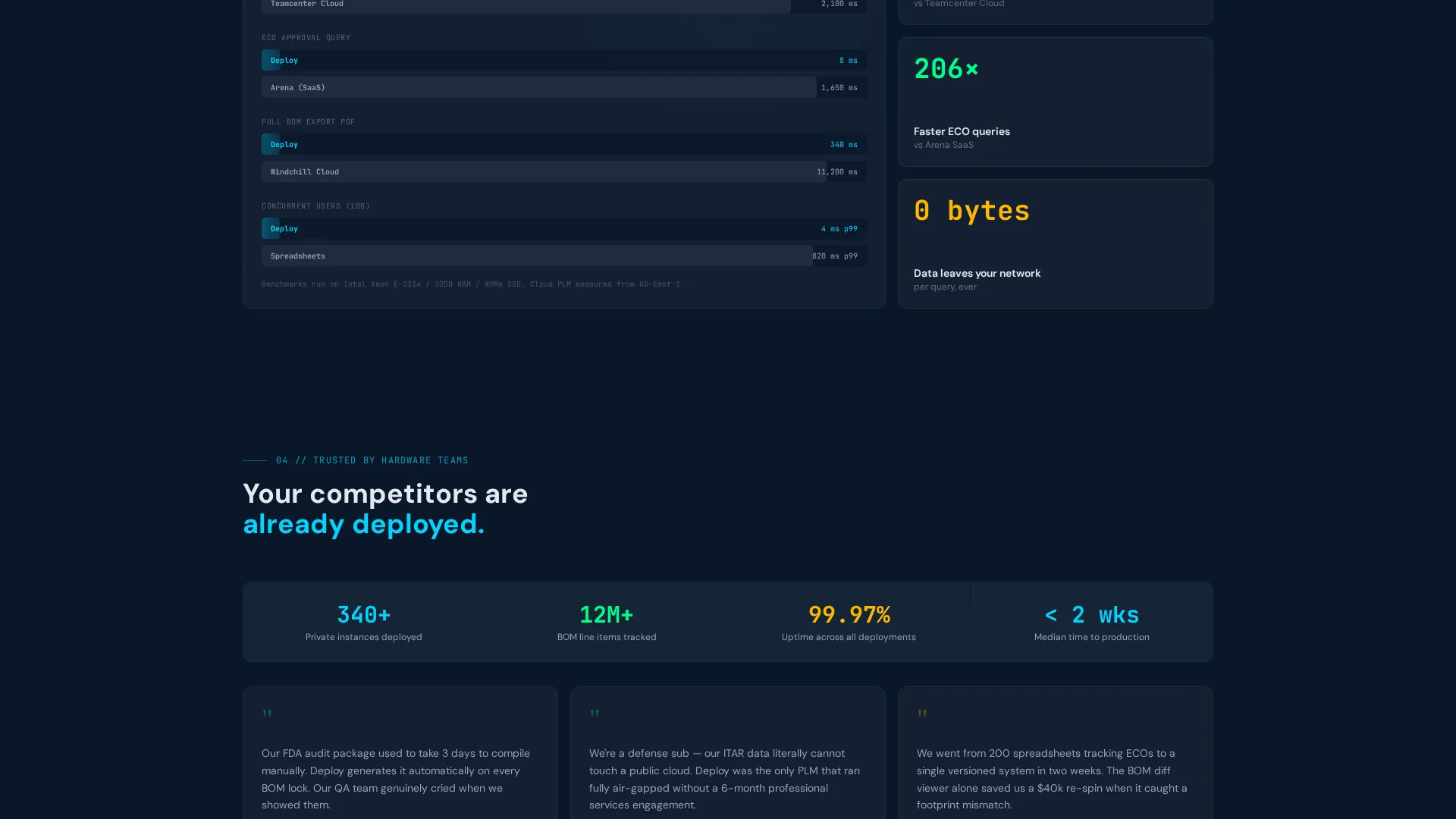
Each card below the header reveals a specific platform capability as the visitor scrolls. Cards animate in with deliberate kinetic energy. Included views cover a deployment diagram inside a virtual private cloud (VPC), an interactive diff viewer showing a redlined engineering change order (ECO), a compliance timeline that auto-populates audit events, and a benchmark chart comparing on-premises query speeds against cloud PLM latency.
Sticky Lead Generation Bar
A persistent bottom bar appears after the second scroll fold and anchors the primary call to action: "Request a Private Instance." The form captures work email, company size via dropdown, current PLM tool via autocomplete text input, and deployment preference including on-premises, private cloud, and air-gapped options.
Gated Whitepaper Download Path
A secondary conversion path offers "Download the Architecture Whitepaper" gated behind email only. This catches technical evaluators who need to build an internal business case before they can commit to a demo request.
Midnight Blue Dashboard Visual System
The entire layout uses a consistent dark-mode design language. Deep terminal navy (#0A1628) forms the primary background, steel panel gray (#1B2838) surfaces the cards, status-light cyan (#00D4FF) marks active states and data highlights, and muted silver (#94A3B8) handles secondary text. Every element stays legible against the dark at a glance.
Page sections overview
| Section | Purpose |
|---|---|
| Tab Switcher Header | Demonstrates BOM, change order, and compliance views interactively |
| Deployment Architecture Card | Shows the platform sitting inside a VPC diagram |
| ECO Diff Viewer Card | Highlights redlined change order edits in a visual diff format |
| Compliance Timeline Card | Auto-populates an audit event timeline for regulatory context |
| Performance Benchmark Card | Compares on-premises query speed against cloud PLM latency |
| Sticky Lead Bar | Captures qualified leads with deployment-specific form fields |
| Whitepaper Download | Provides a secondary email-gated path for technical evaluators |
Design & branding system
The template uses a Dashboard Pro theme with a Midnight Blue color system. Every design decision references the quiet authority of a mission control room, where information is always readable and every active state is immediately obvious.
- Color palette: deep terminal navy (#0A1628) for backgrounds, steel panel gray (#1B2838) for card surfaces, status-light cyan (#00D4FF) for highlights, and muted silver (#94A3B8) for secondary text
- No stock photography or decorative hero images; the interactive dashboard mockup carries all visual weight
- Cyan accent elements function as status indicators, echoing the LED readouts of a live server rack
Mobile & speed optimization
The bento grid layout is structured to reflow cleanly across screen sizes without losing its dashboard character. Technical buyers often review proposals on multiple devices before making contact.
- Bento grid cells stack vertically on smaller screens while preserving visual hierarchy and card legibility
- The sticky lead bar remains accessible at the bottom of the viewport on mobile, keeping the primary call to action in reach at all times
- Interactive tab content and animated card reveals are scoped to efficient transitions that do not interfere with scroll behavior
How this template helps you convert
The conversion architecture is sequential. Each scroll fold adds a layer of confidence before asking for anything in return.
- The Feature Tab Switcher proves the product moves before the visitor reads a single feature claim, reducing the skepticism gap that kills enterprise landing pages early.
- The animated capability cards escalate from understanding to proof to speed comparison, so by the time a visitor reaches the lead form, they have already seen the product in three different operational contexts.
- The dual conversion paths, one for demo requests and one for whitepaper downloads, capture both decision-makers who are ready to act and technical evaluators who still need internal approval.
Other information about this template
This template is suited for self-hosted PLM platforms competing in a market where buyers are already familiar with established enterprise tools. It is built to signal a credible, infrastructure-first alternative without requiring extensive copy to make that case.
- The autocomplete field for current PLM tool is pre-seeded for common incumbent tools, giving the sales team immediate context about each lead
- The deployment preference dropdown covers on-premises, private cloud, and air-gapped environments, which are the three primary deployment models relevant to regulated and defense-adjacent industries
- The compliance timeline card is designed with FDA 21 CFR Part 11 audit trail expectations in mind, reflecting the real requirements of medical device manufacturers
- The template style, color system, and interaction patterns are consistent with the Dashboard Pro theme used across the broader template family
Theme
Dashboard Pro
Creative direction
Launch Energy
Color system
Midnight Blue
Style
Bento Grid
Direction
Lead Generation
Page Sections
Interactive Feature Tab Switcher
Animated Bento Grid Capability Cards
Sticky Lead Capture Bar
Gated Architecture Whitepaper
Midnight Blue Dashboard Visual System
Related questions
Who is this landing page template designed for?
Can I customize the tab labels and dashboard mockup content?
Does the sticky lead bar stay visible on mobile devices?
What is the difference between the two conversion paths?
Is this template suitable for air-gapped or defense-adjacent deployments?



