Self-Hosted LMS Comparison Landing Page Template
Deploy is a single-page landing page template built for self-hosted learning management systems. It targets technical decision-makers who need to move beyond a SaaS LMS and take full ownership of their learning infrastructure. With a terminal-inspired dark design, animated code hero, and a structured three-column comparison table, this template is purpose-built to convert engineers and CTOs into qualified leads.
by Rocket studio
Quick summary
Deploy is a self-hosted LMS comparison landing page template designed for technical audiences who are ready to stop renting their learning infrastructure. It uses a dark terminal aesthetic, a live-formatted code hero, and a rigorous three-column comparison table to show exactly why running your own learning platform beats a SaaS LMS on every dimension that engineers actually care about.
Who this template is for
This template speaks directly to the people who evaluate learning management systems at a technical and operational level. It is not written for marketing teams browsing feature galleries. It is written for infrastructure owners who ask hard questions about data residency, API rate limits, and LTI 1.3 compliance before they sign anything.
- CTOs at edtech startups who have outgrown a SaaS LMS and need a learning platform they fully control
- DevOps leads at enterprise organizations tired of annual contract negotiations and per-seat pricing for corporate training
- Open-source advocates at universities and academic institutions who refuse to hand enrollment data to a cloud-based platform
What problem this template solves
Choosing between self-hosted and cloud-based learning management systems is not a user interface decision. It is an infrastructure decision. Most comparison pages shy away from the technical detail that decision-makers actually need during the evaluation process. This template closes that gap by leading with proof, not promises.
- Technical buyers arrive at a SaaS LMS comparison page and find only marketing copy. They leave without converting because the page never answered the right questions.
- Organizations running corporate training at scale face rising support costs, rigid business plans, and limited control over training data. The page frames self-hosting as the direct answer to those frustrations.
- The LMS market is projected to grow from approximately US$22 billion in 2023 to around US$52 billion by 2032. As demand accelerates, the stakes of a poor LMS choice rise with it. A bad decision leads to lost productivity, lowered employee morale, and ultimately, lowered revenue.
What you get with this template
This template delivers a complete, deployment-ready landing page structured to guide a technical buyer from first impression to lead form submission. Every section earns its place by answering a real objection.
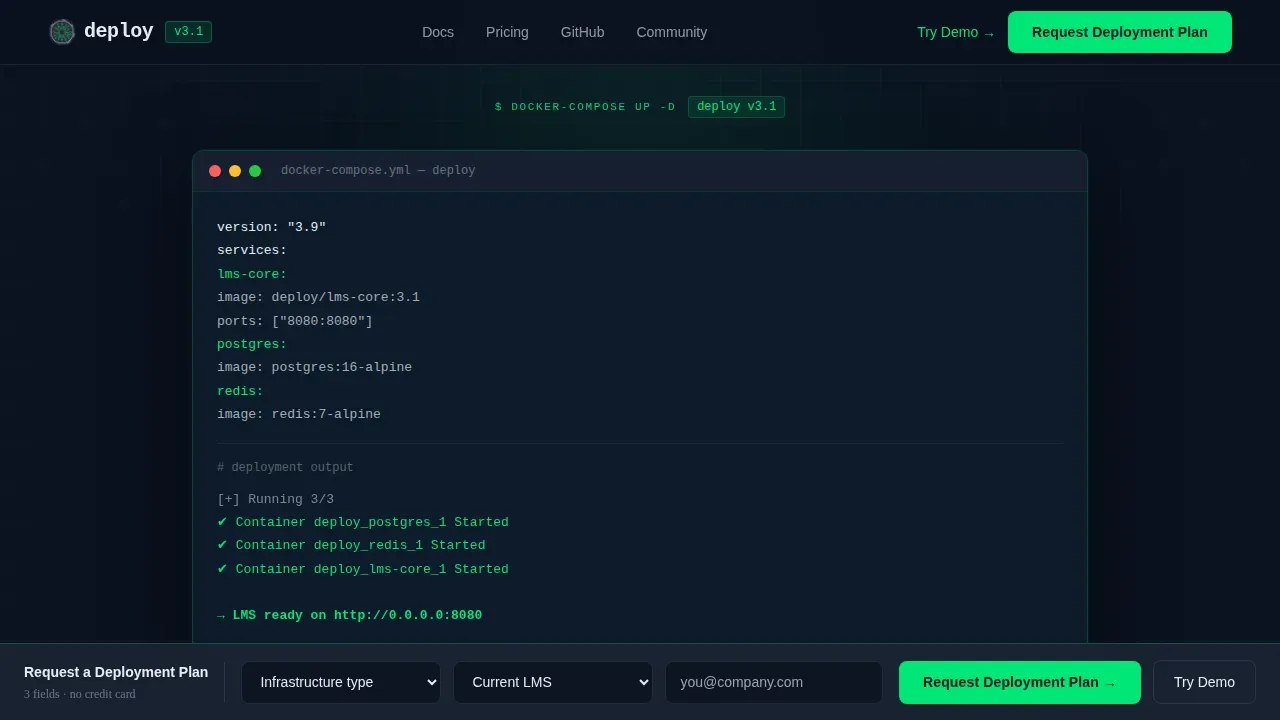
- A syntax-highlighted terminal hero with a live docker-compose animation, a blinking cursor, and a single-command deployment narrative
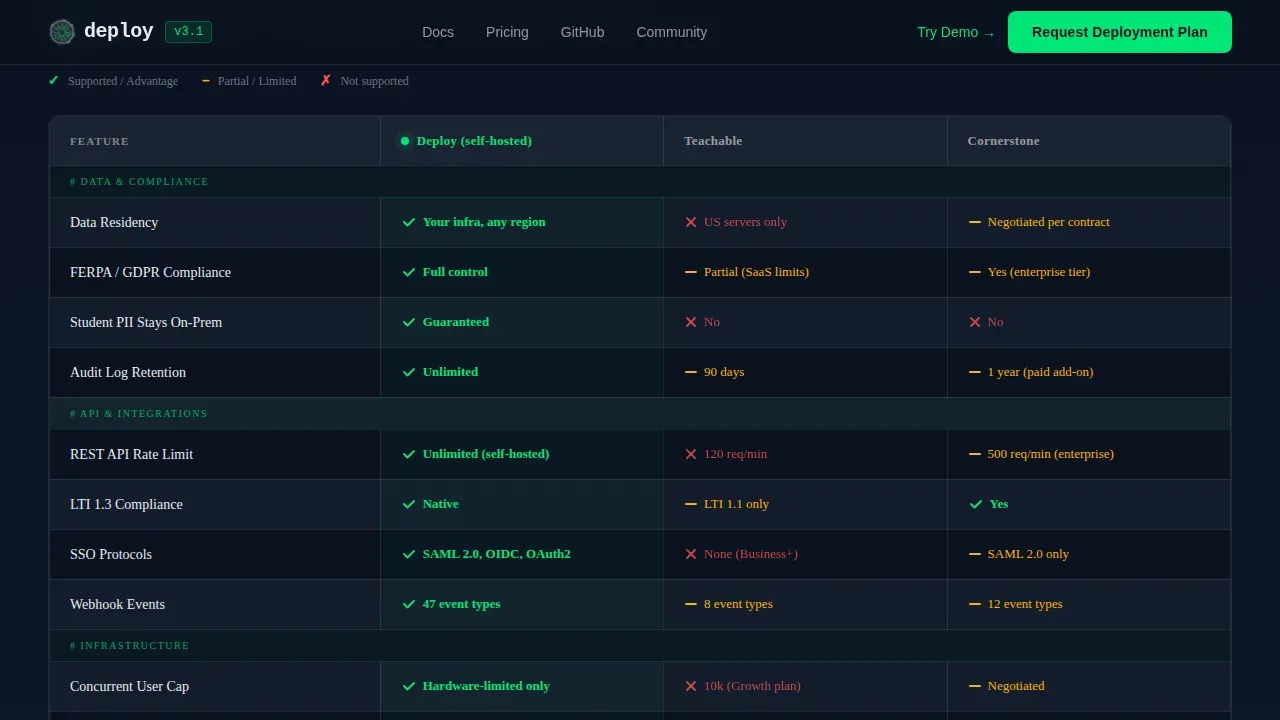
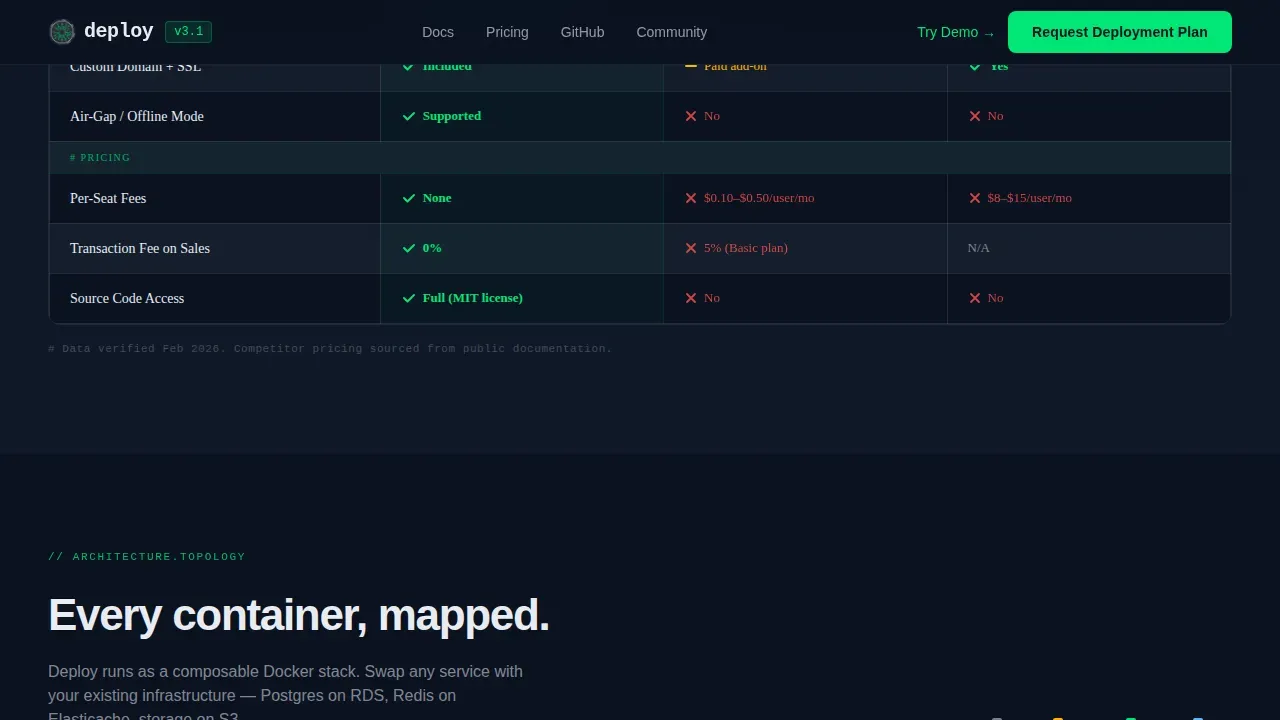
- A three-column comparison table contrasting self-hosted against two named SaaS LMS competitors across data residency, API rate limits, SSO protocols, concurrent user caps, storage pricing per terabyte, and LTI 1.3 compliance
- A sticky lead generation bar with a three-field form and a secondary no-sign-up demo path
Feature list
This template is built around six core capabilities that serve the product and the conversion goal simultaneously.
Animated Terminal Hero with Docker Deployment Output
The hero section renders a live-formatted docker-compose up block in a syntax-highlighted terminal mockup. Monospaced type glows green on navy. The deployment output scrolls through container names, port bindings, and a final ready-on-8080 confirmation. This is not decoration. It immediately signals to a technical buyer that this is a learning platform built for people who think in commands, not clicks. The animation sets the tone for a serious comparison page.
Three-Column Technical Comparison Table
The comparison table is the structural centerpiece of the page. It compares the self-hosted platform against two SaaS LMS competitors across the line items that engineers and DevOps leads use in their evaluation process. Rows cover data residency, API rate limits, SSO protocol support, concurrent user caps, storage pricing per terabyte, and LTI 1.3 compliance. Each cell uses a green checkmark or a red dash. There is no ambiguity. The layout supports the key argument that lms features matter when the stakes are real infrastructure decisions, not just a basic plan comparison.
Architecture Diagram with Deployment Topology
Below the comparison table, a visual architecture diagram shows how the deployment topology fits together. Nodes are animated. This section functions like a documentation page: it answers the next objection before the reader forms it. Technical buyers evaluating a self-hosted open source LMS need to see the system before they commit. This diagram gives them that visibility without requiring a call.
Benchmarks Panel with Real Performance Numbers
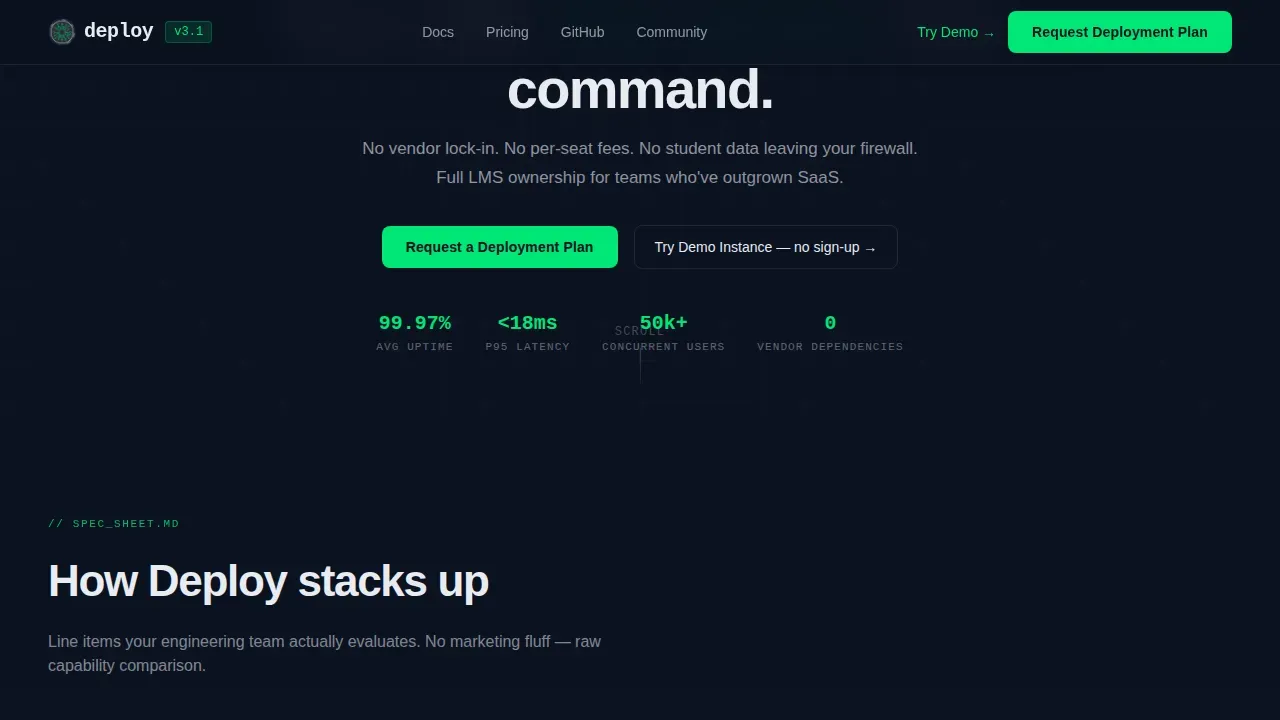
A dedicated benchmarks panel presents latency numbers, concurrent user capacity, and uptime statistics. These are the kinds of figures that validate a learning solution to a DevOps lead faster than any testimonial. Infrastructure and scalability are non-negotiable: the server must handle peak loads and scale with user growth. This section provides the evidence in a format that technical buyers trust.
Migration Timeline Section
The migration timeline answers one of the most common objections to switching from a legacy learning management system: time. This section shows a structured timeline that measures migration in days, not months. It covers transitions from common legacy platforms and gives the reader a realistic sense of what the switch actually involves. This directly reduces friction for enterprise organizations considering a move away from incumbent SaaS LMS contracts.
Sticky Lead Generation Bar with Dual Conversion Paths
The primary call to action reads "Request a Deployment Plan" and anchors inside a sticky bottom bar that appears after the comparison table. The form collects three fields in sequence: infrastructure type, current LMS, and work email. A secondary path labeled "Try the Demo Instance" links to a live sandbox with pre-loaded course content, no sign-up required. This dual-path structure captures both ready-to-commit leads and tire-kickers who need to touch the product first.
Page sections overview
| Section | Purpose |
|---|---|
| Terminal Hero | Establish technical credibility instantly with an animated docker-compose deployment sequence |
| Comparison Table | Contrast self-hosted versus. SaaS LMS across data residency, APIs, SSO, storage pricing, and compliance |
| Architecture Diagram | Show deployment topology with animated nodes to pre-answer infrastructure questions |
| Benchmarks Panel | Present latency, concurrency, and uptime data to validate the platform to DevOps buyers |
| Migration Timeline | Reduce switching friction by showing a days-not-months path from legacy platforms |
| Sticky Lead Bar | Capture qualified leads via a three-field form with a no-sign-up demo as a secondary path |
| Page Footer | Single-row linear footer pattern |
Design & branding system
The visual identity runs on the Startup Velocity theme with a Midnight Blue color system. Every design decision reinforces the terminal-and-monitoring-dashboard mood. The palette feels like a server room at 3 a.m.: dark, focused, and radiating uptime.
- Colors: deep terminal navy (#0B1120) dominates all backgrounds, command-line charcoal (#1A2332) separates table rows and card containers, status-green (#00E676) fires on hover states, toggle switches, and comparison cell checkmarks, and cold interface white (#E8ECF1) keeps body text sharp against the dark field
- Typography: JetBrains Mono handles all terminal and code display elements for authentic readability, while DM Sans covers body copy and headings with clean, modern legibility
- Custom branding is built into the system through configurable color tokens and type scales, allowing any team to adapt the visual identity without rebuilding the layout
Mobile & speed optimization
The template is designed desktop-first, matching the real behavior of the target audience. CTOs and DevOps leads evaluate learning management systems on large screens, often with multiple tabs and documentation open simultaneously. The layout prioritizes dense, information-rich desktop rendering.
- Desktop-first layout ensures the comparison table, architecture diagram, and benchmarks panel all render at full fidelity on wide viewports without horizontal scrolling or collapsed columns
- Server Components handle static content delivery for the non-interactive sections of the page, while Client Components manage the terminal animation, sticky bar appearance, and comparison table hover states
- Mobile learning considerations are addressed through responsive breakpoints that preserve table readability and form usability on smaller screens, ensuring external users on any device can still access training information and submit a lead
How this template helps you convert
This template is engineered around a single conversion goal: turning a skeptical technical evaluator into a qualified lead who has already touched the product.
- The animated terminal hero earns attention in the first three seconds by speaking the visitor's language. A blinking cursor and scrolling deployment output communicate immediately that this is a serious learning platform, not a generic SaaS LMS marketing page. That first impression keeps the reader scrolling.
- The comparison table does the heavy lifting of the evaluation process. By the time a buyer reaches the sticky lead bar, they have already seen green checkmarks on data residency, API rate limits, SSO, and LTI 1.3 compliance. The form asks for only three fields. Friction is minimal. The secondary demo path ensures that buyers who need to verify before committing still enter a conversion funnel through the sandbox.
Other information about this template
The Deploy self hosted lms comparison landing page template is built for a specific and growing segment of the LMS market. Here is additional context that supports the purchase decision for teams evaluating this template.
- Open source LMS platforms reduce licensing fees and give complete ownership of code and deployment. Organizations using an open source LMS fully control the platform, which allows them to avoid vendor lock-in entirely.
- An enterprise-ready open source LMS must prove six gates in a compliance-first pilot: standards, identity, analytics, governance, multi-tenancy, and an upgrade path. This template's comparison table structure supports that evaluation process directly.
- Multi-tenancy is the feature that separates one LMS for everyone from one LMS with safe separation. Tenant isolation covers custom branding per tenant, roles and permissions, and reporting scope. This template surfaces multi-tenancy as a key comparison row.
- A SOC 2 Type 2 report is a widely used benchmark for operational controls and belongs in the governance conversation even when you self-host. The benchmarks panel and architecture diagram in this template give governance stakeholders the evidence they need.
- Open source LMS solutions can incur hidden costs for hosting, maintenance, and customization despite being free to use. The comparison table in this template is designed to surface total cost of ownership honestly, including support costs and infrastructure overhead.
- Moodle is one of the most versatile open source LMS platforms available, with over 2,000 plugins, making it a strong candidate for enterprise use. Open edX is a highly scalable, reliable, and customizable open source LMS. Leading open source LMS options as of 2026 include Moodle, Open edX, Canvas, and Chamilo.
- Canvas self-hosted needs a prove-it step for analytics before it qualifies as an enterprise learning platform. Chamilo is less demanding on server resources than Moodle or Open edX, making it a practical choice for teams with lighter infrastructure.
- Forma LMS is built specifically for corporate training needs and includes built-in compliance tracking, covering compliance training requirements out of the box.
- A saas lms is preferred by many organizations for its ease of use and lower initial total cost of ownership. However, a saas lms transfers control of training data, learner progress records, and course content to a third-party lms provider. The comparison table in this template makes that trade-off explicit for every key row.
- Extended enterprise LMS platforms support training for external audiences such as customers and partners, in addition to internal employee training. This template supports multi-audience learning scenarios, including partner enablement, customer education, and external training use cases, by framing the comparison table around audience scope as well as technical specs.
- Cloud based learning management systems offer fast implementation and minimal IT overhead. A cloud based LMS is ideal for organizations that need remote access with no infrastructure burden. Cloud based LMS platforms and cloud based platforms more broadly remain a dominant choice for smaller teams, while self-hosted lms solutions are the right call when data residency and control are non-negotiable.
- Social learning features such as discussion boards and community learning tools enhance learner engagement by supporting informal knowledge sharing. The comparison table can include social learning capability as a differentiation row.
- Robust advanced analytics and real-time reporting are critical for any LMS platform. The benchmarks panel in this template demonstrates that self-hosted infrastructure can support advanced analytics without routing training data through a third-party cloud lms.
- A solid LMS should support training materials in a variety of formats: videos, PDFs, interactive assessments, and SCORM or xAPI standards. Blended learning formats, including online learning and mobile learning, are supported through the learning paths and course management architecture that this template describes in the architecture diagram section.
- Microsoft Teams integration is a common requirement for enterprise lms platforms. Teams looking for seamless integration between their learning management system and Microsoft Teams will find that the SSO and API comparison rows in the table address this directly.
- The LMS procurement process should be a rigorous exercise, not just a platform search. When lms features matter most is during the evaluation process, when the gap between what a saas lms promises and what an open source LMS actually delivers becomes visible. This template is designed to make that gap explicit and measurable.
- Customer relationship management (CRM) integration and connectivity to business systems are important selection criteria. An LMS should integrate smoothly with HRIS, CRM, and productivity suites to reduce manual work and keep training data in sync.
- Personalised learning paths, learner engagement tools, and the ability to track student progress are expected baseline capabilities for any modern lms solution. The template positions the self-hosted learning platform as fully capable of delivering personalised learning at scale, including mobile learning and offline access, without ceding control to a cloud-based lms provider.
- Gamification tools, social learning features, and personalised dashboards enhance learner engagement and can support development programs across a range of employee training and partner training audiences.
- The template is a comprehensive platform showcase for teams that need to present their learning solution with credibility and technical depth. It is more than just a platform overview. It is a deployment-ready argument for infrastructure ownership.
Theme
Startup Velocity
Creative direction
Spec Sheet
Color system
Midnight Blue
Style
Comparison Table
Direction
Lead Generation
Page Sections
Animated Terminal Hero Section
Three-column LMS Comparison Table
Architecture Diagram with Animated Nodes
Benchmarks Panel with Latency and Uptime Data
Migration Timeline From Legacy Platforms
Sticky Lead Bar with Dual Conversion Paths
Related questions
Who is this landing page template designed for?
Does this template support a lead generation conversion goal?
Can this template be adapted for an open source LMS platform?
What design style and color system does this template use?
Is technical expertise needed to customize this template?



