Certified Government Software Professional Website Template
Depot is a dashboard-style government warehouse management landing page template built for federal and municipal logistics teams. It features a live interactive asset-search preview, a counting stat block, a transfer-tracking timeline, and a trial signup flow. The design uses deep midnight backgrounds, iridescent teal indicators, and violet interactive thresholds to project institutional authority with modern clarity.
by Rocket studio
Quick summary
Depot is a single-page, dashboard-driven landing page template for government warehouse management platforms. It opens with a working micro-dashboard, escalates through accountability-focused stats, and closes with a low-friction trial signup. The visual system pairs deep federal midnight with iridescent teal and violet to make complex logistics data feel organized, alive, and trustworthy.
Who this template is for
This template is built for software teams and agencies serving the public sector. It speaks directly to buyers who manage large-scale government storage operations and need to earn trust fast.
- Federal logistics officers overseeing surplus assets across multiple states
- Municipal procurement directors responsible for emergency supply accountability
- State auditors and compliance teams who require unbroken chain-of-custody records
What problem this template solves
Government warehouse operations are hard to present. A static screenshot does not communicate real-time tracking, audit readiness, or multi-facility scale. Visitors leave before they understand the product.
- No way to show live asset search without a working demo
- Generic SaaS landing pages fail to convey government-grade accountability
- Procurement and audit teams need proof of compliance before they consider a trial
What you get with this template
Depot delivers a complete, section-led landing page structured around accountability and discovery. Every section earns the visitor's attention before asking for credentials.
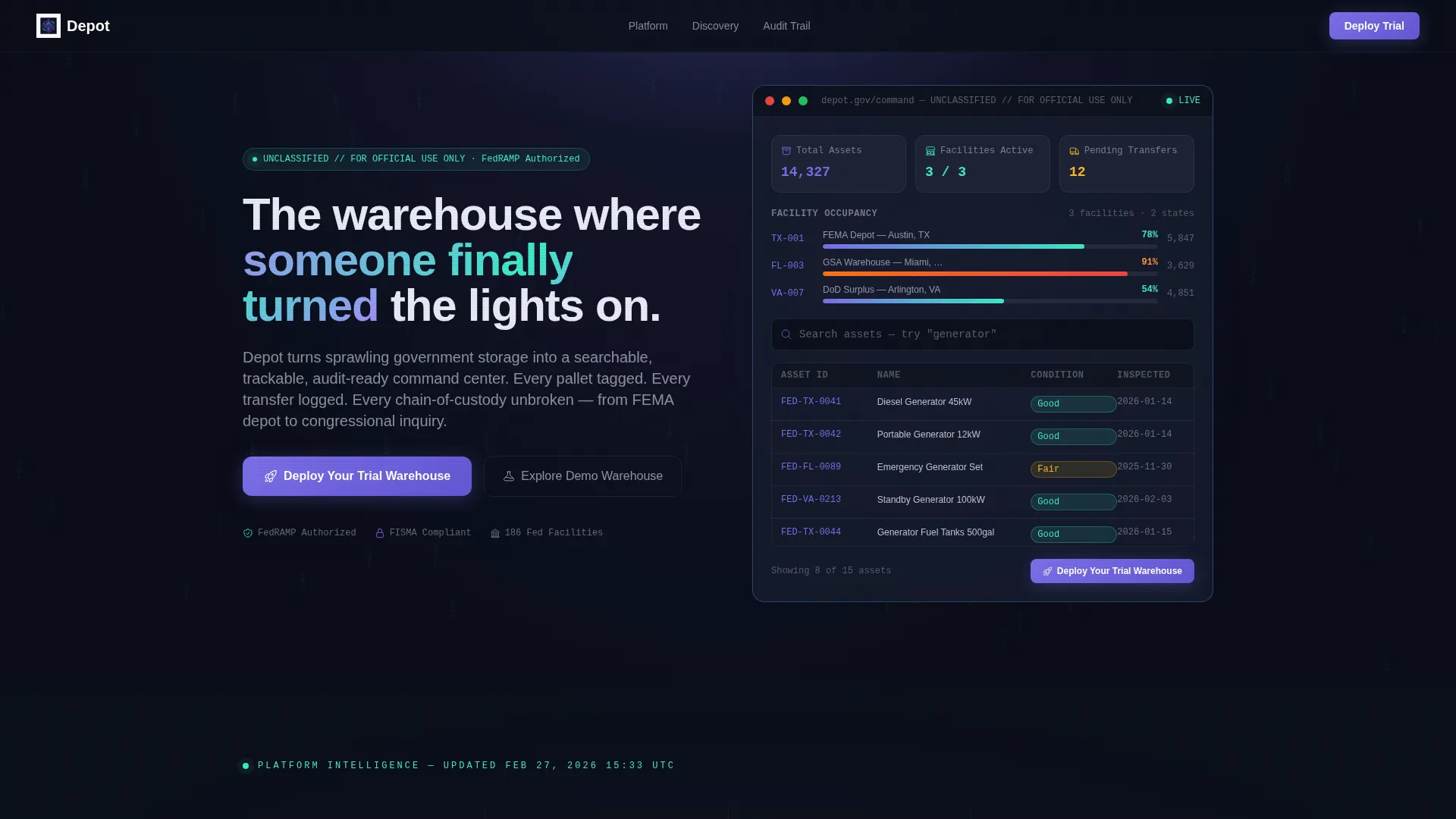
- An interactive header micro-dashboard with real-time asset filtering, occupancy bars, and a live search field
- A stat block with animated count-up numbers and a transfer-tracking timeline showing full chain-of-custody
- A freemium trial signup form and a sandbox demo path for visitors not ready to commit
Feature list
This template includes purpose-built components designed for government logistics software presentations. Each section is crafted to match the expectations of public-sector buyers.
Interactive Header Micro-Dashboard
The header runs a simulated warehouse environment showing 14,327 assets across three facilities. Visitors can type into a live search field, watch the asset grid filter in real time, and see location codes, condition ratings, and last-inspection dates without scrolling.
Animated Stat Block
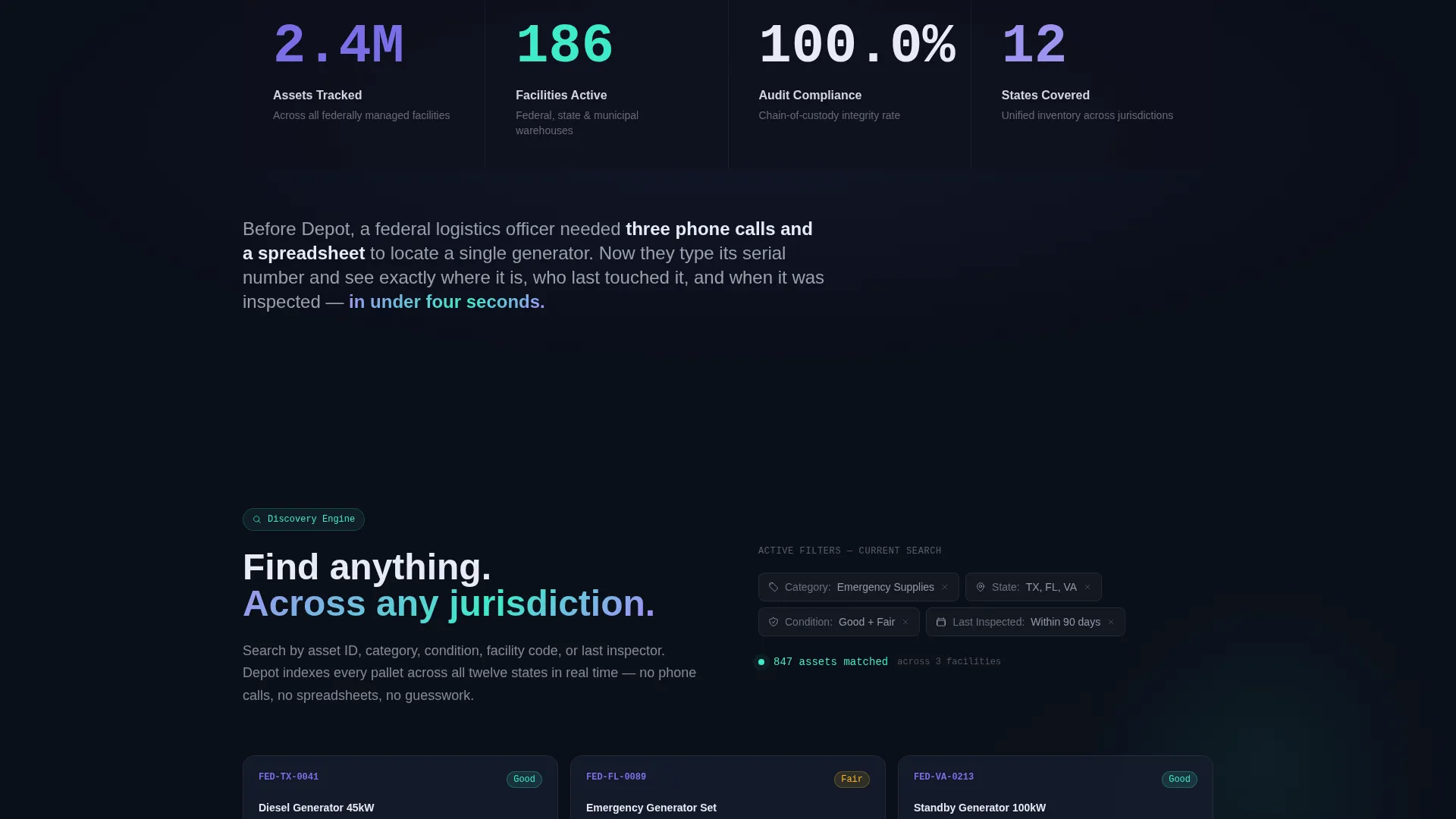
A full-width statistics section displays key platform metrics such as assets tracked, facilities covered, and audit compliance rate. Each number counts up when it enters the viewport, turning raw figures into a credible performance statement.
Transfer-Tracking Timeline
A visual timeline traces a single asset from one facility to another, with every handoff timestamped. This component directly addresses chain-of-custody requirements and gives auditors and compliance officers a concrete reason to trust the platform.
Freemium Trial Signup Form
The primary conversion form collects agency name, facility count via dropdown, and a government or military email address. It is designed to reduce friction while qualifying leads by role and scale.
Sandbox Demo Path
A secondary call-to-action labeled "Explore the Demo Warehouse" routes visitors into a fully synthetic data environment. They can search, filter, and run a mock audit before submitting any credentials.
Discovery Engine Section
A dedicated content section explains how teams search, filter, and locate assets across jurisdictions. It bridges the interactive header experience and the deeper accountability narrative.
Page sections overview
| Section | Purpose |
|---|---|
| Interactive Header Dashboard | Runs a live asset search preview with occupancy and filtering |
| Animated Stat Block | Communicates platform scale with counting numbers on scroll |
| Discovery Engine | Shows multi-jurisdiction search and filter capabilities |
| Transfer-Tracking Timeline | Demonstrates timestamped chain-of-custody asset movement |
| Trial Signup Form | Captures qualified leads with agency and facility context |
| Sticky Bottom Bar | Surfaces the primary call-to-action after the user scrolls |
| Sandbox Demo Path | Offers a no-commitment synthetic warehouse exploration |
Design & branding system
The visual identity follows a Directory and Discovery theme rendered through an AI Iridescent color palette. The result feels like institutional authority meeting something unexpectedly alive.
- Deep federal midnight (#0B0F1A) forms all backgrounds; holographic white (#E8EAF6) floats cards and data grids above it
- Iridescent teal (#3EEAC9) pulses on live-state indicators, real-time elements, and occupancy bars
- Shimmering data-surface violet (#7B6FE8) marks every interactive threshold, filter trigger, and clickable element
Mobile & speed optimization
The template layout is structured to remain clear and navigable across screen sizes. Dashboard components are designed to restack cleanly so that data grids and stat blocks stay readable on smaller devices.
- The interactive header preview adapts its grid layout for narrower viewports without losing the search functionality
- Occupancy bars and timeline components scale proportionally to maintain visual hierarchy on mobile screens
How this template helps you convert
Depot is built around the principle that public-sector buyers need to use the product before they trust it. Every scroll layer adds a new dimension of accountability.
- The interactive header lets visitors search real asset data before they read a single headline, replacing skepticism with direct experience.
- The count-up stat block establishes platform scale and compliance credibility at a glance, answering the "can this handle our volume?" question immediately.
- The dual conversion path serves both ready buyers with the trial form and cautious explorers with the sandbox demo, so no visitor leaves without a next step.
Other information about this template
Depot is categorized under Technology and Government Software, making it well suited for marketplace discovery by public-sector technology buyers. The template style is Dashboard and Data Grid, which reflects the visual language government logistics teams already work with daily.
- Built within the Freemium and Trial landing page direction, so the page structure is tuned for low-friction lead qualification
- The Stats-First Impact creative direction means the page opens with proof before pitch
- Compatible with government warehouse management use cases at federal, state, and municipal levels
- The template niche aligns with procurement compliance, asset accountability, and multi-facility operations


Theme
Directory & Discovery
Creative direction
Stats-First Impact
Color system
AI Iridescent
Style
Dashboard/Data Grid
Direction
Freemium/Trial
Page Sections
Live Interactive Asset Search Preview
Animated Count-up Stat Block
Chain-of-custody Transfer Timeline
Qualified Trial Signup Form
Sandbox Demo Environment Path
AI Iridescent Dashboard Design System
Related questions
Can visitors actually interact with the header dashboard?
What does the trial signup form collect?
Is there a path for visitors who are not ready to sign up?
What color system does this template use?
Who is this template designed for?



